GanosBase Geometry Pyramid is a spatial-temporal extension for PolarDB for PostgreSQL (Compatible with Oracle) that builds a vector tile pyramid on geometry columns, enabling rapid visualization of tens of millions of spatial records. Compared to the traditional map tiling approach, it is faster and more cost-effective:
Faster pyramid creation: Experiments on an average 8-core PolarDB for PostgreSQL (Compatible with Oracle) cluster show that it takes only six minutes to create a vector tile pyramid from 70 million building plane data points.
Cost-effective storage: By storing only vector tiles that contain a large amount of data, the model reduces storage costs.
How it works
Vector tiling
Vector tiling converts spatial geometry data (Point, LineString, Polygon) into vector tiles. Each tile encodes geometry coordinates and attributes in a compact binary format. Front-end applications such as web browsers and GIS tools receive these tiles and render them using user-defined styles: the tile defines what to display; the front-end application controls how it looks.
Mapbox Vector Tile (MVT)
Mapbox Vector Tile (MVT) is the standard format for storing and transferring vector tile data. An MVT file contains named layers, each with geometry features and key-value metadata. Geometry features are encoded as types, coordinates, and path commands (MoveTo, LineTo, ClosePath). MVT is supported by most front-end mapping tools.
Dynamic vector tiling
In dynamic vector tiling, the database retrieves geometry objects, transforms them to the tile coordinate system, and encodes them into MVT on each request. In PostGIS, this follows three steps:
Retrieve geometry objects within the tile extent using a spatial query.
Transform the objects to the tile coordinate system, with simplification and filtering applied via
ST_AsMVTGeom.Encode the transformed objects into MVT binary format via
ST_AsMVT.
GanosBase extends this pipeline with three additional functions to improve rendering efficiency:
ST_IsRandomSampled— checks whether a geometry object has been randomly sampledST_AsMVTGeomEx— removes transformed geometry objects that are too small to render visiblyST_AsMVTEx— removes visually insignificant objects after visualization
Pre-tiling
Pre-tiling generates vector tiles in batch, stores them, and serves them on demand.
Sparse pyramid
The vector tile pyramid uses a sparse pyramid structure that combines both approaches. Tiles for regions with high object density (two or more geometry objects per tile) are pre-generated and stored. Tiles for sparse regions (one or zero objects) are generated on demand.

Server-side rendering
Rendering translates vector tile data into a visible map image. Traditionally, the front-end application handles rendering. With GanosBase Geometry Pyramid, the database can also render tiles and return PNG images directly to the front-end.
When to use the vector tile pyramid
Use the vector tile pyramid when dynamic vector tiling cannot meet your performance requirements. For datasets with acceptable dynamic tiling latency, dynamic vector tiling requires less setup and automatically reflects table updates without an explicit rebuild step.
| Vector tile pyramid | Dynamic vector tiling | |
|---|---|---|
| Preprocessing | Required (build + update) | None |
| Query latency | Low — pre-built tiles are served directly | Higher — tiles are generated per request |
| Storage | Tiles stored for dense regions | No tile storage |
| After table update | Run ST_UpdatePyramid or rebuild | Automatically reflects updates |
| Best for | Tens of millions of records, demanding render performance | Smaller datasets or acceptable query latency |
Use cases
Geometry objects represent real-world entities — roads, buildings, points of interest — and visualization makes the distribution of these entities meaningful. The vector tile pyramid is useful for any dataset stored as geometry objects that requires efficient rendering at scale.
Visualizing POI and trajectory points — POI and trajectory points are stored as the Point type. With the pyramid, users can explore point density across map regions in real time to assess activity levels.
Visualizing roads and waterways — Roads and waterways stored as the LineString type can be queried dynamically for route planning applications:
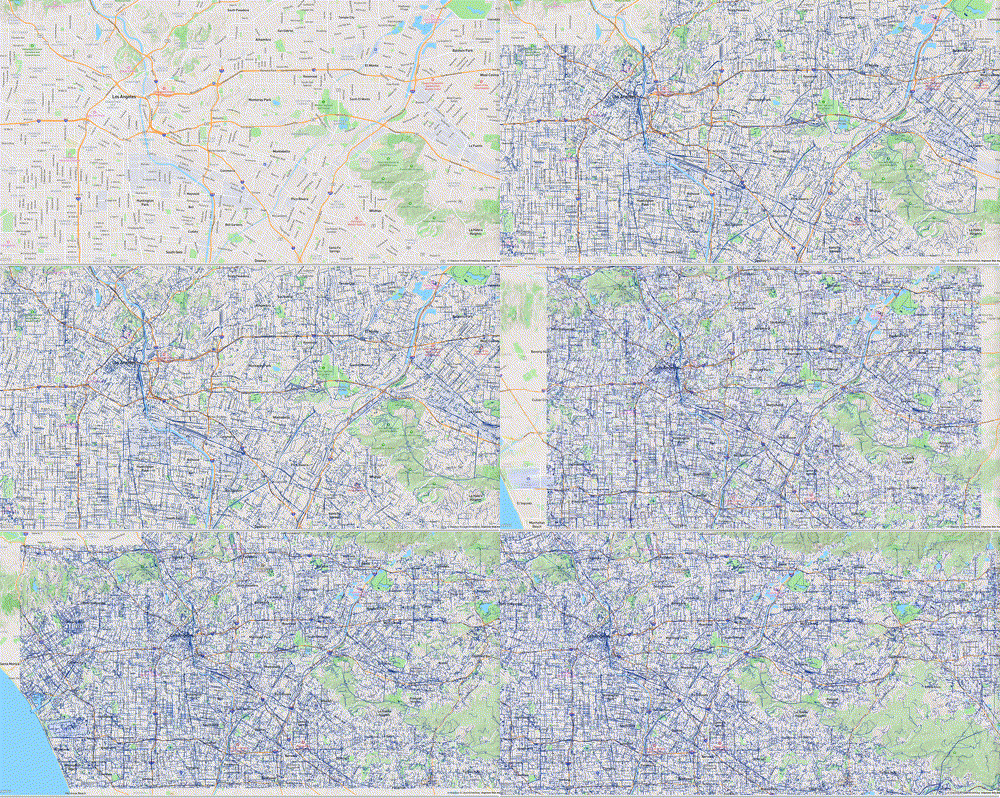
Visualizing buildings, rivers, and forests — In urban planning, Polygon data representing buildings, rivers, and forests enables distribution analysis and informed decision-making:

Quick start
Prerequisites
Before you begin, ensure that you have:
A PolarDB for PostgreSQL (Compatible with Oracle) cluster
A table with a geometry column
A spatial index on the geometry column
Install the extension
CREATE EXTENSION ganos_geometry_pyramid CASCADE;Install the extension into the public schema to avoid permission issues.CREATE EXTENSION ganos_geometry_pyramid WITH SCHEMA public;Build a vector tile pyramid
Call ST_BuildPyramid on your table, specifying the geometry column, the ID column, and the source coordinate system.
-- Build a pyramid on the table named test.
-- The id column must be int4 or int8.
-- sourceSRS specifies the coordinate system of the geometry column data (EPSG:4326).
SELECT ST_BuildPyramid('test', 'geom', 'id', '{"sourceSRS": 4326}');
The default projection coordinate system for the output tiles is EPSG:3857.
Query vector tiles
Use ST_Tile to retrieve a tile by its ID in z_x_y format. If the tile exists, it is returned in MVT format. If not, a null response is returned.
-- Retrieve the tile at zoom level 0, column 0, row 0.
SELECT ST_Tile('test', '0_0_0');
Use ST_AsPNG to retrieve a rendered PNG image instead of raw MVT data.
Update the pyramid
After updating the underlying table, update the pyramid before querying. Without an update, the pyramid reflects the previous state of the table.
For localized changes (less than 1% of the total spatial extent), pass the affected bounding box to ST_UpdatePyramid:
-- Insert three geometry records.
INSERT INTO test(id, geom) VALUES (1, ST_GeomFromEWKT('SRID=4326;POINT(10.1 10.1)'));
INSERT INTO test(id, geom) VALUES (2, ST_GeomFromEWKT('SRID=4326;LINESTRING(10.1 10.1,11 11)'));
INSERT INTO test(id, geom) VALUES (3, ST_GeomFromEWKT('SRID=4326;POLYGON((10 10,11 11,11 12,10 10))'));

-- Update only the tiles that intersect the specified bounding box (EPSG:4326).
SELECT ST_UpdatePyramid('test', 'geom', 'id', ST_SetSRID(ST_MakeBox2D(ST_Point(9, 9), ST_Point(12, 12)), 4326));
For large-area updates (affecting most of the spatial extent), rebuilding the entire pyramid is more efficient than updating tile by tile. ST_BuildPyramid automatically drops the existing pyramid before creating a new one.
-- Insert records distributed across widely separated areas.
INSERT INTO test(id, geom) VALUES (4, ST_GeomFromEWKT('SRID=4326;POINT(-59 -45)'));
INSERT INTO test(id, geom) VALUES (5, ST_GeomFromEWKT('SRID=4326;LINESTRING(110 60,115 70)'));
INSERT INTO test(id, geom) VALUES (6, ST_GeomFromEWKT('SRID=4326;POLYGON((-120 59,-110 65,-110 70,-120 59))'));

-- Rebuild the pyramid. The old pyramid is automatically dropped.
SELECT ST_BuildPyramid('test', 'geom', 'id', '{"sourceSRS": 4326}');
Drop the pyramid (optional)
SELECT ST_DeletePyramid('test');Remove the extension (optional)
DROP EXTENSION ganos_geometry_pyramid CASCADE;Advanced usage
Name a pyramid
By default, the pyramid uses the table name. Assign a custom name when creating multiple pyramids for the same table.
-- Create a pyramid named hello for the table named test.
SELECT ST_BuildPyramid('test', 'geom', 'id', '{"name": "hello"}');
Build with parallel tasks
Parallel tasks speed up pyramid creation for large datasets. The default value 0 means the maximum allowable count. Keep the value at or below four times the number of configured cores.
Parallel builds use Two-phase Commit. Set max_prepared_transactions to 100 or higher before enabling parallelism — this setting takes effect after a cluster restart.
-- Build with 4 parallel tasks.
SELECT ST_BuildPyramid('test', 'geom', 'id', '{"parallel": 4}');
Set tile parameters
| Parameter | Description | Valid range |
|---|---|---|
tileSize | Tile size in pixels | Must be divisible by 256; max 4096 |
tileExtend | Tile extension size in pixels | 0–256 |
For large datasets rendered at full map scale, a smaller tileSize increases rendering parallelism and efficiency.
-- Set tile size to 512 and tile extension size to 8.
SELECT ST_BuildPyramid('test', 'geom', 'id', '{
    "tileSize": 512,
    "tileExtend": 8
}');
Set the maximum pyramid level
The maxLevel parameter controls how many zoom levels are pre-built. When the map zoom exceeds maxLevel, tiles are generated dynamically. If not set, the system infers the maximum level based on data density (default: 16).
-- Pre-build up to zoom level 12; generate tiles dynamically beyond that.
SELECT ST_BuildPyramid('test', 'geom', 'id', '{"maxLevel": 12}');
Apply per-level rules
Use buildRules to control which geometry features are included and which attributes are stored at each zoom level. This is useful for reducing tile size at lower zoom levels or skipping generation of levels that would contain no relevant data.
-- Level 0-5: Generate empty tiles (filter condition "1!=1" never matches).
-- Level 6-9: Include features with code = 1; store the name attribute.
-- Level 10-15: Include all features; store name and width attributes.
SELECT ST_BuildPyramid('test', 'geom', 'id', '{
    "buildRules": [
        {
            "level": [0, 1, 2, 3, 4, 5],
            "value": {
                "filter": "1!=1"
            }
        },
        {
            "level": [6, 7, 8, 9],
            "value": {
                "filter": "code=1",
                "attrFields": ["name"]
            }
        },
        {
            "level": [10, 11, 12, 13, 14, 15],
            "value": {
                "attrFields": ["name", "width"]
            }
        }
    ]
}');
Merge features
Features within a tile can be merged when their attributes meet specified conditions, reducing total feature count. Specify merge conditions in buildRules > value > merge. Features that do not match the condition are left unchanged.
-- Merge features where the code attribute is 1 or 2.
SELECT ST_BuildPyramid('test', 'geom', 'id', '{
    "buildRules": [
        {
            "level": [0, 1, 2, 3, 4, 5],
            "value": {
                "merge": ["code=1", "code=2"]
            }
        }
    ]
}');
Use ST_BuildPyramidUseGeomSideLen for faster builds and updates
ST_BuildPyramidUseGeomSideLen builds and updates pyramids more efficiently than ST_BuildPyramid. It requires the table to have a column storing the maximum span of each geometry's bounding box along either the x-axis or y-axis, with a B-tree index on that column.
Add the span column, populate it, and create the index:
-- Add the geom_side_len column to store the bounding box maximum span.
ALTER TABLE test
ADD COLUMN geom_side_len DOUBLE PRECISION;

CREATE OR REPLACE FUNCTION add_max_len_values() RETURNS VOID AS $$
DECLARE
  t_curs CURSOR FOR
    SELECT * FROM test;
  t_row test%ROWTYPE;
  gm GEOMETRY;
  x_min DOUBLE PRECISION;
  x_max DOUBLE PRECISION;
  y_min DOUBLE PRECISION;
  y_max DOUBLE PRECISION;
BEGIN
  FOR t_row IN t_curs LOOP
    SELECT t_row.geom INTO gm;
    SELECT ST_XMin(gm) INTO x_min;
    SELECT ST_XMax(gm) INTO x_max;
    SELECT ST_YMin(gm) INTO y_min;
    SELECT ST_YMax(gm) INTO y_max;
    UPDATE test
      SET geom_side_len = GREATEST(x_max - x_min, y_max - y_min)
    WHERE CURRENT OF t_curs;
  END LOOP;
END;
$$ LANGUAGE plpgsql;

SELECT add_max_len_values();

-- Create a B-tree index on the span column.
CREATE INDEX ON test USING btree(geom_side_len);
Build the pyramid using the span column:
SELECT ST_BuildPyramidUseGeomSideLen('roads', 'geom', 'geom_side_len', 'id', '{"sourceSRS": 4326}');