DataHub FAQ
Errors related to permissions
Error message:
com.aliyun.datahub.exception.NoPermissionException: No permission, authentication failed in ramThis error indicates that the RAM user lacks the required permissions. Grant the necessary permissions to the RAM user. For details, see Access control.
Errors related to an ApsaraDB RDS instance in a VPC
Error message:
InvalidInstanceId.NotFound:The instance not in current vpcTo resolve this error, find the correct VPC instance ID and update the DataHub connector configuration:
Call the DescribeDBInstanceAttribute operation to query your ApsaraDB RDS instance details.
Click Debug. In the panel that appears, select a region and enter the instance ID.
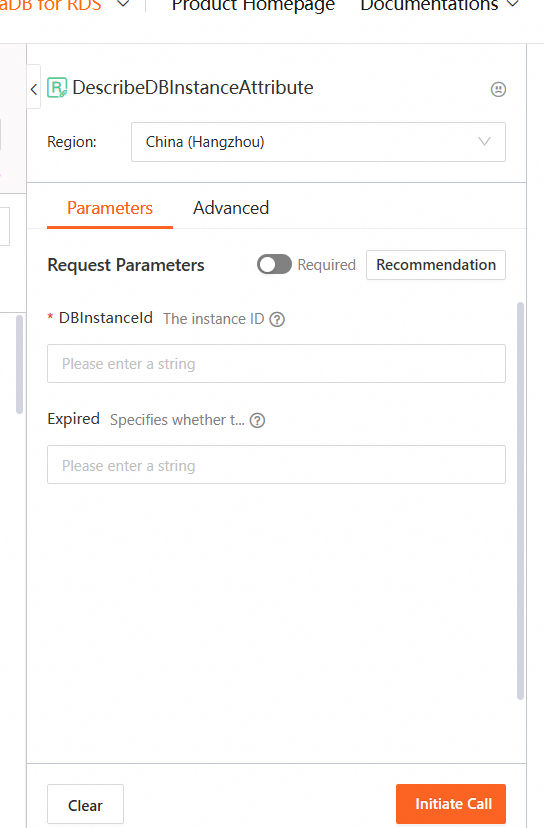
Click Call. Find VpcCloudInstanceId in the returned results.

In the DataHub connector panel for synchronizing data to ApsaraDB RDS, enter the VPC instance ID in the Instance ID field.
Errors related to JAR package conflicts
The following are common JAR package conflicts when using DataHub SDK for Java.
-
InjectionManagerFactorynot foundDataHub SDK for Java depends on Jersey client V2.22.1 by default. If your project uses a Jersey client later than V2.22.1, add the following dependency:
  <dependency>
      <groupId>org.glassfish.jersey.inject</groupId>
      <artifactId>jersey-hk2</artifactId>
      <version>xxx</version>
</dependency>-
java.lang.NoSuchFieldError: EXCLUDE_EMPTYThe jersey-common library version is earlier than V2.22.1. Upgrade to V2.22.1 or later.
-
Error reading entity from input streamCause 1: The HTTP client version is earlier than V4.5.2. Upgrade the HTTP client to V4.5.2 or later.
Cause 2: The current SDK version does not support the required data types. Upgrade the SDK.
-
jersey-apache-connector versions later than V2.22.1 contain TCP connection bugs.
Use V2.22.1.
-
java.lang.NosuchMethodError:okhttp3.HttpUrl.get(java/lang/String:)okhttp3/HttpUrlRun
mvn dependency:treeto check whether the OkHttp client version conflicts with other dependencies.
-
javax/ws/rs/core/ResponseStatusFamilyCheck the dependencies of the
javax.ws.rspackage — for example, verify whether it depends onjsr311-api.
Other errors
-
Parse body failed, Offset: 0This error typically occurs during writes. Earlier versions of Apsara Stack DataHub do not support protocol buffers binary transmission, but some SDKs enable it by default. Disable binary transmission for your SDK:
Java SDK
datahubClient = DatahubClientBuilder.newBuilder()
    .setDatahubConfig(
        new DatahubConfig(endpoint,
            // Specify whether to enable binary data transmission. In DataHub SDK for Java V2.12 and later, the server supports binary data transmission.
            new AliyunAccount(accessId, accessKey), true))
    .build();
Python SDK
# Json mode: for datahub server version <= 2.11
dh = DataHub(access_id, access_key, endpoint, enable_pb=False)
Go SDK
config := &datahub.Config{
    EnableBinary:   false,
}
dh := datahub.NewClientWithConfig(accessId, accessKey, endpoint, config)
Logstash
Set the value of enable_pb to false.-
Request body size exceededThe request body exceeds the size limit. For the limits and how to work within them, see Limits.
-
Record field size not match.The schema you specified does not match the topic schema. Call
getTopicto retrieve the correct schema.
-
The limit of query rate is exceeded.DataHub enforces a queries-per-second (QPS) limit to ensure fair resource usage. Write or read data in batches — for example, write a batch every minute and read up to 1,000 records per batch.
-
Num of topics exceed limitIn the latest version of DataHub, a project can contain a maximum of 20 topics.
-
SeekOutOfRangeThe offset parameter is invalid or has expired.
-
Offset session has changedA subscription can only be consumed by one consumer at a time. Check your program for multiple consumers sharing the same subscription.
-
Can I synchronize DECIMAL data to MaxCompute?
Yes. MaxCompute supports DECIMAL values without explicit precision. By default, a DECIMAL value can have up to 18 digits on each side of the decimal point.
-
What does the
addAttributemethod do?addAttribute()lets you add additional attributes to a record based on your requirements. These attributes are optional.
-
How do I delete data from a topic?
DataHub does not support deleting data from a topic. To discard data, reset the offsets to skip past it.
-
Can I change the 5 GB file size limit for shard data stored in OSS?
No. Each shard's data is written to a randomly named file in the specified Object Storage Service (OSS) path. When a file reaches 5 GB, a new file is created automatically. This limit cannot be changed.
-
My AnalyticDB for MySQL instance cannot access a public endpoint. What should I do?
Apply for an internal endpoint in AnalyticDB for MySQL. Log on to the instance, run
alter database set intranet_vip = trueto enable internal connectivity, and then runselect internal_domain, internal_port from information_schematato retrieve the endpoint.