After you purchase a burstable instance, you are charged additional fees when you enable the unlimited mode and use overdrawn CPU credits. This topic describes how to view the bills of a burstable instance.
Procedure
View the bills of a burstable instance.
Click the Billing Details tab, configure the parameters described in the following table, and then click Search.
Use the default values for other parameters.
Parameter
Description
Billing Cycle
Select a month to view bills.
Resource Group
In the field on the right, enter the name or ID of the burstable instance you want to query.
Product
Select Elastic Compute Service.
Statistic Item
Select Billing Item.
View the bills of the burstable instance at the lower part of the page. Those with the SurplusCredit billing item are generated due to overdrawn CPU credits.

View the usage details of CPU credits.
Click the View Usage Details tab.
Configure the parameters described in the following table, and then click Export CSV.
Parameter
Description
Product
Select Elastic Compute Service (ECS).
Billable Item
Select CpuCredits.
Time Period
Specify a time period.
Time Unit
Only Raw is supported.
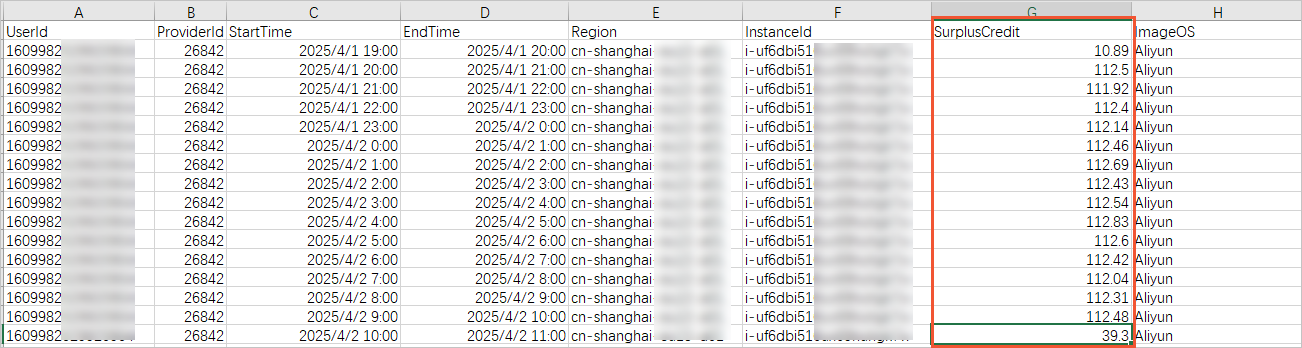
Open the CSV file to view the usage details of overdrawn CPU credits in the SurplusCredit column.