Backup files in ApsaraDB RDS for MySQL occupy backup storage, not your instance's storage capacity. If backup costs are higher than expected, you can delete backup files or reduce how much backup storage they consume.
For a breakdown of how backup storage is charged, see Billable items and pricing for the backup storage of an ApsaraDB RDS for MySQL instance.
Before you begin
Data backup files and log backup files occupy the backup storage that Alibaba Cloud provides to your RDS instance. To check the current size of your backup files, see View and manage the size of backup files for an ApsaraDB RDS for MySQL instance. If your instance is locked due to insufficient storage, see What do I do if my ApsaraDB RDS instance is in the Locking state?
Manage data backup files
Delete data backup files manually
Only backup files from manual backups can be manually deleted. Automatically generated backup files cannot be deleted this way. To check whether a backup set is from a manual or automatic backup, hover over the  icon in the Backup Policy column.
If the backup policy of a manual backup is Database/Table Backup, you cannot delete it.
Deleted backup files cannot be restored.
Go to the Instances page. In the top navigation bar, select the region where your RDS instance resides, then click the instance ID.
In the left navigation pane, click Backup and Restoration.
On the Backup and Restoration page, go to Base Backups > Data Backup.
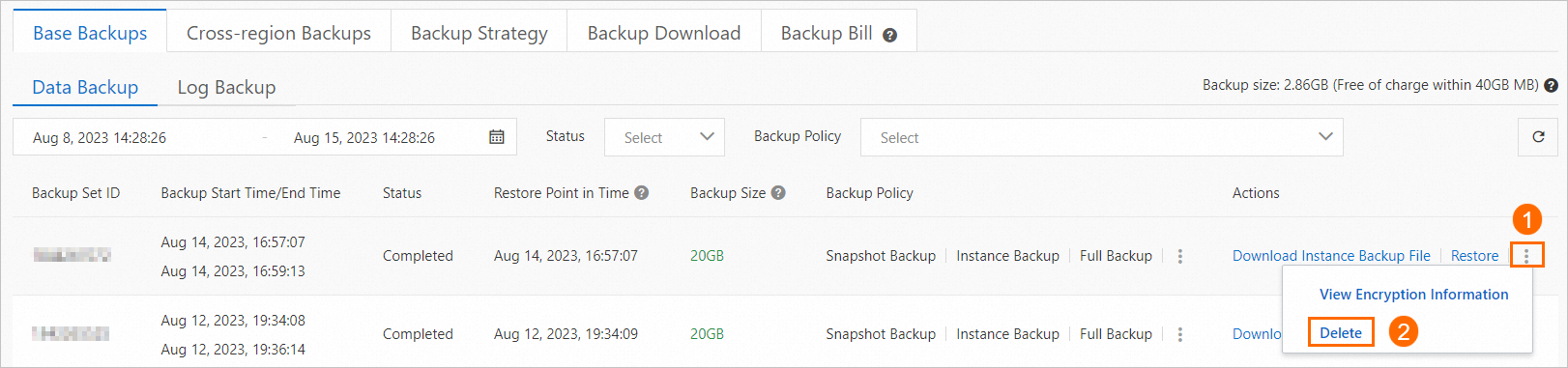
Find the backup file you want to delete, click the
 icon, and select Delete in the Actions column.
Delete data backup files automatically
Shortening the backup retention period removes both manual and automatic backup files that exceed the new limit. For more information, see Manually back up an ApsaraDB RDS for MySQL instance and Configure automatic backup.
Go to the Instances page. In the top navigation bar, select the region where your RDS instance resides, then click the instance ID.
In the left navigation pane, click Backup and Restoration.
On the Backup and Restoration page, click the Backup Strategy tab.
In the Basic Backup section, click Edit and reduce the data backup retention period.
If the retention period is set to 30 days:
Without PITR: Backup files older than 30 days are automatically deleted and cannot be restored. Proceed with caution.
With PITR enabled: Data backup files can be retained beyond 30 days. For details, see Configure the PITR feature.
Reduce the volume of data backup files
Method 1: Reduce backup frequency
Go to the Instances page. In the top navigation bar, select the region where your RDS instance resides, then click the instance ID.
In the left navigation pane, click Backup and Restoration.
On the Backup and Restoration page, click the Backup Strategy tab.
In the Basic Backup section, click Edit and reduce the backup frequency.
Method 2: Use the sparse backup feature
In supported regions, the sparse backup feature lets you configure more flexible backup policies and retain the minimum number of backup sets. Enable it through the advanced backup settings on the Backup Strategy tab. For details, see Switch to the advanced backup settings and Use the sparse backup feature.
Method 3: Delete or migrate data that does not need to be backed up
Manage log backup files
When log backup is enabled, binary logs are replicated to backup storage in real time. Binary logs record all modification operations on the database and support primary-secondary synchronization and data subscription. To query or delete binary logs directly, see Manage binary log files.
Reduce the volume of log backup files
Method 1: Shorten the log backup retention period
This option is available only when log backup or point-in-time recovery (PITR) is enabled. To enable it, see Log backup settings.
Go to the Instances page. In the top navigation bar, select the region where your RDS instance resides, then click the instance ID.
In the left navigation pane, click Backup and Restoration.
On the Backup and Restoration page, click the Backup Strategy tab.
In the Basic Backup section, click Edit and set a shorter value for Log Backup Retention Period (Days) or Time Range of Specific Points in Time for Restoration. For details about the PITR parameters, see Configure the PITR feature.
If the retention period is set to 30 days:
Without PITR: Log backup files older than 30 days are automatically deleted and cannot be restored. Proceed with caution.
With PITR enabled: Modifying Time Range of Specific Points in Time for Restoration adjusts the log backup retention window. The actual retention period of log backup files may exceed the configured value to ensure restoration coverage. For details, see Feature description.
Method 2: Use the sparse backup feature
In supported regions, the sparse backup feature lets you configure more flexible backup policies and retain the minimum number of backup sets. Enable it through the advanced backup settings on the Backup Strategy tab. For details, see Switch to the advanced backup settings and Use the sparse backup feature.
Method 3: Reduce DML operations, especially updates on large fields
Add, delete, and update (DML) operations increase the total size of log backup files. Reducing unnecessary DML operations—particularly updates on large fields—lowers log backup growth.
To analyze DML patterns on your instance, use the SQL Explorer feature. For details, see Use the SQL Explorer feature on an ApsaraDB RDS for MySQL instance.
Disable log backup
After you disable log backup, the system automatically deletes all existing log backup files within 1 to 3 minutes. Deleted files cannot be restored. Proceed with caution.
Go to the Instances page. In the top navigation bar, select the region where your RDS instance resides, then click the instance ID.
In the left navigation pane, click Backup and Restoration.
On the Backup and Restoration page, click the Backup Strategy tab.
In the Basic Backup section, click Edit and disable the log backup feature or the PITR feature.
FAQ
Why is the delete button dimmed for a backup set?
Only backup sets created by manual backups can be manually deleted. For automatic backups, reduce the retention period to 7 days—the system will delete them automatically when the period elapses.
Which logs are stored in my instance's local storage?
Binary logs are stored in the local storage of your RDS instance. To free local storage space, view the total size of binary log files and delete binary log files as needed.
API reference
Call DeleteBackup to delete data backup files.
Call ModifyBackupPolicy to modify backup settings.