To achieve optimal performance for PolarDB for MySQL, PolarDB provides a thread pool feature. The thread pool decouples threads from sessions, enabling a small number of threads to handle tasks from many active sessions.
Benefits
By default, MySQL uses session exclusive mode, where each session creates a dedicated thread. When many sessions exist, significant resource competition occurs and degrades performance. Excessive thread scheduling and frequent cache misses also sharply reduce performance.
The thread pool in PolarDB implements a priority and concurrency control mechanism for different types of SQL operations. It maintains the number of connections near the optimal level, ensuring that the PolarDB database delivers high performance under high-connection and high-concurrency conditions. The benefits of the thread pool include the following:
When many threads run concurrently, the thread pool automatically adjusts the number of concurrent threads to a reasonable range, avoiding excessive thread scheduling and frequent cache misses.
When many transactions run concurrently, the thread pool assigns different priority levels to statements and transactions and controls their concurrency separately to reduce resource competition.
The thread pool assigns higher priority to administration-related SQL statements to ensure they execute first, allowing operations such as creating new connections, administration, and monitoring to remain stable even under high system load.
The thread pool assigns lower priority to complex SQL statements and limits their maximum number of concurrent executions, preventing them from exhausting system resources and causing the entire database service to become unavailable.
Use the thread pool
The thread pool involves the following parameters. You can modify them in the console. For more information, see Set cluster and node parameters.
All cluster parameters in the PolarDB console are prefixed with loose_ for MySQL configuration file compatibility. To modify parameters in the PolarDB console, select the parameters with the loose_ prefix.
Parameter name | Description |
loose_thread_pool_enabled | Specifies whether to enable the thread pool feature. Valid values:
Note
|
loose_thread_pool_size | The number of thread groups in the thread pool. The valid range depends on the number of CPU cores of the primary node in the cluster. Valid range: DBNodeClassCPU to DBNodeClassCPU × 10. Default value: DBNodeClassCPU × 2. Note
Examples:
|
loose_thread_pool_high_prio_mode | The mode for the high-priority queue in the thread pool. Valid values:
Note Applicable scope:
|
loose_thread_pool_high_prio_tickets | The number of tickets for a single entry into the high-priority queue. Valid range: 0 to 4294967295. Default value: 4294967295. Note Applicable scope:
|
loose_thread_pool_idle_timeout | The timeout period for releasing idle threads in the thread pool. An idle thread that has not served any requests within this period is released. Valid range: 0 to 31536000. Default value: 60. Unit: seconds. Note Applicable scope:
|
loose_thread_pool_oversubscribe | The number of active threads allowed in each thread group. An active thread is a thread that is executing an SQL statement. Valid range: 1 to 1000. Default value: 20. |
loose_thread_pool_stall_limit | The time threshold to determine if the thread pool is in a stalled state. When the thread pool enters a stalled state, the system creates a new thread to serve SQL statements. Valid range: 1 to 18446744073709551615. Default value: 10. Unit: milliseconds. Note For MySQL 5.6, the default value is 30 milliseconds. |
loose_bypass_thread_pool_ips | Specifies the IP addresses of clients that are not restricted by the thread pool. This lets you execute SQL statements for administrative operations even when the thread pool is full. Example configuration: Note Applicable scope: MySQL 8.0.1 with a revision version of 8.0.1.1.19 or later. |
loose_bypass_thread_pool_check_ignore_proxy | Specifies whether to ignore client IP addresses connected through a proxy when checking against
Note Applicable scope: MySQL 8.0.1 with a revision version of 8.0.1.1.19 or later. |
loose_thread_pool_high_priority_users | Specifies high-priority database accounts. After configuration, requests from these accounts are placed in the high-priority queue of the thread pool for preferential processing. Example configuration: Note
|
loose_thread_pool_mark_ddl_thread_timeout_sec | Specifies the timeout threshold for DDL threads in the thread pool. After this time, the DDL thread is marked as timed out, and the system creates a new thread to process requests. Valid range: 0 to 864000. Default value: 600. Unit: seconds. Note Applicable scope: MySQL 8.0.1 with a revision version of 8.0.1.1.19 or later. |
loose_thread_pool_mark_ddl_thread_timeout_immediately | Specifies whether to immediately mark a DDL thread as timed out when the thread pool is under high load and the lower-priority queue is stacked. When this happens, the system creates a new thread to process requests. This parameter is suitable for business scenarios that require frequent batch DDL operations. Valid values:
Note Applicable scope: MySQL 8.0.1 with a revision version of 8.0.1.1.19 or later. |
Query the thread pool status
You can run the following command to query the thread pool status:
select * from information_schema.THREAD_POOL_STATUS;The following example shows the returned result.
mysql> select * from information_schema.THREAD_POOL_STATUS;
+----+--------------+---------------------+----------------------+-------------------+---------------------------+------------------+-----------------+------------------+
| ID | THREAD_COUNT | ACTIVE_THREAD_COUNT | WAITING_THREAD_COUNT | DUMP_THREAD_COUNT | SLOW_THREAD_TIMEOUT_COUNT | CONNECTION_COUNT | LOW_QUEUE_COUNT | HIGH_QUEUE_COUNT |
+----+--------------+---------------------+----------------------+-------------------+---------------------------+------------------+-----------------+------------------+
| 0 | 2 | 0 | 0 | 0 | 0 | 0 | 0 | 0 |
| 1 | 2 | 0 | 0 | 0 | 0 | 0 | 0 | 0 |
| 2 | 2 | 0 | 0 | 0 | 0 | 0 | 0 | 0 |
| 3 | 2 | 0 | 0 | 0 | 0 | 0 | 0 | 0 |
| 4 | 2 | 0 | 0 | 0 | 0 | 0 | 0 | 0 |
| 5 | 2 | 0 | 0 | 0 | 0 | 0 | 0 | 0 |
| 6 | 2 | 0 | 0 | 0 | 0 | 0 | 0 | 0 |
| 7 | 2 | 0 | 0 | 0 | 0 | 0 | 0 | 0 |
| 8 | 1 | 0 | 0 | 0 | 0 | 0 | 0 | 0 |
| 9 | 2 | 0 | 0 | 0 | 0 | 0 | 0 | 0 |
| 10 | 2 | 0 | 0 | 0 | 0 | 0 | 0 | 0 |
| 11 | 2 | 0 | 0 | 0 | 0 | 0 | 0 | 0 |
| 12 | 2 | 0 | 0 | 0 | 0 | 0 | 0 | 0 |
| 13 | 2 | 0 | 0 | 0 | 0 | 0 | 0 | 0 |
| 14 | 2 | 0 | 0 | 0 | 0 | 0 | 0 | 0 |
| 15 | 2 | 0 | 0 | 0 | 0 | 0 | 0 | 0 |
| 16 | 2 | 0 | 0 | 0 | 0 | 0 | 0 | 0 |
| 17 | 2 | 0 | 0 | 0 | 0 | 0 | 0 | 0 |
| 18 | 2 | 0 | 0 | 0 | 0 | 0 | 0 | 0 |
| 19 | 2 | 0 | 0 | 0 | 0 | 0 | 0 | 0 |
| 20 | 2 | 0 | 0 | 0 | 0 | 0 | 0 | 0 |
| 21 | 2 | 0 | 0 | 0 | 0 | 0 | 0 | 0 |
| 22 | 2 | 1 | 0 | 0 | 0 | 1 | 0 | 0 |
| 23 | 2 | 0 | 0 | 0 | 0 | 0 | 0 | 0 |
| 24 | 2 | 0 | 0 | 0 | 0 | 0 | 0 | 0 |
| 25 | 2 | 0 | 0 | 0 | 0 | 0 | 0 | 0 |
| 26 | 2 | 0 | 0 | 0 | 0 | 0 | 0 | 0 |
| 27 | 2 | 0 | 0 | 0 | 0 | 0 | 0 | 0 |
| 28 | 2 | 0 | 0 | 0 | 0 | 0 | 0 | 0 |
| 29 | 2 | 0 | 0 | 0 | 0 | 0 | 0 | 0 |
| 30 | 2 | 0 | 0 | 0 | 0 | 1 | 0 | 0 |
| 31 | 2 | 0 | 0 | 0 | 0 | 0 | 0 | 0 |
| 32 | 2 | 0 | 0 | 0 | 0 | 0 | 0 | 0 |
| 33 | 2 | 0 | 0 | 0 | 0 | 1 | 0 | 0 |
| 34 | 2 | 0 | 0 | 0 | 0 | 0 | 0 | 0 |
| 35 | 2 | 0 | 0 | 0 | 0 | 0 | 0 | 0 |
| 36 | 2 | 0 | 0 | 0 | 0 | 0 | 0 | 0 |
| 37 | 2 | 0 | 0 | 0 | 0 | 0 | 0 | 0 |
| 38 | 2 | 0 | 0 | 0 | 0 | 0 | 0 | 0 |
| 39 | 2 | 0 | 0 | 0 | 0 | 0 | 0 | 0 |
| 40 | 2 | 0 | 0 | 0 | 0 | 0 | 0 | 0 |
| 41 | 2 | 0 | 0 | 0 | 0 | 0 | 0 | 0 |
| 42 | 2 | 0 | 0 | 0 | 0 | 0 | 0 | 0 |
| 43 | 1 | 0 | 0 | 0 | 0 | 0 | 0 | 0 |
| 44 | 2 | 0 | 0 | 0 | 0 | 0 | 0 | 0 |
| 45 | 2 | 0 | 0 | 0 | 0 | 0 | 0 | 0 |
| 46 | 2 | 0 | 0 | 0 | 0 | 0 | 0 | 0 |
| 47 | 3 | 1 | 0 | 0 | 0 | 1 | 0 | 0 |
| 48 | 2 | 0 | 0 | 0 | 0 | 0 | 0 | 0 |
| 49 | 3 | 1 | 0 | 0 | 0 | 1 | 0 | 0 |
| 50 | 2 | 0 | 0 | 0 | 0 | 0 | 0 | 0 |
| 51 | 2 | 0 | 0 | 0 | 0 | 0 | 0 | 0 |
| 52 | 2 | 0 | 0 | 0 | 0 | 0 | 0 | 0 |
| 53 | 2 | 0 | 0 | 0 | 0 | 0 | 0 | 0 |
| 54 | 2 | 0 | 0 | 0 | 0 | 0 | 0 | 0 |
| 55 | 2 | 0 | 0 | 0 | 0 | 0 | 0 | 0 |
| 56 | 2 | 0 | 0 | 0 | 0 | 0 | 0 | 0 |
| 57 | 2 | 0 | 0 | 0 | 0 | 0 | 0 | 0 |
| 58 | 1 | 0 | 0 | 0 | 0 | 0 | 0 | 0 |
| 59 | 2 | 0 | 0 | 0 | 0 | 0 | 0 | 0 |
| 60 | 2 | 0 | 0 | 0 | 0 | 0 | 0 | 0 |
| 61 | 2 | 0 | 0 | 0 | 0 | 0 | 0 | 0 |
| 62 | 2 | 0 | 0 | 0 | 0 | 0 | 0 | 0 |
| 63 | 2 | 0 | 0 | 0 | 0 | 0 | 0 | 0 |
+----+--------------+---------------------+----------------------+-------------------+---------------------------+------------------+-----------------+------------------+
64 rows in set (0.00 sec)The metric descriptions are as follows.
Parameter | Description |
ID | The thread pool ID. |
THREAD_COUNT | The number of threads in the thread pool. |
ACTIVE_THREAD_COUNT | The number of active threads in the thread pool. |
WAITING_THREAD_COUNT | The number of threads in the thread pool that are waiting for disk I/O or transaction commits. |
DUMP_THREAD_COUNT | The number of DUMP-class persistent connections in the thread pool. |
SLOW_THREAD_TIMEOUT_COUNT | The number of threads in the thread pool that are marked as timed out. |
CONNECTION_COUNT | The number of established user connections in the thread pool. |
LOW_QUEUE_COUNT | The number of waiting requests in the lower-priority queue of the thread pool. |
HIGH_QUEUE_COUNT | The number of waiting requests in the high-priority queue of the thread pool. |
Sysbench tests
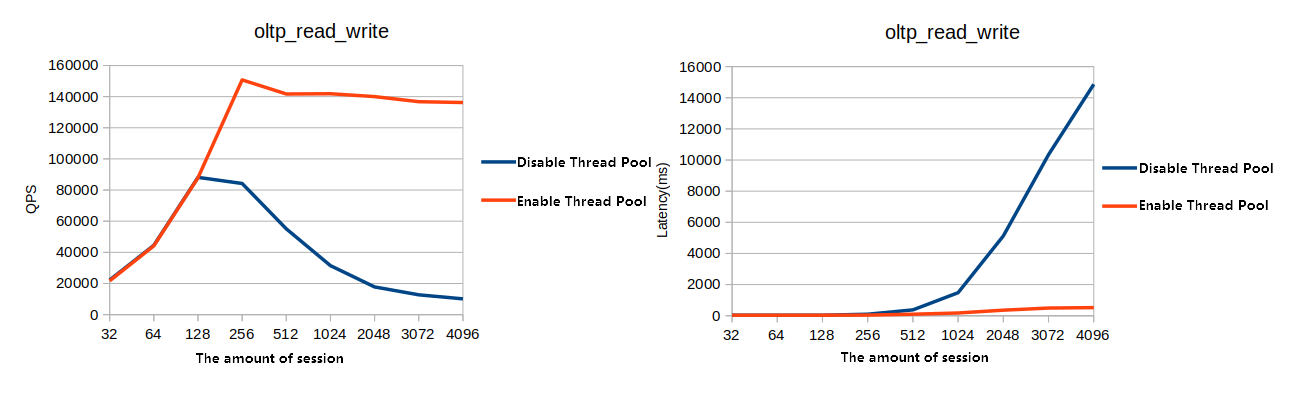
The following figures compare performance with and without the thread pool enabled. The test results show that the thread pool provides a significant performance advantage in high-concurrency scenarios.
Figure 1. OLTP test for updates without an index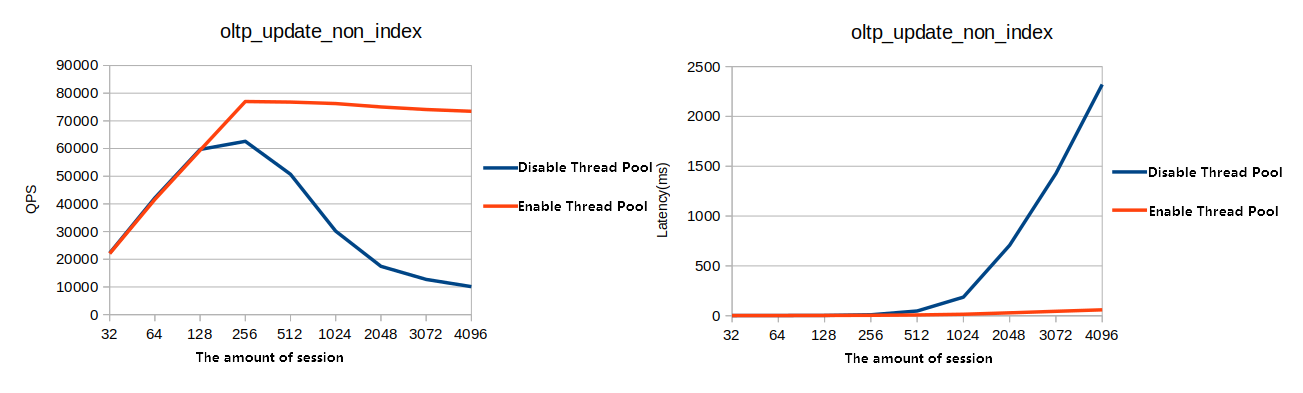
Figure 2. OLTP write-only test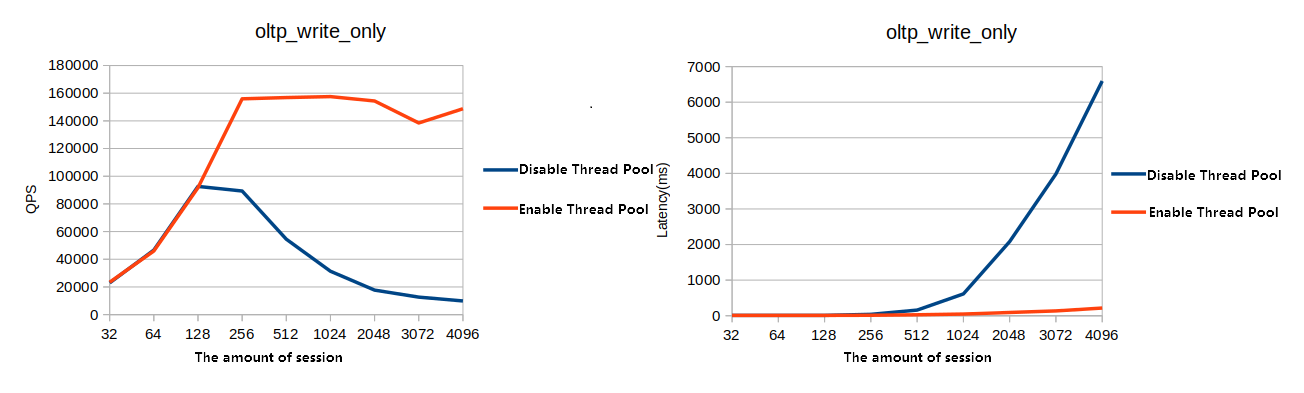
Figure 3. OLTP read-only test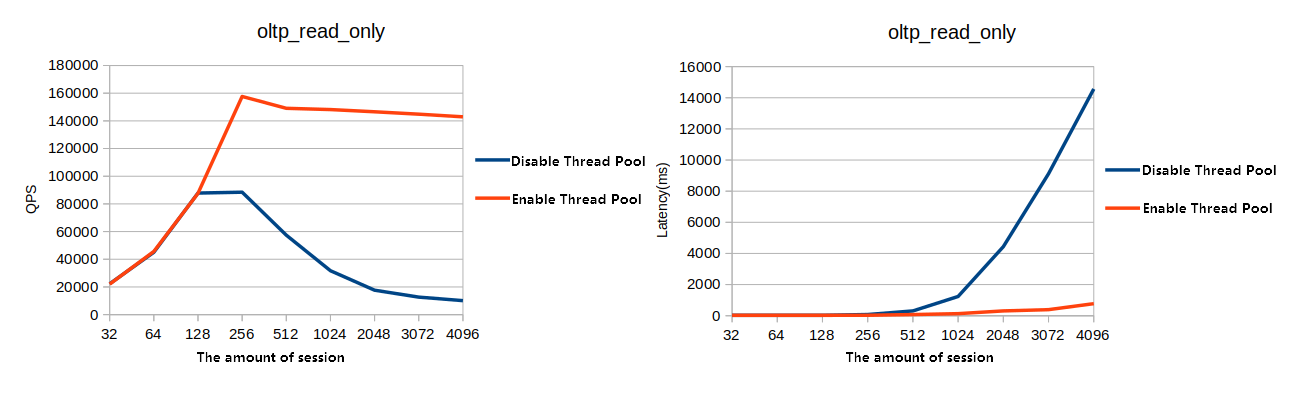
Figure 4. OLTP read/write test