Install, view, uninstall, and update Python libraries via Terminal. DSW persists changes to the image environment.
Install libraries
pip installs libraries into the Python 3 environment by default. To install in a different environment, activate it first:
# Install in Python 3 (default)
pip install <yourLibraryName>

# Install in Python 2
source activate python2
pip install <yourLibraryName>

# Install in TensorFlow 2.0
source activate tf2
pip install <yourLibraryName>
Replace <yourLibraryName> with the library name. Example: pip install bottle.
To install from a Jupyter Notebook cell, prefix with !: !pip install bottle.
If a newly installed library cannot be imported, restart the kernel.
View installed libraries
View all installed libraries:
pip listUninstall libraries
Uninstall a library:
pip uninstall <yourLibraryName>Replace <yourLibraryName> with the library name.
Only user-installed libraries can be uninstalled.
Update libraries
Update a library to a specific version:
pip install --upgrade numpy==<versionNumber>Replace <versionNumber> with the target version.
View or change pip source
View the current pip configuration:
pip config listThe global.index-url value shows the pip source URL. Sample output:
global.index-url='https://mirrors.aliyun.com/pypi/simple/'
global.trusted-host='mirrors.aliyun.com'
install.trusted-host='mirrors.aliyun.com'
Temporarily set the pip source for a single installation using -i:
pip install -i https://pypi.tuna.tsinghua.edu.cn/simple <yourLibraryName>

# If an SSL authentication error occurs, add the --trusted-host parameter:
pip install -i https://pypi.tuna.tsinghua.edu.cn/simple --trusted-host pypi.tuna.tsinghua.edu.cn <yourLibraryName>
Change the global pip source by editing ~/.config/pip/pip.conf:
vim ~/.config/pip/pip.confTo use the Tsinghua University mirror, modify index-url and trusted-host:
[global]
trusted-host=pypi.tuna.tsinghua.edu.cn
index-url = https://pypi.tuna.tsinghua.edu.cn/simple/

[install]
trusted-host=pypi.tuna.tsinghua.edu.cn
FAQ
Will pip-installed packages and code be lost after instance shutdown?
No. DSW preserves all instance disk data, including environments in /mnt/workspace and /root, if the instance uses a cloud disk as system disk. Files and installed packages remain available after restart. Note: Permanently deleting the instance erases all data.
Why does import fail after installing a Python library with pip?
First, restart the Jupyter kernel. If the error persists, the library was likely installed in a different Python environment than the notebook uses. By default, DSW installs packages into Python 3. To install for a different environment, activate it first:
# Install in Python 2
source activate python2
pip install --user xxx

# Install in TensorFlow 2.0
source activate tf2
pip install --user xxx
Replace xxx with the library name.
How to resolve pip install failures due to dependency conflicts or version errors?
This error typically indicates incompatibility between the package and the DSW environment (such as Python or CUDA versions). Resolution steps:
-
Change the DSW image (recommended). Use a different official image that meets the library's requirements. Stop the instance and create a new one with a more suitable image. For example, if a package fails on the PyTorch 2.1 image, try PyTorch 2.3 or a
modelscopeseries image, which often offer better compatibility. -
Install a specific version. Check the library's documentation for a version compatible with the environment's Python and CUDA versions. Install directly:
pip install package_name==x.y.z. -
Use a different pip mirror. Network issues with the default mirror can cause installation failures. Try an alternative:
pip install -i https://pypi.tuna.tsinghua.edu.cn/simple <yourLibraryName>.
Why can't I import a library in Jupyter Notebook after installing it in Terminal?
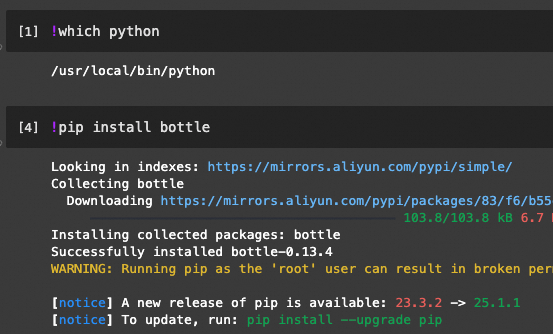
This happens when Terminal and Jupyter Notebook use different Python environments. Confirm environments by running which python in Terminal and !which python in a notebook cell. The simplest fix: install directly from within the notebook, ensuring correct kernel environment. Prefix pip with !:
How to fix "CUDA driver version is too low" error? Should I upgrade the NVIDIA driver manually?
No, do not attempt to upgrade the NVIDIA driver or CUDA toolkit manually. The driver and CUDA versions within a DSW instance are pre-configured and immutable. Modifying them will likely corrupt the instance and cause data loss. The correct solution: replace the DSW image. Stop the current instance and create a new one using an official image with the required CUDA version.
For example, the image tag modelscope:1.9.4-pytorch2.0.1tensorflow2.13.0-gpu-py38-cu118-ubuntu20.04 indicates CUDA 11.8 (cu118).
Can I run Docker commands inside a DSW instance?
It depends on resource type. For Lingjun resources, submit a ticket to be added to the whitelist. For all other DSW instances, Docker is not supported.
How to extract .zip or .7z files if unzip and 7z are not found?
Install the necessary tools using apt-get in Terminal.
-
To extract
.zipfiles: Installunzipwithapt-get update && apt-get install -y unzip. Then useunzip your_file.zip. -
To extract
.7zfiles: Installp7zipwithapt-get update && apt-get install -y p7zip-full. Then use7z x your_file.7z.
What to do when pip install hangs or times out?
pip install hanging or timing out is almost always a network issue. Diagnosis and resolution steps:
Step 1: Confirm network connectivity
Verify the instance can access the internet with ping www.aliyun.com in Terminal. If this fails, the gateway may be misconfigured.
Step 2: Check gateway configuration
In the DSW instance configuration, check the Internet Access Gateway:
-
Public Gateway: Default option. Provides internet access with limited bandwidth, which can cause timeouts for large downloads. For better performance, consider a Dedicated Gateway.
-
Dedicated Gateway: Offers faster network access but requires manual configuration. Create an Internet NAT Gateway in the VPC, bind an Elastic IP (EIP), and configure SNAT rules. If not set up correctly, the instance will have no internet access. For more information, see Improve public network access speed with a dedicated gateway.
Step 3: Switch to a different pip mirror
The default mirror may be slow or temporarily unavailable. Use -i to specify a different mirror:
# Install using Tsinghua source (recommended)
pip install -i https://pypi.tuna.tsinghua.edu.cn/simple --trusted-host pypi.tuna.tsinghua.edu.cn <yourLibraryName>

# Install using USTC source
pip install -i https://pypi.mirrors.ustc.edu.cn/simple --trusted-host pypi.mirrors.ustc.edu.cn <yourLibraryName>

# Install using Douban source
pip install -i https://pypi.doubanio.com/simple --trusted-host pypi.doubanio.com <yourLibraryName>
To change the mirror permanently, see View or change pip source.
Step 4: Use offline installation
If the network is unavailable or unreliable, install offline:
-
Download the package locally. On a machine with stable internet, download the wheel (
.whl) file:# Run on your local computer pip download <yourLibraryName> -d ./packages -
Upload to DSW. Upload the
.whlfile to the DSW instance. For instructions, see Upload and download files. -
Install from the file. In Terminal, install from the uploaded file:
pip install /path/to/your-package.whl
How to get root permissions in DSW WebIDE terminal?
Most official DSW images provide root shell by default. Check if the terminal prompt shows root@.... The "pip running as root" warning can be safely ignored. If the image does not provide root access, this is a characteristic of the image itself, and the only solution is to create a new instance using an image that does.
Can I start xserver or run GUI applications in a DSW instance?
No, DSW environments do not support xserver or GUI applications.