Initialize the KMS instance SDK client before sending requests to the KMS instance API.
Prerequisites
Before you begin, ensure that you have:
A KMS instance (software-based or hardware-based)
A ClientKey file (
clientKey_****.json) and its password file (clientKey_****_Password.txt), downloaded when you created the ClientKeyThe CA certificate file (
PrivateKmsCA_kst-******.pem) for your KMS instance, downloaded from the consoleThe endpoint of your KMS instance
Get the endpoint and CA certificate
Endpoint
The endpoint is the domain address of your KMS instance's dedicated gateway.
Go to the Instances page. Click the Software Key Management or Hardware Key Management tab, then click your KMS instance.
In the Basic Information section, copy the value from the Instance VPC Endpoint field.
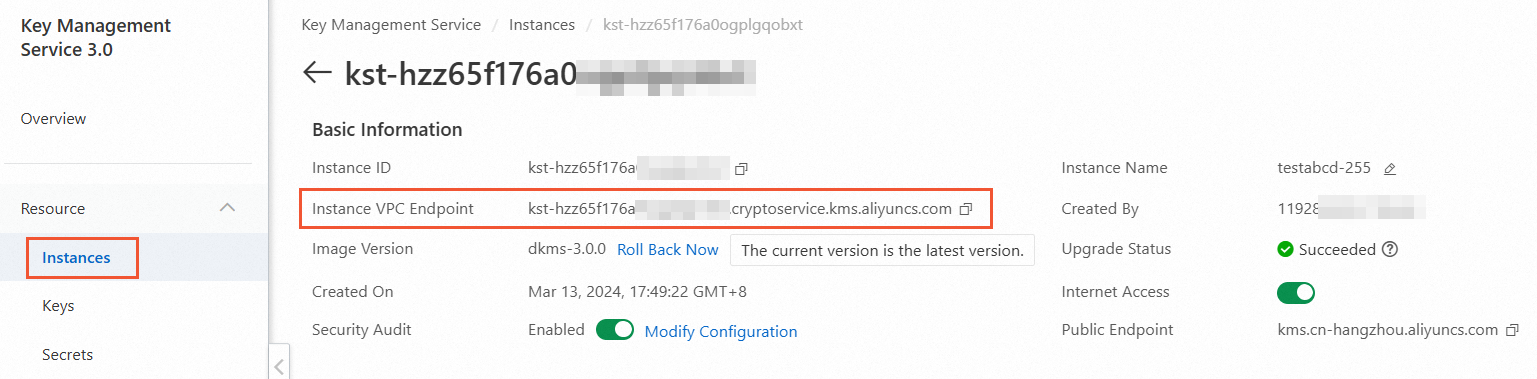
The endpoint follows this format: <instance-id>.cryptoservice.kms.aliyuncs.com.
CA certificate
On the Instances page, find the Instance CA Certificate section and click Download.
In the Instance CA Certificate dialog box, select the instance ID, click Download, and store the file securely.
The downloaded file is named PrivateKmsCA_kst-******.pem.

Initialize the client
The KMS instance service requires HTTPS. All examples set config.protocol to https.
Production environment (recommended)
Use this configuration for production deployments. The CA certificate verifies the authenticity of the SSL/TLS certificate, securing communications between your application and the KMS instance.
# -*- coding: utf-8 -*-
import os
from openapi.models import Config
from openapi_util.models import RuntimeOptions
from sdk.client import Client

# Configure the client
config = Config()
# HTTPS is required — the KMS instance service does not allow HTTP.
config.protocol = "https"
# Path to the ClientKey file (clientKey_****.json), downloaded when you created the ClientKey.
config.client_key_file = "<CLIENT_KEY_FILE>"
# ClientKey password, read from an environment variable to avoid hardcoding credentials.
config.password = os.getenv("CLIENT_KEY_PASSWORD")
# Endpoint format: <instance-id>.cryptoservice.kms.aliyuncs.com
config.endpoint = "<ENDPOINT>"

client = Client(config)

# Configure the CA certificate to verify the KMS instance's SSL/TLS certificate.
runtime_options = RuntimeOptions()
runtime_options.verify = "<CA_CERTIFICATE_FILE_PATH>"
Replace the following placeholders:
| Placeholder | Description | Example |
|---|---|---|
<CLIENT_KEY_FILE> | Path to the ClientKey file | /etc/kms/clientKey_abc123.json |
<ENDPOINT> | Endpoint of your KMS instance | kst-hzz6be97d2dtu3s09.cryptoservice.kms.aliyuncs.com |
<CA_CERTIFICATE_FILE_PATH> | Path to the CA certificate file | /etc/kms/PrivateKmsCA_kst-hzz6.pem |
Set CLIENT_KEY_PASSWORD as an environment variable before running your application:
export CLIENT_KEY_PASSWORD="<your-clientkey-password>"Offline testing (SSL/TLS verification disabled)
Disabling SSL/TLS certificate verification removes a critical security control. Use this configuration only in isolated offline testing environments, never in production.
To disable SSL/TLS certificate verification for offline testing, set the IgnoreSSL field in RuntimeOptions to true:
# -*- coding: utf-8 -*-
import os
from openapi.models import Config
from openapi_util.models import RuntimeOptions
from sdk.client import Client

config = Config()
config.protocol = "https"
config.client_key_file = "<CLIENT_KEY_FILE>"
config.password = os.getenv("CLIENT_KEY_PASSWORD")
config.endpoint = "<ENDPOINT>"

client = Client(config)

runtime_options = RuntimeOptions()
# Set IgnoreSSL to true to disable SSL/TLS certificate verification. For offline testing only.
runtime_options.ignore_ssl = True
Parameter reference
| Parameter | Description |
|---|---|
protocol | Connection protocol. Must be https. |
client_key_file | Path to the ClientKey file (clientKey_****.json). This file stores the application's identity credentials and is automatically downloaded by the browser when you create a ClientKey. |
password | Password for the ClientKey. The password file (clientKey_****_Password.txt) is automatically downloaded by the browser when you create the ClientKey. Store the password as an environment variable rather than hardcoding it in your code. |
endpoint | Endpoint of your KMS instance. Format: <instance-id>.cryptoservice.kms.aliyuncs.com. Find this value in the Instance VPC Endpoint field on the Instances page. |
verify | Path to the CA certificate file (PrivateKmsCA_kst-******.pem) associated with your KMS instance. Download this file from the Instance CA Certificate section on the Instances page. |
IgnoreSSL | Field in RuntimeOptions. Set to true to disable SSL/TLS certificate verification. For offline testing only. |