Data Management (DMS) access control restricts which databases and instances each user can view and access, keeping your organization's data secure.
How access control changes visibility
When access control is disabled, regular users can view and access all databases and instances. When access control is enabled, regular users can view and access only the databases and instances on which they have permissions.
|
Access control state |
Behavior |
|
Disabled |
Regular users can view and access all databases and instances. For example, searching |
|
Enabled |
Regular users can view and access only databases and instances on which they have permissions. For example, searching |
Prerequisites
An administrator role in DMS
The DMS console V5.0
Enable access control for a user
-
Log on to the DMS console V5.0 as an administrator.
-
In the top navigation bar, choose .
NoteIf you use the DMS console in simple mode, move the pointer over the
 icon in the upper-left corner of the DMS console and choose .
 -
On the Users page, find the target user and choose in the Actions column.
-
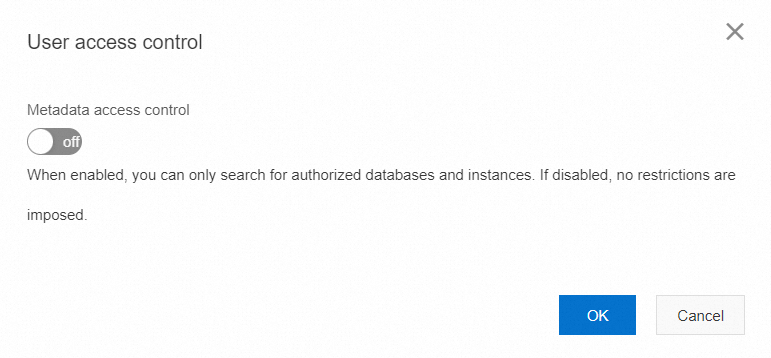
In the User access control dialog box, turn on Metadata access control.
-
Click OK.
Database permissions
DMS provides three database permissions:
| Permission | Grants |
|---|---|
| Query | Query data in the database |
| Export | Export data from the database |
| Change | Make changes to data in the database |
Having any one of these permissions on a database gives you access to:
Database information: The database appears in the search box in the left-side navigation pane, the top navigation bar of the DMS console, and the Select the databases, tables, or columns on which you want to apply for permissions field on the Ticket Application page. You can query data only if you have the Query permission.
Instance information: You can view details about the instance that the database belongs to. To view other databases in the same instance, you need separate permissions on those databases.
What metadata access control applies to
As a centralized data management service, DMS assigns different roles with different permissions. Metadata access control builds on this by restricting visibility to only the resources each user is authorized to access.
Metadata access control applies to three object types:
Users: A user can view and access only databases on which they have permissions.
Databases: A database is visible only to users who have permissions on it.
Instances: An instance and all its databases are accessible only to users who have permissions on the instance.