In the era of the mobile Internet, network request performance has become a key factor that affects user experience. Statistics show that the conversion rate drops significantly as the page load time increases, and the most common user feedback in mobile applications is related to network performance issues such as "slow load" and "stuttering". However, the complexity of the mobile network environment far exceeds that of the web client:
● Multiple network standards such as Wi-Fi, 4G, 5G, 3G, and 2G coexist.
● The signal strength varies, and network transitions are frequent.
● The network quality varies greatly across different regions and carriers.
● There are many Android device brands and models.
● The system version span from Android 5.0 to the latest version is large.
● The device performance is uneven, which affects the network processing capability.
● Lack of visibility: Traditional monitoring can only see whether a request succeeded or failed and the total duration, but cannot understand which specific segment the time is spent on.
● Difficult to reproduce: The user feedback is "very slow", but it often cannot be reproduced in the development environment.
● Lack of quantization basis: Optimization is based on feeling, and the optimization effect cannot be evaluated.
● Lack of end-to-end tracking: Client logs are missing, and it is separated from the server-side monitoring, which cannot form a complete trace.
To solve the above pain points, we need to turn the "black box" of the network request into a "transparent box" to clearly see the duration of each segment. Real User Monitoring (RUM) of Cloud Monitor 2.0 for the Android SDK provides mobile network performance monitoring capabilities. Next, we will introduce the resource metric data model collected by the RUM SDK in detail to help you understand the meaning and compute method of each metric.
To make each phase of each network request clearly visible and quantifiable, you must first establish a standardized data model. Alibaba Cloud RUM uses resource events as the core data model for network request monitoring.
Resource events are a standardized event type specifically designed for network requests. It is formulated based on the Hypertext Transfer Protocol (HTTP) and the World Wide Web Consortium (W3C) Performance Timing API standard, which ensures the accuracy and comparability of data collection. Considering the implementation differences of the API in different environments (Web, iOS, Android, and HarmonyOS), RUM has corrected and snapped them. This allows developers to see consistent performance data on both the web client and mobile clients, facilitating cross-platform performance comparison and troubleshooting.
Next, we will introduce the property fields and metric fields included in resource events in detail.
Resource events contain rich attribute fields that describe the context information of a request:
| Property | Type | Description |
|---|---|---|
| session.id | string | Associated session |
| view.id | string | Associated view |
| view.name | string | Associated view name |
| resource.type | string | Collected resource type (such as css, javascript, media, XHR, image, and navigation) |
| resource.method | string | HTTP request method (such as POST and GET) |
| resource.status_code | string | Resource status code |
| resource.message | string | Supplementary return result for general errors |
| resource.url | string | Resource URL |
| resource.name | string | The default value is the path part of the URL. You can match it based on rules or actively configure it. |
| resource.provider_type | string | Resource provider type (such as first-party, cdn, ad, and analytics) |
| resource.trace_id | string | Resource request trace ID |
| resource.snapshots | string | Snapshot JSON string of the resource |
In addition to property fields, resource events also contain core performance metrics. This part of the data is the core data for us to troubleshoot slow network requests.
| Metric | Type | Description |
|---|---|---|
| resource.success | number | Indicates whether the resource is successfully loaded. 1 indicates succeeded, 0 indicates failed, and -1 indicates unknown. |
| resource.duration | long (ms) | Total time spent on loading the resource (responseEnd - redirectStart) |
| resource.size | long (bytes) | Resource size, which corresponds to decodedBodySize |
| resource.connect_duration | long (ms) | Time spent on establishing a connection with the server (connectEnd - connectStart) |
| resource.ssl_duration | long (ms) | The time spent on the TLS handshake. If the last request is not sent via HTTPS, this metric does not appear (connectEnd - secureConnectionStart). You can make a special judgment here. If the value of secureConnectionStart is 0, it indicates that no Secure Sockets Layer (SSL) connection is initiated. In this case, ssl_duration is not computed, and the value of ssl_duration is assigned 0. |
| resource.dns_duration | long (ms) | The time spent to parse the DNS name of the last request (domainLookupEnd - domainLookupStart) |
| resource.redirect_duration | long (ms) | The time spent on the redirection of the HTTP request (redirectEnd - redirectStart) |
| resource.first_byte_duration | long (ms) | The time spent waiting to accept the first byte of the response (responseStart - requestStart) |
| resource.download_duration | long (ms) | The time spent to download the response (responseEnd - responseStart) |
A complete HTTPS request usually includes the following key phases:
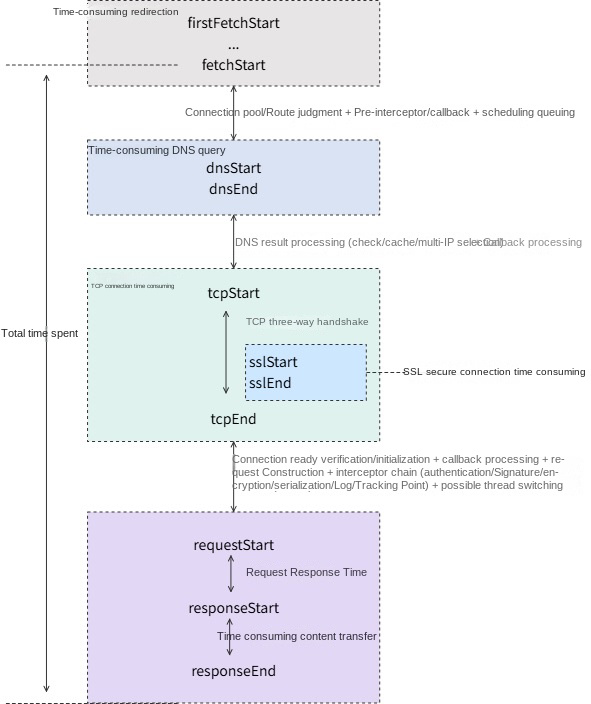
After understanding the definition of the metric, we will deeply understand the specific compute implementation based on OkHttp3 on the Android client.
The following table shows the compute method for the duration of each phase of the Android network resource request, and clearly defines the start and end time points and compute methods of each stage.
You can view the detailed time start points in the resource.timing_data field of the raw data.
| Field | Calculation formula (OkHttp callback phase) | Meaning (console display) | Description |
|---|---|---|---|
| resource.redirect_duration | callStart - (first)callStart |
Redirection duration | The total duration of the HTTP redirection, which is the time from the first request to the completion of the last redirection ● If there is no redirection, the value is 0 |
| resource.dns_duration | dnsEnd - dnsStart |
DNS query duration | The domain name resolution duration, which is the time required to parse the domain name into an IP address ● If a connection pool is used to reuse the connection, this value is 0 (because DNS resolution is not required) |
| resource.connect_duration | connectEnd - connectStart |
TCP connection duration | The total duration to establish a connection with the server, including the time of the TCP three-way handshake and SSL/TLS handshake ● If a connection pool is used to reuse the connection, this value is 0 |
| resource.ssl_duration | secureConnectEnd - secureConnectStart |
SSL secure connection duration | The time consumed for SSL connection ● This value exists only for an HTTPS request, and it is 0 for an HTTP request ● If a connection pool is used to reuse the connection, this value is 0 |
| resource.first_byte_duration | responseHeadersStart - requestHeadersStart |
Request response duration | The time from the start of the request to the first byte of the received response |
| resource.download_duration | responseBodyEnd - responseHeadersStart |
Content transfer duration | The response body download duration, which is the time from when the response starts to be accepted to when the response is completely accepted |
| resource.duration | responseBodyEnd - callStart |
Total resource load duration | The total duration of the resource load, which is the total time from when the request starts to when the response is completely accepted |
Note: The TCP connection duration displayed in the console actually includes the SSL handshake time.
Based on the metric data collected by the RUM SDK, we can detect whether the connection is reused. The judgment basis is as follows:
Judgment basis:
● connectionAcquiredTime > 0: The connection is obtained.
● dnsStartTime ≤ 0: No DNS resolution callback.
● tcpStartTime ≤ 0: No TCP connection callback.
Features when the connection is reused:
● resource.dns_duration = 0
● resource.connect_duration = 0
● resource.ssl_duration = 0
● There is a wait time from callStart to connectionAcquired (connection pool seek time).
This wait time is an important performance metric. If it is too long, it may indicate improper connection pool configuration.
For HTTPS requests, connection establishment is divided into two phases:
connectStart (TCP starts)
    ↓
    [TCP three-way handshake]
    ↓
secureConnectStart (SSL handshake starts)
    ↓
    [SSL/TLS handshake]
    ↓
secureConnectEnd (SSL handshake ends)
    ↓
connectEnd (Connection established)
Time relationship:
Total connection time = connectEnd - connectStart
Pure TCP time = secureConnectStart - connectStart (approximate)
SSL time = secureConnectEnd - secureConnectStartYou can log on to the RUM console, select your application, click the API request module, and click specific details to view the duration and duration distribution of each phase of the request.
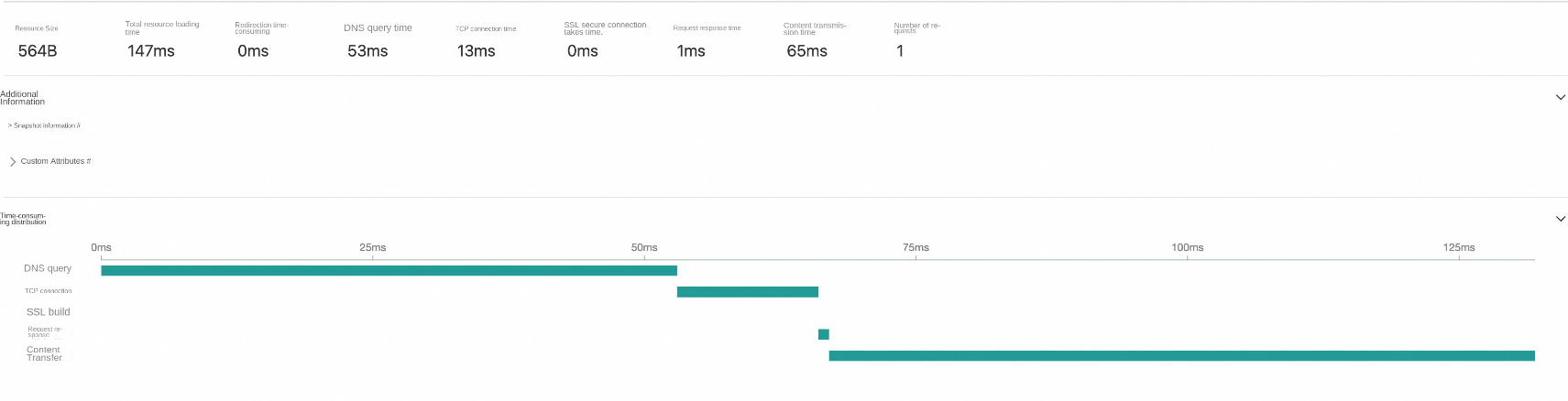
After understanding the data model and data compute methods, let's look at how to use these metric data to quickly locate performance issues through a real online user case.
An app received online user complaints, with feedback such as "page load is particularly slow" and "spinning often exceeds 1 second." The developer team immediately troubleshot the backend service, but found a confusing phenomenon:
The client reported that the response time of a core API often exceeded 1 second (some users even reached 2-3 seconds). This problem existed regardless of whether the network environment was Wi-Fi or 4G, and it was random, making it difficult to stably reproduce in the development environment.
However, backend monitoring showed that the server-side processing time of the API was stable at about 400 ms, the database query performance was normal with no slow queries, and the server CPU and memory payload were also healthy. The data on both sides did not match. The client reported 1.2 seconds, while the server-side only took 400 ms. Where did the remaining 800 ms go? Without fine-grained monitoring, the team fell into a "blind men and an elephant" dilemma: the client and the server-side blamed each other, and the problem could not be resolved for a long time.
By integrating the Alibaba Cloud RUM Android SDK, we collected detailed duration data.
Let's see how the problem was precisely located.
In the resource.timing_data field, we obtained the raw time points (in nanoseconds) of each phase of the request:
{
    "requestHeadersEnd": 1560814315115219,
    "responseBodyStart": 1560814719308917,
    "requestType": "OkHttp3",
    "connectionAcquired": 1560814312934751,
    "connectionReleased": 1560814721700948,
    "requestBodyEnd": 1560814315850323,
    "responseHeadersEnd": 1560814718722250,
    "requestHeadersStart": 1560814312975011,
    "responseBodyEnd": 1560814719441625,
    "requestBodyStart": 1560814315146573,
    "callEnd": 1560814721840948,
    "duration": 1232825780,
    "callStart": 1560813486615845,
    "responseHeadersStart": 1560814718314125
}● No DNS, TCP, or SSL-related callback time points → This indicates that connection pool reuse is used.
● The interval from callStart to connectionAcquired is 826 ms → The connection pool wait time is abnormally long.
● Total duration = 1232.8 ms
There is already a clear clue here: The problem does not lie in DNS, TCP, or SSL handshake, but in the fact that the wait time for the connection pool to assign a connection is too long.
Based on the raw data and the data calculation methods in section 2.4, we calculate the duration phase by phase to precisely locate performance bottlenecks:
callStart → connectionAcquired
Time consumed: (1560814312934751-1560813486615845)/1,000,000 = 826.32 ms⚠️
Note:
● The wait time to retrieve an active connection from the connection pool.
● No DNS/TCP callback = Reuse the existing connection.
● This is the biggest bottleneck. It accounts for 67% of the total duration.
requestHeadersStart → requestHeadersEnd
Time consumed: (1560814315115219-1560814312975011)/1,000,000 = 2.14 ms✅requestBodyStart → requestBodyEnd
Time consumed: (1560814315850323-1560814315146573)/1,000,000 = 0.70 ms✅requestBodyEnd → responseHeadersStart
Time consumed: (1560814718314125-1560814315850323)/1,000,000 = 402.46 msNote: The time the server takes to process the request is consistent with the backend log and is within the normal range.
responseHeadersStart → responseHeadersEnd
Time consumed: (1560814718722250-1560814718314125)/1,000,000 = 0.41 ms✅responseBodyStart → responseBodyEnd
Time consumed: (1560814719441625-1560814719308917)/1,000,000 = 0.13 ms✅responseBodyEnd → connectionReleased
Time consumed: (1560814721700948-1560814719441625)/1,000,000 = 2.26 ms✅Through this analysis, we can clearly see that the connection pool wait time is a performance bottleneck.
Core issue: The connection pool wait time is too long (826 ms).
// View the connection pool configuration of the current OkHttpClient.
ConnectionPool connectionPool = okHttpClient.connectionPool();
// Default configurations: A maximum of five idle connections, and keep alive for 5 minutes.
After the check, it is found that the application uses the OkHttp default configurations, and there are only five idle connections.
You can view the quantity of concurrent requests to the same host within this time segment via the RUM console.
You can view application logs to confirm that all requests have correctly closed the response body:
Response response = client.newCall(request).execute();
try {
    String body = response.body().string();
    // Process the response
} finally {
    response.close();  // Close it
}The issue is caused by a connection pool configuration that is too small. A large number of requests are waiting for connection release, causing critical performance bottlenecks.
After the cause of the issue is identified, we will introduce troubleshooting methods and optimization ideas for common network performance issues.
Through the above case, we have seen how to use RUM data to locate issues. This chapter will systematically introduce four categories of the most common network performance issues and their troubleshooting methods.
Symptom: An abnormal connection acquisition duration is observed in resource.timing_data.
callStart → connectionAcquired duration > 500 ms// Check the current configuration.
ConnectionPool pool=okHttpClient.connectionPool();
// Default: five idle connectionsView the number of concurrent requests for the time period through the RUM console:
-- Execute the query in the RUM console
SELECT
    COUNT(*) as concurrent_requests
FROM rum_resource
WHERE
    timestamp BETWEEN start_time AND end_time
    AND resource.url LIKE 'https://api.example.com%'
GROUP BY timestamp
ORDER BY concurrent_requests DESC// Add log monitoring status for connection pools
interceptor.addInterceptor(chain -> {
ConnectionPool pool = chain.connection().connectionPool();
Log.d("Pool", "Active: " + pool.connectionCount() +
", Idle: " + pool.idleConnectionCount());
return chain.proceed(chain.request());
});// Solution 1: Increase the connection pool size
.connectionPool(new ConnectionPool(30, 5, TimeUnit.MINUTES))
// Solution 2: Increase the maximum number of concurrent requests per host
.dispatcher(new Dispatcher() {{
setMaxRequestsPerHost(10); // 默认5
setMaxRequests(64); // 默认64
}})
// Solution 3: Merge requestsSymptom: It is observed in the console that the DNS duration remains high.
resource.dns_duration > 500msYou can check whether resource.dns_duration remains high. You can check the differences between different network environments (WiFi vs. 4G).// Group by domain name in the RUM console
SELECT
resource.url_host,
AVG(resource.dns_duration) as avg_dns_time,
MAX(resource.dns_duration) as max_dns_time
FROM rum_resource
WHERE resource.dns_duration > 0
GROUP BY resource.url_host
ORDER BY avg_dns_time DESC// Solution 1: Use a custom DNS
.dns(new CustomDns())
// Solution 2: Use HttpDNS
.dns(new AliHttpDns())
// Solution 3: DNS pre-parsing
DnsPreloader.preload(client);</font>Symptom: An abnormal SSL handshake duration is observed in the console.
resource.ssl_duration > 1000ms// Add an interceptor to View SSL information
interceptor.addInterceptor(chain -> {
Connection connection = chain.connection();
if (connection != null) {
Handshake handshake = connection.handshake();
if (handshake != null) {
Log.d("SSL", "Protocol: " + handshake.tlsVersion());
Log.d("SSL", "Cipher: " + handshake.cipherSuite());
}
}
return chain.proceed(chain.request());
});// Query in the RUM console
SELECT
</font><font style="background-color:#d0cece;"> </font><font style="background-color:#d0cece;">COUNT(CASE WHEN resource.ssl_duration = 0 THEN 1 END) * 100.0 / COUNT(*) as reuse_rate
FROM rum_resource
WHERE resource.url LIKE 'https://%' // Solution 1: Enable SSL session reuse
.sslSocketFactory(SslConfig.createSSLSocketFactory())
// Solution 2: Increase the connection keep-alive time
.connectionPool(new ConnectionPool(30, 10, TimeUnit.MINUTES))</font><font style="background-color:#d0cece;"> </font><font style="background-color:#d0cece;">// Extend to 10 minutes
// Solution 3: Use certificate pinning
.certificatePinner(certificatePinner) Symptom: The time from when a request is sent to when the first byte is received is excessively long. You can observe a long request response duration in the console.
resource.first_byte_duration > 2000msMake sure that the following metrics are normal:
● DNS resolution time < 300 ms
● Connection establishment time < 500 ms
● Request sending time < 100 ms
TTFB is mainly determined by the server processing time. If the client metrics are normal, you can:
1. Check the server load.
2. Check the database query performance.
3. Check the complexity of the interface business logic.
4. Use an application performance management (APM) tool to track server performance.// View the TTFB differences across different regions and carriers in the RUM console
SELECT
</font><font style="background-color:#d0cece;"> </font><font style="background-color:#d0cece;">user.region,
</font><font style="background-color:#d0cece;"> </font><font style="background-color:#d0cece;">user.isp,
</font><font style="background-color:#d0cece;"> </font><font style="background-color:#d0cece;">AVG(resource.first_byte_duration) as avg_ttfb
FROM rum_resource
GROUP BY user.region, user.isp
ORDER BY avg_ttfb DESC// Solution 1: Use CDN for acceleration
// Deploy static resources and APIs to CDN points of presence
// Solution 2: Enable server caches
// Implement a reasonable cache policy on the server-side
// Solution 3: Use data prefetching
// Request data in advance before users might access it
PreloadManager.preload("https://api.example.com/user/profile");
// Solution 4: Manage request priorities
.dispatcher(new Dispatcher() {{
// Use a separate thread pool for high-priority requests.
})By using the troubleshooting methods for the preceding four categories of common issues, we have mastered a systematic diagnosis approach. Now, let's return to the real case in Chapter 3 that troubled the team for days: the performance bottlenecks of an 826 ms connection pool wait time. By precisely locating the issue using RUM data, we discovered that the root cause of the issue is that improper connection pool configurations cause requests to queue up and wait. The solution is actually very simple: Select appropriate connection pool configurations based on different application types.
For the maxIdleConnections parameter of OkHttpClient (the default value is 5), we recommend that you adjust it based on application characteristics. Based on experience, common configurations are as follows:
● Highly concurrent applications: maxIdleConnections = 30-50.
Such applications have high user popularity, frequent network requests, and a large amount of concurrency, and require sufficient connection pool support.
● General applications: maxIdleConnections = 10-20.
Moderate the request frequency and concurrency, and maintain a moderate connection pool size.
● Low-frequency applications: maxIdleConnections = 5-10. Fewer user requests. In this case, keep the default configuration or slightly increase it to meet the demand.
However, this case also brings us deeper reflection. Performance optimization should not be an after-the-fact remedy. In addition to mastering post-troubleshooting and optimization methods, establishing a comprehensive performance monitoring system is more important. You can grasp the network performance metrics of the application in real time through the RUM console to shift from "passive firefighting" to "active observation." If necessary, you can also configure custom alert rules based on the RUM platform (such as triggering notifications when the connection pool wait time P95 > 500 ms) to further improve the problem response speed.
RUM data allows users to create custom alerts for real-time monitoring. Establishing a scientific monitoring and alerting system allows you to detect and handle problems in a timely manner before the problems impact users.
Based on industry practices such as the RAIL model and Google Web Vitals, common threshold references are as follows:
| Metric | Alert threshold | Severity | Description |
|---|---|---|---|
resource.duration |
P95 > 3s | Critical | Total duration of resource loading |
resource.first_byte_duration |
P95 > 800ms | Warning | Long TTFB |
resource.dns_duration |
P95 > 200ms | Info | Slow DNS resolution |
resource.connect_duration |
P95 > 400ms | Warning | Slow connection establishment |
resource.ssl_duration |
P95 > 400ms | Info | Slow SSL handshake |
| Connection pool wait time | P95 > 500ms | Critical | Insufficient connection pool configuration |
| Connection reuse rate | < 70% | Warning | Connection not effectively reused |
In mobile application development, network request performance directly impacts user experience. By integrating the Alibaba Cloud RUM Android SDK, developers can obtain the following core capabilities:
● Fine-grained phase duration (such as DNS, TCP, SSL, and TTFB) helps quickly detect problems.
● From the vague description of "slow requests" to the accurate positioning of "connection pool waits for 826 ms"
● Automatically detect the use efficiency of the connection pool
● Detect hidden problems such as connection leaks and improper connection pool configurations
● Collect data based on the network environments of real users
● Analyze performance differences by dimensions such as region, carrier, and network type
● The comparison before and after optimization is clearly visible
● Establish performance baselines and alerting mechanisms for continuous improvement
Alibaba Cloud RUM implements a non-intrusive monitoring and collection SDK for application performance, stability, and user behavior on the Android client. You can refer to the integration document to experience and use the SDK. In addition to Android, RUM also supports monitoring and analysis on multiple platforms such as web, mini program, iOS, and HarmonyOS. For related questions, you can join the RUM support group (DingTalk group number: 67370002064) for consultation.
Achieve Operational Control for OpenClaw with Alibaba Cloud SLS One-Click Integration

786 posts | 60 followers
FollowAlibaba Cloud Native Community - December 10, 2025
Alibaba Cloud Native Community - January 20, 2026
Alibaba Cloud Native Community - August 14, 2026
Alibaba Cloud Native Community - March 11, 2026
Alibaba Cloud Native Community - November 11, 2025
Alibaba Cloud Native Community - September 1, 2026
786 posts | 60 followers
Follow Application Real-Time Monitoring Service
Build business monitoring capabilities with real time response based on frontend monitoring, application monitoring, and custom business monitoring capabilities
Learn More Web Hosting Solution
Explore Web Hosting solutions that can power your personal website or empower your online business.
Learn More Web Hosting
Explore how our Web Hosting solutions help small and medium sized companies power their websites and online businesses.
Learn More EMAS Superapp
Build superapps and corresponding ecosystems on a full-stack platform
Learn MoreMore Posts by Alibaba Cloud Native Community

