Have you ever encountered such a scenario: You need to quickly migrate history logs, backfill data, or process a batch of static files, but are troubled by the inconvenience of traditional collection tools that "monitor constantly and only collect incremental data"? The one-time file collection launched by LoongCollector is a solution tailored for this type of requirement.
LoongCollector is a next-generation data collector launched by Alibaba Cloud Simple Log Service (SLS) that combines performance, stability, and programmability. It is designed to build the next-generation observability pipeline. LoongCollector extends and integrates the observability technology stack, changing the single-scenario limit of traditional log collectors, and supports the collection, processing, routing, and sending of Logs, Metrics, Traces, Events, and Profiles.
Commercial version: https://www.alibabacloud.com/help/en/sls/what-is-sls-loongcollector/
Open source version: https://github.com/alibaba/loongcollector
Different from regular continuous collection, the one-time file collection configuration will scan matching files once, complete reading, and automatically end after it starts, without the need for manual monitoring. It applies to scenarios such as history file migration, data backfilling, and temporary batch processing. It not only saves resources but also ensures complete data upload.
Before the one-time file collection capability was released, LoongCollector (and its predecessor iLogtail) also provided a "history file collection" solution (Reference: Import history logs). Compared with the old solution, the new one-time file collection configuration is simpler and faster, possesses stronger batch processing capabilities and a clearer lifecycle, and improves stability and observability through finer-granularity checkpoints.
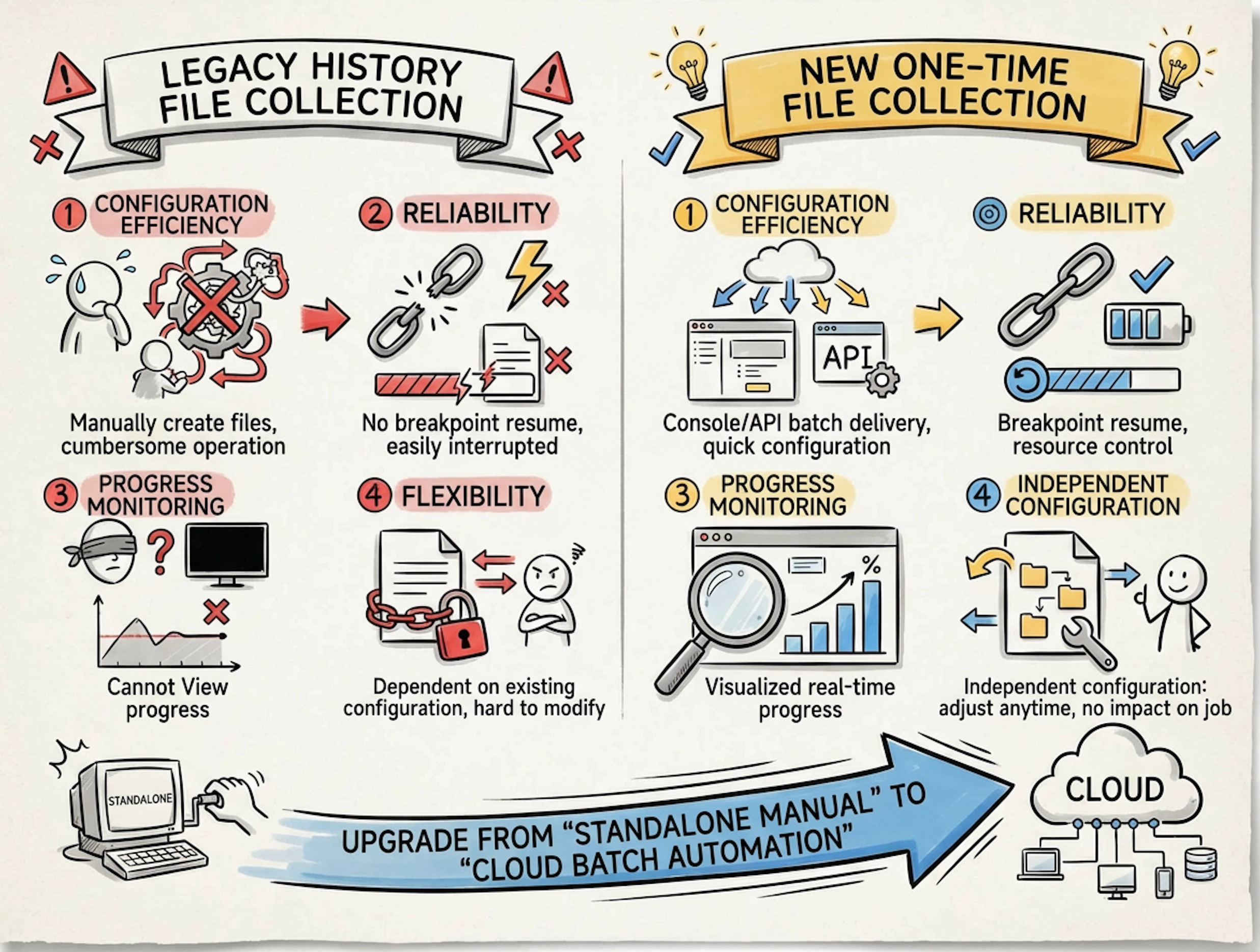
The new version of one-time collection upgrades static data collection from "standalone manual operation" to "cloud-based batch automation," making it more stable, controllable, and traceable. How are these advantages specifically realized? Let us introduce them one by one below.
The collection pipelines of LoongCollector can be divided into two categories:
● Continuous: Runs constantly, continuously discovers and collects new content (typically such as input_file).
● One-time: Executes only once after starting, and ends after the collection is completed (typically such as input_static_file_onetime).
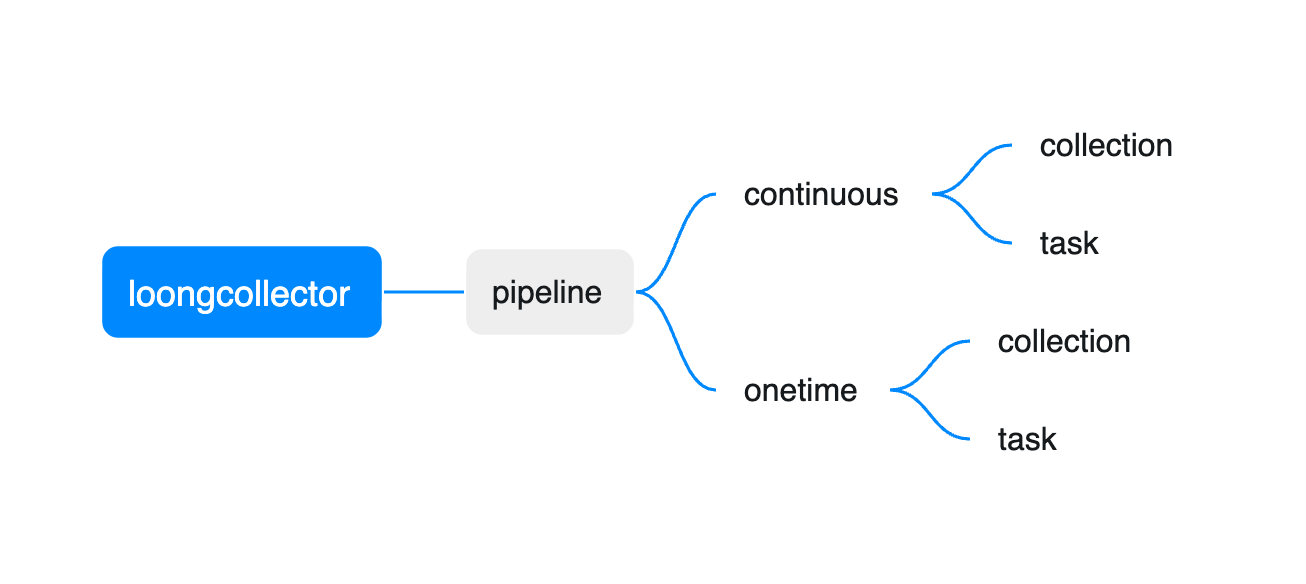
The scenarios for the two types of pipelines can be summarized as follows:
| Continuous pipeline | One-time pipeline | |
|---|---|---|
| Data collection | Continuous collection of logs/Metrics/Traces/events, etc. | Historical log import, batch supplemental recording, folder structure preview, etc. |
| O&M Job | Probe installation, background upgrade | One-time diagnosis, temporary Job |
On the client side, the "Toggle" for the one-time pipeline is global.ExecutionTimeout.
● When global.ExecutionTimeout exists in the configuration, LoongCollector will detect the pipeline as one-time and compute its time-to-live (TTL).
● In addition to global.ExecutionTimeout, the inputs plugin also needs to be a one-time input plugin (usually ending with _onetime). Otherwise, the configuration will not take effect. In this topic, we use the input_static_file_onetime plugin to execute "one-time file collection."
The comparison sample is as follows:
# Normal file collection
enable: true
inputs:
  - Type: input_file
    FilePaths:
      - /var/log/*.log
flushers:
  - Type: flusher_stdout
    OnlyStdout: true
    Tags: true

# One-time file collection
enable: true
global:
  ExcutionTimeout: 3600
inputs:
  - Type: input_static_file_onetime
    FilePaths:
      - /var/log/history/*.log
flushers:
  - Type: flusher_stdout
    OnlyStdout: true
Tags: trueTo provide a comprehensive overview of the one-time collection pipeline, you need to align the configuration lifecycle on the server-side/console side with the execution and reliability mechanisms on the client side. You can understand it as follows:
● Server-side/Console side: Decides when the configuration is distributed and how long the configuration is retained (impacting "which machines can obtain the configuration and how long the machines can obtain the configuration").
● Client side: Decides how the configuration runs after the configuration is obtained, how long the configuration runs, and how to resume collection from breakpoints (impacting "whether the collection can be completed, and whether data is missed or duplicated after a restart").
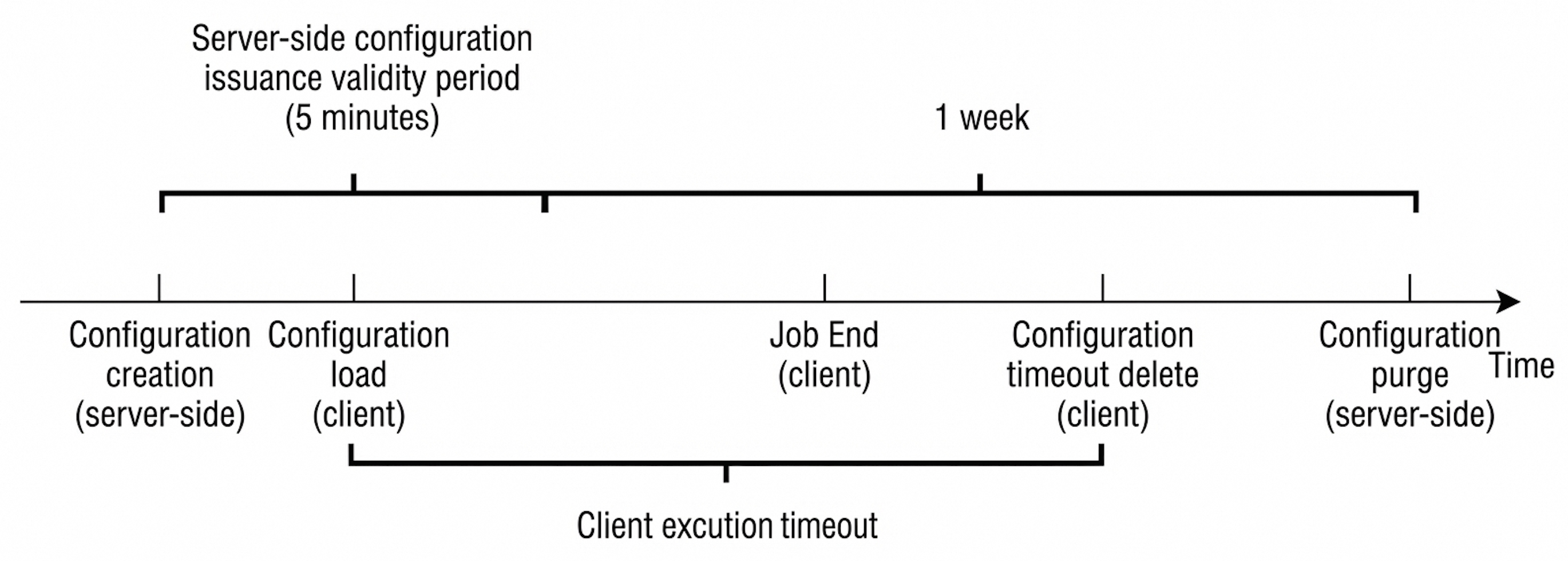
One-time collection configurations usually contain three key time points on the console side:
If machines are added to a group after configuration creation, they may miss the initial distribution window. When the data volume is large, you must increase the ExecutionTimeout in advance to prevent the collection from being interrupted because the execution window time limit is reached before the configuration collection is completed.
One of the design goals of one-time is "avoiding duplicate execution of the same configuration." Therefore, the update policy aims to achieve controllable reruns.
The core semantics of input_static_file_onetime can be summarized in three points:
One-time file collection records "configuration-level status + file-level progress" through checkpoints to support restart, upgrade, and abnormal recovery, and to avoid duplicate collection as much as possible.
This file records the core information of the one-time configuration (such as config_hash, expire_time, inputs_hash, and excution_timeout). This file is used to recover the time-to-live (TTL) and update policy judgment of the one-time configuration after a restart. The path is usually located at /etc/ilogtail/checkpoint/onetime_config_info.json.
This file records the execution progress of one-time file collection and the status of each file. The path is usually located at: /etc/ilogtail/checkpoint/input_static_file/{config_name}@0.json.
Field description (aligned with the actual stored JSON):
|
Parameter Name |
Parameter Explanation |
|
|
config_name |
collection configuration name |
|
|
expire_time |
time-to-live (TTL) of the collection configuration (Unix seconds) |
|
|
file_count |
Quantity of files to collect (Start time snapshot) |
|
|
start_time |
Time when Collection starts (Unix seconds) |
|
|
finish_time |
Time when Collection finishes (Unix seconds) |
|
|
status |
collection configuration Status: running / finished / abort |
|
|
current_file_index |
File index currently processed when running |
|
|
files |
filepath |
File Path (absolute path at Start time) |
|
sig_hash/sig_size |
Take up to 1024 bytes from the beginning of the file to calculate the file signature hash, and record the signature length |
|
|
dev/inode |
Device number and inode, used for rotation positioning |
|
|
status |
File Status: waiting / reading / finished / abort |
|
|
size |
File Size at Start time (only collected to this position this time) |
|
|
offset |
Collection offset (exists during reading/abort) |
|
|
start_time |
File start Collection Time (exists during reading/finished/abort) |
|
|
last_read_time |
File last read time (exists during reading) |
|
|
finish_time |
File Collection completion time (exists when finished) |
|
{
  "config_name" : "xxxx",
  "expire_time" : 1768550944,
  "file_count" : 1,
  "files" :
    [
      {
        "dev" : 2051,
        "filepath" : "/var/log/tmpfs.log",
        "finish_time" : 1768550345,
        "inode" : 2888304,
        "size" : 1282,
        "start_time" : 1768550345,
        "status" : "finished"
      }
    ],
  "finish_time" : 1768550345,
  "input_index" : 0,
  "start_time" : 1768550344,
  "status" : "finished"
}One-time file collection is a native input plugin (implemented in C++). This feature shares the reader system with regular file collection and possesses good throughput capacity. The theoretical limit performance of single-threaded collection for single-line Text logs can reach 300 MB/s. At the same time, "controllable" constraints are imposed on resource usage:
● Single-threaded sequential execution: All input_static_file_onetime collection configurations are uniformly scheduled by the StaticFileServer module inside LoongCollector. The overall process is single-threaded loop processing (different inputs are assigned time slices in the loop) to avoid uncontrolled resource usage caused by excessive concurrency.
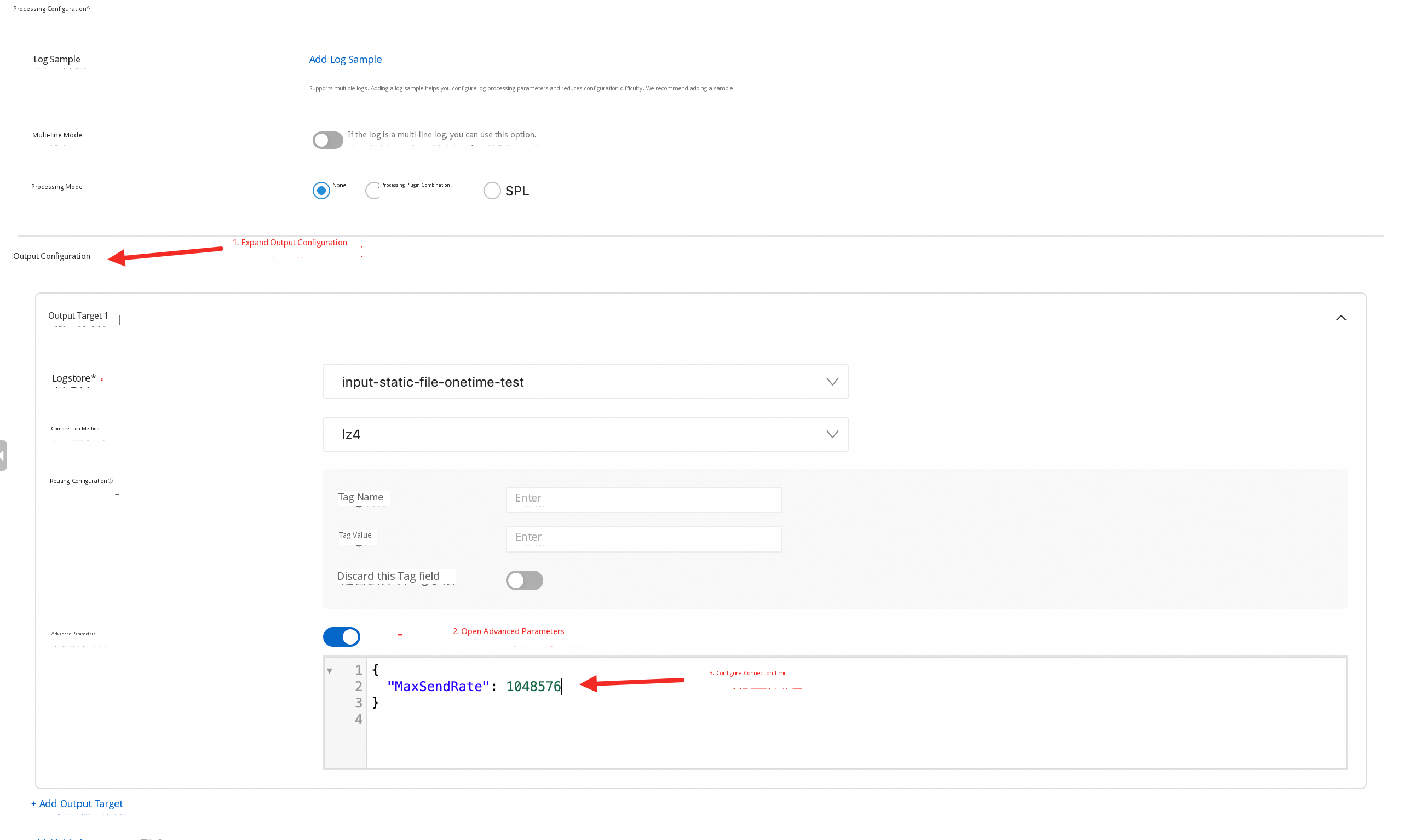
● Sending rate limiting (flusher_sls.MaxSendRate): Use the advanced parameter MaxSendRate of the SLS Outputs to perform Rate Limit on sending. The unit is B/s. When MaxSendRate > 0, the sending queue enables the rate limiter, thereby reducing the impact on network bandwidth and SLS write quotas.
SLS has published the one-time file Collection capability. You can experience the new feature in just three steps:
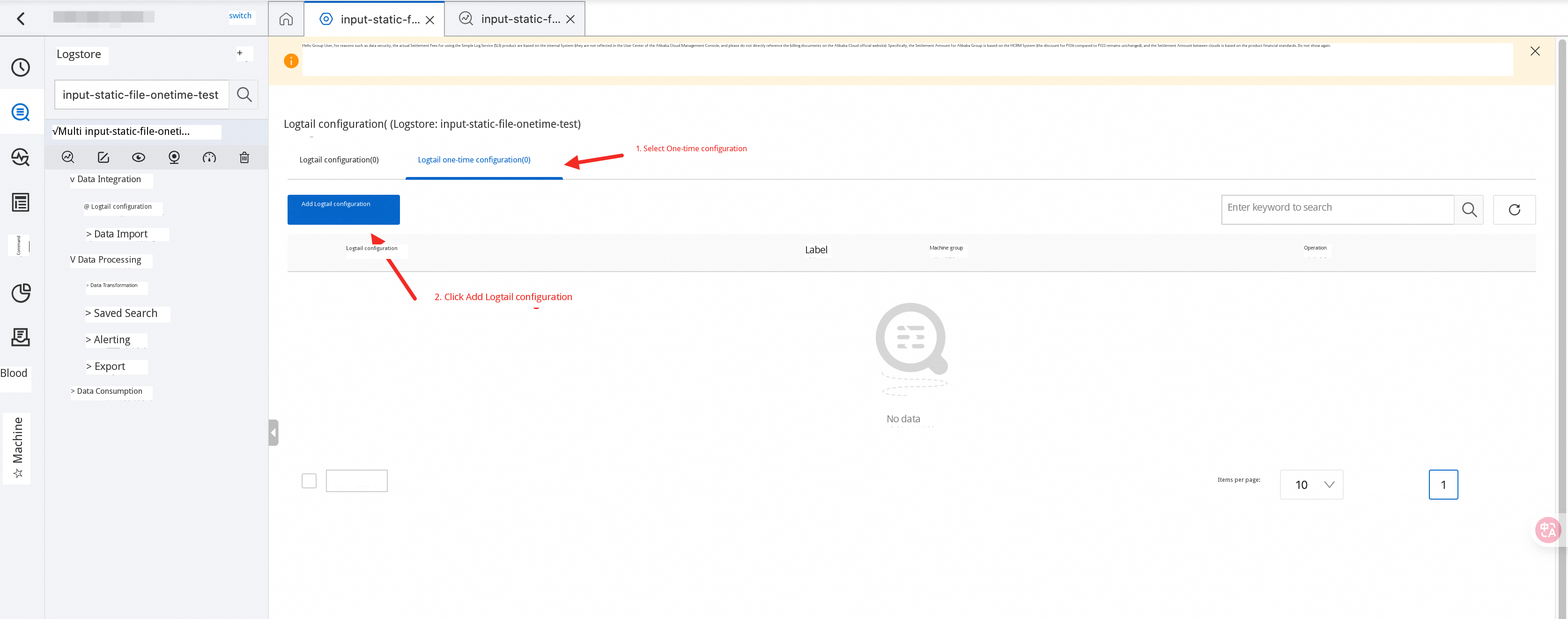
1. Log on to the SLS console. On the Logtail configuration Page, select "One-time Logtail Configuration" and Click "Add Logtail Configuration".
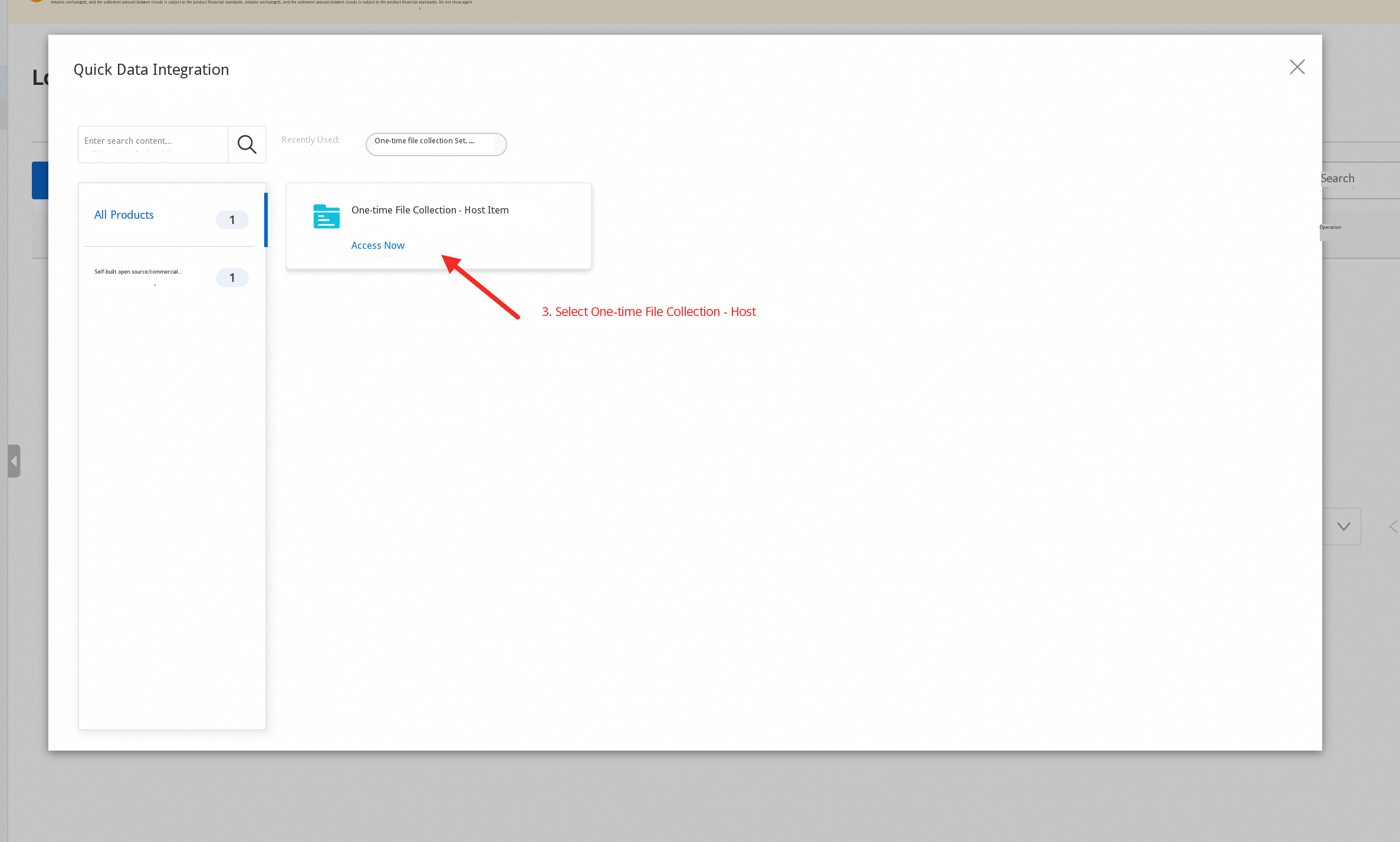
2. Select "One-time File Collection - Host".
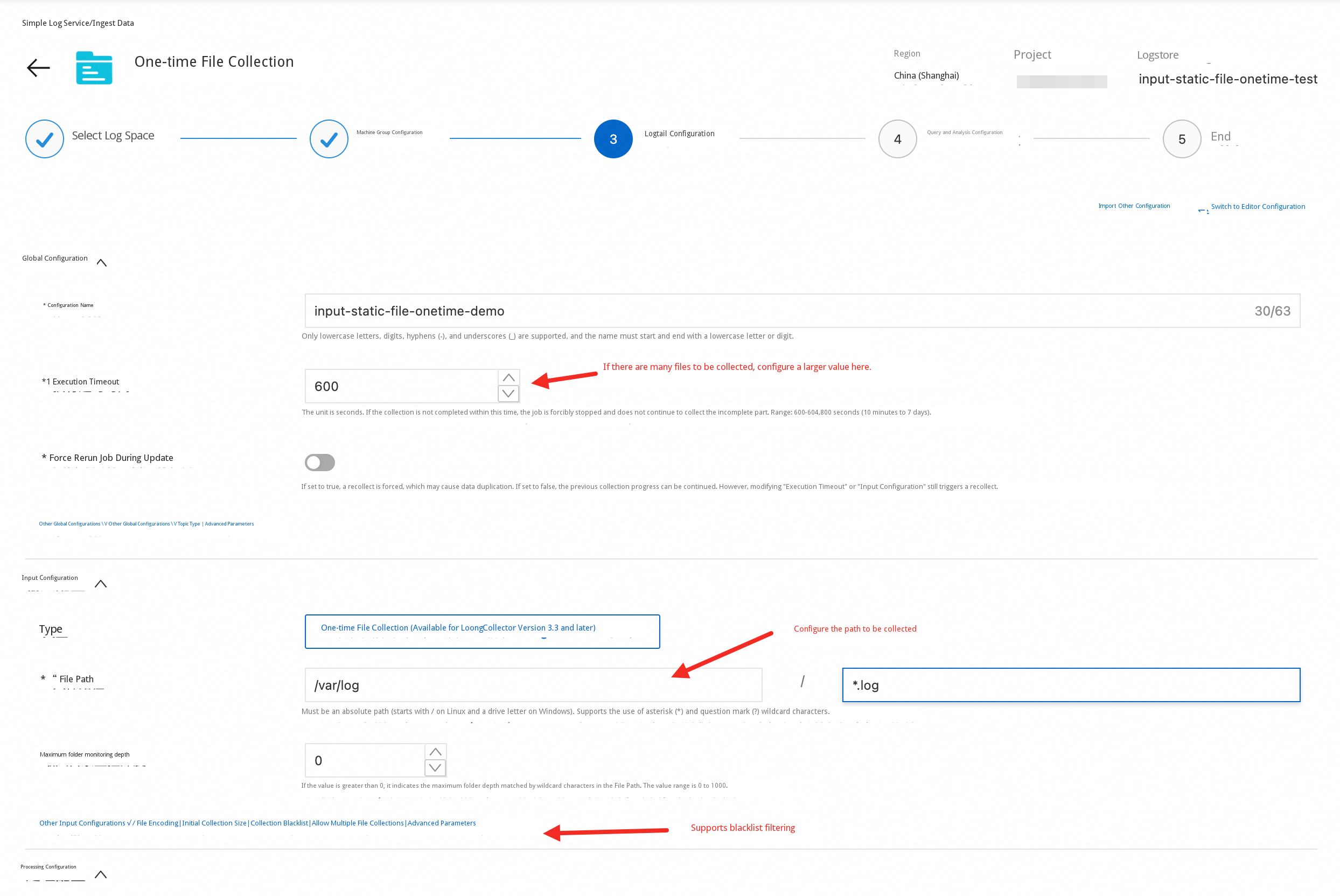
3. Fill in the file collection configuration (consistent with the configuration of regular file collection). Configure processing plugins as needed and save. For more detailed descriptions and parameter explanations, refer to the official documentation.
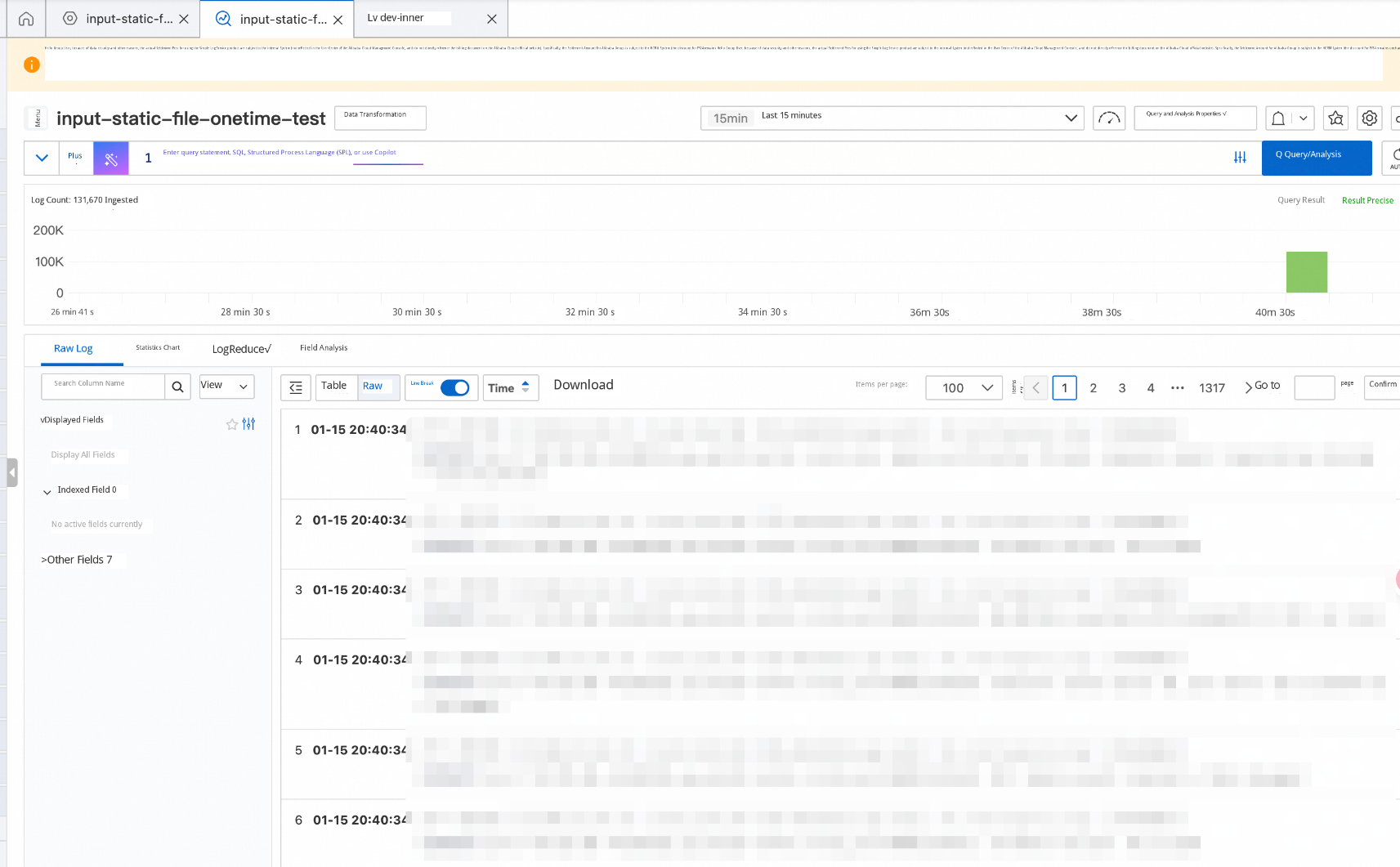
After saving, you can see that the data is collected:
You can also view the complete collection configuration in the configuration details:
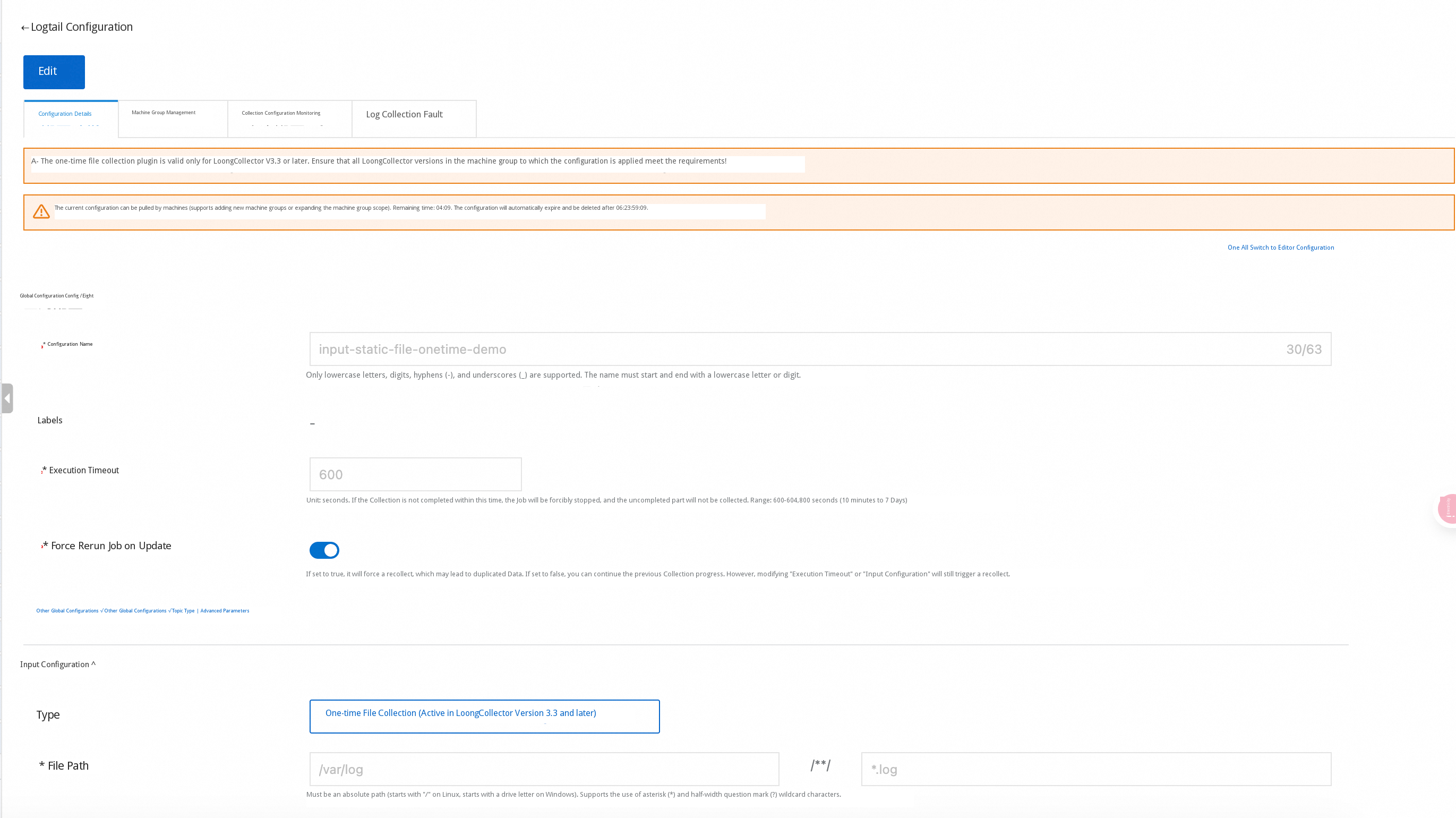
Hypothetical scenario:
● Because of an accidental network disconnection for too long, exceeding the local fault tolerance limit of LoongCollector, 1,000 nodes need to backfill data. Each node needs to backfill about 10 GB.
● The target Logstore has 256 shards. The write limit for each shard is about 5 MB/s.
● The daily traffic of each machine is about 1 MB/s.
If you directly use default parameters to apply the one-time file collection configuration, the following may occur:
It is recommended to perform two-step control:
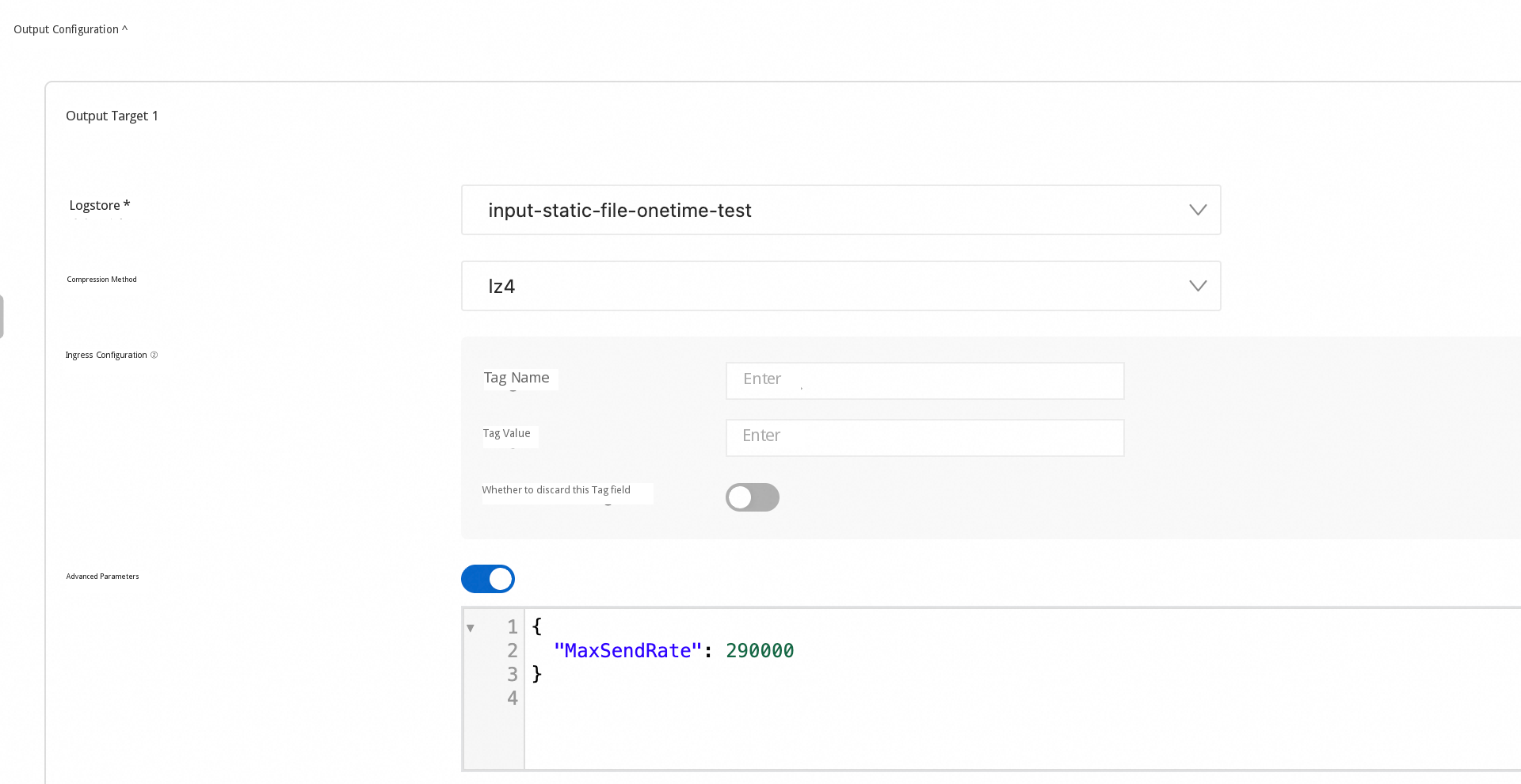
Estimate roughly based on available quota: The remaining available write capacity is about (256 × 5 - 1,000 × 1 = 280) MB/s. Averaged to each machine, it is about 0.28 MB/s (≈ 286 KB/s ≈ 286,720 B/s), rounded to about 290,000 B/s. You can set MaxSendRate to about 290000 (B/s) for rate limiting.
At a sending rate of 286 KB/s, backfilling 10 GB requires at least about 10 GB / 286 KB/s ≈ 36,663 s ≈ 10.2 h. It is recommended to set ExecutionTimeout to 86400 (about 1 day) to leave enough margin for collection.
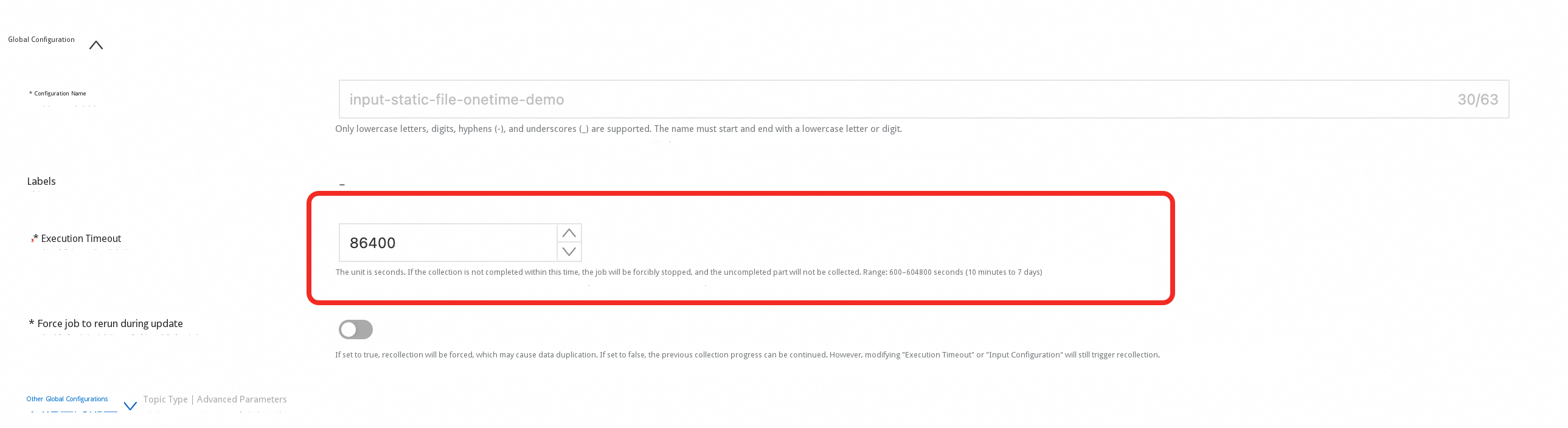
Summary: ExecutionTimeout: 86400 + MaxSendRate: 290000. This allows large-scale backfilling to be completed while minimizing the impact on daily online collection.
Hypothetical scenario (disregarding quota, only discussing "avoiding duplication"):
● The edge zone encountered a network abnormality for an extended period, exceeding the LoongCollector local fault tolerance limit, resulting in the loss of approximately 12 hours of Data.
● There are multiple rotated files on the edge zone, and many files are only partially missing.
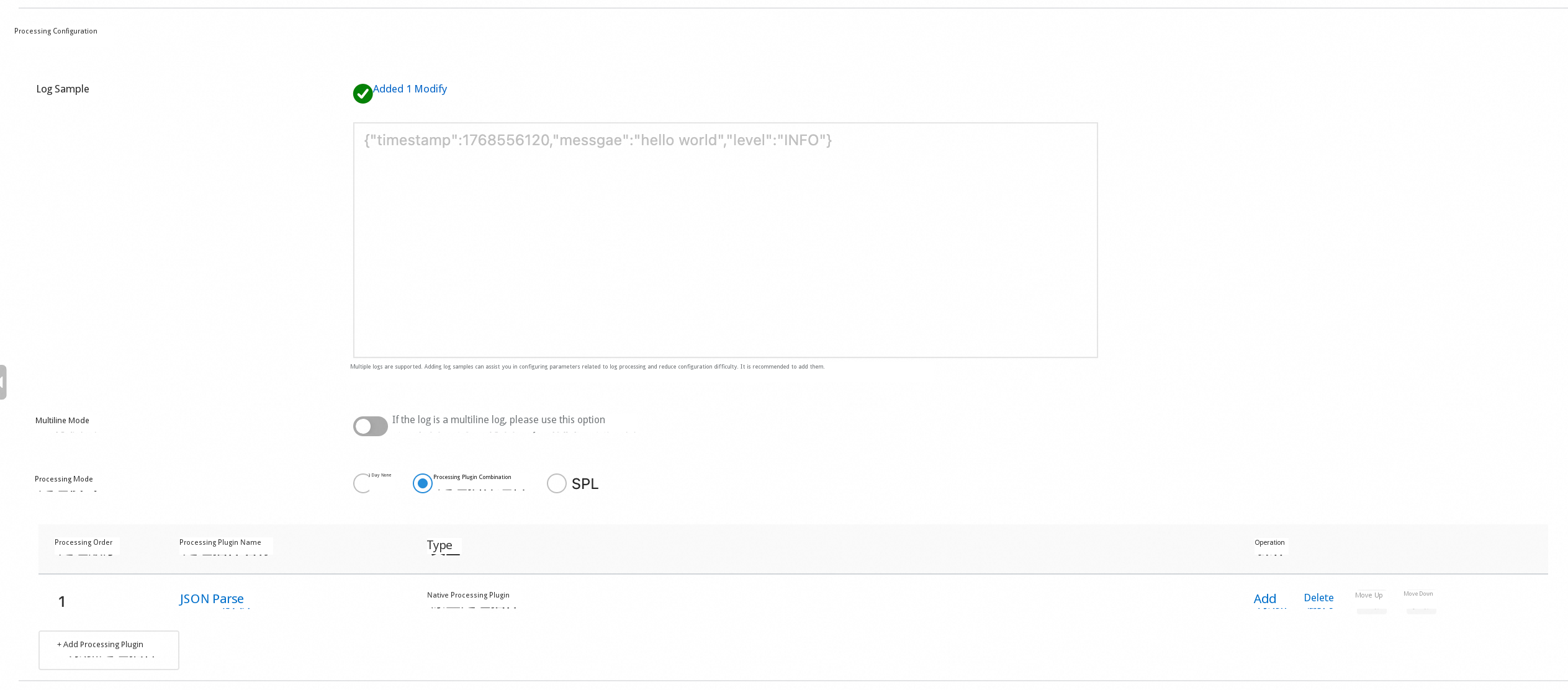
● The log is a single-line JSON, containing
{"timestamp":1768556120,"message":"hello world","level":"INFO"}One-time file collection is executed in units of "file snapshots." If you recollect directly, it is likely that the time segments that have already been reported will be recollected as well.
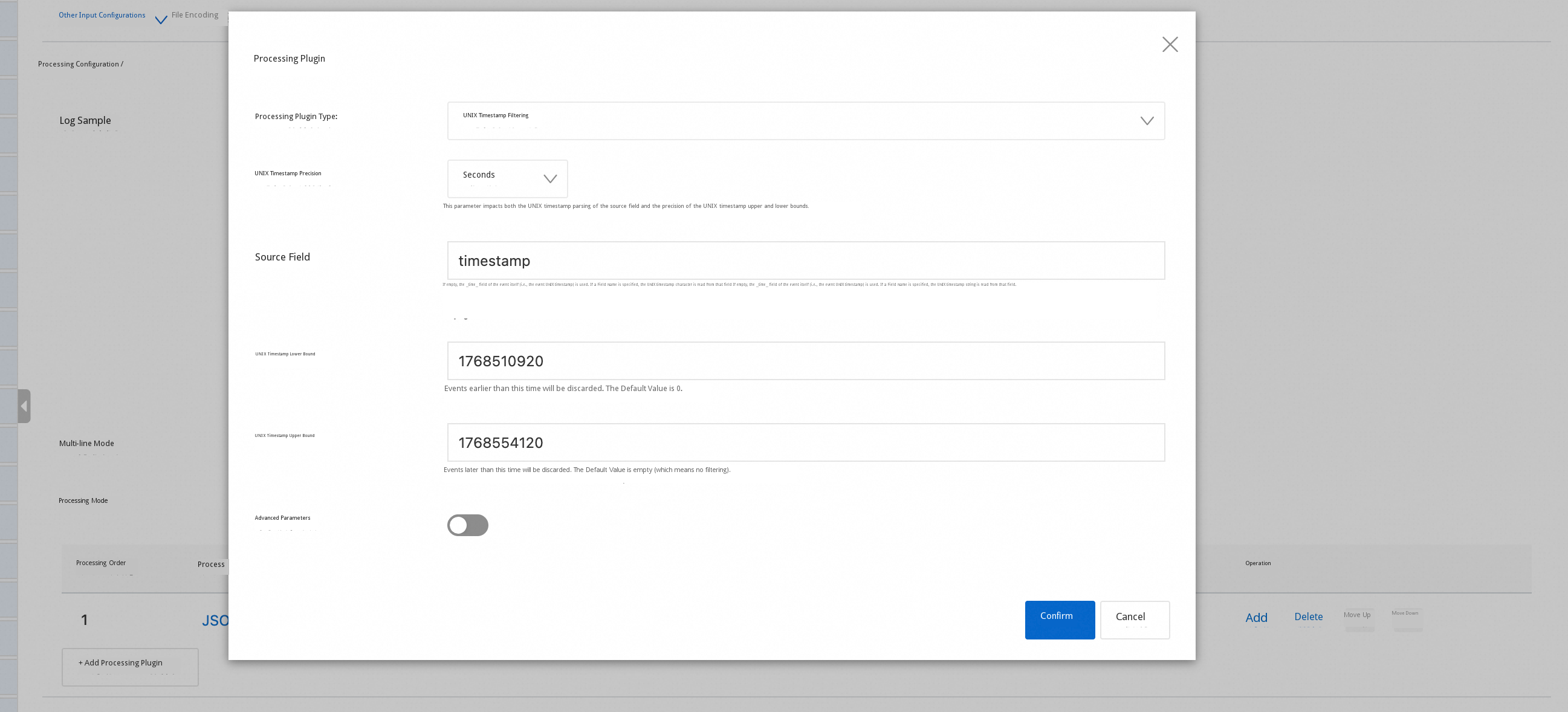
Solution: Add the UNIX timestamp filter processing plugin processor_timestamp_filter_native (combined with processor_parse_json_native/processor_parse_timestamp_native if necessary) to the one-time Collection pipeline to retain only events within the Target time range, thereby achieving "precise recollection."
The console configuration diagram is as follows:
One-time Collection is "executed immediately upon dispatch." If a logic error exists in the initial configuration, even if the configuration is Updated immediately, some unexpected data may have already been generated, causing new and old data to mix and impact analysis.
Suggested practice:
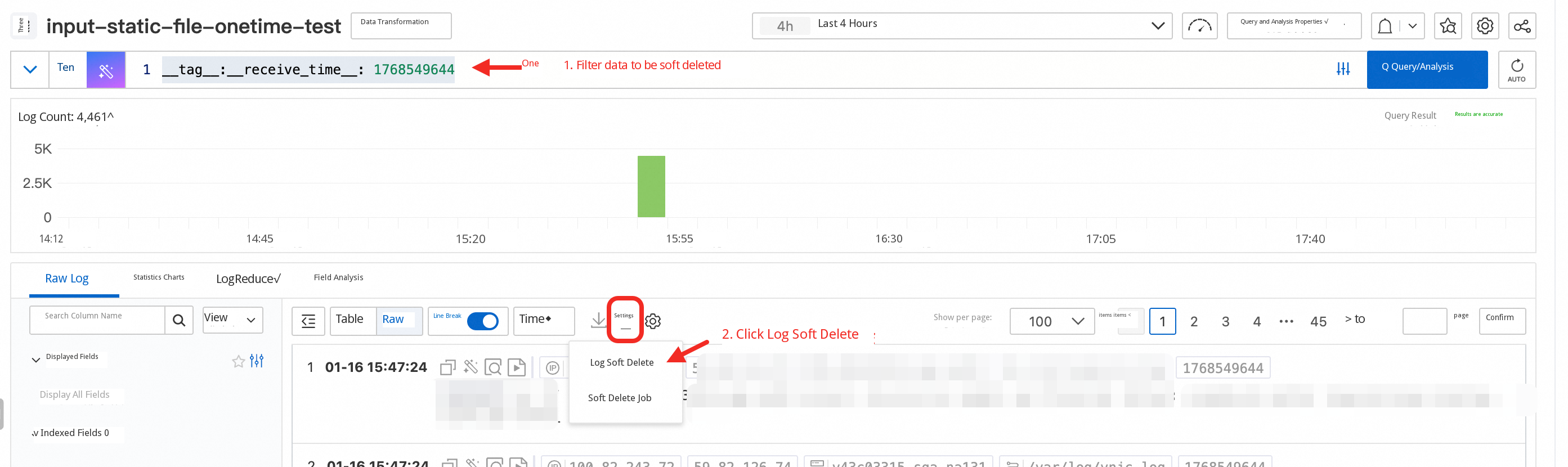
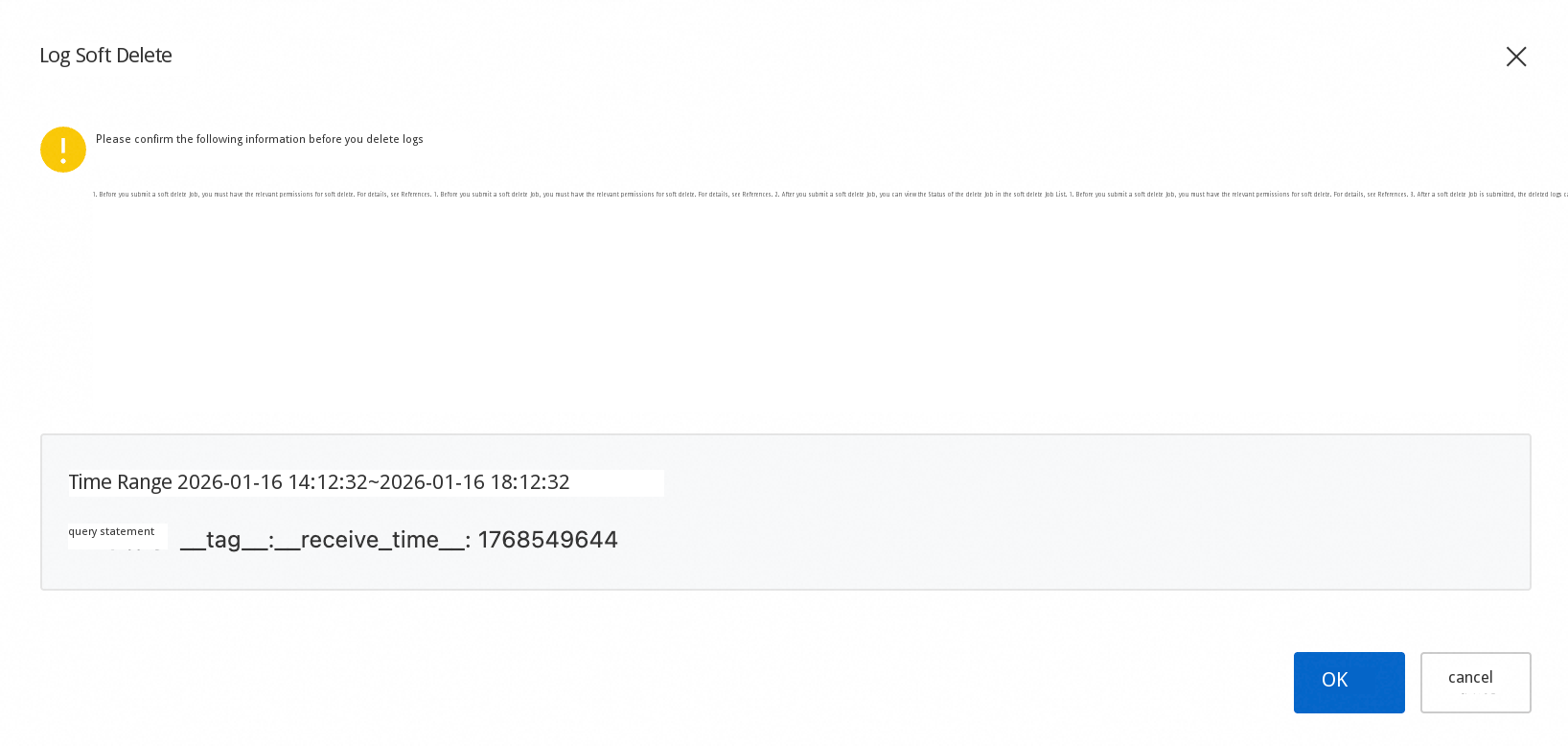
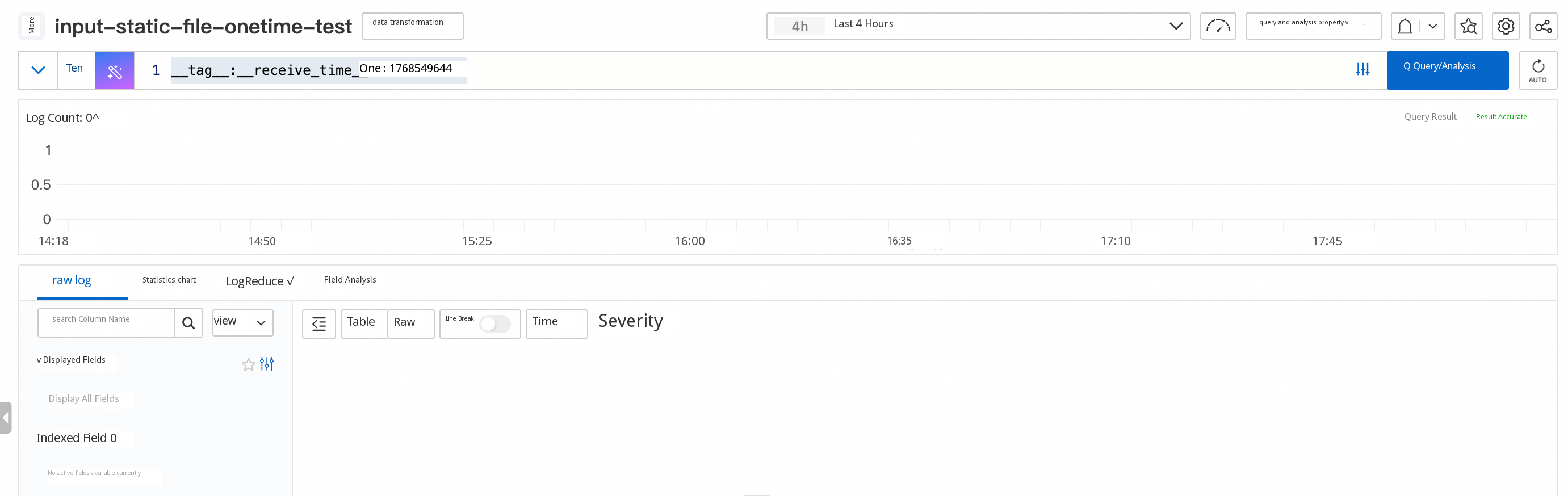
In this way, you can retain only the collection result corresponding to the "final correct configuration" to avoid affecting subsequent analysis.
One-time file collection is suitable for scenarios such as historical data migration, network disconnection recollection, and temporary batch processing. After the configuration is dispatched, it is executed based on the "Start time file snapshot." With checkpoints to ensure recoverability and observability, and combined with ExecutionTimeout and MaxSendRate to provide a double safety net of "duration + traffic," you can steadily backfill the static data without disturbing the continuous online collection. You are welcome to try it out and provide feedback!

681 posts | 56 followers
FollowAlibaba Cloud Native Community - January 4, 2026
Alibaba Cloud Native Community - August 13, 2025
Alibaba Cloud Native Community - August 8, 2025
Alibaba Cloud Native Community - September 5, 2025
Alibaba Cloud Native Community - August 5, 2025
Alibaba Cloud Native Community - September 8, 2025
681 posts | 56 followers
Follow Cloud Migration Solution
Secure and easy solutions for moving you workloads to the cloud
Learn More ISV Solutions for Cloud Migration
Alibaba Cloud offers Independent Software Vendors (ISVs) the optimal cloud migration solutions to ready your cloud business with the shortest path.
Learn More Batch Compute
Resource management and task scheduling for large-scale batch processing
Learn More Oracle Database Migration Solution
Migrate your legacy Oracle databases to Alibaba Cloud to save on long-term costs and take advantage of improved scalability, reliability, robust security, high performance, and cloud-native features.
Learn MoreMore Posts by Alibaba Cloud Native Community

