By Jietao Xiao

In cloud-native scenarios, more clusters use overcommitment and hybrid deployment to maximize resource utility. However, while improving efficiency, this significantly increases the risk of resource contention between hosts and containerized apps.
In resource-constrained scenarios, kernel-level issues like CPU latency and memory allocation latency (Memory Reclaim Latency) propagate to the application layer, causing response time (RT) fluctuations, business jitter, performance bottlenecks, or service interruptions.
In practice, lacking enough observability data makes it hard to correlate app jitter with system latency, leading to low troubleshooting efficiency. This article uses real cases to show how to use ack-sysom-monitor Exporter [1] in Kubernetes for visual analysis of kernel latency to identify root causes and mitigate jitter.
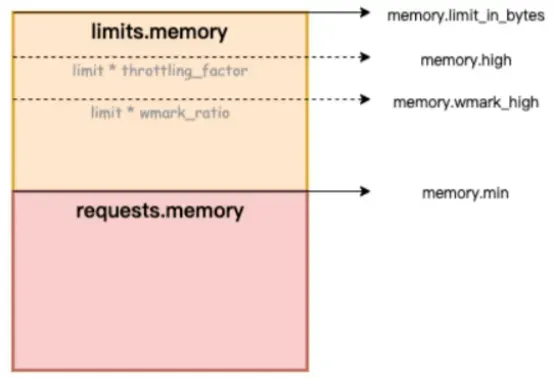
Entering the "slow path" of memory allocation is a major cause of jitter. As shown below, if memory hits the "low" watermark, asynchronous reclamation (kswapd thread reclamation) triggers. If it drops below the "min" watermark, the process enters direct memory reclaim (direct reclaim) and direct memory compaction (direct compact), causing significant delays for business (processes).
• Direct memory reclaim: The process is forced to block and wait for synchronous memory reclamation during allocation due to a memory shortage.
• Direct memory compaction: The process blocks during allocation while waiting for the kernel to compact fragments into continuous usable memory due to excessive fragmentation.
Reclamation and compaction consume time, blocking the process in kernel mode. This causes long delays, high CPU usage, increased system load, and latency jitter for (business) processes.
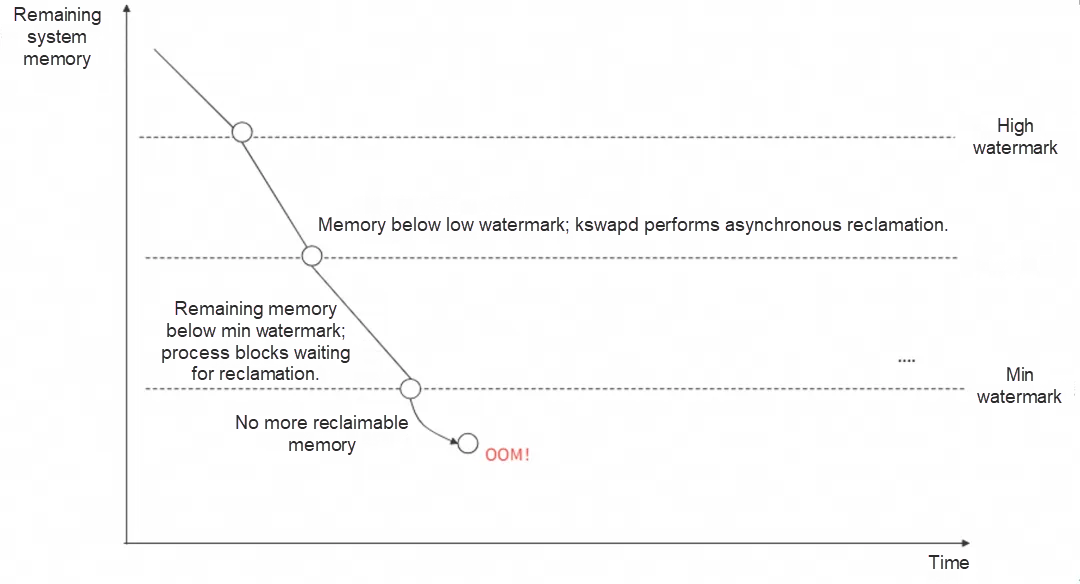
Figure: Linux memory watermarks
CPU latency is the time from when a task becomes runnable (ready to run, unblocked) to when it is selected and executed by the scheduler. Long delays affect operations, such as network latency caused by delayed packet reception scheduling.
With a memory limit (Limit) set, if usage reaches that limit during allocation, direct memory reclaim and compaction occur, causing the application to block.
Even with enough container memory, if the host is under pressure and available node memory falls below the "min" watermark, direct memory reclaim triggers for the container process.
A process awakens but waits too long in the run queue due to queue length or other blocking tasks on the CPU, delaying its execution and causing jitter.
Resource contention triggers high interrupt volumes (network or hardware). Kernel processing time increases, occupying the CPU long-term. Applications competing for a lock cannot obtain it, leading to process hangs.
A process in kernel mode may hold a spinlock while accessing resources. While holding the lock, a CPU might disable local interrupts and scheduling, preventing ksoftirq from scheduling packet reception, causing jitter.
The ACK and OS teams launched SysOM (System Observer Monitoring), an OS kernel-layer container monitoring feature unique to Alibaba Cloud. View dashboards in the "None" and "Pod" dimensions to gain insights into node and container jitter.
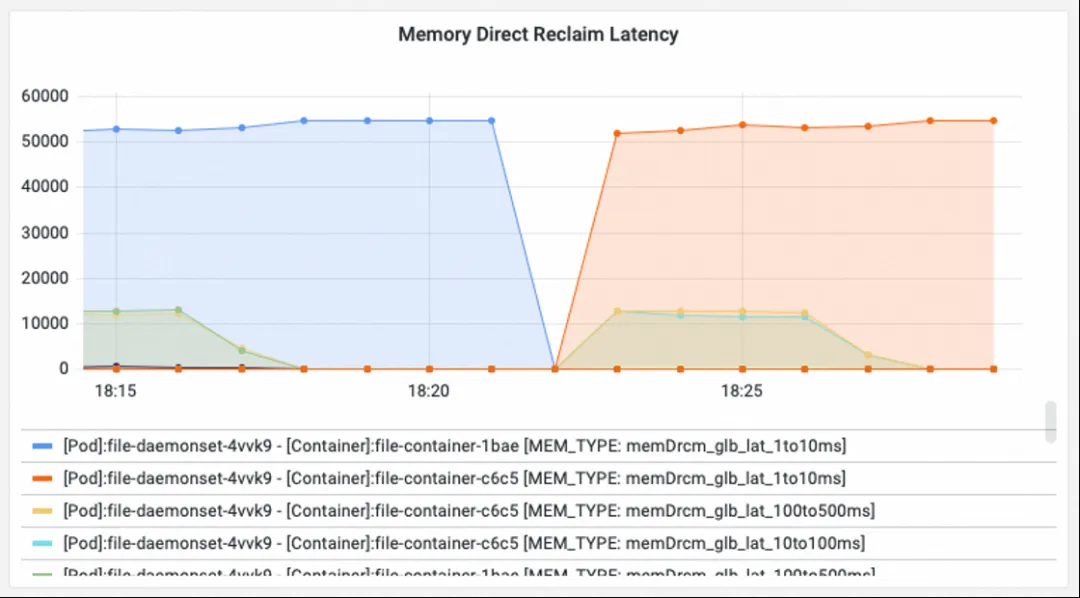
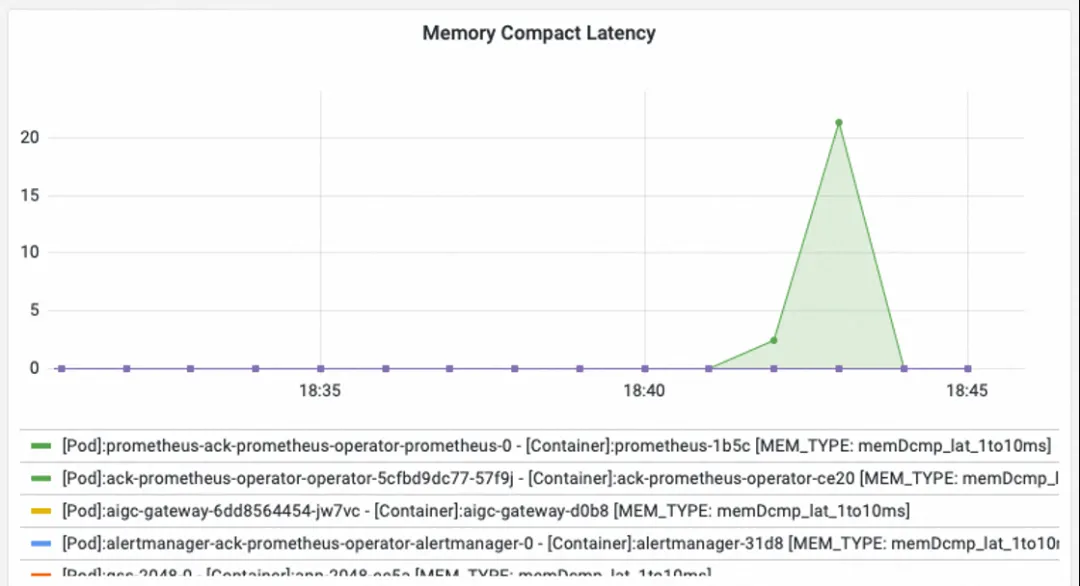
• Check the Direct Reclaim and Compact Latency dashboards in the SysOM container system monitoring - container dimension to observe blocking durations caused by direct memory reclaim and compaction within Pods.
• Check "Memory others" under System Memory in the SysOM container system monitoring - node dimension to detect direct memory reclaim at the node level.
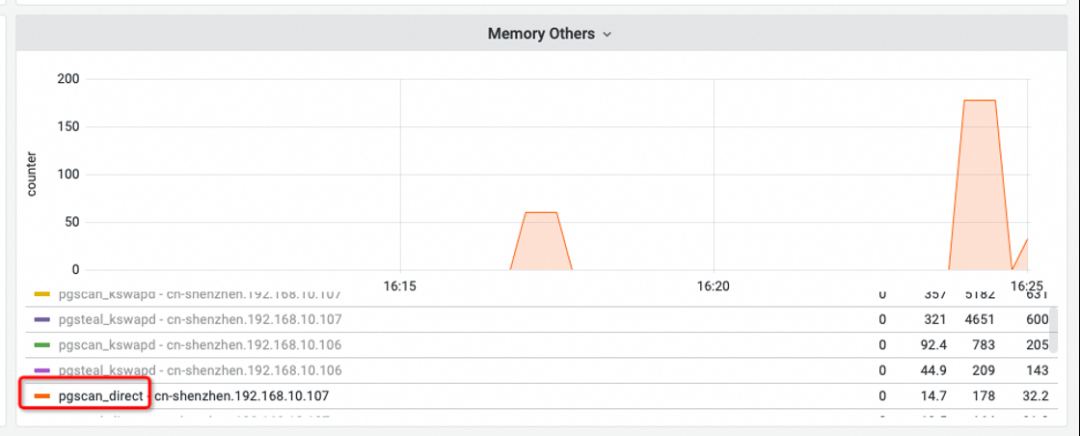
• Memory Others
The pgscan_direct line represents the number of pages scanned during direct memory reclaim. If this value is non-zero, direct memory reclaim has occurred on the node.
• Memory Direct Reclaim Latency
Shows increments in direct memory reclaim counts caused by container memory limits or low node watermarks across latency ranges (e.g., memDrcm_lat_1to10ms for 1-10ms; memDrcm_glb_lat_10to100ms for 10-100ms).
• Memory Compact Latency
Shows the increment in direct memory compaction counts caused by excessive node memory fragmentation preventing allocation of continuous memory.
The direct cause of latency is memory pressure. Optimization requires both clearly "seeing" and effectively "using" memory:
• Use "Node/Pod memory panorama analysis" [2] in the OS Console for a detailed breakdown of memory components like Pod Cache (cache), InactiveFile (inactive file), InactiveAnon (inactive anonymous), and Dirty Memory (dirty) to find memory "black holes."
• Use the Koordinator QoS fine-grained scheduling feature[3] to adjust memory watermarks and trigger earlier asynchronous reclamation, mitigating the performance impact of direct reclaim.
Check the System CPU and schedule dashboard in the SysOM container system monitoring - node dimension:
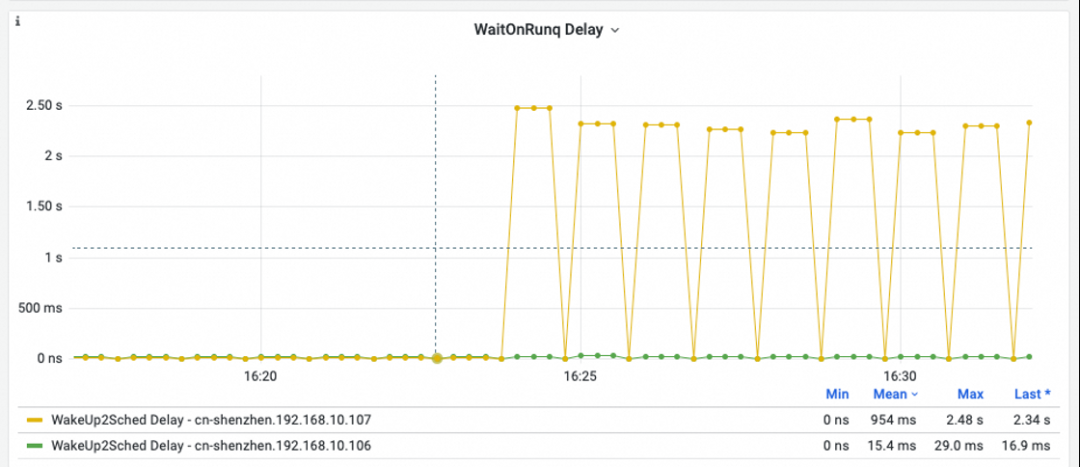
• WaitOnRunq Delay
Shows average time all runnable processes wait in the run queue. Spikes exceeding 50 ms indicate severe scheduling delays where processes cannot be scheduled promptly.
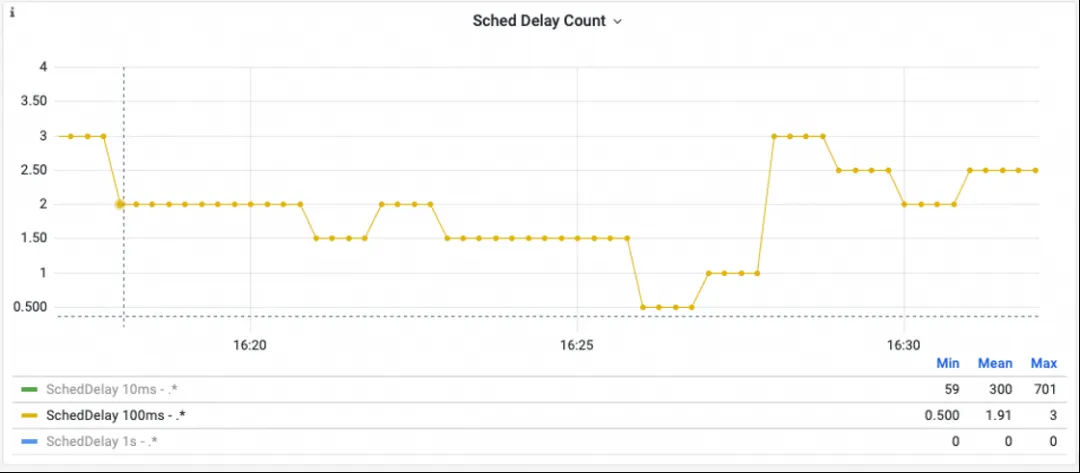
• Sched Delay Count
Statistics on durations without scheduling (e.g., SchedDelay 100ms count). Spikes mean no scheduling occurred for a long time, impacting business processes.
Scheduling latency has many causes, such as long kernel-mode tasks or CPUs disabling interrupts long-term. For root cause analysis, use "Scheduling jitter diagnosis" in the Alibaba Cloud OS Console [4].
A financial customer experienced Redis connection failures on two nodes. Initial investigation suggested the node kernel was slow to receive packets (500 ms+ latency), causing client timeouts.
1. The Sched delay count dashboard showed multiple >1ms delays. This indicated that at those times, a CPU failed to perform scheduling for 500 ms+, likely stalling ksoftirq and causing network jitter.
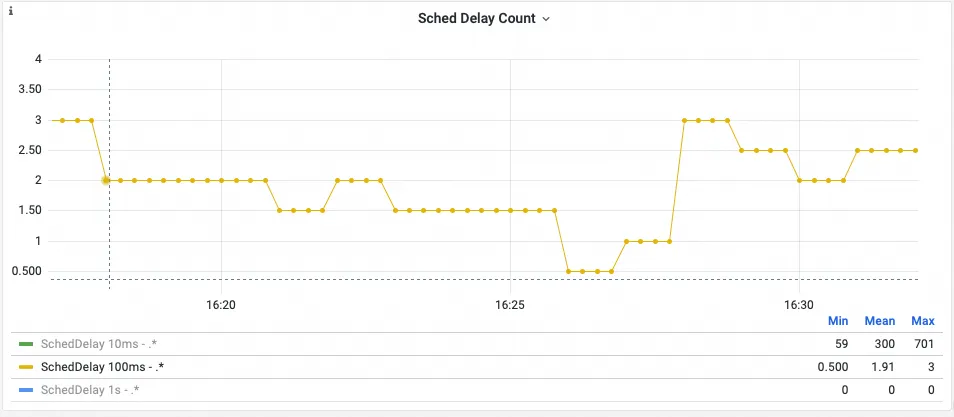
2. Through node anomaly details in the OS Console, we detected scheduling jitter and cgroup leak anomalies.
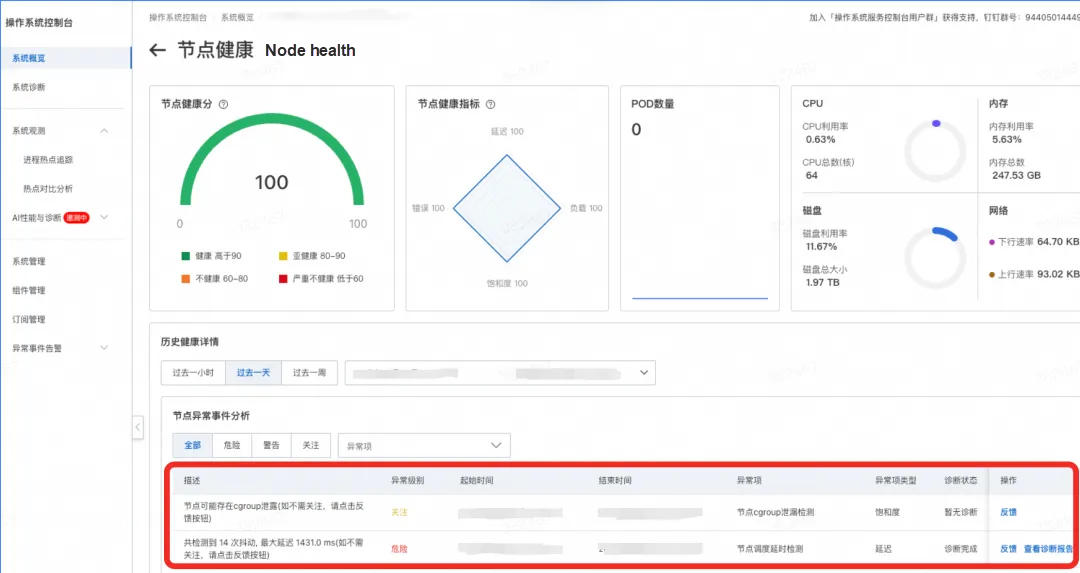
3. Diagnosis reports from "Scheduling jitter diagnosis" in the OS Console provided the detailed findings shown in the figure.
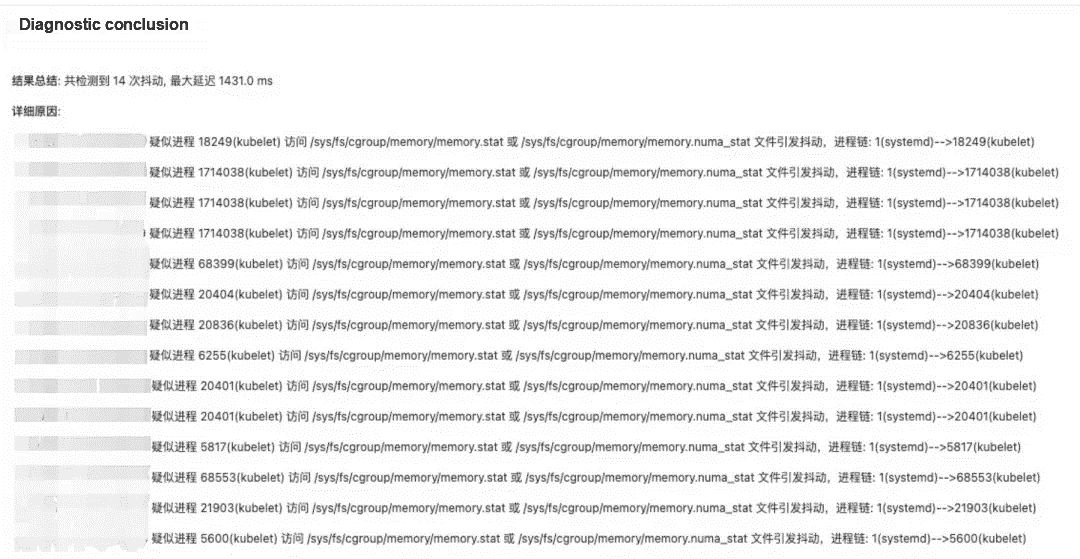
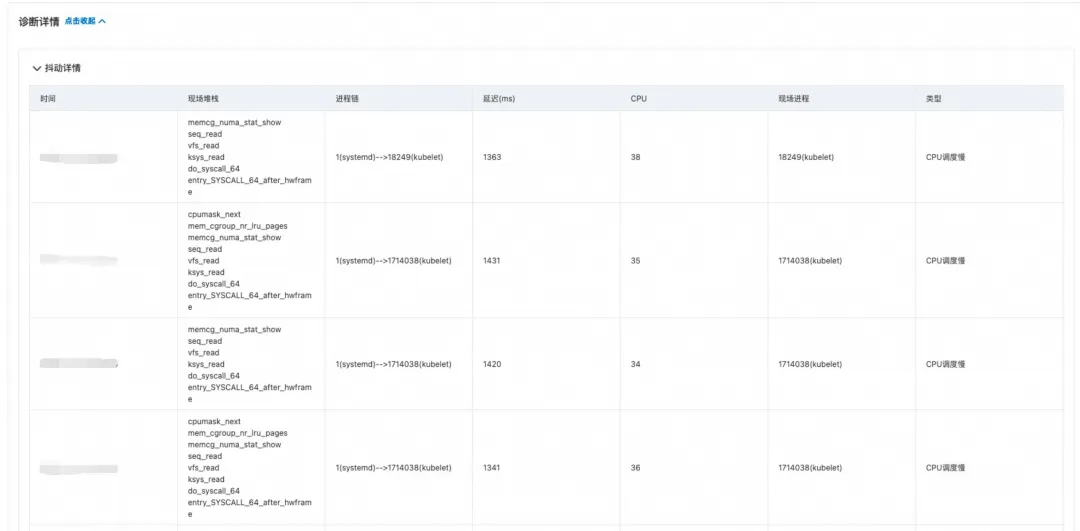
4. Root cause: Memory cgroup leak. When kubelet accessed memory.numa_stat, the Alinux2 kernel repeatedly traversed cgroup hierarchies, causing scheduling jitter and affecting softirq packet reception.
5. Investigation confirmed that CronJobs periodically reading logs caused leaks (new mem cgroups were created; reading files generated page cache; when containers exited, unreleased cache kept cgroups in a "zombie" state).
The focus shifted from network jitter to solving the memory cgroup leak:
For questions or suggestions about the OS console, join our DingTalk group (ID: 94405014449).
[1] SysOM kernel-layer container monitoring:
[2] OS Console memory panorama analysis:
[3] Container memory QoS:
[4] Alibaba Cloud OS Console scheduling jitter diagnosis:
https://www.alibabacloud.com/help/en/alinux/user-guide/scheduling-jitter-diagnosis
[5] Introduction to resource isolation in Anolis OS:
https://openanolis.cn/sig/Cloud-Kernel/doc/659601505054416682
[6] Alibaba Cloud OS Console PC link: https://alinux.console.aliyun.com/

104 posts | 6 followers
FollowOpenAnolis - May 8, 2023
OpenAnolis - April 7, 2023
OpenAnolis - February 13, 2023
OpenAnolis - September 4, 2025
Alibaba Cloud Native Community - November 24, 2025
OpenAnolis - February 2, 2026
104 posts | 6 followers
Follow Container Service for Kubernetes
Alibaba Cloud Container Service for Kubernetes is a fully managed cloud container management service that supports native Kubernetes and integrates with other Alibaba Cloud products.
Learn More
Container Compute Service (ACS)
A cloud computing service that provides container compute resources that comply with the container specifications of Kubernetes
Learn More
ACK One
Provides a control plane to allow users to manage Kubernetes clusters that run based on different infrastructure resources
Learn More Cloud-Native Applications Management Solution
Accelerate and secure the development, deployment, and management of containerized applications cost-effectively.
Learn MoreMore Posts by OpenAnolis

