全部产品
Search
文档中心

人工智能平台 PAI:Model Gallery 快速入门

更新时间:Feb 04, 2026

Model Gallery对PAI-DLC、PAI-EAS进行了封装,帮助您零代码,高效快捷地部署和训练开源大模型。本文以Qwen3-0.6B模型为例,为您介绍如何使用Model Gallery。该流程同样适用于其他模型。

前提条件

使用主账号开通PAI并创建工作空间。登录PAI控制台,左上角选择开通区域,然后一键授权和开通产品。

计费说明

本文案例将使用公共资源创建DLC任务和EAS服务,计费方式为按量付费,详细计费规则请参见DLC计费说明EAS计费说明

模型部署

部署模型

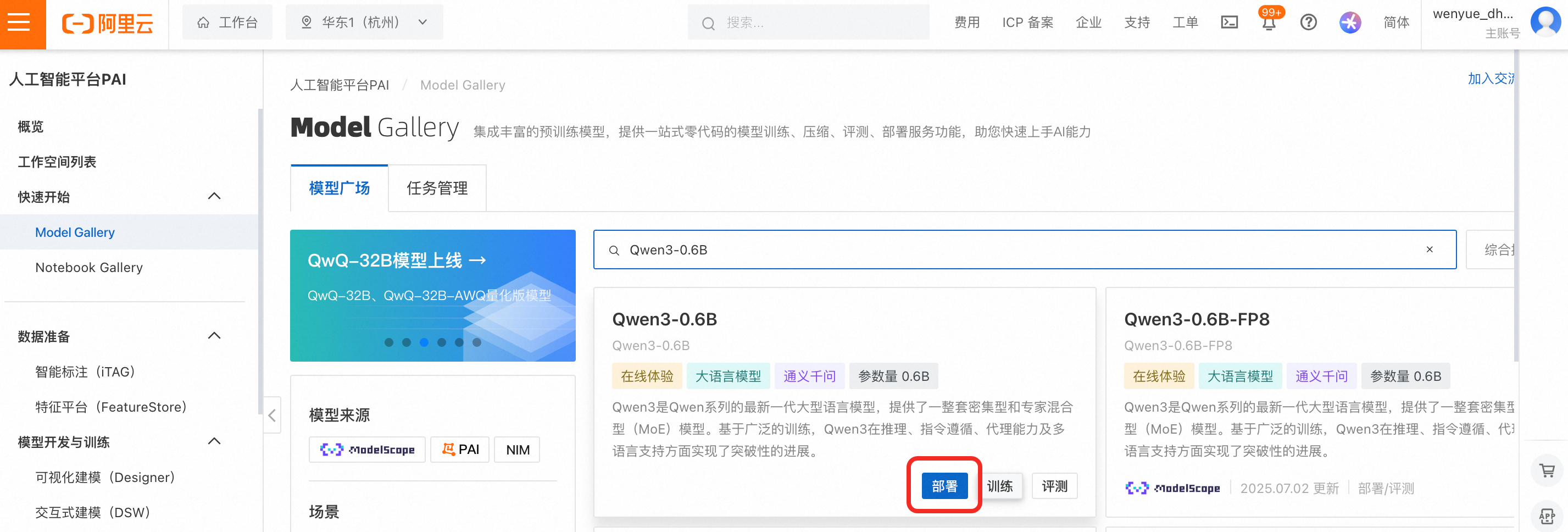
  1. 登录PAI控制台在左侧导航栏单击Model Gallery,搜索并找到Qwen3-0.6B选项卡,然后单击部署

    image

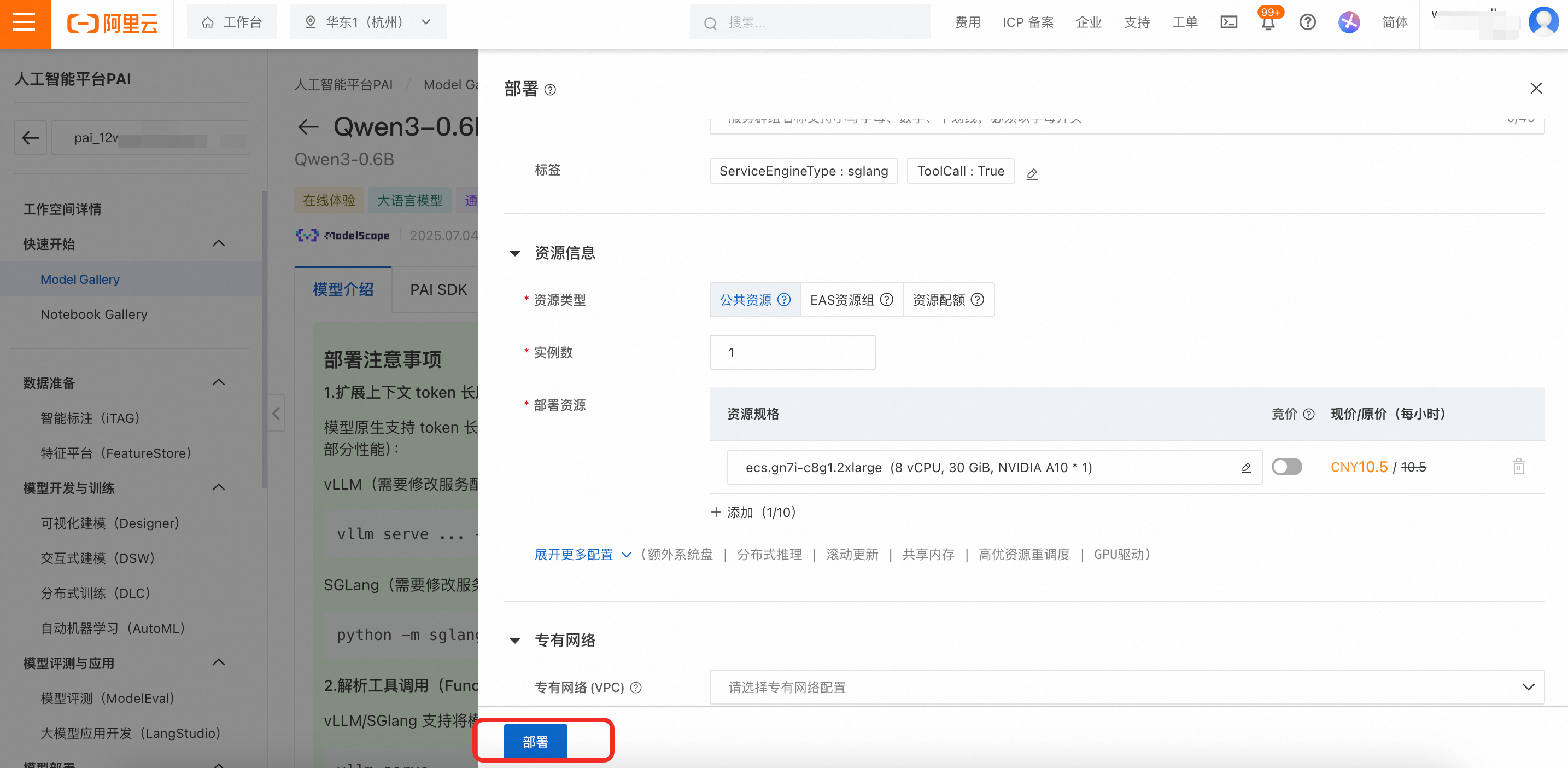
  2. 配置部署参数。在部署配置页面已为您预置了默认参数,直接单击部署 > 确定。部署大约需要等待5分钟,当处于运行中时,代表部署成功。

    默认使用公共资源部署,计费方式为按量付费。

    image

调用模型

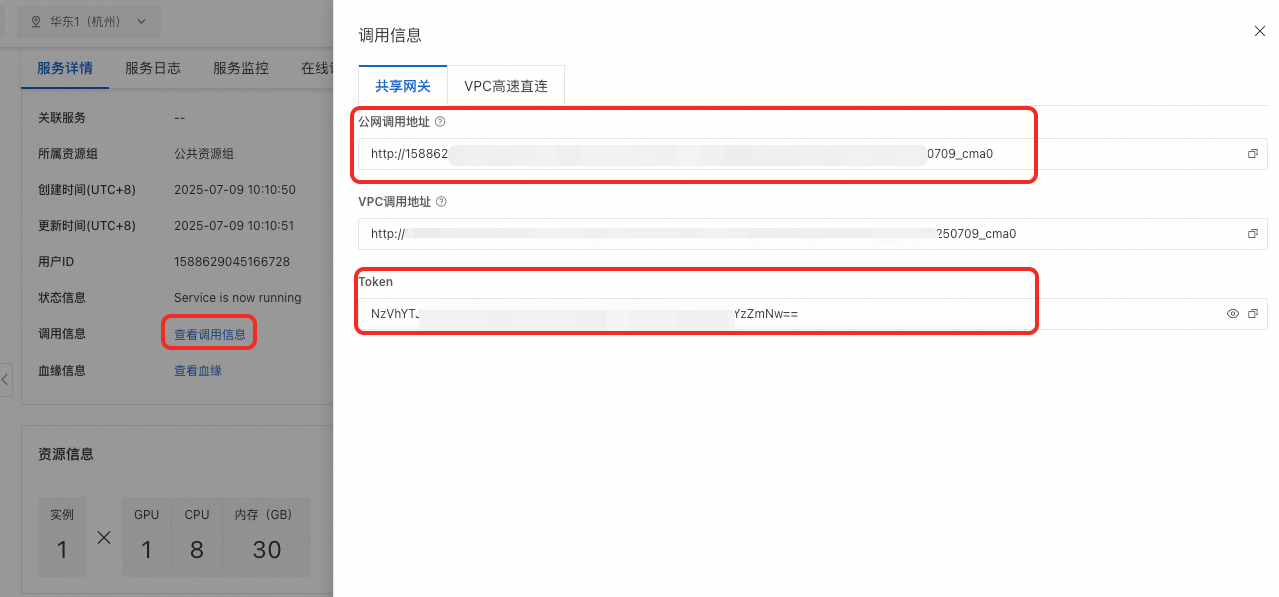
  1. 查看调用信息。在服务详情页面,单击查看调用信息获取调用地址Token

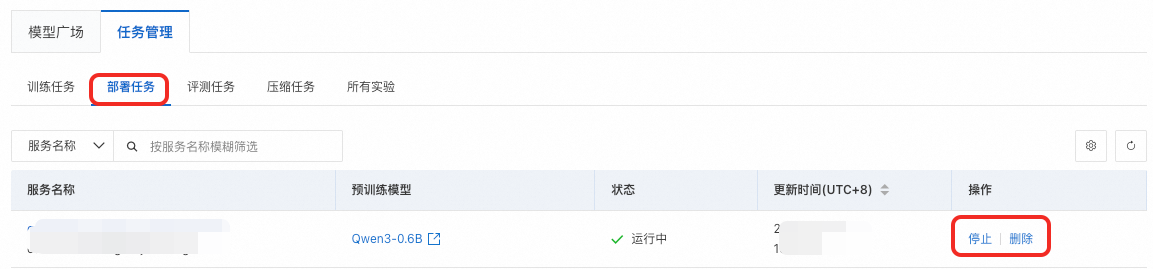
    后续查看部署任务详情,您可通过在左侧导航栏单击Model Gallery > 任务管理 > 部署任务,然后再单击服务名称查看。

    image

  2. 体验模型服务。常用的调用方式如下:

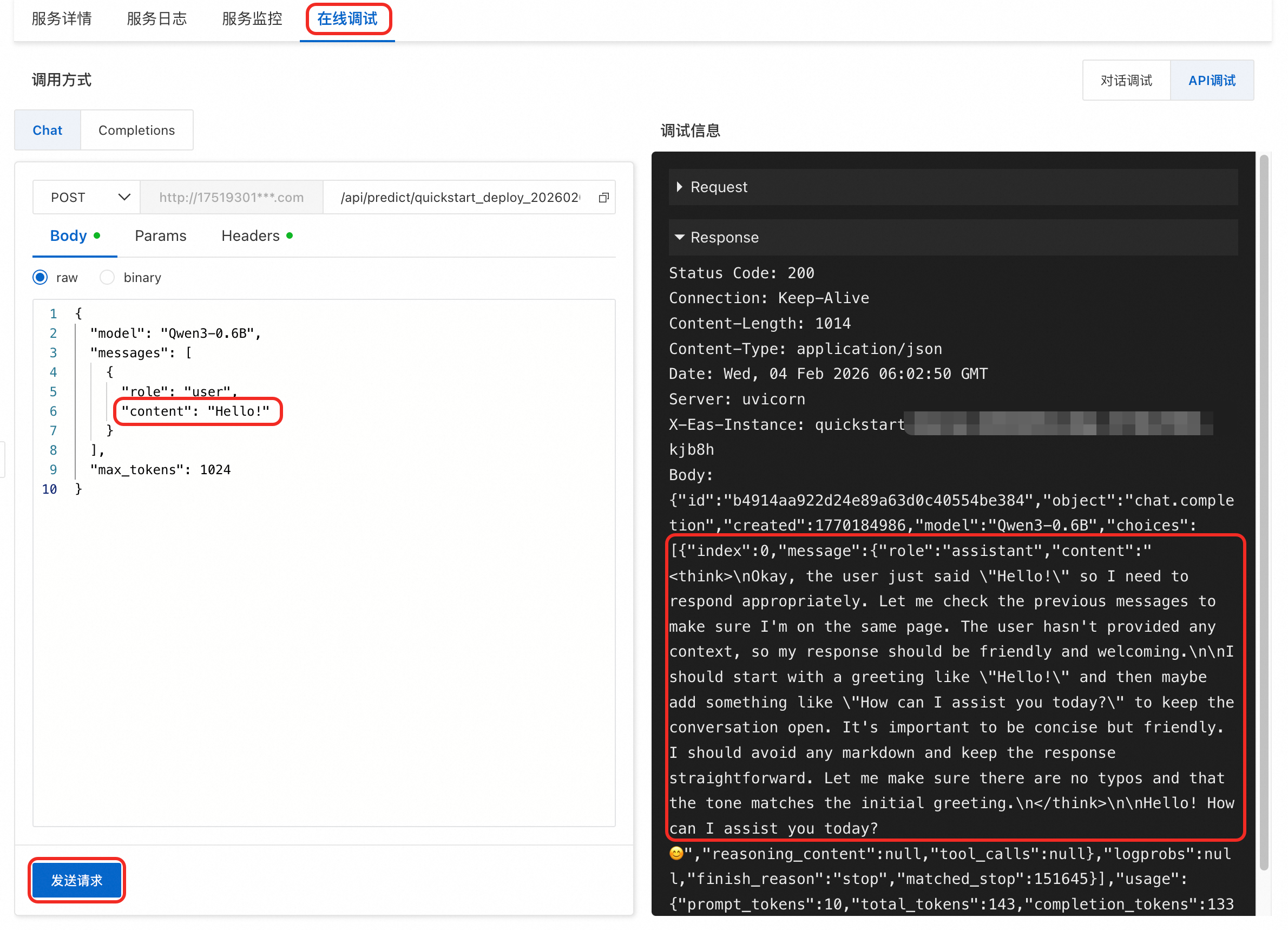
    在线调试

    切换到在线调试页面,大语言模型服务支持对话调试API调试

    image

    使用Cherry Studio客户端

    Cherry Studio 是业界主流的大模型对话客户端,且集成了 MCP 功能,您可以方便地与大模型进行对话。

    连接到在PAI 部署的Qwen3模型

    使用Python SDK

    from openai import OpenAI
    import os
    
    # 若没有配置环境变量,请用EAS服务的Token将下行替换为:token = 'YTA1NTEzMzY3ZTY4Z******************'
    token = os.environ.get("Token")
    # <调用地址>后面有 “/v1”不要去除
    client = OpenAI(
        api_key=token,
        base_url=f'调用地址/v1',
    )
    
    if token is None:
        print("请配置环境变量Token, 或直接将Token赋值给token变量")
        exit()
    
    query = '你好,你是谁'
    messages = [{'role': 'user', 'content': query}]
    
    resp = client.chat.completions.create(model='Qwen3-0.6B', messages=messages, max_tokens=512, temperature=0)
    query = messages[0]['content']
    response = resp.choices[0].message.content
    print(f'query: {query}')
    print(f'response: {response}')

重要提醒

本文使用了公共资源创建模型服务,计费方式为按量付费。当您不需要使用服务时请停止或删除服务,以免继续扣费

image

模型微调

如果您希望模型在特定领域表现更好,可以通过在该领域的数据集上对模型微调来实现。本文以如下场景为例为您介绍模型微调的作用和步骤。

场景示例

在物流领域,常需要从自然语言中提取结构化信息(如收件人、地址、电话)。直接使用大参数模型(如:Qwen3-235B-A22B)效果好,但成本高、响应慢。为兼顾效果与成本,可先用大参数模型标注数据,再用这些数据微调小参数模型(如 Qwen3-0.6B),使其在相同任务上达到相近表现。此过程也被称为模型蒸馏。

相同结构化信息提取任务,使用原始的Qwen3-0.6B模型准确率50%,微调后准确率可达90%以上。

收件人地址信息示例

结构化信息示例

Amina Patel - Phone number (474) 598-1543 - 1425 S 5th St, Apt 3B, Allentown, Pennsylvania 18104

{
    "state": "Pennsylvania",
    "city": "Allentown",
    "zip_code": "18104",
    "street_address": "1425 S 5th St, Apt 3B",
    "name": "Amina Patel",
    "phone": "(474) 598-1543"
}

数据准备

为将教师模型(Qwen3-235B-A22B)在该任务中的知识蒸馏到 Qwen3-0.6B,需先通过教师模型的 API,将收件人的地址信息抽取为结构化 JSON 数据。模型生成这些 JSON 数据可能需要较长时间,因此,本文已为您准备好了示例训练集train.json和验证集eval.json,您可以直接下载使用

在模型蒸馏中大参数量模型也被称为教师模型。本文所用数据均为大模型模拟生成,不涉及用户敏感信息。

生产应用的数据获取建议

如果后续需要应用到实际业务中,我们建议您通过这些方法来准备数据:

真实业务场景(推荐)

真实的业务数据能更好地反映业务场景,微调出来的模型能更好地适配业务。获取业务数据后,您需要通过编程将您的业务数据转化为如下格式的 JSON文件。

[
    {
        "instruction": "You are an expert assistant for extracting structured JSON from US shipping information. The JSON keys are name, street_address, city, state, zip_code, and phone.  Name: Isabella Rivera Cruz | 182 Calle Luis Lloréns Torres, Apt 3B, Mayagüez, Puerto Rico 00680 | MOBILE: (640) 486-5927",
        "output": "{\"name\": \"Isabella Rivera Cruz\", \"street_address\": \"182 Calle Luis Lloréns Torres, Apt 3B\", \"city\": \"Mayagüez\", \"state\": \"Puerto Rico\", \"zip_code\": \"00680\", \"phone\": \"(640) 486-5927\"}"
    },
    {
        "instruction": "You are an expert assistant for extracting structured JSON from US shipping information. The JSON keys are name, street_address, city, state, zip_code, and phone.  1245 Broadwater Avenue, Apt 3B, Bozeman, Montana 59715Receiver: Aisha PatelP: (429) 763-9742",
        "output": "{\"name\": \"Aisha Patel\", \"street_address\": \"1245 Broadwater Avenue, Apt 3B\", \"city\": \"Bozeman\", \"state\": \"Montana\", \"zip_code\": \"59715\", \"phone\": \"(429) 763-9742\"}"
    }
]

JSON文件中包含多个训练样本,每个样本包括instruction(指令)和output(标准答案)两个字段:

  • instruction:包含用于指引大模型行为的提示词,以及输入的数据;

  • output:期望的标准答案,通常由人类专家或大参数量的模型(如 qwen3-235b-a22b 等)生成;

大模型生成

在业务数据不够丰富时,可以考虑使用大模型做数据增强,使数据的多样性和覆盖范围得到提升。为了避免泄漏用户隐私,本方案使用大模型生成了一批虚拟的地址数据,如下生成代码供您参考。

模拟数据集生成的示例代码

本示例代码将调用阿里云百炼中的大模型服务,您需要获取百炼API Key。代码中使用 qwen-plus-latest 生成业务数据,使用qwen3-235b-a22b 模型进行打标。

# -*- coding: utf-8 -*-
import os
import asyncio
import random
import json
import sys
from typing import List
import platform
from openai import AsyncOpenAI

# Create an asynchronous client instance
# NOTE: This script uses the DashScope-compatible API endpoint.
# If you are using a different OpenAI-compatible service, change the base_url.
client = AsyncOpenAI(
    api_key=os.getenv("DASHSCOPE_API_KEY"),
    base_url="https://dashscope.aliyuncs.com/compatible-mode/v1"
)

# List of US States and Territories
us_states = [
    "Alabama", "Alaska", "Arizona", "Arkansas", "California", "Colorado", "Connecticut", "Delaware",
    "Florida", "Georgia", "Hawaii", "Idaho", "Illinois", "Indiana", "Iowa", "Kansas", "Kentucky",
    "Louisiana", "Maine", "Maryland", "Massachusetts", "Michigan", "Minnesota", "Mississippi",
    "Missouri", "Montana", "Nebraska", "Nevada", "New Hampshire", "New Jersey", "New Mexico",
    "New York", "North Carolina", "North Dakota", "Ohio", "Oklahoma", "Oregon", "Pennsylvania",
    "Rhode Island", "South Carolina", "South Dakota", "Tennessee", "Texas", "Utah", "Vermont",
    "Virginia", "Washington", "West Virginia", "Wisconsin", "Wyoming", "District of Columbia",
    "Puerto Rico", "Guam", "American Samoa", "U.S. Virgin Islands", "Northern Mariana Islands"
]

# Recipient templates
recipient_templates = [
    "To: {name}", "Recipient: {name}", "Deliver to {name}", "For: {name}",
    "ATTN: {name}", "{name}", "Name: {name}", "Contact: {name}", "Receiver: {name}"
]

# Phone number templates
phone_templates = [
    "Tel: {phone}", "Tel. {phone}", "Mobile: {phone}", "Phone: {phone}",
    "Contact number: {phone}", "Phone number {phone}", "TEL: {phone}", "MOBILE: {phone}",
    "Contact: {phone}", "P: {phone}", "{phone}", "Call: {phone}",
]


# Generate a plausible US-style phone number
def generate_us_phone():
    """Generates a random 10-digit US phone number in (XXX) XXX-XXXX format."""
    area_code = random.randint(201, 999)  # Avoid 0xx, 1xx area codes
    exchange = random.randint(200, 999)
    line = random.randint(1000, 9999)
    return f"({area_code}) {exchange}-{line}"


# Use LLM to generate recipient and address information
async def generate_recipient_and_address_by_llm(state: str):
    """Uses LLM to generate a recipient's name and address details for a given state."""
    prompt = f"""Please generate recipient information for a location in {state}, USA, including:
1. A realistic full English name (can be common or less common, aim for diversity).
2. A real city name within that state.
3. A specific street address (e.g., street number + name, apartment number, etc., should be realistic).
4. A corresponding 5-digit ZIP code for that city/area.

Please return only the JSON object in the following format:
{{"name": "Recipient Name", "city": "City Name", "street_address": "Specific Street Address", "zip_code": "ZIP Code"}}

Do not include any other text, just the JSON. Ensure names are diverse, not just John Doe.
"""

    try:
        response = await client.chat.completions.create(
            messages=[{"role": "user", "content": prompt}],
            model="qwen-plus-latest",
            temperature=1.5,  # Increase temperature for more diverse names and addresses
        )

        result = response.choices[0].message.content.strip()
        # Clean up potential markdown code block markers
        if result.startswith('```'):
            result = result.split('\n', 1)[1]
        if result.endswith('```'):
            result = result.rsplit('\n', 1)[0]

        # Try to parse JSON
        info = json.loads(result)
        print(info)
        return info
    except Exception as e:
        print(f"Failed to generate recipient and address: {e}, using fallback.")
        # Fallback mechanism
        backup_names = ["Michael Johnson", "Emily Williams", "David Brown", "Jessica Jones", "Christopher Davis",
                        "Sarah Miller"]
        return {
            "name": random.choice(backup_names),
            "city": "Anytown",
            "street_address": f"{random.randint(100, 9999)} Main St",
            "zip_code": f"{random.randint(10000, 99999)}"
        }


# Generate a single raw data record
async def generate_record():
    """Generates one messy, combined string of US address information."""
    # Randomly select a state
    state = random.choice(us_states)

    # Use LLM to generate recipient and address info
    info = await generate_recipient_and_address_by_llm(state)

    # Format recipient name
    recipient = random.choice(recipient_templates).format(name=info['name'])

    # Generate a phone number
    phone = generate_us_phone()
    phone_info = random.choice(phone_templates).format(phone=phone)

    # Assemble the full address line
    full_address = f"{info['street_address']}, {info['city']}, {state} {info['zip_code']}"

    # Combine all components
    components = [recipient, phone_info, full_address]

    # Randomize the order of components
    random.shuffle(components)

    # Choose a random separator
    separators = [' ', ', ', '; ', ' | ', '\t', ' - ', ' // ', '', '  ']
    separator = random.choice(separators)

    # Join the components
    combined_data = separator.join(components)
    return combined_data.strip()


# Generate a batch of data
async def generate_batch_data(count: int) -> List[str]:
    """Generates a specified number of data records."""
    print(f"Starting to generate {count} records...")

    # Use a semaphore to control concurrency (e.g., up to 20 concurrent requests)
    semaphore = asyncio.Semaphore(20)

    async def generate_single_record(index):
        async with semaphore:
            try:
                record = await generate_record()
                print(f"Generated record #{index + 1}: {record}")
                return record
            except Exception as e:
                print(f"Failed to generate record #{index + 1}: {e}")
                return None

    # Concurrently generate data
    tasks = [generate_single_record(i) for i in range(count)]

    data = await asyncio.gather(*tasks)

    successful_data = [record for record in data if record is not None]

    return successful_data


# Save data to a file
def save_data(data: List[str], filename: str = "us_recipient_data.json"):
    """Saves the generated data to a JSON file."""
    with open(filename, 'w', encoding='utf-8') as f:
        json.dump(data, f, ensure_ascii=False, indent=2)
    print(f"Data has been saved to {filename}")


# Phase 1: Data Production
async def produce_data_phase():
    """Handles the generation of raw recipient data."""
    print("=== Phase 1: Starting Raw Recipient Data Generation ===")

    # Generate 2000 records
    batch_size = 2000
    data = await generate_batch_data(batch_size)

    # Save the data
    save_data(data, "us_recipient_data.json")

    print(f"\nTotal records generated: {len(data)}")
    print("\nSample Data:")
    for i, record in enumerate(data[:3]):  # Show first 3 as examples
        print(f"{i + 1}. Raw Data: {record}\n")

    print("=== Phase 1 Complete ===\n")
    return True


# Define the system prompt for the extraction model
def get_system_prompt_for_extraction():
    """Returns the system prompt for the information extraction task."""
    return """You are a professional information extraction assistant specializing in parsing US shipping addresses from unstructured text.

## Task Description
Based on the given input text, accurately extract and generate a JSON object containing the following six fields:
- name: The full name of the recipient.
- street_address: The complete street address, including number, street name, and any apartment or suite number.
- city: The city name.
- state: The full state name (e.g., "California", not "CA").
- zip_code: The 5 or 9-digit ZIP code.
- phone: The complete contact phone number.

## Extraction Rules
1.  **Address Handling**:
    -   Accurately identify the components: street, city, state, and ZIP code.
    -   The `state` field must be the full official name (e.g., "New York", not "NY").
    -   The `street_address` should contain all details before the city, such as "123 Apple Lane, Apt 4B".
2.  **Name Identification**:
    -   Extract the full recipient name.
3.  **Phone Number Handling**:
    -   Extract the complete phone number, preserving its original format.
4.  **ZIP Code**:
    -   Extract the 5-digit or 9-digit (ZIP+4) code.

## Output Format
Strictly adhere to the following JSON format. Do not add any explanatory text or markdown.
{
  "name": "Recipient's Full Name",
  "street_address": "Complete Street Address",
  "city": "City Name",
  "state": "Full State Name",
  "zip_code": "ZIP Code",
  "phone": "Contact Phone Number"
}
"""


# Use LLM to predict structured data from raw text
async def predict_structured_data(raw_data: str):
    """Uses an LLM to predict structured data from a raw string."""
    system_prompt = get_system_prompt_for_extraction()

    try:
        response = await client.chat.completions.create(
            messages=[
                {"role": "system", "content": system_prompt},
                {"role": "user", "content": raw_data}
            ],
            model="qwen3-235b-a22b",  # A powerful model is recommended for this task
            temperature=0.0,  # Lower temperature for higher accuracy in extraction
            response_format={"type": "json_object"},
            extra_body={"enable_thinking": False}
        )

        result = response.choices[0].message.content.strip()

        # Clean up potential markdown code block markers
        if result.startswith('```'):
            lines = result.split('\n')
            for i, line in enumerate(lines):
                if line.strip().startswith('{'):
                    result = '\n'.join(lines[i:])
                    break
        if result.endswith('```'):
            result = result.rsplit('\n```', 1)[0]

        structured_data = json.loads(result)
        return structured_data

    except Exception as e:
        print(f"Failed to predict structured data: {e}, Raw data: {raw_data}")
        # Return an empty structure on failure
        return {
            "name": "",
            "street_address": "",
            "city": "",
            "state": "",
            "zip_code": "",
            "phone": ""
        }


# Phase 2: Data Conversion
async def convert_data_phase():
    """Reads raw data, predicts structured format, and saves as SFT data."""
    print("=== Phase 2: Starting Data Conversion to SFT Format ===")

    try:
        print("Reading us_recipient_data.json file...")
        with open('us_recipient_data.json', 'r', encoding='utf-8') as f:
            raw_data_list = json.load(f)

        print(f"Successfully read {len(raw_data_list)} records.")
        print("Starting to predict structured data using the extraction model...")

        # A simple and clear system message can improve training and inference speed.
        system_prompt = "You are an expert assistant for extracting structured JSON from US shipping information. The JSON keys are name, street_address, city, state, zip_code, and phone."
        output_file = 'us_recipient_sft_data.json'

        # Use a semaphore to control concurrency
        semaphore = asyncio.Semaphore(10)

        async def process_single_item(index, raw_data):
            async with (semaphore):
                structured_data = await predict_structured_data(raw_data)
                print(f"Processing record #{index + 1}: {raw_data}")

                conversation = {
                        "instruction": system_prompt + '  ' + raw_data,
                        "output": json.dumps(structured_data, ensure_ascii=False)
                }

                return conversation

        print(f"Starting conversion to {output_file}...")

        tasks = [process_single_item(i, raw_data) for i, raw_data in enumerate(raw_data_list)]
        conversations = await asyncio.gather(*tasks)

        with open(output_file, 'w', encoding='utf-8') as outfile:
            json.dump(conversations, outfile, ensure_ascii=False, indent=4)

        print(f"Conversion complete! Processed {len(raw_data_list)} records.")
        print(f"Output file: {output_file}")
        print("=== Phase 2 Complete ===")

    except FileNotFoundError:
        print("Error: us_recipient_data.json not found.")
        sys.exit(1)
    except json.JSONDecodeError as e:
        print(f"JSON decoding error: {e}")
        sys.exit(1)
    except Exception as e:
        print(f"An error occurred during conversion: {e}")
        sys.exit(1)


# Main function
async def main():
    print("Starting the data processing pipeline...")
    print("This program will execute two phases in sequence:")
    print("1. Generate raw US recipient data.")
    print("2. Predict structured data and convert it to SFT format.")
    print("-" * 50)

    # Phase 1: Generate data
    success = await produce_data_phase()

    if success:
        # Phase 2: Convert data
        await convert_data_phase()

        print("\n" + "=" * 50)
        print("All processes completed successfully!")
        print("Generated files:")
        print("- us_recipient_data.json: Raw, unstructured data list.")
        print("- us_recipient_sft_data.json: SFT-formatted training data.")
        print("=" * 50)
    else:
        print("Data generation phase failed. Terminating.")


if __name__ == '__main__':
    # Set event loop policy for Windows if needed
    if platform.system() == 'Windows':
        asyncio.set_event_loop_policy(asyncio.WindowsSelectorEventLoopPolicy())

    # Run the main coroutine
    asyncio.run(main(), debug=False)
微调模型

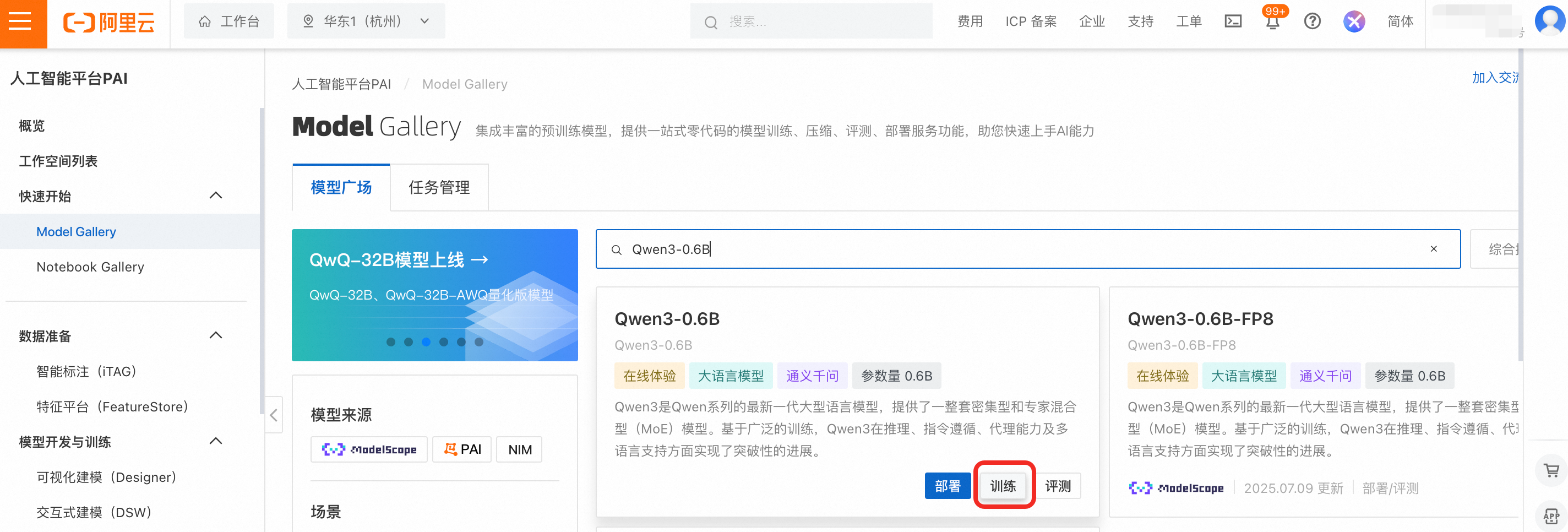
  1. 在左侧导航栏单击Model Gallery,搜索并找到Qwen3-0.6B选项卡,然后单击训练

    image

  2. 配置训练任务参数。只需配置如下关键参数,其他参数默认即可。

    • 训练方式:默认选择SFT监督微调LoRA微调方法。

      LoRA是一种高效的模型微调技术,仅修改模型的部分参数,以节省训练使用的资源。
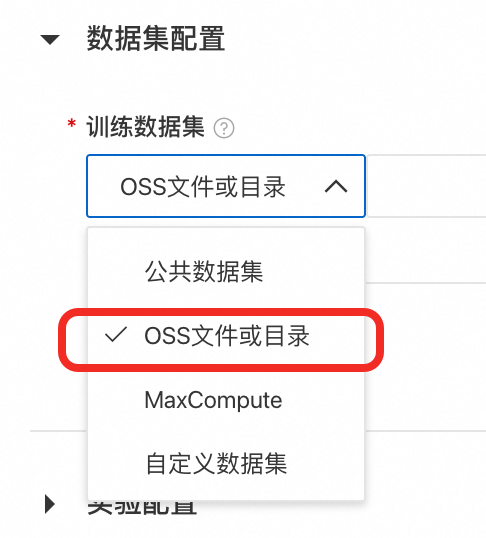
    • 训练数据集:先单击下载示例训练集train.json,然后配置页面选择OSS文件或目录,单击image图标选择Bucket,单击上传文件将下载训练集上传到OSS中,并选择该文件。
      image

    • 验证数据集:先单击下载验证集eval.json,然后单击添加验证数据集,按照和配置训练集相同的操作,上传并选择该文件。

      验证集用于在训练过程中判断模型的性能,帮助评估模型在未见过的数据上的表现。
    • 模型输出路径:默认会将微调后的模型存储到OSS中,如果OSS目录为空,请您新建目录并指定该目录。

    • 资源组类型:选择使用公共资源组,本次微调大约需要5GB显存,控制台中已经为您筛选出满足要求的规格,选择如:ecs.gn7i-c16g1.4xlarge

    • 超参数配置

      • learning_rate: 设置为0.0005

      • num_train_epochs:设置为4

      • per_device_train_batch_size:设置为8

      • seq_length:设置为512

      然后单击训练 > 确定,训练任务进入创建中状态,当处于运行中时,开始微调模型。

  3. 查看训练任务并等待训练完成。模型微调大约需要10分钟,在微调过程中,任务详情页面将展示任务日志及指标曲线,待训练执行完成后,微调后的模型将存储到设置的OSS目录中。

    后续查看训练任务详情,您可通过在左侧导航栏单击Model Gallery > 任务管理 > 训练任务,然后再单击任务名称查看。

    image

    (可选)根据loss图像,调整超参数,提升模型效果

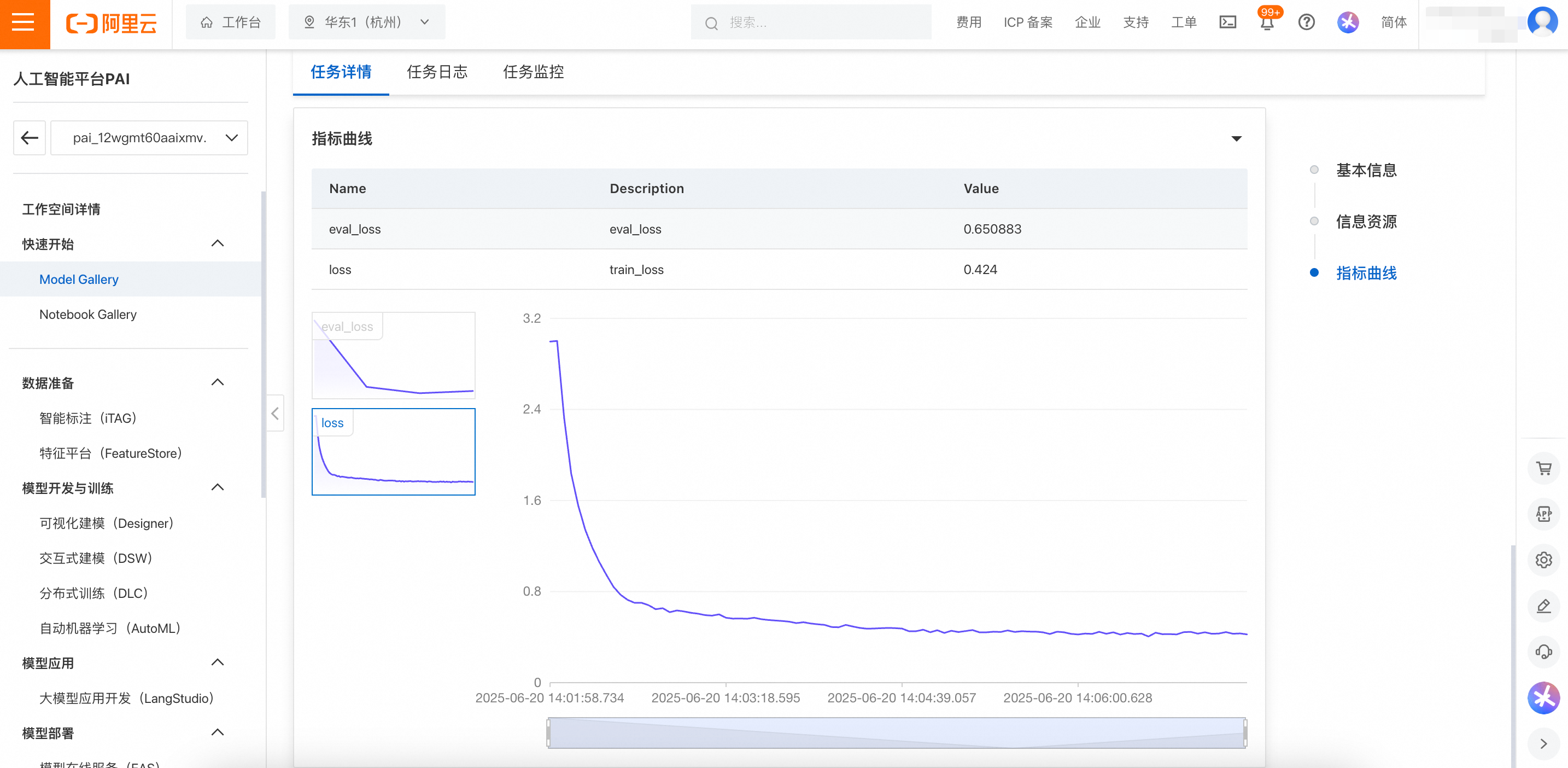
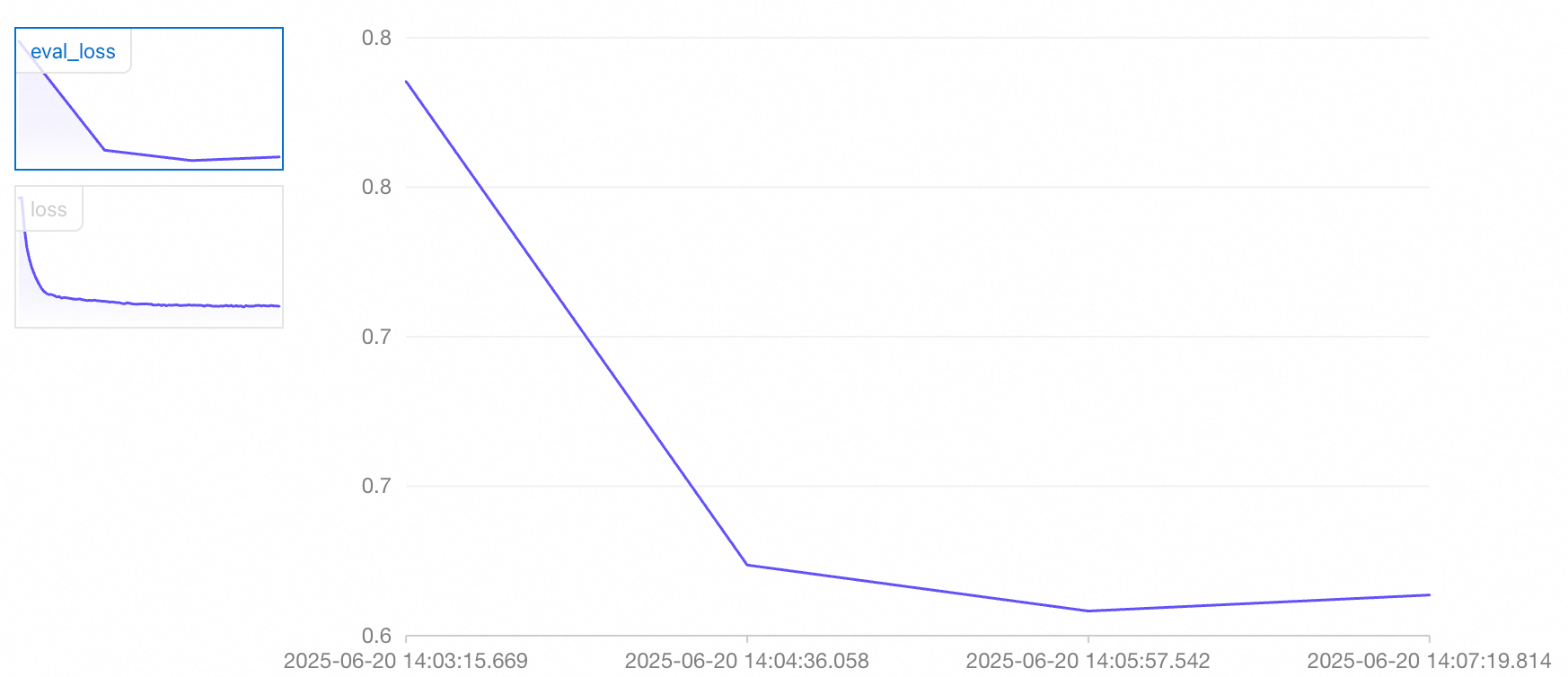
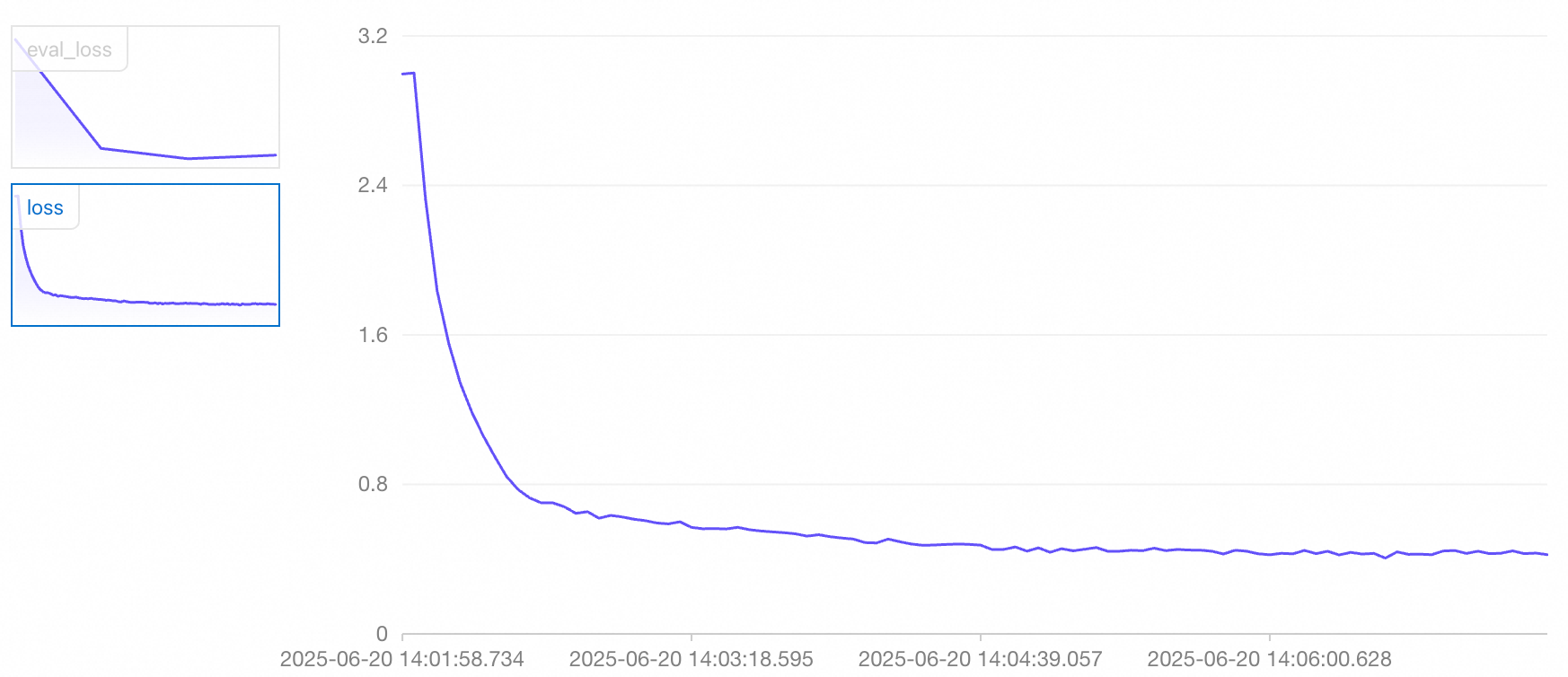
    在任务详情页面可以分别看到train_loss曲线(反映训练集损失)与 eval_loss曲线(反映验证集损失):

    imageimage

    您可以根据损失值的变化趋势,初步判断当前模型的训练效果:

    • 在结束训练前 train_loss 与 eval_loss 仍有下降趋势(欠拟合)

      您可以增加 num_train_epochs(训练轮次,与训练深度正相关) 参数,或适当增大 lora_rank(低秩矩阵的秩,秩越大,模型能表达更复杂的任务,但更容易过度训练)的值后再进行训练,加大模型的对训练数据的拟合程度;

    • 在结束训练前 train_loss 持续下降,eval_loss 开始变大(过拟合)

      您可以减少 num_train_epochs 参数,或适当减小lora_rank的值后再进行训练,防止模型过度训练;

    • 在结束训练前 train_loss 与 eval_loss 均处于平稳状态(良好拟合)

      模型处于该状态时,您可以进行后续步骤。

部署微调后的模型

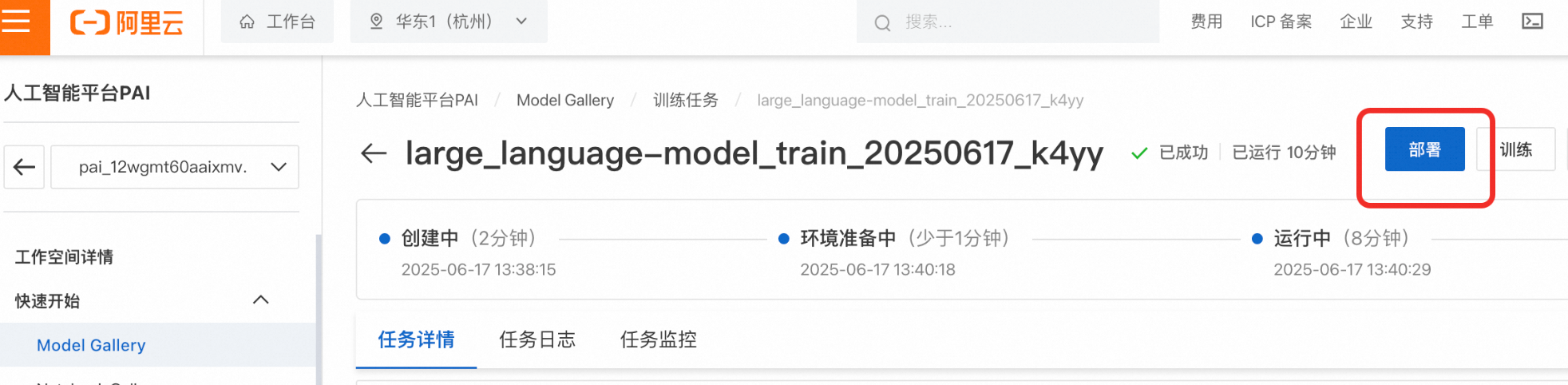
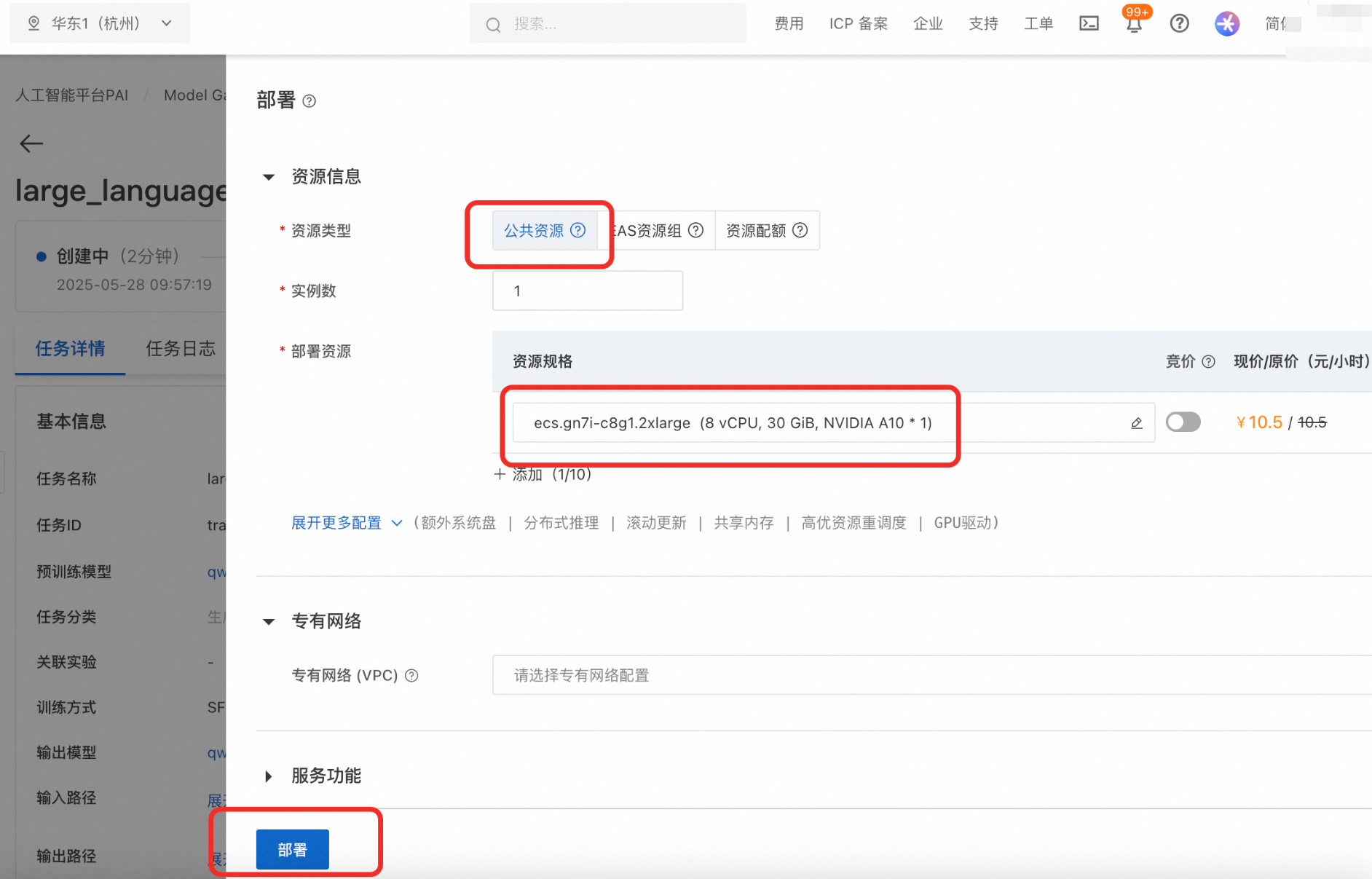
在训练任务详情页,单击部署按钮打开部署配置页,资源类型选择公共资源,部署0.6B的模型大约需要5GB显存,资源规格中已为您筛选出满足要求的规格,选择如:ecs.gn7i-c8g1.2xlarge,其他参数保持默认即可,然后单击部署 > 确定

部署过程大约需要5分钟,当处于运行中时,代表部署成功。

后续查看训练任务详情,您可通过在左侧导航栏单击Model Gallery > 任务管理 > 训练任务,然后再单击任务名称查看。

image

训练任务显示已成功后,如果部署按钮无法点击,代表输出的模型还在注册中,需要等待大约1分钟。

image

后续的模型调用步骤与调用模型相同。

验证微调后模型效果

在将微调后的模型部署到实际业务环境前,建议您先对其效果进行系统性的评测,确保模型具备良好的稳定性和准确性,避免上线后出现意料之外的问题。

准备测试数据

准备与训练数据不重合的测试数据,用于测试模型效果。本方案已为您准备好了测试集,在执行下面的准确率测试代码时会自动下载。

测试数据与训练数据不重合样本,这样可以更准确地反映模型在新数据上的泛化能力,避免因“见过的样本”导致分数虚高。

设计评测指标

评测标准应紧贴实际业务目标。以本方案为例,除了判断生成的 JSON 字符串是否合法,还应该关注对应的 Key、Value 的值是否正确。

您需要通过编程来定义评测指标,本案例评测指标实现,请参见下面准确率测试代码的compare_address_info方法。

验证模型微调后效果

执行如下测试代码,将输出模型在测试集上的准确率。

测试模型准确率代码示例

注意:请将Token、调用地址替换为您上文中获取的真实调用信息。

# pip3 install openai
from openai import AsyncOpenAI
import requests
import json
import asyncio
import os

# If the 'Token' environment variable is not set, replace the following line with your token from the EAS service: token = 'YTA1NTEzMzY3ZTY4Z******************'
token = os.environ.get("Token")

# Do not remove the "/v1" suffix after the service URL.
client = OpenAI(
    api_key=token,
    base_url=f'<Your_Service_URL>/v1',
)

if token is None:
    print("Please set the 'Token' environment variable, or assign your token directly to the 'token' variable.")
    exit()

system_prompt = """You are a professional information extraction assistant specializing in parsing US shipping addresses from unstructured text.

## Task Description
Based on the given input text, accurately extract and generate a JSON object containing the following six fields:
- name: The full name of the recipient.
- street_address: The complete street address, including number, street name, and any apartment or suite number.
- city: The city name.
- state: The full state name (e.g., "California", not "CA").
- zip_code: The 5 or 9-digit ZIP code.
- phone: The complete contact phone number.

## Extraction Rules
1.  **Address Handling**:
    -   Accurately identify the components: street, city, state, and ZIP code.
    -   The `state` field must be the full official name (e.g., "New York", not "NY").
    -   The `street_address` should contain all details before the city, such as "123 Apple Lane, Apt 4B".
2.  **Name Identification**:
    -   Extract the full recipient name.
3.  **Phone Number Handling**:
    -   Extract the complete phone number, preserving its original format.
4.  **ZIP Code**:
    -   Extract the 5-digit or 9-digit (ZIP+4) code.

## Output Format
Strictly adhere to the following JSON format. Do not add any explanatory text or markdown.
{
  "name": "Recipient's Full Name",
  "street_address": "Complete Street Address",
  "city": "City Name",
  "state": "Full State Name",
  "zip_code": "ZIP Code",
  "phone": "Contact Phone Number"
}
"""


def compare_address_info(actual_address_str, predicted_address_str):
    """Compares two JSON strings representing address information to see if they are identical."""
    try:
        # Parse the actual address information
        if actual_address_str:
            actual_address_json = json.loads(actual_address_str)
        else:
            actual_address_json = {}

        # Parse the predicted address information
        if predicted_address_str:
            predicted_address_json = json.loads(predicted_address_str)
        else:
            predicted_address_json = {}

        # Directly compare if the two JSON objects are identical
        is_same = actual_address_json == predicted_address_json

        return {
            "is_same": is_same,
            "actual_address_parsed": actual_address_json,
            "predicted_address_parsed": predicted_address_json,
            "comparison_error": None
        }

    except json.JSONDecodeError as e:
        return {
            "is_same": False,
            "actual_address_parsed": None,
            "predicted_address_parsed": None,
            "comparison_error": f"JSON parsing error: {str(e)}"
        }
    except Exception as e:
        return {
            "is_same": False,
            "actual_address_parsed": None,
            "predicted_address_parsed": None,
            "comparison_error": f"Comparison error: {str(e)}"
        }


async def predict_single_conversation(conversation_data):
    """Predicts the label for a single conversation."""
    try:
        # Extract user content (excluding assistant message)
        messages = conversation_data.get("messages", [])
        user_content = None

        for message in messages:
            if message.get("role") == "user":
                user_content = message.get("content", "")
                break

        if not user_content:
            return {"error": "User message not found"}

        response = await client.chat.completions.create(
            model="Qwen3-0.6B",
            messages=[
                {"role": "system", "content": system_prompt},
                {"role": "user", "content": user_content}
            ],
            response_format={"type": "json_object"},
            extra_body={
                "enable_thinking": False
            }
        )

        predicted_labels = response.choices[0].message.content.strip()
        return {"prediction": predicted_labels}

    except Exception as e:
        return {"error": f"Prediction failed: {str(e)}"}


async def process_batch(batch_data, batch_id):
    """Processes a batch of data."""
    print(f"Processing batch {batch_id}, containing {len(batch_data)} items...")

    tasks = []
    for i, conversation in enumerate(batch_data):
        task = predict_single_conversation(conversation)
        tasks.append(task)

    results = await asyncio.gather(*tasks, return_exceptions=True)

    batch_results = []
    for i, result in enumerate(results):
        if isinstance(result, Exception):
            batch_results.append({"error": f"Exception: {str(result)}"})
        else:
            batch_results.append(result)

    return batch_results


async def main():
    output_file = "predicted_labels.jsonl"
    batch_size = 20  # Number of items to process per batch

    # Read test data
    url = 'https://help-static-aliyun-doc.aliyuncs.com/file-manage-files/zh-CN/20251015/yghxco/test.jsonl'
    conversations = []

    try:
        response = requests.get(url)
        response.raise_for_status()  # Check if the request was successful
        for line_num, line in enumerate(response.text.splitlines(), 1):
            try:
                data = json.loads(line.strip())
                conversations.append(data)
            except json.JSONDecodeError as e:
                print(f"JSON parsing error on line {line_num}: {e}")
                continue
    except requests.exceptions.RequestException as e:
        print(f"Request error: {e}")
        return

    print(f"Successfully read {len(conversations)} conversation data items")

    # Process in batches
    all_results = []
    total_batches = (len(conversations) + batch_size - 1) // batch_size

    for batch_id in range(total_batches):
        start_idx = batch_id * batch_size
        end_idx = min((batch_id + 1) * batch_size, len(conversations))
        batch_data = conversations[start_idx:end_idx]

        batch_results = await process_batch(batch_data, batch_id + 1)
        all_results.extend(batch_results)

        print(f"Batch {batch_id + 1}/{total_batches} completed")

        # Add a small delay to avoid making requests too quickly
        if batch_id < total_batches - 1:
            await asyncio.sleep(1)

    # Save results
    same_count = 0
    different_count = 0
    error_count = 0

    with open(output_file, 'w', encoding='utf-8') as f:
        for i, (original_data, prediction_result) in enumerate(zip(conversations, all_results)):
            result_entry = {
                "index": i,
                "original_user_content": None,
                "actual_address": None,
                "predicted_address": None,
                "prediction_error": None,
                "address_comparison": None
            }

            # Extract original user content
            messages = original_data.get("messages", [])
            for message in messages:
                if message.get("role") == "user":
                    result_entry["original_user_content"] = message.get("content", "")
                    break

            # Extract actual address information (if assistant message exists)
            for message in messages:
                if message.get("role") == "assistant":
                    result_entry["actual_address"] = message.get("content", "")
                    break

            # Save prediction result
            if "error" in prediction_result:
                result_entry["prediction_error"] = prediction_result["error"]
                error_count += 1
            else:
                result_entry["predicted_address"] = prediction_result.get("prediction", "")

                # Compare address information
                comparison_result = compare_address_info(
                    result_entry["actual_address"],
                    result_entry["predicted_address"]
                )
                result_entry["address_comparison"] = comparison_result

                # Tally comparison results
                if comparison_result["comparison_error"]:
                    error_count += 1
                elif comparison_result["is_same"]:
                    same_count += 1
                else:
                    different_count += 1

            f.write(json.dumps(result_entry, ensure_ascii=False) + '\n')

    print(f"All predictions complete! Results have been saved to {output_file}")

    # Statistics
    success_count = sum(1 for result in all_results if "error" not in result)
    prediction_error_count = len(all_results) - success_count
    print(f"Number of samples: {success_count}")
    print(f"Correct responses: {same_count}")
    print(f"Incorrect responses: {different_count}")
    print(f"Accuracy: {same_count * 100 / success_count} %")


if __name__ == "__main__":
    asyncio.run(main())

输出结果:

All predictions complete! Results have been saved to predicted_labels.jsonl
Number of samples: 400
Correct responses: 382
Incorrect responses: 18
Accuracy: 95.5 %
因模型微调随机数种子和大模型输出随机性的影响,您测试出的准确率可能与本方案的结果存在差异,这属于正常情况。

可以看到准确率为 95.5%,相比于原始Qwen3-0.6B模型的 50% 的准确率提高了很多,表明微调后的模型显著增强了在物流填单领域结构化信息抽取的能力。

本文为了您学习过程中减少训练时间,只设置 4 个训练轮次,准确率就已提升至 95.5%。您可以适当增加训练轮次来进一步提升准确率。

重要提醒

本文使用了公共资源创建模型服务,计费方式为按量付费。当您不需要使用服务时请停止或删除服务,以免继续扣费

image

相关文档

  • 更多Model Gallery功能如评测,压缩等,请参见Model Gallery

  • 更多EAS功能如弹性伸缩、压测、监控报警,请参见EAS概述