千问-文生图模型(Qwen-Image)是一款通用图像生成模型,支持多种艺术风格,尤其擅长 复杂文本渲染 。模型支持多行布局、段落级文本生成以及细粒度细节刻画,可实现复杂的图文混合布局设计。
快速入口:使用指南 | 在线体验(新加坡 | 北京) | 技术博客(更多效果展示) |
效果展示
输入提示词 | 输出图像 |
|---|---|
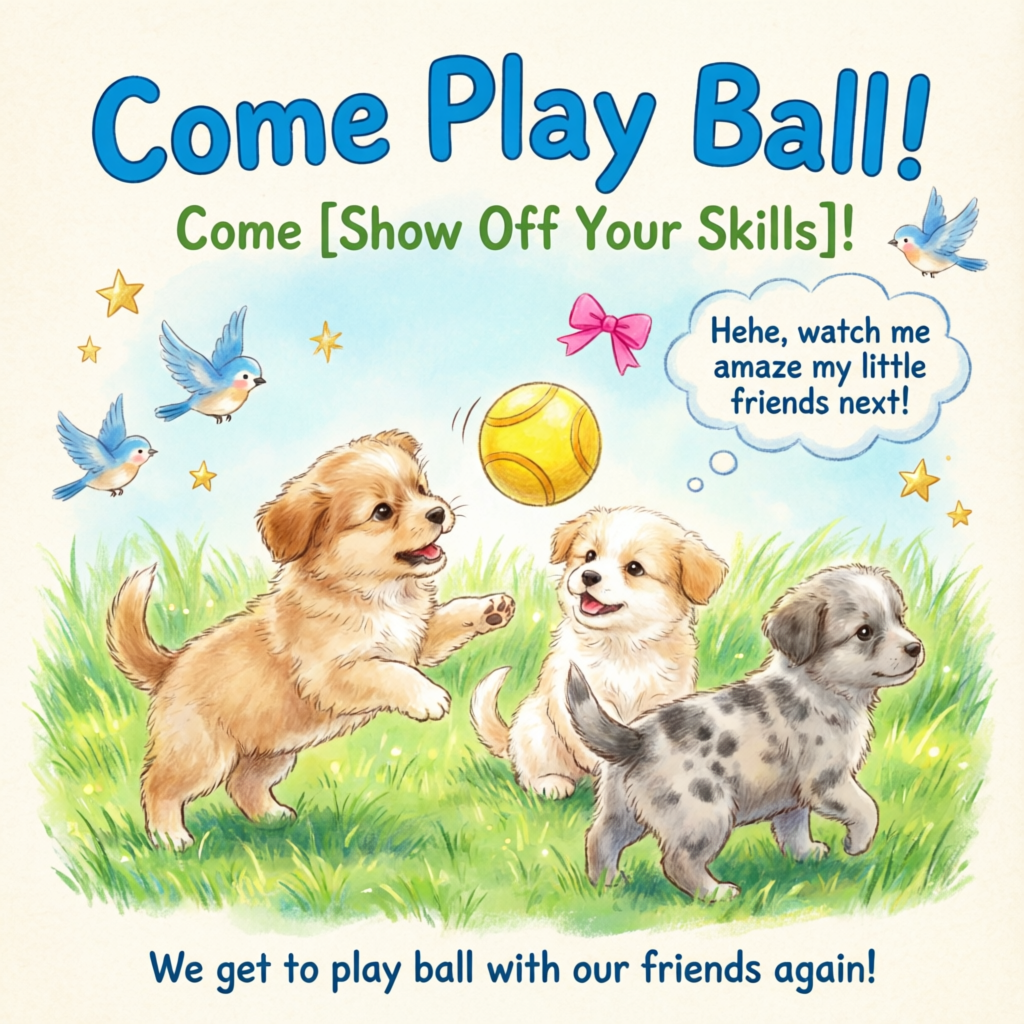
Healing-style hand-drawn poster featuring three puppies playing with a ball on lush green grass, adorned with decorative elements such as birds and stars. The main title “Come Play Ball!” is prominently displayed at the top in bold, blue cartoon font. Below it, the subtitle “Come [Show Off Your Skills]!” appears in green font. A speech bubble adds playful charm with the text: “Hehe, watch me amaze my little friends next!”At the bottom, supplementary text reads: “We get to play ball with our friends again!” The color palette centers on fresh greens and blues, accented with bright pink and yellow tones to highlight a cheerful, childlike atmosphere. |
|
模型概览
| 模型名称 | 模型简介 | 输出图像规格 |
|---|---|---|
qwen-image-3.0-pro | 千问图像生成与编辑3.0系列,同时支持文生图(T2I)和图生图/图像编辑(I2I)。3.0系列API调用请参阅千问-图像生成与编辑3.0。 | 图像分辨率:总像素需在512512至20482048之间。 图像格式:png |
qwen-image-3.0
| ||
qwen-image-2.0-pro
| 千问图像生成与编辑模型Pro系列。文字渲染、真实质感、语义遵循能力更强。
| 图像分辨率:支持自由设置宽高,输出图像总像素需在512512至20482048之间。默认分辨率为2048*2048。 图像格式:png 图像张数:1-6张 |
qwen-image-2.0-pro-2026-06-22 | ||
qwen-image-2.0-pro-2026-04-22 | ||
qwen-image-2.0-pro-2026-03-03 | ||
qwen-image-2.0
| 千问图像生成与编辑模型加速版,兼顾效果与响应速度。
| |
qwen-image-2.0-2026-03-03 | ||
qwen-image-max
| 千问图像生成模型Max系列。真实感、自然度更强,AI合成痕迹更低。 | 图像分辨率:可选分辨率及对应宽高比例请参见size参数设置 图像格式:png 图像张数:固定1张 |
qwen-image-max-2025-12-30 | ||
qwen-image-plus
| 千问图像生成模型Plus系列,擅长多样化艺术风格与文字渲染。 | |
qwen-image-plus-2026-01-09 | ||
qwen-image |
各地域支持的模型请参见百炼控制台。
前提条件
在调用前,先获取与配置 API Key,再配置API Key到环境变量。如需通过SDK进行调用,请安装DashScope SDK。
重要华北2(北京)和新加坡地域拥有独立的 API Key与请求地址,不可混用,跨地域调用将导致鉴权失败或服务报错。
重要阿里云百炼为华北2(北京)、新加坡地域推出了业务空间专属域名,能够为推理请求提供卓越的性能和更高的稳定性,建议迁移至新域名:
- 华北2(北京)地域:从
https://dashscope.aliyuncs.com迁移至https://{WorkspaceId}.cn-beijing.maas.aliyuncs.com - 新加坡地域:从
https://dashscope-intl.aliyuncs.com迁移至https://{WorkspaceId}.ap-southeast-1.maas.aliyuncs.com
其中 {WorkspaceId} 为您的业务空间 ID,可在阿里云百炼控制台的业务空间详情页面查看。现有域名仍可正常使用。
同步接口(推荐)
HTTP调用
千问图像模型支持同步接口,一次请求即可获得结果,调用流程简单,推荐用于多数场景。
新加坡地域:POST https://{WorkspaceId}.ap-southeast-1.maas.aliyuncs.com/api/v1/services/aigc/multimodal-generation/generation
北京地域:POST https://{WorkspaceId}.cn-beijing.maas.aliyuncs.com/api/v1/services/aigc/multimodal-generation/generation
调用时请将{WorkspaceId}替换为真实的Workspace ID。
请求参数请求头(Headers)Content-Type 请求内容类型。此参数必须设置为 Authorization 请求身份认证。接口使用阿里云百炼API Key进行身份认证。示例值:Bearer sk-xxxx。 请求体(Request Body)model 模型名称。示例值: input 输入的基本信息。 parameters 图像处理参数。 属性 negative_prompt 反向提示词,用于描述不希望在图像中出现的内容,对画面进行限制。 支持中英文,长度不超过500个字符,超出部分将自动截断。 示例值:低分辨率,低画质,肢体畸形,手指畸形,画面过饱和,蜡像感,人脸无细节,过度光滑,画面具有AI感。构图混乱。文字模糊,扭曲。 size 输出图像的分辨率,格式为 qwen-image-2.0系列模型:输出图像总像素需在
qwen-image-max、qwen-image-plus系列模型:默认分辨率为
n 输出图像的数量,默认值为1。 对于qwen-image-2.0系列模型,可选择输出1-6张图片。 对于qwen-image-max、qwen-image-plus系列模型,此参数固定为1,设置其他值将导致报错。 prompt_extend 是否开启 Prompt(提示词)智能改写功能。开启后模型将对正向提示词进行优化与润色。此功能不会修改反向提示词。
点击查看改写示例
原始提示词(orig_prompt):A sitting ginger cat with a joyful expression, looking lively, adorable, and incredibly lifelike. 实际提示词(actual_prompt):Photorealistic wildlife portrait: A sitting ginger cat with lush, sun-kissed fur and a vibrant, joyful expression, eyes sparkling with curiosity and warmth. The cat's head is slightly tilted, ears perked forward, mouth gently open in a contented, lively pose—exuding adorable charm and incredible lifelike detail. Soft natural lighting enhances the texture of each individual whisker and fur strand, with subtle highlights on the muzzle and inner ears. Background: a softly blurred autumn garden at golden hour—warm tones of amber leaves, dappled sunlight filtering through trees, and faint hints of mossy stone steps. Composition emphasizes the cat as the central focal point, captured in sharp focus with shallow depth of field. Style: ultra-realistic photography, National Geographic-level detail, 8K resolution, Canon EOS R5, f/1.2 aperture, cinematic lighting, true-to-life color grading, minimal post-processing. No text or overlays. watermark 是否在图像右下角添加 "Qwen-Image" 水印。默认值为 seed 随机数种子,取值范围 使用相同的 注意:模型生成过程具有概率性,即使使用相同的 | 文生图 |

响应参数output 任务输出信息。 usage 输出信息统计。只对成功的结果计数。 request_id 请求唯一标识。可用于请求明细溯源和问题排查。 code 请求失败的错误码。请求成功时不会返回此参数,详情请参见错误码。 message 请求失败的详细信息。请求成功时不会返回此参数,详情请参见错误码。 | 任务执行成功图像URL仅保留24小时,超时后会被自动清除,请及时保存生成的图像。 任务执行异常如果因为某种原因导致任务执行失败,将返回相关信息,可以通过code和message字段明确指示错误原因。请参见错误码进行解决。 |
DashScope SDK调用
DashScope SDK目前已支持Python和Java。
SDK与HTTP接口的参数名基本一致,参数结构根据语言特性进行封装。同步调用参数说明可参考HTTP调用。
Python
说明请先确认已安装最新版DashScope Python SDK,否则可能运行报错:安装SDK。
请求示例
import json
import os
import dashscope
from dashscope import MultiModalConversation

# 以下为新加坡地域的URL,调用时请将 {WorkspaceId} 替换为真实的业务空间ID,各地域的URL不同。
dashscope.base_http_api_url = 'https://{WorkspaceId}.ap-southeast-1.maas.aliyuncs.com/api/v1'

messages = [
    {
        "role": "user",
        "content": [
            {"text": "Healing-style hand-drawn poster featuring three puppies playing with a ball on lush green grass, adorned with decorative elements such as birds and stars. The main title “Come Play Ball!” is prominently displayed at the top in bold, blue cartoon font. Below it, the subtitle “Come [Show Off Your Skills]!” appears in green font. A speech bubble adds playful charm with the text: “Hehe, watch me amaze my little friends next!” At the bottom, supplementary text reads: “We get to play ball with our friends again!” The color palette centers on fresh greens and blues, accented with bright pink and yellow tones to highlight a cheerful, childlike atmosphere."}
        ]
    }
]

# 新加坡和北京地域的API Key不同。获取API Key:https://www.alibabacloud.com/help/model-studio/get-api-key
# 若没有配置环境变量,请用百炼API Key将下行替换为:api_key="sk-xxx"
api_key = os.getenv("DASHSCOPE_API_KEY")

response = MultiModalConversation.call(
    api_key=api_key,
    model="qwen-image-2.0-pro",
    messages=messages,
    result_format='message',
    stream=False,
    watermark=False,
    prompt_extend=True,
    negative_prompt="低分辨率,低画质,肢体畸形,手指畸形,画面过饱和,蜡像感,人脸无细节,过度光滑,画面具有AI感。构图混乱。文字模糊,扭曲。",
    size='2048*2048'
)

if response.status_code == 200:
    print(json.dumps(response, ensure_ascii=False))
else:
    print(f"HTTP返回码:{response.status_code}")
    print(f"错误码:{response.code}")
    print(f"错误信息:{response.message}")
    print("请参考文档:https://www.alibabacloud.com/help/model-studio/error-code")
响应示例
图像链接的有效期为24小时,请及时下载图像。
{
    "status_code": 200,
    "request_id": "d2d1a8c0-325f-9b9d-8b90-xxxxxx",
    "code": "",
    "message": "",
    "output": {
        "text": null,
        "finish_reason": null,
        "choices": [
            {
                "finish_reason": "stop",
                "message": {
                    "role": "assistant",
                    "content": [
                        {
                            "image": "https://dashscope-result-wlcb.oss-cn-wulanchabu.aliyuncs.com/xxx.png?Expires=xxx"
                        }
                    ]
                }
            }
        ]
    },
    "usage": {
        "input_tokens": 0,
        "output_tokens": 0,
        "width": 2048,
        "image_count": 1,
        "height": 2048
    }
}
Java
说明请先确认已安装最新版DashScope Java SDK,否则可能运行报错:安装SDK。
请求示例
import com.alibaba.dashscope.aigc.multimodalconversation.MultiModalConversation;
import com.alibaba.dashscope.aigc.multimodalconversation.MultiModalConversationParam;
import com.alibaba.dashscope.aigc.multimodalconversation.MultiModalConversationResult;
import com.alibaba.dashscope.common.MultiModalMessage;
import com.alibaba.dashscope.common.Role;
import com.alibaba.dashscope.exception.ApiException;
import com.alibaba.dashscope.exception.NoApiKeyException;
import com.alibaba.dashscope.exception.UploadFileException;
import com.alibaba.dashscope.utils.JsonUtils;
import com.alibaba.dashscope.utils.Constants;

import java.io.IOException;
import java.util.Arrays;
import java.util.Collections;
import java.util.HashMap;
import java.util.Map;

public class QwenImage {

    static {
        // 以下为新加坡地域的URL,调用时请将 {WorkspaceId} 替换为真实的业务空间ID,各地域的URL不同。
        Constants.baseHttpApiUrl = "https://{WorkspaceId}.ap-southeast-1.maas.aliyuncs.com/api/v1";
    }

    // 新加坡和北京地域的API Key不同。获取API Key:https://www.alibabacloud.com/help/model-studio/get-api-key
    // 若没有配置环境变量,请用百炼API Key将下行替换为:static String apiKey="sk-xxx"
    static String apiKey = System.getenv("DASHSCOPE_API_KEY");

    public static void call() throws ApiException, NoApiKeyException, UploadFileException, IOException {

        MultiModalConversation conv = new MultiModalConversation();

        MultiModalMessage userMessage = MultiModalMessage.builder().role(Role.USER.getValue())
                .content(Arrays.asList(
                        Collections.singletonMap("text", "Healing-style hand-drawn poster featuring three puppies playing with a ball on lush green grass, adorned with decorative elements such as birds and stars. The main title “Come Play Ball!” is prominently displayed at the top in bold, blue cartoon font. Below it, the subtitle “Come [Show Off Your Skills]!” appears in green font. A speech bubble adds playful charm with the text: “Hehe, watch me amaze my little friends next!” At the bottom, supplementary text reads: “We get to play ball with our friends again!” The color palette centers on fresh greens and blues, accented with bright pink and yellow tones to highlight a cheerful, childlike atmosphere.")
                )).build();

        Map<String, Object> parameters = new HashMap<>();
        parameters.put("watermark", false);
        parameters.put("prompt_extend", true);
        parameters.put("negative_prompt", "低分辨率,低画质,肢体畸形,手指畸形,画面过饱和,蜡像感,人脸无细节,过度光滑,画面具有AI感。构图混乱。文字模糊,扭曲。");
        parameters.put("size", "2048*2048");

        MultiModalConversationParam param = MultiModalConversationParam.builder()
                .apiKey(apiKey)
                .model("qwen-image-2.0-pro")
                .messages(Collections.singletonList(userMessage))
                .parameters(parameters)
                .build();

        MultiModalConversationResult result = conv.call(param);
        System.out.println(JsonUtils.toJson(result));
    }

    public static void main(String[] args) {
        try {
            call();
        } catch (ApiException | NoApiKeyException | UploadFileException | IOException e) {
            System.out.println(e.getMessage());
        }
        System.exit(0);
    }
响应示例
图像链接的有效期为24小时,请及时下载图像。
{
    "requestId": "5b6f2d04-b019-40db-a5cc-xxxxxx",
    "usage": {
        "image_count": 1,
        "width": 2048,
        "height": 2048
    },
    "output": {
        "choices": [
            {
                "finish_reason": "stop",
                "message": {
                    "role": "assistant",
                    "content": [
                        {
                            "image": "https://dashscope-result-wlcb.oss-cn-wulanchabu.aliyuncs.com/xxx.png?Expires=xxx"
                        }
                    ]
                }
            }
        ]
    }
}
异步接口
重要当前仅qwen-image-plus、qwen-image模型支持异步接口调用。
HTTP调用
调用流程分为两步:
- 创建任务获取任务ID:发送一个请求创建任务,该请求会返回任务ID(task_id)。
- 根据任务ID查询结果:使用task_id轮询任务状态,直到任务完成并获得图像URL。
步骤1:创建任务获取任务ID
新加坡地域:POST https://{WorkspaceId}.ap-southeast-1.maas.aliyuncs.com/api/v1/services/aigc/text2image/image-synthesis
北京地域:POST https://{WorkspaceId}.cn-beijing.maas.aliyuncs.com/api/v1/services/aigc/text2image/image-synthesis
说明
- 创建成功后,使用接口返回的
task_id查询结果,task_id 有效期为 24 小时。请勿重复创建任务,轮询获取即可。 - 新手指引请参见Postman。
请求参数请求头(Headers)Content-Type 请求内容类型。此参数必须设置为 Authorization 请求身份认证。接口使用阿里云百炼API Key进行身份认证。示例值:Bearer sk-xxxx。 X-DashScope-Async 异步处理配置参数。HTTP请求只支持异步,必须设置为 重要缺少此请求头将报错:“current user api does not support synchronous calls”。 请求体(Request Body)model 模型名称。当前仅 示例值: input 输入的基本信息,如提示词等。 parameters 图像处理参数。 属性 size 输出图像的分辨率,格式为
n 生成图像的数量。此参数当前固定为1,设置其他值将导致报错。 prompt_extend 是否开启 Prompt(提示词)智能改写功能。开启后模型将对正向提示词进行优化与润色。此功能不会修改反向提示词。
点击查看改写示例
原始提示词(orig_prompt):A sitting ginger cat with a joyful expression, looking lively, adorable, and incredibly lifelike. 实际提示词(actual_prompt):Photorealistic wildlife portrait: A sitting ginger cat with lush, sun-kissed fur and a vibrant, joyful expression, eyes sparkling with curiosity and warmth. The cat's head is slightly tilted, ears perked forward, mouth gently open in a contented, lively pose—exuding adorable charm and incredible lifelike detail. Soft natural lighting enhances the texture of each individual whisker and fur strand, with subtle highlights on the muzzle and inner ears. Background: a softly blurred autumn garden at golden hour—warm tones of amber leaves, dappled sunlight filtering through trees, and faint hints of mossy stone steps. Composition emphasizes the cat as the central focal point, captured in sharp focus with shallow depth of field. Style: ultra-realistic photography, National Geographic-level detail, 8K resolution, Canon EOS R5, f/1.2 aperture, cinematic lighting, true-to-life color grading, minimal post-processing. No text or overlays. watermark 是否在图像右下角添加 "Qwen-Image" 水印。默认值为 seed 随机数种子,取值范围 使用相同的 注意:模型生成过程具有概率性,即使使用相同的 | 文生图当前仅 |
响应参数output 任务输出信息。 request_id 请求唯一标识。可用于请求明细溯源和问题排查。 code 请求失败的错误码。请求成功时不会返回此参数,详情请参见错误码。 message 请求失败的详细信息。请求成功时不会返回此参数,详情请参见错误码。 | 成功响应请保存 task_id,用于查询任务状态与结果。 异常响应创建任务失败,请参见错误码进行解决。 |
步骤2:根据任务ID查询结果
新加坡
GET https://{WorkspaceId}.ap-southeast-1.maas.aliyuncs.com/api/v1/tasks/{task_id}
调用时请将{WorkspaceId}替换为真实的Workspace ID。
华北2(北京)
GET https://{WorkspaceId}.cn-beijing.maas.aliyuncs.com/api/v1/tasks/{task_id}
调用时请将{WorkspaceId}替换为真实的Workspace ID。
说明
- 轮询建议:图像生成过程耗时较长,建议采用轮询机制,并设置合理的查询间隔(如 10 秒)来获取结果。
- 任务状态流转:PENDING(排队中)→ RUNNING(处理中)→ SUCCEEDED(成功)/ FAILED(失败)。
- 结果链接:任务成功后返回图像链接,有效期为 24 小时。建议在获取链接后立即下载并转存至永久存储(如阿里云 OSS)。
请求参数请求头(Headers)Authorization 请求身份认证。接口使用阿里云百炼API Key进行身份认证。示例值:Bearer sk-xxxx。 URL路径参数(Path parameters)task_id 任务ID。 | 查询任务结果将 |
响应参数output 任务输出信息。 usage 输出信息统计。只对成功的结果计数。 request_id 请求唯一标识。可用于请求明细溯源和问题排查。 | 任务执行成功任务数据(如任务状态、图像URL等)仅保留24小时,超时后会被自动清除。请您务必及时保存生成的图像。 任务执行失败若任务执行失败,task_status将置为 FAILED,并提供错误码和信息。请参见错误码进行解决。 |
DashScope SDK调用
DashScope SDK目前已支持Python和Java。
SDK与HTTP接口的参数名基本一致,参数结构根据不同语言的SDK封装而定。异步调用参数说明可参考HTTP调用。
由于图像模型处理时间较长,底层服务采用异步方式。SDK在此基础上封装了两种调用模式:
- 同步调用(阻塞模式): SDK会自动等待任务完成,然后直接返回最终结果,调用体验与常规同步调用一致。
- 异步调用(非阻塞模式): 调用后将立即返回任务ID,需要用户根据该ID自行查询任务状态和最终结果。
Python SDK调用
说明请先确认已安装最新版DashScope Python SDK,否则可能运行报错:安装SDK。
同步调用
请求示例
from http import HTTPStatus
from urllib.parse import urlparse, unquote
from pathlib import PurePosixPath
import requests
from dashscope import ImageSynthesis
import os
import dashscope

# 以下为新加坡地域的URL,调用时请将 {WorkspaceId} 替换为真实的业务空间ID,各地域的URL不同。
dashscope.base_http_api_url = 'https://{WorkspaceId}.ap-southeast-1.maas.aliyuncs.com/api/v1'

prompt = "Healing-style hand-drawn poster featuring three puppies playing with a ball on lush green grass, adorned with decorative elements such as birds and stars. The main title “Come Play Ball!” is prominently displayed at the top in bold, blue cartoon font. Below it, the subtitle “Come [Show Off Your Skills]!” appears in green font. A speech bubble adds playful charm with the text: “Hehe, watch me amaze my little friends next!” At the bottom, supplementary text reads: “We get to play ball with our friends again!” The color palette centers on fresh greens and blues, accented with bright pink and yellow tones to highlight a cheerful, childlike atmosphere."

# 新加坡和北京地域的API Key不同。获取API Key:https://www.alibabacloud.com/help/model-studio/get-api-key
# 若没有配置环境变量,请用百炼API Key将下行替换为:api_key="sk-xxx"
api_key = os.getenv("DASHSCOPE_API_KEY")

print('----sync call, please wait a moment----')
rsp = ImageSynthesis.call(api_key=api_key,
                          model="qwen-image-plus", # 当前仅qwen-image-plus、qwen-image模型支持异步接口
                          prompt=prompt,
                          negative_prompt=" ",
                          n=1,
                          size='1664*928',
                          prompt_extend=True,
                          watermark=False)
print(f'response: {rsp}')
if rsp.status_code == HTTPStatus.OK:
    # 在当前目录下保存图像
    for result in rsp.output.results:
        file_name = PurePosixPath(unquote(urlparse(result.url).path)).parts[-1]
        with open('./%s' % file_name, 'wb+') as f:
            f.write(requests.get(result.url).content)
else:
    print(f'sync_call Failed, status_code: {rsp.status_code}, code: {rsp.code}, message: {rsp.message}')
响应示例
url 有效期24小时,请及时下载图像。
{
    "status_code": 200,
    "request_id": "a47b1a65-7041-4565-9068-xxxxxx",
    "code": null,
    "message": "",
    "output": {
        "task_id": "91093132-475e-43cf-b94e-xxxxxx",
        "task_status": "SUCCEEDED",
        "results": [
            {
                "url": "https://dashscope-result-sz.oss-cn-shenzhen.aliyuncs.com/xxx.png?Expires=xxxxxx",
                "orig_prompt": "Healing-style hand-drawn poster featuring three puppies playing with a ball on lush green grass, adorned with decorative elements such as birds and stars. The main title “Come Play Ball!” is prominently displayed at the top in bold, blue cartoon font. Below it, the subtitle “Come [Show Off Your Skills]!” appears in green font. A speech bubble adds playful charm with the text: “Hehe, watch me amaze my little friends next!” At the bottom, supplementary text reads: “We get to play ball with our friends again!” The color palette centers on fresh greens and blues, accented with bright pink and yellow tones to highlight a cheerful, childlike atmosphere.",
                "actual_prompt": "Childhood-inspired hand-drawn poster design: Three playful puppies joyfully interact with a colorful ball on a vibrant patch of lush green grass. Delicate decorative elements including fluttering birds and twinkling stars are scattered throughout. At the top center, the bold, blue cartoon-style title “Come Play Ball!” stands out prominently. Directly beneath, the subtitle “Come [Show Off Your Skills]!” is rendered in cheerful green lettering. A whimsical speech bubble near one of the puppies contains the playful text: “Hehe, watch me amaze my little friends next!” At the bottom edge, smaller supplementary text reads: “We get to play ball with our friends again!” The color palette is centered on fresh greens and sky blues, accented with pops of bright pink and sunny yellow, enhancing the cheerful, childlike atmosphere. Style evokes nostalgic, hand-inked illustrations with soft textures, gentle linework, and a whimsical, storybook-like composition."
            }
        ],
        "submit_time": "2025-09-09 13:39:20.659",
        "scheduled_time": "2025-09-09 13:39:20.717",
        "end_time": "2025-09-09 13:39:45.233"
    },
    "usage": {
        "image_count": 1
    }
}
异步调用
请求示例
from http import HTTPStatus
from urllib.parse import urlparse, unquote
from pathlib import PurePosixPath
import requests
from dashscope import ImageSynthesis
import os
import dashscope
import time

# 以下为新加坡地域的URL,调用时请将 {WorkspaceId} 替换为真实的业务空间ID,各地域的URL不同。
dashscope.base_http_api_url = 'https://{WorkspaceId}.ap-southeast-1.maas.aliyuncs.com/api/v1'

prompt = "Healing-style hand-drawn poster featuring three puppies playing with a ball on lush green grass, adorned with decorative elements such as birds and stars. The main title “Come Play Ball!” is prominently displayed at the top in bold, blue cartoon font. Below it, the subtitle “Come [Show Off Your Skills]!” appears in green font. A speech bubble adds playful charm with the text: “Hehe, watch me amaze my little friends next!” At the bottom, supplementary text reads: “We get to play ball with our friends again!” The color palette centers on fresh greens and blues, accented with bright pink and yellow tones to highlight a cheerful, childlike atmosphere."

# 新加坡和北京地域的API Key不同。获取API Key:https://www.alibabacloud.com/help/model-studio/get-api-key
# 若没有配置环境变量,请用百炼API Key将下行替换为:api_key="sk-xxx"
api_key = os.getenv("DASHSCOPE_API_KEY")

def async_call():
    print('----Creating Task----')
    task_info = create_async_task()
    print('----Polling Task Status----')
    poll_task_status(task_info)

# Create asynchronous task
def create_async_task():
    rsp = ImageSynthesis.async_call(api_key=api_key,
                                    model="qwen-image-plus", # 当前仅qwen-image-plus、qwen-image模型支持异步接口
                                    prompt=prompt,
                                    negative_prompt=" ",
                                    n=1,
                                    size='1664*928',
                                    prompt_extend=True,
                                    watermark=False)
    print(rsp)
    if rsp.status_code == HTTPStatus.OK:
        print(rsp.output)
    else:
        print(f'Failed to create task, status_code: {rsp.status_code}, code: {rsp.code}, message: {rsp.message}')
    return rsp

# Poll asynchronous task status, query every 5 seconds, maximum polling for 1 minute
def poll_task_status(task):
    start_time = time.time()
    timeout = 60  # 1 minute timeout

    while True:
        # Check if timeout
        if time.time() - start_time > timeout:
            print('Polling timeout (1 minute), task not completed')
            return

        # Get task status
        status_rsp = ImageSynthesis.fetch(task)
        print(f'Task status query result: {status_rsp}')

        if status_rsp.status_code != HTTPStatus.OK:
            print(f'Failed to get task status, status_code: {status_rsp.status_code}, code: {status_rsp.code}, message: {status_rsp.message}')
            return
        task_status = status_rsp.output.task_status
        print(f'Current task status: {task_status}')

        if task_status == 'SUCCEEDED':
            print('Task completed, downloading image...')
            for result in status_rsp.output.results:
                file_name = PurePosixPath(unquote(urlparse(result.url).path)).parts[-1]
                with open(f'./{file_name}', 'wb+') as f:
                    f.write(requests.get(result.url).content)
                print(f'Image saved as: {file_name}')
            break
        elif task_status == 'FAILED':
            print(f'Task execution failed, status: {task_status}, code: {status_rsp.code}, message: {status_rsp.message}')
            break
        elif task_status == 'PENDING' or task_status == 'RUNNING':
            print('Task in progress, continue querying after 5 seconds...')
            time.sleep(5)
        else:
            print(f'Unknown task status: {task_status}, continue querying after 5 seconds...')
            time.sleep(5)

# Cancel asynchronous task, only tasks in PENDING status can be canceled
def cancel_task(task):
    rsp = ImageSynthesis.cancel(task)
    print(rsp)
    if rsp.status_code == HTTPStatus.OK:
        print(rsp.output.task_status)
    else:
        print(f'Failed to cancel task, status_code: {rsp.status_code}, code: {rsp.code}, message: {rsp.message}')

if __name__ == '__main__':
    async_call()
响应示例
1、创建任务的响应示例
{
	"status_code": 200,
	"request_id": "31b04171-011c-96bd-ac00-xxxxxx",
	"code": "",
	"message": "",
	"output": {
		"task_id": "4f90cf14-a34e-4eae-xxxxxxxx",
		"task_status": "PENDING",
		"results": []
	},
	"usage": null
}
2、查询任务结果的响应示例
url 有效期24小时,请及时下载图像。
{
    "status_code": 200,
    "request_id": "a47b1a65-7041-4565-9068-xxxxxx",
    "code": null,
    "message": "",
    "output": {
        "task_id": "91093132-475e-43cf-b94e-xxxxxx",
        "task_status": "SUCCEEDED",
        "results": [
            {
                "url": "https://dashscope-result-sz.oss-cn-shenzhen.aliyuncs.com/xxx.png?Expires=xxxxxx",
                "orig_prompt": "Healing-style hand-drawn poster featuring three puppies playing with a ball on lush green grass, adorned with decorative elements such as birds and stars. The main title “Come Play Ball!” is prominently displayed at the top in bold, blue cartoon font. Below it, the subtitle “Come [Show Off Your Skills]!” appears in green font. A speech bubble adds playful charm with the text: “Hehe, watch me amaze my little friends next!” At the bottom, supplementary text reads: “We get to play ball with our friends again!” The color palette centers on fresh greens and blues, accented with bright pink and yellow tones to highlight a cheerful, childlike atmosphere.",
                "actual_prompt": "Childhood-inspired hand-drawn poster design: Three playful puppies joyfully interact with a colorful ball on a vibrant patch of lush green grass. Delicate decorative elements including fluttering birds and twinkling stars are scattered throughout. At the top center, the bold, blue cartoon-style title “Come Play Ball!” stands out prominently. Directly beneath, the subtitle “Come [Show Off Your Skills]!” is rendered in cheerful green lettering. A whimsical speech bubble near one of the puppies contains the playful text: “Hehe, watch me amaze my little friends next!” At the bottom edge, smaller supplementary text reads: “We get to play ball with our friends again!” The color palette is centered on fresh greens and sky blues, accented with pops of bright pink and sunny yellow, enhancing the cheerful, childlike atmosphere. Style evokes nostalgic, hand-inked illustrations with soft textures, gentle linework, and a whimsical, storybook-like composition."
            }
        ],
        "submit_time": "2025-09-09 13:39:20.659",
        "scheduled_time": "2025-09-09 13:39:20.717",
        "end_time": "2025-09-09 13:39:45.233"
    },
    "usage": {
        "image_count": 1
    }
}
Java SDK调用
说明请先确认已安装最新版DashScope Java SDK,否则可能运行报错:安装SDK。
同步调用
请求示例
// Copyright (c) Alibaba, Inc. and its affiliates.

import com.alibaba.dashscope.aigc.imagesynthesis.ImageSynthesis;
import com.alibaba.dashscope.aigc.imagesynthesis.ImageSynthesisListResult;
import com.alibaba.dashscope.aigc.imagesynthesis.ImageSynthesisParam;
import com.alibaba.dashscope.aigc.imagesynthesis.ImageSynthesisResult;
import com.alibaba.dashscope.exception.ApiException;
import com.alibaba.dashscope.exception.NoApiKeyException;
import com.alibaba.dashscope.task.AsyncTaskListParam;
import com.alibaba.dashscope.utils.Constants;
import com.alibaba.dashscope.utils.JsonUtils;
import java.util.HashMap;
import java.util.Map;

public class Text2Image {
    static {
        // 以下为新加坡地域的URL,调用时请将 {WorkspaceId} 替换为真实的业务空间ID,各地域的URL不同。
        Constants.baseHttpApiUrl = "https://{WorkspaceId}.ap-southeast-1.maas.aliyuncs.com/api/v1";
    }

    // 新加坡和北京地域的API Key不同。获取API Key:https://www.alibabacloud.com/help/model-studio/get-api-key
    // 若没有配置环境变量,请用百炼API Key将下行替换为:static String apiKey = "sk-xxx"
    static String apiKey = System.getenv("DASHSCOPE_API_KEY");

    public static void basicCall() throws ApiException, NoApiKeyException {
        String prompt = "Healing-style hand-drawn poster featuring three puppies playing with a ball on lush green grass, adorned with decorative elements such as birds and stars. The main title “Come Play Ball!” is prominently displayed at the top in bold, blue cartoon font. Below it, the subtitle “Come [Show Off Your Skills]!” appears in green font. A speech bubble adds playful charm with the text: “Hehe, watch me amaze my little friends next!” At the bottom, supplementary text reads: “We get to play ball with our friends again!” The color palette centers on fresh greens and blues, accented with bright pink and yellow tones to highlight a cheerful, childlike atmosphere.";
        Map<String, Object> parameters = new HashMap<>();
        parameters.put("prompt_extend", true);
        parameters.put("watermark", false);
        parameters.put("negative_prompt", " ");
        ImageSynthesisParam param =
                ImageSynthesisParam.builder()
                        .apiKey(apiKey)
                        // 当前仅qwen-image-plus、qwen-image模型支持异步接口
                        .model("qwen-image-plus")
                        .prompt(prompt)
                        .n(1)
                        .size("1664*928")
                        .parameters(parameters)
                        .build();

        ImageSynthesis imageSynthesis = new ImageSynthesis();
        ImageSynthesisResult result = null;
        try {
            System.out.println("---sync call, please wait a moment----");
            result = imageSynthesis.call(param);
        } catch (ApiException | NoApiKeyException e){
            throw new RuntimeException(e.getMessage());
        }
        System.out.println(JsonUtils.toJson(result));
    }

    public static void main(String[] args){
        try{
            basicCall();
        }catch(ApiException|NoApiKeyException e){
            System.out.println(e.getMessage());
        }
    }
}
响应示例
url 有效期24小时,请及时下载图像。
{
    "request_id": "9f3044ba-528f-4606-8830-xxxxxx",
    "output": {
        "task_id": "fecf4c7f-3508-45f4-8454-xxxxxx",
        "task_status": "SUCCEEDED",
        "results": [
            {
                "orig_prompt": "Healing-style hand-drawn poster featuring three puppies playing with a ball on lush green grass, adorned with decorative elements such as birds and stars. The main title “Come Play Ball!” is prominently displayed at the top in bold, blue cartoon font. Below it, the subtitle “Come [Show Off Your Skills]!” appears in green font. A speech bubble adds playful charm with the text: “Hehe, watch me amaze my little friends next!” At the bottom, supplementary text reads: “We get to play ball with our friends again!” The color palette centers on fresh greens and blues, accented with bright pink and yellow tones to highlight a cheerful, childlike atmosphere.",
                "actual_prompt": "Childhood-inspired hand-drawn poster design: Three playful puppies joyfully interact with a colorful ball on a vibrant patch of lush green grass. Delicate decorative elements including fluttering birds and twinkling stars are scattered throughout. At the top center, the bold, blue cartoon-style title “Come Play Ball!” stands out prominently. Directly beneath, the subtitle “Come [Show Off Your Skills]!” is rendered in cheerful green lettering. A whimsical speech bubble near one of the puppies contains the playful text: “Hehe, watch me amaze my little friends next!” At the bottom edge, smaller supplementary text reads: “We get to play ball with our friends again!” The color palette is centered on fresh greens and sky blues, accented with pops of bright pink and sunny yellow, enhancing the cheerful, childlike atmosphere. Style evokes nostalgic, hand-inked illustrations with soft textures, gentle linework, and a whimsical, storybook-like composition.",
                "url": "https://dashscope-result-sz.oss-cn-shenzhen.aliyuncs.com/xxx.png?Expires=xxxx"
            }
        ]
    },
    "usage": {
        "image_count": 1
    }
}
异步调用
请求示例
// Copyright (c) Alibaba, Inc. and its affiliates.

import com.alibaba.dashscope.aigc.imagesynthesis.ImageSynthesis;
import com.alibaba.dashscope.aigc.imagesynthesis.ImageSynthesisParam;
import com.alibaba.dashscope.aigc.imagesynthesis.ImageSynthesisResult;
import com.alibaba.dashscope.exception.ApiException;
import com.alibaba.dashscope.exception.NoApiKeyException;
import com.alibaba.dashscope.utils.Constants;
import com.alibaba.dashscope.utils.JsonUtils;
import java.util.HashMap;
import java.util.Map;

public class Text2Image {

    static {
        // 以下为新加坡地域的URL,调用时请将 {WorkspaceId} 替换为真实的业务空间ID,各地域的URL不同。
        Constants.baseHttpApiUrl = "https://{WorkspaceId}.ap-southeast-1.maas.aliyuncs.com/api/v1";
    }

    // 新加坡和北京地域的API Key不同。获取API Key:https://www.alibabacloud.com/help/model-studio/get-api-key
    // 若没有配置环境变量,请用百炼API Key将下行替换为:static String apiKey = "sk-xxx"
    static String apiKey = System.getenv("DASHSCOPE_API_KEY");

    public void asyncCall() {
        System.out.println("---Creating task----");
        String taskId = this.createAsyncTask();
        System.out.println("--Waiting for task to complete and return image url----");
        this.waitAsyncTask(taskId);
    }

    public String createAsyncTask() {
        String prompt = "Healing-style hand-drawn poster featuring three puppies playing with a ball on lush green grass, adorned with decorative elements such as birds and stars. The main title “Come Play Ball!” is prominently displayed at the top in bold, blue cartoon font. Below it, the subtitle “Come [Show Off Your Skills]!” appears in green font. A speech bubble adds playful charm with the text: “Hehe, watch me amaze my little friends next!” At the bottom, supplementary text reads: “We get to play ball with our friends again!” The color palette centers on fresh greens and blues, accented with bright pink and yellow tones to highlight a cheerful, childlike atmosphere.";
        Map<String, Object> parameters = new HashMap<>();
        parameters.put("prompt_extend", true);
        parameters.put("watermark", false);
        parameters.put("negative_prompt", " ");
        ImageSynthesisParam param =
                ImageSynthesisParam.builder()
                        .apiKey(apiKey)
                        // 当前仅qwen-image-plus、qwen-image模型支持异步接口
                        .model("qwen-image-plus")
                        .prompt(prompt)
                        .n(1)
                        .size("1664*928")
                        .parameters(parameters)
                        .build();

        try {
            ImageSynthesisResult result = new ImageSynthesis().asyncCall(param);
            System.out.println(JsonUtils.toJson(result));
            String taskId = result.getOutput().getTaskId();
            System.out.println("task_id=" + taskId);
            return taskId;
        } catch (Exception e) {
            throw new RuntimeException(e.getMessage());
        }
    }

    public void waitAsyncTask(String taskId) {
        ImageSynthesis imageSynthesis = new ImageSynthesis();
        long startTime = System.currentTimeMillis();
        int timeout = 60 * 1000; // 1 minute timeout
        int interval = 5 * 1000;  // 5 second polling interval

        while (true) {
            if (System.currentTimeMillis() - startTime > timeout) {
                System.out.println("Polling timed out (1 minute), task not completed");
                return;
            }

            try {
                ImageSynthesisResult result = imageSynthesis.fetch(taskId, apiKey);
                System.out.println("Task status query result: " + JsonUtils.toJson(result));
                if (result.getOutput() == null) {
                    System.out.println("Failed to get task status, output is empty");
                    return;
                }
                String taskStatus = result.getOutput().getTaskStatus();
                System.out.println("Current task status: " + taskStatus);
                switch (taskStatus) {
                    case "SUCCEEDED":
                        System.out.println("Task completed");
                        System.out.println(JsonUtils.toJson(result));
                        return;
                    case "FAILED":
                        System.out.println("Task execution failed, status: " + taskStatus);
                        return;
                    case "PENDING":
                    case "RUNNING":
                        System.out.println("Task in progress, querying again in 5 seconds...");
                        Thread.sleep(interval);
                        break;
                    default:
                        System.out.println("Unknown task status: " + taskStatus + ", querying again in 5 seconds...");
                        Thread.sleep(interval);
                        break;
                }
            } catch (ApiException | NoApiKeyException e) {
                System.err.println("API call exception: " + e.getMessage());
                return;
            } catch (InterruptedException e) {
                System.err.println("Thread interruption exception: " + e.getMessage());
                Thread.currentThread().interrupt();
                return;
            }
        }
    }

    public static void main(String[] args){
        Text2Image text2Image = new Text2Image();
        text2Image.asyncCall();
    }
}
响应示例
1、创建任务的响应示例
{
	"request_id": "5dbf9dc5-4f4c-9605-85ea-542f97709ba8",
	"output": {
		"task_id": "7277e20e-aa01-4709-xxxxxxxx",
		"task_status": "PENDING"
	}
}
2、查询任务结果的响应示例
url 有效期24小时,请及时下载图像。
{
    "request_id": "9f3044ba-528f-4606-8830-xxxxxx",
    "output": {
        "task_id": "fecf4c7f-3508-45f4-8454-xxxxxx",
        "task_status": "SUCCEEDED",
        "results": [
            {
                "orig_prompt": "Healing-style hand-drawn poster featuring three puppies playing with a ball on lush green grass, adorned with decorative elements such as birds and stars. The main title “Come Play Ball!” is prominently displayed at the top in bold, blue cartoon font. Below it, the subtitle “Come [Show Off Your Skills]!” appears in green font. A speech bubble adds playful charm with the text: “Hehe, watch me amaze my little friends next!” At the bottom, supplementary text reads: “We get to play ball with our friends again!” The color palette centers on fresh greens and blues, accented with bright pink and yellow tones to highlight a cheerful, childlike atmosphere.",
                "actual_prompt": "Childhood-inspired hand-drawn poster design: Three playful puppies joyfully interact with a colorful ball on a vibrant patch of lush green grass. Delicate decorative elements including fluttering birds and twinkling stars are scattered throughout. At the top center, the bold, blue cartoon-style title “Come Play Ball!” stands out prominently. Directly beneath, the subtitle “Come [Show Off Your Skills]!” is rendered in cheerful green lettering. A whimsical speech bubble near one of the puppies contains the playful text: “Hehe, watch me amaze my little friends next!” At the bottom edge, smaller supplementary text reads: “We get to play ball with our friends again!” The color palette is centered on fresh greens and sky blues, accented with pops of bright pink and sunny yellow, enhancing the cheerful, childlike atmosphere. Style evokes nostalgic, hand-inked illustrations with soft textures, gentle linework, and a whimsical, storybook-like composition.",
                "url": "https://dashscope-result-sz.oss-cn-shenzhen.aliyuncs.com/xxx.png?Expires=xxxx"
            }
        ]
    },
    "usage": {
        "image_count": 1
    }
}
结合 OpenAI Agents SDK 使用
千问-文生图(Qwen-Image)等图像生成模型通过 DashScope 原生接口调用,不支持 OpenAI 兼容(compatible-mode)模式,因此无法直接作为 OpenAI Agents SDK 中 Agent 的推理模型。
在 OpenAI Agents SDK 等智能体框架中,可将图像生成能力封装为工具(function tool),由支持 OpenAI 兼容模式的文本对话模型(如 qwen-plus)作为 Agent 的推理核心进行调度。示例如下:
运行前请先安装依赖:pip install openai-agents dashscope。
import os
import asyncio
import dashscope
from openai import AsyncOpenAI
from dashscope import MultiModalConversation
from agents import Agent, Runner, function_tool, OpenAIChatCompletionsModel

# 从环境变量读取百炼 API Key(若未配置,可直接替换为 api_key="sk-xxx")
API_KEY = os.getenv("DASHSCOPE_API_KEY")

# 以下为新加坡地域的URL,调用时请将 {WorkspaceId} 替换为真实的业务空间ID,各地域的URL不同。
dashscope.base_http_api_url = "https://{WorkspaceId}.ap-southeast-1.maas.aliyuncs.com/api/v1"
# 文本对话模型(Agent 推理核心)通过 OpenAI 兼容模式接入
client = AsyncOpenAI(api_key=API_KEY, base_url="https://{WorkspaceId}.ap-southeast-1.maas.aliyuncs.com/compatible-mode/v1")

# 将图像生成封装为工具(function tool),供 Agent 调用
@function_tool
def generate_image(prompt: str) -> str:
    """根据文本描述生成一张图片并返回图片 URL。prompt:图片内容的文字描述。"""
    rsp = MultiModalConversation.call(
        api_key=API_KEY,
        model="qwen-image",
        messages=[{"role": "user", "content": [{"text": prompt}]}],
        result_format="message",
    )
    if rsp.status_code != 200:
        return f"生成失败:{rsp.code} {rsp.message}"
    return rsp.output.choices[0].message.content[0]["image"]

agent = Agent(
    name="图像生成助手",
    instructions="你是图像生成助手。当用户想要图片时,调用 generate_image 工具,并把返回的图片 URL 告诉用户。",
    model=OpenAIChatCompletionsModel(model="qwen-plus", openai_client=client),
    tools=[generate_image],
)

async def main():
    result = await Runner.run(agent, "帮我画一只在草地上奔跑的柯基犬")
    print(result.final_output)

if __name__ == "__main__":
    asyncio.run(main())
计费与限流
- 模型免费额度和计费单价请参见模型价格。
- 模型限流请参见千问(Qwen-Image)。
- 计费说明:按成功生成的 图像张数 计费。模型调用失败或处理错误不产生任何费用,也不消耗新人免费额度。
错误码
如果模型调用失败并返回报错信息,请参见错误码进行解决。
常见问题
Q:prompt_extend参数应该开启还是关闭?
A:如果希望图像内容更多样化,由模型补充细节,建议开启此选项(默认)。如果图像细节更可控,建议关闭此选项,并参考文生图Prompt指南进行优化,
Q:qwen-image、qwen-image-plus、qwen-image-max、qwen-image-2.0、qwen-image-edit 等模型的区别是什么?
A:
-
图像生成与编辑融合模型:同时支持文生图和图像编辑。
qwen-image-2.0-pro、qwen-image-2.0-pro-2026-04-22:当前两者能力相同,Pro系列具备更专业的文字渲染能力、更细腻的真实质感,细腻刻画写实场景,以及更强的语义遵循能力。仅支持同步接口。qwen-image-2.0、qwen-image-2.0-2026-03-03:当前两者能力相同,加速版有效实现了模型效果和性能的最佳平衡。仅支持同步接口。
-
文生图模型:根据文本描述生成图像。
qwen-image-max、qwen-image-max-2025-12-30:当前两者能力相同,相较于qwen-image-plus提升了生成图像的真实感与自然度,在人物质感、纹理细节和文字渲染等方面效果更佳。qwen-image、qwen-image-plus:当前两者能力相同,但qwen-image-plus的价格更优惠。qwen-image-plus-2026-01-09:千问图像生成的全新快照版模型,为qwen-image-max的蒸馏加速版,支持快速生成高质量图像。
-
图像编辑模型:
qwen-image-edit:根据输入的图像和文本指令,执行图生图、局部修改等操作,详情请参见千问-图像编辑。
Q:如何获取图像存储的访问域名白名单?
A: 模型生成的图像存储于阿里云OSS,API将返回一个临时的公网URL。若需要对该下载地址进行防火墙白名单配置,请注意:由于底层存储会根据业务情况进行动态变更,为避免过期信息影响访问,文档不提供固定的OSS域名白名单。如有安全管控需求,请联系客户经理获取最新OSS域名列表。