Model API适用于面向人工智能应用开发的团队,提供了更加灵活和智能的AI网关配置和调试能力。它可以用于各种AI代理、AI观测、消费者鉴权、内容安全防护等插件的预置。本文主要介绍了如何创建、编辑、调试和删除Model API。
创建Model API
打开AI网关控制台实例页面,在顶部菜单栏选择目标实例所在地域,并单击目标实例ID。
在左侧导航栏,单击Model API,然后单击创建Model API。
选择使用场景,并单击对应场景的创建按钮。
不同的场景会影响后续协议可选项与系统自动创建的默认路由,当前支持:
文本生成(Text):支持 OpenAI 兼容协议和 Anthropic 协议
图片生成(Image)
视频生成(Video)
语音合成(Audio)
向量化(Embedding)
文本排序(Rerank)
其他(Others)
配置基本信息。
在弹窗中先完成选择使用场景,进入创建Model API表单后,您可按以下说明进行配置:
协议:不同协议对应该场景下的一组内置默认路由,用于快速生成常用的 OpenAI/DashScope/vLLM 等兼容接口。
API名称:您可自定义API名称,需注意名称必须全局唯一(同一账号下不可重复),支持英文、数字、下划线“_”、“-”,且不超过64个字符。
域名:访问该 API 的域名,支持选择多个。域名与基本路径
BasePath的组合必须唯一。如果还没有域名,请单击右侧添加域名按钮完成创建。
Base Path:配置API的基本请求路径,默认为
/。可选择是否启用转发至后端服务时移除。说明开启转发至后端服务时移除后,当请求转发到后端服务时,系统会自动移除请求路径中的BasePath部分。例如:
BasePath设置为 /api
原始请求路径 /api/users
实际转发到后端的路径变为 /users
AI 请求观测: 开启后可查看 Metrics、Logging、Tracing 信息。Logging 与 Tracing 依赖 SLS 日志投递服务。可勾选开启记录请求内容与记录响应内容,开启后将记录对大模型的请求或大模型返回的Context。
重要启用后系统会记录所有 AI 请求内容(包括请求体 body)到访问日志,请妥善配置 SLS 并做好数据安全防护。
大模型服务: 支持单模型服务、多模型服务(按模型名称)、多模型服务(按权重)。
单模型服务:选择 1 个 AI 服务,并可设置模型名称(可透传或改写)。
多模型服务(按模型名称):根据请求体中的模型名按规则匹配到不同服务;匹配规则支持通配符
?与*,例如qwen-*可匹配qwen-max、qwen-long。多模型服务(按权重):选择多个 AI 服务并设置权重,支持透传或改写模型名。
多服务(按观测指标):系统将根据各服务的响应时间、成功率等观测指标自动选择最优服务进行请求路由,无需手动配置权重。
多模型服务(智能路由):系统将根据模型特征为请求自动选择最合适的模型,详情参考智能路由。
说明多服务(按观测指标)和多模型服务(智能路由)需要将AI网关版本升级至
2.1.15及以上。
Fallback: 可开启并按顺序配置多条 Fallback 策略(可复用同一服务)。
首包超时:用于控制流式响应中从请求发送到接收到第一个响应包之间的最大等待时间,适用于对响应延迟敏感的流式交互场景。(单位为毫秒,设为0时表示不启用)。
资源组:支持选择默认或已有资源组,也可新建。资源组用于对账户资源分组管理、授权与监控。
如需创建新的资源组,您可以单击创建资源组完成创建。
确认配置参数并单击确定完成创建。
默认路由
在不同使用场景下选择不同协议时,系统将自动创建默认路由。
文本生成(Text)
协议:OpenAI 兼容(OpenAI/v1)
路由名称 | 路径 | 方法 | 说明 |
|
| POST | Creates a model response for the given chat conversation。 |
|
| POST | Creates a completion for the provided prompt and parameters。 |
协议:Anthropic(Anthropic)
Anthropic协议专为Claude等Anthropic系列模型设计,提供原生的消息格式和交互方式。该协议适用于需要使用Anthropic原生API格式的应用场景。
支持该协议的大模型供应商包括:阿里云百炼(Qwen)、Claude、月之暗面(Moonshot)、智谱 AI(ZhipuAI)等。以上供应商AI服务自动支持Anthropic协议,无需额外配置。
路由名称 | 路径 | 方法 | 说明 |
|
| POST | Creates a message for the given chat conversation using Anthropic's native message format。 |
图片生成(Image)
协议:阿里云百炼图片生成
路由名称 | 路径 | 方法 | 说明 |
|
| POST | Generate a text-to-image synthesis image。 |
|
| POST | Generate an image-to-image synthesis image。 |
|
| POST | Generate an image-to-image outpainting image。 |
|
| POST | Generate a virtual model image。 |
|
| POST | Generate a background generation image。 |
|
| GET/POST/PUT/PATCH/DELETE | Manage asynchronous tasks。 |
协议:OpenAI 兼容
路由名称 | 路径 | 方法 | 说明 |
|
| POST | Generate an image。 |
|
| POST | Edit an image。 |
|
| POST | Variation an image。 |
协议:ComfyUI
路由名称 | 路径 | 方法 | 说明 |
|
| GET | WebSocket endpoint for real-time communication with the server. |
|
| GET | Retrieve a list of the names of embeddings available. |
|
| GET | Retrieve a list of the extensions registering a WEB_DIRECTORY. |
|
| GET | Retrieve server features and capabilities. |
|
| GET | Retrieve a list of available model types. |
|
| GET | Retrieve models in a specific folder. |
|
| GET | Retrieve a map of custom node modules and associated template workflows. |
|
| POST | Upload an image. |
|
| POST | Upload a mask. |
|
| GET | View an image. Lots of options. |
|
| GET | Retrieve metadata for a model. |
|
| GET | Retrieve information about the system (python version, devices, vram etc). |
|
| GET/POST | Retrieve current queue status and execution information or submit a prompt to the queue. |
|
| GET | Retrieve details of all node types. |
|
| GET | Retrieve details of one node type. |
|
| GET/POST | Retrieve the queue history. |
|
| GET | Retrieve the queue history for a specific prompt. |
|
| GET/POST | Retrieve the current state of the execution queue or manage queue operations. |
|
| POST | Stop the current workflow execution. |
|
| POST | Free memory by unloading specified models. |
|
| GET | List user data files in a specified directory. |
|
| GET | Enhanced version that lists files and directories in structured format. |
|
| GET/POST/DELETE | Retrieve, upload, update or delete a specific user data file. |
|
| POST | Move or rename a user data file. |
|
| GET/POST | Get user information or create a new user. |
视频生成(Video)
协议:阿里云百炼视频生成
路由名称 | 路径 | 方法 | 说明 |
|
| POST | Generate a video-generation synthesis video。 |
|
| POST | Generate an image-to-video synthesis video。 |
|
| GET/POST/PUT/PATCH/DELETE | Manage asynchronous tasks。 |
语音合成(Audio)
协议:阿里云百炼语音合成
路由名称 | 路径 | 方法 | 说明 |
|
| GET | Generate a text-to-audio synthesis audio。 |
协议:OpenAI 兼容(OpenAI/v1)
路由名称 | 路径 | 方法 | 说明 |
|
| POST | Generate speech audio。 |
向量化(Embedding)
协议:OpenAI 兼容(OpenAI/v1)
路由名称 | 路径 | 方法 | 说明 |
|
| POST | Creates an embedding vector representing the input text。 |
文本排序(Rerank)
协议:阿里云百炼文本排序
路由名称 | 路径 | 方法 | 说明 |
|
| POST | Rerank the given documents to be sorted based on query relevance。 |
协议:vLLM(vLLM)
路由名称 | 路径 | 方法 | 说明 |
|
| POST | Rerank the given documents to be sorted based on query relevance。 |
其他(Others)
协议:OpenAI 兼容(OpenAI/v1)
路由名称 | 路径 | 方法 | 说明 |
|
| GET/POST/PUT/PATCH/DELETE | Manage models。 |
|
| GET/POST/PUT/PATCH/DELETE | Manage files。 |
|
| GET/POST/PUT/PATCH/DELETE | Manage batches。 |
|
| GET/POST/PUT/PATCH/DELETE | Manage fine-tuning jobs。 |
兼容性说明:对于支持Anthropic协议的大模型供应商(阿里云百炼、Claude、月之暗面、智谱 AI等),创建AI服务时会自动支持多种协议,包括OpenAI兼容协议和Anthropic协议,用户可根据需要选择合适的协议创建Model API。
智能路由
在企业级智能应用场景中,随着大语言模型能力的多样化发展,不同模型在特定领域展现出差异化的优势:
代码生成:Qwen-Coder系列在代码理解和生成方面表现优异。
数学推理:Qwen-Math系列擅长复杂数学问题的求解。
翻译任务:Qwen-MT系列针对多语言翻译进行了专项优化。
快速响应:Qwen-Flash系列在延迟敏感场景下提供极速响应。
复杂推理:Qwen-Max、DeepSeek-R1等模型在复杂逻辑推理上更胜一筹。
然而,在实际应用中面临以下挑战:
用户体验割裂:用户需要手动选择模型,难以判断哪个模型最适合当前任务。
资源利用不均:简单任务使用高成本模型造成资源浪费。
开发复杂度高:应用层需要实现复杂的路由逻辑,增加开发和维护成本。
缺乏统一入口:多模型部署导致 API 分散,难以统一管理。
为应对以上问题,AI网关设计实现模型语义智能路由功能,通过语义分析自动将用户请求路由到最合适的模型服务,支持以下意图分类
IntentCode | 描述 | 典型场景 |
| 代码编写与调试 | 编程问题、代码生成、Bug修复 |
| 数学计算与推理 | 数学证明、公式推导、统计分析 |
| 多语言翻译 | 文档翻译、实时翻译、本地化 |
| 快速简单响应 | 简单问答、信息查询、日常对话 |
| 复杂逻辑推理 | 深度分析、复杂决策、长文本理解 |
编辑Model API
打开AI网关控制台实例页面,在顶部菜单栏选择目标实例所在地域,并单击目标实例ID。
在左侧导航栏,单击Model API,单击目标API操作列的编辑。在编辑Model API面板中修改相关参数配置。关于配置参数说明,请参见创建Model API。
确认配置信息并单击确定。
调试Model API
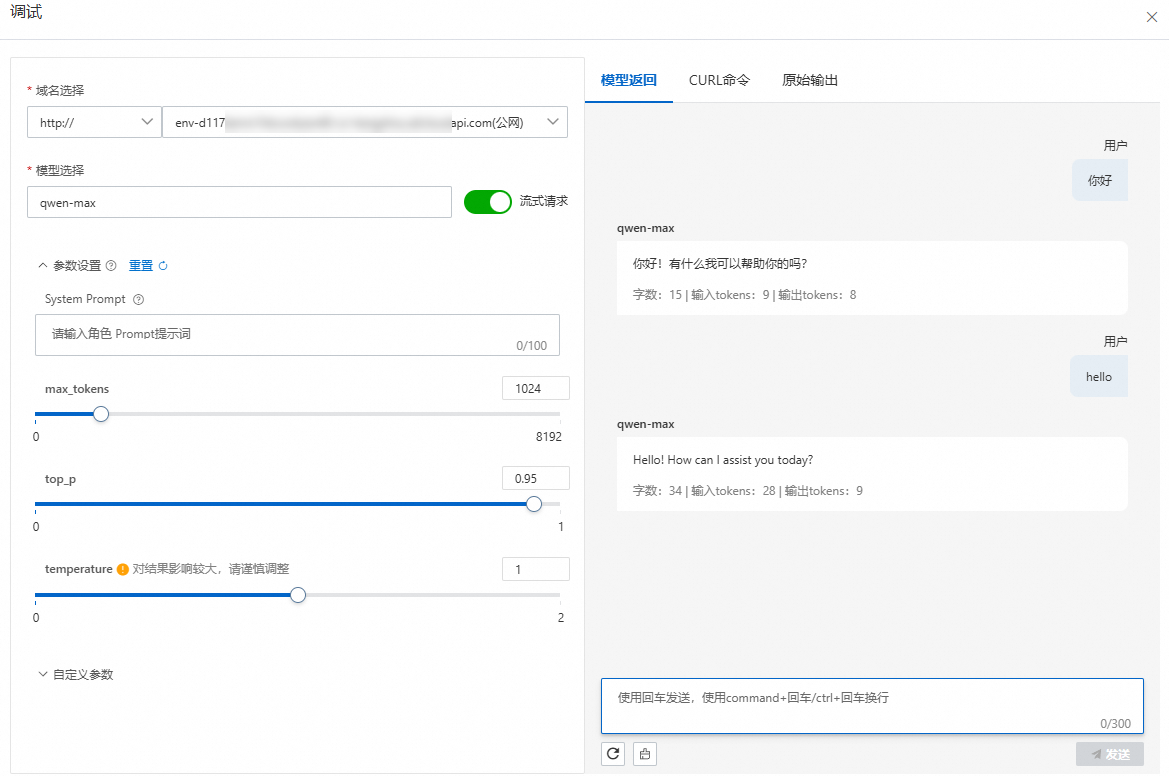
当前只支持文本生成的/v1/chat/completions调试。
打开AI网关控制台实例页面,在顶部菜单栏选择目标实例所在地域,并单击目标实例ID。
在左侧导航栏,选择Model API,单击目标API操作列的调试。
在调试面板中,选择域名和模型,按需开启流式请求开关、配置参数设置和自定义参数。在右侧模型返回页签中,输入调试内容并单击发送进行调试。
删除Model API
打开AI网关控制台实例页面,在顶部菜单栏选择目标实例所在地域,并单击目标实例ID。
在左侧导航栏,选择Model API,单击目标API操作列下的删除,在确认删除的弹框中输入API名称,然后单击删除。