Bir elastik ağ arabirimini (ENI) Elastic Compute Service (ECS) örneğinden ayırır.
Operation description
Aşağıdaki hususlara dikkat edin:
-
Bir örneğin birincil ENI'sini ayıramazsınız.
-
Ayrılacak ENI'nin Detaching (Unbinding) veya InUse (Bound) durumunda olduğundan emin olun.
-
ENI'yi ayırmak istediğiniz örneğin Running veya Stopped durumunda olduğundan emin olun.
-
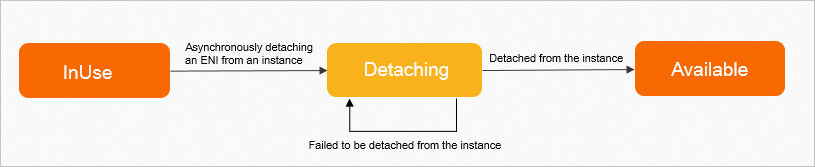
DetachNetworkInterface işlemi eşzamansız bir işlemdir. Bir ENI'yi ayırmak için bu işlem çağrıldıktan sonra, ENI'nin ayrılıp ayrılmadığını belirlemek için ENI'nin durumunu veya olaylarını kontrol edebilirsiniz. Aşağıdaki şekil, ENI'nin durumları arasındaki geçişleri göstermektedir.
-
ENI Detaching durumundaysa, ENI ayırma isteği gönderilmiş olup ENI ilişkili örnekten ayrılmaktadır.
-
ENI Available durumundaysa, ENI ilişkili örnekten ayrılmıştır.
-
ENI Detaching durumunda takılı kalırsa, belirli nedenlerden dolayı ENI ilişkili örnekten ayrılamayabilir. Örneğin, örneğin işletim sistemi ENI ayırma isteğine yanıt vermediği için ENI ayrılamayabilir. Bu sorun oluşursa, ENI'yi ayırma isteğini yeniden başlatabilirsiniz. Sorun devam ederse örneği yeniden başlatın.
-
DetachNetworkInterface işleminin nasıl çağrılacağına ilişkin örnekler hakkında bilgi için Bir ENI'yi ECS örneğinden ayırma konusuna bakın.
Try it now
 Test
Test
RAM authorization
|
Action |
Access level |
Resource type |
Condition key |
Dependent action |
|
ecs:DetachNetworkInterface |
update |
*NetworkInterface
*Instance
|
None | None |
Request parameters
|
Parameter |
Type |
Required |
Description |
Example |
| RegionId |
string |
Yes |
ENI kimliği. |
cn-hangzhou |
| NetworkInterfaceId |
string |
Yes |
ENI kimliği. |
cn-hangzhou |
| InstanceId |
string |
Yes |
Örnek kimliği. |
eni-bp67acfmxazb4p**** |
| TrunkNetworkInstanceId |
string |
No |
Trunk ENI kimliği.\n\n> Bu parametre kullanılamaz. |
i-bp67acfmxazb4p**** |
Response elements
|
Element |
Type |
Description |
Example |
|
object |
|||
| RequestId |
string |
İstek kimliği. |
473469C7-AA6F-4DC5-B3DB-A3DC0DE3C83E |
Examples
Success response
JSON format
{
  "RequestId": "473469C7-AA6F-4DC5-B3DB-A3DC0DE3C83E"
}
Error codes
|
HTTP status code |
Error code |
Error message |
Description |
|---|---|---|---|
| 400 | MissingParameter | %s | A parameter is not specified. |
| 400 | UnsupportedParameter | %s | The parameter is not supported. |
| 400 | InvalidParameter | %s | The specified parameter is invalid. |
| 400 | InvalidInstanceID.Malformed | %s | The specified InstanceId parameter is invalid. |
| 400 | InvalidOperation.InvalidRegion | %s | The specified RegionId parameter is invalid. |
| 400 | InvalidOperation.InvalidEcsState | %s | The current status of the instance does not support this operation. |
| 400 | InvalidOperation.InvalidEniState | %s | The current status of the ENI does not allow modifying ENI attributes. |
| 400 | InvalidOperation.DetachPrimaryEniNotAllowed | %s | Detaching the primary ENI from an instance is not allowed. |
| 400 | Forbidden.RegionId | %s | The service is unavailable in the current region. |
| 400 | InvalidParams.EniId | %s | The specified EniId parameter is invalid. |
| 400 | InvalidParameter.EniNotBelongEcs | %s | The specified ENI does not belong to the specified ECS instance. For more information, see the actual return result of the %s placeholder in the error message. You can call DescribeInstances to view the ENI IDs attached to the specified ECS instance. |
| 400 | InvalidOperation.EniHotPlugNotSupported | The ENI with high-performance traffic mode cannot be hot-plugged. Please stop the ECS instance to which the ENI is attached, and try again. | An ENI with high-performance communication mode enabled does not support hot unplugging. Stop the ECS instance to which the ENI is mounted and try again. |
| 500 | InternalError | The request processing has failed due to some unknown error, exception or failure. | An internal error has occurred. Try again later. |
| 500 | InvalidSecurityGroupId.EniMustHaveSecurityGroup | The specified network card does not have an associated security group. | The specified NIC is not associated with a security group. |
| 403 | InvalidUserType.NotSupported | %s | Your account does not support this operation. |
| 403 | Abs.InvalidAccount.NotFound | %s | Your Alibaba Cloud account does not exist or your AccessKey pair has expired. |
| 403 | Forbidden.NotSupportRAM | %s | RAM users are not authorized to perform this operation. |
| 403 | Forbidden.SubUser | %s | You are not authorized to manage this resource. Contact the owner of the Alibaba Cloud account for authorization. |
| 403 | MaxEniCountExceeded | %s | The maximum number of ENIs that can be managed has been reached. |
| 403 | EniPerInstanceLimitExceeded | %s | The maximum number of ENIs that can be attached to the specified instance has been reached. |
| 403 | InvalidOperation.AvailabilityZoneMismatch | %s | The operation is invalid. |
| 403 | InvalidOperation.VpcMismatch | %s | The operation is invalid. Check whether the VPC in the operation corresponds to other parameters. |
| 403 | SecurityGroupInstanceLimitExceed | %s | The number of instances in the security group has reached the maximum limit. |
| 403 | InvalidSecurityGroupId.NotVpc | %s | The specified SecurityGroupId parameter is invalid and the network type of the security group is not VPC. |
| 403 | InvalidOperation.InvalidEniType | %s | The current type of the Elastic Network Interface (ENI) does not support this operation. |
| 403 | InvalidOperation.EniServiceManaged | %s | The operation is invalid. |
| 403 | InvalidOperation.EniLinked | %s | The operation is invalid because the current ENI of the instance is associated with other ENIs. You must disassociate the ENI from the other ENIs before you can unbind the ENI from the instance. |
| 403 | InvalidInstanceId.NotFound | %s | The specified instance does not exist. Check whether the InstanceId parameter is valid. |
| 403 | InvalidOperation.HotPlugNotSupport | %s | The operation is not supported while the specified resource is running. For more information, see the return value of the %s placeholder in the error message. |
| 403 | InvalidOperation.InvalidTrunkEniStatus | %s | The current status of the specified trunk-mode ENI does not allow this operation. For more information, see the actual return result in the %s placeholder of the error message. |
| 403 | InvalidOperation.TrunkingIsNotAllowed | %s | The trunk network card is not operational. |
| 403 | InvalidOperation.InstanceTypeNotSupportEniTrunking | %s | The specified instance type does not support trunk mode for Elastic Network Interfaces (ENIs). |
| 403 | InvalidParameter.EniNotBelongTrunk | %s | The specified ENI is not in trunk mode. For more information, see the return value of the %s placeholder in the error message. |
| 403 | InvalidOperation.EniTypeNotSupportTrunking | %s | The type of the ENI does not support operations related to the trunk mode. For more information, see the return value of the %s placeholder in the error message. |
| 403 | InvalidOperation.HasMemberEniAttached | %s | Other ENIs are attached to the ENI that works in trunk mode. For more information, see the return value of the %s placeholder in the error message. |
| 403 | InvalidParameter.EniNotBelongEcs | %s | |
| 404 | InvalidEcsId.NotFound | %s | The specified instance ID does not exist. |
| 404 | InvalidEniId.NotFound | %s | |
| 404 | InvalidVSwitchId.NotFound | %s | The specified vSwitch does not exist. |
| 404 | InvalidSecurityGroupId.NotFound | %s | The specified security group ID does not exist. |
See Error Codes for a complete list.
Release notes
See Release Notes for a complete list.