Bir Elastik Ağ Arabirimini (ENI) zamanuyumsuz olarak siler.
Operation description
Bu işlemi çağırırken aşağıdaki hususlara dikkat edin:
-
ENI'nin Kullanılabilir durumunda olması gerekir.
-
ENI bir ECS örneğine bağlıysa, ENI'yi silebilmeniz için önce örneğin bağlantısını kesmeniz (DetachNetworkInterface) gerekir.
-
ENI silindikten sonra:
-
ENI'nin tüm özel adresleri (birincil özel IP adresi ve ikincil özel IP adresleri dahil) otomatik olarak serbest bırakılır.
-
Silinen ENI, ilişkili tüm güvenlik gruplarından kaldırılır.
-
-
Bu zamanuyumsuz bir işlemdir. İşlemi başarıyla çağırdıktan sonra sonucu belirlemek için ENI durumunu kontrol edebilir veya ağ arabirimi denetleyicisi (NIC) işlem olaylarını dinleyebilirsiniz. ENI durum makinesi aşağıdaki şekilde gösterilmiştir:
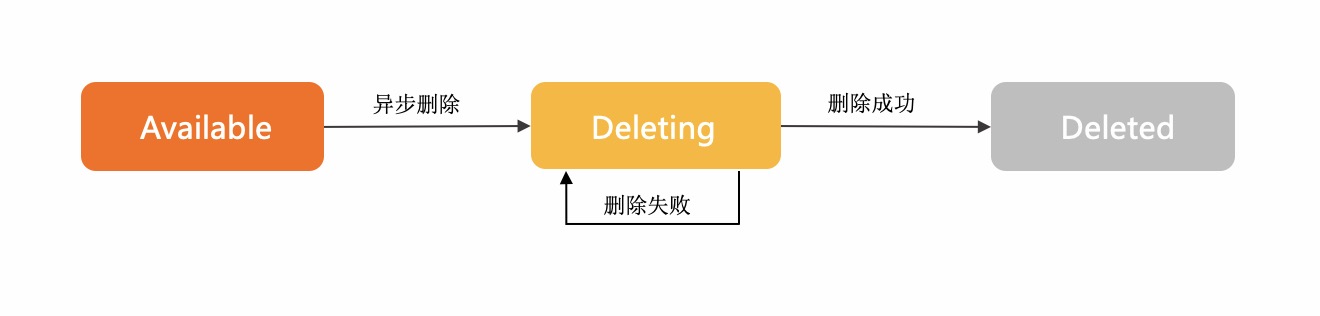
Deleting durumu, silme isteğinin başarıyla gönderildiğini ve ENI'nin silinmekte olduğunu gösterir.
ENI bulunamıyorsa, ENI silinmiş demektir.
ENI uzun bir süre Deleting durumunda kalırsa, silme işlemi başarısız olmuştur. Bu durumda, ENI için yeni bir silme isteği gönderebilirsiniz.
Örnek kod ayrıntıları için Bir ENI silme konusuna bakın.
Try it now
 Test
Test
RAM authorization
|
Action |
Access level |
Resource type |
Condition key |
Dependent action |
|
ecs:DeleteNetworkInterface |
delete |
*NetworkInterface
|
None | None |
Request parameters
|
Parameter |
Type |
Required |
Description |
Example |
| RegionId |
string |
Yes |
Bölge kimliği. En son bölge listesini sorgulamak için DescribeRegions API'sini çağırabilirsiniz. |
cn-hangzhou |
| NetworkInterfaceId |
string |
Yes |
ENI kimliği. |
eni-bp14v2sdd3v8htln**** |
Response elements
|
Element |
Type |
Description |
Example |
|
object |
|||
| RequestId |
string |
İstek kimliği. |
F3CD6886-D8D0-4FEE-B93E-1B73239673DE |
Examples
Success response
JSON format
{
  "RequestId": "F3CD6886-D8D0-4FEE-B93E-1B73239673DE"
}
Error codes
|
HTTP status code |
Error code |
Error message |
Description |
|---|---|---|---|
| 400 | InvalidOperation.HasSlaveEniBonded | %s | |
| 400 | MissingParameter | %s | |
| 400 | UnsupportedParameter | %s | |
| 400 | InvalidParameter | %s | |
| 400 | InvalidInstanceID.Malformed | %s | |
| 400 | InvalidOperation.InvalidEcsState | %s | |
| 400 | InvalidOperation.InvalidEniState | %s | |
| 400 | InvalidOperation.DetachPrimaryEniNotAllowed | %s | |
| 400 | Forbidden.RegionId | %s | |
| 400 | InvalidParams.EniId | %s | |
| 500 | InternalError | The request processing has failed due to some unknown error, exception or failure. | |
| 500 | InvalidSecurityGroupId.EniMustHaveSecurityGroup | The specified network card does not have an associated security group. | |
| 403 | InvalidUserType.NotSupported | %s | |
| 403 | Abs.InvalidAccount.NotFound | %s | |
| 403 | Forbidden.NotSupportRAM | %s | |
| 403 | Forbidden.SubUser | %s | |
| 403 | MaxEniCountExceeded | %s | |
| 403 | EniPerInstanceLimitExceeded | %s | |
| 403 | InvalidOperation.AvailabilityZoneMismatch | %s | |
| 403 | InvalidOperation.VpcMismatch | %s | |
| 403 | SecurityGroupInstanceLimitExceed | %s | |
| 403 | InvalidSecurityGroupId.NotVpc | %s | |
| 403 | InvalidOperation.InvalidEniType | %s | |
| 403 | InvalidEniId.NotFound | %s | |
| 403 | InvalidOperation.EniServiceManaged | %s | |
| 403 | InvalidOperation.TrunkingIsNotAllowed | The account is not authorized to use trunk ENI or perform trunking operation. | |
| 404 | InvalidEcsId.NotFound | %s | |
| 404 | InvalidEniId.NotFound | %s | |
| 404 | InvalidVSwitchId.NotFound | %s | |
| 404 | InvalidSecurityGroupId.NotFound | %s |
See Error Codes for a complete list.
Release notes
See Release Notes for a complete list.