AttachNetworkInterface işlemini çağırarak VPC'ye bağlı bir ECS örneğine Elastik Ağ Arabirimi (ENI) ekler. NetworkInterfaceId, InstanceId ve NetworkCardIndex gibi parametreleri belirtebilirsiniz.
Operation description
Bu işlemi çağırırken aşağıdaki hususlara dikkat edin:
-
Elastik Ağ Arabirimi (ENI) etkin (
Available) durumunda olmalıdır. Bir ENI, yalnızca ağ arabirimi denetleyicisi (NIC) ile aynı bölgede ve VPC'de bulunan tek bir örneğe eklenebilir. -
ECS örneği Çalışıyor (Running) veya Durduruldu (Stopped) durumunda olmalıdır. Bazı ECS örnek türleri, Elastik Ağ Arabirimi (ENI) eklerken ECS örneğinin Durduruldu durumunda olmasını gerektirir. Daha fazla bilgi için ENI ekleme konusundaki ECS örneğinin durdurulmasını gerektiren ECS örnek türleri bölümüne bakın.
NotÖrnek en son 1 Nisan 2018'den önce başlatıldıysa (yeni satın alınan bir örneği başlatma, yeniden başlatma veya açma dahil ancak bunlarla sınırlı olmamak üzere), Çalışıyor durumundaki örneği yeniden başlatmak için RebootInstance işlemini çağırmanız gerekir. Aksi takdirde, ağ arabirimi denetleyicisi (NIC) eklenemez.
-
Tek bir örneğe aynı anda birden fazla Elastik Ağ Arabirimi (ENI) eklenebilir. Daha fazla bilgi için ENI'ye genel bakış konusuna bakın.
-
Ağ arabirimi denetleyicisinin (NIC) ait olduğu vSwitch, örnekle aynı bölgede ve VPC'de olmalıdır.
-
Bu eşzamansız bir işlemdir. Başarılı bir çağrıdan sonra, sonucu almak için Elastik Ağ Arabirimi (ENI) durumunu kontrol edebilir veya ağ arabirimi denetleyicisi (NIC) işlem olaylarını dinleyebilirsiniz. ENI durum makinesi aşağıdaki şekilde gösterilmektedir:
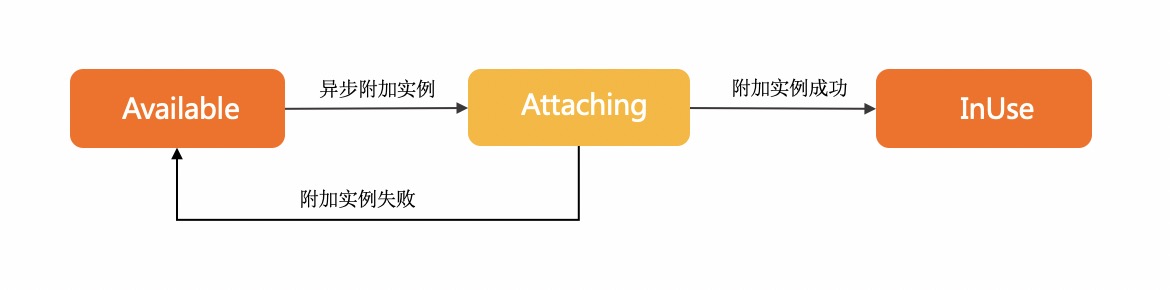
Attaching, ENI'yi ekleme isteğinin başarıyla gönderildiğini ve ENI'nin ECS örneğine eklendiğini gösterir.
InUse, ENI'nin ECS örneğine eklendiğini gösterir.
Available, ENI'nin ECS örneğine eklenemediğini gösterir.
Ayrıntılar için Ağ arabirimi denetleyicisi (NIC) ekleme konusuna bakın.
Try it now
 Test
Test
RAM authorization
|
Action |
Access level |
Resource type |
Condition key |
Dependent action |
|
ecs:AttachNetworkInterface |
update |
*NetworkInterface
*Instance
|
None | None |
Request parameters
|
Parameter |
Type |
Required |
Description |
Example |
| RegionId |
string |
Yes |
Örneğin bölge kimliği. En son bölge listesini sorgulamak için DescribeRegions işlemini çağırabilirsiniz. |
cn-hangzhou |
| NetworkInterfaceId |
string |
Yes |
Ağ arabirimi denetleyicisi (NIC) kimliği. |
eni-bp17pdijfczax1huji**** |
| InstanceId |
string |
Yes |
Örnek kimliği. |
i-bp16qstyvxj9gpqw**** |
| TrunkNetworkInstanceId |
string |
No |
Gövde ENI'sinin kimliği. Not
Bu parametre henüz kullanılamıyor. |
eni-f8zapqwj1v1j4ia3**** |
| WaitForNetworkConfigurationReady |
boolean |
No |
Not
Bu parametre kullanımdan kaldırılmıştır. |
null |
| NetworkCardIndex |
integer |
No |
ENI için belirtilen ağ kartının dizini. Not
NetworkCardIndex için geçerli değerler örnek ailesine bağlıdır. Örnek türü ağ kartlarını desteklemiyorsa, bu parametreyi belirtemezsiniz. Örnek türü ağ kartlarını destekliyorsa, geçerli değerler için Örnek aileleri konusuna bakın. |
0 |
Response elements
|
Element |
Type |
Description |
Example |
|
object |
|||
| RequestId |
string |
İstek kimliği. |
473469C7-AA6F-4DC5-B3DB-A3DC0DE3C83E |
Examples
Success response
JSON format
{
  "RequestId": "473469C7-AA6F-4DC5-B3DB-A3DC0DE3C83E"
}
Error codes
|
HTTP status code |
Error code |
Error message |
Description |
|---|---|---|---|
| 400 | MissingParameter | %s | A parameter is not specified. |
| 400 | UnsupportedParameter | %s | The parameter is not supported. |
| 400 | InvalidParameter | %s | The specified parameter is invalid. |
| 400 | InvalidInstanceID.Malformed | %s | The specified InstanceId parameter is invalid. |
| 400 | InvalidOperation.InvalidRegion | %s | The specified RegionId parameter is invalid. |
| 400 | InvalidOperation.InvalidEcsState | %s | The current status of the instance does not support this operation. |
| 400 | InvalidOperation.InvalidEniState | %s | The current status of the ENI does not allow modifying ENI attributes. |
| 400 | InvalidOperation.DetachPrimaryEniNotAllowed | %s | Detaching the primary ENI from an instance is not allowed. |
| 400 | Forbidden.RegionId | %s | The service is unavailable in the current region. |
| 400 | InvalidOperation.InvalidGeneration | %s | The specified ECS instance type does not support attaching an Elastic Network Interface (ENI). |
| 400 | InvalidParams.EniId | %s | The specified EniId parameter is invalid. |
| 400 | InvalidOperation.UserNotSupportNetworkCard | User not support network card. | |
| 400 | InvalidOperation.ConnectionTrackingConfigNotSupportMemberEni | Member eni not support ConnectionTrackingConfiguration. | Network connection configurations cannot be specified for member network interfaces. |
| 400 | InvalidParameter.NetworkCardIndexInvalid | The network card index is invalid or the current ECS/ENI type does not support the value. | Physical NIC properties do not meet the NIC or instance type restrictions |
| 400 | InvalidOperation.InstanceTypeNotSupportRss | The ECS instance type does not support Rss. | The ECS instance type does not support Rss. |
| 400 | OperationDenied.NoEniStock | The requested resource of ENI is insufficient in the specified ECS, please retry or upgrade to enterprise-level computing instance types. | The requested resource of ENI is insufficient in the specified ECS, please retry or upgrade to enterprise-level computing instance types. |
| 400 | InvalidOperation.InstanceTypeNotSupportSriov | The specified instance type does not support ENI Sriov. | The specified instance type does not support ENI Sriov. |
| 500 | InternalError | The request processing has failed due to some unknown error, exception or failure. | An internal error has occurred. Try again later. |
| 500 | InvalidSecurityGroupId.EniMustHaveSecurityGroup | The specified network card does not have an associated security group. | The specified NIC is not associated with a security group. |
| 403 | InvalidUserType.NotSupported | %s | Your account does not support this operation. |
| 403 | Abs.InvalidAccount.NotFound | %s | Your Alibaba Cloud account does not exist or your AccessKey pair has expired. |
| 403 | Forbidden.NotSupportRAM | %s | RAM users are not authorized to perform this operation. |
| 403 | Forbidden.SubUser | %s | You are not authorized to manage this resource. Contact the owner of the Alibaba Cloud account for authorization. |
| 403 | MaxEniCountExceeded | %s | The maximum number of ENIs that can be managed has been reached. |
| 403 | EniPerInstanceLimitExceeded | %s | The maximum number of ENIs that can be attached to the specified instance has been reached. |
| 403 | InvalidOperation.AvailabilityZoneMismatch | %s | The operation is invalid. |
| 403 | InvalidOperation.VpcMismatch | %s | The operation is invalid. Check whether the VPC in the operation corresponds to other parameters. |
| 403 | SecurityGroupInstanceLimitExceed | %s | The number of instances in the security group has reached the maximum limit. |
| 403 | InvalidSecurityGroupId.NotVpc | %s | The specified SecurityGroupId parameter is invalid and the network type of the security group is not VPC. |
| 403 | InvalidOperation.InvalidEniType | %s | The current type of the Elastic Network Interface (ENI) does not support this operation. |
| 403 | InvalidInstanceId.NotFound | %s | The specified instance does not exist. Check whether the InstanceId parameter is valid. |
| 403 | InvalidEni.NotSameVpc | %s | The specified resource and the specified ENI do not belong to the same VPC. For more information, see the return value of the %s placeholder in the error message. |
| 403 | InvalidOperation.Ipv4CountExceeded | %s | The operation is valid because the maximum number of IPv4 addresses has been reached. |
| 403 | InvalidOperation.EniServiceManaged | %s | The operation is invalid. |
| 403 | InvalidOperation.MultiGroupType | The specified instance can't join different types of security group. | The specified instance cannot join security groups of different types. |
| 403 | InvalidOperation.NotSupportEnterpriseGroup | The specified instance type doesn't support enterprise level security group. | |
| 403 | InvalidOperation.EniCountExceeded | The maximum number of eni in a enterprise level security group is exceeded. | The number of NICs in the enterprise security group exceeds the limit. |
| 403 | InvalidOperation.EipBindModel | %s | |
| 403 | InvalidOperation.Ipv6NotSupport | %s | The current instance type does not support IPv6. |
| 403 | InvalidOperation.HotPlugNotSupport | %s | The operation is not supported while the specified resource is running. For more information, see the return value of the %s placeholder in the error message. |
| 403 | InvalidInstance.NetworkType | %s | |
| 403 | InvalidOperation.InvalidTrunkEniStatus | %s | The current status of the specified trunk-mode ENI does not allow this operation. For more information, see the actual return result in the %s placeholder of the error message. |
| 403 | InvalidOperation.TrunkingIsNotAllowed | %s | The trunk network card is not operational. |
| 403 | InvalidOperation.InstanceTypeNotSupportEniTrunking | %s | The specified instance type does not support trunk mode for Elastic Network Interfaces (ENIs). |
| 403 | InvalidOperation.EniTypeNotSupportTrunking | %s | The type of the ENI does not support operations related to the trunk mode. For more information, see the return value of the %s placeholder in the error message. |
| 403 | InvalidOperation.EniTrunkDeviceFull | %s | |
| 403 | InvalidParameter.EniNotBelongTrunk | %s | The specified ENI is not in trunk mode. For more information, see the return value of the %s placeholder in the error message. |
| 403 | InvalidOperation.EniTypeNotSupportAttachToTrunk | %s | |
| 403 | InvalidParameter.EniNotBelongEcs | %s | |
| 403 | InvalidParameter.InvalidEniQueueNumber | %s | The number of network interface controller (NIC) queues is incorrect. For more information, refer to the actual return result of the %s placeholder in the error message. |
| 403 | InvalidOperation.MaxEniQueueNumberExceeded | %s | The number of Elastic Network Interface (ENI) queues exceeds the upper limit. For more information, see the actual return result of the %s placeholder in the error message. |
| 403 | InvalidOperation.ExceedInstanceTypeQueueNumber | %s | The maximum number of queues for all ENIs on an instance has been exceeded. For more information, see the return value of the %s placeholder in the error message. |
| 403 | InvalidOperation.HighPerformanceTrafficModeNotSupportTrunkEni | %s | |
| 403 | InvalidOperation.HighPerformanceTrafficModeNotSupportMemberEni | %s | |
| 403 | InvalidOperation.InstanceTypeNotSupportHighPerformanceTrafficMode | %s | The instance type of the specified instance does not support the NIC of the RDMA communication mode. |
| 403 | InvalidOperation.EniTrafficModeNotSupportIpv6 | %s | |
| 403 | InvalidOperation.MaxEniQueuePairNumberExceed | %s | |
| 403 | InvalidParameter.InvalidQueuePairNumber | %s | |
| 403 | InvalidOperation.EniQueuePairNumberOverflow | %s | |
| 403 | InvalidOperation.HighPerformanceEniPerInstanceLimitExceeded | %s | |
| 403 | InvalidOperation.Ipv6CountExceeded | %s. | The operation is invalid because the number of IPv6 has reached the upper limit. |
| 403 | InvalidOperation.PrimaryEniNotExist | Primary Eni Not Exist. | The primary NIC of the instance does not exist. |
| 404 | InvalidEcsId.NotFound | %s | The specified instance ID does not exist. |
| 404 | InvalidEniId.NotFound | %s | |
| 404 | InvalidVSwitchId.NotFound | %s | The specified vSwitch does not exist. |
| 404 | InvalidSecurityGroupId.NotFound | %s | The specified security group ID does not exist. |
See Error Codes for a complete list.
Release notes
See Release Notes for a complete list.