通過Scan搜尋實現上下文查詢
開發人員無需登入伺服器,在大量日誌中通過關鍵字檢索日誌,Log Service支援通過Scan搜尋查看指定日誌在原始檔案中的上下文資訊。
帶內容欄位返回的Scan文法
{Index Search Query} | {Scan Query} | with_pack_meta前提條件
服務端通過PackId關聯日誌上下文,請參見通過PackId機制關聯日誌上下文,上傳PackId。
操作步驟
Java SDK
程式碼範例
-
在pom.xml檔案中添加如下依賴。
<!-- https://mvnrepository.com/artifact/com.aliyun.openservices/aliyun-log --> <dependency> <groupId>com.aliyun.openservices</groupId> <artifactId>aliyun-log</artifactId> <version>0.6.120</version> </dependency> -
使用如下代碼。根據實際情況替換參數
project、logStore、endpoint、accessKeyId和accessKeySecret,Log Service的公網網域名稱,擷取方式請參見服務存取點,使用者身份識別ID,擷取方式,請參見建立AccessKey。import com.aliyun.openservices.log.Client; import com.aliyun.openservices.log.common.QueriedLog; import com.aliyun.openservices.log.exception.LogException; import com.aliyun.openservices.log.response.GetLogsResponse; public class DoScanTest { // 本樣本從環境變數中擷取AccessKey ID和AccessKey Secret。 static String accessKeyId = System.getenv("ALIBABA_CLOUD_ACCESS_KEY_ID"); static String accessKeySecret = System.getenv("ALIBABA_CLOUD_ACCESS_KEY_SECRET"); //Log Service的服務存取點。此處以杭州為例,其它地區請根據實際情況填寫。 static String host = "cn-hangzhou.log.aliyuncs.com"; //初始化Log Serviceclient static Client client = new Client(host, accessKeyId, accessKeySecret); public static void main(String[] args) throws LogException { String project = "test-project"; String logStore = "test-logstore"; int fromTime = 1740985125; // event-time, [from, to) int toTime = 1740985125 + 7200; // event-time, [from, to) // String query = "Status:404 | where http_host = 'www.yt.mock.com'"; // 不返回上下文資訊 String query = "Status:404 | where http_host = 'www.yt.mock.com' | with_pack_meta"; // 返回上下文資訊 int totalCount = 0; // boolean reverse = false; // 從前向後尋找 boolean reverse = true; // 從後向前尋找 boolean forward = true; int offset = 0; while (true) { GetLogsResponse resp = client.GetLogs(project, logStore, fromTime, toTime, "", query, 100, offset, reverse, forward, "mode=scan;"); for (QueriedLog log : resp.getLogs()) { System.out.println(log.GetLogItem().ToJsonString()); } System.out.println("[response of this scan]\tbegin offset: " + resp.GetBeginOffset() + "\tend offset: " + resp.GetEndOffset() + "\tresult logs: " + resp.getLogs().size() + "\tis finished: " + resp.IsScanAll()); totalCount += resp.getLogs().size(); if (resp.IsScanAll()) { break; } offset = forward ? (int) resp.GetEndOffset() : (int) resp.GetBeginOffset(); } System.out.println("totally scanned logs\t: " + totalCount); } } -
運行輸出。
{ "referer": "www.xxx.xxx.xxx", "slbid": "slb-01", "scheme": "https", "vpc_id": "8c093000-9f68-2c0f-a904-5c612483505a", "upstream_addr": "125.36.xx.xx", "owner_id": "owner-01", "body_bytes_sent": "1733", "request_method": "GET", "http_host": "www.yt.mock.com", "http_user_agent": "Mozilla/4.0 (Windows NT 6.3; Win64; x64) AppleWebKit/537.36 (KHTML, like Gecko) Chrome/11.0.1245.0 Safari/537.36", "remote_user": "0iu9d", "upstream_status": "200", "vip_addr": "139.207.xxx.xxx", "request_time": "24", "__pack_meta__": "0|MTczNjkzNzIxNzg2NDA5NT****==|287|277", "__tag__:__pack_id__":"5253859C5169****-3", "host": "www.xxx.xxx.xxx", "client_ip": "58.19.XXX.XX", "user_agent": "Mozilla/5.0 (Windows NT 7.1) AppleWebKit/534.30 (KHTML, like Gecko) Chrome/12.0.742.112 Safari/534.30", "remote_addr": "183.70.XX.XXX", "__topic__": "nginx_access_log", "instance_name": "instance-01", "time_local": "03/Mar/2025:08:02:34", "request_uri": "/request/path-2/file-4", "instance_id": "i-01", "request_length": "4458", "http_x_forwarded_for": "103.96.xxx.xxx", "upstream_response_time": "30", "network_type": "vlan", "region": "cn-shanghai", "logtime": 1740988954, "server_protocol": "HTTP/2.0", "status": "404" } [response of this scan] begin offset: 0 end offset: 1 result logs: 1 is finished: true totally scanned logs : 1 Process finished with exit code 0 -
上下文資訊。
在代碼中,當Scan 文法是
{Index Search Query} | {Scan Query}時,返回的日誌資訊中不包含內容欄位。帶內容欄位返回的文法是{Index Search Query} | {Scan Query} | with_pack_meta。如上程式碼範例中,返回的日誌內容欄位如下:
__pack_meta__: 0|MTczNjkzNzIxNzg2NDA5NT****==|287|277 __tag__:__pack_id__: 5253859C5169****-3有了這些上下文資訊後,您可以參考GetContextLogs獲得這條日誌在原始檔案中的上一條和下一條。
控制台
-
單擊目標LogStore,在搜尋方塊輸入如下Scan查詢語句。在控制台通過Scan搜尋,實現上下文查詢時,控制台會預設為Scan語句添加
with_pack_meta以請求後端。Status:404 | where http_host = 'www.yt.mock.com'執行查詢後,查詢結果返回滿足條件的日誌記錄,可展開單條日誌查看
http_host、remote_addr、request_uri、referer等欄位的詳細資料。 -
在頁簽下,找到目標日誌,單擊
 表徵圖。
表徵圖。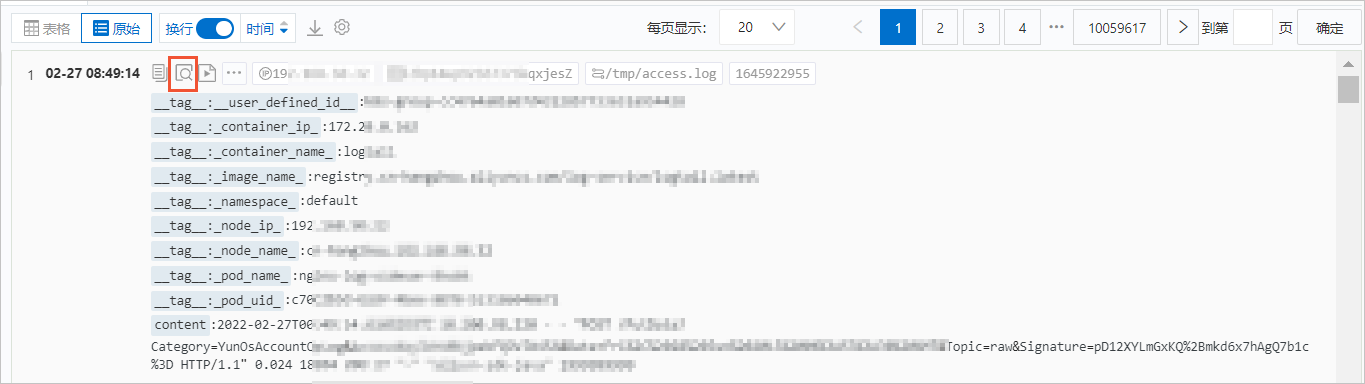
-
使用滑鼠在當前頁面上下滾動查看指定日誌的上下文資訊。
-
單擊更早,進行向上翻頁瀏覽。
-
單擊更新,進行向下翻頁瀏覽。
-
單擊全部欄位,展示頁面顯示的欄位名稱(預設全部展示),單擊欄位名稱可以取消顯示該欄位,再次單擊欄位名稱顯示該欄位。
-
在過濾文字框中設定過濾字串,可實現日誌列表中只顯示包含過濾字串的日誌。
-
在高亮文字框中設定需要高亮顯示的字串,可實現字串標黃顯示。

-