樹深度是指決策樹模型中從根節點到最深分葉節點的最長路徑上的節點數。樹深度是一個重要的超參數,它直接影響模型的複雜度和擬合能力。較深的樹可以捕捉更多的資料模式,但也更容易導致過擬合;較淺的樹則可能欠擬合資料。因此選擇適當的樹深度對於模型的效能和泛化能力非常重要。
配置組件
方法一:可視化方式
在Designer工作流程頁面添加樹深度組件,並在介面右側配置相關參數:
參數類型 | 參數 | 描述 |
欄位設定 | 輸入邊表的起點所在列 | 邊表的起點所在列。 |
輸入邊表的終點所在列 | 邊表的終點所在列。 | |
執行調優 | 進程數量 | 作業並存執行的節點數。數字越大並行度越高,但是架構通訊開銷會增大。 |
進程記憶體 | 單個作業可使用的最大記憶體量,單位:MB,預設值為4096。 如果實際使用記憶體超過該值,會拋出 | |
資料切分大小 | 資料切分的大小,單位:MB,預設值為64。 |
方法二:PAI命令方式
使用PAI命令配置樹深度組件參數。您可以使用SQL指令碼組件進行PAI命令調用,詳情請參見情境4:在SQL指令碼組件中執行PAI命令。
PAI -name TreeDepth
    -project algo_public
    -DinputEdgeTableName=TreeDepth_func_test_edge
    -DfromVertexCol=flow_out_id
    -DtoVertexCol=flow_in_id
    -DoutputTableName=TreeDepth_func_test_result;
參數 | 是否必選 | 預設值 | 描述 |
inputEdgeTableName | 是 | 無 | 輸入邊表名。 |
inputEdgeTablePartitions | 否 | 全表讀入 | 輸入邊表的分區。 |
fromVertexCol | 是 | 無 | 輸入邊表的起點所在列。 |
toVertexCol | 是 | 無 | 輸入邊表的終點所在列。 |
outputTableName | 是 | 無 | 輸出表名。 |
outputTablePartitions | 否 | 無 | 輸出表的分區。 |
lifecycle | 否 | 無 | 輸出表的生命週期。 |
workerNum | 否 | 未設定 | 作業並存執行的節點數。數字越大並行度越高,但是架構通訊開銷會增大。 |
workerMem | 否 | 4096 | 單個作業可使用的最大記憶體量,單位:MB,預設值為4096。 如果實際使用記憶體超過該值,會拋出 |
splitSize | 否 | 64 | 資料切分大小。 |
使用樣本
添加SQL指令碼組件,去勾選使用Script模式和是否由系統添加Create Table語句,並在SQL指令碼中輸入以下SQL語句。
drop table if exists TreeDepth_func_test_edge;
create table TreeDepth_func_test_edge as
select * from
(
    select '0' as flow_out_id, '1' as flow_in_id
    union all
    select '0' as flow_out_id, '2' as flow_in_id
    union all
    select '1' as flow_out_id, '3' as flow_in_id
    union all
    select '1' as flow_out_id, '4' as flow_in_id
    union all
    select '2' as flow_out_id, '4' as flow_in_id
    union all
    select '2' as flow_out_id, '5' as flow_in_id
    union all
    select '4' as flow_out_id, '6' as flow_in_id
    union all
    select 'a' as flow_out_id, 'b' as flow_in_id
    union all
    select 'a' as flow_out_id, 'c' as flow_in_id
    union all
    select 'c' as flow_out_id, 'd' as flow_in_id
    union all
    select 'c' as flow_out_id, 'e' as flow_in_id
)tmp;
drop table if exists TreeDepth_func_test_result;
create table TreeDepth_func_test_result
(
  node string,
  root string,
  depth bigint
);
對應的資料結構圖:
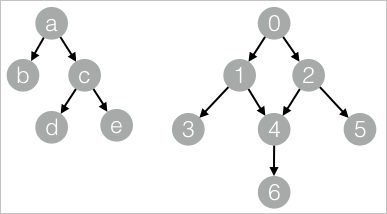
添加SQL指令碼組件,去勾選使用Script模式和是否由系統添加Create Table語句,在SQL指令碼中輸入以下PAI命令,並將步驟 1和步驟 2的組件進行連線。
drop table if exists ${o1};
PAI -name TreeDepth
    -project algo_public
    -DinputEdgeTableName=TreeDepth_func_test_edge
    -DfromVertexCol=flow_out_id
    -DtoVertexCol=flow_in_id
    -DoutputTableName=${o1};
單擊左上方
 ,運行工作流程。
待運行結束,按右鍵步驟 2的組件,選擇查看資料 > SQL指令碼的輸出,查看訓練結果。
| node | root | depth |
| ---- | ---- | ----- |
| a    | a    | 0     |
| b    | a    | 1     |
| c    | a    | 1     |
| d    | a    | 2     |
| e    | a    | 2     |
| 0    | 0    | 0     |
| 1    | 0    | 1     |
| 2    | 0    | 1     |
| 3    | 0    | 2     |
| 4    | 0    | 2     |
| 5    | 0    | 2     |
| 6    | 0    | 3     |