本文為您介紹Checkpoint(ckpt)、Hypernetwork和LoRA等模型,以及如何使用模型廣場。
點擊登入PAI ArtLab控制台。
前提條件
使用模型廣場的模型
SD WebUI/ComfyUI/Kohya專享版
登入PAI ArtLab控制台,在左側導覽列單擊模型,在模型廣場頁簽,單擊
 將目標模型添加至我的模型。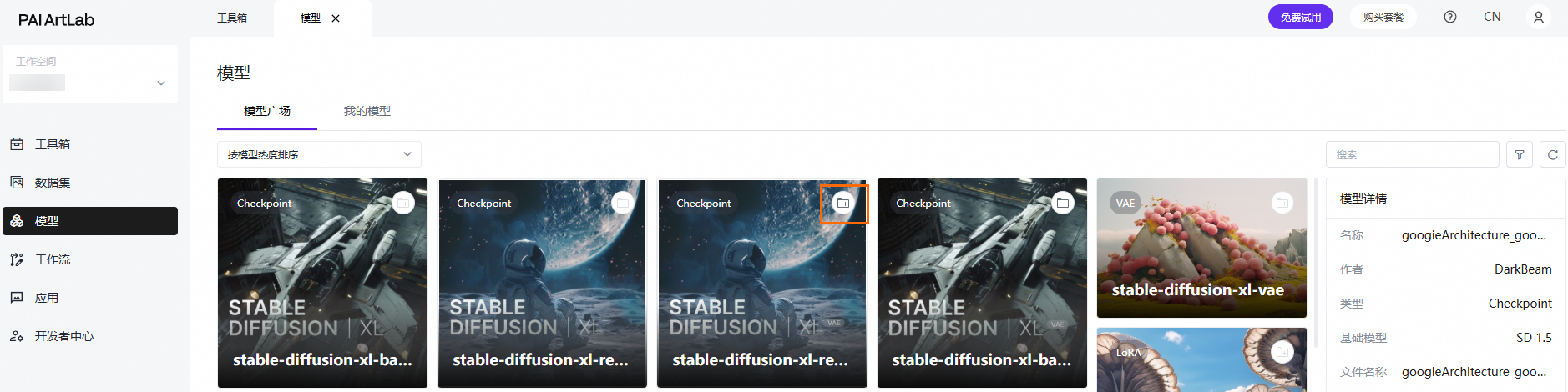
待模型傳輸完後,在我的模型頁簽可查看該模型。
SD WebUI共用版
登入PAI ArtLab控制台,在左側導覽列單擊模型,在我的模型頁簽,單擊
 將目標模型添加到SD共用版。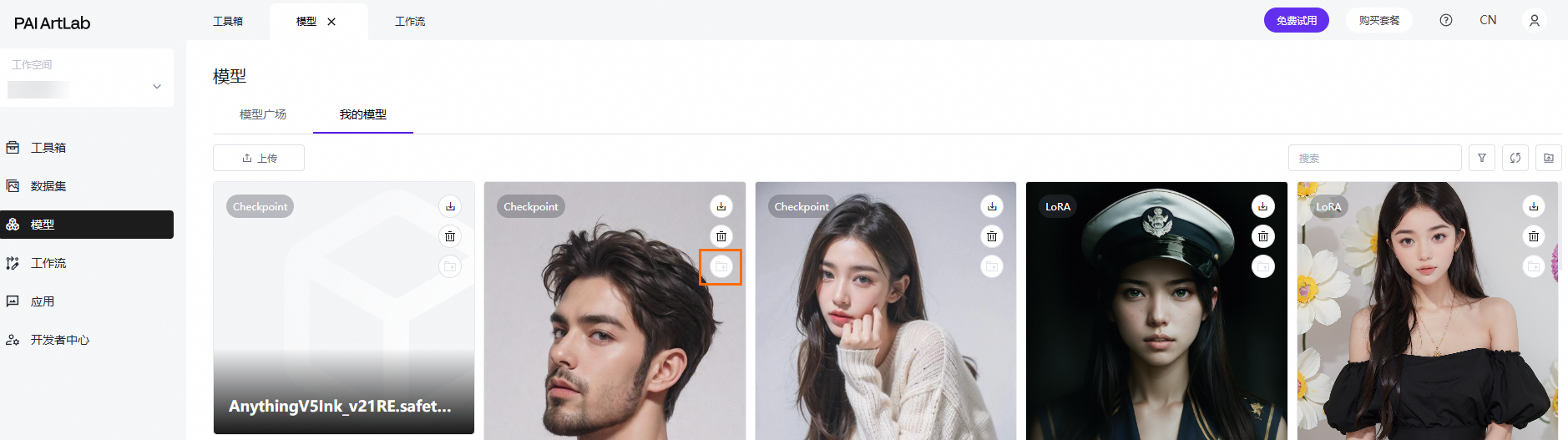
待模型傳輸完後,重新整理模型地區,即可找到該模型。
上傳本地模型到PAI ArtLab平台
支援自訂上傳模型或安裝節點:SD WebUI共用版工具、SD WebUI/ComfyUI/Kohya專享版工具
不支援自訂上傳模型或安裝節點:ComfyUI共用版工具
模型檔案小於5 GB
登入PAI ArtLab控制台,在左側導覽列單擊模型,在我的模型頁簽,單擊上傳,完成相關配置後,單擊確定。
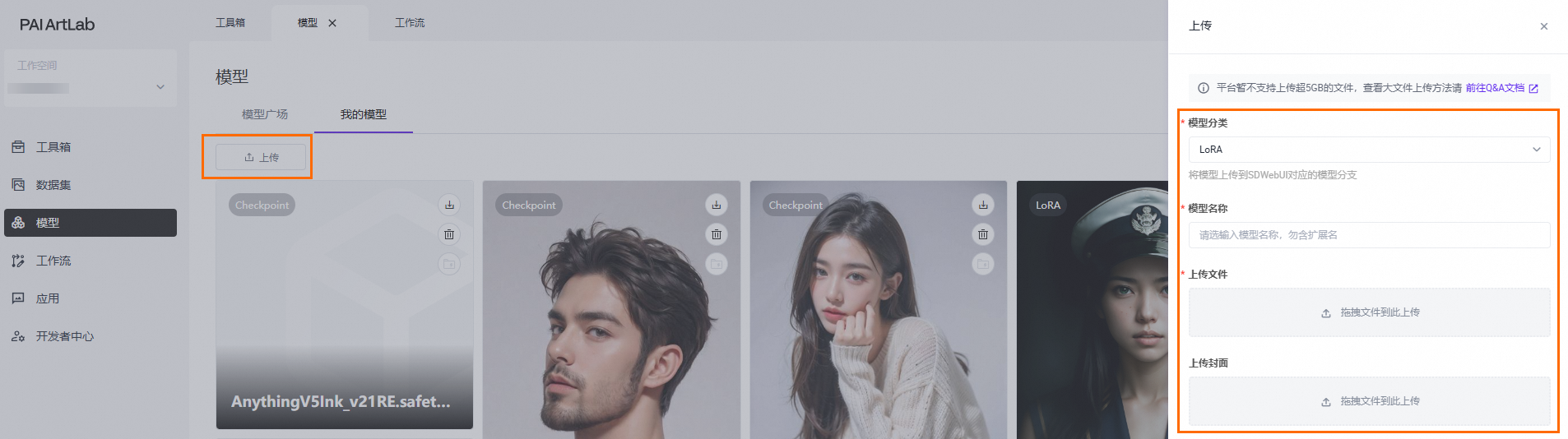
待模型傳輸完後,重新整理模型地區,即可找到該模型。
模型檔案大於5 GB
登入PAI ArtLab控制台,記錄工作空間ID、帳號ID和儲存路徑。
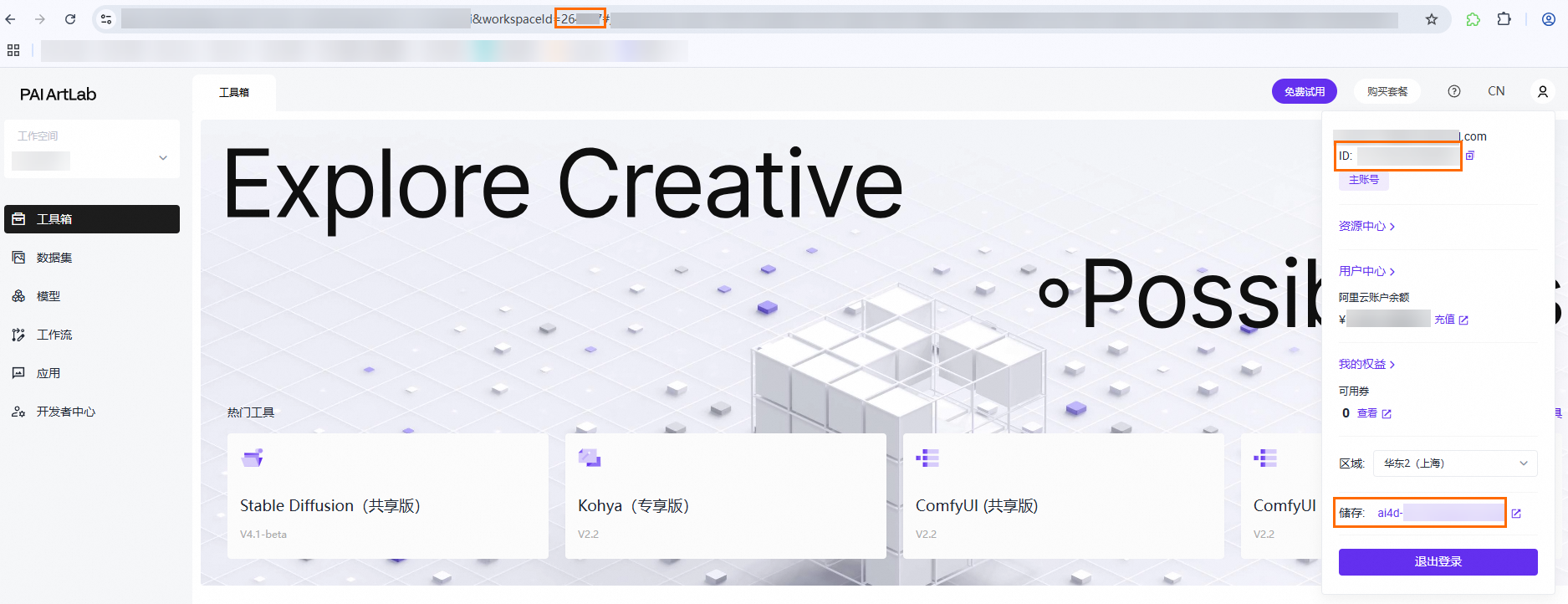
上傳模型檔案。
進入OSS Browser,通過搜尋儲存路徑,找到對應Bucket。
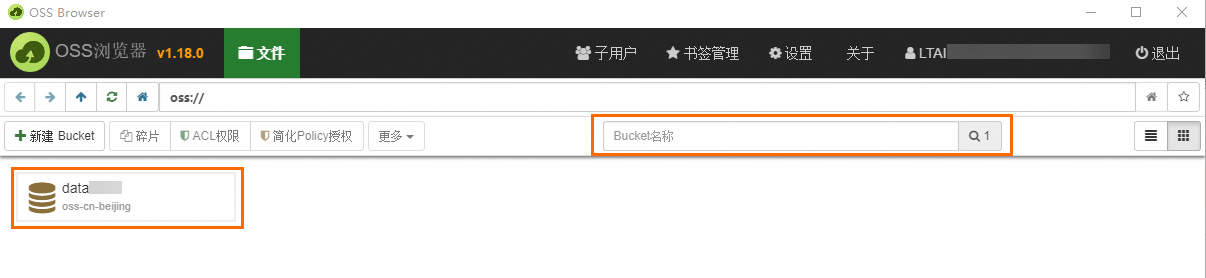
進入Bucket,通過搜尋工作空間ID,找到對應檔案路徑。
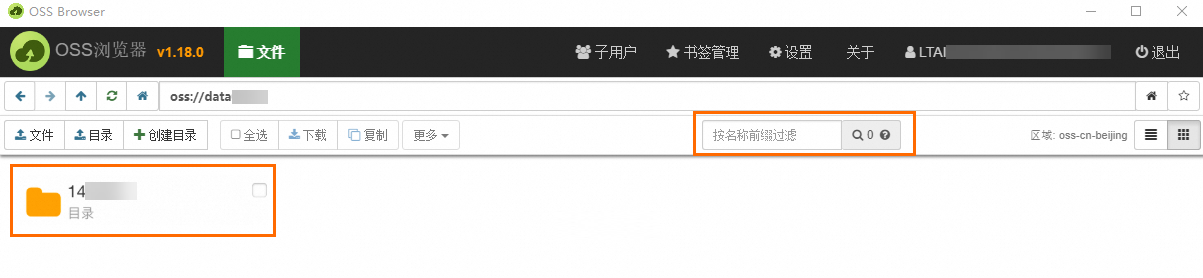
進入該檔案路徑,通過搜尋帳號ID,找到該ID對應的上傳模型的路徑,並上傳目標模型、安裝的節點檔案。
CmofyUI專享版工具、節點檔案放在custom_nodes檔案夾裡,StableDiffusion/Kohya/Comfy UI專享版工具、模型檔案放在models對應的Stable Diffusion(checkpoint)、lora等檔案夾裡。
關閉工具Tab頁簽後,重啟工具後生效。
附錄:模型類型說明
Checkpoint是基本模型或主模型,包括官方的1.5版本和2.1版本,以及使用者自訂的特色風格模型。這些模型已完成預訓練,可直接用於產生圖片。若需個人化調整,可藉助其他模型進行微調。
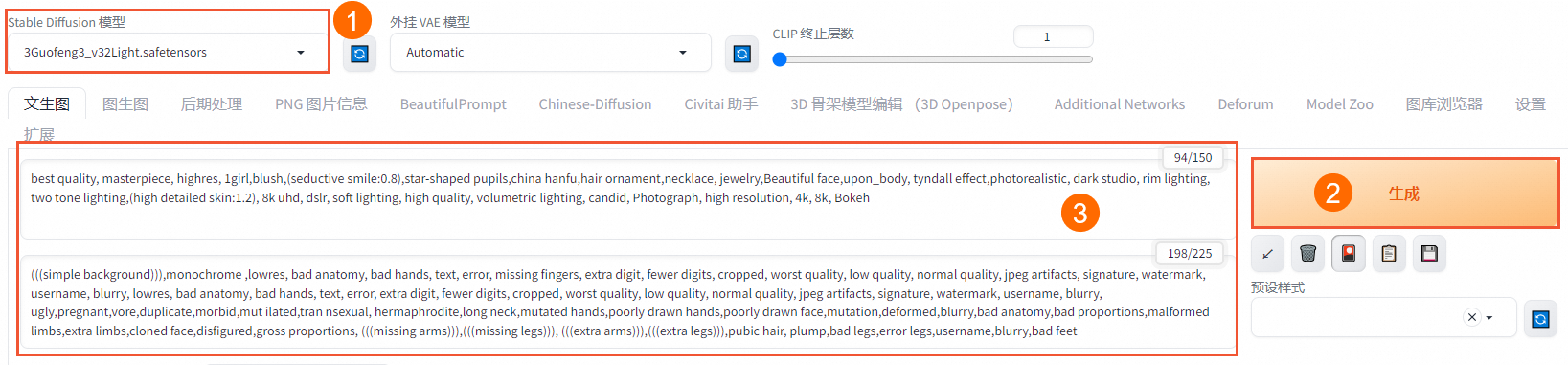
Checkpoint模型效果展示:
正向prompt:best quality, masterpiece, highres, 1girl,blush,(seductive smile:0.8),star-shaped pupils,china hanfu,hair ornament,necklace, jewelry,Beautiful face,upon_body, tyndall effect,photorealistic, dark studio, rim lighting, two tone lighting,(high detailed skin:1.2), 8k uhd, dslr, soft lighting, high quality, volumetric lighting, candid, Photograph, high resolution, 4k, 8k, Bokeh
負向prompt:(((simple background))),monochrome ,lowres, bad anatomy, bad hands, text, error, missing fingers, extra digit, fewer digits, cropped, worst quality, low quality, normal quality, jpeg artifacts, signature, watermark, username, blurry, lowres, bad anatomy, bad hands, text, error, extra digit, fewer digits, cropped, worst quality, low quality, normal quality, jpeg artifacts, signature, watermark, username, blurry, ugly,pregnant,vore,duplicate,morbid,mut ilated,tran nsexual, hermaphrodite,long neck,mutated hands,poorly drawn hands,poorly drawn face,mutation,deformed,blurry,bad anatomy,bad proportions,malformed limbs,extra limbs,cloned face,disfigured,gross proportions, (((missing arms))),(((missing legs))), (((extra arms))),(((extra legs))),pubic hair, plump,bad legs,error legs,username,blurry,bad feet
prompt來源:civitai
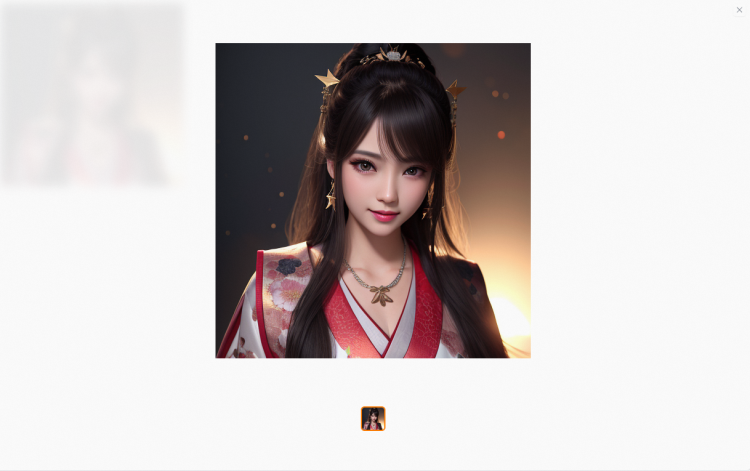
效果展示:
Embedding模型(又稱Textual Inversion模型)需與主模型搭配使用。它可以產生指定角色的特徵和風格,體積小,節省空間的,但資訊量較少,畫面和風格還原度不高,使用頻率較低。
Embedding模型使用方式:
選擇模型後,對應prompt地區會自動產生tag。
Embedding模型效果展示:
正向prompt:best quality, masterpiece, highres, 1girl,blush,(seductive smile:0.8),star-shaped pupils,china hanfu,hair ornament,necklace, jewelry,Beautiful face,upon_body, tyndall effect,photorealistic, dark studio, rim lighting, two tone lighting,(high detailed skin:1.2), 8k uhd, dslr, soft lighting, high quality, volumetric lighting, candid, Photograph, high resolution, 4k, 8k, Bokeh
負向prompt:(((simple background))),monochrome ,lowres, bad anatomy, bad hands, text, error, missing fingers, extra digit, fewer digits, cropped, worst quality, low quality, normal quality, jpeg artifacts, signature, watermark, username, blurry, lowres, bad anatomy, bad hands, text, error, extra digit, fewer digits, cropped, worst quality, low quality, normal quality, jpeg artifacts, signature, watermark, username, blurry, ugly,pregnant,vore,duplicate,morbid,mut ilated,tran nsexual, hermaphrodite,long neck,mutated hands,poorly drawn hands,poorly drawn face,mutation,deformed,blurry,bad anatomy,bad proportions,malformed limbs,extra limbs,cloned face,disfigured,gross proportions, (((missing arms))),(((missing legs))), (((extra arms))),(((extra legs))),pubic hair, plump,bad legs,error legs,username,blurry,bad feet
prompt來源:civitai
效果對比(左側為原圖,右側為模型處理後圖片):
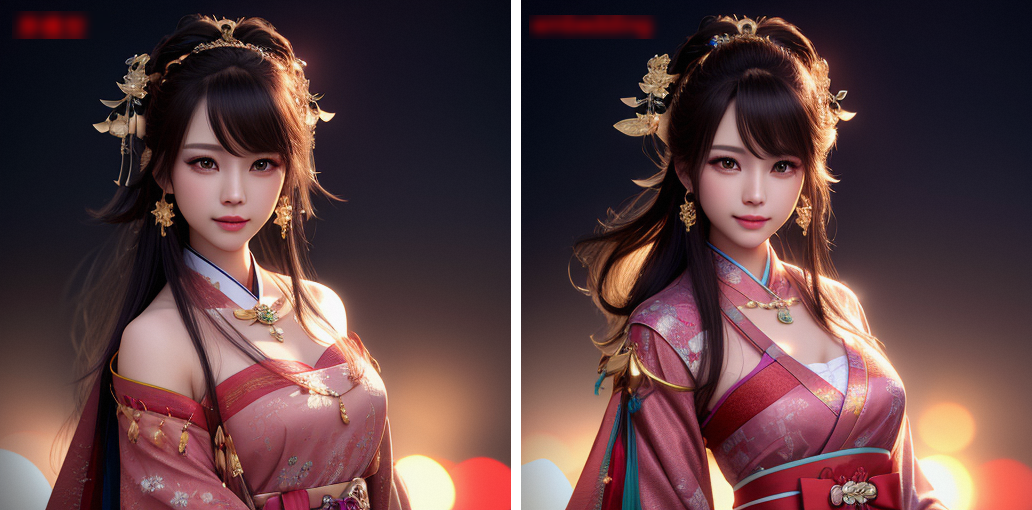
LoRA模型需要搭配主模型使用,無法單獨產生圖片,LoRA模型是在主模型的基礎上訓練出來的,所以與搭配的主模型使用效果會更好。在civitai上分享的預訓練LoRA模型,作者通常會註明指出該模型是基於哪個主模型進行訓練的,使用者可以選擇對應的主模型與其配合使用,提升產生效果。
LoRA模型使用方式:
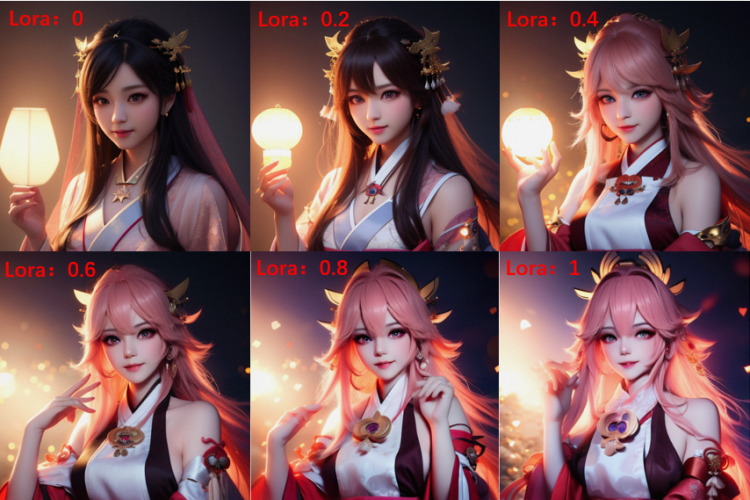
單擊LoRA模型,即可在prompt中產生權重為1的tag。權重可進行調整(0~1),推薦值為0.8,可根據實際情況調整,值越大越接近LoRA模型。
LoRA模型效果展示:
原模型
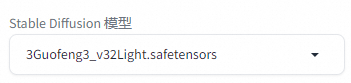
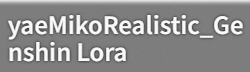
LoRA模型
正向prompt: best quality, masterpiece, highres, 1girl,blush,(seductive smile:0.8),star-shaped pupils,china hanfu,hair ornament,necklace, jewelry,Beautiful face,upon_body, tyndall effect,photorealistic, dark studio, rim lighting, two tone lighting,(high detailed skin:1.2), 8k uhd, dslr, soft lighting, high quality, volumetric lighting, candid, Photograph, high resolution, 4k, 8k, Bokeh
負向prompt:(((simple background))),monochrome ,lowres, bad anatomy, bad hands, text, error, missing fingers, extra digit, fewer digits, cropped, worst quality, low quality, normal quality, jpeg artifacts, signature, watermark, username, blurry, lowres, bad anatomy, bad hands, text, error, extra digit, fewer digits, cropped, worst quality, low quality, normal quality, jpeg artifacts, signature, watermark, username, blurry, ugly,pregnant,vore,duplicate,morbid,mut ilated,tran nsexual, hermaphrodite,long neck,mutated hands,poorly drawn hands,poorly drawn face,mutation,deformed,blurry,bad anatomy,bad proportions,malformed limbs,extra limbs,cloned face,disfigured,gross proportions, (((missing arms))),(((missing legs))), (((extra arms))),(((extra legs))),pubic hair, plump,bad legs,error legs,username,blurry,bad feet
prompt來源:civitai
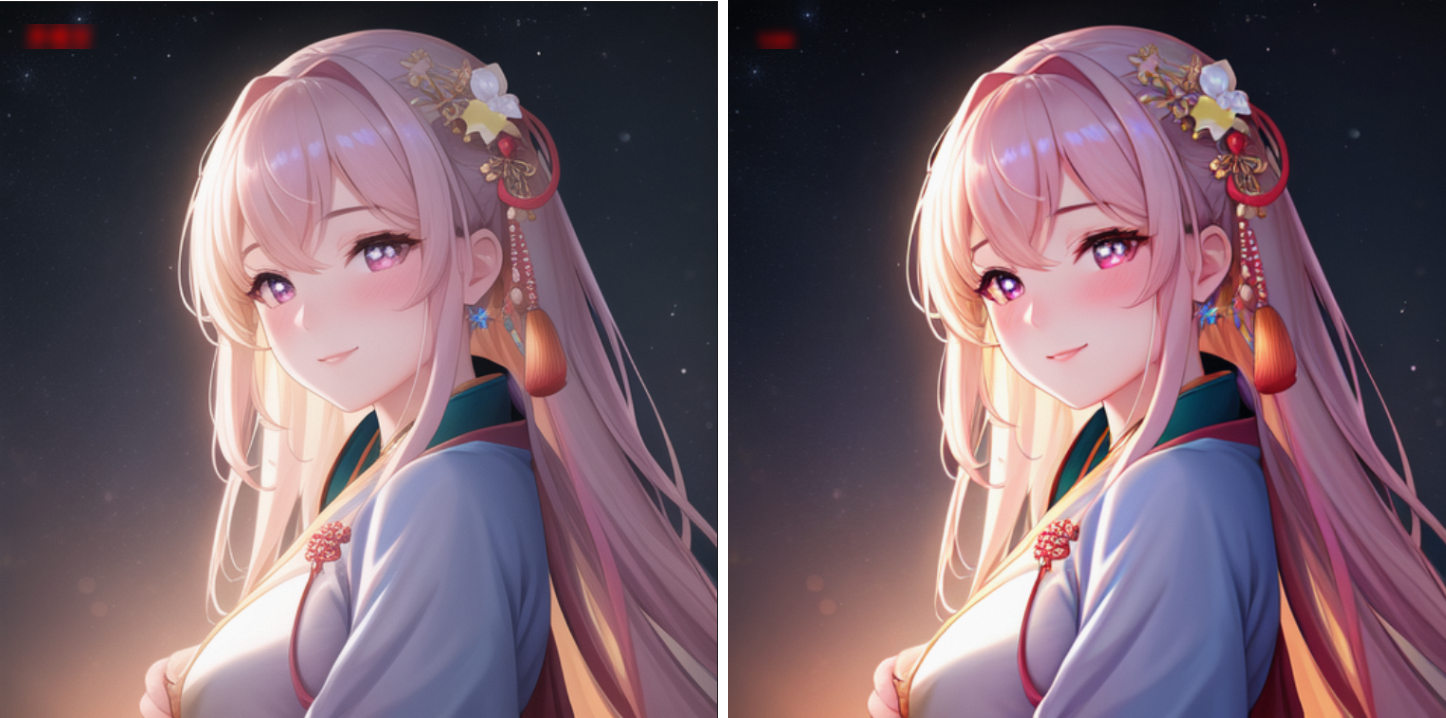
隨機數種子設定為3,其他參數保持預設,調整LoRA權重,依次查看產生效果。
VAE模型與主模型搭配使用,主要用於調整圖片的色彩和濾鏡。大部分主模型已內建VAE,無需單獨下載,可根據需求選擇不同風格的VAE模型。
VAE模型效果展示:
正向prompt: best quality, masterpiece, highres, 1girl,blush,(seductive smile:0.8),star-shaped pupils,china hanfu,hair ornament, jewelry,Beautiful face,tyndall effect,photorealistic, dark studio, rim lighting,high detailed skin:1.2), 8k uhd, dslr, soft lighting, high quality, volumetric lighting, candid, Photograph, high resolution, 4k, 8k, Bokeh
負向prompt:(((simple background))),monochrome ,lowres, bad anatomy, bad hands, text, error, missing fingers, extra digit, fewer digits, cropped, worst quality, low quality, normal quality, jpeg artifacts, signature, watermark, username, blurry, lowres, bad anatomy, bad hands, text, error, extra digit, fewer digits, cropped, worst quality, low quality, normal quality, jpeg artifacts, signature, watermark, username, blurry, ugly,pregnant,vore,duplicate,morbid,mut ilated,tran nsexual, hermaphrodite,long neck,mutated hands,poorly drawn hands,poorly drawn face,mutation,deformed,blurry,bad anatomy,bad proportions,malformed limbs,extra limbs,cloned face,disfigured,gross proportions, (((missing arms))),(((missing legs))), (((extra arms))),(((extra legs))),pubic hair, plump,bad legs,error legs,username,blurry,bad feet
prompt來源:civitai
隨機數種子:為55555,其他參數保持預設。
效果圖(左側為原圖,右側為模型處理後圖片):
模型廣場說明
模型來源
模型廣場展示的模型、圖片素材等均由第三方提供,您需閱讀模型詳情並同意遵守第三方提出的各項要求,才可正式開啟使用。PAI ArtLab不對其導致您的不良結果或潛在風險承擔任何責任。
目前優質熱門開源模型大部分來自Civitai開源模型社區,由於訪問限制,中國內地使用者不方便訪問社區以及下載模型。PAI ArtLab旨在為使用者提供一個便捷的訪問及下載的途徑。我們誠邀在開源社群高熱度高品質的模型入駐PAI ArtLab,通過正式溝通並獲得模型創作者授權後,上架到模型廣場。簡化使用者的下載流程,促進模型的廣泛應用與創意交流,同時也希望更多的設計行業與設計師可以通過平台,瞭解並運用更多優質模型。
模型費用
PAI ArtLab不對模型本身進行商用,不會對模型以及用模型產生的圖收費。
模型創作者的權益和保障
PAI ArtLab對您遵守的承諾:
在入駐的模型詳情中展示開源模型的作者署名、模型名稱、模型來源與開源協議。
對於您的模型及其產生內容,在PAI ArtLab上不對使用者收取任何費用。
您需要對PAI ArtLab遵守的承諾:
您賦予ArtLab全球性、非獨佔性、可撤銷、免費的授權,用於託管、儲存、傳輸、公示、展示、交流、複製、修改和派生創作,支援多層再授權,適用所有媒介形式與渠道。
您需保證模型的合法合規性,並確保在PAI ArtLab的上述使用行為不侵犯任何第三方權益。
合作機遇拓展:
藉助阿里雲平台,向B端領域展示模型優勢,促進模型創作者與企業間合作。
模型上線後,平台將通過推廣活動顯著提升模型曝光率與使用者認知。
計劃推出模型生態合作專案,為創作者開拓更多合作機遇。
智慧財產權尊重聲明:
PAI ArtLab充分尊重原作者的智慧財產權,引入模型旨在構建學習與交流的平台。若您對展示內容持有異議,作為著作權方或權利人,請通過PAI-ArtLab@alibabacloud.com聯絡我們。