EAS的LLM智能路由支援相容OpenAI的批量推理,允許提交大規模的推理請求並在幕後處理,適用於離線評估、資料標註、內容產生等不需要即時響應的情境。相比線上推理,批量推理能夠顯著降低成本並提高資源使用率。
功能特點
非同步處理,解耦調用:提交大規模請求後,無需同步等待結果,可以非同步查詢任務狀態,降低了用戶端的等待壓力和複雜性。
削峰填穀,降本增效:允許在業務低峰期或資源空閑時執行大量推理任務,最大化GPU等計算資源的利用率,從而顯著降低單位推理請求的成本。
服務部署
核心參數說明
要使用LLM批量推理功能,需要在部署LLM智能路由服務時配置OSS儲存路徑並授予相應的存取權限。目前僅支援通過JSON參數設定,相關參數如下:
參數名 | 是否必須 | 描述 |
| 是 | 用於存放批量推理任務輸入檔案和輸出結果的OSS路徑。 格式要求:必須以 最佳實務:建議為批量推理任務使用獨立的Bucket或首碼,便於許可權管理和配置生命週期規則。 |
| 是 | 必須設定為 |
| 否 | OSS的Endpoint。預設為當前地區的內網Endpoint,通常無需配置。 |
| 否 | 批量推理的其他參數選項:
例如: |
部署方式
批量推理的服務部署支援2種方式:
單獨部署:先部署一個獨立的LLM智能路由服務,再部署LLM服務並關聯該路由。
統一部署:將LLM智能路由和推理服務打包在同一個服務內部署。
單獨部署
部署 LLM智能路由服務。在中填入JSON設定檔,然後單擊部署。JSON配置樣本如下。
注意:llm_gateway.batch_oss_path、metadata.workspace_id(工作空間id)、metadata.group(群組名稱)、metadata.name(服務名稱)根據實際情況修改。
{ "llm_gateway": { "batch_oss_path": "oss://your-bucket/path/to/prefix" }, "llm_scheduler": { "cpu": 2, "memory": 4000, "policy": "prefix-cache" }, "metadata": { "cpu": 4, "gpu": 0, "group": "group_llm_gateway", "instance": 2, "memory": 8000, "name": "llm_gateway", "type": "LLMGatewayService", "workspace_id": "217**3" }, "options": { "enable_ram_role": true } }部署LLM服務。 參見LLM大語言模型部署部署一個
Qwen3-8B的服務。重要目前暫不支援通過部署頁面的直接關聯支援批量推理的LLM智能路由,請在配置完其他參數後,在服務配置地區,單擊編輯,在JSON中增加
metadata.group參數,值為部署LLM智能路由時設定的群組名稱,如樣本中group_llm_gateway。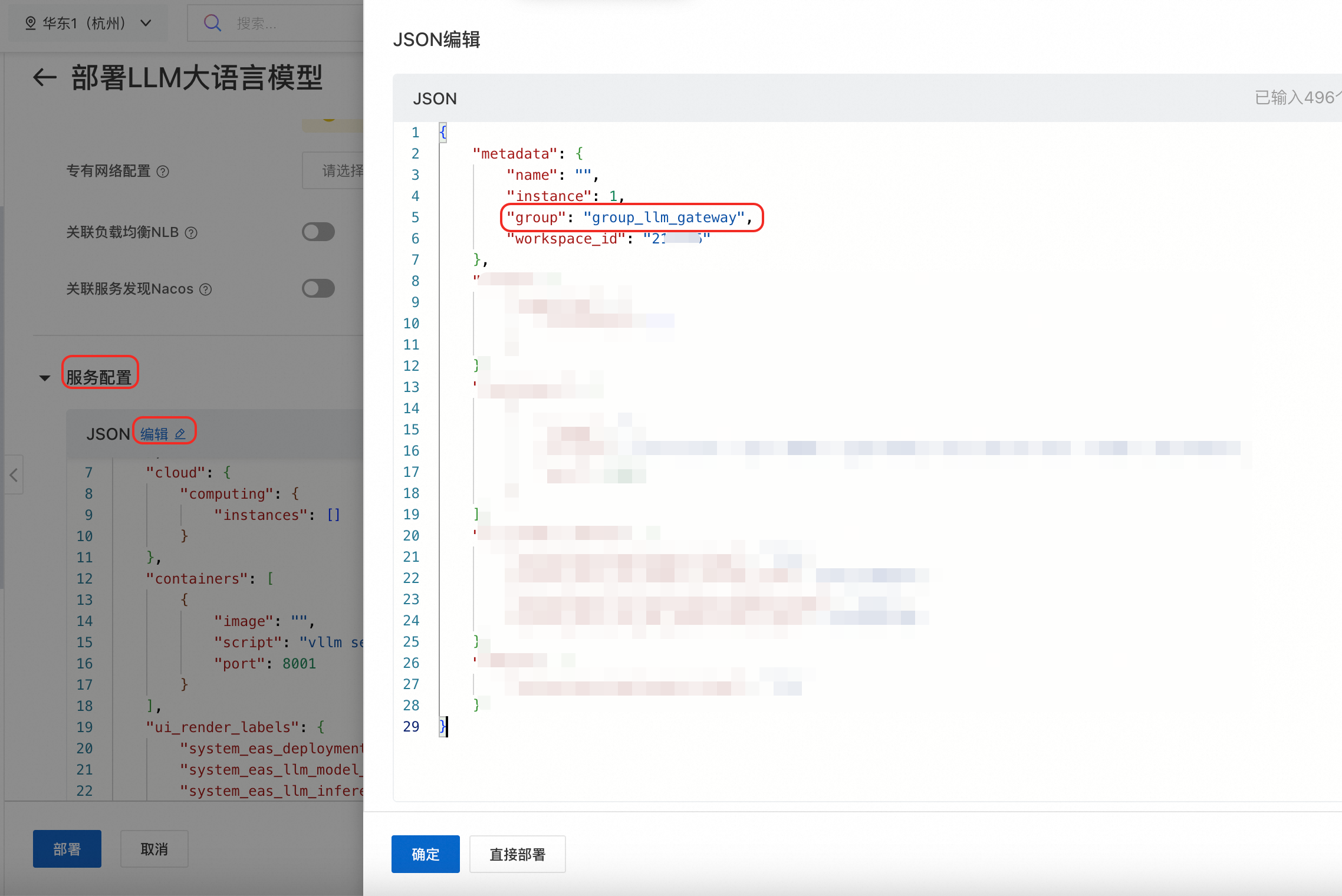
統一部署
統一部署只需在JSON檔案中LLM智能路由服務部分增加options.enable_ram_role 與llm_gateway.batch_oss_path兩個參數。
{
  "metadata": {
    "group": "feitest",
    "name": "feitest",
    "workspace_id": "217123"
  },
  "members": [
    {
      "llm_gateway": {
        "batch_oss_path": "oss://your-bucket/path/to/prefix", // required
        "infer_backend": "vllm"
      },
      "llm_scheduler": {
        "cpu": 2,
        "memory": 4000,
        "policy": "prefix-cache"
      },
      "metadata": {
        "cpu": 4,
        "gpu": 0,
        "group": "group_llm_gateway",
        "instance": 2,
        "memory": 8000,
        "name": "llm_gateway",
        "type": "LLMGatewayService",
        "workspace_id": "217123"
      },
      "options": {
        "enable_ram_role": true // required
      }
    },
   {
      // inference member
    }
  ]
}
擷取訪問憑證
進行批量推理必須將請求發往LLM智能路由服務,請根據如下步驟擷取公網調用地址和Token。
在模型線上服務(EAS)頁面,找到部署的LLM智能路由服務。
單擊服務名稱進入概览頁面,在基本信息地區單擊查看调用信息。
在調用資訊頁面,複製服务独立流量入口下的公网调用地址和Token。

建議設定為環境變數,方便後續調用。命令樣本如下:
export YOUR_GATEWAY_URL="https://*********3.cn-hangzhou.pai-eas.aliyuncs.com/api/predict/group_****y.ll****_gateway"
export YOUR_TOKEN="NzY4NWZ*************ZWU5Nw=="
使用流程
批量推理的完整流程包括以下4個步驟:
上傳輸入檔案:將待處理的請求以JSONL格式上傳到OSS。
建立批處理任務:調用API建立批處理任務。
任務執行:系統非同步執行推理任務,可以隨時查詢任務狀態。
擷取結果:任務完成後,調用API或直接從OSS下載包含推理結果的輸出檔案。
1. 上傳輸入檔案
建立一個名為input.jsonl的檔案,每一行是一個獨立的JSON對象,代表一個推理請求。樣本如下:
{"custom_id": "request-1", "method": "POST", "url": "/v1/chat/completions", "body": {"model": "Qwen3-8B", "messages": [{"role": "user", "content": "Hello world!"}]}}
{"custom_id": "request-2", "method": "POST", "url": "/v1/chat/completions", "body": {"model": "Qwen3-8B", "messages": [{"role": "user", "content": "Tell me a joke."}]}}
調用上傳檔案API將檔案上傳到部署LLM智能路由時配置的OSS存放路徑。
curl -s "$YOUR_GATEWAY_URL/v1/files" \
  -H "Authorization: Bearer $YOUR_TOKEN" \
  -F purpose="batch" \
-F file="@input.jsonl"2. 使用檔案id建立批處理任務
將<input_file_id>替換為步驟1返回結果中的id的值。
curl -s "$YOUR_GATEWAY_URL/v1/batches" \
  -H "Authorization: Bearer $YOUR_TOKEN" \
  -H "Content-Type: application/json" \
  -d '{
    "input_file_id": "<input_file_id>",
    "endpoint": "/v1/chat/completions",
    "completion_window": "24h"
}'3. 查詢任務狀態
將路徑中{batch_id}替換為步驟2返回結果中的id的值。
curl -s "$YOUR_GATEWAY_URL/v1/batches/{batch_id}" \
  -H "Authorization: Bearer $YOUR_TOKEN" \
-H "Content-Type: application/json"4. 擷取任務結果
當查詢到任務狀態為completed時,可通過檔案API擷取到結果並輸出到檔案output.jsonl。
其中,路徑中的{output_file_id}替換為任務狀態結果中的output_file_id的值。
curl -s "$YOUR_GATEWAY_URL/v1/files/{output_file_id}" \
-H "Authorization: Bearer $YOUR_TOKEN" > output.jsonloutput.jsonl內容樣本如下。可以通過custom_id將結果與輸入請求進行匹配。
{"id":"batch_xxx","custom_id":"request-1","response":{"status_code":200,"request_id":"req_id_1","body":{"id":"chatcmpl-xxx","object":"chat.completion","model":"Qwen3-8B", "choices":[{"index":0,"message":{"role":"assistant","reasoning_content":null,"content":"\u003cthink\u003e\nOkay, the user said \"Hello world!\" xxxxxxx What would you like to do?","tool_calls":[]},"logprobs":null,"finish_reason":"stop","stop_reason":null}],"usage":{"prompt_tokens":11,"total_tokens":231,"completion_tokens":220,"prompt_tokens_details":null},"prompt_logprobs":null,"kv_transfer_params":null}}}
{"id":"batch_xxx","custom_id":"request-2","response":{"status_code":200,"request_id":"req_id_2","body":{"id":"chatcmpl-yyy","object":"chat.completion","model":"Qwen3-8B", "choices":[{"index":0,"message":{"role":"assistant","reasoning_content":null,"content":"\u003cthink\u003e\nOkay, xxxxxxx Let me know if you want another!","tool_calls":[]},"logprobs":null,"finish_reason":"stop","stop_reason":null}],"usage":{"prompt_tokens":13,"total_tokens":595,"completion_tokens":582,"prompt_tokens_details":null},"prompt_logprobs":null,"kv_transfer_params":null}}}使用指令碼執行批處理任務
將以下指令碼儲存為run_batch.sh,並替換其中的<YOUR_GATEWAY_URL>和<YOUR_TOKEN>。
#!/bin/bash

# 替換為您的服務地址和Token
GATEWAY_URL="<YOUR_GATEWAY_URL>"
TOKEN="<YOUR_TOKEN>"

# 1. 上傳輸入檔案
echo "Uploading input file..."
UPLOAD_RESPONSE=$(curl -s "${GATEWAY_URL}/v1/files" \
  -H "Authorization: Bearer ${TOKEN}" \
  -F purpose="batch" \
  -F file="@input.jsonl")

INPUT_FILE_ID=$(echo ${UPLOAD_RESPONSE} | grep -o '"id": *"[^"]*"' | cut -d'"' -f4)
if [ -z "$INPUT_FILE_ID" ]; then
  echo "Failed to upload file. Response: $UPLOAD_RESPONSE"
  exit 1
fi
echo "Input file uploaded. File ID: ${INPUT_FILE_ID}"

# 2. 建立批處理任務
echo "Creating batch job..."
CREATE_RESPONSE=$(curl -s -X POST "${GATEWAY_URL}/v1/batches" \
  -H "Authorization: Bearer ${TOKEN}" \
  -H "Content-Type: application/json" \
  -d "{
    \"input_file_id\": \"${INPUT_FILE_ID}\",
    \"endpoint\": \"/v1/chat/completions\",
    \"completion_window\": \"24h\"
  }")

BATCH_ID=$(echo ${CREATE_RESPONSE} | grep -o '"id": *"[^"]*"' | cut -d'"' -f4)
if [ -z "$BATCH_ID" ]; then
  echo "Failed to create batch job. Response: $CREATE_RESPONSE"
  exit 1
fi
echo "Batch job created. Batch ID: ${BATCH_ID}"

# 3. 輪詢任務狀態直到完成
echo "Polling batch status..."
while true; do
  STATUS_RESPONSE=$(curl -s "${GATEWAY_URL}/v1/batches/${BATCH_ID}" \
    -H "Authorization: Bearer ${TOKEN}")

  STATUS=$(echo ${STATUS_RESPONSE} | grep -o '"status": *"[^"]*"' | cut -d'"' -f4)
  echo "Current status: ${STATUS}"

  if [[ "$STATUS" == "completed" ]]; then
    OUTPUT_FILE_ID=$(echo ${STATUS_RESPONSE} | grep -o '"output_file_id": *"[^"]*"' | cut -d'"' -f4)
    echo "Batch job completed. Output file ID: ${OUTPUT_FILE_ID}"
    break
  elif [[ "$STATUS" == "failed" || "$STATUS" == "expired" || "$STATUS" == "cancelled" ]]; then
    echo "Batch job ended with status: ${STATUS}. Error details: ${STATUS_RESPONSE}"
    exit 1
  fi
  sleep 10
done

# 4. 下載並查看結果檔案
echo "Downloading result file..."
curl -s "${GATEWAY_URL}/v1/files/${OUTPUT_FILE_ID}/content" \
  -H "Authorization: Bearer ${TOKEN}" > output.jsonl

echo "Result downloaded to output.jsonl. Content:"
cat output.jsonl
執行指令碼:
bash run_batch.sh批處理任務狀態
一個批處理任務會經歷多個狀態,以下是完整的狀態列表和說明。
狀態值 | 階段 | 說明 | 可操作性 |
| 準備 | 待處理:任務已建立,正在等待系統調度處理。 | 可取消 |
| 正在驗證:正在驗證輸入檔案格式及參數。若驗證失敗,任務將進入 | 可取消 | |
| 處理 | 處理中:任務正在執行,向後端推理服務發送請求。 | 可取消 |
| 結束 | 結束中:所有請求分區已處理完畢,正在等待彙總結果。 | 不可操作 |
| 最終確定中:正在彙總結果並產生最終的輸出檔案。 | 不可操作 | |
| 已完成:任務成功完成,輸出檔案可供下載。 | 不可操作 | |
| 驗證失敗:任務在 | 不可操作 | |
| 取消中:已收到取消請求,系統正在停止處理中的請求。 | 不可操作 | |
| 已取消:任務被成功取消。 | 不可操作 | |
| 已到期:任務未在 | 不可操作 |
API參考
與OpenAI的Batch API基本保持一致,具體支援的 API 如下。
批處理(Batch)API
Batch對象結構
參數 | 類型 | 說明 |
id | string | 批處理任務的唯一識別碼。 |
object | string | 對象的類型,目前始終為 |
endpoint | string | 批處理任務要調用的 API 端點(例如:/v1/chat/completions)。目前僅支援:
|
model | string | 批處理請求中使用的模型。目前為空白。 |
errors | object | 任務失敗時的錯誤詳情(僅狀態為 |
errors.data | array | validate產生的錯誤資訊。 |
errors.data[].code | string | 錯誤碼。 |
errors.data[].line | int | 暫不支援,始終為0. |
errors.data[].message | string | 錯誤資訊。 |
errors.data[].param | string | 暫不支援,始終為空白。 |
input_file_id | string | 包含輸入請求的檔案的 ID(jsonl 格式)。 |
completion_window | string | 工作要求完成的時間視窗(例如:24h)。 |
status | string | 批處理任務的目前狀態(例如:validating, in_progress, completed)。 |
output_file_id | string | 包含處理後響應的檔案的 ID(僅在任務成功完成時存在)。 |
error_file_id | string | 包含處理失敗請求的檔案的 ID。 |
created_at | integer | 任務的建立時間(Unix 時間戳記,單位秒)。 |
in_progress_at | integer | 任務開始處理的時間(Unix 時間戳記,單位秒)。 |
expires_at | integer | 設定的任務到期時間,在此時間後還未完成的任務將進入逾時狀態(Unix 時間戳記,單位秒)。 |
finalizing_at | integer | 任務進入最終確定階段的時間(Unix 時間戳記,單位秒)。 |
completed_at | integer | 任務成功完成的時間(Unix 時間戳記,單位秒)。 |
failed_at | integer | 任務失敗的時間(Unix 時間戳記,單位秒)。 |
expired_at | integer | 任務到期的時間(Unix 時間戳記,單位秒)。 |
cancelling_at | integer | 任務進入取消階段的時間(Unix 時間戳記,單位秒)。 |
cancelled_at | integer | 任務真正被取消的時間(Unix 時間戳記,單位秒)。 |
request_counts | object | 包含任務中請求數量的統計資訊(總數、已完成、失敗等)。 |
request_counts.total | integer | 請求總數。 |
request_counts.compelted | integer | 請求成功數。 |
request_counts.failed | integer | 請求失敗數。 |
usage | object | 暫不支援。任務消耗的用量資訊(例如:token 計數)。 |
metadata | map | 使用者提供的可選索引值對中繼資料。 |
建立批處理任務:POST /v1/batches
請求樣本
curl -s "<YOUR_GATEWAY_URL>/v1/batches" \
  -H "Authorization: Bearer <YOUR_TOKEN>" \
  -H "Content-Type: application/json" \
  -d '{
    "input_file_id": "batch_input_11fb297e-653d-47cf-bb6a-a80209dc562b",
    "endpoint": "/v1/chat/completions",
    "completion_window": "24h"
}'輸入參數
參數 | 類型 | 是否必填 | 說明 |
input_file_id | string | 是 | 已上傳的檔案id,檔案格式必須是合法的jsonl。最多包含50000個request並且檔案大小最大為200MB。 |
endpoint | string | 是 | 批處理請求要調用的API endpoint。 |
completion_window | string | 否 | 批處理任務完成的時間視窗。目前僅支援24h。 |
metadata | map | 否 | 批處理任務的中繼資料資訊。最多包含16個索引值對,其中key最長支援16個字元,value最長支援512字元。 |
output_expires_after | object | 否 | 暫不支援,所有檔案不會自動到期清理。Batch的輸出檔案或錯誤檔案的到期策略。 |
返回參數
返回建立的Batch對象
查詢batch資訊:GET /v1/batches/{batch_id}
請求樣本
curl -s "<YOUR_GATEWAY_URL>/v1/batches/batch_98d4d6e3-c7ec-4aa9-969e-fb8531059523" \
  -H "Authorization: Bearer <YOUR_TOKEN>" \
-H "Content-Type: application/json"輸入參數
參數 | 類型 | 是否必填 | 說明 |
batch_id | string | 是 | 需要查詢的批處理任務id。 |
返回參數
返回查詢的Batch對象
取消批處理任務:POST /v1/batches/{batch_id}/cancel
只有處於validating和in_progress狀態的任務可以被取消。
請求樣本
curl -s "<YOUR_GATEWAY_URL>/v1/batches/batch_98d4d6e3-c7ec-4aa9-969e-fb8531059523/cancel" \
  -H "Authorization: Bearer <YOUR_TOKEN>"
-X POST輸入參數
參數 | 類型 | 是否必填 | 說明 |
batch_id | string | 是 | 需要取消的批處理任務id。 |
返回參數
返回取消的Batch對象
列出batch:GET /v1/batches
請求樣本
curl -s "<YOUR_GATEWAY_URL>/v1/batches/batch_98d4d6e3-c7ec-4aa9-969e-fb8531059523" \
-H "Authorization: Bearer <YOUR_TOKEN>"輸入參數
參數 | 類型 | 是否必填 | 說明 |
limit | integer | 否 | 要返回的最大結果數。 |
after | string | 否 | 上次請求的最後一個batch_id。 |
返回參數
參數 | 類型 | 說明 |
object | string | 始終為"list"。 |
data | array | Batch對象組成的list。以建立時間逆序排列(最新的在最前面)。 |
first_id | string | 此次響應的第一個batch_id。 |
last_id | string | 此次響應的最後一個batch_id。 |
has_more | bool | 最後batch_id之後是否還有。 |
檔案API
檔案對象結構
參數 | 類型 | 說明 |
id | string | 檔案的唯一識別碼。 |
object | string | 對象的類型,始終為"file"。 |
bytes | integer | 檔案的大小(以位元組為單位)。 |
created_at | integer | 檔案建立的時間(Unix 時間戳記,單位秒)。 |
expires_at | integer | 檔案將到期的時間(Unix 時間戳記,單位秒)。 |
filename | string | 使用者上傳時指定的檔案名稱。 |
purpose | string | 檔案的用途,始終為"batch"。 |
輸入檔案格式(JSONL)
輸入檔案必須為.jsonl格式,每行一個JSON對象。
參數 | 類型 | 是否必填 | 說明 |
custom_id | string | 是 | 自訂請求id,必須保證每條請求唯一。 |
method | string | 是 | 請求推理服務的方法,一般為POST。 |
url | string | 是 | 請求推理服務的endpoint,目前必須跟建立批處理任務時指定的endpoint保持一致。 |
body | object | 是 | 請求推理服務的body,會不做改動直接發往推理服務。 |
輸出檔案格式(JSONL)
輸出檔案同樣為.jsonl格式,每行一個JSON對象,不保證與輸入檔案順序一致。
說明 您需要使用custom_id來將輸出檔案中的每一行與輸入檔案中的原始請求進行匹配。參數 | 類型 | 說明 |
id | string | batch_id。 |
custom_id | string | 自訂請求id。 |
response | object | 請求的響應。 |
response.status_code | int | 推理服務返回的http狀態代碼。 |
response.request_id | string | 推理請求id。 |
response.body | object | 推理服務返回的body。 |
error | object | 錯誤資訊,有錯誤的時候存在。錯誤的原因可能是推理服務不可用,請求的格式不合法以及LLM Gateway內部錯誤。 |
error.code | string | 具體的錯誤碼。 |
error.message | string | 具體的錯誤資訊。 |
上傳檔案:POST /v1/files
目的:上傳一個包含批量請求的jsonl檔案,以供後續建立批處理任務使用。
請求樣本
curl "<YOUR_GATEWAY_URL>/v1/files" \
  -H "Authorization: Bearer <YOUR_TOKEN>" \
  -F purpose="batch" \
-F file="@input.jsonl"輸入參數
參數名 | 類型 | 是否必填 | 說明 |
file | File | 是 | 要上傳的檔案。(multipart/form-data) |
purpose | string | 是 | 檔案的用途,只能為"batch"。(multipart/form-data) |
返回參數
返回建立的檔案對象。
列出檔案:GET /v1/files
目的:列出所有已上傳的檔案中繼資料。
請求樣本
curl "<YOUR_GATEWAY_URL>/v1/files" \
-H "Authorization: Bearer <YOUR_TOKEN>"輸入參數
無
返回參數
參數 | 類型 | 說明 |
object | string | 始終為"list"。 |
data | array | 檔案對象組成的list。以建立時間逆序排列(最新的在最前面)。 |
first_id | string | 此次響應的第一個file_id。 |
last_id | string | 此次響應的最後一個file_id。 |
查詢檔案:GET /v1/files/{file_id}
目的:下載指定檔案的內容,例如擷取已完成任務的結果檔案。
請求樣本
curl -s "<YOUR_GATEWAY_URL>/v1/files/batch_input_11fb297e-653d-47cf-bb6a-a80209dc562b" \
-H "Authorization: Bearer <YOUR_TOKEN>"輸入參數
參數 | 類型 | 是否必填 | 說明 |
file_id | string | 是 | 需要查詢的檔案id。 |
輸出參數
返回查詢的檔案對象。
刪除檔案:DELETE /v1/files/{file_id}
目的:刪除檔案的中繼資料記錄。
警告:檔案刪除操作僅移除中繼資料 調用此介面不會刪除儲存在您OSS Bucket中的物理檔案。此操作僅刪除EAS LLM Gateway中的檔案記錄。如不手動或通過生命週期規則清理,OSS上的檔案將持續保留並持續產生儲存費用。
請求樣本
curl -s "<YOUR_GATEWAY_URL>/v1/files/batch_input_11fb297e-653d-47cf-bb6a-a80209dc562b" \
  -H "Authorization: Bearer <YOUR_TOKEN>"
  -X DELETE
返回樣本
{
  "deleted": true,
  "id": "batch_output_a31a8f26-3abe-4522-9e3f-5c845fa56af7",
  "object": "file"
}
輸入參數
參數 | 類型 | 是否必填 | 說明 |
file_id | string | 是 | 需要刪除的檔案id。 |
返回參數
參數 | 類型 | 說明 |
id | string | 檔案id。 |
object | string | 檔案類型,目前始終為"file"。 |
deleted | bool | true |
擷取檔案內容:GET /v1/files/{file_id}/content
請求樣本
curl -s "<YOUR_GATEWAY_URL>/v1/files/batch_input_11fb297e-653d-47cf-bb6a-a80209dc562b" \
  -H "Authorization: Bearer <YOUR_TOKEN>"
返回樣本
{"id":"batch_5f968571-b0b6-413f-a2a8-69bf750112af","custom_id":"request-1","response":{"status_code":200,"request_id":"282f82b5-577a-44f3-9bf7-a17522ac7d1c","body":{"id":"chatcmpl-282f82b5-577a-44f3-9bf7-a17522ac7d1c","object":"chat.completion","created":1765868675,"model":"Qwen3-VL-2B-Instruct","choices":[{"index":0,"message":{"role":"assistant","content":"Hello! How can I assist you today?","refusal":null,"annotations":null,"audio":null,"function_call":null,"tool_calls":[],"reasoning_content":null},"logprobs":null,"finish_reason":"stop","stop_reason":null,"token_ids":null}],"service_tier":null,"system_fingerprint":null,"usage":{"prompt_tokens":22,"total_tokens":32,"completion_tokens":10,"prompt_tokens_details":null},"prompt_logprobs":null,"prompt_token_ids":null,"kv_transfer_params":null}}}
...
輸入參數
參數 | 類型 | 是否必填 | 說明 |
file_id | string | 是 | 需要擷取內容的檔案id。 |
返回參數
返迴文件內容。
最佳實務
效能調優
通過調整服務部署時的batch_options參數,可以最佳化任務處理效能。
--batch-parallel:並發度。建議值與服務執行個體數(instance)和單個執行個體的並發處理能力相關。初次使用可從instance數 * 2開始嘗試,並根據後端推理服務的CPU/GPU負載情況進行調整。--batch-lines-per-shard:每分區行數。該參數主要用於計算分區數(即輸入檔案總行數除以每分區行數後向上取整)。分區數較多有助於均衡不同並發請求的負載,但會導致中間檔案更片段化,並增加 OSS API 呼叫次數。建議根據輸入檔案總行數設定該值,使最終分區數為並發度的整數倍,以充分提升資源使用率。推薦取值範圍為 500–2000。
成本管理
配置OSS生命週期規則:這是最重要的成本管理措施。請務必為儲存批量任務檔案的OSS Bucket或首碼配置生命週期規則,定期刪除舊的輸入、輸出和錯誤檔案,避免不必要的儲存費用。
利用閑時資源:在業務低峰期(如夜間)運行計算密集型的批量任務,可以充分利用閑置的GPU資源,實現成本效益最大化。
任務管理
拆分超大任務:對於包含數百萬級請求的超大規模任務,建議將其拆分為多個較小的批處理任務。這有助於隔離失敗、簡化管理和提高重試效率。
常見問題
Q1: 任務長時間處於 pending 或 validating 狀態怎麼辦?
檢查EAS服務執行個體的狀態是否正常,資源(CPU/記憶體/GPU)是否充足。
檢查輸入檔案是否已成功上傳到OSS對應的路徑。
檢查服務的RAM角色是否配置正確,以及該角色是否具有對
batch_oss_path的oss:GetObject和oss:ListObjects許可權。
Q2: 任務狀態變為 failed,如何排查?
任務進入failed狀態通常意味著在validating階段出錯。
調用
GET /v1/batches/{batch_id}介面,查看返回的errors欄位擷取失敗原因。常見原因包括:輸入檔案不是合法的JSONL格式、檔案內JSON對象缺少必要欄位(如
custom_id)、url欄位與建立任務時指定的endpoint不匹配。
Q3: 任務 completed,但部分請求失敗了,如何處理?
下載
output_file_id對應的結果檔案。遍曆結果檔案,篩選出包含
error欄位的行,這些即為失敗的請求。您可以根據
custom_id和error資訊,將這些失敗的請求收集起來,放入一個新的輸入檔案,建立新的批處理任務進行重試。
Q4: 如何判斷是OSS許可權問題?
如果任務在
validating階段失敗,且錯誤資訊與檔案讀取相關,可能是缺少oss:GetObject許可權。如果任務長時間卡在
finalizing或finalize階段,最終逾時expired,可能是缺少向OSS寫入結果檔案的oss:PutObject許可權。