全部產品
Search
文件中心

:適用於低於v0.3.0版本鏡像

更新時間:Oct 12, 2025

PAI-RAG提供豐富的API介面,用於服務管理、對話等功能。本文為您介紹使用低於v0.3.0版本鏡像部署的RAG服務所支援的介面類型及調用方式。

使用限制

該文檔僅適用於使用低於v0.3.0版本鏡像部署的RAG服務。

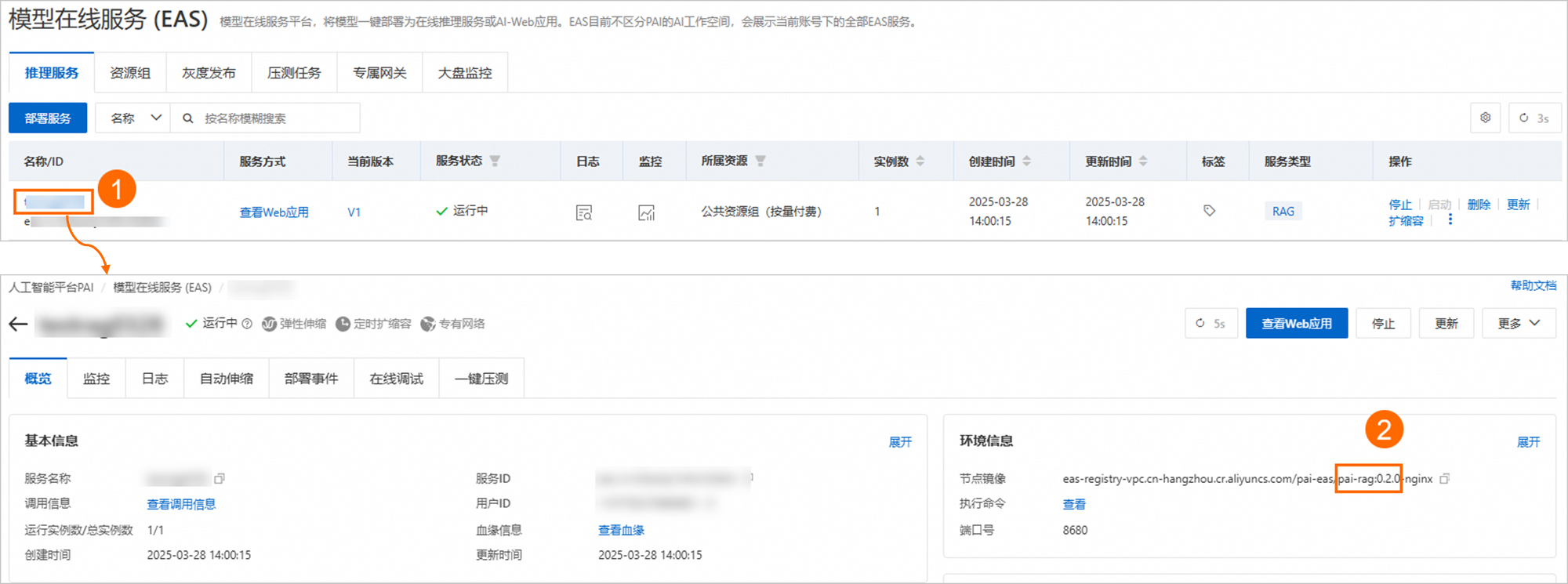
您可以前往模型線上服務(EAS)頁面,單擊RAG服務名稱,然後在概覽頁面的環境資訊地區,查看鏡像版本。image
擷取服務訪問地址和Token

通過API介面調用RAG服務前,您需擷取RAG服務的訪問地址和Token:

  1. 登入PAI控制台,在頁面上方選擇目標地區,並在右側選擇目標工作空間,然後單擊進入EAS

  2. 單擊目標服務名稱,然後在基本資料地區,單擊查看調用資訊

  3. 調用資訊對話方塊中擷取服務訪問地址(EAS_SERVICE_URL)Token(EAS_Token)

    重要
    • 請將EAS_SERVICE_URL末尾的斜杠(/)刪除。

    • 使用公網地址調用:調用用戶端支援訪問公網。

    • 使用VPC地址調用:調用用戶端必須與RAG服務位於同一個專用網路內。

    image

Chat API(對話介面)

通過OpenAI-Compatiable API調用服務。調用服務前,您需根據使用的功能,提前在RAG服務的WebUI頁面完成相應配置。

支援功能

  • web search:連網搜尋。需配置網路搜尋參數

  • chat knowledgebase:知識庫查詢。需上傳知識庫檔案

  • chat llm:使用LLM回答。需配置LLM服務

  • chat agent:智能體工具調用。需在WebUI頁面配置Agent相關代碼。

  • chat db:資料庫/表格式查詢。需在WebUI頁面配置DBChat相關參數。

調用方式

調用地址

{EAS_SERVICE_URL}/v1/chat/completions

請求方式

POST

請求HEADERS

Authorization: EAS_TOKEN(EAS調用Token)

HTTP Body範例

{
    "model": "default",  # 模型名稱,填default
    "messages": [
        {"role": "user", "content": "您好"},
        {"role": "assistant", "content": "您好,有什麼能幫到您?"},
        {"role": "user", "content": "浙江省會是哪裡"},
        {"role": "assistant", "content": "杭州是浙江的省會。"},
        {"role": "user", "content": "有哪些好玩的"},
    ],
    "stream": true,  # 是否流式
    "chat_knowledgebase": true,  # 是否查詢本地知識庫
    "search_web": false,  # 是否使用連網搜尋
    "chat_llm": false,  # 是否僅使用LLM聊天
    "chat_agent": false,  # 是否使用Agent
    "chat_db": false,  # 是否查詢資料庫
    "index_name": "default_index",  # 索引名稱用於RAG情境,僅支援配置1個索引名稱,若未指定,系統將使用預設索引
    "max_tokens": 1024,  # 最大輸出長度,如1024
    "temperature": 0.1,  # 控制產生內容隨機性,取值範圍[0,1],值越低確定性越高,值越高內容越多樣化
}
重要
  • 如果同時配置多個功能,系統會按照該優先順序進行調用,優先順序從高到低依次為search_web、chat_knowledgebase、chat_agent、chat_db、chat_llm。同時,在每個功能中,系統會進行前置意圖識別,以區分是否調用該功能,或直接使用大語言模型(LLM)產生回複。

  • 如果所有功能開關都為 false 或未傳遞,則預設查詢本地知識庫(即"chat_knowledgebase": true)。

請求樣本(單擊此處,查看詳情)

連網搜尋

from openai import OpenAI

##### API 配置 #####
# <EAS_TOKEN>和<EAS_SERVICE_URL>需分別替換為服務Token和訪問地址。

openai_api_key = "<EAS_TOKEN>"
openai_api_base = "<EAS_SERVICE_URL>/v1"
client = OpenAI(
    api_key=openai_api_key,
    base_url=openai_api_base,
)


#### Chat ######
def chat():
    stream = True
    chat_completion = client.chat.completions.create(
        model="default",
        stream=stream,
        messages=[
            {"role": "user", "content": "你好"},
            {"role": "assistant", "content": "你好,有什麼能幫到您?"},
            {"role": "user", "content": "浙江省會是哪裡"},
            {"role": "assistant", "content": "杭州是浙江的省會。"},
            {"role": "user", "content": "有哪些好玩的"},
        ],
        extra_body={
            "search_web": True,
        },
    )

    if stream:
        for chunk in chat_completion:
            print(chunk.choices[0].delta.content, end="")
    else:
        result = chat_completion.choices[0].message.content
        print(result)


chat()

查詢資料庫

from openai import OpenAI

##### API 配置 #####
# <EAS_TOKEN>和<EAS_SERVICE_URL>需分別替換為服務Token和訪問地址。

openai_api_key = "<EAS_TOKEN>"
openai_api_base = "<EAS_SERVICE_URL>/v1"
client = OpenAI(
    api_key=openai_api_key,
    base_url=openai_api_base,
)


#### Chat ######
def chat():
    stream = True
    chat_completion = client.chat.completions.create(
        model="default",
        stream=stream,
        messages=[
            {"role": "user", "content": "有多少只貓"},
            {"role": "assistant", "content": "有2隻貓"},
            {"role": "user", "content": "狗呢"},
        ],
        extra_body={
            "chat_db": True,
        },
    )

    if stream:
        for chunk in chat_completion:
            print(chunk.choices[0].delta.content, end="")
    else:
        result = chat_completion.choices[0].message.content
        print(result)


chat()

Management API(管理介面)

上傳知識庫檔案

調用方式

調用地址

{EAS_SERVICE_URL}/api/v1/upload_data

請求方式

POST

請求HEADERS

  • Authorization: EAS_TOKEN # EAS調用Token

  • Content-Type: multipart/form-data

請求參數

  • files:檔案

  • oss_path:Object Storage Service路徑

  • index_name:索引名稱(預設為default_index)

cURL請求樣本(單擊此處,查看詳情)

  • 上傳單個檔案

     # <EAS_TOKEN>和<EAS_SERVICE_URL>需分別替換為服務Token和訪問地址。
     # "-F 'files=@"後的路徑需替換為您的檔案路徑。 
     # index_name配置為您的知識庫索引名稱。 
       curl -X 'POST' <EAS_SERVICE_URL>/api/v1/upload_data \
      -H 'Authorization: <EAS_TOKEN>' \
      -H 'Content-Type: multipart/form-data' \
      -F 'files=@example_data/paul_graham/paul_graham_essay.txt' \
      -F 'index_name=default_index'
  • 上傳多份檔案,可以使用多個-F 'files=@path'參數,每個參數對應一個要上傳的檔案,樣本如下:

      # <EAS_TOKEN>和<EAS_SERVICE_URL>需分別替換為服務Token和訪問地址。
      # “-F 'files=@”後的路徑需替換為您的檔案路徑。 
      # index_name配置為您的知識庫索引名稱。 
      curl -X 'POST' <EAS_SERVICE_URL>/api/v1/upload_data \
      -H 'Authorization: <EAS_TOKEN>' \
      -H 'Content-Type: multipart/form-data' \
      -F 'files=@example_data/paul_graham/paul_graham_essay.txt' \
      -F 'files=@example_data/another_file1.md' \
      -F 'files=@example_data/another_file2.pdf' \
      -F 'index_name=default_index'

返回樣本(單擊此處,查看詳情)

  { "task_id": "2c1e557733764fdb9fefa0635389****" }

檢查上傳任務狀態

調用方式

調用地址

{EAS_SERVICE_URL}/api/v1/get_upload_state

請求方式

GET

請求HEADERS

Authorization: EAS_TOKEN # EAS調用Token

cURL請求樣本(單擊此處,查看詳情)

# <EAS_TOKEN>和<EAS_SERVICE_URL>需分別替換為服務Token和訪問地址。
# task_id配置為“上傳知識庫檔案”返回的task_id。 
curl -X 'GET' '<EAS_SERVICE_URL>/api/v1/get_upload_state?task_id=2c1e557733764fdb9fefa0635389****' -H 'Authorization: <EAS_TOKEN>'

返回樣本(單擊此處,查看詳情)

  {
    "task_id": "2c1e557733764fdb9fefa0635389****",
    "status": "completed",
    "detail": null
  }

知識庫檢索

調用方式

調用地址

{EAS_SERVICE_URL}/api/v1/query/retrieval

請求方式

POST

請求HEADERS

  • Authorization: EAS_TOKEN # EAS調用Token

  • Content-Type: application/json

請求參數

  • question:使用者檢索問題

  • index_name:索引名稱(預設為default_index)

cURL請求樣本(單擊此處,查看詳情)

# <EAS_TOKEN>和<EAS_SERVICE_URL>需分別替換為服務Token和訪問地址。
# question:配置為使用者檢索問題。 
# index_name:配置為索引名稱。 
  curl -X 'POST' '<EAS_SERVICE_URL>/api/v1/query/retrieval' \
  -H 'Authorization: <EAS_TOKEN>' \
  -H 'Content-Type: application/json' \
  -d '{
      "question": "What can I do when the x13-auto-arima component reports an error?",
      "index_name": "default_index"
  }'

返回樣本(單擊此處,查看詳情)

{
  "docs": [
    {
      "text": "2.PAl-Studio/Designer FAQ 2.1. FAQ about algorithm components : \nCharacters that cannot be transcoded are displayed as \"blob.\" Ignore this error, because nodes in the downstream can read and process the data.\nWhat can I do when the x13-auto-arima component reports an error?\nMake sure that up to 1,200 training data samples are imported into the x13-auto-arima component.\nWhat can I do when the Doc2Vec component reports the CallExecutorToParseTaskFail error?",
      "score": 0.83608,
      "metadata": {
        "file_path": "***/pai_document.md",
        "file_name": "pai_document.md",
        "file_size": 3794,
        "creation_date": "2025-03-20",
        "last_modified_date": "2025-03-20"
      },
      "image_url": null
    }
  ]
}

上傳Excel/CSV檔案用於Chat_DB的表格內容查詢

調用方式

調用地址

{EAS_SERVICE_URL}/api/v1/upload_datasheet

請求方式

POST

請求HEADERS

  • Authorization: EAS_TOKEN # EAS調用Token

  • Content-Type: multipart/form-data

請求參數

Excel或CSV檔案。

cURL請求樣本(單擊此處,查看詳情)

  # <EAS_TOKEN>和<EAS_SERVICE_URL>需分別替換為服務Token和訪問地址。
  # “-F 'file=@”後的路徑替換為實際檔案路徑。 
  curl -X 'POST' <EAS_SERVICE_URL>/api/v1/upload_datasheet \
  -H 'Authorization: <EAS_TOKEN>' \
  -H 'Content-Type: multipart/form-data' \
  -F 'file=@example_data/titanic_train.csv'

返回樣本(單擊此處,查看詳情)

  {
    "task_id": "3b12cf5fabee4a99a32895d2f693****",
    "destination_path": "./localdata/data_analysis/titanic_train.csv",
    "data_preview": "xxx"
  }

上傳JSON檔案用於Chat_DB的資料庫資訊補充-問答對

調用方式

調用地址

{EAS_SERVICE_URL}/api/v1/upload_db_history

請求方式

POST

請求HEADERS

  • Authorization: EAS_TOKEN # EAS調用Token

  • Content-Type: multipart/form-data

請求參數

  • file:JSON檔案

  • db_name:資料庫名稱

cURL請求樣本(單擊此處,查看詳情)

  # <EAS_TOKEN>和<EAS_SERVICE_URL>需分別替換為服務Token和訪問地址。
  # “-F 'file=@”配置為您的JSON檔案路徑。 
  # db_name配置為您的資料庫名稱。 
  curl -X 'POST' <EAS_SERVICE_URL>/api/v1/upload_db_history \
  -H 'Authorization: <EAS_TOKEN>' \
  -H 'Content-Type: multipart/form-data' \
  -F 'file=@example_data/db_query_history.json' \
  -F 'db_name=my_pets'

返回樣本(單擊此處,查看詳情)

  {
    "task_id": "204191f946384a54a48b13ec00fd****",
    "destination_path": "./localdata/data_analysis/nl2sql/history/my_pets_db_query_history.json"
  } 

載入資料庫資訊

調用方式

調用地址

{EAS_SERVICE_URL}/api/v1/query/load_db_info

請求方式

POST

請求HEADERS

Authorization: EAS_TOKEN # EAS調用Token

cURL請求樣本(單擊此處,查看詳情)

# <EAS_TOKEN>和<EAS_SERVICE_URL>需分別替換為服務Token和訪問地址。
curl -X 'POST' <EAS_SERVICE_URL>/api/v1/query/load_db_info -H 'Authorization: <EAS_TOKEN>'

返回樣本(單擊此處,查看詳情)

"Load database info successfully."

擷取當前所有知識庫索引

調用方式

調用地址

{EAS_SERVICE_URL}/api/v1/indexes

請求方式

GET

請求HEADERS

Authorization: EAS_TOKEN # EAS調用Token

cURL請求樣本(單擊此處,查看詳情)

# <EAS_TOKEN>和<EAS_SERVICE_URL>需分別替換為服務Token和訪問地址。
curl -X 'GET' '<EAS_SERVICE_URL>/api/v1/indexes' -H 'Authorization: <EAS_TOKEN>'

返回樣本(單擊此處,查看詳情)

  {
    "indexes": {
      "default_index": {
        "index_name": "default_index",
        "vector_store_config": {
          "persist_path": "localdata/storage",
          "type": "faiss",
          "is_image_store": false
        },
        "embedding_config": {
          "source": "huggingface",
          "model": "bge-m3",
          "embed_batch_size": 10,
          "enable_sparse": false
        }
      }
    },
    "current_index_name": "default_index"
  }

建立知識庫索引

調用方式

調用地址

{EAS_SERVICE_URL}/api/v1/indexes/{index_name}

請求方式

POST

請求HEADERS

  • Authorization: EAS_TOKEN # EAS調用Token

  • Content-Type: application/json

請求參數

  • index_name:索引名稱

  • vector_store_config:向量庫配置

  • embedding_config:Embedding模型配置

cURL請求樣本(單擊此處,查看詳情)

    # <EAS_TOKEN>和<EAS_SERVICE_URL>需分別替換為服務Token和訪問地址。
    # <my_index>替換為新增的知識庫索引。 
    # vector_store_config需配置為向量資料庫配置。
    curl -X 'POST' '<EAS_SERVICE_URL>/api/v1/indexes/<my_index>' \
    -H 'Authorization: <EAS_TOKEN>' \
    -H 'Content-Type: application/json' \
    -d '{
        "index_name": "<my_index>",
        "vector_store_config": {
            "type": "faiss"
        },
        "embedding_config": {
            "model": "bge-m3",
            "source": "huggingface"
        }
    }'

上述代碼中vector_store_config配置以faiss為例,其他向量資料庫vector_store_config配置說明如下:

milvus

"vector_store_config":
      {
          "type":"milvus",
          "host":"c-xxxxx.milvus.aliyuncs.com",
          "port":19530,
          "user":"root",
          "password":"xxx",
          "database":"default",
          "collection_name":"test",
          "reranker_weights":[0.5,0.5]
      }

hologres

"vector_store_config":
      {
          "type":"hologres",
          "host":"xxx",
          "port":xxx,
          "user":"xxx",
          "password":"xxx",
          "database":"default",
          "table_name":"test",
          "pre_delete_table":"false"
      }

elasticsearch

"vector_store_config":
      {
          "type":"elasticsearch",
          "es_url":"xxx",
          "es_user":xxx,
          "es_password":"xxx",
          "es_index":"xxx"
      }

opensearch

"vector_store_config":
      {
          "type":"opensearch",
          "endpoint":"xxx",
          "instance_id":xxx,
          "username":"xxx",
          "password":"xxx",
          "table_name":"xxx"
      }

analyticdb

"vector_store_config":
      {
          "type":"analyticdb",
          "ak":"xxx",
          "sk":xxx,
          "region_id":"xxx",
          "instance_id":"xxx",
          "account":"xxx",
          "account_password":"xxx",
          "namespace":"xxx",
          "collection":"xxx"
      }

tablestore

"vector_store_config":
      {
          "type":"tablestore",
          "endpoint":"xxx",
          "instance_name":xxx,
          "access_key_id":"xxx",
          "access_key_secret":"xxx",
          "table_name":"xxx"
      }

dashvector

"vector_store_config":
      {
          "type":"dashvector",
          "endpoint":"xxx",
          "api_key":xxx,
          "collection_name":"xxx",
          "partition_name":"xxx"
      }

返回樣本(單擊此處,查看詳情)

  { "msg": "Add index 'my_index' successfully." }

更新知識庫索引

調用方式

調用地址

{EAS_SERVICE_URL}/api/v1/indexes/{index_name}

請求方式

PATCH

請求HEADERS

  • Authorization: EAS_TOKEN # EAS調用Token

  • Content-Type: application/json

請求參數

  • index_name:索引名稱

  • vector_store_config:向量庫配置

  • embedding_config:Embedding模型配置

cURL請求樣本 (單擊此處,查看詳情)

    # <EAS_TOKEN>和<EAS_SERVICE_URL>需分別替換為服務Token和訪問地址。
    # <my_index>替換為待更新的知識庫索引。 
    # vector_store_config需配置為待更新的向量資料庫配置。
    curl -X 'PATCH' '<EAS_SERVICE_URL>/api/v1/indexes/<my_index>' \
    -H 'Authorization: <EAS_TOKEN>' \
    -H 'Content-Type: application/json' \
    -d '{
        "index_name": "<my_index>",
        "vector_store_config": {
            "type": "faiss"
        },
        "embedding_config": {
            "model": "bge-m3",
            "source": "huggingface"
        }
    }'

上述代碼中vector_store_config配置以faiss為例,其他向量資料庫vector_store_config配置說明,請參見建立知識庫索引

返回樣本(單擊此處,查看詳情)

  { "msg": "Update index 'my_index' successfully." }

刪除知識庫索引

調用方式

調用地址

{EAS_SERVICE_URL}/api/v1/indexes/{index_name}

請求方式

DELETE

請求HEADERS

  • Authorization: EAS_TOKEN # EAS調用Token

  • Content-Type: application/json

請求參數

index_name:索引名稱

cURL請求樣本(單擊此處,查看詳情)

# <EAS_TOKEN>和<EAS_SERVICE_URL>需分別替換為服務Token和訪問地址。
# <my_index>替換為待刪除的知識庫索引。 
curl -X 'DELETE' '<EAS_SERVICE_URL>/api/v1/indexes/<my_index>' -H 'Authorization: <EAS_TOKEN>' -H 'Content-Type: application/json' -d '{"index_name":"<my_index>"}'

返回樣本(單擊此處,查看詳情)

  { "msg": "Delete index 'my_index' successfully." }

擷取RAG服務配置

調用方式

調用地址

{EAS_SERVICE_URL}/api/v1/config

請求方式

GET

請求HEADERS

Authorization: EAS_TOKEN # EAS調用Token

cURL請求樣本(單擊此處,查看詳情)

# <EAS_TOKEN>和<EAS_SERVICE_URL>需分別替換為服務Token和訪問地址。
curl -X 'GET' '<EAS_SERVICE_URL>/api/v1/config' -H 'Authorization: <EAS_TOKEN>'

返回樣本(單擊此處,查看詳情)

  {
    "system": {
      "default_web_search": false,
      "query_type": "websearch"
    },
    "data_reader": {
      "concat_csv_rows": false,
      "enable_mandatory_ocr": false,
      "format_sheet_data_to_json": false,
      "sheet_column_filters": null,
      "number_workers": 4
    },
    "node_parser": {
      "type": "Sentence",
      "chunk_size": 500,
      "chunk_overlap": 10,
      "enable_multimodal": true,
      "paragraph_separator": "\n\n\n",
      "sentence_window_size": 3,
      "sentence_chunk_overlap": 200,
      "breakpoint_percentile_threshold": 95,
      "buffer_size": 1
    },
    "index": {
      "vector_store": {
        "persist_path": "localdata/storage",
        "type": "faiss",
        "is_image_store": false
      },
      "enable_multimodal": true,
      "persist_path": "localdata/storage"
    },
    "embedding": {
      "source": "huggingface",
      "model": "bge-m3",
      "embed_batch_size": 10,
      "enable_sparse": false
    },
    "multimodal_embedding": {
      "source": "cnclip",
      "model": "ViT-L-14",
      "embed_batch_size": 10,
      "enable_sparse": false
    },
    "llm": {
      "source": "openai_compatible",
      "temperature": 0.1,
      "system_prompt": null,
      "max_tokens": 4000,
      "base_url": "https://dashscope.aliyuncs.com/compatible-mode/v1",
      "api_key": "sk-xxx",
      "model": "qwen-max"
    },
    "multimodal_llm": {
      "source": "openai_compatible",
      "temperature": 0.1,
      "system_prompt": null,
      "max_tokens": 4000,
      "base_url": "https://dashscope.aliyuncs.com/compatible-mode/v1",
      "api_key": "sk-xxx",
      "model": ""
    },
    "functioncalling_llm": null,
    "agent": {
      "system_prompt": "你是一個旅遊小助手,xxx",
      "python_scripts": "xxx",
      "function_definition": "xxx",
      "api_definition": "xxx"
    },
    "chat_store": {
      "type": "local",
      "persist_path": "localdata/storage"
    },
    "data_analysis": {
      "type": "mysql",
      "nl2sql_prompt": "給定一個輸入問題,xxx",
      "synthesizer_prompt": "給定一個輸入問題,xxx",
      "database": "my_pets",
      "tables": [],
      "descriptions": {},
      "enable_enhanced_description": false,
      "enable_db_history": true,
      "enable_db_embedding": true,
      "max_col_num": 100,
      "max_val_num": 1000,
      "enable_query_preprocessor": true,
      "enable_db_preretriever": true,
      "enable_db_selector": true,
      "user": "root",
      "password": "xxx",
      "host": "127.0.0.1",
      "port": 3306
    },
    "intent": {
      "descriptions": {
        "rag": "\nThis tool can help you get more specific information from the knowledge base.\n",
        "tool": "\nThis tool can help you get travel information about time, weather, flights, train and hotels.\n"
      }
    },
    "node_enhancement": {
      "tree_depth": 3,
      "max_clusters": 52,
      "proba_threshold": 0.1
    },
    "oss_store": {
      "bucket": "",
      "endpoint": "oss-cn-hangzhou.aliyuncs.com",
      "ak": null,
      "sk": null
    },
    "postprocessor": {
      "reranker_type": "no-reranker",
      "similarity_threshold": 0.5
    },
    "retriever": {
      "vector_store_query_mode": "default",
      "similarity_top_k": 3,
      "image_similarity_top_k": 2,
      "search_image": false,
      "hybrid_fusion_weights": [0.7, 0.3]
    },
    "search": {
      "source": "google",
      "search_count": 10,
      "serpapi_key": "142xxx",
      "search_lang": "zh-CN"
    },
    "synthesizer": {
      "use_multimodal_llm": false,
      "system_role_template": "您是xxx",
      "custom_prompt_template": "您的目標是提供準確、有用且易於理解的資訊。xxx"
    },
    "query_rewrite": {
      "enabled": true,
      "rewrite_prompt_template": "# 角色\n您是一位專業的資訊檢索專家,xxx",
      "llm": {
        "source": "openai_compatible",
        "temperature": 0.1,
        "system_prompt": null,
        "max_tokens": 4000,
        "base_url": "https://dashscope.aliyuncs.com/compatible-mode/v1",
        "api_key": null,
        "model": ""
      }
    },
    "guardrail": {
      "endpoint": null,
      "region": null,
      "access_key_id": null,
      "access_key_secret": null,
      "custom_advice": null
    }
  }

更新RAG服務配置

調用方式

調用地址

{EAS_SERVICE_URL}/api/v1/config

請求方式

PATCH

請求HEADERS

  • Authorization: EAS_TOKEN # EAS調用Token

  • Content-Type: application/json

請求參數

new_config:更新的配置資訊

cURL請求樣本(單擊此處,查看詳情)

    # <EAS_TOKEN>和<EAS_SERVICE_URL>需分別替換為服務Token和訪問地址。
    curl -X 'PATCH' '<EAS_SERVICE_URL>/api/v1/config' \
    -H 'Authorization: <EAS_TOKEN>' \
    -H 'Content-Type: application/json' \
    -d '{
        "system": {
          "default_web_search": false,
          "query_type": "websearch"
        },
        "data_reader": {
          "concat_csv_rows": false,
          "enable_mandatory_ocr": false,
          "format_sheet_data_to_json": false,
          "sheet_column_filters": null,
          "number_workers": 4
        },
        "node_parser": {
          "type": "Sentence",
          "chunk_size": 500,
          "chunk_overlap": 10,
          "enable_multimodal": true,
          "paragraph_separator": "\n\n\n",
          "sentence_window_size": 3,
          "sentence_chunk_overlap": 200,
          "breakpoint_percentile_threshold": 95,
          "buffer_size": 1
        },
        ...
    }' # (更多配置資訊可參考 擷取RAG配置 的返回樣本)

返回樣本(單擊此處,查看詳情)

  { "msg": "Update RAG configuration successfully." }