執行OOS快速部署靜態網站至OSS
您可以通過OSS儲存空間(Bucket)託管靜態網站,並讓訪問者通過Bucket綁定的自訂網域名(例如example.com)訪問您的網站。當您的網站原始碼儲存在Git倉庫(如GitHub或Gitee)時,請按照本文方法,建立OOS執行來快速部署靜態網站到OSS。
準備工作
註冊網站網域名稱
搭建靜態網站前,您需要為網站準備一個網域名稱。建議您使用阿里雲網域名稱服務 (DNS)快速註冊一個屬於您的網域名稱。具體操作,請參見通用網域名稱註冊基本流程如何註冊阿里雲網域名稱。
本樣本使用
example.com作為測試網域名稱。重要若您註冊的網域名稱需綁定在中國內地的Bucket上,您還需在中國工信部備案網域名稱。更多資訊,請參見備案。
建立Bucket
建立一個Bucket(具有公用讀取許可權),用以設定靜態網站託管及存放網站資料。如果您未建立Bucket,請參見建立儲存空間。
準備靜態網站的網頁檔案
您的Git倉庫中應包含靜態網站的源檔案(例如
index.html或error.html等檔案),以下樣本僅供參考:說明一個靜態網站的頁麵包括
index.html、error.html等檔案,具體目錄結構,請參見設定靜態網站託管。樣本:在Git倉庫上建立兩個HTML格式檔案(即預設首頁和404錯誤頁)
預設首頁
本樣本使用以下內容產生靜態網站的首頁檔案index.html。實際環境中,請根據您的需求產生首頁檔案內容。
<html> <head> <title>Hello OSS!</title> <meta charset="utf-8"> </head> <body> <p>開始阿里雲OSS託管</p> <p>這是索引頁面</p> </body> </html>預設404頁面
本樣本使用以下內容產生靜態網站的404錯誤頁檔案error.html。實際環境中,請根據您的需求產生404錯誤頁檔案的內容。
<html>
<head>
   <title>Hello OSS!</title>
   <meta charset="utf-8">
</head>
<body>
   <p>這是404錯誤頁面</p>
</body>
</html>
操作步驟
步驟一:建立OOS模板並執行
建立自訂模板。
選擇使用樣本模板建立,營運模板選擇空白模板,複製以下模板內容到YAML編輯框,單擊建立模板完成建立。具體操作,請參見建立模板。
展開查看:模板內容
FormatVersion: OOS-2019-06-01 Description: en: Start FC, Deploy static website source files hosted in git repository to OSS zh-cn: 啟動FC,部署託管在git倉庫的靜態網站源檔案到OSS name-en: deploy-static-website-to-oss name-zh-cn: 部署靜態網站到OSS Parameters: platform: Type: String Label: en: Platform zh-cn: 平台 AssociationProperty: ALIYUN::OOS::GitPlatform::Name Default: gitee Description: en: ECS in mainland China may experience unstable GitHub connection. It is recommended to use Gitee first. zh-cn: 中國內地ECS可能會出現GitHub串連不穩定,建議優先使用Gitee。 AllowedValues: - github - gitee owner: Type: String Label: en: Owner zh-cn: 所有者 AssociationProperty: ALIYUN::OOS::GitAccount::Name AssociationPropertyMetadata: Platform: ${platform} organization: Type: String Label: en: Organization zh-cn: 組織 Default: '' AssociationProperty: ALIYUN::OOS::GitOrganization::Name AssociationPropertyMetadata: Platform: ${platform} Owner: ${owner} repository: Type: String Label: en: Repository zh-cn: 倉庫 AssociationProperty: ALIYUN::OOS::GitRepository::Name AssociationPropertyMetadata: Platform: ${platform} Organization: ${organization} Owner: ${owner} branch: Label: en: Branch zh-cn: 分支 AssociationProperty: ALIYUN::OOS::GitBranch::Name AssociationPropertyMetadata: Platform: ${platform} Organization: ${organization} Owner: ${owner} RepoFullName: ${repository} Type: String OSSBucketName: Label: en: OSSBucketName zh-cn: OSS Bucket 名稱 Type: String AssociationProperty: ALIYUN::OSS::Bucket::BucketName AssociationPropertyMetadata: RegionId: {{ ACS::RegionId }} OSSDirectory: Type: String Label: en: OSSDirectory zh-cn: OSS目錄 Description: en: The directory where the project is deployed to the OSS Bucket. If not filled, it defaults to the root directory of the bucket. Example directory -- my-dir, my-dir/sub-dir/sub-sub-dir. Note, Do not add / at the beginning or end, and do not appear continuous /. zh-cn: 專案部署到 OSS Bucket 中的目錄,不填預設為bucket的根目錄。樣本目錄:my-dir, my-dir/sub-dir/sub-sub-dir。注意,請不要在開頭或結尾添加/,也不要出現連續的/。 Default: '' indexFile: Type: String Label: en: IndexFile zh-cn: 首頁檔案 Description: en: The index file of the static website. zh-cn: 靜態網站首頁的html檔案。 Default: '' AssociationProperty: ALIYUN::OOS::GitContent::Content AssociationPropertyMetadata: Platform: ${platform} Owner: ${owner} OrgId: ${organization} RepoFullName: ${repository} Branch: ${branch} Required: Condition: Fn::Equals: - ${platform} - ${platform} errorFile: Type: String Label: en: 404File zh-cn: 404分頁檔 Description: en: The 404 page file of the static website. zh-cn: 靜態網站404頁面的html檔案。 Default: '' AssociationProperty: ALIYUN::OOS::GitContent::Content AssociationPropertyMetadata: Platform: ${platform} Owner: ${owner} OrgId: ${organization} RepoFullName: ${repository} Branch: ${branch} Required: Condition: Fn::Equals: - ${platform} - ${platform} WhetherUseTemporaryRam: Label: en: WhetherUseTemporaryRam zh-cn: 是否使用臨時Ram角色授權 Description: en: Function Compute needs the read and write permissions of the target OSS bucket to complete the deployment. Select true to agree that OOS automatically creates a temporary ram role to authorize the necessary permissions. Select false, you can create a ram role or select an existing ram role to authorize. zh-cn: Function Compute需要目標OSS bucket的寫入權限來完成部署。選擇true,代表您同意OOS自動建立臨時ram角色以授權Function Compute必要許可權(運行結束會自動釋放)。選擇false,您可以自己建立ram角色或選擇已有的ram角色授權。 Type: String AllowedValues: - true - false FCAssumeRole: Label: en: FCAssumeRole zh-cn: FC扮演的RAM角色 Description: en: Please select the ram role that has the necessary permissions to access the target OSS bucket. For details, please see <a href="https://www.alibabacloud.com/help/zh/functioncompute/fc-2-0/security-and-compliance/grant-function-compute-permissions-to-access-other-alibaba-cloud-services?spm=a2c63.p38356.0.i2" target="_blank ">Grant Function Compute permissions to access other cloud services</a> zh-cn: 請選擇擁有目標OSS bucket寫入權限(oss:PutObject)的ram角色,詳情請查看<a href="https://www.alibabacloud.com/help/zh/functioncompute/fc-3-0/grant-function-compute-permissions-to-access-other-alibaba-cloud-services?spm=a3c0i.23458820.2359477120.1.23286e9by8sX0a" target="_blank">授予Function Compute訪問其他雲端服務的許可權</a> Type: String AssociationProperty: ALIYUN::RAM::Service::Role AssociationPropertyMetadata: Service: fc.aliyuncs.com Visible: Condition: Fn::Equals: - ${WhetherUseTemporaryRam} - false Required: Condition: Fn::Equals: - ${WhetherUseTemporaryRam} - false Default: '' Tasks: - Name: createTemporaryRam When: Fn::Equals: - '{{ WhetherUseTemporaryRam }}' - true OnError: deleteTemporaryRam Action: ACS::ROS::CreateStack Description: en: Create temporary Ram zh-cn: 建立臨時ram Properties: regionId: '{{ ACS::RegionId }}' stackName: Fn::Replace: - .: _ - OOS-{{ACS::ExecutionId}} disableRollback: true templateBody: |- { "ROSTemplateFormatVersion": "2015-09-01", "Resources": { "MyRAMRole": { "Type": "ALIYUN::RAM::Role", "Properties": { "RoleName": "TemporaryRAMRole-{{ACS::ExecutionId}}", "Description": "Role for OSS PutObject access", "AssumeRolePolicyDocument": { "Version": "1", "Statement": [ { "Effect": "Allow", "Principal": { "Service": [ "fc.aliyuncs.com" ] }, "Action": "sts:AssumeRole" } ] }, "Policies": [ { "PolicyName": "Policy-{{ACS::ExecutionId}}", "Description": "Allow PutObject to OSS", "PolicyDocument": { "Version": "1", "Statement": [ { "Effect": "Allow", "Action": [ "oss:PutObject" ], "Resource": [ "acs:oss:*:*:{{OSSBucketName}}/*" ] } ] } } ] } } }, "Outputs": { "RoleNameOutput": { "Value": { "Fn::GetAtt": [ "MyRAMRole", "RoleName" ] } } } } parameters: [] Outputs: stackId: Type: String ValueSelector: stackId - Name: getRamName When: Fn::Equals: - '{{ WhetherUseTemporaryRam }}' - true Action: ACS::ExecuteAPI OnError: deleteTemporaryRam Description: en: Get Ram info zh-cn: 擷取ram資訊 Properties: Service: ROS API: GetStack Parameters: StackId: '{{createTemporaryRam.stackId}}' Outputs: ramName: Type: String ValueSelector: .Outputs[0].OutputValue - Name: GitCodeRepo Action: ACS::CICD::GitCodeRepo Description: 指定代碼源,產生臨時授權連結 Properties: organization: '{{ organization }}' platform: '{{ platform }}' owner: '{{ owner }}' repository: '{{ repository }}' branch: '{{ branch }}' - Action: ACS::FC::ExecuteScript Name: ExecuteScript OnError: deleteTemporaryRam Description: 拉取代碼並部署到OSS Properties: runtime: python3.10 handler: index.handler script: |- import json import os import subprocess import oss2 def handler(event, context): des_dir = 'OOS-{{ACS::ExecutionId}}' subprocess.run('apt-get install git -y', shell=True, check=True) subprocess.run('git --version', shell=True, check=True) subprocess.run('git clone {{GitCodeRepo.authorizedUrl}} OOS-{{ACS::ExecutionId}}', shell=True, check=True) auth = oss2.StsAuth(context.credentials.access_key_id, context.credentials.access_key_secret, context.credentials.security_token) endpoint = 'https://oss-{{ACS::RegionId}}.aliyuncs.com' bucket = oss2.Bucket(auth, endpoint, '{{OSSBucketName}}') result = [] for dirpath, _, filenames in os.walk(des_dir): for filename in filenames: # Construct the relative file path from the base_dir file_path = os.path.relpath(os.path.join(dirpath, filename), des_dir) full_file_path = os.path.join(dirpath, filename) if "{{OSSDirectory}}" != "": bucket.put_object_from_file('{{OSSDirectory}}' + '/' + file_path, full_file_path) else: bucket.put_object_from_file(file_path, full_file_path) return result role: Fn::If: - Fn::Equals: - '{{ WhetherUseTemporaryRam }}' - true - '{{getRamName.ramName}}' - '{{FCAssumeRole}}' Outputs: {} - Name: configurePage Action: 'ACS::ExecuteAPI' Description: en: Configure default index page and 404 page zh-cn: 配置預設首頁和404頁面 Properties: Service: OSS API: PutBucketWebsite Method: PUT URI: '?website' Headers: Content-MD5: '' Content-Type: application/json Parameters: BucketName: '{{ OSSBucketName }}' RegionId: '{{ ACS::RegionId }}' Body: WebsiteConfiguration: IndexDocument: Suffix: '{{ indexFile }}' SupportSubDir: false Type: 0 ErrorDocument: Key: '{{ errorFile }}' HttpStatus: 404 - Name: deleteTemporaryRam When: Fn::Equals: - '{{ WhetherUseTemporaryRam }}' - true Action: ACS::ROS::DeleteStack Description: en: Delete temporary Ram zh-cn: 刪除臨時ram Properties: regionId: '{{ ACS::RegionId }}' stackId: '{{ createTemporaryRam.stackId }}' retainAllResources: false Outputs: {} Metadata: ALIYUN::OOS::Interface: ParameterGroups: - Parameters: - platform - owner - organization - repository - branch Label: default: zh-cn: 代碼源配置 en: Code Source Configuration - Parameters: - OSSBucketName - OSSDirectory - indexFile - errorFile Label: default: zh-cn: 要部署到的目標OSS配置 en: OSS Configuration - Parameters: - WhetherUseTemporaryRam - FCAssumeRole Label: default: zh-cn: FC扮演的RAM角色 en: FC Assume Role找到已建立的自訂模板,單擊對應操作列下的建立執行。

在建立任務頁面,完成基本資料和設定參數階段的配置,單擊下一步:確定。
說明該執行會啟動一個FC函數,用於拉取Git倉庫代碼,並部署到已建立的OSS bucket。
主要參數項說明如下:
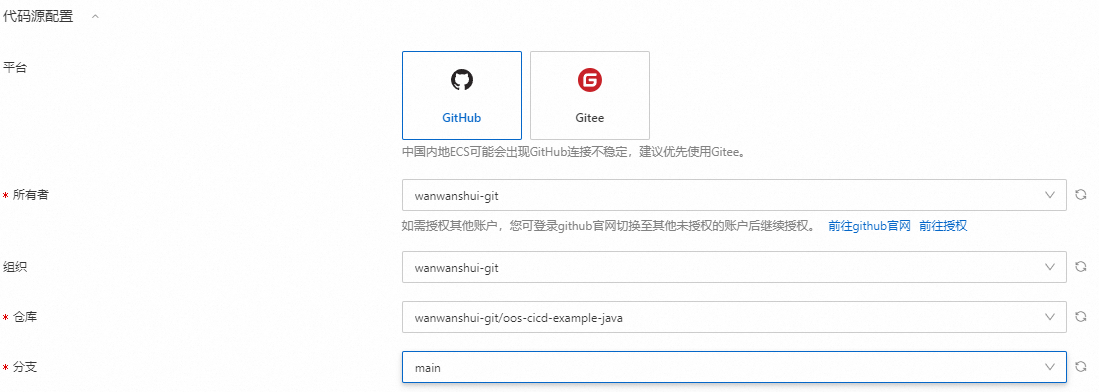
代碼源配置:選擇您的網站原始碼儲存在Git倉庫的資訊。
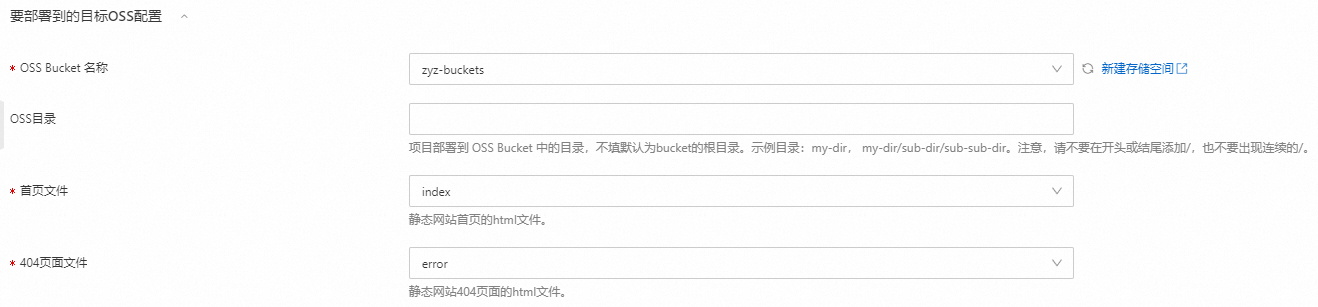
要部署到的目標OSS配置:您需要指定OSS Bucket,以及選擇靜態網站的預設首頁和404頁面。
FC扮演的RAM角色:該執行會啟動一個FC函數,您需要授權FC訪問您的目標OSS Bucket。

確認資訊無誤後,單擊建立。
在任務執行管理頁面,查看執行結果。
步驟二:綁定自訂網域名
將準備好的example.com網域名稱綁定到已建立的Bucket,以便能夠使用您的網域名稱訪問Bucket。
在Bucket列表頁面,選擇並單擊已建立的Bucket名稱。
在左側導覽列,選擇Bucket配置 > 網域名稱管理。
在網域名稱管理頁面,單擊綁定網域名稱。
在網域名稱文字框輸入
example.com,單擊確認綁定,然後開啟自動添加CNAME記錄開關。等待網域名稱狀態顯示為已生效,表示網域名稱綁定成功。
靜態網站訪問驗證
在瀏覽器中訪問以下URL以驗證網站是否正常運行:
訪問靜態網站首頁
http://example.com,配置正確時顯示如下頁面:英文圖片後續補齊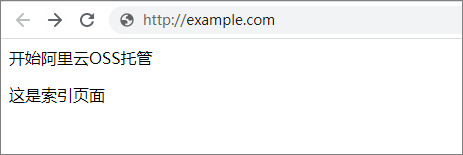
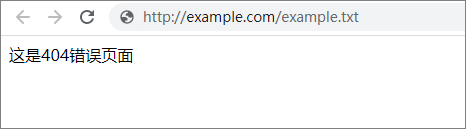
訪問Bucket中不存在的檔案
http://example.com/example.txt,配置正確時顯示如下頁面:
如果您的Git倉庫代碼有更新或改動,您可以再次執行本文建立的OOS模板。執行完成後,訪問對應頁面會看到更新的內容。