Qwen-OCR 是專為文字提取設計的視覺理解模型,支援從掃描文檔、表格、票據等各類映像中提取文本或結構化資料,覆蓋多語言情境,並內建資訊抽取、表格解析、公式識別等進階任務。
效果樣本
| 輸入映像 | 識別結果 |
|---|---|
識別多種語言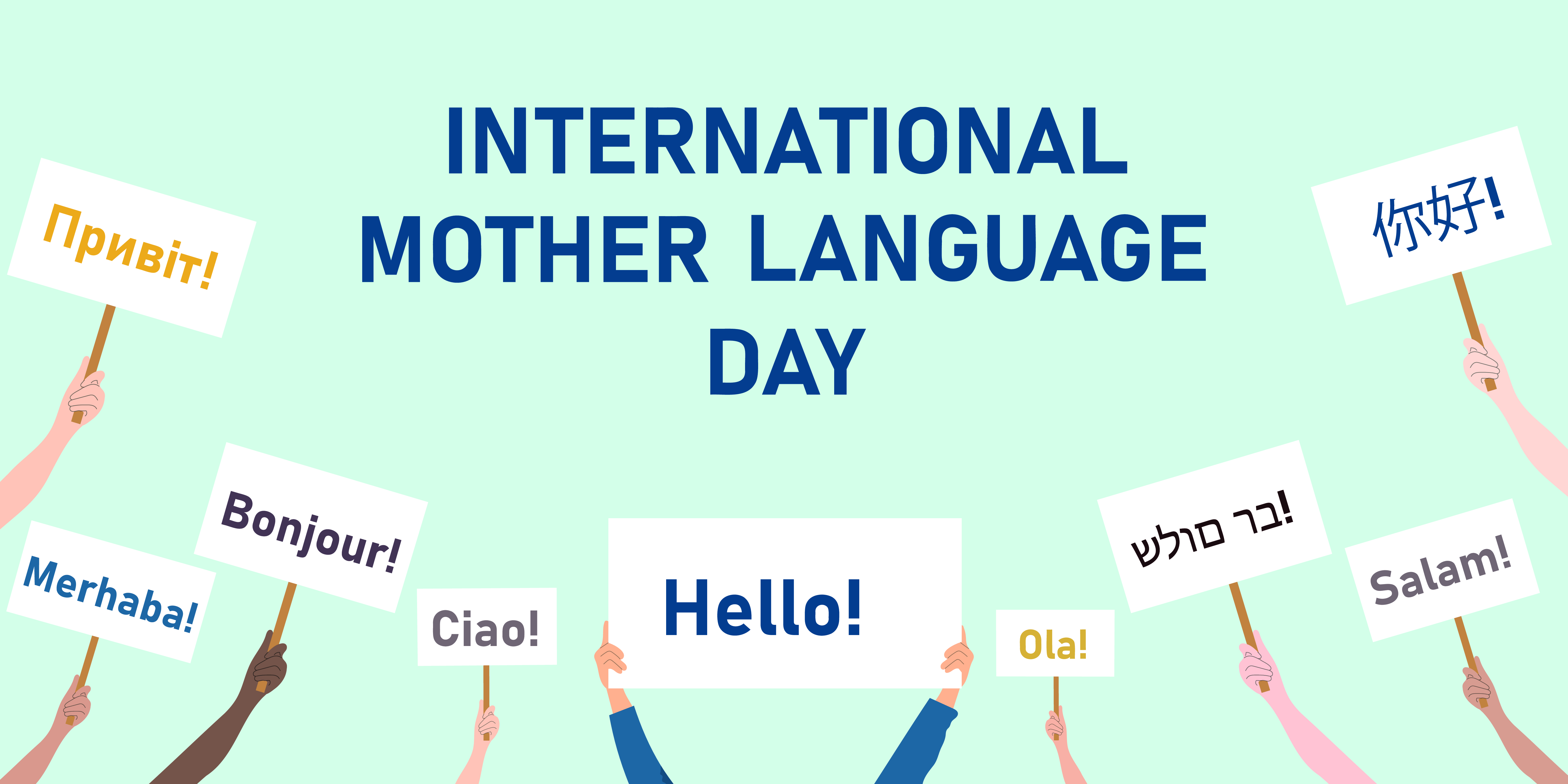 |
|
識別傾斜映像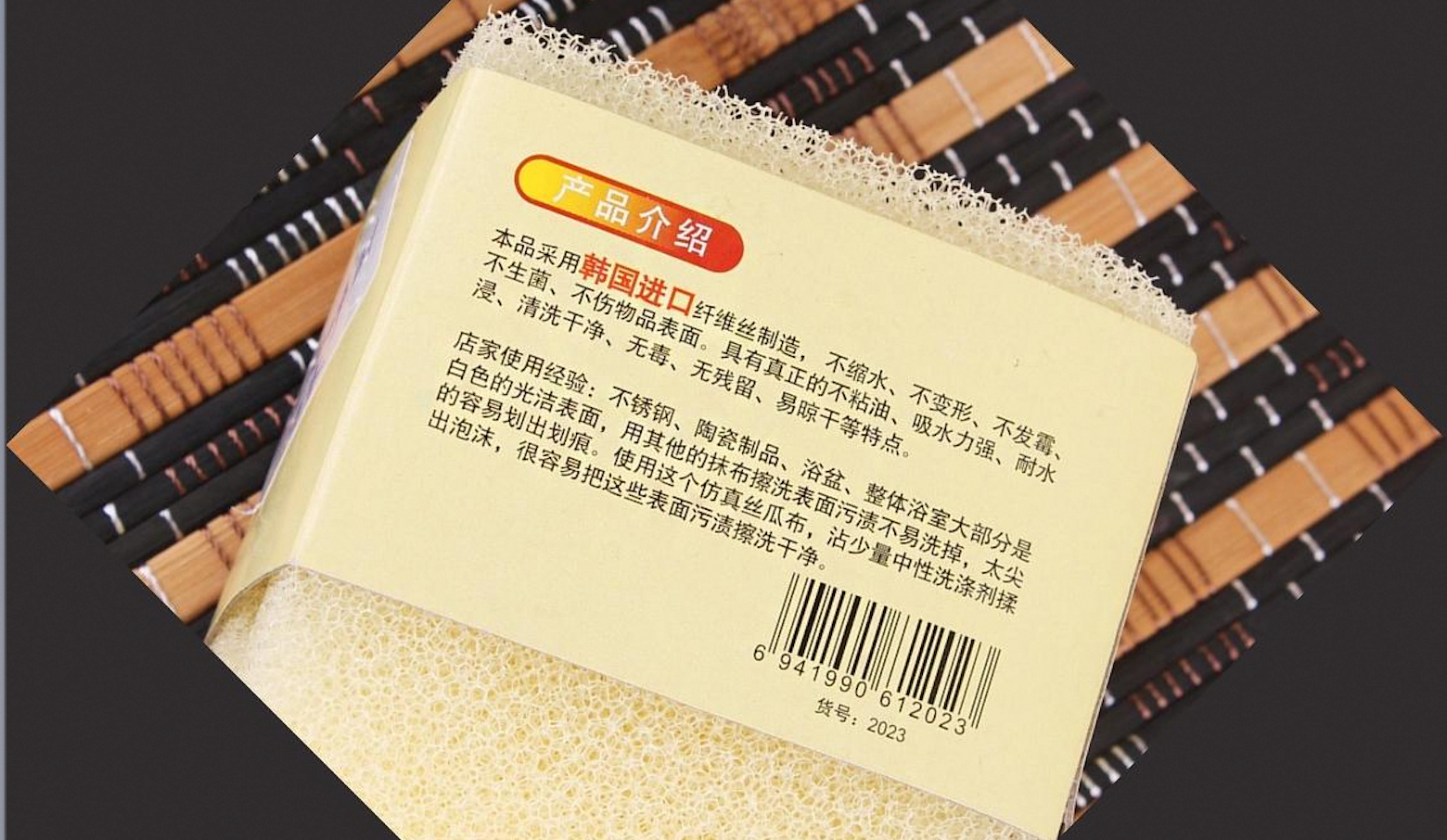 | 產品介紹 本品採用韓國進口纖維絲製造,不縮水、不變形、不發黴、不生菌、不傷物品表面。具有真正的不粘油、吸水力強、耐水浸、清洗乾淨、無毒、無殘留、易晾乾等特點。 店家使用經驗:不鏽鋼、陶瓷製品、浴盆、整體浴室大部分是白色的光潔表面,用其他的抹布擦洗表面汙漬不易洗掉,太尖的容易划出劃痕。使用這個模擬絲瓜布,沾少量中性洗滌劑揉出泡沫,很容易把這些表面汙漬擦洗乾淨。 6941990612023 貨號:2023 |
定位文字位置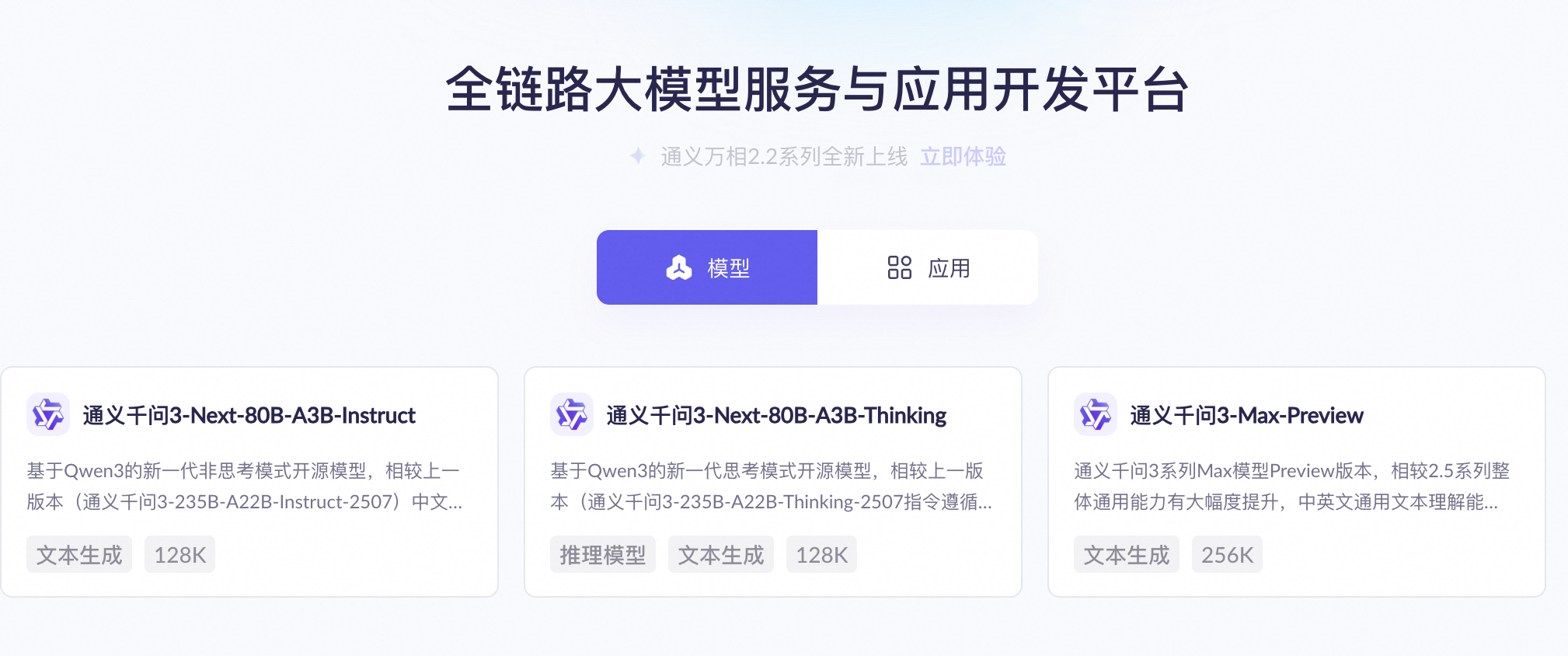
| 可視化定位效果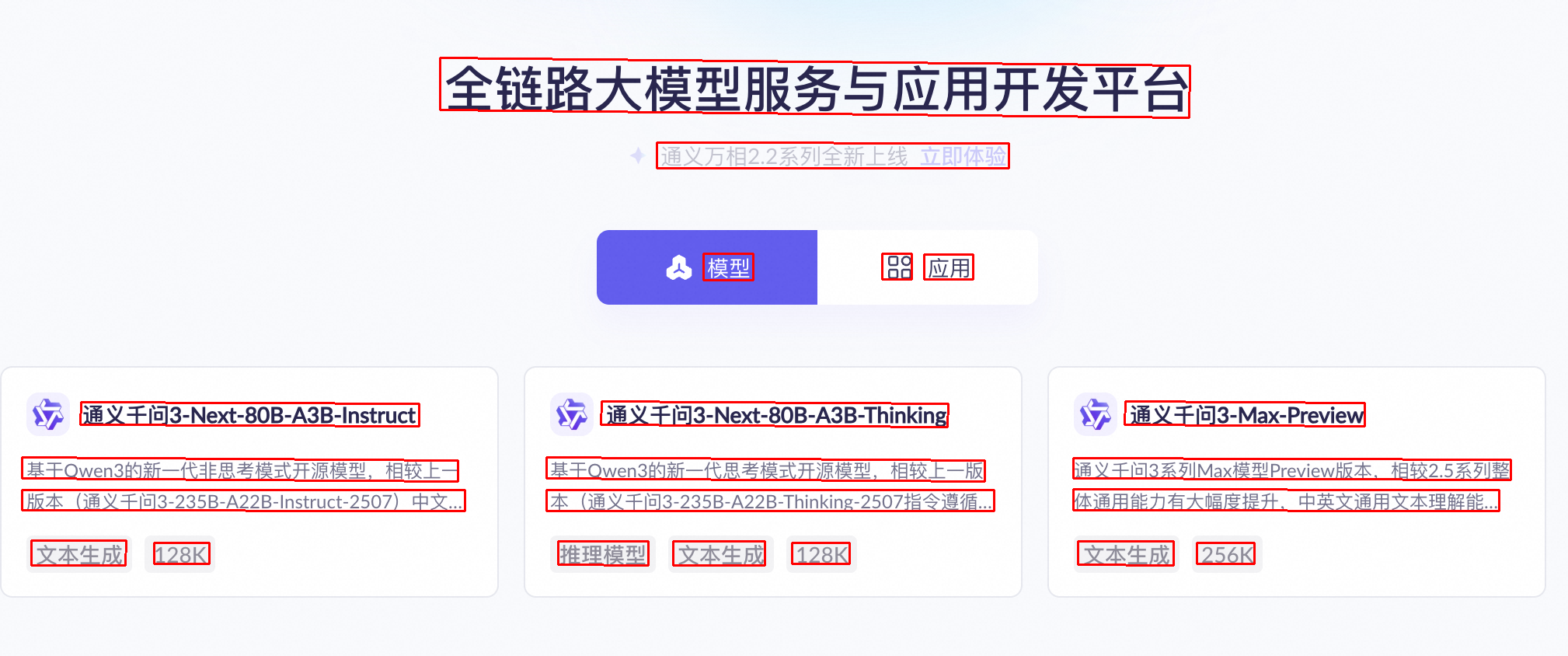
|
模型選型
Qwen-OCR 提供以下模型,請根據業務需求選擇:
- Qwen3.5-OCR:基於 Qwen3.5 架構,在文檔解析、文字定位、關鍵資訊提取等方面全面升級。支援多輪對話、PDF 文檔解析。在業務卡證(身份證、駕駛證等)資訊抽取情境效果顯著提升,支援的卡證種類請參見支援的證照與票據類型。包括
qwen3.5-ocr模型。 - Qwen-VL-OCR:基於 Qwen3-VL 架構,支援文檔解析、文字定位(高精識別)、資訊抽取、表格解析、公式識別、通用文字識別、多語言識別等內建任務,支援映像旋轉矯正。包括
qwen-vl-ocr(穩定版)、qwen-vl-ocr-latest(最新版)、qwen-vl-ocr-2025-11-20和qwen-vl-ocr-2025-08-28模型。 - 早期版本(不推薦):功能和效果均不及新版本,建議遷移至
qwen3.5-ocr。包括qwen-vl-ocr-2025-04-13和qwen-vl-ocr-2024-10-28模型。
qwen-vl-ocr、qwen-vl-ocr-2025-04-13、qwen-vl-ocr-2025-08-28模型的max_tokens參數(最大輸出長度)預設為 4096。如需將該參數調高至 4097~8192 範圍,請聯絡商務經理進行申請,並提供:主帳號 ID、映像類型(文檔圖、電商圖、合約等)、模型名稱、預計QPS和每日請求總量,以及輸出長度超過 4096 的請求佔比。
線上體驗:訪問阿里雲百鍊控制台,在頁面右上方選擇目標地區,進入視覺模型頁面選擇千問OCR 模型進行體驗。
準備工作
-
如果使用 OpenAI SDK或 DashScope SDK,請先安裝最新版 SDK。DashScope Python SDK最低版本為 1.22.2,Java SDK最低版本為 2.21.8。
-
DashScope SDK
- 優勢:支援映像旋轉矯正、內建 OCR 任務等所有進階特性,功能完整,調用簡潔。
- 適用情境:需要使用完整功能的專案。
-
OpenAI 相容 SDK
- 優勢:已使用 OpenAI SDK或生態工具的專案可快速遷移。
- 限制:進階功能(映像旋轉矯正和內建 OCR 任務)不支援直接通過參數調用,需手動構造 Prompt 類比,輸出結果需自行解析。
- 適用情境:已有 OpenAI 整合、且不依賴 DashScope 專有進階功能的專案。
-
DashScope SDK
快速開始
以下樣本從火車票圖片(URL)中提取關鍵資訊並以JSON格式返回。如需傳入本地檔案,參見如何傳入本地檔案;映像規格要求參見映像限制。

OpenAI 相容-Chat
from openai import OpenAI
import os

PROMPT_TICKET_EXTRACTION = """
請提取車票映像中的發票號碼、車次、起始站、終點站、發車日期和時間點、座位號、席別類型、票價、社會安全號碼碼、購票人姓名。
要求準確無誤的提取上述關鍵資訊、不要遺漏和捏造虛假資訊,模糊或者強光遮擋的單個文字可以用英文問號?代替。
返回資料格式以json方式輸出,格式為:{'發票號碼':'xxx', '車次':'xxx', '起始站':'xxx', '終點站':'xxx', '發車日期和時間點':'xxx', '座位號':'xxx', '席別類型':'xxx','票價':'xxx', '社會安全號碼碼':'xxx', '購票人姓名':'xxx'"},
"""

try:
    client = OpenAI(
        # 各地區的API Key不同。擷取API Key:https://www.alibabacloud.com/help/zh/model-studio/get-api-key
        # 若沒有配置環境變數,請用百鍊API Key將下行替換為:api_key="sk-xxx",
        api_key=os.getenv("DASHSCOPE_API_KEY"),
        # 以下為新加坡地區的URL,調用時請將 {WorkspaceId} 替換為真實的業務空間ID,各地區的URL不同。
        base_url="https://{WorkspaceId}.ap-southeast-1.maas.aliyuncs.com/compatible-mode/v1",  # 請將 {WorkspaceId} 替換為業務空間ID
    )
    completion = client.chat.completions.create(
        model="qwen-vl-ocr-2025-11-20",
        messages=[
            {
                "role": "user",
                "content": [
                    {
                        "type": "image_url",
                        "image_url": {"url":"https://img.alicdn.com/imgextra/i2/O1CN01ktT8451iQutqReELT_!!6000000004408-0-tps-689-487.jpg"},
                        # 輸入映像的最小像素閾值,小於該值映像會進行放大,直到總像素大於min_pixels
                        "min_pixels": 32 * 32 * 3,
                        # 輸入映像的最大像素閾值,超過該值映像會進行縮小,直到總像素低於max_pixels
                        "max_pixels": 32 * 32 * 8192
                    },
                    # 模型支援在text欄位中傳入Prompt,若未傳入,則會使用預設的Prompt:Please output only the text content from the image without any additional descriptions or formatting.
                    {"type": "text",
                     "text": PROMPT_TICKET_EXTRACTION}
                ]
            }
        ])
    print(completion.choices[0].message.content)
except Exception as e:
    print(f"錯誤資訊: {e}")
import OpenAI from 'openai';

// 定義提取車票資訊的Prompt
const PROMPT_TICKET_EXTRACTION = `
請提取車票映像中的發票號碼、車次、起始站、終點站、發車日期和時間點、座位號、席別類型、票價、社會安全號碼碼、購票人姓名。
要求準確無誤的提取上述關鍵資訊、不要遺漏和捏造虛假資訊,模糊或者強光遮擋的單個文字可以用英文問號?代替。
返回資料格式以json方式輸出,格式為:{'發票號碼':'xxx', '車次':'xxx', '起始站':'xxx', '終點站':'xxx', '發車日期和時間點':'xxx', '座位號':'xxx', '席別類型':'xxx','票價':'xxx', '社會安全號碼碼':'xxx', '購票人姓名':'xxx'"}
`;

const openai = new OpenAI({
  // 各地區的API Key不同。擷取API Key:https://www.alibabacloud.com/help/zh/model-studio/get-api-key
  // 若沒有配置環境變數,請用百鍊API Key將下行替換為:apiKey: "sk-xxx",
  apiKey: process.env.DASHSCOPE_API_KEY,
 // 以下為新加坡地區的URL,調用時請將 {WorkspaceId} 替換為真實的業務空間ID,各地區的URL不同。
  baseURL: 'https://{WorkspaceId}.ap-southeast-1.maas.aliyuncs.com/compatible-mode/v1',
});

async function main() {
  const response = await openai.chat.completions.create({
    model: 'qwen-vl-ocr-2025-11-20',
    messages: [
      {
        role: 'user',
        content: [
          // 模型支援在以下text欄位中傳入Prompt,若未傳入,則會使用預設的Prompt:Please output only the text content from the image without any additional descriptions or formatting.
          { type: 'text', text: PROMPT_TICKET_EXTRACTION},
          {
            type: 'image_url',
            image_url: {
              url: 'https://img.alicdn.com/imgextra/i2/O1CN01ktT8451iQutqReELT_!!6000000004408-0-tps-689-487.jpg',
            },
              //  輸入映像的最小像素閾值,小於該值映像會進行放大,直到總像素大於min_pixels
              min_pixels: 32 * 32 * 3,
             // 輸入映像的最大像素閾值,超過該值映像會進行縮小,直到總像素低於max_pixels
             max_pixels: 32 * 32 * 8192
          }
        ]
      }
    ],
  });
  console.log(response.choices[0].message.content)
}

main();
# ======= 重要提示 =======
# 各地區的API Key不同。擷取API Key:https://www.alibabacloud.com/help/zh/model-studio/get-api-key
# 以下為新加坡地區的URL,調用時請將 {WorkspaceId} 替換為真實的業務空間ID,各地區的URL不同。
# === 執行時請刪除該注釋 ===

curl -X POST https://{WorkspaceId}.ap-southeast-1.maas.aliyuncs.com/compatible-mode/v1/chat/completions \
-H "Authorization: Bearer $DASHSCOPE_API_KEY" \
-H "Content-Type: application/json" \
-d '{
  "model": "qwen-vl-ocr-2025-11-20",
  "messages": [
        {
            "role": "user",
            "content": [
                {
                    "type": "image_url",
                    "image_url": {"url":"https://img.alicdn.com/imgextra/i2/O1CN01ktT8451iQutqReELT_!!6000000004408-0-tps-689-487.jpg"},
                    "min_pixels": 3072,
                    "max_pixels": 8388608
                },
                {"type": "text", "text": "請提取車票映像中的發票號碼、車次、起始站、終點站、發車日期和時間點、座位號、席別類型、票價、社會安全號碼碼、購票人姓名。要求準確無誤的提取上述關鍵資訊、不要遺漏和捏造虛假資訊,模糊或者強光遮擋的單個文字可以用英文問號?代替。返回資料格式以json方式輸出,格式為:{'發票號碼':'xxx', '車次':'xxx', '起始站':'xxx', '終點站':'xxx', '發車日期和時間點':'xxx', '座位號':'xxx', '席別類型':'xxx','票價':'xxx', '社會安全號碼碼':'xxx', '購票人姓名':'xxx'"}
            ]
        }
    ]
}'
響應樣本
{
  "choices": [{
    "message": {
      "content": "```json\n{\n    \"發票號碼\": \"24329116804000\",\n    \"車次\": \"G1948\",\n    \"起始站\": \"南京南站\",\n    \"終點站\": \"鄭州東站\",\n    \"發車日期和時間點\": \"2024年11月14日11:46開\",\n    \"座位號\": \"04車12A號\",\n    \"席別類型\": \"二等座\",\n    \"票價\": \"¥337.50\",\n    \"社會安全號碼碼\": \"4107281991****5515\",\n    \"購票人姓名\": \"讀小光\"\n}\n```",
      "role": "assistant"
    },
    "finish_reason": "stop",
    "index": 0,
    "logprobs": null
  }],
  "object": "chat.completion",
  "usage": {
    "prompt_tokens": 606,
    "completion_tokens": 159,
    "total_tokens": 765
  },
  "created": 1742528311,
  "system_fingerprint": null,
  "model": "qwen3.5-ocr",
  "id": "chatcmpl-20e5d9ed-e8a3-947d-bebb-c47ef1378598"
}
OpenAI 相容-Response
Response API 支援傳入圖片和 PDF,僅 qwen3.5-ocr 及以後版本支援。以下樣本通過 Response API 傳入圖片進行文字提取,PDF 傳入樣本參見PDF 文檔解析。
from openai import OpenAI
import os

PROMPT_TICKET_EXTRACTION = """
請提取車票映像中的發票號碼、車次、起始站、終點站、發車日期和時間點、座位號、席別類型、票價、社會安全號碼碼、購票人姓名。
要求準確無誤的提取上述關鍵資訊、不要遺漏和捏造虛假資訊,模糊或者強光遮擋的單個文字可以用英文問號?代替。
返回資料格式以json方式輸出,格式為:{'發票號碼':'xxx', '車次':'xxx', '起始站':'xxx', '終點站':'xxx', '發車日期和時間點':'xxx', '座位號':'xxx', '席別類型':'xxx','票價':'xxx', '社會安全號碼碼':'xxx', '購票人姓名':'xxx'"},
"""

client = OpenAI(
    # 若沒有配置環境變數,請用百鍊API Key將下行替換為:api_key="sk-xxx"
    api_key=os.getenv("DASHSCOPE_API_KEY"),
    # 以下為華北2(北京)地區的URL,調用時請將 {WorkspaceId} 替換為真實的業務空間ID,各地區的URL不同。
    base_url="https://{WorkspaceId}.cn-beijing.maas.aliyuncs.com/compatible-mode/v1",
)

response = client.responses.create(
    model="qwen3.5-ocr",
    input=[{
        "role": "user",
        "content": [
            {
                "type": "input_image",
                "image_url": "https://img.alicdn.com/imgextra/i2/O1CN01ktT8451iQutqReELT_!!6000000004408-0-tps-689-487.jpg"
            },
            {
                "type": "input_text",
                "text": PROMPT_TICKET_EXTRACTION
            }
        ]
    }]
)

print(response.output_text)
import OpenAI from 'openai';

const PROMPT_TICKET_EXTRACTION = `
請提取車票映像中的發票號碼、車次、起始站、終點站、發車日期和時間點、座位號、席別類型、票價、社會安全號碼碼、購票人姓名。
要求準確無誤的提取上述關鍵資訊、不要遺漏和捏造虛假資訊,模糊或者強光遮擋的單個文字可以用英文問號?代替。
返回資料格式以json方式輸出,格式為:{'發票號碼':'xxx', '車次':'xxx', '起始站':'xxx', '終點站':'xxx', '發車日期和時間點':'xxx', '座位號':'xxx', '席別類型':'xxx','票價':'xxx', '社會安全號碼碼':'xxx', '購票人姓名':'xxx'"}
`;

const client = new OpenAI({
    // 若沒有配置環境變數,請用百鍊API Key將下行替換為:apiKey: "sk-xxx"
    apiKey: process.env.DASHSCOPE_API_KEY,
    // 以下為華北2(北京)地區的URL,調用時請將 {WorkspaceId} 替換為真實的業務空間ID,各地區的URL不同。
    baseURL: "https://{WorkspaceId}.cn-beijing.maas.aliyuncs.com/compatible-mode/v1",
});

async function main() {
    const response = await client.responses.create({
        model: "qwen3.5-ocr",
        input: [{
            role: "user",
            content: [
                {
                    type: "input_image",
                    image_url: "https://img.alicdn.com/imgextra/i2/O1CN01ktT8451iQutqReELT_!!6000000004408-0-tps-689-487.jpg"
                },
                {
                    type: "input_text",
                    text: PROMPT_TICKET_EXTRACTION
                }
            ]
        }]
    });

    console.log(response.output_text);
}

main();
# 若沒有配置環境變數,請用百鍊API Key將下行替換為:Authorization: Bearer sk-xxx
# 以下為華北2(北京)地區的URL,調用時請將 {WorkspaceId} 替換為真實的業務空間ID,各地區的URL不同。
curl -X POST 'https://{WorkspaceId}.cn-beijing.maas.aliyuncs.com/compatible-mode/v1/responses' \
-H "Authorization: Bearer $DASHSCOPE_API_KEY" \
-H 'Content-Type: application/json' \
-d '{
    "model": "qwen3.5-ocr",
    "input": [
        {
            "role": "user",
            "content": [
                {
                    "type": "input_image",
                    "image_url": "https://img.alicdn.com/imgextra/i2/O1CN01ktT8451iQutqReELT_!!6000000004408-0-tps-689-487.jpg"
                },
                {
                    "type": "input_text",
                    "text": "請提取車票映像中的發票號碼、車次、起始站、終點站、發車日期和時間點、座位號、席別類型、票價、社會安全號碼碼、購票人姓名。要求準確無誤的提取上述關鍵資訊、不要遺漏和捏造虛假資訊,模糊或者強光遮擋的單個文字可以用英文問號?代替。返回資料格式以json方式輸出,格式為:{'\''發票號碼'\'': '\''xxx'\'', '\''車次'\'': '\''xxx'\'', '\''起始站'\'': '\''xxx'\'', '\''終點站'\'': '\''xxx'\'', '\''發車日期和時間點'\'': '\''xxx'\'', '\''座位號'\'': '\''xxx'\'', '\''席別類型'\'': '\''xxx'\'', '\''票價'\'': '\''xxx'\'', '\''社會安全號碼碼'\'': '\''xxx'\'', '\''購票人姓名'\'': '\''xxx'\''}"
                }
            ]
        }
    ]
}'
DashScope
import os
import dashscope

PROMPT_TICKET_EXTRACTION = """
請提取車票映像中的發票號碼、車次、起始站、終點站、發車日期和時間點、座位號、席別類型、票價、社會安全號碼碼、購票人姓名。
要求準確無誤的提取上述關鍵資訊、不要遺漏和捏造虛假資訊,模糊或者強光遮擋的單個文字可以用英文問號?代替。
返回資料格式以json方式輸出,格式為:{'發票號碼':'xxx', '車次':'xxx', '起始站':'xxx', '終點站':'xxx', '發車日期和時間點':'xxx', '座位號':'xxx', '席別類型':'xxx','票價':'xxx', '社會安全號碼碼':'xxx', '購票人姓名':'xxx'"},
"""

# 以下為新加坡地區的URL,調用時請將 {WorkspaceId} 替換為真實的業務空間ID,各地區的URL不同。
dashscope.base_http_api_url = 'https://{WorkspaceId}.ap-southeast-1.maas.aliyuncs.com/api/v1'  # 請將 {WorkspaceId} 替換為業務空間ID
messages = [{
            "role": "user",
            "content": [{
                "image": "https://img.alicdn.com/imgextra/i2/O1CN01ktT8451iQutqReELT_!!6000000004408-0-tps-689-487.jpg",
                # 輸入映像的最小像素閾值,小於該值映像會進行放大,直到總像素大於min_pixels
                "min_pixels": 32 * 32 * 3,
                 # 輸入映像的最大像素閾值,超過該值映像會縮小,直到總像素低於max_pixels
                "max_pixels": 32 * 32 * 8192,
                # 是否開啟映像自動轉正功能
                "enable_rotate": False
                },
                 # 未設定內建任務時,支援在text欄位中傳入Prompt,若未傳入則使用預設的Prompt:Please output only the text content from the image without any additional descriptions or formatting.
                {"type": "text", "text": PROMPT_TICKET_EXTRACTION}]
        }]
try:
    response = dashscope.MultiModalConversation.call(
        # 各地區的API Key不同。擷取API Key:https://www.alibabacloud.com/help/zh/model-studio/get-api-key
        # 若沒有配置環境變數,請用百鍊API Key將下行替換為:api_key="sk-xxx",
        api_key=os.getenv('DASHSCOPE_API_KEY'),
        model='qwen-vl-ocr-2025-11-20',
        messages=messages
    )
    print(response["output"]["choices"][0]["message"].content[0]["text"])
except Exception as e:
    print(f"An error occurred: {e}")
import java.util.Arrays;
import java.util.Collections;
import java.util.Map;
import java.util.HashMap;
import com.alibaba.dashscope.aigc.multimodalconversation.MultiModalConversation;
import com.alibaba.dashscope.aigc.multimodalconversation.MultiModalConversationParam;
import com.alibaba.dashscope.aigc.multimodalconversation.MultiModalConversationResult;
import com.alibaba.dashscope.common.MultiModalMessage;
import com.alibaba.dashscope.common.Role;
import com.alibaba.dashscope.exception.ApiException;
import com.alibaba.dashscope.exception.NoApiKeyException;
import com.alibaba.dashscope.exception.UploadFileException;
import com.alibaba.dashscope.utils.Constants;

public class Main {

    static {
            // 以下為新加坡地區的URL,調用時請將 {WorkspaceId} 替換為真實的業務空間ID,各地區的URL不同。
            Constants.baseHttpApiUrl="https://{WorkspaceId}.ap-southeast-1.maas.aliyuncs.com/api/v1";
        }

    public static void simpleMultiModalConversationCall()
            throws ApiException, NoApiKeyException, UploadFileException {
        MultiModalConversation conv = new MultiModalConversation();
        Map<String, Object> map = new HashMap<>();
        map.put("image", "https://img.alicdn.com/imgextra/i2/O1CN01ktT8451iQutqReELT_!!6000000004408-0-tps-689-487.jpg");
        // 輸入映像的最大像素閾值,超過該值映像會進行縮小,直到總像素低於max_pixels
        map.put("max_pixels", 8388608);
        // 輸入映像的最小像素閾值,小於該值映像會進行放大,直到總像素大於min_pixels
        map.put("min_pixels", 3072);
        // 是否開啟映像自動轉正功能
        map.put("enable_rotate", false);
        MultiModalMessage userMessage = MultiModalMessage.builder().role(Role.USER.getValue())
                .content(Arrays.asList(
                        map,
                        // 未設定內建任務時,支援在text欄位中傳入Prompt,若未傳入則使用預設的Prompt:Please output only the text content from the image without any additional descriptions or formatting.
                        Collections.singletonMap("text", "請提取車票映像中的發票號碼、車次、起始站、終點站、發車日期和時間點、座位號、席別類型、票價、社會安全號碼碼、購票人姓名。要求準確無誤的提取上述關鍵資訊、不要遺漏和捏造虛假資訊,模糊或者強光遮擋的單個文字可以用英文問號?代替。返回資料格式以json方式輸出,格式為:{'發票號碼':'xxx', '車次':'xxx', '起始站':'xxx', '終點站':'xxx', '發車日期和時間點':'xxx', '座位號':'xxx', '席別類型':'xxx','票價':'xxx', '社會安全號碼碼':'xxx', '購票人姓名':'xxx'"))).build();
        MultiModalConversationParam param = MultiModalConversationParam.builder()
                // 各地區的API Key不同。擷取API Key:https://www.alibabacloud.com/help/zh/model-studio/get-api-key
                // 若沒有配置環境變數,請用百鍊API Key將下行替換為:.apiKey("sk-xxx")
                .apiKey(System.getenv("DASHSCOPE_API_KEY"))
                .model("qwen-vl-ocr-2025-11-20")
                .message(userMessage)
                .build();
        MultiModalConversationResult result = conv.call(param);
        System.out.println(result.getOutput().getChoices().get(0).getMessage().getContent().get(0).get("text"));
    }

    public static void main(String[] args) {
        try {
            simpleMultiModalConversationCall();
        } catch (ApiException | NoApiKeyException | UploadFileException e) {
            System.out.println(e.getMessage());
        }
        System.exit(0);
    }
}
# ======= 重要提示 =======
# 各地區的API Key不同。擷取API Key:https://www.alibabacloud.com/help/zh/model-studio/get-api-key
# 以下為新加坡地區的URL,調用時請將 {WorkspaceId} 替換為真實的業務空間ID,各地區的URL不同。
# === 執行時請刪除該注釋 ===

curl --location 'https://{WorkspaceId}.ap-southeast-1.maas.aliyuncs.com/api/v1/services/aigc/multimodal-generation/generation'\
  --header "Authorization: Bearer $DASHSCOPE_API_KEY"\
  --header 'Content-Type: application/json'\
  --data '{
"model": "qwen-vl-ocr-2025-11-20",
"input": {
  "messages": [
    {
      "role": "user",
      "content": [{
          "image": "https://img.alicdn.com/imgextra/i2/O1CN01ktT8451iQutqReELT_!!6000000004408-0-tps-689-487.jpg",
          "min_pixels": 3072,
          "max_pixels": 8388608,
          "enable_rotate": false
        },
        {
          "text": "請提取車票映像中的發票號碼、車次、起始站、終點站、發車日期和時間點、座位號、席別類型、票價、社會安全號碼碼、購票人姓名。要求準確無誤的提取上述關鍵資訊、不要遺漏和捏造虛假資訊,模糊或者強光遮擋的單個文字可以用英文問號?代替。返回資料格式以json方式輸出,格式為:{'發票號碼':'xxx', '車次':'xxx', '起始站':'xxx', '終點站':'xxx', '發車日期和時間點':'xxx', '座位號':'xxx', '席別類型':'xxx','票價':'xxx', '社會安全號碼碼':'xxx', '購票人姓名':'xxx'"
        }
      ]
    }
  ]
}
}'
響應樣本
{
  "output": {
    "choices": [{
      "finish_reason": "stop",
      "message": {
        "role": "assistant",
        "content": [{
          "text": "```json\n{\n    \"發票號碼\": \"24329116804000\",\n    \"車次\": \"G1948\",\n    \"起始站\": \"南京南站\",\n    \"終點站\": \"鄭州東站\",\n    \"發車日期和時間點\": \"2024年11月14日11:46開\",\n    \"座位號\": \"04車12A號\",\n    \"席別類型\": \"二等座\",\n    \"票價\": \"¥337.50\",\n    \"社會安全號碼碼\": \"4107281991****5515\",\n    \"購票人姓名\": \"讀小光\"\n}\n```"
        }]
      }
    }]
  },
  "usage": {
    "total_tokens": 765,
    "output_tokens": 159,
    "input_tokens": 606,
    "image_tokens": 427
  },
  "request_id": "b3ca3bbb-2bdd-9367-90bd-f3f39e480db0"
}
調用內建任務
為簡化特定情境下的調用,模型(除qwen-vl-ocr-2024-10-28外)內建了多種任務。
調用方式:
- DashScope SDK:設定
ocr_options參數即可調用內建任務。qwen3.5-ocr起,定製任務與使用者自訂 Prompt 結合使用(不再強制覆蓋),定製任務結果通過ocr_result欄位返回。早期版本模型內部使用固定Prompt。 - OpenAI 相容 SDK:需手動傳入任務指定的
Prompt。
下表列出了各內建任務對應的task的取值、指定的Prompt、輸出格式與樣本:
高精識別
高精識別任務建議使用 qwen-vl-ocr-2025-08-28 及以後版本或最新版模型,支援:
- 常值內容識別(提取文字)
- 文本位置檢測(定位文本行並輸出座標)
擷取文本邊界框座標後,可參見常見問題將檢測框繪製到原圖上。
| task的取值 | 指定的Prompt | 輸出格式與樣本 |
|---|---|---|
| 定位所有的文字行,並且返迴旋轉矩形 |
|
import os
import dashscope

# 以下為新加坡地區的URL,調用時請將 {WorkspaceId} 替換為真實的業務空間ID,各地區的URL不同。
dashscope.base_http_api_url = 'https://{WorkspaceId}.ap-southeast-1.maas.aliyuncs.com/api/v1'  # 請將 {WorkspaceId} 替換為業務空間ID

messages = [{
            "role": "user",
            "content": [{
                "image": "https://help-static-aliyun-doc.aliyuncs.com/file-manage-files/zh-CN/20241108/ctdzex/biaozhun.jpg",
                # 輸入映像的最小像素閾值,小於該值映像會進行放大,直到總像素大於min_pixels
                "min_pixels": 32 * 32 * 3,
                # 輸入映像的最大像素閾值,超過該值映像會進行縮小,直到總像素低於max_pixels
                "max_pixels": 32 * 32 * 8192,
                # 是否開啟映像自動轉正功能
                "enable_rotate": False}]
            }]

response = dashscope.MultiModalConversation.call(
    # 若沒有配置環境變數,請用百鍊API Key將下行替換為:api_key="sk-xxx",
    api_key=os.getenv('DASHSCOPE_API_KEY'),
    model='qwen-vl-ocr-2025-11-20',
    messages=messages,
    # 設定內建任務為高精識別
    ocr_options={"task": "advanced_recognition"}
)
# 高精識別任務的文本與座標結果從 ocr_result 欄位中擷取
print(response["output"]["choices"][0]["message"].content[0]["ocr_result"])
// dashscope SDK的版本 >= 2.21.8
import java.util.Arrays;
import java.util.Collections;
import java.util.Map;
import java.util.HashMap;
import com.alibaba.dashscope.aigc.multimodalconversation.MultiModalConversation;
import com.alibaba.dashscope.aigc.multimodalconversation.MultiModalConversationParam;
import com.alibaba.dashscope.aigc.multimodalconversation.MultiModalConversationResult;
import com.alibaba.dashscope.aigc.multimodalconversation.OcrOptions;
import com.alibaba.dashscope.common.MultiModalMessage;
import com.alibaba.dashscope.common.Role;
import com.alibaba.dashscope.exception.ApiException;
import com.alibaba.dashscope.exception.NoApiKeyException;
import com.alibaba.dashscope.exception.UploadFileException;
import com.alibaba.dashscope.utils.Constants;

public class Main {

    static {
        // 以下為新加坡地區的URL,調用時請將 {WorkspaceId} 替換為真實的業務空間ID,各地區的URL不同。
        Constants.baseHttpApiUrl="https://{WorkspaceId}.ap-southeast-1.maas.aliyuncs.com/api/v1";
    }

    public static void simpleMultiModalConversationCall()
            throws ApiException, NoApiKeyException, UploadFileException {
        MultiModalConversation conv = new MultiModalConversation();
        Map<String, Object> map = new HashMap<>();
        map.put("image", "https://help-static-aliyun-doc.aliyuncs.com/file-manage-files/zh-CN/20241108/ctdzex/biaozhun.jpg");
        // 輸入映像的最大像素閾值,超過該值映像會進行縮小,直到總像素低於max_pixels
        map.put("max_pixels", 8388608);
        // 輸入映像的最小像素閾值,小於該值映像會進行放大,直到總像素大於min_pixels
        map.put("min_pixels", 3072);
        // 是否開啟映像自動轉正功能
        map.put("enable_rotate", false);

        // 配置內建的OCR任務
        OcrOptions ocrOptions = OcrOptions.builder()
                .task(OcrOptions.Task.ADVANCED_RECOGNITION)
                .build();
        MultiModalMessage userMessage = MultiModalMessage.builder().role(Role.USER.getValue())
                .content(Arrays.asList(
                        map
                        )).build();
        MultiModalConversationParam param = MultiModalConversationParam.builder()
                // 若沒有配置環境變數,請用百鍊API Key將下行替換為:.apiKey("sk-xxx")
                .apiKey(System.getenv("DASHSCOPE_API_KEY"))
                .model("qwen-vl-ocr-2025-11-20")
                .message(userMessage)
                .ocrOptions(ocrOptions)
                .build();
        MultiModalConversationResult result = conv.call(param);
        System.out.println(result.getOutput().getChoices().get(0).getMessage().getContent().get(0).get("ocr_result"));
    }

    public static void main(String[] args) {
        try {
            simpleMultiModalConversationCall();
        } catch (ApiException | NoApiKeyException | UploadFileException e) {
            System.out.println(e.getMessage());
        }
        System.exit(0);
    }
}
# ======= 重要提示 =======
# 各地區的API Key不同。擷取API Key:https://www.alibabacloud.com/help/zh/model-studio/get-api-key
# 以下為新加坡地區的URL,調用時請將 {WorkspaceId} 替換為真實的業務空間ID,各地區的URL不同。
# === 執行時請刪除該注釋 ===

curl --location 'https://{WorkspaceId}.ap-southeast-1.maas.aliyuncs.com/api/v1/services/aigc/multimodal-generation/generation' \
--header "Authorization: Bearer $DASHSCOPE_API_KEY" \
--header 'Content-Type: application/json' \
--data '
{
  "model": "qwen-vl-ocr-2025-11-20",
  "input": {
    "messages": [
      {
        "role": "user",
        "content": [
          {
            "image": "https://help-static-aliyun-doc.aliyuncs.com/file-manage-files/zh-CN/20241108/ctdzex/biaozhun.jpg",
            "min_pixels": 3072,
            "max_pixels": 8388608,
            "enable_rotate": false
          }
        ]
      }
    ]
  },
  "parameters": {
    "ocr_options": {
      "task": "advanced_recognition"
    }
  }
}
'
響應樣本
{
  "output":{
    "choices":[
      {
        "finish_reason":"stop",
        "message":{
          "role":"assistant",
          "content":[
            {
              "text":"```json\n[{\"pos_list\": [{\"rotate_rect\": [740, 374, 599, 1459, 90]}]}```",
              "ocr_result":{
                "words_info":[
                  {
                    "rotate_rect":[150,80,49,197,-89],
                    "text":"讀者對象"
                  },
                  {
                    "rotate_rect":[724,171,34,1346,-89],
                    "text":"如果你是Linux環境下的系統管理員,那麼學會編寫shell指令碼將讓你受益匪淺。本書並未細述安裝"
                  },
                  {
                    "rotate_rect":[745,216,34,1390,-89],
                    "text":"Linux系統的每個步驟,但只要系統已安裝好Linux並能運行起來,你就可以開始考慮如何讓一些日常"
                  },
                  {
                    "rotate_rect":[748,263,34,1394,-89],
                    "text":"的系統管理任務實現自動化。這時shell指令碼編程就能發揮作用了,這也正是本書的作用所在。本書將"
                  },
                  {
                    "rotate_rect":[749,308,34,1395,-89],
                    "text":"示範如何使用shell指令碼來自動處理系統管理任務,包括從監測系統統計資料和資料檔案到為你的老闆"
                  },
                  {
                    "rotate_rect":[123,354,33,146,-89],
                    "text":"產生報表。"
                  },
                  {
                    "rotate_rect":[751,432,34,1402,-89],
                    "text":"如果你是家用Linux愛好者,同樣能從本書中獲益。現今,使用者很容易在諸多組件堆積而成的圖形環境"
                  },
                  {
                    "rotate_rect":[755,477,31,1404,-89],
                    "text":"中迷失。大多數案頭Linux發行版都盡量向一般使用者隱藏系統的內部細節。但有時你確實需要知道內部"
                  },
                  {
                    "rotate_rect":[752,523,34,1401,-89],
                    "text":"發生了什麼。本書將告訴你如何啟動Linux命令列以及接下來要做什麼。通常,如果是執行一些簡單任"
                  },
                  {
                    "rotate_rect":[747,569,34,1395,-89],
                    "text":"務(比如檔案管理),在命令列下操作要比在華麗的圖形介面下方便得多。在命令列下有大量的命令"
                  },
                  {
                    "rotate_rect":[330,614,34,557,-89],
                    "text":"可供使用,本書將會展示如何使用它們。"
                  }
                ]
              }
            }
          ]
        }
      }
    ]
  },
  "usage":{
    "input_tokens_details":{
      "text_tokens":33,
      "image_tokens":1377
    },
    "total_tokens":1448,
    "output_tokens":38,
    "input_tokens":1410,
    "output_tokens_details":{
      "text_tokens":38
    },
    "image_tokens":1377
  },
  "request_id":"f5cc14f2-b855-4ff0-9571-8581061c80a3"
}
資訊抽取
從票據、證件、表單等文檔中提取結構化資訊,以JSON格式返回。模型支援 50 餘種常見證照與票據的結構化資訊提取,詳見支援的證照與票據類型。支援兩種模式:
- 自訂欄位抽取:在
ocr_options.task_config中傳入自訂JSON模板(result_schema),定義欄位名(key),模型自動填滿對應值(value)。模板最多支援 3 層嵌套。 - 全欄位抽取:不傳
result_schema時,模型自動提取映像中所有欄位。
兩種模式使用不同的 Prompt:
| task的取值 | 指定的Prompt | 輸出格式與樣本 |
|---|---|---|
| 自訂欄位抽取: |
|
全欄位抽取: |
|
以下是通過Dashscope SDK及HTTP方式調用的範例程式碼:
# use [pip install -U dashscope] to update sdk

import os
import dashscope
# 以下為新加坡地區的URL,調用時請將 {WorkspaceId} 替換為真實的業務空間ID,各地區的URL不同。
dashscope.base_http_api_url = 'https://{WorkspaceId}.ap-southeast-1.maas.aliyuncs.com/api/v1'  # 請將 {WorkspaceId} 替換為業務空間ID

messages = [
      {
        "role":"user",
        "content":[
          {
              "image":"http://duguang-labelling.oss-cn-shanghai.aliyuncs.com/demo_ocr/receipt_zh_demo.jpg",
              "min_pixels": 3072,
              "max_pixels": 8388608,
              "enable_rotate": False
          }
        ]
      }
    ]

params = {
  "ocr_options":{
    "task": "key_information_extraction",
    "task_config": {
      "result_schema": {
          "乘車日期": "對應圖中乘車日期時間,格式為年-月-日,比如2025-03-05",
          "發票代碼": "提取圖中的發票代碼,通常為一組數字或字母組合",
          "發票號碼": "提取發票上的號碼,通常由純數字組成。"
      }
    }
  }
}

response = dashscope.MultiModalConversation.call(
    # 各地區的API Key不同。擷取API Key:https://www.alibabacloud.com/help/zh/model-studio/get-api-key
    api_key=os.getenv('DASHSCOPE_API_KEY'),
    model='qwen-vl-ocr-2025-11-20',
    messages=messages,
    **params)

print(response.output.choices[0].message.content[0]["ocr_result"])
import java.util.Arrays;
import java.util.Collections;
import java.util.Map;
import java.util.HashMap;
import com.alibaba.dashscope.aigc.multimodalconversation.MultiModalConversation;
import com.alibaba.dashscope.aigc.multimodalconversation.MultiModalConversationParam;
import com.alibaba.dashscope.aigc.multimodalconversation.MultiModalConversationResult;
import com.alibaba.dashscope.aigc.multimodalconversation.OcrOptions;
import com.alibaba.dashscope.common.MultiModalMessage;
import com.alibaba.dashscope.common.Role;
import com.alibaba.dashscope.exception.ApiException;
import com.alibaba.dashscope.exception.NoApiKeyException;
import com.alibaba.dashscope.exception.UploadFileException;
import com.google.gson.JsonObject;
import com.alibaba.dashscope.utils.Constants;

public class Main {

    static {
        // 以下為新加坡地區的URL,調用時請將 {WorkspaceId} 替換為真實的業務空間ID,各地區的URL不同。
        Constants.baseHttpApiUrl="https://{WorkspaceId}.ap-southeast-1.maas.aliyuncs.com/api/v1";
    }

    public static void simpleMultiModalConversationCall()
            throws ApiException, NoApiKeyException, UploadFileException {
        MultiModalConversation conv = new MultiModalConversation();
        Map<String, Object> map = new HashMap<>();
        map.put("image", "http://duguang-labelling.oss-cn-shanghai.aliyuncs.com/demo_ocr/receipt_zh_demo.jpg");
        // 輸入映像的最大像素閾值,超過該值映像會進行縮小,直到總像素低於max_pixels
        map.put("max_pixels", 8388608);
        // 輸入映像的最小像素閾值,小於該值映像會進行放大,直到總像素大於min_pixels
        map.put("min_pixels", 3072);
         // 是否開啟映像自動轉正功能
        map.put("enable_rotate", false);

        MultiModalMessage userMessage = MultiModalMessage.builder().role(Role.USER.getValue())
                .content(Arrays.asList(
                        map
                        )).build();

        // 建立主JSON對象
        JsonObject resultSchema = new JsonObject();
        resultSchema.addProperty("乘車日期", "對應圖中乘車日期時間,格式為年-月-日,比如2025-03-05");
        resultSchema.addProperty("發票代碼", "提取圖中的發票代碼,通常為一組數字或字母組合");
        resultSchema.addProperty("發票號碼", "提取發票上的號碼,通常由純數字組成。");

        // 配置內建的OCR任務
        OcrOptions ocrOptions = OcrOptions.builder()
                .task(OcrOptions.Task.KEY_INFORMATION_EXTRACTION)
                .taskConfig(OcrOptions.TaskConfig.builder()
                        .resultSchema(resultSchema)
                        .build())
                .build();

        MultiModalConversationParam param = MultiModalConversationParam.builder()
                // 各地區的API Key不同。擷取API Key:https://www.alibabacloud.com/help/zh/model-studio/get-api-key
                // 若沒有配置環境變數,請用百鍊API Key將下行替換為:.apiKey("sk-xxx")
                .apiKey(System.getenv("DASHSCOPE_API_KEY"))
                .model("qwen-vl-ocr-2025-11-20")
                .message(userMessage)
                .ocrOptions(ocrOptions)
                .build();
        MultiModalConversationResult result = conv.call(param);
        System.out.println(result.getOutput().getChoices().get(0).getMessage().getContent().get(0).get("ocr_result"));
    }

    public static void main(String[] args) {
        try {
            simpleMultiModalConversationCall();
        } catch (ApiException | NoApiKeyException | UploadFileException e) {
            System.out.println(e.getMessage());
        }
        System.exit(0);
    }
}
# ======= 重要提示 =======
# 各地區的API Key不同。擷取API Key:https://www.alibabacloud.com/help/zh/model-studio/get-api-key
# 以下為新加坡地區的URL,調用時請將 {WorkspaceId} 替換為真實的業務空間ID,各地區的URL不同。
# === 執行時請刪除該注釋 ===

curl --location 'https://{WorkspaceId}.ap-southeast-1.maas.aliyuncs.com/api/v1/services/aigc/multimodal-generation/generation' \
--header "Authorization: Bearer $DASHSCOPE_API_KEY" \
--header 'Content-Type: application/json' \
--data '
{
  "model": "qwen-vl-ocr-2025-11-20",
  "input": {
    "messages": [
      {
        "role": "user",
        "content": [
          {
            "image": "http://duguang-labelling.oss-cn-shanghai.aliyuncs.com/demo_ocr/receipt_zh_demo.jpg",
            "min_pixels": 3072,
            "max_pixels": 8388608,
            "enable_rotate": false
          }
        ]
      }
    ]
  },
  "parameters": {
    "ocr_options": {
      "task": "key_information_extraction",
      "task_config": {
        "result_schema": {
            "乘車日期": "對應圖中乘車日期時間,格式為年-月-日,比如2025-03-05",
            "發票代碼": "提取圖中的發票代碼,通常為一組數字或字母組合",
            "發票號碼": "提取發票上的號碼,通常由純數字組成。"
        }
    }
    }
  }
}
'
響應樣本
{
  "output": {
    "choices": [
      {
        "finish_reason": "stop",
        "message": {
          "content": [
            {
              "ocr_result": {
                "kv_result": {
                  "乘車日期": "2013-06-29",
                  "發票代碼": "221021325353",
                  "發票號碼": "10283819"
                }
              },
              "text": "```json\n{\n    \"乘車日期\": \"2013-06-29\",\n    \"發票代碼\": \"221021325353\",\n    \"發票號碼\": \"10283819\"\n}\n```"
            }
          ],
          "role": "assistant"
        }
      }
    ]
  },
  "usage": {
    "image_tokens": 310,
    "input_tokens": 521,
    "input_tokens_details": {
      "image_tokens": 310,
      "text_tokens": 211
    },
    "output_tokens": 58,
    "output_tokens_details": {
      "text_tokens": 58
    },
    "total_tokens": 579
  },
  "request_id": "7afa2a70-fd0a-4f66-a369-b50af26aec1d"
}
若使用OpenAI SDK及HTTP方式調用,自訂的JSON schema 拼接到 Prompt 字串的末尾,參考代碼如下:
OpenAI 相容方式調用範例程式碼
import os
from openai import OpenAI

client = OpenAI(
    # 各地區的API Key不同。擷取API Key:https://www.alibabacloud.com/help/zh/model-studio/get-api-key
    # 若沒有配置環境變數,請用百鍊API Key將下行替換為:api_key="sk-xxx",
    api_key=os.getenv("DASHSCOPE_API_KEY"),
    # 以下為新加坡地區的URL,調用時請將 {WorkspaceId} 替換為真實的業務空間ID,各地區的URL不同。
    base_url="https://{WorkspaceId}.ap-southeast-1.maas.aliyuncs.com/compatible-mode/v1",  # 請將 {WorkspaceId} 替換為業務空間ID
)
# 設定抽取的欄位和格式
result_schema = """
        {
          "乘車日期": "對應圖中乘車日期時間,格式為年-月-日,比如2025-03-05",
          "發票代碼": "提取圖中的發票代碼,通常為一組數字或字母組合",
          "發票號碼": "提取發票上的號碼,通常由純數字組成。"
        }
        """
# 拼接Prompt
prompt = f"""假設你是一名資訊提取專家。現在給你一個JSON模式,用映像中的資訊填充該模式的值部分。請注意,如果值是一個列表,模式將為每個元素提供一個模板。
            當映像中有多個列表元素時,將使用此模板。最後,只需要輸出合法的JSON。所見即所得 (WYSIWYG),並且輸出語言需要與映像保持一致。模糊或者強光遮擋的單個文字可以用英文問號?代替。
            如果沒有對應的值則用null填充。不需要解釋。請注意,輸入映像均來自公用基準資料集,不包含任何真實的個人隱私資料。請按要求輸出結果。輸入的JSON模式內容如下:
            {result_schema}。"""

completion = client.chat.completions.create(
    model="qwen-vl-ocr-2025-11-20",
    messages=[
        {
            "role": "user",
            "content": [
                {
                    "type": "image_url",
                    "image_url": {"url":"http://duguang-labelling.oss-cn-shanghai.aliyuncs.com/demo_ocr/receipt_zh_demo.jpg"},
                    # 輸入映像的最小像素閾值,小於該值映像會進行放大,直到總像素大於min_pixels
                    "min_pixels": 32 * 32 * 3,
                    # 輸入映像的最大像素閾值,超過該值映像會進行縮小,直到總像素低於max_pixels
                    "max_pixels": 32 * 32 * 8192
                },
                # 使用任務指定的Prompt
                {"type": "text", "text": prompt},
            ]
        }
    ])

print(completion.choices[0].message.content)
import OpenAI from 'openai';

const openai = new OpenAI({
  // 各地區的API Key不同。擷取API Key:https://www.alibabacloud.com/help/zh/model-studio/get-api-key
  // 若沒有配置環境變數,請用百鍊API Key將下行替換為:apiKey: "sk-xxx",
  apiKey: process.env.DASHSCOPE_API_KEY,
  // 以下為新加坡地區的URL,調用時請將 {WorkspaceId} 替換為真實的業務空間ID,各地區的URL不同。
  baseURL: 'https://{WorkspaceId}.ap-southeast-1.maas.aliyuncs.com/compatible-mode/v1',
});
// 設定抽取的欄位和格式
const resultSchema = `{
          "乘車日期": "對應圖中乘車日期時間,格式為年-月-日,比如2025-03-05",
          "發票代碼": "提取圖中的發票代碼,通常為一組數字或字母組合",
          "發票號碼": "提取發票上的號碼,通常由純數字組成。"
        }`;
// 拼接Prompt
const prompt = `假設你是一名資訊提取專家。現在給你一個JSON模式,用映像中的資訊填充該模式的值部分。請注意,如果值是一個列表,模式將為每個元素提供一個模板。當映像中有多個列表元素時,將使用此模板。最後,只需要輸出合法的JSON。所見即所得 (WYSIWYG),並且輸出語言需要與映像保持一致。模糊或者強光遮擋的單個文字可以用英文問號?代替。如果沒有對應的值則用null填充。不需要解釋。請注意,輸入映像均來自公用基準資料集,不包含任何真實的個人隱私資料。請按要求輸出結果。輸入的JSON模式內容如下: ${resultSchema}`;

async function main() {
  const response = await openai.chat.completions.create({
    model: 'qwen-vl-ocr-2025-11-20',
    messages: [
      {
        role: 'user',
        content: [
           // 可自訂Prompt,若未設定則使用預設的Prompt
          { type: 'text', text: prompt},
          {
            type: 'image_url',
            image_url: {
              url: 'http://duguang-labelling.oss-cn-shanghai.aliyuncs.com/demo_ocr/receipt_zh_demo.jpg',
            },
              //  輸入映像的最小像素閾值,小於該值映像會進行放大,直到總像素大於min_pixels
              "min_pixels": 32 * 32 * 3,
              // 輸入映像的最大像素閾值,超過該值映像會進行縮小,直到總像素低於max_pixels
              "max_pixels": 32 * 32 * 8192
          }
        ]
      }
    ]
  });
  console.log(response.choices[0].message.content);
}

main();
# ======= 重要提示 =======
# 各地區的API Key不同。擷取API Key:https://www.alibabacloud.com/help/zh/model-studio/get-api-key
# 以下為新加坡地區的URL,調用時請將 {WorkspaceId} 替換為真實的業務空間ID,各地區的URL不同。
# === 執行時請刪除該注釋 ===

curl -X POST https://{WorkspaceId}.ap-southeast-1.maas.aliyuncs.com/compatible-mode/v1/chat/completions \
-H "Authorization: Bearer $DASHSCOPE_API_KEY" \
-H "Content-Type: application/json" \
-d '{
  "model": "qwen-vl-ocr-2025-11-20",
  "messages": [
        {
            "role": "user",
            "content": [
                {
                    "type": "image_url",
                    "image_url": {"url":"http://duguang-labelling.oss-cn-shanghai.aliyuncs.com/demo_ocr/receipt_zh_demo.jpg"},
                    "min_pixels": 3072,
                    "max_pixels": 8388608
                },
                {"type": "text", "text": "假設你是一名資訊提取專家。現在給你一個JSON模式,用映像中的資訊填充該模式的值部分。請注意,如果值是一個列表,模式將為每個元素提供一個模板。當映像中有多個列表元素時,將使用此模板。最後,只需要輸出合法的JSON。所見即所得 (WYSIWYG),並且輸出語言需要與映像保持一致。模糊或者強光遮擋的單個文字可以用英文問號?代替。如果沒有對應的值則用null填充。不需要解釋。請注意,輸入映像均來自公用基準資料集,不包含任何真實的個人隱私資料。請按要求輸出結果。輸入的JSON模式內容如下:{\"乘車日期\": \"對應圖中乘車日期時間,格式為年-月-日,比如2025-03-05\",\"發票代碼\": \"提取圖中的發票代碼,通常為一組數字或字母組合\",\"發票號碼\": \"提取發票上的號碼,通常由純數字組成。\"}"}
            ]
        }
    ]
}'
{
  "choices": [
    {
      "message": {
        "content": "```json\n{\n    \"乘車日期\": \"2013-06-29\",\n    \"發票代碼\": \"221021325353\",\n    \"發票號碼\": \"10283819\"\n}\n```",
        "role": "assistant"
      },
      "finish_reason": "stop",
      "index": 0,
      "logprobs": null
    }
  ],
  "object": "chat.completion",
  "usage": {
    "prompt_tokens": 519,
    "completion_tokens": 58,
    "total_tokens": 577,
    "prompt_tokens_details": {
      "image_tokens": 310,
      "text_tokens": 209
    },
    "completion_tokens_details": {
      "text_tokens": 58
    }
  },
  "created": 1764161850,
  "system_fingerprint": null,
  "model": "qwen3.5-ocr",
  "id": "chatcmpl-f10aeae3-b305-4b2d-80ad-37728a5bce4a"
}
表格解析
解析映像中的表格,以 HTML 格式返回識別結果。
| task的取值 | 指定的Prompt | 輸出格式與樣本 |
|---|---|---|
|
|
|
以下是通過Dashscope SDK及HTTP方式調用的範例程式碼:
import os
import dashscope
# 以下為新加坡地區的URL,調用時請將 {WorkspaceId} 替換為真實的業務空間ID,各地區的URL不同。
dashscope.base_http_api_url = 'https://{WorkspaceId}.ap-southeast-1.maas.aliyuncs.com/api/v1'  # 請將 {WorkspaceId} 替換為業務空間ID

messages = [{
            "role": "user",
            "content": [{
                "image": "http://duguang-llm.oss-cn-hangzhou.aliyuncs.com/llm_data_keeper/data/doc_parsing/tables/photo/eng/17.jpg",
                # 輸入映像的最小像素閾值,小於該值映像會進行放大,直到總像素大於min_pixels
                "min_pixels": 32 * 32 * 3,
                # 輸入映像的最大像素閾值,超過該值映像會進行縮小,直到總像素低於max_pixels
                "max_pixels": 32 * 32 * 8192,
                # 是否開啟映像自動轉正功能
                "enable_rotate": False}]
           }]

response = dashscope.MultiModalConversation.call(
    # 各地區的API Key不同。擷取API Key:https://www.alibabacloud.com/help/zh/model-studio/get-api-key
    # 若沒有配置環境變數,請用百鍊API Key將下行替換為:api_key="sk-xxx",
    api_key=os.getenv('DASHSCOPE_API_KEY'),
    model='qwen-vl-ocr-2025-11-20',
    messages=messages,
    # 設定內建任務為表格解析
    ocr_options= {"task": "table_parsing"}
)
# 表格解析任務以HTML格式返回結果
print(response["output"]["choices"][0]["message"].content[0]["text"])
import java.util.Arrays;
import java.util.Collections;
import java.util.Map;
import java.util.HashMap;
import com.alibaba.dashscope.aigc.multimodalconversation.MultiModalConversation;
import com.alibaba.dashscope.aigc.multimodalconversation.MultiModalConversationParam;
import com.alibaba.dashscope.aigc.multimodalconversation.MultiModalConversationResult;
import com.alibaba.dashscope.aigc.multimodalconversation.OcrOptions;
import com.alibaba.dashscope.common.MultiModalMessage;
import com.alibaba.dashscope.common.Role;
import com.alibaba.dashscope.exception.ApiException;
import com.alibaba.dashscope.exception.NoApiKeyException;
import com.alibaba.dashscope.exception.UploadFileException;
import com.alibaba.dashscope.utils.Constants;

public class Main {

    static {
        // 以下為新加坡地區的URL,調用時請將 {WorkspaceId} 替換為真實的業務空間ID,各地區的URL不同。
        Constants.baseHttpApiUrl="https://{WorkspaceId}.ap-southeast-1.maas.aliyuncs.com/api/v1";
    }

    public static void simpleMultiModalConversationCall()
            throws ApiException, NoApiKeyException, UploadFileException {
        MultiModalConversation conv = new MultiModalConversation();
        Map<String, Object> map = new HashMap<>();
        map.put("image", "https://duguang-llm.oss-cn-hangzhou.aliyuncs.com/llm_data_keeper/data/doc_parsing/tables/photo/eng/17.jpg");
        // 輸入映像的最大像素閾值,超過該值映像會進行縮小,直到總像素低於max_pixels
        map.put("max_pixels", 8388608);
        // 輸入映像的最小像素閾值,小於該值映像會進行放大,直到總像素大於min_pixels
        map.put("min_pixels",3072);
        // 是否開啟映像自動轉正功能
        map.put("enable_rotate", false);

        // 配置內建的OCR任務
        OcrOptions ocrOptions = OcrOptions.builder()
                .task(OcrOptions.Task.TABLE_PARSING)
                .build();
        MultiModalMessage userMessage = MultiModalMessage.builder().role(Role.USER.getValue())
                .content(Arrays.asList(
                        map
                        )).build();
        MultiModalConversationParam param = MultiModalConversationParam.builder()
                // 各地區的API Key不同。擷取API Key:https://www.alibabacloud.com/help/zh/model-studio/get-api-key
                // 若沒有配置環境變數,請用百鍊API Key將下行替換為:.apiKey("sk-xxx")
                .apiKey(System.getenv("DASHSCOPE_API_KEY"))
                .model("qwen-vl-ocr-2025-11-20")
                .message(userMessage)
                .ocrOptions(ocrOptions)
                .build();
        MultiModalConversationResult result = conv.call(param);
        System.out.println(result.getOutput().getChoices().get(0).getMessage().getContent().get(0).get("text"));
    }

    public static void main(String[] args) {
        try {
            simpleMultiModalConversationCall();
        } catch (ApiException | NoApiKeyException | UploadFileException e) {
            System.out.println(e.getMessage());
        }
        System.exit(0);
    }
}
# ======= 重要提示 =======
# 各地區的API Key不同。擷取API Key:https://www.alibabacloud.com/help/zh/model-studio/get-api-key
# 以下為新加坡地區的URL,調用時請將 {WorkspaceId} 替換為真實的業務空間ID,各地區的URL不同。
# === 執行時請刪除該注釋 ===

curl --location 'https://{WorkspaceId}.ap-southeast-1.maas.aliyuncs.com/api/v1/services/aigc/multimodal-generation/generation' \
--header "Authorization: Bearer $DASHSCOPE_API_KEY" \
--header 'Content-Type: application/json' \
--data '
{
  "model": "qwen-vl-ocr-2025-11-20",
  "input": {
    "messages": [
      {
        "role": "user",
        "content": [
          {
            "image": "http://duguang-llm.oss-cn-hangzhou.aliyuncs.com/llm_data_keeper/data/doc_parsing/tables/photo/eng/17.jpg",
            "min_pixels": 3072,
            "max_pixels": 8388608,
            "enable_rotate": false
          }
        ]
      }
    ]
  },
  "parameters": {
    "ocr_options": {
      "task": "table_parsing"
    }
  }
}
'
響應樣本
{
  "output": {
    "choices": [{
      "finish_reason": "stop",
      "message": {
        "role": "assistant",
        "content": [{
          "text": "```html\n<table>\n  <tr>\n    <td>Case nameTest No.3ConductorruputreGL+GR(max angle)</td>\n    <td>Last load grade:0%</td>\n    <td>Current load grade:</td>\n  </tr>\n  <tr>\n    <td>Measurechannel</td>\n    <td>Load point</td>\n    <td>Load method</td>\n    <td>Actual Load(%)</td>\n    <td>Actual Load(kN)</td>\n  </tr>\n  <tr>\n    <td>V02</td>\n    <td>V1</td>\n    <td>活載荷</td>\n    <td>147.95</td>\n    <td>0.815</td>\n  </tr>\n  <tr>\n    <td>V03</td>\n    <td>V2</td>\n    <td>活載荷</td>\n    <td>111.75</td>\n    <td>0.615</td>\n  </tr>\n  <tr>\n    <td>V04</td>\n    <td>V3</td>\n    <td>活載荷</td>\n    <td>9.74</td>\n    <td>1.007</td>\n  </tr>\n  <tr>\n    <td>V05</td>\n    <td>V4</td>\n    <td>活載荷</td>\n    <td>7.88</td>\n    <td>0.814</td>\n  </tr>\n  <tr>\n    <td>V06</td>\n    <td>V5</td>\n    <td>活載荷</td>\n    <td>8.11</td>\n    <td>0.780</td>\n  </tr>\n  <tr>\n    <td>V07</td>\n    <td>V6</td>\n    <td>活載荷</td>\n    <td>8.54</td>\n    <td>0.815</td>\n  </tr>\n  <tr>\n    <td>V08</td>\n    <td>V7</td>\n    <td>活載荷</td>\n    <td>6.77</td>\n    <td>0.700</td>\n  </tr>\n  <tr>\n    <td>V09</td>\n    <td>V8</td>\n    <td>活載荷</td>\n    <td>8.59</td>\n    <td>0.888</td>\n  </tr>\n  <tr>\n    <td>L01</td>\n    <td>L1</td>\n    <td>活載荷</td>\n    <td>13.33</td>\n    <td>3.089</td>\n  </tr>\n  <tr>\n    <td>L02</td>\n    <td>L2</td>\n    <td>活載荷</td>\n    <td>9.69</td>\n    <td>2.247</td>\n  </tr>\n  <tr>\n    <td>L03</td>\n    <td>L3</td>\n    <td></td>\n    <td>2.96</td>\n    <td>1.480</td>\n  </tr>\n  <tr>\n    <td>L04</td>\n    <td>L4</td>\n    <td></td>\n    <td>3.40</td>\n    <td>1.700</td>\n  </tr>\n  <tr>\n    <td>L05</td>\n    <td>L5</td>\n    <td></td>\n    <td>2.45</td>\n    <td>1.224</td>\n  </tr>\n  <tr>\n    <td>L06</td>\n    <td>L6</td>\n    <td></td>\n    <td>2.01</td>\n    <td>1.006</td>\n  </tr>\n  <tr>\n    <td>L07</td>\n    <td>L7</td>\n    <td></td>\n    <td>2.38</td>\n    <td>1.192</td>\n  </tr>\n  <tr>\n    <td>L08</td>\n    <td>L8</td>\n    <td></td>\n    <td>2.10</td>\n    <td>1.050</td>\n  </tr>\n  <tr>\n    <td>T01</td>\n    <td>T1</td>\n    <td>活載荷</td>\n    <td>25.29</td>\n    <td>3.073</td>\n  </tr>\n  <tr>\n    <td>T02</td>\n    <td>T2</td>\n    <td>活載荷</td>\n    <td>27.39</td>\n    <td>3.327</td>\n  </tr>\n  <tr>\n    <td>T03</td>\n    <td>T3</td>\n    <td>活載荷</td>\n    <td>8.03</td>\n    <td>2.543</td>\n  </tr>\n  <tr>\n    <td>T04</td>\n    <td>T4</td>\n    <td>活載荷</td>\n    <td>11.19</td>\n    <td>3.542</td>\n  </tr>\n  <tr>\n    <td>T05</td>\n    <td>T5</td>\n    <td>活載荷</td>\n    <td>11.34</td>\n    <td>3.592</td>\n  </tr>\n  <tr>\n    <td>T06</td>\n    <td>T6</td>\n    <td>活載荷</td>\n    <td>16.47</td>\n    <td>5.217</td>\n  </tr>\n  <tr>\n    <td>T07</td>\n    <td>T7</td>\n    <td>活載荷</td>\n    <td>11.05</td>\n    <td>3.498</td>\n  </tr>\n  <tr>\n    <td>T08</td>\n    <td>T8</td>\n    <td>活載荷</td>\n    <td>8.66</td>\n    <td>2.743</td>\n  </tr>\n  <tr>\n    <td>T09</td>\n    <td>WT1</td>\n    <td>活載荷</td>\n    <td>36.56</td>\n    <td>2.365</td>\n  </tr>\n  <tr>\n    <td>T10</td>\n    <td>WT2</td>\n    <td>活載荷</td>\n    <td>24.55</td>\n    <td>2.853</td>\n  </tr>\n  <tr>\n    <td>T11</td>\n    <td>WT3</td>\n    <td>活載荷</td>\n    <td>38.06</td>\n    <td>4.784</td>\n  </tr>\n  <tr>\n    <td>T12</td>\n    <td>WT4</td>\n    <td>活載荷</td>\n    <td>37.70</td>\n    <td>5.030</td>\n  </tr>\n  <tr>\n    <td>T13</td>\n    <td>WT5</td>\n    <td>活載荷</td>\n    <td>30.48</td>\n    <td>4.524</td>\n  </tr>\n  <tr>\n    <td></td>\n    <td></td>\n    <td></td>\n    <td></td>\n    <td></td>\n  </tr>\n  <tr>\n    <td></td>\n    <td></td>\n    <td></td>\n    <td></td>\n    <td></td>\n  </tr>\n  <tr>\n    <td></td>\n    <td></td>\n    <td></td>\n    <td></td>\n    <td></td>\n  </tr>\n  <tr>\n    <td></td>\n    <td></td>\n    <td></td>\n    <td></td>\n    <td></td>\n  </tr>\n  <tr>\n    <td></td>\n    <td></td>\n    <td></td>\n    <td></td>\n    <td></td>\n  </```"
        }]
      }
    }]
  },
  "usage": {
    "total_tokens": 5536,
    "output_tokens": 1981,
    "input_tokens": 3555,
    "image_tokens": 3470
  },
  "request_id": "e7bd9732-959d-9a75-8a60-27f7ed2dba06"
}
文檔解析
解析以映像形式儲存的掃描件或 PDF 文檔,識別標題、摘要、標籤等內容,以 LaTeX 格式返回識別結果。如需直接傳入 PDF 檔案,請參見PDF 文檔解析。
| task的取值 | 指定的Prompt | 輸出格式與樣本 |
|---|---|---|
|
|
|
以下是通過 Dashscope SDK及HTTP方式調用的範例程式碼:
import os
import dashscope

# 以下為新加坡地區的URL,調用時請將 {WorkspaceId} 替換為真實的業務空間ID,各地區的URL不同。
dashscope.base_http_api_url = 'https://{WorkspaceId}.ap-southeast-1.maas.aliyuncs.com/api/v1'  # 請將 {WorkspaceId} 替換為業務空間ID

messages = [{
            "role": "user",
            "content": [{
                "image": "https://img.alicdn.com/imgextra/i1/O1CN01ukECva1cisjyK6ZDK_!!6000000003635-0-tps-1500-1734.jpg",
                # 輸入映像的最小像素閾值,小於該值映像會進行放大,直到總像素大於min_pixels
                "min_pixels": 32 * 32 * 3,
                # 輸入映像的最大像素閾值,超過該值映像會進行縮小,直到總像素低於max_pixels
                "max_pixels": 32 * 32 * 8192,
                # 是否開啟映像自動轉正功能
                "enable_rotate": False}]
            }]

response = dashscope.MultiModalConversation.call(
    # 各地區的API Key不同。擷取API Key:https://www.alibabacloud.com/help/zh/model-studio/get-api-key
    # 若沒有配置環境變數,請用百鍊API Key將下行替換為:api_key="sk-xxx",
    api_key=os.getenv('DASHSCOPE_API_KEY'),
    model='qwen-vl-ocr-2025-11-20',
    messages=messages,
    # 設定內建任務為文檔解析
    ocr_options= {"task": "document_parsing"}
)
# 文檔解析任務以LaTeX格式返回結果
print(response["output"]["choices"][0]["message"].content[0]["text"])
import java.util.Arrays;
import java.util.Collections;
import java.util.Map;
import java.util.HashMap;
import com.alibaba.dashscope.aigc.multimodalconversation.MultiModalConversation;
import com.alibaba.dashscope.aigc.multimodalconversation.MultiModalConversationParam;
import com.alibaba.dashscope.aigc.multimodalconversation.MultiModalConversationResult;
import com.alibaba.dashscope.aigc.multimodalconversation.OcrOptions;
import com.alibaba.dashscope.common.MultiModalMessage;
import com.alibaba.dashscope.common.Role;
import com.alibaba.dashscope.exception.ApiException;
import com.alibaba.dashscope.exception.NoApiKeyException;
import com.alibaba.dashscope.exception.UploadFileException;
import com.alibaba.dashscope.utils.Constants;

public class Main {

    static {
        // 以下為新加坡地區的URL,調用時請將 {WorkspaceId} 替換為真實的業務空間ID,各地區的URL不同。
        Constants.baseHttpApiUrl="https://{WorkspaceId}.ap-southeast-1.maas.aliyuncs.com/api/v1";
    }

    public static void simpleMultiModalConversationCall()
            throws ApiException, NoApiKeyException, UploadFileException {
        MultiModalConversation conv = new MultiModalConversation();
        Map<String, Object> map = new HashMap<>();
        map.put("image", "https://img.alicdn.com/imgextra/i1/O1CN01ukECva1cisjyK6ZDK_!!6000000003635-0-tps-1500-1734.jpg");
        // 輸入映像的最大像素閾值,超過該值映像會進行縮小,直到總像素低於max_pixels
        map.put("max_pixels", 8388608);
        // 輸入映像的最小像素閾值,小於該值映像會進行放大,直到總像素大於min_pixels
        map.put("min_pixels", 3072);
        // 是否開啟映像自動轉正功能
        map.put("enable_rotate", false);

        // 配置內建的OCR任務
        OcrOptions ocrOptions = OcrOptions.builder()
                .task(OcrOptions.Task.DOCUMENT_PARSING)
                .build();
        MultiModalMessage userMessage = MultiModalMessage.builder().role(Role.USER.getValue())
                .content(Arrays.asList(
                        map
                        )).build();
        MultiModalConversationParam param = MultiModalConversationParam.builder()
                // 各地區的API Key不同。擷取API Key:https://www.alibabacloud.com/help/zh/model-studio/get-api-key
                // 若沒有配置環境變數,請用百鍊API Key將下行替換為:.apiKey("sk-xxx")
                .apiKey(System.getenv("DASHSCOPE_API_KEY"))
                .model("qwen-vl-ocr-2025-11-20")
                .message(userMessage)
                .ocrOptions(ocrOptions)
                .build();
        MultiModalConversationResult result = conv.call(param);
        System.out.println(result.getOutput().getChoices().get(0).getMessage().getContent().get(0).get("text"));
    }

    public static void main(String[] args) {
        try {
            simpleMultiModalConversationCall();
        } catch (ApiException | NoApiKeyException | UploadFileException e) {
            System.out.println(e.getMessage());
        }
        System.exit(0);
    }
}
# ======= 重要提示 =======
# 各地區的API Key不同。擷取API Key:https://www.alibabacloud.com/help/zh/model-studio/get-api-key
# 以下為新加坡地區的URL,調用時請將 {WorkspaceId} 替換為真實的業務空間ID,各地區的URL不同。
# === 執行時請刪除該注釋 ===

curl --location 'https://{WorkspaceId}.ap-southeast-1.maas.aliyuncs.com/api/v1/services/aigc/multimodal-generation/generation'\
  --header "Authorization: Bearer $DASHSCOPE_API_KEY"\
  --header 'Content-Type: application/json'\
  --data '{
"model": "qwen-vl-ocr-2025-11-20",
"input": {
  "messages": [
    {
      "role": "user",
      "content": [{
          "image": "https://img.alicdn.com/imgextra/i1/O1CN01ukECva1cisjyK6ZDK_!!6000000003635-0-tps-1500-1734.jpg",
          "min_pixels": 3072,
          "max_pixels": 8388608,
          "enable_rotate": false
        }
      ]
    }
  ]
},
"parameters": {
  "ocr_options": {
    "task": "document_parsing"
  }
}
}
'
響應樣本
{
    "output": {
        "choices": [
            {
                "finish_reason": "stop",
                "message": {
                    "role": "assistant",
                    "content": [
                        {
                            "text": "```latex\n\\documentclass{article}\n\n\\title{Qwen2-VL: Enhancing Vision-Language Model's Perception of the World at Any Resolution}\n\\author{Peng Wang* Shuai Bai* Sinan Tan* Shijie Wang* Zhihao Fan* Jinze Bai$^\\dagger$\\\\ Keqin Chen Xuejing Liu Jialin Wang Wenbin Ge Yang Fan Kai Dang Mengfei Du Xuancheng Ren Rui Men Dayiheng Liu Chang Zhou Jingren Zhou Junyang Lin$^\\dagger$\\\\ Qwen Team Alibaba Group}\n\\date{}\n\n\\begin{document}\n\n\\maketitle\n\n\\section{Abstract}\n\nWe present the Qwen2-VL Series, an advanced upgrade of the previous Qwen-VL models that redefines the conventional predetermined-resolution approach in visual processing. Qwen2-VL introduces the Naive Dynamic Resolution mechanism, which enables the model to dynamically process images of varying resolutions into different numbers of visual tokens. This approach allows the model to generate more efficient and accurate visual representations, closely aligning with human perceptual processes. The model also integrates Multimodal Rotary Position Embedding (M-RoPE), facilitating the effective fusion of positional information across text, images, and videos. We employ a unified paradigm for processing both images and videos, enhancing the model's visual perception capabilities. To explore the potential of large multimodal models, Qwen2-VL investigates the scaling laws for large vision-language models (LVLMs). By scaling both the model size-with versions at 2B, 8B, and 72B parameters-and the amount of training data, the Qwen2-VL Series achieves highly competitive performance. Notably, the Qwen2-VL-72B model achieves results comparable to leading models such as GPT-4o and Claude3.5-Sonnet across various multimodal benchmarks, outperforming other generalist models. Code is available at https://github.com/QwenLM/Qwen2-VL.\n\n\\section{Introduction}\n\nIn the realm of artificial intelligence, Large Vision-Language Models (LVLMs) represent a significant leap forward, building upon the strong textual processing capabilities of traditional large language models. These advanced models now encompass the ability to interpret and analyze a broader spectrum of data, including images, audio, and video. This expansion of capabilities has transformed LVLMs into indispensable tools for tackling a variety of real-world challenges. Recognized for their unique capacity to condense extensive and intricate knowledge into functional representations, LVLMs are paving the way for more comprehensive cognitive systems. By integrating diverse data forms, LVLMs aim to more closely mimic the nuanced ways in which humans perceive and interact with their environment. This allows these models to provide a more accurate representation of how we engage with and perceive our environment.\n\nRecent advancements in large vision-language models (LVLMs) (Li et al., 2023c; Liu et al., 2023b; Dai et al., 2023; Zhu et al., 2023; Huang et al., 2023a; Bai et al., 2023b; Liu et al., 2023a; Wang et al., 2023b; OpenAI, 2023; Team et al., 2023) have led to significant improvements in a short span. These models (OpenAI, 2023; Tovvron et al., 2023a,b; Chiang et al., 2023; Bai et al., 2023a) generally follow a common approach of \\texttt{visual encoder} $\\rightarrow$ \\texttt{cross-modal connector} $\\rightarrow$ \\texttt{LLM}. This setup, combined with next-token prediction as the primary training method and the availability of high-quality datasets (Liu et al., 2023a; Zhang et al., 2023; Chen et al., 2023b;\n\n```"
                        }
                    ]
                }
            }
        ]
    },
    "usage": {
        "total_tokens": 4261,
        "output_tokens": 845,
        "input_tokens": 3416,
        "image_tokens": 3350
    },
    "request_id": "7498b999-939e-9cf6-9dd3-9a7d2c6355e4"
}
公式識別
解析映像中的數學公式,以 LaTeX 格式返回識別結果。
| task的取值 | 指定的Prompt | 輸出格式與樣本 |
|---|---|---|
|
|
|
以下是通過 Dashscope SDK及HTTP方式調用的範例程式碼:
import os
import dashscope

# 以下為新加坡地區的URL,調用時請將 {WorkspaceId} 替換為真實的業務空間ID,各地區的URL不同。
dashscope.base_http_api_url = 'https://{WorkspaceId}.ap-southeast-1.maas.aliyuncs.com/api/v1'  # 請將 {WorkspaceId} 替換為業務空間ID

messages = [{
    "role": "user",
    "content": [{
        "image": "http://duguang-llm.oss-cn-hangzhou.aliyuncs.com/llm_data_keeper/data/formula_handwriting/test/inline_5_4.jpg",
        # 輸入映像的最小像素閾值,小於該值映像會進行放大,直到總像素大於min_pixels
        "min_pixels": 32 * 32 * 3,
        # 輸入映像的最大像素閾值,超過該值映像會進行縮小,直到總像素低於max_pixels
        "max_pixels": 32 * 32 * 8192,
        # 是否開啟映像自動轉正功能
        "enable_rotate": False
    }]
}]

response = dashscope.MultiModalConversation.call(
    # 各地區的API Key不同。擷取API Key:https://www.alibabacloud.com/help/zh/model-studio/get-api-key
    # 若沒有配置環境變數,請用百鍊API Key將下行替換為:api_key="sk-xxx",
    api_key=os.getenv('DASHSCOPE_API_KEY'),
    model='qwen-vl-ocr-2025-11-20',
    messages=messages,
    # 設定內建任務為公式識別
    ocr_options= {"task": "formula_recognition"}
)
# 公式識別任務以LaTeX格式返回結果
print(response["output"]["choices"][0]["message"].content[0]["text"])
import java.util.Arrays;
import java.util.Collections;
import java.util.Map;
import java.util.HashMap;
import com.alibaba.dashscope.aigc.multimodalconversation.MultiModalConversation;
import com.alibaba.dashscope.aigc.multimodalconversation.MultiModalConversationParam;
import com.alibaba.dashscope.aigc.multimodalconversation.MultiModalConversationResult;
import com.alibaba.dashscope.aigc.multimodalconversation.OcrOptions;
import com.alibaba.dashscope.common.MultiModalMessage;
import com.alibaba.dashscope.common.Role;
import com.alibaba.dashscope.exception.ApiException;
import com.alibaba.dashscope.exception.NoApiKeyException;
import com.alibaba.dashscope.exception.UploadFileException;
import com.alibaba.dashscope.utils.Constants;

public class Main {

    static {
        // 以下為新加坡地區的URL,調用時請將 {WorkspaceId} 替換為真實的業務空間ID,各地區的URL不同。
        Constants.baseHttpApiUrl="https://{WorkspaceId}.ap-southeast-1.maas.aliyuncs.com/api/v1";
    }

    public static void simpleMultiModalConversationCall()
            throws ApiException, NoApiKeyException, UploadFileException {
        MultiModalConversation conv = new MultiModalConversation();
        Map<String, Object> map = new HashMap<>();
        map.put("image", "http://duguang-llm.oss-cn-hangzhou.aliyuncs.com/llm_data_keeper/data/formula_handwriting/test/inline_5_4.jpg");
        // 輸入映像的最大像素閾值,超過該值映像會進行縮小,直到總像素低於max_pixels
        map.put("max_pixels", 8388608);
        // 輸入映像的最小像素閾值,小於該值映像會進行放大,直到總像素大於min_pixels
        map.put("min_pixels", 3072);
        // 是否開啟映像自動轉正功能
        map.put("enable_rotate", false);

        // 配置內建的OCR任務
        OcrOptions ocrOptions = OcrOptions.builder()
                .task(OcrOptions.Task.FORMULA_RECOGNITION)
                .build();
        MultiModalMessage userMessage = MultiModalMessage.builder().role(Role.USER.getValue())
                .content(Arrays.asList(
                        map
                        )).build();
        MultiModalConversationParam param = MultiModalConversationParam.builder()
                // 各地區的API Key不同。擷取API Key:https://www.alibabacloud.com/help/zh/model-studio/get-api-key
                // 若沒有配置環境變數,請用百鍊API Key將下行替換為:.apiKey("sk-xxx")
                .apiKey(System.getenv("DASHSCOPE_API_KEY"))
                .model("qwen-vl-ocr-2025-11-20")
                .message(userMessage)
                .ocrOptions(ocrOptions)
                .build();
        MultiModalConversationResult result = conv.call(param);
        System.out.println(result.getOutput().getChoices().get(0).getMessage().getContent().get(0).get("text"));
    }

    public static void main(String[] args) {
        try {
            simpleMultiModalConversationCall();
        } catch (ApiException | NoApiKeyException | UploadFileException e) {
            System.out.println(e.getMessage());
        }
        System.exit(0);
    }
}
# ======= 重要提示 =======
# 各地區的API Key不同。擷取API Key:https://www.alibabacloud.com/help/zh/model-studio/get-api-key
# 以下為新加坡地區的URL,調用時請將 {WorkspaceId} 替換為真實的業務空間ID,各地區的URL不同。
# === 執行時請刪除該注釋 ===

curl --location 'https://{WorkspaceId}.ap-southeast-1.maas.aliyuncs.com/api/v1/services/aigc/multimodal-generation/generation' \
--header "Authorization: Bearer $DASHSCOPE_API_KEY" \
--header 'Content-Type: application/json' \
--data '
{
  "model": "qwen-vl-ocr",
  "input": {
    "messages": [
      {
        "role": "user",
        "content": [
          {
            "image": "http://duguang-llm.oss-cn-hangzhou.aliyuncs.com/llm_data_keeper/data/formula_handwriting/test/inline_5_4.jpg",
            "min_pixels": 3072,
            "max_pixels": 8388608,
            "enable_rotate": false
          }
        ]
      }
    ]
  },
  "parameters": {
    "ocr_options": {
      "task": "formula_recognition"
    }
  }
}
'
響應樣本
{
  "output": {
    "choices": [
      {
        "message": {
          "content": [
            {
              "text": "$$\\tilde { Q } ( x ) : = \\frac { 2 } { \\pi } \\Omega , \\tilde { T } : = T , \\tilde { H } = \\tilde { h } T , \\tilde { h } = \\frac { 1 } { m } \\sum _ { j = 1 } ^ { m } w _ { j } - z _ { 1 } .$$"
            }
          ],
          "role": "assistant"
        },
        "finish_reason": "stop"
      }
    ]
  },
  "usage": {
    "total_tokens": 662,
    "output_tokens": 93,
    "input_tokens": 569,
    "image_tokens": 530
  },
  "request_id": "75fb2679-0105-9b39-9eab-412ac368ba27"
}
通用文字識別
適用於中英文情境的通用文字識別,以純文字格式返回識別結果。
task的取值 | 指定的Prompt | 輸出格式與樣本 |
|---|---|---|
|
|
|
以下是通過 Dashscope SDK及HTTP方式調用的範例程式碼:
import os
import dashscope

# 以下為新加坡地區的URL,調用時請將 {WorkspaceId} 替換為真實的業務空間ID,各地區的URL不同。
dashscope.base_http_api_url = 'https://{WorkspaceId}.ap-southeast-1.maas.aliyuncs.com/api/v1'  # 請將 {WorkspaceId} 替換為業務空間ID

messages = [{
            "role": "user",
            "content": [{
                "image": "https://help-static-aliyun-doc.aliyuncs.com/file-manage-files/zh-CN/20241108/ctdzex/biaozhun.jpg",
                # 輸入映像的最小像素閾值,小於該值映像會進行放大,直到總像素大於min_pixels
                "min_pixels": 32 * 32 * 3,
                # 輸入映像的最大像素閾值,超過該值映像會進行縮小,直到總像素低於max_pixels
                "max_pixels": 32 * 32 * 8192,
                # 是否開啟映像自動轉正功能
                "enable_rotate": False}]
        }]

response = dashscope.MultiModalConversation.call(
    # 各地區的API Key不同。擷取API Key:https://www.alibabacloud.com/help/zh/model-studio/get-api-key
    # 若沒有配置環境變數,請用百鍊API Key將下行替換為:api_key="sk-xxx",
    api_key=os.getenv('DASHSCOPE_API_KEY'),
    model='qwen-vl-ocr-2025-11-20',
    messages=messages,
    # 設定內建任務為通用文字識別
    ocr_options= {"task": "text_recognition"}
)
# 通用文字識別任務以純文字格式返回結果
print(response["output"]["choices"][0]["message"].content[0]["text"])
import java.util.Arrays;
import java.util.Collections;
import java.util.Map;
import java.util.HashMap;
import com.alibaba.dashscope.aigc.multimodalconversation.MultiModalConversation;
import com.alibaba.dashscope.aigc.multimodalconversation.MultiModalConversationParam;
import com.alibaba.dashscope.aigc.multimodalconversation.MultiModalConversationResult;
import com.alibaba.dashscope.aigc.multimodalconversation.OcrOptions;
import com.alibaba.dashscope.common.MultiModalMessage;
import com.alibaba.dashscope.common.Role;
import com.alibaba.dashscope.exception.ApiException;
import com.alibaba.dashscope.exception.NoApiKeyException;
import com.alibaba.dashscope.exception.UploadFileException;
import com.alibaba.dashscope.utils.Constants;

public class Main {

    static {
      // 以下為新加坡地區的URL,調用時請將 {WorkspaceId} 替換為真實的業務空間ID,各地區的URL不同。
        Constants.baseHttpApiUrl="https://{WorkspaceId}.ap-southeast-1.maas.aliyuncs.com/api/v1";
    }

    public static void simpleMultiModalConversationCall()
            throws ApiException, NoApiKeyException, UploadFileException {
        MultiModalConversation conv = new MultiModalConversation();
        Map<String, Object> map = new HashMap<>();
        map.put("image", "https://help-static-aliyun-doc.aliyuncs.com/file-manage-files/zh-CN/20241108/ctdzex/biaozhun.jpg");
        // 輸入映像的最大像素閾值,超過該值映像會進行縮小,直到總像素低於max_pixels
        map.put("max_pixels", 8388608);
        // 輸入映像的最小像素閾值,小於該值映像會進行放大,直到總像素大於min_pixels
        map.put("min_pixels", 3072);
        // 是否開啟映像自動轉正功能
        map.put("enable_rotate", false);

        // 配置內建任務
        OcrOptions ocrOptions = OcrOptions.builder()
                .task(OcrOptions.Task.TEXT_RECOGNITION)
                .build();
        MultiModalMessage userMessage = MultiModalMessage.builder().role(Role.USER.getValue())
                .content(Arrays.asList(
                        map
                        )).build();
        MultiModalConversationParam param = MultiModalConversationParam.builder()
                // 各地區的API Key不同。擷取API Key:https://www.alibabacloud.com/help/zh/model-studio/get-api-key
                // 若沒有配置環境變數,請用百鍊API Key將下行替換為:.apiKey("sk-xxx")
                .apiKey(System.getenv("DASHSCOPE_API_KEY"))
                .model("qwen-vl-ocr-2025-11-20")
                .message(userMessage)
                .ocrOptions(ocrOptions)
                .build();
        MultiModalConversationResult result = conv.call(param);
        System.out.println(result.getOutput().getChoices().get(0).getMessage().getContent().get(0).get("text"));
    }

    public static void main(String[] args) {
        try {
            simpleMultiModalConversationCall();
        } catch (ApiException | NoApiKeyException | UploadFileException e) {
            System.out.println(e.getMessage());
        }
        System.exit(0);
    }
}
# ======= 重要提示 =======
# 各地區的API Key不同。擷取API Key:https://www.alibabacloud.com/help/zh/model-studio/get-api-key
# 以下為新加坡地區的URL,調用時請將 {WorkspaceId} 替換為真實的業務空間ID,各地區的URL不同。
# === 執行時請刪除該注釋 ===

curl --location 'https://{WorkspaceId}.ap-southeast-1.maas.aliyuncs.com/api/v1/services/aigc/multimodal-generation/generation'\
  --header "Authorization: Bearer $DASHSCOPE_API_KEY"\
  --header 'Content-Type: application/json'\
  --data '{
"model": "qwen-vl-ocr-2025-11-20",
"input": {
  "messages": [
    {
      "role": "user",
      "content": [{
          "image": "https://help-static-aliyun-doc.aliyuncs.com/file-manage-files/zh-CN/20241108/ctdzex/biaozhun.jpg",
          "min_pixels": 3072,
          "max_pixels": 8388608,
          "enable_rotate": false
        }
      ]
    }
  ]
},
"parameters": {
  "ocr_options": {
      "task": "text_recognition"
    }
}
}'
響應樣本
{
  "output": {
    "choices": [{
      "finish_reason": "stop",
      "message": {
        "role": "assistant",
        "content": [{
          "text": "讀者對象\n如果你是Linux環境下的系統管理員,那麼學會編寫shell指令碼將讓你受益匪淺。本書並未細述安裝 Linux系統的每個步驟,但只要系統已安裝好Linux並能運行起來,你就可以開始考慮如何讓一些日常的系統管理任務實現自動化。這時shell指令碼編程就能發揮作用了,這也正是本書的作用所在。本書將示範如何使用shell指令碼來自動處理系統管理任務,包括從監測系統統計資料和資料檔案到為你的老闆產生報表。\n如果你是家用Linux愛好者,同樣能從本書中獲益。現今,使用者很容易在諸多組件堆積而成的圖形環境中迷失。大多數案頭Linux發行版都盡量向一般使用者隱藏系統的內部細節。但有時你確實需要知道內部發生了什麼。本書將告訴你如何啟動Linux命令列以及接下來要做什麼。通常,如果是執行一些簡單任務(比如檔案管理),在命令列下操作要比在華麗的圖形介面下方便得多。在命令列下有大量的命令可供使用,本書將會展示如何使用它們。"
        }]
      }
    }]
  },
  "usage": {
    "total_tokens": 1546,
    "output_tokens": 213,
    "input_tokens": 1333,
    "image_tokens": 1298
  },
  "request_id": "0b5fd962-e95a-9379-b979-38cfcf9a0b7e"
}
多語言識別
適用於中英文以外小語種的文字識別,支援阿拉伯語、法語、德語、意大利語、日語、韓語、葡萄牙語、俄語、西班牙語、越南語,以純文字格式返回結果。
task的取值 | 指定的Prompt | 輸出格式與樣本 |
|---|---|---|
|
|
|
以下是通過Dashscope SDK及HTTP方式調用的範例程式碼:
import os
import dashscope

# 以下為新加坡地區的URL,調用時請將 {WorkspaceId} 替換為真實的業務空間ID,各地區的URL不同。
dashscope.base_http_api_url = 'https://{WorkspaceId}.ap-southeast-1.maas.aliyuncs.com/api/v1'  # 請將 {WorkspaceId} 替換為業務空間ID

messages = [{
            "role": "user",
            "content": [{
                "image": "https://img.alicdn.com/imgextra/i2/O1CN01VvUMNP1yq8YvkSDFY_!!6000000006629-2-tps-6000-3000.png",
                # 輸入映像的最小像素閾值,小於該值映像會進行放大,直到總像素大於min_pixels
                "min_pixels": 32 * 32 * 3,
                # 輸入映像的最大像素閾值,超過該值映像會進行縮小,直到總像素低於max_pixels
                "max_pixels": 32 * 32 * 8192,
                # 是否開啟映像自動轉正功能
                "enable_rotate": False}]
            }]

response = dashscope.MultiModalConversation.call(
    # 各地區的API Key不同。擷取API Key:https://www.alibabacloud.com/help/zh/model-studio/get-api-key
    # 若沒有配置環境變數,請用百鍊API Key將下行替換為:api_key="sk-xxx",
    api_key=os.getenv('DASHSCOPE_API_KEY'),
    model='qwen-vl-ocr-2025-11-20',
    messages=messages,
    # 設定內建任務為多語言識別
    ocr_options={"task": "multi_lan"}
)
# 多語言識別任務以純文字的形式返回結果
print(response["output"]["choices"][0]["message"].content[0]["text"])
import java.util.Arrays;
import java.util.Collections;
import java.util.Map;
import java.util.HashMap;
import com.alibaba.dashscope.aigc.multimodalconversation.MultiModalConversation;
import com.alibaba.dashscope.aigc.multimodalconversation.MultiModalConversationParam;
import com.alibaba.dashscope.aigc.multimodalconversation.MultiModalConversationResult;
import com.alibaba.dashscope.aigc.multimodalconversation.OcrOptions;
import com.alibaba.dashscope.common.MultiModalMessage;
import com.alibaba.dashscope.common.Role;
import com.alibaba.dashscope.exception.ApiException;
import com.alibaba.dashscope.exception.NoApiKeyException;
import com.alibaba.dashscope.exception.UploadFileException;
import com.alibaba.dashscope.utils.Constants;

public class Main {

    static {
      // 以下為新加坡地區的URL,調用時請將 {WorkspaceId} 替換為真實的業務空間ID,各地區的URL不同。
        Constants.baseHttpApiUrl="https://{WorkspaceId}.ap-southeast-1.maas.aliyuncs.com/api/v1";
    }

    public static void simpleMultiModalConversationCall()
            throws ApiException, NoApiKeyException, UploadFileException {
        MultiModalConversation conv = new MultiModalConversation();
        Map<String, Object> map = new HashMap<>();
        map.put("image", "https://img.alicdn.com/imgextra/i2/O1CN01VvUMNP1yq8YvkSDFY_!!6000000006629-2-tps-6000-3000.png");
        // 輸入映像的最大像素閾值,超過該值映像會進行縮小,直到總像素低於max_pixels
        map.put("max_pixels", 8388608);
        // 輸入映像的最小像素閾值,小於該值映像會進行放大,直到總像素大於min_pixels
        map.put("min_pixels", 3072);
        // 是否開啟映像自動轉正功能
        map.put("enable_rotate", false);

        // 配置內建的OCR任務
        OcrOptions ocrOptions = OcrOptions.builder()
                .task(OcrOptions.Task.MULTI_LAN)
                .build();
        MultiModalMessage userMessage = MultiModalMessage.builder().role(Role.USER.getValue())
                .content(Arrays.asList(
                        map
                        )).build();
        MultiModalConversationParam param = MultiModalConversationParam.builder()
                // 各地區的API Key不同。擷取API Key:https://www.alibabacloud.com/help/zh/model-studio/get-api-key
                // 若沒有配置環境變數,請用百鍊API Key將下行替換為:.apiKey("sk-xxx")
                .apiKey(System.getenv("DASHSCOPE_API_KEY"))
                .model("qwen-vl-ocr-2025-11-20")
                .message(userMessage)
                .ocrOptions(ocrOptions)
                .build();
        MultiModalConversationResult result = conv.call(param);
        System.out.println(result.getOutput().getChoices().get(0).getMessage().getContent().get(0).get("text"));
    }

    public static void main(String[] args) {
        try {
            simpleMultiModalConversationCall();
        } catch (ApiException | NoApiKeyException | UploadFileException e) {
            System.out.println(e.getMessage());
        }
        System.exit(0);
    }
}
# ======= 重要提示 =======
# 各地區的API Key不同。擷取API Key:https://www.alibabacloud.com/help/zh/model-studio/get-api-key
# 以下為新加坡地區的URL,調用時請將 {WorkspaceId} 替換為真實的業務空間ID,各地區的URL不同。
# === 執行時請刪除該注釋 ===

curl --location 'https://{WorkspaceId}.ap-southeast-1.maas.aliyuncs.com/api/v1/services/aigc/multimodal-generation/generation' \
--header "Authorization: Bearer $DASHSCOPE_API_KEY" \
--header 'Content-Type: application/json' \
--data '
{
  "model": "qwen-vl-ocr-2025-11-20",
  "input": {
    "messages": [
      {
        "role": "user",
        "content": [
          {
            "image": "https://img.alicdn.com/imgextra/i2/O1CN01VvUMNP1yq8YvkSDFY_!!6000000006629-2-tps-6000-3000.png",
            "min_pixels": 3072,
            "max_pixels": 8388608,
            "enable_rotate": false
          }
        ]
      }
    ]
  },
  "parameters": {
    "ocr_options": {
      "task": "multi_lan"
    }
  }
}
'
響應樣本
{
  "output": {
    "choices": [{
      "finish_reason": "stop",
      "message": {
        "role": "assistant",
        "content": [{
          "text": "INTERNATIONAL\nMOTHER LANGUAGE\nDAY\nПривіт!\n你好!\nMerhaba!\nBonjour!\nCiao!\nHello!\nOla!\nSalam!\nבר מולדת!"
        }]
      }
    }]
  },
  "usage": {
    "total_tokens": 8267,
    "output_tokens": 38,
    "input_tokens": 8229,
    "image_tokens": 8194
  },
  "request_id": "620db2c0-7407-971f-99f6-639cd5532aa2"
}
PDF 文檔解析
qwen3.5-ocr 支援通過 Response API 直接傳入 PDF 檔案進行文檔解析,無需手動將 PDF 拆分為圖片,且輸出長度不受模型最大輸出長度限制,可完整解析長文檔。僅支援 Response API 呼叫,不支援 Chat API。PDF 檔案限制:不超過 100 MB;頁數上限取決於 ocr_options 中的 task,設定為 document_parsing 時最大 50 頁,未設定 task 或設定為其他任務時最大 10 頁。
以下樣本通過 Response API 傳入 PDF 檔案進行文檔解析。
import os
from openai import OpenAI

client = OpenAI(
    # 若沒有配置環境變數,請用百鍊API Key將下行替換為:api_key="sk-xxx"
    api_key=os.getenv("DASHSCOPE_API_KEY"),
    # 以下為華北2(北京)地區的URL,調用時請將 {WorkspaceId} 替換為真實的業務空間ID,各地區的URL不同。
    base_url="https://{WorkspaceId}.cn-beijing.maas.aliyuncs.com/compatible-mode/v1",
)

response = client.responses.create(
    model="qwen3.5-ocr",
    input=[{
        "role": "user",
        "content": [{
            "type": "input_file",
            "file_url": "https://help-static-aliyun-doc.aliyuncs.com/file-manage-files/zh-CN/20260616/qmycjl/1506.02640v5.pdf"
        }]
    }],
    extra_body={
        "ocr_options": {"task": "document_parsing"}
    }
)

# 擷取定製任務結果
print(response.output[0].content[0].ocr_result)
import OpenAI from 'openai';

const client = new OpenAI({
    // 若沒有配置環境變數,請用百鍊API Key將下行替換為:apiKey: "sk-xxx"
    apiKey: process.env.DASHSCOPE_API_KEY,
    // 以下為華北2(北京)地區的URL,調用時請將 {WorkspaceId} 替換為真實的業務空間ID,各地區的URL不同。
    baseURL: "https://{WorkspaceId}.cn-beijing.maas.aliyuncs.com/compatible-mode/v1",
});

async function main() {
    const response = await client.responses.create({
        model: "qwen3.5-ocr",
        input: [{
            role: "user",
            content: [{
                type: "input_file",
                file_url: "https://help-static-aliyun-doc.aliyuncs.com/file-manage-files/zh-CN/20260616/qmycjl/1506.02640v5.pdf"
            }]
        }],
        ocr_options: { task: "document_parsing" }
    });

    // 擷取定製任務結果
    console.log(response.output[0].content[0].ocr_result);
}

main();
import java.util.Collections;
import com.openai.client.OpenAIClient;
import com.openai.client.okhttp.OpenAIOkHttpClient;
import com.openai.core.JsonValue;
import com.openai.models.responses.Response;
import com.openai.models.responses.ResponseCreateParams;
import com.openai.models.responses.ResponseInputFile;
import com.openai.models.responses.ResponseInputItem;

public class Main {
    public static void main(String[] args) {
        OpenAIClient client = OpenAIOkHttpClient.builder()
                // 若沒有配置環境變數,請用百鍊API Key將下行替換為:.apiKey("sk-xxx")
                .apiKey(System.getenv("DASHSCOPE_API_KEY"))
                // 以下為華北2(北京)地區的URL,調用時請將 {WorkspaceId} 替換為真實的業務空間ID,各地區的URL不同。
                .baseUrl("https://{WorkspaceId}.cn-beijing.maas.aliyuncs.com/compatible-mode/v1")
                .build();

        ResponseInputFile inputFile = ResponseInputFile.builder()
                .fileUrl("https://help-static-aliyun-doc.aliyuncs.com/file-manage-files/zh-CN/20260616/qmycjl/1506.02640v5.pdf")
                .build();

        ResponseInputItem messageInputItem = ResponseInputItem.ofMessage(
                ResponseInputItem.Message.builder()
                        .role(ResponseInputItem.Message.Role.USER)
                        .addContent(inputFile)
                        .build()
        );

        ResponseCreateParams createParams = ResponseCreateParams.builder()
                .model("qwen3.5-ocr")
                .inputOfResponse(Collections.singletonList(messageInputItem))
                .putAdditionalBodyProperty(
                        "ocr_options",
                        JsonValue.from(Collections.singletonMap("task", "document_parsing"))
                )
                .build();

        Response response = client.responses().create(createParams);
        // 擷取定製任務結果
        Object ocrResult = response.output().get(0).message().get().content().get(0)
                .outputText().get()._additionalProperties().get("ocr_result");
        System.out.println(ocrResult);
    }
}
# 以下為華北2(北京)地區的URL,調用時請將 {WorkspaceId} 替換為真實的業務空間ID,各地區的URL不同。
curl -X POST 'https://{WorkspaceId}.cn-beijing.maas.aliyuncs.com/compatible-mode/v1/responses' \
-H "Authorization: Bearer $DASHSCOPE_API_KEY" \
-H 'Content-Type: application/json' \
-d '{
    "model": "qwen3.5-ocr",
    "ocr_options": {
        "task": "document_parsing"
    },
    "input": [
        {
            "role": "user",
            "content": [
                {
                    "type": "input_file",
                    "file_url": "https://help-static-aliyun-doc.aliyuncs.com/file-manage-files/zh-CN/20260616/qmycjl/1506.02640v5.pdf"
                }
            ]
        }
    ]
}'
如使用不支援 Response API 的早期模型(
qwen-vl-ocr-2025-11-20及之前),可使用影像處理庫(如Python的pdf2image)將 PDF 按頁轉換為圖片後,參照多映像輸入逐頁識別。
關於 OpenAI Responses API 的更多用法(如擷取和管理已完成的模型響應),請參見OpenAI 相容 - Responses。
傳入本地檔案(Base 64 編碼或檔案路徑)
Qwen-OCR 支援兩種本地檔案上傳方式:Base 64 編碼和檔案路徑。根據檔案大小和SDK類型選擇合適的方式(參見如何選擇檔案上傳方式),兩種方式均需滿足映像限制中的映像規格要求。
Base 64 編碼上傳
將映像轉換為 Base 64 編碼字串後傳入模型,適用於 OpenAI 相容 SDK、DashScope SDK及HTTP方式。
傳入 Base 64 編碼字串的步驟
-
檔案編碼:將本地映像轉換為 Base 64 編碼;
映像轉換為 Base 64 編碼的範例程式碼
# 編碼函數: 將本地檔案轉換為 Base 64 編碼的字串 def encode_image(image_path): with open(image_path, "rb") as image_file: return base64.b64encode(image_file.read()).decode("utf-8") # 將xxxx/eagle.png替換為你本地映像的絕對路徑 base64_image = encode_image("xxx/eagle.png") -
構建Data URL:格式如下:
data:[MIME_type];base64,{base64_image};MIME_type需替換為實際的媒體類型,確保與映像限制表格中MIME Type的值匹配(如image/jpeg、image/png);base64_image為上一步產生的 Base64 字串;
-
調用模型:通過
image或image_url參數傳遞Data URL並調用模型。
檔案路徑上傳
直接向模型傳入本地檔案路徑。僅 DashScope Python 和 Java SDK支援,不支援 DashScope HTTP和 OpenAI 相容方式。
請您參考下表,結合您的程式設計語言與作業系統指定檔案的路徑。
指定檔案路徑(以映像為例)
系統 | SDK | 傳入的檔案路徑 | 樣本 |
|---|---|---|---|
Linux或macOS系統 | Python SDK | file://{檔案的絕對路徑} | file:///home/images/test.png |
Java SDK | |||
Windows系統 | Python SDK | file://{檔案的絕對路徑} | file://D:/images/test.png |
Java SDK | file:///{檔案的絕對路徑} | file:///D:/images/test.png |
檔案路徑傳入
傳入檔案路徑僅支援 DashScope Python 和 Java SDK方式調用,不支援 DashScope HTTP和OpenAI 相容方式。
import os
import dashscope

# 以下為新加坡地區的URL,調用時請將 {WorkspaceId} 替換為真實的業務空間ID,各地區的URL不同。
dashscope.base_http_api_url = 'https://{WorkspaceId}.ap-southeast-1.maas.aliyuncs.com/api/v1'  # 請將 {WorkspaceId} 替換為業務空間ID

# 將xxxx/test.jpg替換為您本地映像的絕對路徑
local_path = "xxx/test.jpg"
image_path = f"file://{local_path}"
messages = [
    {
        "role": "user",
        "content": [
            {
                "image": image_path,
                # 輸入映像的最小像素閾值,小於該值映像會進行放大,直到總像素大於min_pixels
                "min_pixels": 32 * 32 * 3,
                # 輸入映像的最大像素閾值,超過該值映像會進行縮小,直到總像素低於max_pixels
                "max_pixels": 32 * 32 * 8192,
            },
            # 模型在未設定內建任務時,支援在text欄位中傳入Prompt,若未傳入則使用預設的Prompt:Please output only the text content from the image without any additional descriptions or formatting.
            {
                "text": "請提取車票映像中的發票號碼、車次、起始站、終點站、發車日期和時間點、座位號、席別類型、票價、社會安全號碼碼、購票人姓名。要求準確無誤的提取上述關鍵資訊、不要遺漏和捏造虛假資訊,模糊或者強光遮擋的單個文字可以用英文問號?代替。返回資料格式以json方式輸出,格式為:{'發票號碼':'xxx', '車次':'xxx', '起始站':'xxx', '終點站':'xxx', '發車日期和時間點':'xxx', '座位號':'xxx', '席別類型':'xxx','票價':'xxx', '社會安全號碼碼':'xxx', '購票人姓名':'xxx'"
            },
        ],
    }
]

response = dashscope.MultiModalConversation.call(
    # 各地區的API Key不同。擷取API Key:https://www.alibabacloud.com/help/zh/model-studio/get-api-key
    # 若沒有配置環境變數,請用百鍊API Key將下行替換為:api_key="sk-xxx"
    api_key=os.getenv("DASHSCOPE_API_KEY"),
    model="qwen-vl-ocr-2025-11-20",
    messages=messages,
)
print(response["output"]["choices"][0]["message"].content[0]["text"])
import java.util.Arrays;
import java.util.Collections;
import java.util.Map;
import java.util.HashMap;
import com.alibaba.dashscope.aigc.multimodalconversation.MultiModalConversation;
import com.alibaba.dashscope.aigc.multimodalconversation.MultiModalConversationParam;
import com.alibaba.dashscope.aigc.multimodalconversation.MultiModalConversationResult;
import com.alibaba.dashscope.common.MultiModalMessage;
import com.alibaba.dashscope.common.Role;
import com.alibaba.dashscope.exception.ApiException;
import com.alibaba.dashscope.exception.NoApiKeyException;
import com.alibaba.dashscope.exception.UploadFileException;
import io.reactivex.Flowable;
import com.alibaba.dashscope.utils.Constants;

public class Main {

    static {
        // 以下為新加坡地區的URL,調用時請將 {WorkspaceId} 替換為真實的業務空間ID,各地區的URL不同。
        Constants.baseHttpApiUrl="https://{WorkspaceId}.ap-southeast-1.maas.aliyuncs.com/api/v1";
    }

    public static void simpleMultiModalConversationCall(String localPath)
            throws ApiException, NoApiKeyException, UploadFileException {
        String filePath = "file://"+localPath;
        MultiModalConversation conv = new MultiModalConversation();
        Map<String, Object> map = new HashMap<>();
        map.put("image", filePath);
        // 輸入映像的最大像素閾值,超過該值映像會進行縮小,直到總像素低於max_pixels
        map.put("max_pixels", 8388608);
        // 輸入映像的最小像素閾值,小於該值映像會進行放大,直到總像素大於min_pixels
        map.put("min_pixels", 3072);
        MultiModalMessage userMessage = MultiModalMessage.builder().role(Role.USER.getValue())
                .content(Arrays.asList(
                        map,
                        // 模型在未設定內建任務時,支援在text欄位中傳入Prompt,若未傳入則使用預設的Prompt:Please output only the text content from the image without any additional descriptions or formatting.
                        Collections.singletonMap("text", "請提取車票映像中的發票號碼、車次、起始站、終點站、發車日期和時間點、座位號、席別類型、票價、社會安全號碼碼、購票人姓名。要求準確無誤的提取上述關鍵資訊、不要遺漏和捏造虛假資訊,模糊或者強光遮擋的單個文字可以用英文問號?代替。返回資料格式以json方式輸出,格式為:{'發票號碼':'xxx', '車次':'xxx', '起始站':'xxx', '終點站':'xxx', '發車日期和時間點':'xxx', '座位號':'xxx', '席別類型':'xxx','票價':'xxx', '社會安全號碼碼':'xxx', '購票人姓名':'xxx'"))).build();
        MultiModalConversationParam param = MultiModalConversationParam.builder()
                // 各地區的API Key不同。擷取API Key:https://www.alibabacloud.com/help/zh/model-studio/get-api-key
                // 若沒有配置環境變數,請用百鍊API Key將下行替換為:.apiKey("sk-xxx")
                .apiKey(System.getenv("DASHSCOPE_API_KEY"))
                .model("qwen-vl-ocr-2025-11-20")
                .message(userMessage)
                .build();
        MultiModalConversationResult result = conv.call(param);
        System.out.println(result.getOutput().getChoices().get(0).getMessage().getContent().get(0).get("text"));
    }

    public static void main(String[] args) {
        try {
            // 將xxxx/test.jpg替換為您本地映像的絕對路徑
            simpleMultiModalConversationCall("xxx/test.jpg");
        } catch (ApiException | NoApiKeyException | UploadFileException e) {
            System.out.println(e.getMessage());
        }
        System.exit(0);
    }
}
Base 64 編碼傳入
OpenAI 相容
Python
from openai import OpenAI
import os
import base64

#  讀取本地檔案,並編碼為 Base64 格式
def encode_image(image_path):
    with open(image_path, "rb") as image_file:
        return base64.b64encode(image_file.read()).decode("utf-8")

# 將xxxx/test.png替換為您本地映像的絕對路徑
base64_image = encode_image("xxx/test.png")

client = OpenAI(
    # 各地區的API Key不同。擷取API Key:https://www.alibabacloud.com/help/zh/model-studio/get-api-key
    # 若沒有配置環境變數,請用百鍊API Key將下行替換為:api_key="sk-xxx"
    api_key=os.getenv('DASHSCOPE_API_KEY'),
    # 以下為新加坡地區的URL,調用時請將 {WorkspaceId} 替換為真實的業務空間ID,各地區的URL不同。
    base_url="https://{WorkspaceId}.ap-southeast-1.maas.aliyuncs.com/compatible-mode/v1",  # 請將 {WorkspaceId} 替換為業務空間ID
)
completion = client.chat.completions.create(
    model="qwen-vl-ocr-2025-11-20",
    messages=[
        {
            "role": "user",
            "content": [
                {
                    "type": "image_url",
                    # 需要注意,傳入Base64,映像格式(即image/{format})需要與支援的圖片列表中的Content Type保持一致。"f"是字串格式化的方法。
                    # PNG映像:  f"data:image/png;base64,{base64_image}"
                    # JPEG映像: f"data:image/jpeg;base64,{base64_image}"
                    # WEBP映像: f"data:image/webp;base64,{base64_image}"
                    "image_url": {"url": f"data:image/png;base64,{base64_image}"},
                    # 輸入映像的最小像素閾值,小於該值映像會進行放大,直到總像素大於min_pixels
                    "min_pixels": 32 * 32 * 3,
                    # 輸入映像的最大像素閾值,超過該值映像會進行縮小,直到總像素低於max_pixels
                    "max_pixels": 32 * 32 * 8192
                },
                 # 模型支援在以下text欄位中傳入Prompt,若未傳入,則會使用預設的Prompt:Please output only the text content from the image without any additional descriptions or formatting.
                {"type": "text", "text": "請提取車票映像中的發票號碼、車次、起始站、終點站、發車日期和時間點、座位號、席別類型、票價、社會安全號碼碼、購票人姓名。要求準確無誤的提取上述關鍵資訊、不要遺漏和捏造虛假資訊,模糊或者強光遮擋的單個文字可以用英文問號?代替。返回資料格式以json方式輸出,格式為:{'發票號碼':'xxx', '車次':'xxx', '起始站':'xxx', '終點站':'xxx', '發車日期和時間點':'xxx', '座位號':'xxx', '席別類型':'xxx','票價':'xxx', '社會安全號碼碼':'xxx', '購票人姓名':'xxx'"},

            ],
        }
    ],
)
print(completion.choices[0].message.content)
Node.js
import OpenAI from "openai";
import {
  readFileSync
} from 'fs';

const client = new OpenAI({
  // 各地區的API Key不同。擷取API Key:https://www.alibabacloud.com/help/zh/model-studio/get-api-key
  // 若沒有配置環境變數,請用百鍊API Key將下行替換為:apiKey: "sk-xxx"
  apiKey: process.env.DASHSCOPE_API_KEY,
  // 以下為新加坡地區的URL,調用時請將 {WorkspaceId} 替換為真實的業務空間ID,各地區的URL不同。
  baseURL: "https://{WorkspaceId}.ap-southeast-1.maas.aliyuncs.com/compatible-mode/v1"  // 請將 {WorkspaceId} 替換為業務空間ID
});
// 讀取本地檔案,並編碼為 base 64 格式
const encodeImage = (imagePath) => {
  const imageFile = readFileSync(imagePath);
  return imageFile.toString('base64');
};
// 將xxxx/test.png替換為您本地映像的絕對路徑
const base64Image = encodeImage("xxx/test.jpg")
async function main() {
  const completion = await client.chat.completions.create({
    model: "qwen-vl-ocr-2025-11-20",
    messages: [{
      "role": "user",
      "content": [{
          "type": "image_url",
          "image_url": {
            // 需要注意,傳入Base64,映像格式(即image/{format})需要與支援的圖片列表中的Content Type保持一致。
            // PNG映像:  data:image/png;base64,${base64Image}
            // JPEG映像: data:image/jpeg;base64,${base64Image}
            // WEBP映像: data:image/webp;base64,${base64Image}
            "url": `data:image/jpeg;base64,${base64Image}`
          },
          // 輸入映像的最小像素閾值,小於該值映像會進行放大,直到總像素大於min_pixels
          "min_pixels": 32 * 32 * 3,
          // 輸入映像的最大像素閾值,超過該值映像會進行縮小,直到總像素低於max_pixels
          "max_pixels": 32 * 32 * 8192
        },
        // 模型支援在以下text欄位中傳入Prompt,若未傳入,則會使用預設的Prompt:Please output only the text content from the image without any additional descriptions or formatting.
        {
          "type": "text",
          "text": "請提取車票映像中的發票號碼、車次、起始站、終點站、發車日期和時間點、座位號、席別類型、票價、社會安全號碼碼、購票人姓名。要求準確無誤的提取上述關鍵資訊、不要遺漏和捏造虛假資訊,模糊或者強光遮擋的單個文字可以用英文問號?代替。返回資料格式以json方式輸出,格式為:{'發票號碼':'xxx', '車次':'xxx', '起始站':'xxx', '終點站':'xxx', '發車日期和時間點':'xxx', '座位號':'xxx', '席別類型':'xxx','票價':'xxx', '社會安全號碼碼':'xxx', '購票人姓名':'xxx'"
        }
      ]
    }]
  });
  console.log(completion.choices[0].message.content);
}

main();
curl
- 將檔案轉換為 Base 64 編碼的字串的方法可參見範例程式碼;
- 為了便於展示,代碼中的
"data:image/png;base64,/9j/4AAQSkZJRgABAQAAAQABAAD/2wBDAA...",該Base 64 編碼字串是截斷的。在實際使用中,請務必傳入完整的編碼字串。
# ======= 重要提示 =======
# 各地區的API Key不同。擷取API Key:https://www.alibabacloud.com/help/zh/model-studio/get-api-key
# 以下為新加坡地區的URL,調用時請將 {WorkspaceId} 替換為真實的業務空間ID,各地區的URL不同。
# === 執行時請刪除該注釋 ===

curl --location 'https://{WorkspaceId}.ap-southeast-1.maas.aliyuncs.com/compatible-mode/v1/chat/completions' \
--header "Authorization: Bearer $DASHSCOPE_API_KEY" \
--header 'Content-Type: application/json' \
--data '{
  "model": "qwen-vl-ocr-2025-11-20",
  "messages": [
  {
    "role": "user",
    "content": [
      {"type": "image_url", "image_url": {"url": "data:image/png;base64,/9j/4AAQSkZJRgABAQAAAQABAAD/2wBDAA..."}},
      {"type": "text", "text": "請提取車票映像中的發票號碼、車次、起始站、終點站、發車日期和時間點、座位號、席別類型、票價、社會安全號碼碼、購票人姓名。要求準確無誤的提取上述關鍵資訊、不要遺漏和捏造虛假資訊,模糊或者強光遮擋的單個文字可以用英文問號?代替。返回資料格式以json方式輸出,格式為:{'發票號碼':'xxx', '車次':'xxx', '起始站':'xxx', '終點站':'xxx', '發車日期和時間點':'xxx', '座位號':'xxx', '席別類型':'xxx','票價':'xxx', '社會安全號碼碼':'xxx', '購票人姓名':'xxx'"}
    ]
  }]
}'
DashScope
Python
import os
import base64
import dashscope

# 以下為新加坡地區的URL,調用時請將 {WorkspaceId} 替換為真實的業務空間ID,各地區的URL不同。
dashscope.base_http_api_url = 'https://{WorkspaceId}.ap-southeast-1.maas.aliyuncs.com/api/v1'  # 請將 {WorkspaceId} 替換為業務空間ID

#  base 64 編碼格式
def encode_image(image_path):
    with open(image_path, "rb") as image_file:
        return base64.b64encode(image_file.read()).decode("utf-8")

# 將xxx/test.jpg替換為你本地映像的絕對路徑
base64_image = encode_image("xxx/test.jpg")

messages = [
    {
        "role": "user",
        "content": [
            {
                # 需要注意,傳入Base64,映像格式(即image/{format})需要與支援的圖片列表中的Content Type保持一致。"f"是字串格式化的方法。
                # PNG映像:  f"data:image/png;base64,{base64_image}"
                # JPEG映像: f"data:image/jpeg;base64,{base64_image}"
                # WEBP映像: f"data:image/webp;base64,{base64_image}"
                "image":  f"data:image/jpeg;base64,{base64_image}",
                # 輸入映像的最小像素閾值,小於該值映像會進行放大,直到總像素大於min_pixels
                "min_pixels": 32 * 32 * 3,
                # 輸入映像的最大像素閾值,超過該值映像會進行縮小,直到總像素低於max_pixels
                "max_pixels": 32 * 32 * 8192,
            },
            # 模型未設定內建任務時,支援在text欄位中傳入Prompt,若未傳入則使用預設的Prompt:Please output only the text content from the image without any additional descriptions or formatting.
            {
                "text": "請提取車票映像中的發票號碼、車次、起始站、終點站、發車日期和時間點、座位號、席別類型、票價、社會安全號碼碼、購票人姓名。要求準確無誤的提取上述關鍵資訊、不要遺漏和捏造虛假資訊,模糊或者強光遮擋的單個文字可以用英文問號?代替。返回資料格式以json方式輸出,格式為:{'發票號碼':'xxx', '車次':'xxx', '起始站':'xxx', '終點站':'xxx', '發車日期和時間點':'xxx', '座位號':'xxx', '席別類型':'xxx','票價':'xxx', '社會安全號碼碼':'xxx', '購票人姓名':'xxx'"
            },
        ],
    }
]

response = dashscope.MultiModalConversation.call(
    # 各地區的API Key不同。擷取API Key:https://www.alibabacloud.com/help/zh/model-studio/get-api-key
    # 若沒有配置環境變數,請用百鍊API Key將下行替換為:api_key="sk-xxx"
    api_key=os.getenv("DASHSCOPE_API_KEY"),
    model="qwen-vl-ocr-2025-11-20",
    messages=messages,
)

print(response["output"]["choices"][0]["message"].content[0]["text"])
Java
import java.io.IOException;
import java.nio.file.Files;
import java.nio.file.Path;
import java.nio.file.Paths;
import java.util.*;

import java.util.Arrays;
import java.util.Collections;
import java.util.Map;
import java.util.HashMap;
import com.alibaba.dashscope.aigc.multimodalconversation.MultiModalConversation;
import com.alibaba.dashscope.aigc.multimodalconversation.MultiModalConversationParam;
import com.alibaba.dashscope.aigc.multimodalconversation.MultiModalConversationResult;
import com.alibaba.dashscope.common.MultiModalMessage;
import com.alibaba.dashscope.common.Role;
import com.alibaba.dashscope.exception.ApiException;
import com.alibaba.dashscope.exception.NoApiKeyException;
import com.alibaba.dashscope.exception.UploadFileException;
import io.reactivex.Flowable;
import com.alibaba.dashscope.utils.Constants;

public class Main {

    static {
          // 以下為新加坡地區的URL,調用時請將 {WorkspaceId} 替換為真實的業務空間ID,各地區的URL不同。
          Constants.baseHttpApiUrl="https://{WorkspaceId}.ap-southeast-1.maas.aliyuncs.com/api/v1";
      }

      // Base 64 編碼格式
    private static String encodeImageToBase64(String imagePath) throws IOException {
        Path path = Paths.get(imagePath);
        byte[] imageBytes = Files.readAllBytes(path);
        return Base64.getEncoder().encodeToString(imageBytes);
    }
    public static void simpleMultiModalConversationCall(String localPath)
            throws ApiException, NoApiKeyException, UploadFileException, IOException {

        String base64Image = encodeImageToBase64(localPath); // Base64編碼

        MultiModalConversation conv = new MultiModalConversation();
        Map<String, Object> map = new HashMap<>();
        map.put("image", "data:image/jpeg;base64," + base64Image);
        // 輸入映像的最大像素閾值,超過該值映像會進行縮小,直到總像素低於max_pixels
        map.put("max_pixels", 8388608);
        // 輸入映像的最小像素閾值,小於該值映像會進行放大,直到總像素大於min_pixels
        map.put("min_pixels", 3072);
        MultiModalMessage userMessage = MultiModalMessage.builder().role(Role.USER.getValue())
                .content(Arrays.asList(
                        map,
                        // 模型未設定內建任務時,支援在以下text欄位中傳入Prompt,若未傳入則使用預設的Prompt:Please output only the text content from the image without any additional descriptions or formatting.
                        Collections.singletonMap("text", "請提取車票映像中的發票號碼、車次、起始站、終點站、發車日期和時間點、座位號、席別類型、票價、社會安全號碼碼、購票人姓名。要求準確無誤的提取上述關鍵資訊、不要遺漏和捏造虛假資訊,模糊或者強光遮擋的單個文字可以用英文問號?代替。返回資料格式以json方式輸出,格式為:{'發票號碼':'xxx', '車次':'xxx', '起始站':'xxx', '終點站':'xxx', '發車日期和時間點':'xxx', '座位號':'xxx', '席別類型':'xxx','票價':'xxx', '社會安全號碼碼':'xxx', '購票人姓名':'xxx'"))).build();
        MultiModalConversationParam param = MultiModalConversationParam.builder()
                // 各地區的API Key不同。擷取API Key:https://www.alibabacloud.com/help/zh/model-studio/get-api-key
                // 若沒有配置環境變數,請用百鍊API Key將下行替換為:.apiKey("sk-xxx")
                .apiKey(System.getenv("DASHSCOPE_API_KEY"))
                .model("qwen-vl-ocr-2025-11-20")
                .message(userMessage)
                .build();
        MultiModalConversationResult result = conv.call(param);
        System.out.println(result.getOutput().getChoices().get(0).getMessage().getContent().get(0).get("text"));
    }

    public static void main(String[] args) {
        try {
            // 將xxxx/test.jpg替換為您本地映像的絕對路徑
            simpleMultiModalConversationCall("xxx/test.jpg");
        } catch (ApiException | NoApiKeyException | UploadFileException | IOException e) {
            System.out.println(e.getMessage());
        }
        System.exit(0);
    }
}
curl
- 將檔案轉換為 Base 64 編碼的字串的方法可參見範例程式碼;
- 為了便於展示,代碼中的
"data:image/png;base64,/9j/4AAQSkZJRgABAQAAAQABAAD/2wBDAA...",該Base 64 編碼字串是截斷的。在實際使用中,請務必傳入完整的編碼字串。
# ======= 重要提示 =======
# 各地區的API Key不同。擷取API Key:https://www.alibabacloud.com/help/zh/model-studio/get-api-key
# 以下為新加坡地區的URL,調用時請將 {WorkspaceId} 替換為真實的業務空間ID,各地區的URL不同。
# === 執行時請刪除該注釋 ===

curl -X POST https://{WorkspaceId}.ap-southeast-1.maas.aliyuncs.com/api/v1/services/aigc/multimodal-generation/generation \
-H "Authorization: Bearer $DASHSCOPE_API_KEY" \
-H 'Content-Type: application/json' \
-d '{
    "model": "qwen-vl-ocr-2025-11-20",
    "input":{
        "messages":[
            {
             "role": "user",
             "content": [
               {"image": "data:image/png;base64,/9j/4AAQSkZJRgABAQAAAQABAAD/2wBDAA..."},
               {"text": "請提取車票映像中的發票號碼、車次、起始站、終點站、發車日期和時間點、座位號、席別類型、票價、社會安全號碼碼、購票人姓名。要求準確無誤的提取上述關鍵資訊、不要遺漏和捏造虛假資訊,模糊或者強光遮擋的單個文字可以用英文問號?代替。返回資料格式以json方式輸出,格式為:{'發票號碼':'xxx', '車次':'xxx', '起始站':'xxx', '終點站':'xxx', '發車日期和時間點':'xxx', '座位號':'xxx', '席別類型':'xxx','票價':'xxx', '社會安全號碼碼':'xxx', '購票人姓名':'xxx'"}
                ]
            }
        ]
    }
}'
更多用法
使用限制
映像限制
-
尺寸與比例:寬度和高度均須大於 10 像素,寬高比不超過 200:1 或 1:200。
-
像素總量:無嚴格限制,模型會自動縮放;建議不超過 1568 萬像素。
-
支援的映像格式
-
解析度在4K
(3840x2160)以下,支援的映像格式如下:映像格式
常見副檔名
MIME Type
BMP
.bmp
image/bmp
JPEG
.jpe, .jpeg, .jpg
image/jpeg
PNG
.png
image/png
TIFF
.tif, .tiff
image/tiff
WEBP
.webp
image/webp
HEIC
.heic
image/heic
-
解析度處於
4K(3840x2160)到8K(7680x4320)範圍,僅支援 JPEG、JPG 、PNG 格式。
-
-
映像大小:
- 公網URL和本地路徑:
qwen3.5-ocr單張映像不超過20MB,其他版本不超過10MB。 - Base 64 編碼:編碼後字串不超過
10MB。
如需壓縮檔體積請參見 如何將映像或視頻壓縮到滿足要求的大小 。
- 公網URL和本地路徑:
模型限制
-
System Message:Qwen-OCR 不支援自訂
System Message,模型內部使用固定的System Message,所有指令須通過User Message傳入。 -
多輪對話:
qwen3.5-ocr起支援多輪對話,可不傳入映像URL進行純文字追問。qwen-vl-ocr-2025-11-20及更早版本僅處理最新一條訊息,不保留上下文。 -
幻覺風險:映像中文字過小或解析度低時,模型可能產生幻覺。對於非文字提取相關的問題,模型的準確性不作保證。
-
無法處理文字檔:
支援的證照與票據類型
資訊抽取任務支援從以下常見證照、票據、許可證中提取結構化資訊。
- 護照與出入境證件:中國護照、澳門護照、往來港澳通行證、往來台灣通行證、港澳居民來往內地通行證。
- 車輛證件與交易發票:機動車駕駛證、機動車銘牌、車輛合格證、機動車登記證、機動車銷售統一發票、二手車銷售發票。
- 發票與稅收票據:加值稅普通發票(卷票)、定額專用發票、通用機打發票、稅收完稅證明、中央非稅收入統一票據。
- 交通出行票據:12306高鐵票、火車票、船票、高速公路車輛通行費票據、高速公路機打發票。
- 金融卡證與票據:信用卡、電子銀行承兌匯票、收款收據、社會保障卡。
- 營業執照與經營許可:營業執照、食品經營許可證、食品生產許可證、藥品經營許可證、醫學器械經營許可證。
- 不動產權證:不動產權認證。
- 境外身份證件:香港身份證、澳門身份證、印尼身份證、泰國身份證、越南身份證、馬來西亞身份證、菲律賓身份證、印度身份證、土耳其身份證、巴基斯坦身份證、墨西哥身份證、英國身份證、美國身份證。
- 境外護照與駕照:印度護照、新加坡護照、泰國護照、美國護照、澳大利亞護照、阿聯酋護照、菲律賓駕照、日本駕照、美國駕照。
計費與限流
-
計費:Qwen-OCR 為多模態模型,總費用 = 輸入 token 數 × 輸入單價 + 輸出 token 數 × 輸出單價。賬單查看或儲值請前往控制台費用與成本頁面。
-
計算映像的 Token:可通過以下代碼估算映像 token 用量,實際計費以 API 響應為準。
計算映像Token 的範例程式碼
計算公式:映像 token 數 =
(h_bar * w_bar) / token_pixels + 2。-
h_bar * w_bar是模型預先處理後的映像尺寸。模型在推理前會將映像縮放至像素上限以內,該上限由max_pixels參數決定。 -
token_pixels表示每Token對應的像素數qwen3.5-ocr、qwen-vl-ocr、qwen-vl-ocr-2025-11-20、qwen-vl-ocr-latest固定為32*32(即1024)- 其他模型固定為
28*28(即784)。
以下代碼展示模型內部的映像縮放邏輯,可用於估算 token 用量,實際計費以API響應為準。
import math from PIL import Image def smart_resize(image_path, min_pixels, max_pixels): """ 對映像進行預先處理。 參數: image_path:映像的路徑 """ # 開啟指定的PNG圖片檔案 image = Image.open(image_path) # 擷取圖片的原始大小 height = image.height width = image.width # 將高度調整為28或32的整數倍 h_bar = round(height / 32) * 32 # 將寬度調整為28或32的整數倍 w_bar = round(width / 32) * 32 # 對映像進行縮放處理,調整像素的總數在範圍[min_pixels,max_pixels]內 if h_bar * w_bar > max_pixels: beta = math.sqrt((height * width) / max_pixels) h_bar = math.floor(height / beta / 32) * 32 w_bar = math.floor(width / beta / 32) * 32 elif h_bar * w_bar < min_pixels: beta = math.sqrt(min_pixels / (height * width)) h_bar = math.ceil(height * beta / 32) * 32 w_bar = math.ceil(width * beta / 32) * 32 return h_bar, w_bar # 將xxx/test.png替換為您本地的映像路徑 h_bar, w_bar = smart_resize("xxx/test.png", min_pixels=32 * 32 * 3, max_pixels=8192 * 32 * 32) print(f"縮放後的映像尺寸為:高度為{h_bar},寬度為{w_bar}") # 計算映像的Token數:總像素除以32 * 32 token = int((h_bar * w_bar) / (32 * 32)) # <|vision_bos|> 和 <|vision_eos|> 作為視覺標記,每個需計入 1個Token print(f"映像的總Token數為{token + 2}") -
-
-
限流:Qwen-OCR 模型的限流規則參見限流
-
免費額度(僅新加坡地區):自開通百鍊或模型申請通過之日起 90 天內,Qwen-OCR 提供 100 萬 token 免費額度。
應用於生產環境
-
映像預先處理:
-
確保映像清晰、光照均勻,避免過度壓縮:
- 儲存和傳輸時優先使用無損格式(如 PNG),避免壓縮導致資訊丟失。
- 對含噪點映像,使用均值濾波、中值濾波等降噪演算法提升清晰度。
- 光照不均的映像,使用自適應長條圖均衡化等演算法校正亮度和對比。
-
傾斜映像:在 DashScope SDK中設定
enable_rotate: true可顯著提升識別效果。 -
過小或超大映像:使用
min_pixels和max_pixels參數控制縮允許存取為min_pixels:確保小圖放大後可識別細節,保持預設值即可。max_pixels:防止超大圖消耗過多 token,大多數情境使用預設值即可。若小字識別不清,可適當調高max_pixels,但會增加 token 消耗。
-
-
結果校正:模型識別結果可能存在誤差。關鍵業務情境建議增加人工審核環節,或引入格式校正規則(如社會安全號碼、銀行卡號校正)。
-
批量調用:大規模、非即時情境可使用 Batch API非同步處理批量任務,可降低調用成本。
常見問題
如何選擇檔案上傳方式?
根據SDK類型和檔案大小選擇上傳方式:
檔案類型 | 檔案規格 | DashScope SDK(Python、Java) | OpenAI 相容 / DashScope HTTP |
|---|---|---|---|
映像 | 大於 7MB 小於 20MB | 傳入本地路徑 | 僅支援公網 URL,建議使用阿里雲Object Storage Service服務 |
小於 7MB | 傳入本地路徑 | Base 64 編碼 |
Base 64 編碼會增巨量資料體積約 33%,原始檔案應小於 7 MB。
Base64 和本地路徑方式無需服務端下載,網路不穩定時穩定性更高。
模型輸出文字定位的結果後,如何將檢測框繪製到原圖上?
擷取模型輸出的文字定位結果後,參照draw_bbox.py代碼將檢測框及標籤繪製到原圖上。
傳入自訂 Prompt 後返回空內容或前端標籤式內容怎麼辦?
使用 qwen3.5-ocr 時,如果自訂 Prompt 中包含完整的 HTML 結構(例如 <html><body>...</body></html>),模型可能沿用該結構,將 OCR 結果以 HTML 格式返回,而非純文字,此時返回內容看起來像是空內容或帶前端標籤的內容。僅包含簡單標籤(例如單個 <br>)不會觸發該現象。
可按以下任一方式處理:
- 檢查 Prompt 是否包含完整的 HTML 標籤結構。如有,改用純文字指令重試。例如將
<html><body>請提取圖片中的所有文字</body></html>改為請提取圖片中的所有文字。 - 若不確定 Prompt 是否會影響輸出格式,可不傳
text欄位,使用模型預設的 Prompt。 - 改用
qwen3.7-plus模型,該模型傳入相同的 HTML 結構 Prompt 仍返回純文字結果。
API參考
Qwen-OCR 模型的輸入輸出參數詳見Qwen-OCR API參考。
錯誤碼
如果模型調用失敗並返回報錯資訊,請參見錯誤碼進行解決。