千問-影像編輯模型支援多圖輸入和多圖輸出,可精確修改圖內文字、增刪或移動物體、改變主體動作、遷移圖片風格及增強畫面細節。
模型概覽
輸入圖1 | 輸入圖2 | 輸入圖3 | 輸出映像(多圖) | |
|---|---|---|---|---|
|
|
|
|
|


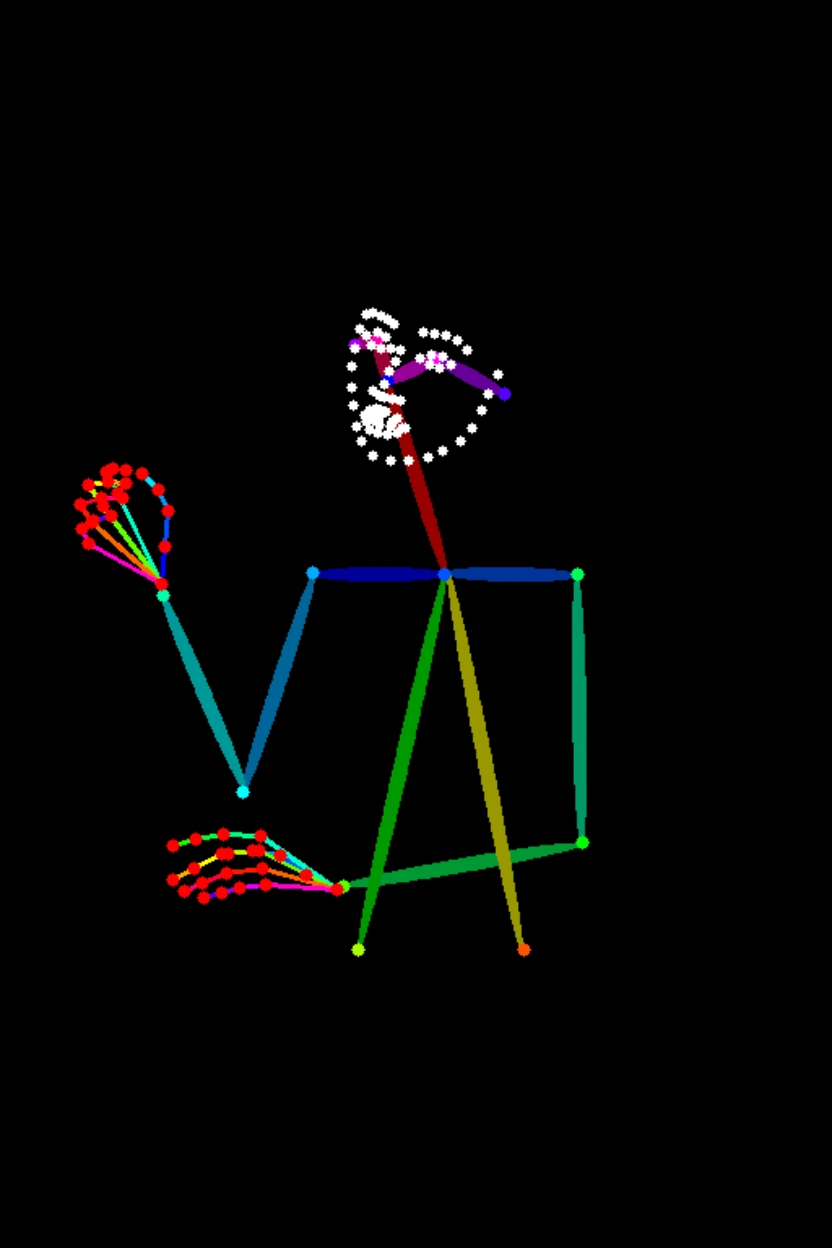


輸入提示詞:圖1中的女生穿著圖2中的黑色裙子按圖3的姿勢坐下。
| 模型名稱 | 模型簡介 | 輸出映像規格 |
|---|---|---|
qwen-image-2.0-pro
| 千問映像產生與編輯模型Pro系列。文字渲染、真實質感、語義遵循能力更強。
| 映像解析度:
映像格式:png 映像張數:1-6張 |
qwen-image-2.0-pro-2026-06-22 | ||
qwen-image-2.0-pro-2026-04-22 | ||
qwen-image-2.0-pro-2026-03-03 | ||
qwen-image-2.0
| 千問映像產生與編輯模型加速版,兼顧效果與響應速度。
| |
qwen-image-2.0-2026-03-03 | ||
qwen-image-edit-max
| 千問影像編輯Max系列。工業設計、幾何推理、角色一致性更強。 | 映像解析度:
映像格式:png 映像張數:1-6張 |
qwen-image-edit-max-2026-01-16 | ||
qwen-image-edit-plus
| 千問影像編輯Plus系列,支援多圖輸出與自訂解析度。 | |
qwen-image-edit-plus-2025-12-15 | ||
qwen-image-edit-plus-2025-10-30 | ||
qwen-image-edit | 支援單圖編輯和多圖融合。 | 映像解析度:不可指定。建置規則同上方的預設規則。 映像格式:png 映像張數:固定1張 |
各地區支援的模型請參見百鍊控制台。
前提條件
在調用前,您需要擷取API Key,再配置API Key到環境變數。
如需通過SDK進行調用,請安裝DashScope SDK。目前,該SDK已支援Python和Java。
請將範例程式碼中的
DASHSCOPE_API_HOST替換為擷取的 API Host。
重要華北2(北京)和新加坡地區擁有獨立的 API Key與請求地址,不可混用,跨地區調用將導致鑒權失敗或服務報錯。
重要阿里雲百鍊為華北2(北京)、新加坡地區推出了業務空間專屬網域名稱,能夠為推理請求提供卓越的效能和更高的穩定性,建議遷移至新網域名稱:
- 華北2(北京)地區:從
https://dashscope.aliyuncs.com遷移至https://{WorkspaceId}.cn-beijing.maas.aliyuncs.com - 新加坡地區:從
https://dashscope-intl.aliyuncs.com遷移至https://{WorkspaceId}.ap-southeast-1.maas.aliyuncs.com
其中 {WorkspaceId} 為您的業務空間 ID,可在阿里雲百鍊控制台的業務空間詳情頁面查看。現有網域名稱仍可正常使用。
HTTP調用
新加坡地區:POST https://{WorkspaceId}.ap-southeast-1.maas.aliyuncs.com/api/v1/services/aigc/multimodal-generation/generation
北京地區:POST https://{WorkspaceId}.cn-beijing.maas.aliyuncs.com/api/v1/services/aigc/multimodal-generation/generation
調用時請將{WorkspaceId}替換為真實的Workspace ID。
請求參數要求標頭(Headers)Content-Type 請求內容類型。此參數必須設定為 Authorization 請求身份認證。介面使用阿里雲百鍊API Key進行身份認證。樣本值:Bearer sk-xxxx。 請求體(Request Body)model 模型名稱,樣本值qwen-image-2.0-pro。 input 輸入參數對象,包含以下欄位: parameters 控製圖像產生的附加參數。 | 單圖編輯此處以使用 多圖融合此處以使用 |
響應參數output 包含模型產生結果。 usage 本次調用的資源使用方式,僅調用成功時返回。 request_id 請求唯一標識。可用於請求明細溯源和問題排查。 code 請求失敗的錯誤碼。請求成功時不會返回此參數,詳情請參見錯誤碼。 message 請求失敗的詳細資料。請求成功時不會返回此參數,詳情請參見錯誤碼。 | 任務執行成功任務資料(如任務狀態、映像URL等)僅保留24小時,逾時後會被自動清除。請您務必及時儲存產生的映像。 任務執行異常如果因為某種原因導致任務執行失敗,將返回相關資訊,可以通過code和message欄位明確指示錯誤原因。請參見錯誤碼進行解決。 |
DashScope SDK調用
SDK 的參數命名與HTTP介面基本一致,參數結構根據語言特性進行封裝,完整參數列表請參見千問 API 參考。
Python SDK調用
說明
- 推薦安裝最新版DashScope Python SDK,否則可能運行報錯:安裝或升級SDK。
- 不支援非同步介面。
請求樣本
import json
import os
import dashscope
from dashscope import MultiModalConversation

# 以下為新加坡地區的URL。請將 {WorkspaceId} 替換為您的百鍊業務空間ID,各地區的URL不同。
dashscope.base_http_api_url = 'https://{WorkspaceId}.ap-southeast-1.maas.aliyuncs.com/api/v1'

# 模型支援輸入1-3張圖片
messages = [
    {
        "role": "user",
        "content": [
            {"image": "https://help-static-aliyun-doc.aliyuncs.com/file-manage-files/zh-CN/20250925/thtclx/input1.png"},
            {"image": "https://help-static-aliyun-doc.aliyuncs.com/file-manage-files/zh-CN/20250925/iclsnx/input2.png"},
            {"image": "https://help-static-aliyun-doc.aliyuncs.com/file-manage-files/zh-CN/20250925/gborgw/input3.png"},
            {"text": "圖1中的女生穿著圖2中的黑色裙子按圖3的姿勢坐下"}
        ]
    }
]

# 新加坡和北京地區的API Key不同。擷取API Key:https://www.alibabacloud.com/help/zh/model-studio/get-api-key
# 若沒有配置環境變數,請用百鍊API Key將下行替換為:api_key="sk-xxx"
api_key = os.getenv("DASHSCOPE_API_KEY")

# qwen-image-2.0系列、qwen-image-edit-max、qwen-image-edit-plus系列支援輸出1-6張圖片,此處以2張為例
response = MultiModalConversation.call(
    api_key=api_key,
    model="qwen-image-2.0-pro",
    messages=messages,
    stream=False,
    n=2,
    watermark=False,
    negative_prompt=" ",
    prompt_extend=True,
    size="1024*1536",
)

if response.status_code == 200:
    # 如需查看完整響應,請取消下行注釋
    # print(json.dumps(response, ensure_ascii=False))
    for i, content in enumerate(response.output.choices[0].message.content):
        print(f"輸出映像{i+1}的URL:{content['image']}")
else:
    print(f"HTTP返回碼:{response.status_code}")
    print(f"錯誤碼:{response.code}")
    print(f"錯誤資訊:{response.message}")
    print("請參考文檔:https://www.alibabacloud.com/help/zh/model-studio/error-code")
import json
import os
import dashscope
from dashscope import MultiModalConversation
import base64
import mimetypes

# 以下為新加坡地區的URL。請將 {WorkspaceId} 替換為您的百鍊業務空間ID,各地區的URL不同。
dashscope.base_http_api_url = 'https://{WorkspaceId}.ap-southeast-1.maas.aliyuncs.com/api/v1'

# ---用於 Base 64 編碼 ---
# 格式為 data:{mime_type};base64,{base64_data}
def encode_file(file_path):
    mime_type, _ = mimetypes.guess_type(file_path)
    if not mime_type or not mime_type.startswith("image/"):
        raise ValueError("不支援或無法識別的映像格式")

    try:
        with open(file_path, "rb") as image_file:
            encoded_string = base64.b64encode(
                image_file.read()).decode('utf-8')
        return f"data:{mime_type};base64,{encoded_string}"
    except IOError as e:
        raise IOError(f"讀取檔案時出錯: {file_path}, 錯誤: {str(e)}")

# 擷取映像的 Base 64 編碼
# 調用編碼函數,請將 "/path/to/your/image.png" 替換為您的本地圖片檔案路徑,否則無法運行
image = encode_file("/path/to/your/image.png")

messages = [
    {
        "role": "user",
        "content": [
            {"image": image},
            {"text": "產生一張符合深度圖的映像,遵循以下描述:一輛紅色的破舊的單車停在一條泥濘的小路上,背景是茂密的原始森林"}
        ]
    }
]

# 新加坡和北京地區的API Key不同。擷取API Key:https://www.alibabacloud.com/help/zh/model-studio/get-api-key
# 若沒有配置環境變數,請用百鍊API Key將下行替換為:api_key="sk-xxx"
api_key = os.getenv("DASHSCOPE_API_KEY")

# qwen-image-2.0系列、qwen-image-edit-max、qwen-image-edit-plus系列支援輸出1-6張圖片,此處以2張為例
response = MultiModalConversation.call(
    api_key=api_key,
    model="qwen-image-2.0-pro",
    messages=messages,
    stream=False,
    n=2,
    watermark=False,
    negative_prompt=" ",
    prompt_extend=True,
    size="1536*1024",
)

if response.status_code == 200:
    # 如需查看完整響應,請取消下行注釋
    # print(json.dumps(response, ensure_ascii=False))
    for i, content in enumerate(response.output.choices[0].message.content):
        print(f"輸出映像{i+1}的URL:{content['image']}")
else:
    print(f"HTTP返回碼:{response.status_code}")
    print(f"錯誤碼:{response.code}")
    print(f"錯誤資訊:{response.message}")
    print("請參考文檔:https://www.alibabacloud.com/help/zh/model-studio/error-code")
# 需要安裝requests以下載映像: pip install requests
import requests

def download_image(image_url, save_path='output.png'):
    try:
        response = requests.get(image_url, stream=True, timeout=300)  # 設定逾時
        response.raise_for_status()  # 如果HTTP狀態代碼不是200,則引發異常
        with open(save_path, 'wb') as f:
            for chunk in response.iter_content(chunk_size=8192):
                f.write(chunk)
        print(f"映像已成功下載到: {save_path}")

    except requests.exceptions.RequestException as e:
        print(f"映像下載失敗: {e}")

image_url = "https://dashscope-result-sz.oss-cn-shenzhen.aliyuncs.com/xxx.png?Expires=xxx"
download_image(image_url, save_path='output.png')
響應樣本
映像連結的有效期間為24小時,請及時下載映像。
input_tokens、output_tokens和characters為相容欄位,當前固定為0。
{
    "status_code": 200,
    "request_id": "fa41f9f9-3cb6-434d-a95d-4ae6b9xxxxxx",
    "code": "",
    "message": "",
    "output": {
        "text": null,
        "finish_reason": null,
        "choices": [
            {
                "finish_reason": "stop",
                "message": {
                    "role": "assistant",
                    "content": [
                        {
                            "image": "https://dashscope-result-hz.oss-cn-hangzhou.aliyuncs.com/xxx.png?Expires=xxx"
                        },
                        {
                            "image": "https://dashscope-result-hz.oss-cn-hangzhou.aliyuncs.com/xxx.png?Expires=xxx"
                        }
                    ]
                }
            }
        ],
        "audio": null
    },
    "usage": {
        "input_tokens": 0,
        "output_tokens": 0,
        "characters": 0,
        "height": 1536,
        "image_count": 2,
        "width": 1024
    }
}
Java SDK調用
說明推薦安裝最新版DashScope Java SDK,否則可能運行報錯:安裝或升級SDK。
請求樣本
import com.alibaba.dashscope.aigc.multimodalconversation.MultiModalConversation;
import com.alibaba.dashscope.aigc.multimodalconversation.MultiModalConversationParam;
import com.alibaba.dashscope.aigc.multimodalconversation.MultiModalConversationResult;
import com.alibaba.dashscope.common.MultiModalMessage;
import com.alibaba.dashscope.common.Role;
import com.alibaba.dashscope.exception.ApiException;
import com.alibaba.dashscope.exception.NoApiKeyException;
import com.alibaba.dashscope.exception.UploadFileException;
import com.alibaba.dashscope.utils.JsonUtils;
import com.alibaba.dashscope.utils.Constants;

import java.io.IOException;
import java.util.Arrays;
import java.util.Collections;
import java.util.HashMap;
import java.util.Map;
import java.util.List;

public class QwenImageEdit {

    static {
        // 以下為新加坡地區的URL。請將 {WorkspaceId} 替換為您的百鍊業務空間ID,各地區的URL不同。
        Constants.baseHttpApiUrl = "https://{WorkspaceId}.ap-southeast-1.maas.aliyuncs.com/api/v1";
    }

    // 新加坡和北京地區的API Key不同。擷取API Key:https://www.alibabacloud.com/help/zh/model-studio/get-api-key
    // 若沒有配置環境變數,請用百鍊 API Key 將下行替換為:apiKey="sk-xxx"
    static String apiKey = System.getenv("DASHSCOPE_API_KEY");

    public static void call() throws ApiException, NoApiKeyException, UploadFileException, IOException {

        MultiModalConversation conv = new MultiModalConversation();

        // 模型支援輸入1-3張圖片
        MultiModalMessage userMessage = MultiModalMessage.builder().role(Role.USER.getValue())
                .content(Arrays.asList(
                        Collections.singletonMap("image", "https://help-static-aliyun-doc.aliyuncs.com/file-manage-files/zh-CN/20250925/thtclx/input1.png"),
                        Collections.singletonMap("image", "https://help-static-aliyun-doc.aliyuncs.com/file-manage-files/zh-CN/20250925/iclsnx/input2.png"),
                        Collections.singletonMap("image", "https://help-static-aliyun-doc.aliyuncs.com/file-manage-files/zh-CN/20250925/gborgw/input3.png"),
                        Collections.singletonMap("text", "圖1中的女生穿著圖2中的黑色裙子按圖3的姿勢坐下")
                )).build();
        // qwen-image-2.0系列、qwen-image-edit-max、qwen-image-edit-plus系列支援輸出1-6張圖片,此處以2張為例
        Map<String, Object> parameters = new HashMap<>();
        parameters.put("watermark", false);
        parameters.put("negative_prompt", " ");
        parameters.put("n", 2);
        parameters.put("prompt_extend", true);
        parameters.put("size", "1024*1536");

        MultiModalConversationParam param = MultiModalConversationParam.builder()
                .apiKey(apiKey)
                .model("qwen-image-edit-max")
                .messages(Collections.singletonList(userMessage))
                .parameters(parameters)
                .build();

        MultiModalConversationResult result = conv.call(param);
        // 如需查看完整響應,請取消下行注釋
        // System.out.println(JsonUtils.toJson(result));
        List<Map<String, Object>> contentList = result.getOutput().getChoices().get(0).getMessage().getContent();
        int imageIndex = 1;
        for (Map<String, Object> content : contentList) {
            if (content.containsKey("image")) {
                System.out.println("輸出映像" + imageIndex + "的URL:" + content.get("image"));
                imageIndex++;
            }
        }
    }

    public static void main(String[] args) {
        try {
            call();
        } catch (ApiException | NoApiKeyException | UploadFileException | IOException e) {
            System.out.println(e.getMessage());
        }
    }
}
import com.alibaba.dashscope.aigc.multimodalconversation.MultiModalConversation;
import com.alibaba.dashscope.aigc.multimodalconversation.MultiModalConversationParam;
import com.alibaba.dashscope.aigc.multimodalconversation.MultiModalConversationResult;
import com.alibaba.dashscope.common.MultiModalMessage;
import com.alibaba.dashscope.common.Role;
import com.alibaba.dashscope.exception.ApiException;
import com.alibaba.dashscope.exception.NoApiKeyException;
import com.alibaba.dashscope.exception.UploadFileException;
import com.alibaba.dashscope.utils.JsonUtils;
import com.alibaba.dashscope.utils.Constants;

import java.io.IOException;
import java.nio.file.Files;
import java.nio.file.Path;
import java.nio.file.Paths;
import java.util.Arrays;
import java.util.Base64;
import java.util.Collections;
import java.util.HashMap;
import java.util.Map;
import java.util.List;

public class QwenImageEdit {

    static {
        // 以下為新加坡地區的URL。請將 {WorkspaceId} 替換為您的百鍊業務空間ID,各地區的URL不同。
        Constants.baseHttpApiUrl = "https://{WorkspaceId}.ap-southeast-1.maas.aliyuncs.com/api/v1";
    }

    // 新加坡和北京地區的API Key不同。擷取API Key:https://www.alibabacloud.com/help/zh/model-studio/get-api-key
    // 若沒有配置環境變數,請用百鍊 API Key 將下行替換為:apiKey="sk-xxx"
    static String apiKey = System.getenv("DASHSCOPE_API_KEY");

    public static void call() throws ApiException, NoApiKeyException, UploadFileException, IOException {

        // 請將 "/path/to/your/image.png" 替換為您的本地圖片檔案路徑,否則無法運行
        String image = encodeFile("/path/to/your/image.png");

        MultiModalConversation conv = new MultiModalConversation();

        MultiModalMessage userMessage = MultiModalMessage.builder().role(Role.USER.getValue())
                .content(Arrays.asList(
                        Collections.singletonMap("image", image),
                        Collections.singletonMap("text", "產生一張符合深度圖的映像,遵循以下描述:一輛紅色的破舊的單車停在一條泥濘的小路上,背景是茂密的原始森林")
                )).build();
        // qwen-image-2.0系列、qwen-image-edit-max、qwen-image-edit-plus系列支援輸出1-6張圖片,此處以2張為例
        Map<String, Object> parameters = new HashMap<>();
        parameters.put("watermark", false);
        parameters.put("negative_prompt", " ");
        parameters.put("n", 2);
        parameters.put("prompt_extend", true);
        parameters.put("size", "1536*1024");

        MultiModalConversationParam param = MultiModalConversationParam.builder()
                .apiKey(apiKey)
                .model("qwen-image-edit-max")
                .messages(Collections.singletonList(userMessage))
                .parameters(parameters)
                .build();

        MultiModalConversationResult result = conv.call(param);
        // 如需查看完整響應,請取消下行注釋
        // System.out.println(JsonUtils.toJson(result));
        List<Map<String, Object>> contentList = result.getOutput().getChoices().get(0).getMessage().getContent();
        int imageIndex = 1;
        for (Map<String, Object> content : contentList) {
            if (content.containsKey("image")) {
                System.out.println("輸出映像" + imageIndex + "的URL:" + content.get("image"));
                imageIndex++;
            }
        }
    }

    /**
     * 將檔案編碼為Base64字串
     * @param filePath 檔案路徑
     * @return Base64字串,格式為 data:{mime_type};base64,{base64_data}
     */
    public static String encodeFile(String filePath) {
        Path path = Paths.get(filePath);
        if (!Files.exists(path)) {
            throw new IllegalArgumentException("檔案不存在: " + filePath);
        }
        // 檢測MIME類型
        String mimeType = null;
        try {
            mimeType = Files.probeContentType(path);
        } catch (IOException e) {
            throw new IllegalArgumentException("無法檢測檔案類型: " + filePath);
        }
        if (mimeType == null || !mimeType.startsWith("image/")) {
            throw new IllegalArgumentException("不支援或無法識別的映像格式");
        }
        // 讀取檔案內容並編碼
        byte[] fileBytes = null;
        try{
            fileBytes = Files.readAllBytes(path);
        } catch (IOException e) {
            throw new IllegalArgumentException("無法讀取檔案內容: " + filePath);
        }

        String encodedString = Base64.getEncoder().encodeToString(fileBytes);
        return "data:" + mimeType + ";base64," + encodedString;
    }

    public static void main(String[] args) {
        try {
            call();
        } catch (ApiException | NoApiKeyException | UploadFileException | IOException e) {
            System.out.println(e.getMessage());
        }
    }
}
import java.io.FileOutputStream;
import java.io.InputStream;
import java.net.HttpURLConnection;
import java.net.URL;

public class ImageDownloader {
    public static void downloadImage(String imageUrl, String savePath) {
        try {
            URL url = new URL(imageUrl);
            HttpURLConnection connection = (HttpURLConnection) url.openConnection();
            connection.setConnectTimeout(5000);
            connection.setReadTimeout(300000);
            connection.setRequestMethod("GET");
            InputStream inputStream = connection.getInputStream();
            FileOutputStream outputStream = new FileOutputStream(savePath);
            byte[] buffer = new byte[8192];
            int bytesRead;
            while ((bytesRead = inputStream.read(buffer)) != -1) {
                outputStream.write(buffer, 0, bytesRead);
            }
            inputStream.close();
            outputStream.close();

            System.out.println("映像已成功下載到: " + savePath);
        } catch (Exception e) {
            System.err.println("映像下載失敗: " + e.getMessage());
        }
    }

    public static void main(String[] args) {
        String imageUrl = "http://dashscope-result-bj.oss-cn-beijing.aliyuncs.com/xxx?Expires=xxx";
        String savePath = "output.png";
        downloadImage(imageUrl, savePath);
    }
}
響應樣本
映像連結的有效期間為24小時,請及時下載映像。
{
    "requestId": "46281da9-9e02-941c-ac78-be88b8xxxxxx",
    "usage": {
        "image_count": 2,
        "width": 1024,
        "height": 1536
    },
    "output": {
        "choices": [
            {
                "finish_reason": "stop",
                "message": {
                    "role": "assistant",
                    "content": [
                        {
                            "image": "https://dashscope-result-sz.oss-cn-shenzhen.aliyuncs.com/xxx.png?Expires=xxx"
                        },
                        {
                            "image": "https://dashscope-result-sz.oss-cn-shenzhen.aliyuncs.com/xxx.png?Expires=xxx"
                        }
                    ]
                }
            }
        ]
    }
}
錯誤碼
如果模型調用失敗並返回報錯資訊,請參見錯誤碼進行解決。
計費與限流
- 模型免費額度和計費單價請參見選擇模型。
- 模型限流請參見千問(Qwen-Image)。
- 計費說明:按成功產生的 映像張數 計費。模型調用失敗或處理錯誤不產生任何費用,也不消耗新人免費額度。
常見問題
Q:千問影像編輯模型支援哪些語言?
A:目前正式支援簡體中文和英文;其他語言可自行嘗試,但效果存在不確定性。
Q: 如何查看模型調用量?
A: 模型調用完一小時後,請在 模型监控(新加坡)或模型监控(北京)頁面,查看模型的調用次數、成功率等指標。詳情請參見賬單查詢與成本管理。
Q:如何擷取映像儲存的訪問網域名稱白名單?
A: 模型產生的映像儲存於阿里雲OSS,API將返回一個臨時的公網URL。若需要對該下載地址進行防火牆白名單配置,請注意:由於底層儲存會根據業務情況進行動態變更,為避免到期資訊影響訪問,文檔不提供固定的OSS網域名稱白名單。如有安全管控需求,請聯絡客戶經理擷取最新OSS網域名稱列表。