本文通過程式碼範例展示了如何結合向量檢索服務Milvus版(簡稱Milvus)與千問VL大模型,以提取圖片特徵,並利用多模態Embedding模型實現高效的多模態搜尋,涵蓋了以文搜圖、以文搜文、以圖搜圖以及以圖搜文等多種檢索方式。
背景資訊
在多模態搜尋情境中,圖片和文本的非結構化資料需要被轉換為向量表示,然後通過向量檢索技術快速找到相似的內容。本實踐使用以下工具:
Milvus:高效的向量資料庫,用於儲存和檢索向量。
千問VL:提取圖片描述和關鍵詞。更多詳情請參見千問VL。
DashScope Embedding API:將圖片和文本轉換為向量。更多詳情請參見Multimodal-Embedding API詳情。
其功能包括:
以文搜圖:輸入文字查詢,搜尋最相似的圖片。
以文搜文:輸入文字查詢,搜尋最相似的圖片描述。
以圖搜圖:輸入圖片查詢,搜尋最相似的圖片。
以圖搜文:輸入圖片查詢,搜尋最相似的圖片描述。
系統架構
下圖展示了本文中使用的多模態搜尋系統的整體架構。
前提條件
已建立Milvus執行個體。具體操作,請參見快速建立Milvus執行個體。
已開通百鍊服務並獲得API-KEY。具體操作,請參見擷取API Key。
已安裝所需的依賴包。
pip3 install dashscope pymilvus==2.5.0本文樣本基於
Python 3.9環境運行。已下載並解壓縮樣本資料集。
wget https://github.com/milvus-io/pymilvus-assets/releases/download/imagedata/reverse_image_search.zip
unzip -q -o reverse_image_search.zip
樣本資料集包含一個CSV檔案
reverse_image_search.csv和若干圖片檔案。說明本文使用的樣本資料集及其圖片來源於開源專案Milvus。
核心代碼介紹
在本文樣本中,首先利用千問VL模型提取圖片描述資訊,並將其儲存在image_description欄位中。接著,通過多模態Embedding模型,將圖片及其描述分別轉換為對應的向量表示(image_embedding和text_embedding),以便後續進行跨模態檢索或分析。
為了簡化示範,本樣本僅從前200張圖片中提取資料並完成上述流程。
import base64
import csv
import dashscope
import os
import pandas as pd
import sys
import time
from tqdm import tqdm
from pymilvus import (
    connections,
    FieldSchema,
    CollectionSchema,
    DataType,
    Collection,
    MilvusException,
    utility,
)

from http import HTTPStatus
import logging

logging.basicConfig(level=logging.INFO)
logger = logging.getLogger(__name__)


class FeatureExtractor:
    def __init__(self, DASHSCOPE_API_KEY):
        self._api_key = DASHSCOPE_API_KEY  # 使用環境變數儲存API密鑰

    def __call__(self, input_data, input_type):
        if input_type not in ("image", "text"):
            raise ValueError("Invalid input type. Must be 'image' or 'text'.")

        try:
            if input_type == "image":
                _, ext = os.path.splitext(input_data)
                image_format = ext.lstrip(".").lower()
                with open(input_data, "rb") as image_file:
                    base64_image = base64.b64encode(image_file.read()).decode("utf-8")
                input_data = f"data:image/{image_format};base64,{base64_image}"
                payload = [{"image": input_data}]
            else:
                payload = [{"text": input_data}]

            resp = dashscope.MultiModalEmbedding.call(
                model="multimodal-embedding-v1",
                input=payload,
                api_key=self._api_key,
            )

            if resp.status_code == HTTPStatus.OK:
                return resp.output["embeddings"][0]["embedding"]
            else:
                raise RuntimeError(
                    f"API調用失敗,狀態代碼: {resp.status_code}, 錯誤資訊: {resp.message}"
                )
        except Exception as e:
            logger.error(f"處理失敗: {str(e)}")
            raise


class FeatureExtractorVL:
    def __init__(self, DASHSCOPE_API_KEY):
        self._api_key = DASHSCOPE_API_KEY  # 使用環境變數儲存API密鑰

    def __call__(self, input_data, input_type):
        if input_type not in ("image"):
            raise ValueError("Invalid input type. Must be 'image'.")

        try:
            if input_type == "image":
                payload=[
                            {
                                "role": "system",
                                "content": [{"type":"text","text": "You are a helpful assistant."}]
                            },
                            {
                                "role": "user",
                                "content": [
                                            # {"image": "https://dashscope.oss-cn-beijing.aliyuncs.com/images/dog_and_girl.jpeg"},
                                            {"image": input_data},
                                            {"text": "先用50字內的文字描述這張圖片,然後再給出5個關鍵詞"}
                                            ],
                            }
                        ]

            resp = dashscope.MultiModalConversation.call(
                model="qwen-vl-plus",
                messages=payload,
                api_key=self._api_key,
            )

            if resp.status_code == HTTPStatus.OK:
                return resp.output["choices"][0]["message"].content[0]["text"]
            else:
                raise RuntimeError(
                    f"API調用失敗,狀態代碼: {resp.status_code}, 錯誤資訊: {resp.message}"
                )
        except Exception as e:
            logger.error(f"處理失敗: {str(e)}")
            raise


class MilvusClient:
    def __init__(self, MILVUS_TOKEN, MILVUS_HOST, MILVUS_PORT, INDEX, COLLECTION_NAME):
        self._token = MILVUS_TOKEN
        self._host = MILVUS_HOST
        self._port = MILVUS_PORT
        self._index = INDEX
        self._collection_name = COLLECTION_NAME

        self._connect()
        self._create_collection_if_not_exists()

    def _connect(self):
        try:
            connections.connect(alias="default", host=self._host, port=self._port, token=self._token)
            logger.info("Connected to Milvus successfully.")
        except Exception as e:
            logger.error(f"串連Milvus失敗: {str(e)}")
            sys.exit(1)

    def _collection_exists(self):
        return self._collection_name in utility.list_collections()

    def _create_collection_if_not_exists(self):
        try:
            if not self._collection_exists():
                fields = [
                    FieldSchema(name="id", dtype=DataType.INT64, is_primary=True, auto_id=True),
                    FieldSchema(name="origin", dtype=DataType.VARCHAR, max_length=512),
                    FieldSchema(name="image_description", dtype=DataType.VARCHAR, max_length=1024),
                    FieldSchema(name="image_embedding", dtype=DataType.FLOAT_VECTOR, dim=1024),
                    FieldSchema(name="text_embedding", dtype=DataType.FLOAT_VECTOR, dim=1024)
                ]

                schema = CollectionSchema(fields)

                self._collection = Collection(self._collection_name, schema)

                if self._index == 'IVF_FLAT':
                    self._create_ivf_index()
                else:
                    self._create_hnsw_index()
                logger.info("Collection created successfully.")
            else:
                self._collection = Collection(self._collection_name)
                logger.info("Collection already exists.")
        except Exception as e:
            logger.error(f"建立或載入集合失敗: {str(e)}")
            sys.exit(1)


    def _create_ivf_index(self):
        index_params = {
            "index_type": "IVF_FLAT",
            "params": {
                        "nlist": 1024, # Number of clusters for the index
                    },
            "metric_type": "L2",
        }
        self._collection.create_index("image_embedding", index_params)
        self._collection.create_index("text_embedding", index_params)
        logger.info("Index created successfully.")

    def _create_hnsw_index(self):
        index_params = {
            "index_type": "HNSW",
            "params": {
                        "M": 64, # Maximum number of neighbors each node can connect to in the graph
                        "efConstruction": 100, # Number of candidate neighbors considered for connection during index construction
                    },
            "metric_type": "L2",
        }
        self._collection.create_index("image_embedding", index_params)
        self._collection.create_index("text_embedding", index_params)
        logger.info("Index created successfully.")

    def insert(self, data):
        try:
            self._collection.insert(data)
            self._collection.load()
            logger.info("資料插入並載入成功.")
        except MilvusException as e:
            logger.error(f"插入資料失敗: {str(e)}")
            raise

    def search(self, query_embedding, field, limit=3):
        try:
            if self._index == 'IVF_FLAT':
                param={"metric_type": "L2", "params": {"nprobe": 10}}
            else:
                param={"metric_type": "L2", "params": {"ef": 10}}

            result = self._collection.search(
                data=[query_embedding],
                anns_field=field,
                param=param,
                limit=limit,
                output_fields=["origin", "image_description"],
            )
            return [{"id": hit.id, "distance": hit.distance, "origin": hit.origin, "image_description": hit.image_description} for hit in result[0]]
        except Exception as e:
            logger.error(f"搜尋失敗: {str(e)}")
            return None


#  資料載入與嵌入產生
def load_image_embeddings(extractor, extractorVL, csv_path):
    df = pd.read_csv(csv_path)
    image_embeddings = {}

    for image_path in tqdm(df["path"].tolist()[:200], desc="產生映像embedding"): # 僅用前200張圖進行示範
        try:
            desc = extractorVL(image_path, "image")
            image_embeddings[image_path] = [desc, extractor(image_path, "image"), extractor(desc, "text")]
            time.sleep(1)  # 控制API調用頻率
        except Exception as e:
            logger.warning(f"處理{image_path}失敗,已跳過: {str(e)}")

    return [{"origin": k, 'image_description':v[0], "image_embedding": v[1], 'text_embedding': v[2]} for k, v in image_embeddings.items()]
其中:
FeatureExtractor:該類用於調用DashScope Embedding API,將圖片或文本轉換為向量表示。FeatureExtractorVL:該類調用千問VL模型,提取圖片的文字描述和關鍵詞。MilvusClient:該類封裝了Milvus的操作,包括串連、集合建立、索引構建、資料插入和搜尋。
操作流程
步驟一:載入資料集
if __name__ == "__main__":
    # 配置Milvus和DashScope API
    MILVUS_TOKEN = "root:****"
    MILVUS_HOST = "c-0aa16b1****.milvus.aliyuncs.com"
    MILVUS_PORT = "19530"
    COLLECTION_NAME = "multimodal_search"
    INDEX = "IVF_FLAT"  # IVF_FLAT OR HNSW
    script_dir = os.path.dirname(os.path.abspath(__file__))
    csv_path = os.path.join(script_dir, "reverse_image_search.csv")


    # Step 1:初始化Milvus用戶端
    milvus_client = MilvusClient(MILVUS_TOKEN, MILVUS_HOST, MILVUS_PORT, INDEX, COLLECTION_NAME)

    # Step 2:初始化千問VL大模型與多模態Embedding模型
    extractor = FeatureExtractor(DASHSCOPE_API_KEY)
    extractorVL = FeatureExtractorVL(DASHSCOPE_API_KEY)

    # Step 3:將圖片資料集Embedding後插入到Milvus
    embeddings = load_image_embeddings(extractor, extractorVL, csv_path)
    milvus_client.insert(embeddings)
涉及以下參數,請您根據實際情況替換。
參數名稱 | 說明 |
| DashScope的API密鑰,用於調用千問VL和多模態Embedding模型。 |
| Milvus執行個體的訪問憑證,格式為 |
| Milvus執行個體的內網或者公網地址,例如 |
| Milvus執行個體的連接埠號碼,預設為 |
| Milvus集合名稱,用於儲存圖片和文本的向量資料。 |
執行以上Python檔案,當回顯資訊中包含以下內容,則說明載入成功。
產生映像embedding:  100%
INFO:__main__:資料插入並載入成功您也可以訪問Attu頁面,在資料頁簽,進一步驗證載入後的資料集資訊。
例如,通過千問VL大模型對圖片進行分析後,提取出的文本總結生動地描繪了畫面內容為“站在海灘上的人穿著牛仔褲和綠色靴子。沙灘上有水跡覆蓋。關鍵詞:海灘、腳印、沙地、鞋子、褲子”。
圖片描述以簡潔而形象的語言展現了圖片的主要特徵,使人能夠清晰地想象出畫面情境。

步驟二:多模態向量檢索
樣本 1:以文搜圖與以文搜文
在本樣本中,查詢文本query為“棕色的狗”。首先,通過多模態向量模型將query轉換為向量表示(Embedding)。隨後,基於產生的向量,在image_embedding中進行以文搜圖操作,同時在text_embedding中進行以文搜文操作,最終分別得到映像和文本的檢索結果。
在上述的Python檔案中,替換main部分資訊,然後執行。
if __name__ == "__main__":
    MILVUS_HOST = "c-xxxxxxxxxxxx.milvus.aliyuncs.com"
    MILVUS_PORT = "19530"
    MILVUS_TOKEN = "root:****"
    COLLECTION_NAME = "multimodal_search"
    INDEX = "IVF_FLAT" # IVF_FLAT OR HNSW
    DASHSCOPE_API_KEY = "<YOUR_DASHSCOPE_API_KEY >"

    # Step1:初始化Milvus用戶端
    milvus_client = MilvusClient(MILVUS_TOKEN, MILVUS_HOST, MILVUS_PORT, INDEX, COLLECTION_NAME)

    # Step2:初始化多模態Embedding模型
    extractor = FeatureExtractor(DASHSCOPE_API_KEY)

    # Step4:多模態搜尋樣本,以文搜圖和以文搜文
    text_query = "棕色的狗"
    text_embedding = extractor(text_query, "text")
    text_results_1 = milvus_client.search(text_embedding, field = 'image_embedding')
    logger.info(f"以文搜圖查詢結果: {text_results_1}")
    text_results_2 = milvus_client.search(text_embedding, field = 'text_embedding')
    logger.info(f"以文搜文查詢結果: {text_results_2}")
返回資訊如下所示。
由於大模型的輸出存在一定的隨機性,本樣本的結果可能無法完全複現。
INFO:__main__:以文搜圖查詢結果: [
{'id': 456882250782308942, 'distance': 1.338853359222412, 'origin': './train/Rhodesian_ridgeback/n02087394_9675.JPEG', 'image_description': '一張小狗站在地毯上的照片
。它有著棕色的毛髮和藍色的眼睛。\n關鍵詞:小狗、地毯、眼睛、毛色、站立'},
{'id': 456882250782308933, 'distance': 1.3568601608276367, 'origin': './train/Rhodesian_ridgeback/n02087394_6382.JPEG', 'image_description': '這是一隻棕色的獵犬,耳朵垂下,脖子上戴著項圈。它正直視前方。\n\n關鍵詞:狗、棕色、獵犬、耳朵、項鏈'},
{'id': 456882250782308940, 'distance': 1.3838427066802979, 'origin': './train/Rhodesian_ridgeback/n02087394_5846.JPEG', 'image_description': '兩隻小狗在毛毯上玩耍。一隻狗躺在另一隻上面,背景中有一個玩具熊。\n\n關鍵詞:小狗、玩鬧、毛毯、玩具熊、互動'}]
INFO:__main__:以文搜文查詢結果: [
{'id': 456882250782309025, 'distance': 0.6969608068466187, 'origin': './train/mongoose/n02137549_7552.JPEG', 'image_description': '這是一張棕色的小動物的特寫照片。它
有著圓潤的臉龐和大大的眼睛。\n\n關鍵詞:小動物、棕毛、圓形臉、大眼、自然背景'},
{'id': 456882250782308933, 'distance': 0.7110348343849182, 'origin': './train/Rhodesian_ridgeback/n02087394_6382.JPEG', 'image_description': '這是一隻棕色的獵犬,耳朵垂下,脖子上戴著項圈。它正直視前方。\n\n關鍵詞:狗、棕色、獵犬、耳朵、項鏈'},
{'id': 456882250782308992, 'distance': 0.7725887298583984, 'origin': './train/lion/n02129165_19310.JPEG', 'image_description': '這是一張獅子的特寫照片。它有著濃密的鬃毛和銳利的眼神。\n\n關鍵詞:獅子、眼神、鬃毛、自然環境、野生動物'}]樣本2:以圖搜圖與以圖搜文
本樣本中,使用test目錄中的獅子圖片(路徑為test\lion\n02129165_13728.JPEG)進行相似性檢索。
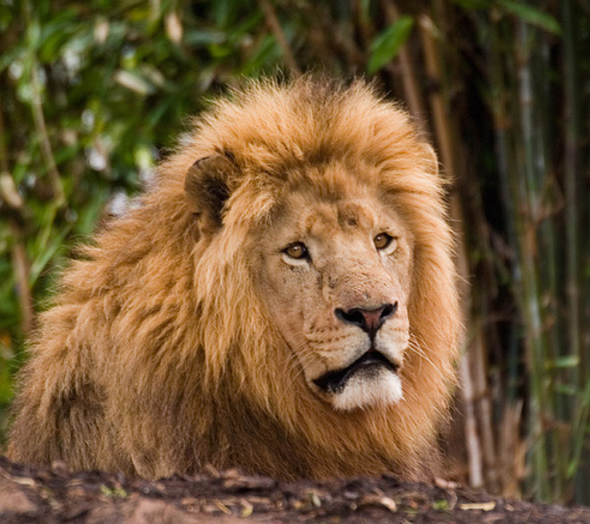
通過以圖搜圖和以圖搜文兩種方式,分別從映像和文本的角度挖掘與靶心圖表片相關的內容,實現多維度相似性匹配。
if __name__ == "__main__":
    # 配置Milvus和DashScope API
    MILVUS_TOKEN = "root:****"
    MILVUS_HOST = "c-0aa16b1****.milvus.aliyuncs.com"
    MILVUS_PORT = "19530"
    COLLECTION_NAME = "multimodal_search"
    INDEX = "IVF_FLAT"  # IVF_FLAT OR HNSW
    DASHSCOPE_API_KEY = "<YOUR_DASHSCOPE_API_KEY >"

    # Step1:初始化Milvus用戶端
    milvus_client = MilvusClient(MILVUS_TOKEN, MILVUS_HOST, MILVUS_PORT, INDEX, COLLECTION_NAME)

    # Step2:初始化多模態Embedding模型
    extractor = FeatureExtractor(DASHSCOPE_API_KEY)

    # Step5:多模態搜尋樣本,以圖搜圖和以圖搜文
    image_query_path = "./test/lion/n02129165_13728.JPEG"
    image_embedding = extractor(image_query_path, "image")
    image_results_1 = milvus_client.search(image_embedding, field = 'image_embedding')
    logger.info(f"以圖搜圖查詢結果: {image_results_1}")
    image_results_2 = milvus_client.search(image_embedding, field = 'text_embedding')
    logger.info(f"以圖搜文查詢結果: {image_results_2}")
返回資訊如下所示。
由於大模型的輸出存在一定的隨機性,本樣本的結果可能無法完全複現。
INFO:__main__:以圖搜圖查詢結果: [
{'id': 456882250782308987, 'distance': 0.23892249166965485, 'origin': './train/lion/n02129165_19953.JPEG', 'image_description': '這是一隻雄壯的獅子站在岩石旁,背景是
樹木和灌木叢。陽光灑在它的身上。\n\n關鍵詞:獅子、岩石、森林、陽光、野性'},
{'id': 456882250782308989, 'distance': 0.4113130569458008, 'origin': './train/lion/n02129165_1142.JPEG', 'image_description': '一隻獅子在茂密的綠色植物中休息。背景是竹子和樹木。\n\n關鍵詞:獅子、草地、綠植、樹榦、自然環境'},
{'id': 456882250782308984, 'distance': 0.5206397175788879, 'origin': './train/lion/n02129165_16.JPEG', 'image_description': '圖中是一對獅子在草地上站立。雄獅鬃毛濃密,雌獅則顯得更為瘦弱。\n\n關鍵詞:獅子、草地、雄性、雌性、自然環境'}]
INFO:__main__:以圖搜文查詢結果:
[{'id': 456882250782308989, 'distance': 1.0935896635055542, 'origin': './train/lion/n02129165_1142.JPEG', 'image_description': '一隻獅子在茂密的綠色植物中休息。背景是
竹子和樹木。\n\n關鍵詞:獅子、草地、綠植、樹榦、自然環境'},
{'id': 456882250782308987, 'distance': 1.2102885246276855, 'origin': './train/lion/n02129165_19953.JPEG', 'image_description': '這是一隻雄
壯的獅子站在岩石旁,背景是樹木和灌木叢。陽光灑在它的身上。\n\n關鍵詞:獅子、岩石、森林、陽光、野性'},
{'id': 456882250782308992, 'distance': 1.2725986242294312, 'origin': './train/lion/n02129165_19310.JPEG', 'image_description': '這是一張獅子的特寫照片。它有著濃密的鬃毛和銳利的眼神。\n\n關鍵詞:獅子、眼神、鬃毛、自然環境、野生動物'}]