本文為您介紹基於MaxCompute Studio通過Java UDTF讀取MaxCompute資源的使用樣本。
前提條件
-
已安裝MaxCompute Studio,並串連至MaxCompute專案,建立了MaxCompute Java Module。
-
已安裝開發工具IDEA 2024,JDK1.8版本。
-
更多操作資訊,請參見安裝MaxCompute Studio、管理專案串連和建立MaxCompute Java Module。
-
更多MaxCompute資源資訊,請參見資源。
UDTF程式碼範例
java UDTF代碼。
|
參數區別 |
參數類型 |
參數說明 |
|
入參 |
字串(string)。 |
第一個輸入參數。 |
|
字串(string)。 |
第二個輸入參數。 |
|
|
出參 |
字串(string)。 |
第一個輸入參數值。 |
|
整型(bigint)。 |
第二個輸入參數的字串長度值。 |
|
|
字串(string)。 |
file_resource.txt行數,table_resource1資源錶行數和table_resource2資源錶行數,三者拼接返回的值。 |
package com.aliyun.odps.examples.udf;
import java.io.BufferedReader;
import java.io.IOException;
import java.io.InputStream;
import java.io.InputStreamReader;
import java.util.Iterator;
import com.aliyun.odps.udf.ExecutionContext;
import com.aliyun.odps.udf.UDFException;
import com.aliyun.odps.udf.UDTF;
import com.aliyun.odps.udf.annotation.Resolve;
/**
 * project: example_project
 * table: wc_in2
 * partitions: p1=2,p2=1
 * columns: cola,colc
 */
@Resolve("string,string->string,bigint,string")
public class UDTFResource extends UDTF {
  ExecutionContext ctx;
  long fileResourceLineCount;
  long tableResource1RecordCount;
  long tableResource2RecordCount;
  @Override
  public void setup(ExecutionContext ctx) throws UDFException {
  this.ctx = ctx;
  try {
   InputStream in = ctx.readResourceFileAsStream("file_resource.txt");
   BufferedReader br = new BufferedReader(new InputStreamReader(in));
   String line;
   fileResourceLineCount = 0;
   while ((line = br.readLine()) != null) {
     fileResourceLineCount++;
   }
   br.close();
   Iterator<Object[]> iterator = ctx.readResourceTable("table_resource1").iterator();
   tableResource1RecordCount = 0;
   while (iterator.hasNext()) {
     tableResource1RecordCount++;
     iterator.next();
   }
   iterator = ctx.readResourceTable("table_resource2").iterator();
   tableResource2RecordCount = 0;
   while (iterator.hasNext()) {
     tableResource2RecordCount++;
     iterator.next();
   }
 } catch (IOException e) {
   throw new UDFException(e);
 }
}
   @Override
   public void process(Object[] args) throws UDFException {
     String a = (String) args[0];
     long b = args[1] == null ? 0 : ((String) args[1]).length();
     forward(a, b, "fileResourceLineCount=" + fileResourceLineCount + "|tableResource1RecordCount="
     + tableResource1RecordCount + "|tableResource2RecordCount=" + tableResource2RecordCount);
    }
}
pom.xml代碼,本地測試需要引入。
<dependency>
    <groupId>com.aliyun.odps</groupId>
    <artifactId>odps-udf-local</artifactId>
    <version>0.48.0-public</version>
</dependency>
操作步驟
本地測試
-
在MaxCompute Studio中建立UDTF類型的Java程式。例如Java Class名稱為
UDTFResource,程式碼為UDTF程式碼範例中的代碼。 -
根據Java Module中warehouse資源內容,配置運行參數。
說明-
入參為本地資源中wc_in2表中分區p1=2,p2=1中每行第一列和第三列的值。
-
代碼執行擷取本地資源file_resource.txt中資料,table_resource1對應表wc_in1中的資料,table_resource2對應表wc_in2(p1=2,p2=1)的資料。

-
-
在類名UDTFResource上,按右鍵运行。並返回結果。


用戶端測試
-
單擊IDEA左上方
 Project Explorer,選擇
 添加資源。
添加資源。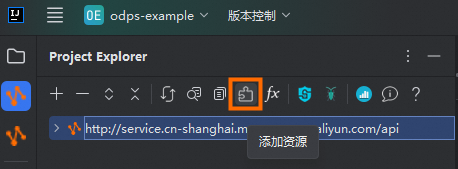
-
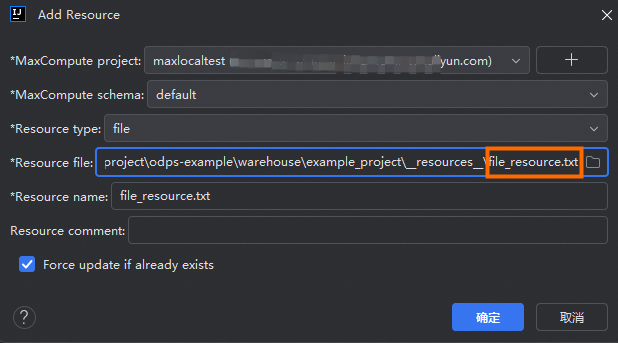
根據MaxCompute執行個體資訊,添加file_resource.txt檔案。
-
在MaxCompute專案中建立樣本資料表wc_in1和wc_in2,並插入資料。
CREATE TABLE wc_in1 ( col1 STRING, col2 STRING, col3 STRING, col4 STRING ); INSERT INTO wc_in1 VALUES ('A1','A2','A3','A4'), ('A1','A2','A3','A4'), ('A1','A2','A3','A4'), ('A1','A2','A3','A4'); CREATE TABLE wc_in2 ( cola STRING, colb STRING, colc STRING ) PARTITIONED BY (p1 STRING, p2 STRING); ALTER TABLE wc_in2 ADD PARTITION (p1='2',p2='1'); INSERT INTO wc_in2 PARTITION (p1='2',p2='1') VALUES ('three1','three2','three3'), ('three1','three2','three3'), ('three1','three2','three3'); -
將MaxCompute建立的wc_in1和wc_in2兩張表映射到Resource的table_resource1和table_resource2中。
wc_in1添加資源。

wc_in2添加資源。

-
將建立的UDTF打包為JAR包,上傳至MaxCompute專案並註冊函數。例如函數名稱為
my_udtf。在類名UDTFResource上,按右鍵Deploy to Server...,進入打包上傳介面,並在Extra resources中添加所需的file_resource.txt、table_resource1和table_resource2資源。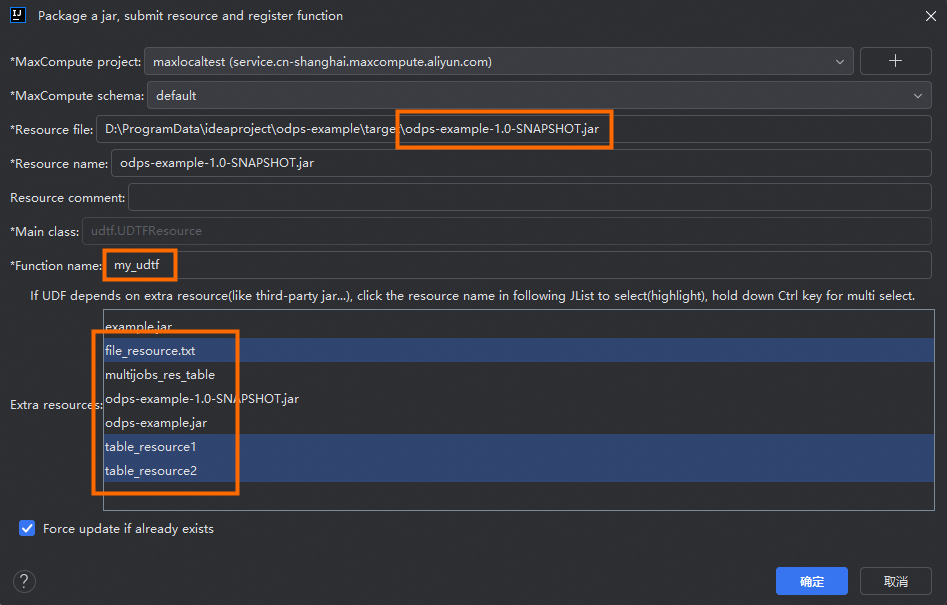
-
單擊IDEA左上方
Project Explorer,在目標MaxCompute專案上單擊右鍵Open Console,啟動MaxCompute用戶端,並執行SQL命令調用新建立的UDTF,並返回結果。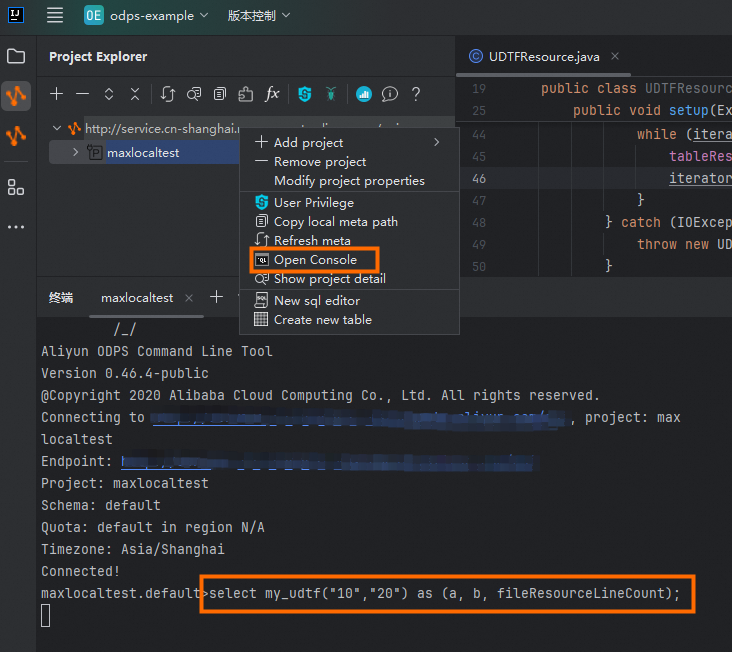

範例程式碼如下。
SELECT my_udtf("10","20") AS (a, b, fileResourceLineCount);