本文介紹如何在阿里雲MaxCompute中使用MaxFrame AI Function,結合典型案例快速上手大模型離線推理應用。
功能概述
MaxFrame AI Function是阿里雲MaxCompute平台針對大模型離線推理情境推出的端到端解決方案,旨在無縫整合資料處理與AI能力,降低企業級大模型應用門檻。
設計理念:“資料即模型輸入,結果即資料輸出”。允許使用者基於MaxFrame Python開發架構與Pandas風格API,直接在MaxCompute生態中完成從資料準備、資料處理、模型推理到結果儲存的完整流程。
適用情境:適用於處理海量結構化資料(如日誌分析、使用者行為日誌)、非結構化資料(如文本翻譯、文檔摘要)以及資料 Embedding 等情境,支援單次任務處理 PB 級資料規模,且通過分散式運算架構實現低延遲與線性擴充能力。可應用於從文本資料中提取結構化資訊、整理總結內容、產生摘要、翻譯語言,以及文本品質評估、情感分類等多項任務,極大簡化大模型資料處理流程並提升處理結果的品質。
整體架構
MaxFrame AI Function提供了靈活、通用的
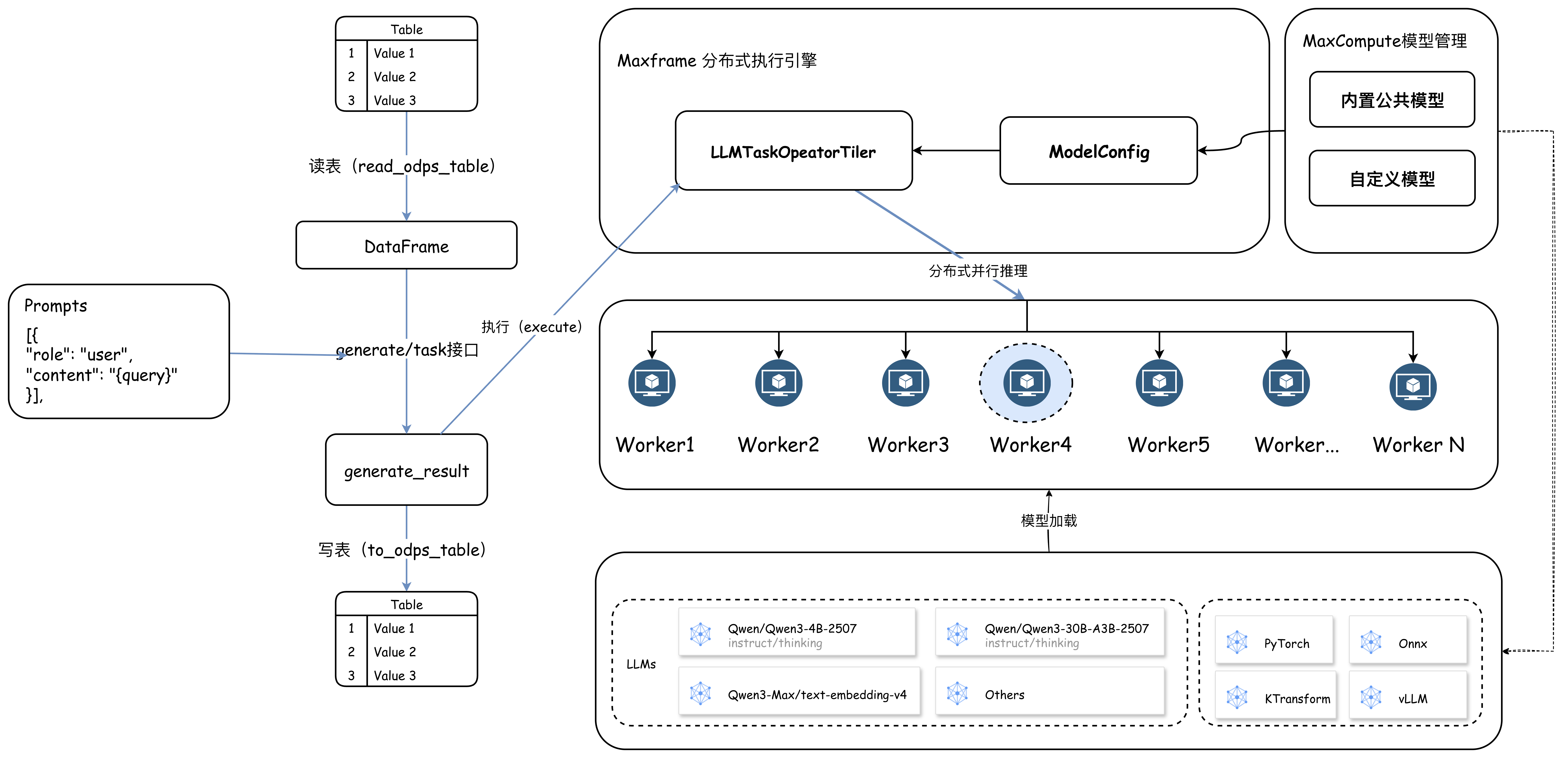
generate及簡潔的、情境化的task(如文本翻譯、結構化提取、Embedding 等)介面,允許使用者選擇模型種類,輸入參數為MaxCompute表和Prompts。在介面執行中,MaxFrame會先切分表資料,使用者可根據資料規模設定合適的並發度並啟動Worker組執行計算任務。每個Worker以使用者傳入的Prompts參數為模板,基於輸入的資料行渲染並構建模型,並將推理結果和成功狀態寫入MaxCompute。
整體架構和流程如圖所示:
核心優勢:
易用性:熟悉的 Python API,開箱即用的模型庫,零部署成本。
擴充性:依託 MaxCompute CU、GU、Token Quota 計算資源,支援大規模平行處理,提升整體 token 吞吐率。
Data + AI 一體化:在統一平台內完成資料讀取、資料處理、AI 推理與結果儲存,減少資料移轉成本,提升開發效率。
情境覆蓋:覆蓋翻譯、結構化抽取及向量化等10+個高頻情境。
適用範圍
支援地區:
華東1(杭州)、華東2(上海)、華北2(北京)、華北6(烏蘭察布)、華南1(深圳)、西南1(成都)、中國香港、華東 1 金融雲、華東 2 金融雲。
支援Python3.11版本。
支援SDK版本:需確保MaxFrame SDK版本為2.7.1 或以上版本。可以通過以下方式查看版本:
// Windows系統
pip list | findstr maxframe

// Linux系統
pip list | grep maxframe
若版本過低,直接執行安裝指令
pip install --upgrade maxframe;安裝最新版本。安裝MaxFrame最新用戶端。
模型支援體系
目前,MaxFrame以開箱即用的方式支援Qwen 3、Deepseek-R1-Distill-Qwen、Qwen3-embedding等系列內建大模型,同時支援調用百鍊商業化大模型,如qwen3.7-max、qwen3.6-plus、qwen3.6-flash、deepseek-v4-pro、deepseek-v4-flash、qwen3-vl-embedding、text-embedding-v4等多模態及文本類商業化旗艦大模型。模型均離線託管在MaxCompute平台內部。無需考慮模型下載、分發以及API調用的並發上限問題,僅需通過 API 呼叫即可使用,充分利用MaxCompute海量的計算資源,以較高的總體Token吞吐率和並發完成大模型離線推理任務。
支援模型(持續更新)
模型類型 | 模型名稱 | 適用Quota |
百鍊商業化旗艦大模型 |
|
|
Qwen 3系列開源模型 |
|
|
Qwen Embedding開源模型 |
|
|
Deepseek-R1-Distill-Qwen系列開源模型 |
|
|
Deepseek-R1-0528-Qwen3開源模型 |
|
|
Quota 資源類型說明
MaxFrame 支援三種資源類型,可根據模型規模和業務需求靈活選擇。
CU Quota 資源
CU(1CU = 1CPU + 4GB記憶體)為通用CPU計算資源,適用於小尺寸模型和小規模資料量的推理任務。
配置方式:
# 使用CU Quota計算資源
options.session.quota_name = "mf_cpu_quota"
GU Quota 資源
GU為GPU計算資源,針對大模型推理最佳化,支援更多尺寸模型規模,適用於 8B 及以上模型的推理任務。
配置方式:
# 使用GU Quota計算資源
options.session.gu_quota_name = "mf_gpu_quota"
模型計算 Quota 資源(Token 計費)
支援直接調用百鍊商業化大模型,按照 Token Quota 資源使用計費,支援如qwen3-max、text-embedding-v4等大尺寸模型推理任務。該方式按實際 Token 消耗計費,無需預先配置 CU/GU 資源、無需管理底層計算資源,使用更加靈活便捷且成本可控。
介面說明
MaxFrame AI Function 通過generate及Task雙介面平衡靈活性與易用性:
通用介面:generate
通用介面:generate
關鍵參數說明
參數名稱 | 是否必填 | 說明 |
model_name | 必填 | 模型名稱。 |
df | 必填 | 封裝在DataFrame中需要分析的文本或資料。 |
prompt_template | 必填 | 訊息列表,格式與OpenAI文本Chat Format Messages相容,在Content中可以使用 |
特定情境介面:Task
特定情境介面:Task
預設標準化任務介面,簡化常見情境的開發流程。當前支援的task介面有:translate、extract、embedding。
關鍵參數說明
參數名稱
是否必填
說明
model_name
必填
模型名稱。
df
必填
封裝在DataFrame中需要分析的文本或資料。
task介面
必填
translate:文本翻譯extract:結構化提取embed:向量化
使用樣本
from maxframe.learn.contrib.llm.models.managed import ManagedTextLLM

llm = ManagedTextLLM(name="<model_name>")

# 文本翻譯
translated_df = llm.translate(
    df["english_column"],
    source_language="english",
    target_language="Chinese",
    examples=[("Hello", "你好"), ("Goodbye", "再見")],
)

translated_df.execute()
典型應用情境
GU Quota 資源情境
GU Quota 資源情境
語言翻譯
情境描述:某跨國企業需將 10 萬份英文合約翻譯成中文,並標註關鍵條款。
import os
import maxframe.dataframe as md
from maxframe import new_session
from maxframe.config import options
from maxframe.udf import with_running_options
from odps import ODPS

options.dag.settings = {
    "engine_order": ["DPE", "MCSQL"]
}

o = ODPS(
    os.getenv('ALIBABA_CLOUD_ACCESS_KEY_ID'),
    os.getenv('ALIBABA_CLOUD_ACCESS_KEY_SECRET'),
    project='your-default-project',
    endpoint='your-end-point',
)

# 初始化MaxFrame會話
session = new_session(o)

# 列印工作Logview地址
print(session.get_logview_address())

# 1. 使用GU Quota計算資源
options.session.gu_quota_name = "mf_gu_quota"

# 2. 使用Qwen3 4B模型
from maxframe.learn.contrib.llm.models.managed import ManagedTextLLM

llm = ManagedTextLLM(name="Qwen3-1.7B")

# 3. 資料準備,如果已有資料可忽略構建測試資料步驟
# o.execute_sql("""
#   CREATE TABLE IF NOT EXISTS raw_contracts (
#       en STRING
#   );
#   """)
#
# o.execute_sql("""
#   INSERT INTO raw_contracts VALUES
#   ('This agreement is governed by the laws of the State of California.'),
#   ('The tenant shall pay rent on the first day of each month.'),
#   ('Either party may terminate this contract with 30 days written notice.'),
#   ('All intellectual property rights shall remain with the original owner.'),
#   ('The warranty period for this product is twelve months from the date of purchase.');
#   """)

df = md.read_odps_table("raw_contracts")

# 4.定義Prompts模板
messages = [
    {
        "role": "system",
        "content": "你是一個文檔翻譯專家,能夠將使用者給定的英文流暢的翻譯成中文",
    },
    {
        "role": "user",
        "content": "請將以下英文翻譯成中文,直接輸出翻譯後的文本,不要輸出任何其他內容。\n\n 例如:\n輸入:Hi\n輸出:你好。\n\n 以下是你要處理的文本:\n\n{en}",
    },
]

# 5.直接使用 `generate` 介面,定義提示詞,引用對應的資料列。
result_df = llm.generate(
    df,
    prompt_template=messages,
    params={
        "temperature": 0.7,
        "top_p": 0.8,
    },
).execute()

# 6.結果資料寫入MaxCompute表
result_df.to_odps_table("raw_contracts_result")
關鍵詞提取
情境描述:該情境展示MaxFrame AI Function在非結構化資料處理上的能力。非結構化資料中佔據較高比例的文本和映像,在巨量資料分析中帶來了巨大的處理挑戰。以下是利用AI Function簡化這一過程的樣本。
如下代碼示範如何使用AI Function從簡曆中提取候選人的工作經驗,樣本使用資料為隨機產生的簡曆文本。詳細使用實踐及 Demo 可參考:AI Function On GU 開發實踐。
import maxframe.dataframe as md
from maxframe import new_session
from maxframe.config import options
from maxframe.udf import with_running_options
from odps import ODPS

options.dag.settings = {
    "engine_order": ["DPE", "MCSQL"]
}

o = ODPS(
    os.getenv('ALIBABA_CLOUD_ACCESS_KEY_ID'),
    os.getenv('ALIBABA_CLOUD_ACCESS_KEY_SECRET'),
    project='your-default-project',
    endpoint='your-end-point',
)

# 初始化MaxFrame會話
session = new_session(o)

# 列印工作Logview地址
print(session.get_logview_address())

# 1. 使用GU Quota計算資源
options.session.gu_quota_name = "mf_gu_quota"

# 2. 使用Qwen3 4B模型
from maxframe.learn.contrib.llm.models.managed import ManagedTextLLM

llm = ManagedTextLLM(name="Qwen3-4B-Instruct-2507-FP8")

df = md.read_odps_table("traditional_chinese_medicine", index_col="index")

# 指定四個並發
parallel_partitions = 4
df = df.mf.rebalance(num_partitions=parallel_partitions)

# 3. 使用 extract 預設任務介面
result_df = llm.extract(
    df["text"],
    description="請從以下就診記錄中按順序抽取結構化資料,最終按照 schema 以嚴格的 JSON 格式返回",
    schema=MedicalRecord,
    examples=[(example_input, example_output)],
)
result_df.execute()
Inference Quota 資源情境(Token計費)
Inference Quota 資源情境
文本向量化:text-embedding-v4
情境描述:使用百鍊商業化模型text-embedding-v4進行向量化任務,按 Token 消耗計費,無需管理底層計算資源。適用於複雜文本分析任務、需要大尺寸模型或百鍊商業化大模型的高品質推理任務。
Qwen3.6-Plus 百鍊多模態模型圖片理解
情境描述:適用於需要大尺寸模型或百鍊商業化大模型的高品質推理以及複雜文本分析、多模態資料處理任務。按需使用,成本可控。
效能最佳化
並行推理
MaxFrame採用並行計算機制實現大規模資料離線推理:
資料切分:通過
rebalance介面將輸入資料表按指定分區數(num_partitions)均勻分配至多個Worker節點。模型並行載入:每個Worker獨立載入模型並進行預熱,避免因模型載入導致的冷啟動延遲。
結果彙總:輸出結果按分區寫入MaxCompute表,支援後續的資料分析。
常用效能調優建議
異構計算資源切換
針對大尺寸模型(如 8B 及以上模型),CPU 推理效率較低,可切換至 GU Quota 計算資源或 Token Quota 計算資源推理。
資料分區平行處理
針對大規模資料推理作業,可根據資料情況通過
rebalance介面提前切分並發,從而平行處理資料。