全部產品
Search
文件中心

:Red Hat Enterprise Linux升級

更新時間:Mar 14, 2025

本文介紹如何在ECS執行個體上將Red Hat Enterprise Linux(RHEL)7升級為RHEL 8或將RHEL 8升級為RHEL 9。

RHEL 7升級為RHEL 8

2024年06月30日後,RHEL 7從維護支援(Maintenance Support)階段過渡到延長生命週期(Extended Life)階段,紅帽僅提供有限的支援人員,為了您能夠獲得全面的支援人員和安全更新,建議您將RHEL 7升級到RHEL 8。

說明

如果您是RHEL 7.9系統且當前的業務必須保留在RHEL 7.9版本,建議您先購買阿里雲Red Hat Enterprise Linux Extended Life Cycle Support (ELS) Add-On訂閱,以持續獲得安全更新和錯誤修複。更多資訊,請參見購買延長生命週期支援(ELS)訂閱

前提條件

  • 請確保待升級RHEL執行個體滿足系統啟動並執行要求。具體要求,請參見Red Hat Enterprise Linux 技術能力和限制

  • 請確保您RHEL執行個體是通過阿里雲公用鏡像購買的RHEL 7系統(已包含RHEL 7訂閱)或在阿里雲自行匯入的RHEL 7且購買了阿里雲RHEL 7訂閱的系統。

    說明
    • 阿里雲RHEL訂閱是為了在阿里雲上使用RHEL作業系統時,提供合法的軟體存取權限、安全更新和支援人員。

    • 如果您是自行購買的紅帽的RHEL系統,請參考紅帽官方文檔Upgrading from RHEL 7 to RHEL 8進行升級。

操作步驟

  1. 在升級之前,建議您提前瞭解升級風險並建立快照備份資料,以防升級出現問題時可以快速恢複。

  2. 使用root使用者遠端連線RHEL系統的ECS執行個體。

    具體操作,請參見使用Workbench工具以SSH協議登入Linux執行個體

    重要

    升級操作涉及對系統設定檔、庫檔案等修改,需要root許可權進行操作,以確保升級過程順利完成。

  3. 運行以下命令,確認您的RHEL執行個體是否已使用阿里雲RHEL訂閱。

    rpm -q client-rhel7
    • 如果沒有任何回顯資訊,表示您的系統未使用阿里雲RHEL訂閱,請先購買訂閱,再執行升級操作。

    • 如果有類似client-rhel7-3.0-1.el7_9.noarch回顯資訊,表示您的系統已使用阿里雲RHEL訂閱,可以繼續執行本文升級操作。

      image

  4. 準備升級環境。

    1. 運行以下命令,將RHEL系統升級到最新版本,最新版本通常包含對已知漏洞、錯誤和安全問題的修複,並重啟系統使其生效。

      yum -y update
      reboot
    2. 運行以下命令,在RHEL系統上安裝Leapp升級工具。

      yum -y install leapp leapp-rhui-alibaba --enablerepo="*"
    3. 運行以下命令,確認Leapp是否安裝成功。

      leapp --version

      如果有類似leapp version xxx回顯資訊,表示Leapp安裝成功。

  5. 預升級檢查。

    由於RHEL各系統差異較大,在升級前需要先通過Leapp工具對系統進行預升級檢查。您可以查看Leapp工具的檢查結果,並根據Leapp工具的建議進行修複,以滿足升級需求。

    1. 運行以下命令,進行預升級檢查。

      • 預升級RHEL 8最新版本。

        leapp preupgrade  --no-rhsm
      • 預升級至具體的目標版本,例如需要將RHEL 7升級至RHEL 8.8版本。

        leapp preupgrade --no-rhsm --target 8.8
        說明

        您可以通過leapp preupgrade -h命令查看當前系統支援升級的目標版本。

    2. 查看預升級檢查結果。

      Leapp工具預升級的檢查日誌儲存在以下記錄檔中:

      • /var/log/leapp/leapp-preupgrade.log:Leapp工具的日誌

      • /var/log/leapp/leapp-report.txt:文字格式設定的預升級檢查報告

      • /var/log/leapp/leapp-report.json :JSON格式的預升級檢查報告

      預升級檢查失敗後,會列印出一些具體檢查失敗項, 如下圖所示。

      image.png

    3. (條件必選)處理預升級報錯。

      在記錄檔/var/log/leapp/leapp-report.txt中查看預升級是否有報錯資訊,請您根據Leapp工具的建議進行修複。以下按風險等級列出一些常見的預升級檢查報錯及處理辦法。

      • high (inhibitor):高風險(阻止升級),這類問題會直接阻止升級過程,必須解決後才能繼續升級。

        • 案例1:系統中安裝了多個核心版本

          Risk Factor: high (inhibitor)
          Title: Multiple devel kernels installed
          Summary: DNF cannot produce a valid upgrade transaction when multiple kernel-devel packages are installed.
          Remediation: [hint] Remove all but one kernel-devel packages before running Leapp again.
          [command] yum -y remove kernel-devel-3.10.0-1160.11.1.el7

          處理辦法:系統中安裝了多個核心版本,需要卸載舊的核心包。您可以根據leapp工具的提示命令卸載舊核心,例如本案例中的yum -y remove kernel-devel-3.10.0-1160.11.1.el7

        • 案例2:系統中載入了RHEL 8不支援的核心模組

          Risk Factor: high (inhibitor)                                                                                                                                                                                         
          Title: Leapp detected loaded kernel drivers which have been removed in RHEL 8. Upgrade cannot proceed.                                                                                                                
          Summary: Support for the following RHEL 7 device drivers has been removed in RHEL 8:                                                                                                                                  
               - floppy

          處理辦法:部分模組(例如本案例的floppy模組)在RHEL 8上不支援,您可以運行以下命令進行卸載。

          rmmod floppy
        • 案例3:sshd_config配置異常

          Risk Factor: high (inhibitor)
          Title: Possible problems with remote login using root account
          Summary: OpenSSH configuration file does not explicitly state the option PermitRootLogin in sshd_config file, which will default in RHEL8 to "prohibit-password".
          Remediation: [hint] If you depend on remote root logins using passwords, consider setting up a different user for remote administration or adding "PermitRootLogin yes" to sshd_config. 
          If this change is ok for you, add explicit "PermitRootLogin prohibit-password" to your sshd_config to ignore this inhibitor

          處理辦法:

          1. 將設定檔/etc/ssh/sshd_config中的PermitRootLogin預設值配置為yes

            說明

            RHEL 7和RHEL 8的PermitRootLogin的預設值有差異:

            • RHEL 7:預設值為yes,表示允許root使用密碼、密鑰登入。

            • RHEL 8:預設值為prohibit-password,表示禁止密碼登入。

          2. 運行以下命令,重啟sshd服務。

            systemctl restart sshd
        • 案例4:沒有編輯確認應答檔案

          Risk Factor: high (inhibitor)
          Title: Missing required answers in the answer file
          Summary: One or more sections in answerfile are missing user choices: remove_pam_pkcs11_module_check.confirm
          For more information consult https://leapp.readthedocs.io/en/latest/dialogs.html
          Remediation: [hint] Please register user choices with leapp answer cli command or by manually editing the answerfile.
          [command] leapp answer --section remove_pam_pkcs11_module_check.confirm=True
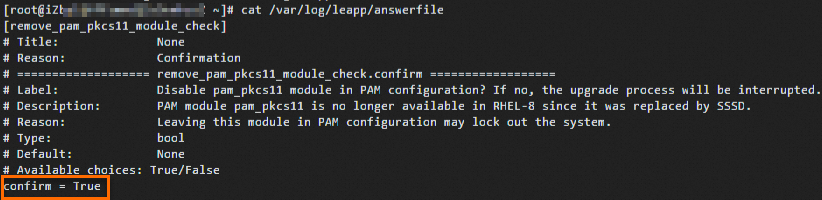
          處理辦法:本案例需要刪除RHEL 8上不支援的pam模組,需要在應答檔案/var/log/leapp/answerfile中確認,您可以運行以下命令將confirm設定為True進行確認。

          leapp answer --section remove_pam_pkcs11_module_check.confirm=True

          image.png

      • high:高風險,這類問題不會直接阻止升級,但建議您在升級前或升級後解決這些問題,以避免升級後出現問題。

        • 案例1:一些軟體包無法安裝

          Risk Factor: high
          Title: Packages from unknown repositories may not be installed
          Summary: 3 packages may not be installed or upgraded due to repositories unknown to leapp:
          - python3-pyxattr (repoid: rhel8-CRB)
          - rpcgen (repoid: rhel8-CRB)
          - ustr (repoid: rhel8-CRB)
          Remediation: [hint] In case the listed repositories are mirrors of official repositories for RHEL (provided by Red Hat on CDN) and their repositories IDs has been customized, you can change the configuration to use the official IDs instead of fixing the problem. You can also review the projected DNF upgrade transaction result in the logs to see what is going to happen, as this does not necessarily mean that the listed packages will not be upgraded. You can also install any missing packages after the in-place upgrade manually.

          處理辦法:您可以在升級後手動安裝丟失的軟體包。

        • 案例2:RHEL 7的一些軟體包未升級

          Risk Factor: high
          Title: Some RHEL 7 packages have not been upgraded
          Summary: Following RHEL 7 packages have not been upgraded:
          leapp-upgrade-el7toel8-0.18.0-1.el7_9
          kernel-3.10.0-1160.92.1.el7
          leapp-rhui-alibaba-1.0.0-1.el7_9
          Please remove these packages to keep your system in supported state.

          處理辦法:運行yum remove leapp-upgrade-el7toel8-0.18.0-1.el7_9 kernel-3.10.0-1160.92.1.el7 leapp-rhui-alibaba-1.0.0-1.el7_9命令刪除這些軟體包。

      • medium:中風險,這類問題不會直接阻止升級,但建議您在升級前或升級後解決這些問題,以避免升級後出現潛在問題。

        案例:PAM配置中的pam_pkcs11 模組將被移除

        Title: Module pam_pkcs11 will be removed from PAM configuration
        Summary: Module pam_pkcs11 was surpassed by SSSD and therefore it was removed from RHEL-8. Keeping it in PAM configuration may lock out the system thus it will be automatically removed from PAM configuration before upgrading to RHEL-8. Please switch to SSSD to recover the functionality of pam_pkcs11.
        Remediation: [hint] Configure SSSD to replace pam_pkcs11

        處理辦法:為了確保升級後系統的認證功能正常運行,需要配置SSSD以替代 pam_pkcs11 的功能。

      • low:低風險,這類問題對升級過程或系統啟動並執行影響較小,但建議您在升級前或升級後解決這些問題,以確保系統穩定運行。

        案例:SELinux將被設定為permissive模式

        Risk Factor: low 
        Title: SElinux will be set to permissive mode
        Summary: SElinux will be set to permissive mode. Current mode: enforcing. This action is required by the upgrade process to make sure the upgraded system can boot without beinig blocked by SElinux rules.
        Remediation: [hint] Make sure there are no SElinux related warnings after the upgrade and enable SElinux manually afterwards. Notice: You can ignore the "/root/tmp_leapp_py3" SElinux warnings.

        處理辦法:升級後確保沒有SELinux相關警告,然後將SELinux重新設定為 enforcing 模式,確保系統安全合規。

      • info:提示,這類問題通常是資訊性提示,不會對升級過程或系統運行產生影響。您可以查看報告中的具體提示,瞭解升級過程中會發生的變化。

        案例:/etc/dnf/vars/releasever 中的發行版本將被設定為當前目標版本

        Risk Factor: info 
        Title: Release version in /etc/dnf/vars/releasever will be set to the current target release
        Summary: On this system, Leapp detected "releasever" variable is either configured through DNF/YUM configuration file and/or the system is using RHUI infrastructure. In order to avoid issues with repofile URLs (when --release option is not provided) in cases where there is the previous major.minor version value in the configuration, release version will be set to the target release version (8.8). This will also ensure the system stays on the expected target version after the upgrade

        處理辦法:無需操作。

  6. 運行以下命令,進行升級。

    • 升級至RHEL 8最新版本。

      leapp upgrade  --no-rhsm
    • 升級至具體的目標版本,例如需要將RHEL 7升級至RHEL 8.8版本。

      leapp upgrade  --no-rhsm --target 8.8

    如下圖所示,表示升級成功。
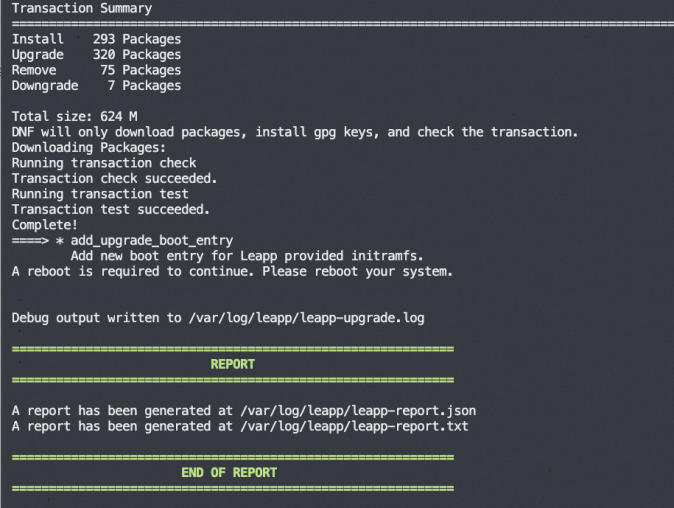
    image.png

  7. 運行以下命令,重啟進入新系統。

    reboot
  8. 驗證升級結果。

    • 運行cat /etc/redhat-release命令檢查系統版本是否已更新。

    • 查看升級的執行日誌或報告是否正常。

    • 觀察您的業務在RHEL 8系統上運行是否正常。

  9. (條件必選)運行以下命令,配置RHEL的源。

    使用Leapp升級工具升級完成後,預設會修改/etc/dnf/vars/releasever檔案來限定系統升級到RHEL的具體版本。例如RHEL 8.8,repo源資訊為https://xxxx/8.8/xxx,後續您只能訪問RHEL 8.8版本下的軟體包。如果您希望能夠自動訪問RHEL 8最新版本的軟體包,確保擷取到最新的安全補丁和功能更新,可以通過刪除releasever設定檔並重建中繼資料快取來實現。

    rm -f /etc/dnf/vars/releasever
    dnf clean all && dnf makecache

    執行完成後,RHEL 8的repo源資訊會更新為https://xxxx/8/xxx,系統將能夠自動擷取RHEL 8最新版本的安全補丁和功能更新,確保系統始終處於最新狀態。

RHEL 8升級為RHEL 9

RHEL 8雖然目前仍處於完全支援階段(Full Support),您可以按需將系統升級到RHEL 9,以獲得最新功能、硬體適配和長期支援等。

前提條件

  • 請確保待升級RHEL執行個體滿足系統啟動並執行要求。具體要求,請參見Red Hat Enterprise Linux 技術能力和限制

  • 請確保您RHEL執行個體是通過阿里雲公用鏡像購買的RHEL 8系統(已包含RHEL 8訂閱)或在阿里雲自行匯入的RHEL 8且購買了阿里雲RHEL 8訂閱的系統。

    說明
    • 阿里雲RHEL訂閱是為了在阿里雲上使用RHEL作業系統時,提供合法的軟體存取權限、安全更新和支援人員。

    • 如果您是自行購買的紅帽的RHEL系統,請參考紅帽官方文檔Upgrading from RHEL 8 to RHEL 9進行升級。

操作步驟

  1. 在升級之前,建議您提前瞭解升級風險並建立快照備份資料,以防升級出現問題時可以快速恢複。

  2. 使用root使用者遠端連線RHEL系統的ECS執行個體。

    具體操作,請參見使用Workbench工具以SSH協議登入Linux執行個體

    重要

    升級操作涉及對系統設定檔、庫檔案等修改,需要root許可權進行操作,以確保升級過程順利完成。

  3. 運行以下命令,確認您的RHEL執行個體是否已使用阿里雲RHEL訂閱。

    rpm -qa |grep aliyun
    • 如果沒有任何回顯資訊,表示您的系統未使用阿里雲RHEL訂閱,請先購買訂閱,再執行升級操作。

    • 如果有類似如下包含小版本rhel8.6的回顯資訊,請先提交工單擷取並安裝最新的rpm包,再執行升級操作。

      image

      說明

      在阿里雲上運行RHEL時,系統需要通過阿里雲的RHUI服務訪問Red Hat的軟體倉庫。如果系統中安裝的是小版本的包(例如 aliyun_rhel8.6-2.0-1.noarch),系統可能無法正確串連到 RHUI,導致無法擷取軟體更新或無法升級到新版本。

    • 如果有類似aliyun_rhui_rhel8-2.0-3.x86_64訂閱包回顯資訊,表示您的系統已使用阿里雲RHEL訂閱,可以繼續執行本文升級操作。

      image

  4. 準備升級環境。

    1. 運行以下命令,將RHEL系統升級到最新版本,最新版本通常包含對已知漏洞、錯誤和安全問題的修複,並重啟系統使其生效。

      yum -y update
      reboot
    2. 運行以下命令,在RHEL系統上安裝Leapp升級工具。

      yum -y install leapp leapp-rhui-alibaba --enablerepo="*"
    3. 運行以下命令,確認Leapp是否安裝成功。

      leapp --version

      如果有類似leapp version xxx回顯資訊,表示Leapp安裝成功。

  5. 預升級檢查。

    由於RHEL各系統差異較大,在升級前需要先通過Leapp工具對系統進行預升級檢查。您可以查看Leapp工具的檢查結果,並根據Leapp工具的建議進行修複,以滿足升級需求。

    1. 運行以下命令,進行預升級檢查。

      • 預升級至RHEL 9最新版本。

        leapp preupgrade  --no-rhsm
      • 預升級至具體的目標版本,例如需要將RHEL 8升級至RHEL 9.4版本。

        leapp preupgrade --no-rhsm --target 9.4
        說明

        您可以通過leapp preupgrade -h命令查看當前系統支援升級的目標版本。

    2. 查看預升級檢查結果。

      Leapp工具預升級的檢查日誌儲存在以下記錄檔中:

      • /var/log/leapp/leapp-preupgrade.log:Leapp工具的日誌

      • /var/log/leapp/leapp-report.txt:文字格式設定的預升級檢查報告

      • /var/log/leapp/leapp-report.json :JSON格式的預升級檢查報告

      預升級檢查失敗後,會列印出一些具體檢查失敗項, 如下圖所示。

      image

    3. (條件必選)處理預升級報錯。

      在記錄檔/var/log/leapp/leapp-report.txt中查看預升級是否有報錯資訊,您可以根據Leapp工具的建議進行修複。以下按風險等級列出一些常見的預升級檢查報錯及處理辦法。

      • high:高風險,這類問題不會直接阻止升級,但建議您在升級前或升級後解決這些問題,以避免升級後出現問題。

        • 案例1:檢測到自訂的Leapp actors或檔案

          Risk Factor: high 
          Title: Detected custom leapp actors or files.
          Summary: We have detected installed custom actors or files on the system. These can be provided e.g. by third party vendors, Red Hat consultants, or can be created by users to customize the upgrade (e.g. to migrate custom applications). This is allowed and appreciated. However Red Hat is not responsible for any issues caused by these custom leapp actors. Note that upgrade tooling is under agile development which could require more frequent update of custom actors.
          The list of custom leapp actors and files:
              - /usr/share/leapp-repository/repositories/system_upgrade/common/files/rhui/alibaba/content.crt
              - /usr/share/leapp-repository/repositories/system_upgrade/common/files/rhui/alibaba/key.pem
              - /usr/share/leapp-repository/repositories/system_upgrade/common/files/rhui/alibaba/leapp-alibaba.repo
          Related links:
              - Customizing your Red Hat Enterprise Linux in-place upgrade: https://red.ht/customize-rhel-upgrade
          Remediation: [hint] In case of any issues connected to custom or third party actors, contact vendor of such actors. Also we suggest to ensure the installed custom leapp actors are up to date, compatible with the installed packages.

          處理辦法:確保自訂actors是最新版本,並且與Leapp工具和系統內容相容。升級完成後,檢查系統是否正常運行,並及時解決因自訂actors引起的問題。如何管理自訂actors可參見Customizing your Red Hat Enterprise Linux in-place upgrade

        • 案例2: 在升級過程中自動更新GRUB2配置

          Risk Factor: high 
          Title: GRUB2 core will be automatically updated during the upgrade
          Summary: On legacy (BIOS) systems, GRUB2 core (located in the gap between the MBR and the first partition) cannot be updated during the rpm transaction and Leapp has to initiate the update running "grub2-install" after the transaction. No action is needed before the upgrade. After the upgrade, it is recommended to check the GRUB configuration.

          處理辦法:升級後檢查GRUB配置,確保系統能夠正常啟動。

      • low:低風險,這類問題對升級過程或系統啟動並執行影響較小,但建議您在升級前或升級後解決這些問題,以確保系統穩定運行。

        案例:SELinux將被設定為permissive模式

        Risk Factor: low 
        Title: SElinux will be set to permissive mode
        Summary: SElinux will be set to permissive mode. Current mode: enforcing. This action is required by the upgrade process to make sure the upgraded system can boot without beinig blocked by SElinux rules.
        Remediation: [hint] Make sure there are no SElinux related warnings after the upgrade and enable SElinux manually afterwards. Notice: You can ignore the "/root/tmp_leapp_py3" SElinux warnings.

        處理辦法:升級後確保沒有SELinux相關警告,然後將SELinux重新設定為 enforcing 模式,確保系統安全合規。

      • info:提示,這類問題通常是資訊性提示,不會對升級過程或系統運行產生影響。您可以查看報告中的具體提示,瞭解升級過程中會發生的變化。

        案例:排除部分目標系統倉庫

        Risk Factor: info 
        Title: Excluded target system repositories
        Summary: The following repositories are not supported by Red Hat and are excluded from the list of repositories used during the upgrade.
        - rhui-codeready-builder-for-rhel-9-aarch64-rhui-rpms
        - codeready-builder-for-rhel-9-aarch64-rpms
        - codeready-builder-for-rhel-9-s390x-rpms
        - codeready-builder-beta-for-rhel-9-ppc64le-rpms
        - codeready-builder-for-rhel-9-x86_64-rpms
        Remediation: [hint] If some of excluded repositories are still required to be used during the upgrade, execute leapp with the --enablerepo option with the repoid of the repository required to be enabled as an argument (the option can be used multiple times).

        處理辦法:如果某些被排除的倉庫在升級過程中仍然需要啟用,可以使用 --enablerepo 選項啟用它們。

  6. 運行以下命令,進行升級。

    • 升級至RHEL 9最新版本。

      leapp upgrade  --no-rhsm
    • 升級至具體的目標版本,例如需要將RHEL 8升級至RHEL 9.4版本。

      leapp upgrade  --no-rhsm --target 9.4

    如下圖所示,表示升級成功。

    image

  7. 運行以下命令,重啟進入新系統。

    reboot
  8. 驗證升級結果。

    • 運行cat /etc/redhat-release命令檢查系統版本是否已更新。

    • 查看升級的執行日誌或報告是否正常。

    • 觀察您的業務在RHEL 9系統上運行是否正常。

  9. (條件必選)運行以下命令,配置RHEL的源。

    使用Leapp升級工具升級完成後,預設會修改/etc/dnf/vars/releasever檔案來限定系統升級到RHEL的具體版本。例如RHEL 9.4,repo源資訊為https://xxxx/9.4/xxx,後續您只能訪問RHEL 9.4版本下的軟體包。如果您希望能夠自動訪問RHEL 9最新版本的軟體包,確保擷取到最新的安全補丁和功能更新,可以通過刪除releasever設定檔並重建中繼資料快取來實現。

    rm -f /etc/dnf/vars/releasever
    dnf clean all && dnf makecache

    執行完成後,RHEL 9的repo源資訊會更新為https://xxxx/9/xxx,系統將能夠自動擷取RHEL 9最新版本的安全補丁和功能更新,確保系統始終處於最新狀態。

相關文檔

  • 您也可以通過Server Migration Center將RedHat 8升級至RedHat 9。具體操作,請參見作業系統遷移(Linux)

  • 有關Red Hat的更多介紹,請參見紅帽官方文檔Red Hat Enterprise Linux

  • 關於RHEL 7進入延長生命週期階段的常見問題可參考紅帽官方FAQ文檔。