當您使用資源群組對資源進行分組管理時,可以結合存取控制(RAM),在單個阿里雲帳號內實現資源的隔離和精微調權限管理。本文總結了Elastic Compute Service對資源群組的支援情況,以及資源群組層級的授權操作步驟。
-
只有支援資源群組的資源類型和支援資源群組層級授權的操作,資源群組層級授權才會生效。
-
對於不支援資源群組的資源類型,授予資源群組範圍的許可權將無效。在選擇資源範圍時,請選擇帳號層級,進行帳號層級授權。具體操作,請參見不支援資源群組層級授權的操作。
資源群組授權的工作原理
您可以使用資源群組(Resource Group)對阿里雲帳號內的資源進行分組管理。例如,為不同的專案建立對應的資源群組,並將資源轉移到對應的組中,以便集中管理各專案的資源。更多資訊,請參見什麼是資源群組。
在完成資源分組後,您可以為不同的RAM授權主體(RAM使用者、RAM使用者組或RAM角色)授予指定資源群組範圍的許可權,從而限定這個授權主體只能管理該資源群組內的資源。更多資訊,請參見資源分組和授權。
這種授權方式的優點有:
-
許可權精細化:確保每個身份能獲得最準確的資源存取權限,避免帳號下的多重專案的資源混合管理。
-
良好的擴充性:後續新增資源時,只需將其加入該資源群組,RAM身份便會自動獲得新資源的相應許可權,無需再次授權。
為RAM使用者授予資源群組層級的許可權
下面以RAM使用者為例,介紹授予指定資源群組內Elastic Compute Service資源許可權的操作步驟。
1. 前置步驟
2. 進行資源群組層級授權
您可以通過以下任一方式進行資源群組層級授權。
方式一:在資源管理主控台中授權
通過資源群組的許可權管理功能為指定 RAM 使用者授權。詳情操作可參見為RAM身份授予資源群組範圍的許可權。
方式二:在 RAM 控制台中授權
通過RAM控制台為指定 RAM 使用者進行資源群組層級授權。詳細操作可參見為RAM使用者授權。
支援資源群組的資源類型
Elastic Compute Service支援資源群組的資源類型如下表所示:
|
雲端服務 |
雲端服務代碼 |
資源類型 |
|
Elastic Compute Service |
ecs |
ddh : DDH |
|
Elastic Compute Service |
ecs |
disk : 磁碟 |
|
Elastic Compute Service |
ecs |
eni : 彈性網卡 |
|
Elastic Compute Service |
ecs |
image : 鏡像 |
|
Elastic Compute Service |
ecs |
imagecomponent : 鏡像組件 |
|
Elastic Compute Service |
ecs |
imagepipeline : 鏡像模板 |
|
Elastic Compute Service |
ecs |
instance : 執行個體 |
|
Elastic Compute Service |
ecs |
keypair : 金鑰組 |
|
Elastic Compute Service |
ecs |
launchtemplate : 執行個體啟動模板 |
|
Elastic Compute Service |
ecs |
securitygroup : 安全性群組 |
|
Elastic Compute Service |
ecs |
snapshot : 快照 |
|
Elastic Compute Service |
ecs |
snapshotpolicy : 快照策略 |
對於暫不支援資源群組的資源類型,如有需要,您可以在資源群組控制台提交反饋。
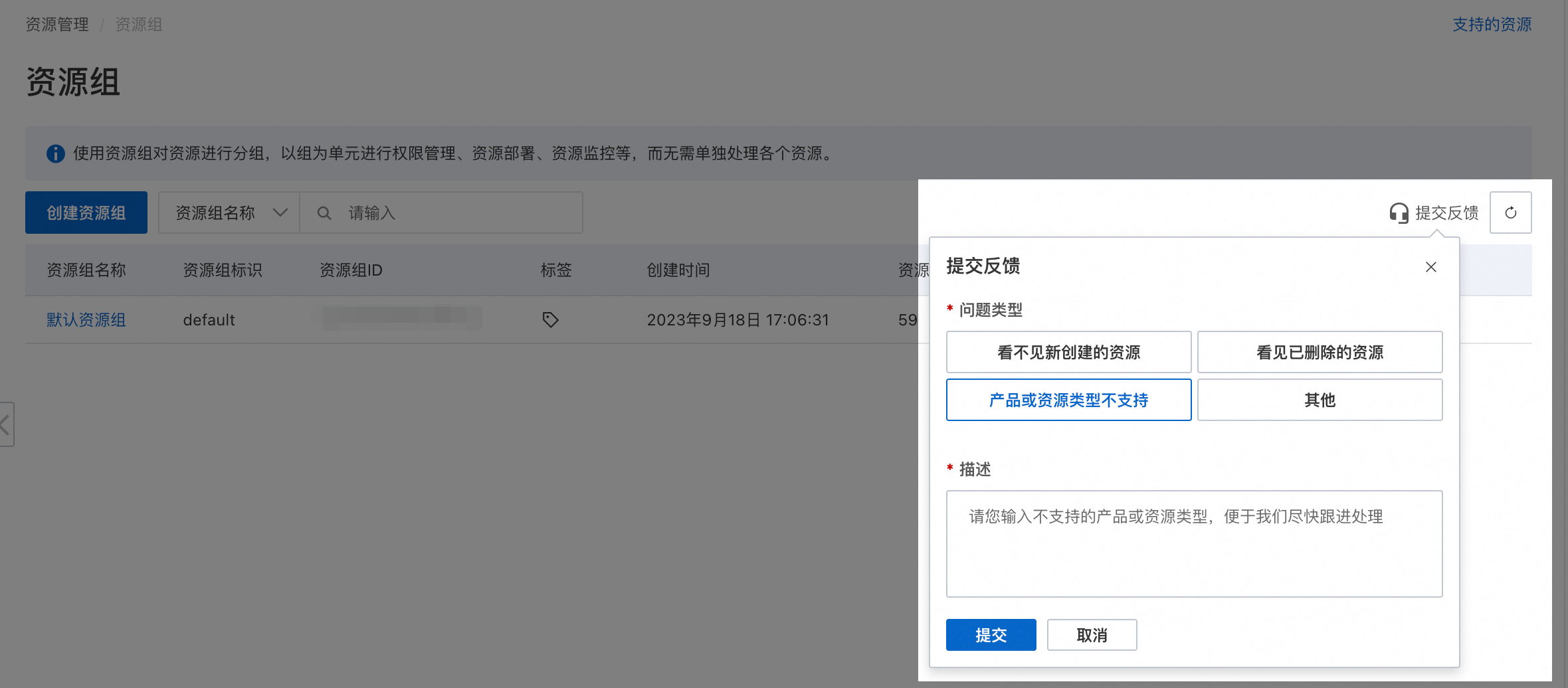
不支援資源群組層級授權的操作
Elastic Compute Service中不支援資源群組層級授權的操作(Action)如下:
|
操作(Action) |
操作描述 |
|
ecs:AddInstancesToCarePlan |
- |
|
ecs:AddInvisibleChecks |
- |
|
ecs:AllocateEipAddress |
- |
|
ecs:ApplySecurityGroupSnapshot |
- |
|
ecs:AssociateEipAddress |
- |
|
ecs:AssociateSecurityGroupSnapshotPolicy |
- |
|
ecs:CancelMigrationPlan |
- |
|
ecs:CancelTask |
- |
|
ecs:CheckOpenSnapshotService |
- |
|
ecs:ConfirmCarePlanBill |
- |
|
ecs:CreateCarePlan |
- |
|
ecs:CreateClassicToVpcRollbackTask |
- |
|
ecs:CreateDeploymentSet |
- |
|
ecs:CreateDiagnosisOperateRecords |
- |
|
ecs:CreateDiagnosticMetricSet |
- |
|
ecs:CreateFunctionFeedback |
- |
|
ecs:CreateHpcCluster |
- |
|
ecs:CreateIssueCategoryReportRelation |
- |
|
ecs:CreateNetworkInsightsPath |
- |
|
ecs:CreatePlanMaintenanceWindow |
- |
|
ecs:CreatePortRangeList |
- |
|
ecs:CreateSecurityGroupSnapshotPolicy |
- |
|
ecs:DeleteCarePlan |
- |
|
ecs:DeleteDeploymentSet |
- |
|
ecs:DeleteDiagnosticMetricSets |
- |
|
ecs:DeleteDiagnosticReports |
- |
|
ecs:DeleteHpcCluster |
- |
|
ecs:DeleteNetworkInsightsAnalysis |
- |
|
ecs:DeleteNetworkInsightsPath |
- |
|
ecs:DeletePlanMaintenanceWindow |
- |
|
ecs:DeletePortRangeList |
- |
|
ecs:DeleteReservationDemand |
- |
|
ecs:DeleteSecurityGroupSnapshotPolicy |
- |
|
ecs:DeleteVolume |
- |
|
ecs:DeleteWaitingOrders |
- |
|
ecs:DescribeAccountAttributes |
- |
|
ecs:DescribeAccountCommonQuotas |
- |
|
ecs:DescribeAccountLimits |
- |
|
ecs:DescribeAvailableResource |
- |
|
ecs:DescribeBandwidthHistory |
- |
|
ecs:DescribeCarePlans |
- |
|
ecs:DescribeChargeTypeModificationPrice |
- |
|
ecs:DescribeClassicLinkInstances |
- |
|
ecs:DescribeCloudAssistantSettings |
- |
|
ecs:DescribeClusters |
- |
|
ecs:DescribeCustomerIssueCategory |
- |
|
ecs:DescribeDedicatedBlockStorageClusterDisks |
- |
|
ecs:DescribeDeploymentSetTopology |
- |
|
ecs:DescribeDeploymentSets |
- |
|
ecs:DescribeDiagnosisOperateRecords |
- |
|
ecs:DescribeDiagnosticMetrics |
- |
|
ecs:DescribeDiagnosticReportAttributes |
- |
|
ecs:DescribeDiskDefaultKMSKeyId |
- |
|
ecs:DescribeDiskEncryptionByDefaultStatus |
- |
|
ecs:DescribeEcsScenarioFacade |
- |
|
ecs:DescribeEipAddresses |
- |
|
ecs:DescribeEipPrice |
- |
|
ecs:DescribeFunctionFeedback |
- |
|
ecs:DescribeHpcClusters |
- |
|
ecs:DescribeImageFromFamily |
- |
|
ecs:DescribeInsightCheckItems |
- |
|
ecs:DescribeInsightChecks |
- |
|
ecs:DescribeInsightStatus |
- |
|
ecs:DescribeInsightSummaries |
- |
|
ecs:DescribeInstanceCrossZoneModifyConstraint |
- |
|
ecs:DescribeInstanceMigrationLog |
- |
|
ecs:DescribeInstanceStatus |
- |
|
ecs:DescribeInstanceTypeResource |
- |
|
ecs:DescribeInstanceTypes |
- |
|
ecs:DescribeKMSKeyAttribute |
- |
|
ecs:DescribeKMSKeys |
- |
|
ecs:DescribeLimitation |
- |
|
ecs:DescribeLinkedKMSKeys |
- |
|
ecs:DescribeMigrationInstancesTask |
- |
|
ecs:DescribeMigrationPlans |
- |
|
ecs:DescribeMigrationPreferences |
- |
|
ecs:DescribeNetworkInsightsAnalysisResult |
- |
|
ecs:DescribeNetworkInsightsAnalysises |
- |
|
ecs:DescribeNetworkInsightsPaths |
- |
|
ecs:DescribeOrderAutoRebootTime |
- |
|
ecs:DescribePlanMaintenanceWindows |
- |
|
ecs:DescribePortRangeListAssociations |
- |
|
ecs:DescribePortRangeListEntries |
- |
|
ecs:DescribePurchaseRecommendation |
- |
|
ecs:DescribeRegions |
- |
|
ecs:DescribeReservationDemandCommittedAmount |
- |
|
ecs:DescribeReservationDemands |
- |
|
ecs:DescribeReservedInstanceCategories |
- |
|
ecs:DescribeResourceByTags |
- |
|
ecs:DescribeResourceDisplay |
- |
|
ecs:DescribeResourceStatusDiagnosis |
- |
|
ecs:DescribeSecurityGroupSnapshotAttributes |
- |
|
ecs:DescribeSecurityGroupSnapshotPolicies |
- |
|
ecs:DescribeSecurityGroupSnapshots |
- |
|
ecs:DescribeSnapshotBusinessStatus |
- |
|
ecs:DescribeSnapshotCampaign |
- |
|
ecs:DescribeSnapshotMonitorData |
- |
|
ecs:DescribeSnapshotPackage |
- |
|
ecs:DescribeSnapshotPolicyAssociatedSecurityGroups |
- |
|
ecs:DescribeSnapshotPrice |
- |
|
ecs:DescribeSnapshotWarmups |
- |
|
ecs:DescribeSnapshotsUsage |
- |
|
ecs:DescribeSpotPriceHistory |
- |
|
ecs:DescribeStorageCapacityUnitDeductFactor |
- |
|
ecs:DescribeStorageSetDetails |
- |
|
ecs:DescribeTaskAttribute |
- |
|
ecs:DescribeTasks |
- |
|
ecs:DescribeUserBusinessBehavior |
- |
|
ecs:DescribeVSwitches |
- |
|
ecs:DescribeVolumes |
- |
|
ecs:DescribeVpcHavsInstances |
- |
|
ecs:DescribeVpcs |
- |
|
ecs:DescribeWaitingOrders |
- |
|
ecs:DescribeZones |
- |
|
ecs:DisableDiskEncryptionByDefault |
- |
|
ecs:DiskDefaultEncryptionQueryByParam |
- |
|
ecs:EnableDiskEncryptionByDefault |
- |
|
ecs:EnableInsight |
- |
|
ecs:GetSnapshotBlock |
- |
|
ecs:GetSnapshotInfo |
- |
|
ecs:InnerCreateDiagnosticReport |
- |
|
ecs:InnerOpenSnapShotService |
- |
|
ecs:InnerReleaseDedicatedHost |
- |
|
ecs:InnerReleaseElasticAssurance |
- |
|
ecs:JoinSnapshotCampaign |
- |
|
ecs:KeepUsing |
- |
|
ecs:ListAccountEcsQuotas |
- |
|
ecs:ListBandwidthHistory |
- |
|
ecs:ListChangedBlocks |
- |
|
ecs:ListServiceSettings |
- |
|
ecs:ListSnapshotBlocks |
- |
|
ecs:ModifyCarePlanAttribute |
- |
|
ecs:ModifyCloudAssistantSettings |
- |
|
ecs:ModifyDeploymentSetAttribute |
- |
|
ecs:ModifyDiskDefaultKMSKeyId |
- |
|
ecs:ModifyHpcClusterAttribute |
- |
|
ecs:ModifyOrderAutoRebootTime |
- |
|
ecs:ModifyPlanMaintenanceWindow |
- |
|
ecs:ModifyPortRangeList |
- |
|
ecs:ModifyReservationDemand |
- |
|
ecs:ModifyResourceMeta |
- |
|
ecs:ModifySecurityGroupSnapshotPolicy |
- |
|
ecs:ModifySnapshotBusinessStatus |
- |
|
ecs:ModifyUserBusinessBehavior |
- |
|
ecs:ModifyVolumeAttribute |
- |
|
ecs:OpenSnapShotService |
- |
|
ecs:OpenSnapshotService |
- |
|
ecs:PurchaseSavingPlanOffering |
- |
|
ecs:PurchaseStorageCapacityUnit |
- |
|
ecs:QueryConstraints |
- |
|
ecs:QueryCopyImageSupportRegions |
- |
|
ecs:QueryNeedKeepUsing |
- |
|
ecs:QueryUsableSnapshots |
- |
|
ecs:QueryUserInfo |
- |
|
ecs:ReAddMigrationTaskInPlan |
- |
|
ecs:ReInitVolume |
- |
|
ecs:ReinitDisk |
- |
|
ecs:ReleaseCapacityReservation |
- |
|
ecs:ReleaseEipAddress |
- |
|
ecs:RemoveInvisibleChecks |
- |
|
ecs:ResetDiskDefaultKMSKeyId |
- |
|
ecs:ResizeVolume |
- |
|
ecs:RollbackVolume |
- |
|
ecs:RunInstance |
- |
|
ecs:StartNetworkInsightsAnalysis |
- |
|
ecs:UnassociateEipAddress |
- |
|
ecs:UnassociateSecurityGroupSnapshotPolicy |
- |
|
ecs:UpdateServiceSettings |
- |
|
ecs:WithdrawCarePlan |
- |
|
ecs:describeImageFromFamily |
- |
|
ecs:describeInstances |
- |
|
ecs:runInstances |
- |
|
ecs:unmountPEDisk |
- |
對於不支援資源群組授權的操作,授權時資源範圍選取資源群組層級將無效。如果仍需要RAM使用者有上述操作許可權,您需要建立自訂權限原則,授權時資源範圍選取帳號層級。
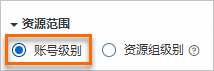 以下是兩個自訂權限原則樣本,您可以根據實際需要調整策略內容。
-
允許不支援資源群組層級授權的全部唯讀操作:
Action中列舉不支援資源群組層級授權的所有隻讀操作。{ "Version": "1", "Statement": [ { "Effect": "Allow", "Action": [ "ecs:CheckOpenSnapshotService", "ecs:DescribeAccountAttributes", "ecs:DescribeAccountCommonQuotas", "ecs:DescribeAccountLimits", "ecs:DescribeBandwidthHistory", "ecs:DescribeClassicLinkInstances", "ecs:DescribeCloudAssistantSettings", "ecs:DescribeDedicatedBlockStorageClusterDisks", "ecs:DescribeDeploymentSetTopology", "ecs:DescribeDeploymentSets", "ecs:DescribeDiagnosisOperateRecords", "ecs:DescribeDiagnosticMetrics", "ecs:DescribeDiagnosticReportAttributes", "ecs:DescribeDiskDefaultKMSKeyId", "ecs:DescribeDiskEncryptionByDefaultStatus", "ecs:DescribeEcsScenarioFacade", "ecs:DescribeEipPrice", "ecs:DescribeFunctionFeedback", "ecs:DescribeHpcClusters", "ecs:DescribeImageFromFamily", "ecs:DescribeInsightCheckItems", "ecs:DescribeInsightChecks", "ecs:DescribeInsightStatus", "ecs:DescribeInsightSummaries", "ecs:DescribeInstanceCrossZoneModifyConstraint", "ecs:DescribeInstanceMigrationLog", "ecs:DescribeInstanceStatus", "ecs:DescribeInstanceTypeResource", "ecs:DescribeKMSKeyAttribute", "ecs:DescribeKMSKeys", "ecs:DescribeLimitation", "ecs:DescribeLinkedKMSKeys", "ecs:DescribeMigrationInstancesTask", "ecs:DescribeMigrationPlans", "ecs:DescribeMigrationPreferences", "ecs:DescribeNetworkInsightsAnalysisResult", "ecs:DescribeNetworkInsightsAnalysises", "ecs:DescribeNetworkInsightsPaths", "ecs:DescribeOrderAutoRebootTime", "ecs:DescribePlanMaintenanceWindows", "ecs:DescribePortRangeListAssociations", "ecs:DescribePortRangeListEntries", "ecs:DescribeReservationDemandCommittedAmount", "ecs:DescribeReservationDemands", "ecs:DescribeReservedInstanceCategories", "ecs:DescribeResourceByTags", "ecs:DescribeResourceDisplay", "ecs:DescribeResourceStatusDiagnosis", "ecs:DescribeSecurityGroupSnapshotAttributes", "ecs:DescribeSecurityGroupSnapshotPolicies", "ecs:DescribeSecurityGroupSnapshots", "ecs:DescribeSnapshotBusinessStatus", "ecs:DescribeSnapshotCampaign", "ecs:DescribeSnapshotMonitorData", "ecs:DescribeSnapshotPackage", "ecs:DescribeSnapshotPolicyAssociatedSecurityGroups", "ecs:DescribeSnapshotsUsage", "ecs:DescribeStorageCapacityUnitDeductFactor", "ecs:DescribeStorageSetDetails", "ecs:DescribeTaskAttribute", "ecs:DescribeTasks", "ecs:DescribeUserBusinessBehavior", "ecs:DescribeVolumes", "ecs:DescribeVpcHavsInstances", "ecs:DescribeWaitingOrders", "ecs:DiskDefaultEncryptionQueryByParam", "ecs:GetSnapshotBlock", "ecs:GetSnapshotInfo", "ecs:ListAccountEcsQuotas", "ecs:ListChangedBlocks", "ecs:ListServiceSettings", "ecs:ListSnapshotBlocks", "ecs:QueryNeedKeepUsing", "ecs:QueryUsableSnapshots", "ecs:QueryUserInfo" ], "Resource": "*" } ] } -
允許不支援資源群組層級授權的全部操作:
Action中列舉不支援資源群組層級授權的全部操作。{ "Version": "1", "Statement": [ { "Effect": "Allow", "Action": [ "ecs:AddInstancesToCarePlan", "ecs:AddInvisibleChecks", "ecs:AllocateEipAddress", "ecs:ApplySecurityGroupSnapshot", "ecs:AssociateEipAddress", "ecs:AssociateSecurityGroupSnapshotPolicy", "ecs:CancelMigrationPlan", "ecs:CancelTask", "ecs:CheckOpenSnapshotService", "ecs:ConfirmCarePlanBill", "ecs:CreateCarePlan", "ecs:CreateClassicToVpcRollbackTask", "ecs:CreateDeploymentSet", "ecs:CreateDiagnosisOperateRecords", "ecs:CreateDiagnosticMetricSet", "ecs:CreateFunctionFeedback", "ecs:CreateHpcCluster", "ecs:CreateIssueCategoryReportRelation", "ecs:CreateNetworkInsightsPath", "ecs:CreatePlanMaintenanceWindow", "ecs:CreatePortRangeList", "ecs:CreateSecurityGroupSnapshotPolicy", "ecs:DeleteCarePlan", "ecs:DeleteDeploymentSet", "ecs:DeleteDiagnosticMetricSets", "ecs:DeleteDiagnosticReports", "ecs:DeleteHpcCluster", "ecs:DeleteNetworkInsightsAnalysis", "ecs:DeleteNetworkInsightsPath", "ecs:DeletePlanMaintenanceWindow", "ecs:DeletePortRangeList", "ecs:DeleteReservationDemand", "ecs:DeleteSecurityGroupSnapshotPolicy", "ecs:DeleteVolume", "ecs:DeleteWaitingOrders", "ecs:DescribeAccountAttributes", "ecs:DescribeAccountCommonQuotas", "ecs:DescribeAccountLimits", "ecs:DescribeAvailableResource", "ecs:DescribeBandwidthHistory", "ecs:DescribeCarePlans", "ecs:DescribeChargeTypeModificationPrice", "ecs:DescribeClassicLinkInstances", "ecs:DescribeCloudAssistantSettings", "ecs:DescribeClusters", "ecs:DescribeCustomerIssueCategory", "ecs:DescribeDedicatedBlockStorageClusterDisks", "ecs:DescribeDeploymentSetTopology", "ecs:DescribeDeploymentSets", "ecs:DescribeDiagnosisOperateRecords", "ecs:DescribeDiagnosticMetrics", "ecs:DescribeDiagnosticReportAttributes", "ecs:DescribeDiskDefaultKMSKeyId", "ecs:DescribeDiskEncryptionByDefaultStatus", "ecs:DescribeEcsScenarioFacade", "ecs:DescribeEipAddresses", "ecs:DescribeEipPrice", "ecs:DescribeFunctionFeedback", "ecs:DescribeHpcClusters", "ecs:DescribeImageFromFamily", "ecs:DescribeInsightCheckItems", "ecs:DescribeInsightChecks", "ecs:DescribeInsightStatus", "ecs:DescribeInsightSummaries", "ecs:DescribeInstanceCrossZoneModifyConstraint", "ecs:DescribeInstanceMigrationLog", "ecs:DescribeInstanceStatus", "ecs:DescribeInstanceTypeResource", "ecs:DescribeInstanceTypes", "ecs:DescribeKMSKeyAttribute", "ecs:DescribeKMSKeys", "ecs:DescribeLimitation", "ecs:DescribeLinkedKMSKeys", "ecs:DescribeMigrationInstancesTask", "ecs:DescribeMigrationPlans", "ecs:DescribeMigrationPreferences", "ecs:DescribeNetworkInsightsAnalysisResult", "ecs:DescribeNetworkInsightsAnalysises", "ecs:DescribeNetworkInsightsPaths", "ecs:DescribeOrderAutoRebootTime", "ecs:DescribePlanMaintenanceWindows", "ecs:DescribePortRangeListAssociations", "ecs:DescribePortRangeListEntries", "ecs:DescribePurchaseRecommendation", "ecs:DescribeRegions", "ecs:DescribeReservationDemandCommittedAmount", "ecs:DescribeReservationDemands", "ecs:DescribeReservedInstanceCategories", "ecs:DescribeResourceByTags", "ecs:DescribeResourceDisplay", "ecs:DescribeResourceStatusDiagnosis", "ecs:DescribeSecurityGroupSnapshotAttributes", "ecs:DescribeSecurityGroupSnapshotPolicies", "ecs:DescribeSecurityGroupSnapshots", "ecs:DescribeSnapshotBusinessStatus", "ecs:DescribeSnapshotCampaign", "ecs:DescribeSnapshotMonitorData", "ecs:DescribeSnapshotPackage", "ecs:DescribeSnapshotPolicyAssociatedSecurityGroups", "ecs:DescribeSnapshotPrice", "ecs:DescribeSnapshotWarmups", "ecs:DescribeSnapshotsUsage", "ecs:DescribeSpotPriceHistory", "ecs:DescribeStorageCapacityUnitDeductFactor", "ecs:DescribeStorageSetDetails", "ecs:DescribeTaskAttribute", "ecs:DescribeTasks", "ecs:DescribeUserBusinessBehavior", "ecs:DescribeVSwitches", "ecs:DescribeVolumes", "ecs:DescribeVpcHavsInstances", "ecs:DescribeVpcs", "ecs:DescribeWaitingOrders", "ecs:DescribeZones", "ecs:DisableDiskEncryptionByDefault", "ecs:DiskDefaultEncryptionQueryByParam", "ecs:EnableDiskEncryptionByDefault", "ecs:EnableInsight", "ecs:GetSnapshotBlock", "ecs:GetSnapshotInfo", "ecs:InnerCreateDiagnosticReport", "ecs:InnerOpenSnapShotService", "ecs:InnerReleaseDedicatedHost", "ecs:InnerReleaseElasticAssurance", "ecs:JoinSnapshotCampaign", "ecs:KeepUsing", "ecs:ListAccountEcsQuotas", "ecs:ListBandwidthHistory", "ecs:ListChangedBlocks", "ecs:ListServiceSettings", "ecs:ListSnapshotBlocks", "ecs:ModifyCarePlanAttribute", "ecs:ModifyCloudAssistantSettings", "ecs:ModifyDeploymentSetAttribute", "ecs:ModifyDiskDefaultKMSKeyId", "ecs:ModifyHpcClusterAttribute", "ecs:ModifyOrderAutoRebootTime", "ecs:ModifyPlanMaintenanceWindow", "ecs:ModifyPortRangeList", "ecs:ModifyReservationDemand", "ecs:ModifyResourceMeta", "ecs:ModifySecurityGroupSnapshotPolicy", "ecs:ModifySnapshotBusinessStatus", "ecs:ModifyUserBusinessBehavior", "ecs:ModifyVolumeAttribute", "ecs:OpenSnapShotService", "ecs:OpenSnapshotService", "ecs:PurchaseSavingPlanOffering", "ecs:PurchaseStorageCapacityUnit", "ecs:QueryConstraints", "ecs:QueryCopyImageSupportRegions", "ecs:QueryNeedKeepUsing", "ecs:QueryUsableSnapshots", "ecs:QueryUserInfo", "ecs:ReAddMigrationTaskInPlan", "ecs:ReInitVolume", "ecs:ReinitDisk", "ecs:ReleaseCapacityReservation", "ecs:ReleaseEipAddress", "ecs:RemoveInvisibleChecks", "ecs:ResetDiskDefaultKMSKeyId", "ecs:ResizeVolume", "ecs:RollbackVolume", "ecs:RunInstance", "ecs:StartNetworkInsightsAnalysis", "ecs:UnassociateEipAddress", "ecs:UnassociateSecurityGroupSnapshotPolicy", "ecs:UpdateServiceSettings", "ecs:WithdrawCarePlan", "ecs:describeImageFromFamily", "ecs:describeInstances", "ecs:runInstances", "ecs:unmountPEDisk" ], "Resource": "*" } ] }
獲得帳號層級許可權的RAM使用者或RAM角色,能夠操作整個帳號範圍內的相關資源。請務必確認所授與權限是否符合預期,遵從最小授權原則謹慎分配許可權。
常見問題
如何查看當前資源屬於哪個資源群組?
-
方式一:單擊資源名稱,進入資源的詳情頁面,即可查看到當前資源的資源群組。
-
方式二:登入資源管理主控台,單擊,在左側選擇目標資源所屬帳號(預設為當前帳號),通過篩選條件定位目標資源,即可查看其所屬資源群組。
如何查看當前產品在某個資源群組下的所有資源?
如何批量修改多個資源的資源群組?
登入資源管理主控台,單擊,在目標資源群組所在行的操作列下,單擊資源管理以進入資源管理頁面。通過篩選條件定位多個目標資源,批量勾選第一列的複選框後單擊下方轉移資源群組,並按頁面提示完成資源群組修改。