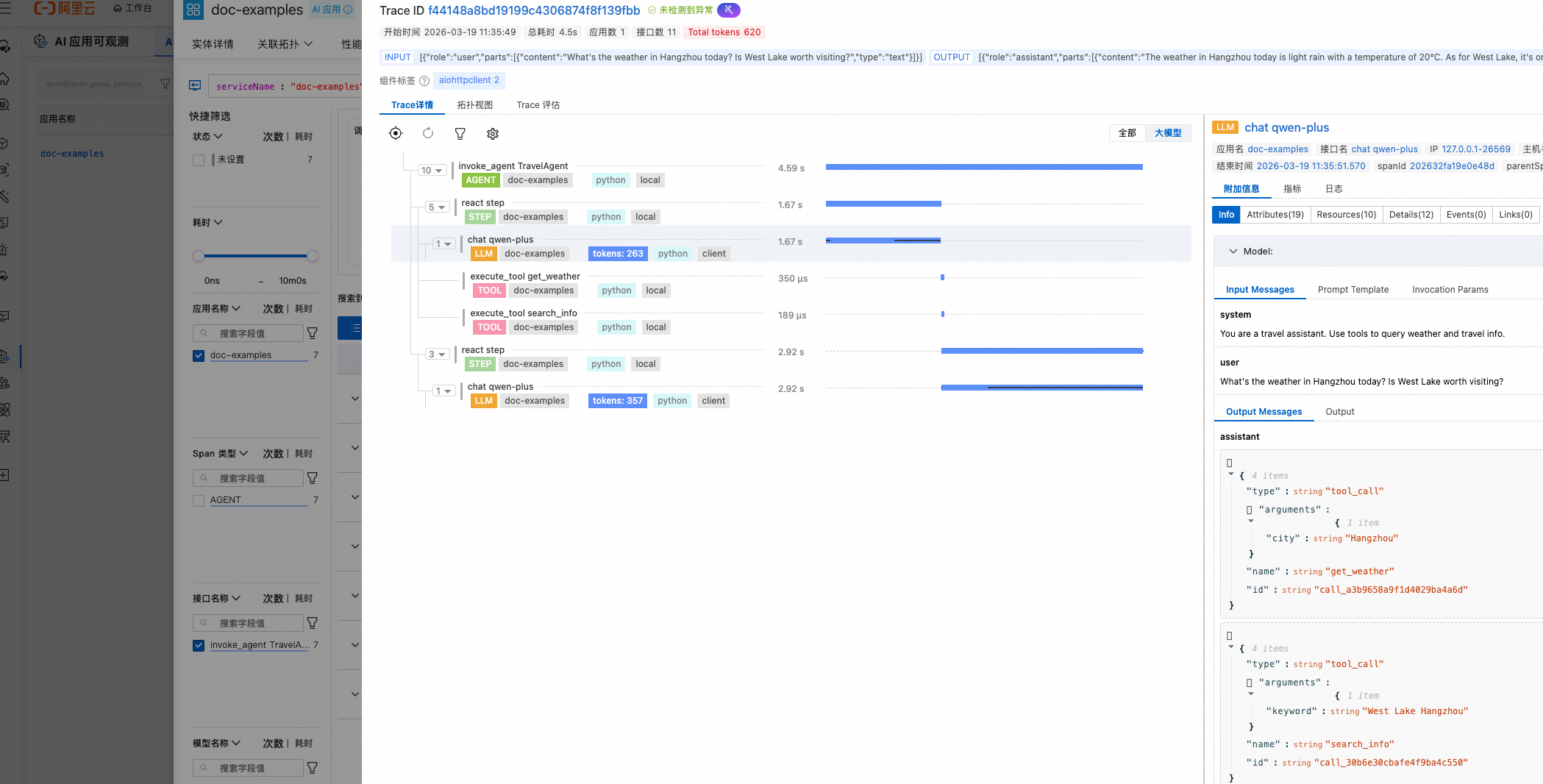
大模型可觀測支援通過Python探針對AgentScope應用進行可觀測,Python探針是阿里雲可觀測產品自研的Python語言的可觀測採集探針,其基於OpenTelemetry標準實現了自動化埋點能力。本文介紹如何將AgentScope應用接入CloudMonitor2.0,以協助使用者即時瞭解 AI 應用運行狀態。
架構介紹
AgentScope 是阿里巴巴開源的多 Agent 應用開發架構,提供 ReActAgent 等多種 Agent 類型,內建 DashScope、OpenAI 等模型適配器,支援工具調用、記憶管理和多 Agent 協作。
接入後,以下能力將被自動監控:
Agent 執行鏈路
LLM 調用(模型調用的 Token 用量、輸入/輸出內容)
工具調用鏈路(Toolkit 中各工具的調用詳情)
ReAct Step(每一步迴圈輪次的行動觀察)
接入方式
Container Service ACK 和容器計算服務 ACS 接入
步驟一:探針接入助手(ack-onepilot)安裝
登入Container Service管理主控台,在叢集列表頁面單擊目的地組群名稱。
在左側導覽列單擊組件管理,然後在右上方通過關鍵字搜尋ack-onepilot。
在ack-onepilot卡片上單擊安裝。配置相關的參數,建議使用預設值,單擊確認。
說明需要保證ack-onepilot組件版本大於等於5.1.1版本,在上述步驟3中會展示當前安裝的ack-onepilot版本。如果已經安裝較低版本ack-onepilot,可重複上述步驟1、2,在步驟3中點擊升級即可
步驟二:修改配置以啟動 AI 應用監控
登入Container Service管理主控台,在左側導覽列選擇叢集列表。
在叢集列表頁面,單擊目的地組群名稱,然後在左側導覽列,選擇。
切換命名空間,找到待監控的工作負載,點擊最右側操作列的更多表徵圖
 後,在彈出的對話方塊中點擊YAML編輯。
在YAML檔案中將以下
labels添加到spec > template > metadata層級下。添加完成後點擊 更新。labels: aliyun.com/app-language: python # Python應用必填,標明此應用是Python應用。 armsPilotAutoEnable: 'on' armsPilotCreateAppName: "deployment-name" # 應用在ARMS中的展示名稱 armsPilotAppWorkspace: "workspace" # 替換為當前workspace名稱,如未指定則使用預設工作空間。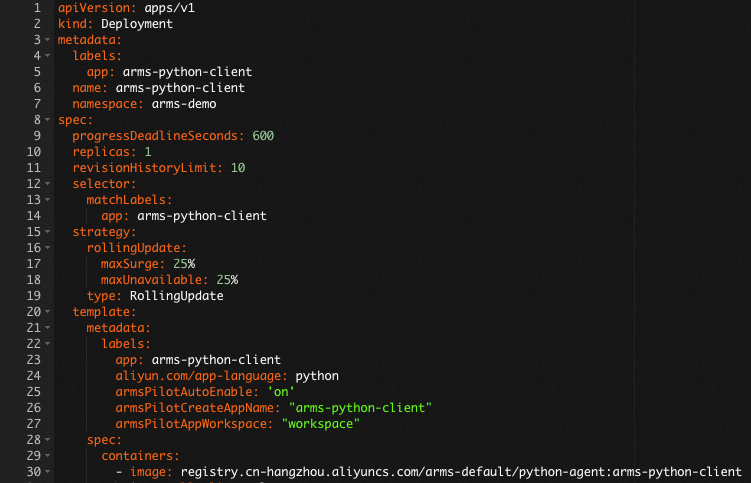
手動接入探針
步驟一:下載探針安裝器 aliyun-bootstrap
從PyPI倉庫下載探針安裝器。
pip3 install aliyun-bootstrap步驟二:配置環境變數
您需要手動為Python應用添加以下環境變數:
# 方式一:為本SHELL中所有進程添加環境變數
export ARMS_APP_NAME=xxx   # 應用程式名稱。
export ARMS_WORKSPACE=xxx   # 替換為當前Workspace名稱。
export ARMS_REGION_ID=xxx   # 對應的阿里雲帳號的RegionID。
export ARMS_LICENSE_KEY=xxx   # 阿里雲 LicenseKey。
# 方式二:為某個進程單獨添加環境變數
ARMS_APP_NAME=xxx ARMS_WORKSPACE=xxx ARMS_REGION_ID=xxx ARMS_LICENSE_KEY=xxx aliyun-instrument xxx.py其中LicenseKey可以通過OpenAPI擷取,具體參見擷取應用可觀測介面傳回值中的authToken欄位。
(可選)Docker環境安裝參考
對於Docker環境,可以參考以下Dockerfile樣本修改您的Dockerfile檔案。
# 添加環境變數
ENV ARMS_APP_NAME={AppName}
ENV ARMS_REGION_ID={regionId}
ENV ARMS_LICENSE_KEY={licenseKey}
ENV ARMS_WORKSPACE={worksapce}

## 原有環境
步驟三:使用aliyun-bootstrap安裝Python探針
為了加快安裝,建議您使用如下命令先配置鏡像倉庫。
pip config set global.index-url https://mirrors.aliyun.com/pypi/simple/ && pip config set install.trusted-host mirrors.aliyun.com安裝探針。
aliyun-bootstrap -a install
步驟四:啟動應用
通過ARMS Python探針啟動應用
aliyun-instrument python app.py範例程式碼
import asyncio
import os
from agentscope.agent import ReActAgent
from agentscope.formatter import DashScopeChatFormatter
from agentscope.message import Msg, TextBlock
from agentscope.model import DashScopeChatModel
from agentscope.tool import Toolkit, ToolResponse

def get_weather(city: str) -> ToolResponse:
    weather_data = {
        "Beijing": "Sunny 25°C",
        "Shanghai": "Cloudy 22°C",
        "Hangzhou": "Light rain 20°C",
    }
    result = weather_data.get(city, f"{city}: No weather data available")
    return ToolResponse(content=[TextBlock(type="text", text=result)])

def search_info(keyword: str) -> ToolResponse:
    info = {
        "West Lake": "West Lake in Hangzhou is a famous freshwater lake, UNESCO World Heritage",
        "Great Wall": "Ancient Chinese defensive structure, UNESCO World Heritage",
    }
    result = info.get(keyword, f"No information found for '{keyword}'")
    return ToolResponse(content=[TextBlock(type="text", text=result)])

async def main():
    model = DashScopeChatModel(
        model_name=os.environ.get("MODEL_NAME", "qwen-plus"),
        api_key=os.environ.get("DASHSCOPE_API_KEY"),
    )
    toolkit = Toolkit()
    toolkit.register_tool_function(get_weather)
    toolkit.register_tool_function(search_info)
    agent = ReActAgent(
        name="TravelAgent",
        sys_prompt="You are a travel assistant. Use tools to query weather and travel info.",
        model=model,
        formatter=DashScopeChatFormatter(),
        toolkit=toolkit,
        max_iters=5,
    )
    msg = Msg(
        name="user",
        content="What's the weather in Hangzhou today? Is West Lake worth visiting?",
        role="user",
    )
    result = await agent(msg)
    print(result.content)

asyncio.run(main())
查看監控詳情
登入CloudMonitor2.0控制台,選擇目標工作空間,在左側導覽列選擇。
在AI應用列表頁面可以看到已接入的應用,單擊應用程式名稱可以查看詳細的應用監控資料。