背景資訊
使用DCDN加速服務後,使用者訪問鏈路變為:用戶端 → 加速節點 → 來源站點。因此,來源站點預設擷取的訪問IP是DCDN節點的IP,而非用戶端的真實IP,這會影響訪問資料的準確統計。
為解決此問題,需要在來源站點上進行相應配置,以擷取用戶端的真實IP。阿里雲DCDN預設通過ali-cdn-real-ip要求標頭將用戶端IP透傳至來源站點。
ali-cdn-real-ip擷取的是與DCDN節點直接建立串連的用戶端IP。如果用戶端通過其他代理訪問DCDN,則該要求標頭擷取到的是Proxy 伺服器的IP。
操作步驟
本文以Nginx來源站點為例,介紹如何通過修改Nginx配置,實現以下三種方式擷取用戶端真實IP:
在Nginx訪問日誌中記錄用戶端真實IP。
在回應標頭中添加包含用戶端真實IP的自訂欄位。
通過特定介面,在響應體中直接返回用戶端真實IP。
配置自訂日誌格式
通過log_format指令定義新的日誌格式custom_log,在預設日誌資訊的基礎上,增加$http_ali_cdn_real_ip變數來記錄ali-cdn-real-ip要求標頭的值。
   log_format custom_log '$remote_addr - $remote_user [$time_local] '
                         '"$request" $status $body_bytes_sent '
                         '"$http_referer" "$http_user_agent" '
                         'ali_cdn_real_ip:"$http_ali_cdn_real_ip"';
配置測試介面
通過location指令配置/api/ip介面,用於直接返回用戶端真實IP。
   location /api/ip {
       # Obtain the client's real IP address from the request header.
       set $real_ip $http_ali_cdn_real_ip;
       # Add the real IP address to the response header.
       add_header realip $real_ip;
       # Set the response content type (optional, but recommended).
       add_header Content-Type text/plain;
       # Return the value of the request header to the response body.
       return 200 $real_ip;
   }
完整配置樣本
以下為完整的Nginx設定檔樣本,請根據實際情況替換server_name等參數。
修改Nginx配置之後,需要重啟Nginx該配置才會生效。
使用該配置時,需要配置DCDN的預設回源HOST,並且回源HOST的值必須和
server_name保持一致。
# /etc/nginx/nginx.conf
user nginx;
worker_processes auto;
error_log /var/log/nginx/error.log warn;
pid /var/run/nginx.pid;

events {
    worker_connections 1024;
}

http {
    include       /etc/nginx/mime.types;
    default_type  application/octet-stream;

    # Customize log format by adding the ali_cdn_real_ip field.
    log_format custom_log '$remote_addr - $remote_user [$time_local] '
                         '"$request" $status $body_bytes_sent '
                         '"$http_referer" "$http_user_agent" '
                         'ali_cdn_real_ip:"$http_ali_cdn_real_ip"';

    sendfile        on;
    keepalive_timeout  65;

    # Gzip Settings
    gzip on;
    gzip_vary on;
    gzip_min_length 1024;
    gzip_types text/plain text/css application/json application/javascript text/xml application/xml;

    server {
        listen 80;
        # Please replace it with your accelerated domain name.
        server_name localhost;

        # Use custom log format
        access_log /var/log/nginx/access.log custom_log;

        location / {
            root   /usr/share/nginx/html;
            index  index.html index.htm;
        }

        # Interface used to obtain the client's real IP address
        location /api/ip {
           # Obtain the client's real IP address from the request header.
           set $real_ip $http_ali_cdn_real_ip;
           # Add the real IP address to the response header.
           add_header realip $real_ip;
           # Set the response content type (optional, but recommended).
           add_header Content-Type text/plain;
           # Return the value of the request header to the response body.
           return 200 $real_ip;
        }

        # Error page configuration
        error_page   500 502 503 504  /50x.html;
        location = /50x.html {
            root   /usr/share/nginx/html;
        }
    }

    # For HTTPS configuration, please refer to the following configuration.
    # server {
    #     listen 443 ssl;
    #     server_name localhost; # Please replace it with your accelerated domain name.
    #
    #     ssl_certificate /path/to/cert.pem;
    #     ssl_certificate_key /path/to/privkey.pem;
    #
    #     access_log /var/log/nginx/access.log custom_log;
    #
    #     location /api/ip {
    #         set $real_ip $http_ali_cdn_real_ip;
    #         add_header realip $real_ip;
    #         add_header Content-Type text/plain;
    #         return 200 $real_ip;
    #     }
    # }
}
結果驗證
驗證回應標頭和響應體
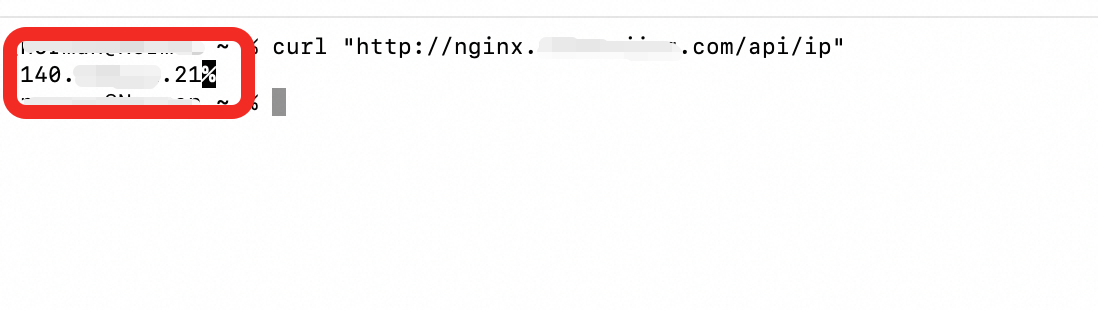
通過DCDN加速網域名稱訪問/api/ip介面。
回應標頭中包含
realip欄位,其值為用戶端真實IP。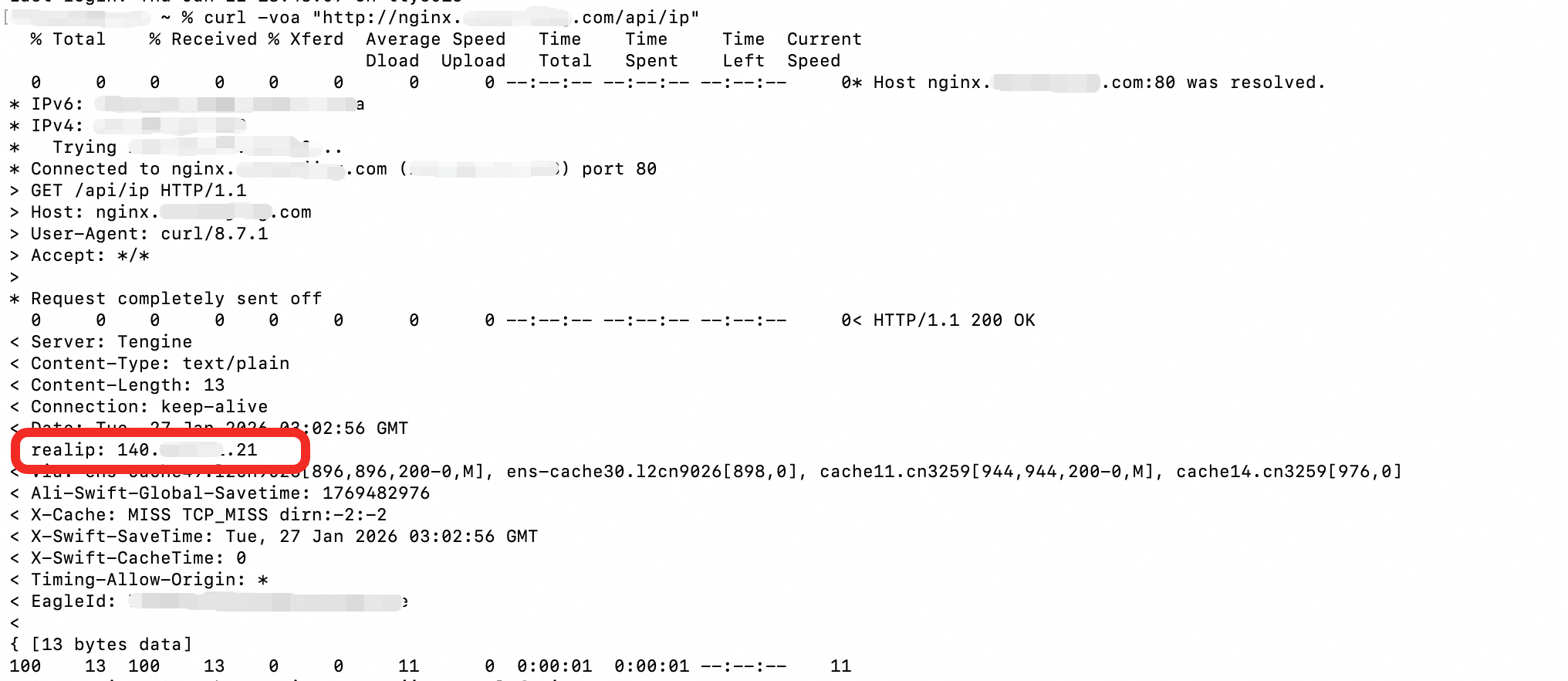
響應體內容為用戶端真實IP。
驗證訪問日誌
在來源站點伺服器上查看Nginx的訪問日誌(預設為/var/log/nginx/access.log)。日誌中已成功記錄ali_cdn_real_ip欄位及其值。
