說明
附件郵件總大小不超過15MB,一次最多不超過100個附件。
15MB是指發信郵件實際總大小(包括郵件標頭,本文,附件),由於base64編碼郵件代碼會膨脹1.5倍以上,總大小非客戶側看到的大小,附件限制建議按照8MB來準備。若需要發送大附件,建議內容裡加超連結的方式發送。
# -*- coding: utf-8 -*-
import sys
from typing import List
from typing import BinaryIO
from alibabacloud_dm20151123.client import Client as Dm20151123Client
from alibabacloud_tea_openapi import models as open_api_models
from alibabacloud_dm20151123 import models as dm_20151123_models
from alibabacloud_tea_util import models as util_models
from alibabacloud_dm20151123 import models as main_models

attachments = []


class Sample:
    def __init__(self) -> None:
        pass

    @staticmethod
    def create_client() -> Dm20151123Client:
        """
        使用憑據初始化帳號Client
        @return: Client
        @throws Exception
        """
        # 工程代碼建議使用更安全的無AK方式,憑據配置方式請參見:https://www.alibabacloud.com/help/zh/sdk/developer-reference/v2-manage-python-access-credentials。
        config = open_api_models.Config(
            access_key_id='xxxxxx',
            access_key_secret='xxxxxx'
        )
        # Endpoint 請參考 https://api.alibabacloud.com/product/Dm
        config.endpoint = f'dm.ap-southeast-1.aliyuncs.com'
        config.region_id = f'ap-southeast-1'
        return Dm20151123Client(config)

    @staticmethod
    def main(
            args: List[str],
    ) -> None:
        client = Sample.create_client()
        single_sendmail_request = dm_20151123_models.SingleSendMailAdvanceRequest(
            account_name='sender@example.com',
            address_type='1',
            reply_to_address='true',
            to_address='recipient@example.com',
            subject='主題',
            html_body='郵件內容',
            attachments=getAttachments()
        )
        try:
            # 複製代碼運行請自行列印 API 的傳回值
            response = client.single_send_mail_advance(single_sendmail_request, util_models.RuntimeOptions())
            print(response)
        except Exception as error:
            # 此處僅做列印展示,請謹慎對待異常處理,在工程專案中切勿直接忽略異常。
            # 錯誤 message
            print(error.data)
            # # 診斷地址
            # print(error.data.get("Recommend"))
            # UtilClient.assert_as_string(error.message)

def getAttachments() -> List[main_models.SingleSendMailAdvanceRequestAttachments]:
    attach = main_models.SingleSendMailAdvanceRequestAttachments("test1.txt", getFile(r"C:\Users\Downloads\111.txt"))
    attach1 = main_models.SingleSendMailAdvanceRequestAttachments("test2.txt", getFile(r"C:\Users\Downloads\222.txt"))
    attachments.append(attach)
    attachments.append(attach1)
    return attachments


def getFile(v_file) -> BinaryIO:
    f = open(v_file, 'rb')
    return f


if __name__ == '__main__':
Sample.main(sys.argv[1:])package org.example;
import com.aliyun.dm20151123.models.SingleSendMailAdvanceRequest;
import com.aliyun.dm20151123.models.SingleSendMailResponse;
import com.aliyun.tea.TeaException;
import com.google.gson.Gson;
import java.io.File;
import java.io.FileInputStream;
import java.util.ArrayList;
import java.util.List;
public class Sample {
/**
* <b>description</b> :
* <p>使用憑據初始化帳號Client</p>
* @return Client
*
* @throws Exception
*/
public static com.aliyun.dm20151123.Client createClient() throws Exception {
// 工程代碼建議使用更安全的無AK方式,憑據配置方式請參見:https://www.alibabacloud.com/help/zh/sdk/developer-reference/v2-manage-python-access-credentials。
// com.aliyun.credentials.Client credential = new com.aliyun.credentials.Client();
com.aliyun.teaopenapi.models.Config config = new com.aliyun.teaopenapi.models.Config()
.setAccessKeyId("xxxxxx")
.setAccessKeySecret("xxxxxx");
// Endpoint 請參考 https://api.alibabacloud.com/product/Dm
config.endpoint = "dm.ap-southeast-1.aliyuncs.com";
config.regionId = "ap-southeast-1";
return new com.aliyun.dm20151123.Client(config);
}
private static final Gson gson = new Gson(); // 新增 Gson 執行個體
public static void main(String[] args_) throws Exception {
com.aliyun.dm20151123.Client client = Sample.createClient();
SingleSendMailAdvanceRequest singleSendMailAdvanceRequest = new SingleSendMailAdvanceRequest();
List<SingleSendMailAdvanceRequest.SingleSendMailAdvanceRequestAttachments> attachments = new ArrayList<>();
SingleSendMailAdvanceRequest.SingleSendMailAdvanceRequestAttachments attachment1 = new SingleSendMailAdvanceRequest.SingleSendMailAdvanceRequestAttachments();
attachment1.setAttachmentName("test1.txt");
attachment1.setAttachmentUrlObject(new FileInputStream(new File("C:\\Users\\Downloads\\111.txt")));
SingleSendMailAdvanceRequest.SingleSendMailAdvanceRequestAttachments attachment2 = new SingleSendMailAdvanceRequest.SingleSendMailAdvanceRequestAttachments();
attachment2.setAttachmentName("test2.txt");
attachment2.setAttachmentUrlObject(new FileInputStream(new File("C:\\Users\\Downloads\\222.txt")));
attachments.add(attachment1);
attachments.add(attachment2);
singleSendMailAdvanceRequest.setAttachments(attachments);
singleSendMailAdvanceRequest.setAccountName("sender@example.com");
singleSendMailAdvanceRequest.setAddressType(1);
singleSendMailAdvanceRequest.setReplyToAddress(true);
singleSendMailAdvanceRequest.setToAddress("recipient@example.com");
singleSendMailAdvanceRequest.setSubject("主題");
singleSendMailAdvanceRequest.setHtmlBody("郵件內容");
singleSendMailAdvanceRequest.setClickTrace("1");
try {
// 複製代碼運行請自行列印 API 的傳回值
SingleSendMailResponse response = client.singleSendMailAdvance(singleSendMailAdvanceRequest, new com.aliyun.teautil.models.RuntimeOptions());
System.out.println(gson.toJson(response));
} catch (TeaException error) {
// 此處僅做列印展示,請謹慎對待異常處理,在工程專案中切勿直接忽略異常。
// 錯誤 message
System.out.println(error.getMessage());
// 診斷地址
System.out.println(error.getData().get("Recommend"));
com.aliyun.teautil.Common.assertAsString(error.message);
} catch (Exception _error) {
TeaException error = new TeaException(_error.getMessage(), _error);
// 此處僅做列印展示,請謹慎對待異常處理,在工程專案中切勿直接忽略異常。
// 錯誤 message
System.out.println(error.getMessage());
// 診斷地址
System.out.println(error.getData().get("Recommend"));
com.aliyun.teautil.Common.assertAsString(error.message);
}
}
}
<?php

// This file is auto-generated, don't edit it. Thanks.
namespace AlibabaCloud\SDK\Sample;

use AlibabaCloud\SDK\Dm\V20151123\Dm;
// use AlibabaCloud\Credentials\Credential;
use \Exception;
use AlibabaCloud\Tea\Exception\TeaError;
use AlibabaCloud\Tea\Utils\Utils;

use Darabonba\OpenApi\Models\Config;
use AlibabaCloud\SDK\Dm\V20151123\Models\SingleSendMailAdvanceRequest;
use AlibabaCloud\SDK\Dm\V20151123\Models\SingleSendMailAdvanceRequest\attachments;
use GuzzleHttp\Psr7\Stream;
use AlibabaCloud\Tea\Utils\Utils\RuntimeOptions;

require_once __DIR__ . '\\..\\..\\vendor\\autoload.php';

class Sample {

    /**
     * 使用憑據初始化帳號Client
     * @return Dm Client
     */
    public static function createClient(){
        // 工程代碼建議使用更安全的無AK方式,憑據配置方式請參見:https://www.alibabacloud.com/help/zh/sdk/developer-reference/v2-manage-python-access-credentials。
        $config = new Config([
            "accessKeyId" => "xxxxxx",
            "accessKeySecret" => "xxxxxxx"
        ]);
        // Endpoint 請參考 https://api.alibabacloud.com/product/Dm
        $config->endpoint = "dm.ap-southeast-1.aliyuncs.com";
        $config->regionId = "ap-southeast-1";
        return new Dm($config);
    }
    // public static function createClient(){
    //     // 工程代碼建議使用更安全的無AK方式,憑據配置方式請參見:https://api.alibabacloud.com/product/Dm。
    //     $credential = new Credential();
    //     $config = new Config([
    //         "credential" => $credential
    //     ]);
    //     // Endpoint 請參考 https://api.aliyun.com/product/Dm
    //     $config->endpoint = "dm.aliyuncs.com";
    //     $config->regionId = "cn-hangzhou";
    //     return new Dm($config);
    // }
    /**
     * 擷取檔案流
     * @param string $filePath 檔案路徑
     * @return Stream
     */
    public static function getFile($filePath) {
        $fileResource = fopen($filePath, 'rb');
        $fileSize = filesize($filePath); // 擷取檔案大小
        var_dump("檔案大小:");
        var_dump($fileSize);
        return new Stream($fileResource);
    }

    /**
     * 擷取附件列表
     * @return array
     */
    public static function getAttachments() {
        $attachments = [];

        // 建立第一個附件
        $attachment1 = new attachments();
        $attachment1->attachmentName = "test1.txt";
        $attachment1->attachmentUrlObject = self::getFile("C:\\Users\\Downloads\\111.txt");
        $attachments[] = $attachment1;

        // 建立第二個附件
        $attachment2 = new attachments();
        $attachment2->attachmentName = "test2.txt";
        $attachment2->attachmentUrlObject = self::getFile("C:\\Users\\Downloads\\222.txt");
        $attachments[] = $attachment2;
        //列印$attachments;
        var_dump($attachments);
        return $attachments;
    }

    /**
     * @param string[] $args
     * @return void
     */
    public static function main($args){
        $client = self::createClient();

        // 建立郵件請求
        $singleSendMailRequest = new SingleSendMailAdvanceRequest([
            "accountName" => "sender@example.com",
            "addressType" => 1,
            "replyToAddress" => true,
            "subject" => "主題",
            "toAddress" => "recipient@example.com",
            "attachments" => self::getAttachments(),
            "htmlBody" => "<h1>內容</h1>",
            "textBody" => "內容"
        ]);

        // // 建立運行時選項
        // $runtime = new RuntimeOptions([
        //     "ca" => "C:\\Users\\cacert.pem" // 指定本地 CA 憑證路徑
        // ]);
        $runtime = new RuntimeOptions();

        try {
            // 發送郵件
            $client->singleSendMailAdvance($singleSendMailRequest, $runtime);
            var_dump("發送成功");
        }
        catch (Exception $error) {
            if (!($error instanceof TeaError)) {
                $error = new TeaError([], $error->getMessage(), $error->getCode(), $error);
            }
            // 此處僅做列印展示,請謹慎對待異常處理,在工程專案中切勿直接忽略異常。
            // 錯誤 message
            var_dump($error->message);
            // 診斷地址
            var_dump($error->data["Recommend"]);
            Utils::assertAsString($error->message);
        }
    }
}
$path = __DIR__ . \DIRECTORY_SEPARATOR . '..' . \DIRECTORY_SEPARATOR . 'vendor' . \DIRECTORY_SEPARATOR . 'autoload.php';
if (file_exists($path)) {
    require_once $path;
}
Sample::main(array_slice($argv, 1));package main
import (
"fmt"
"os"
openapiutil "github.com/alibabacloud-go/darabonba-openapi/v2/utils"
dm "github.com/alibabacloud-go/dm-20151123/v2/client"
"github.com/alibabacloud-go/tea/dara"
"github.com/aliyun/credentials-go/credentials"
)
// Description:
//
// 使用憑據初始化帳號Client
//
// @return Client
//
// @throws Exception
func CreateClient() (_result *dm.Client, _err error) {
config := new(credentials.Config).
SetType("access_key").
SetAccessKeyId("xxxxxx").
SetAccessKeySecret("xxxxxx")
akCredential, err := credentials.NewCredential(config)
if err != nil {
return _result, err
}
openapiConfig := &openapiutil.Config{
Credential: akCredential,
}
// Endpoint 請參考 https://api.alibabacloud.com/product/Dm
openapiConfig.Endpoint = dara.String("dm.ap-southeast-1.aliyuncs.com")
_result, _err = dm.NewClient(openapiConfig)
return _result, _err
}
func main() {
err := _main(dara.StringSlice(os.Args[1:]))
if err != nil {
panic(err)
}
}
func _main(args []*string) (_err error) {
client, _err := CreateClient()
if _err != nil {
return _err
}
// 建立附件
attachments, _err := getAttachments()
if _err != nil {
return _err
}
// 使用SingleSendMailAdvanceRequest而不是SingleSendMailRequest
singleSendMailRequest := &dm.SingleSendMailAdvanceRequest{
AccountName: dara.String("sender@example.com"),
AddressType: dara.Int32(1),
ReplyToAddress: dara.Bool(true),
ToAddress: dara.String("recipient@example.com"),
Subject: dara.String("主題"),
HtmlBody: dara.String("郵件內容"),
Attachments: attachments,
}
runtime := &dara.RuntimeOptions{}
// 使用SingleSendMailAdvance方法而不是SingleSendMailWithOptions
resp, _err := client.SingleSendMailAdvance(singleSendMailRequest, runtime)
if _err != nil {
fmt.Printf("[ERROR] %s\n", _err.Error())
return _err
}
fmt.Printf("[LOG] %s\n", dara.Stringify(resp))
return _err
}
// getAttachments 擷取附件列表
func getAttachments() ([]*dm.SingleSendMailAdvanceRequestAttachments, error) {
// 注意:這裡需要根據實際檔案路徑進行修改
attach1, err := createAttachmentFromFile("test1.txt", `C:\Users\Downloads\111.txt`)
if err != nil {
return nil, fmt.Errorf("建立附件test1.txt失敗: %v", err)
}
attach2, err := createAttachmentFromFile("test2.txt", `C:\Users\Downloads\222.txt`)
if err != nil {
return nil, fmt.Errorf("建立附件test2.txt失敗: %v", err)
}
return []*dm.SingleSendMailAdvanceRequestAttachments{attach1, attach2}, nil
}
// createAttachmentFromFile 從檔案建立附件
func createAttachmentFromFile(name, filePath string) (*dm.SingleSendMailAdvanceRequestAttachments, error) {
// 開啟檔案
file, err := os.Open(filePath)
if err != nil {
return nil, fmt.Errorf("無法開啟檔案 %s: %v", filePath, err)
}
// 擷取檔案資訊
fileInfo, err := file.Stat()
if err != nil {
file.Close()
return nil, fmt.Errorf("無法擷取檔案資訊 %s: %v", filePath, err)
}
// 檢查檔案大小
// if fileInfo.Size() > 15*1024*1024 {
// file.Close()
// return nil, fmt.Errorf("檔案 %s 大小超過限制", filePath)
// }
// 建立附件對象,使用檔案作為io.Reader
attachment := &dm.SingleSendMailAdvanceRequestAttachments{
AttachmentName: dara.String(name),
AttachmentUrlObject: file, // 直接使用檔案作為io.Reader
}
fmt.Printf("成功建立附件 %s,大小: %d 位元組\n", name, fileInfo.Size())
// 注意:在實際應用中,你可能需要保持檔案開啟直到發送完成
// 或者將檔案內容讀取到記憶體中以避免檔案控制代碼問題
return attachment, nil
}
說明
請前往openapi下載最新的SDK包,才會有附件相關的方法。
若使用VPC伺服器,需要走內網串連的使用者,請設定相關參數config.setEndpointType("internal");
調用說明(暫未提供所有開發語言樣本,基本邏輯類似)
以python為例:
基本邏輯是讀取檔案的二進位流,多個附件封裝到列表,傳入附件欄位,再調用single_send_mail_advance介面發信,非原來的singleSendMailWithOptions。
SingleSendMailAdvanceRequestAttachments
作用:定義一個郵件附件,包含附件的檔案名稱和檔案內容(二進位流)
SingleSendMailAdvanceRequest
作用:封裝發送郵件所需的所有參數,包括髮件人、收件者、主題、本文以及附件等資訊。
single_send_mail_advance發送郵件
作用:使用 Dm20151123Client 執行個體調用該方法,發送一封帶附件的。
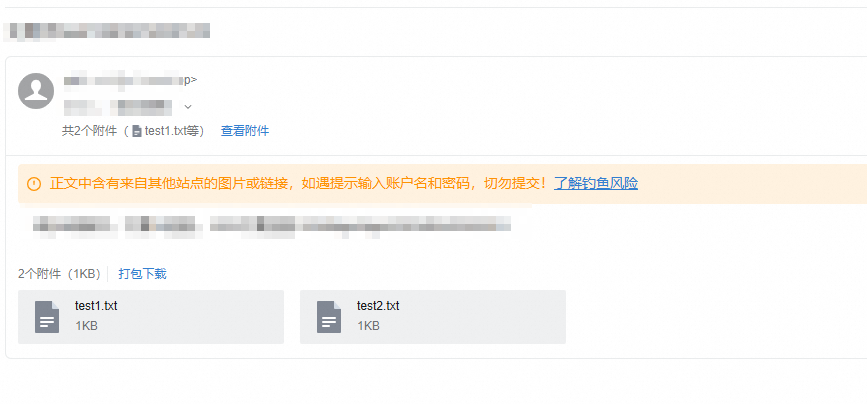
效果展示
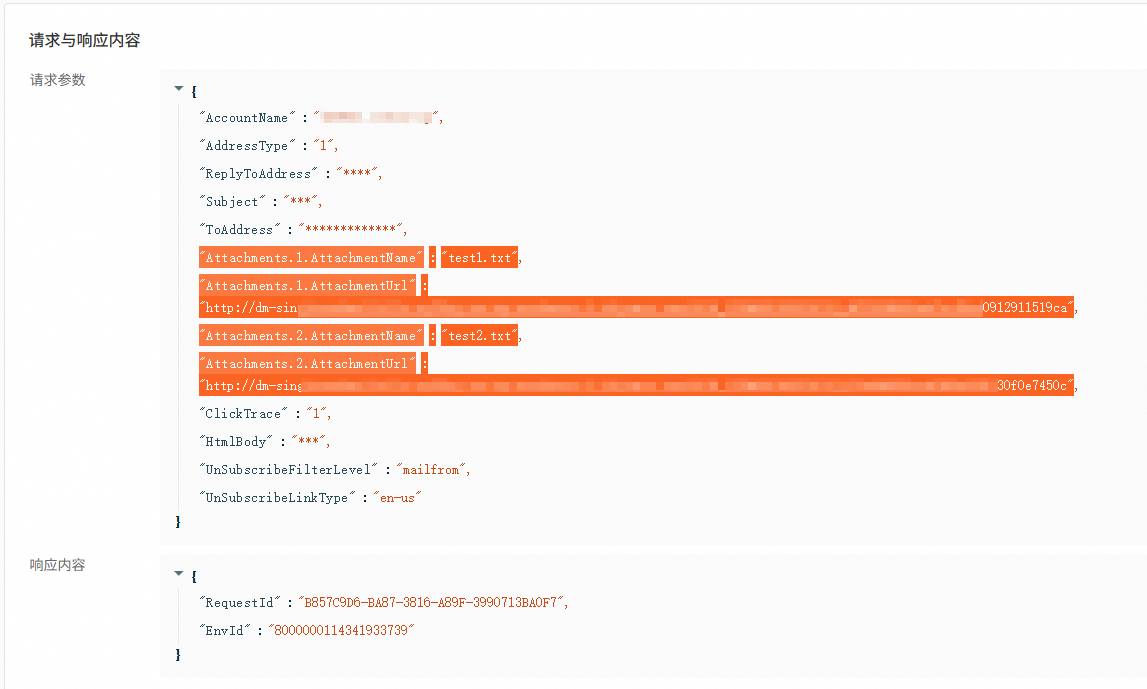
可以使用診斷分析工具查詢request-id,判斷傳參是否正確。

dm20151123的1.8.1要搭配新版的tea-openapi,更新為0.3.10可以解決:
<dependency>
      <groupId>com.aliyun</groupId>
      <artifactId>dm20151123</artifactId>
      <version>1.8.1</version>
</dependency>
<dependency>
      <groupId>com.aliyun</groupId>
      <artifactId>tea-openapi</artifactId>
      <version>0.3.10</version>
</dependency>