模板ID
SX4CLB1IH4FYNAGH
地址:https://bpstudio.console.alibabacloud.com/bpStudio/topo?TemplateId=SX4CLB1IH4FYNAGH
支援地區
杭州、北京、上海、深圳、廣州、成都等
模板架構
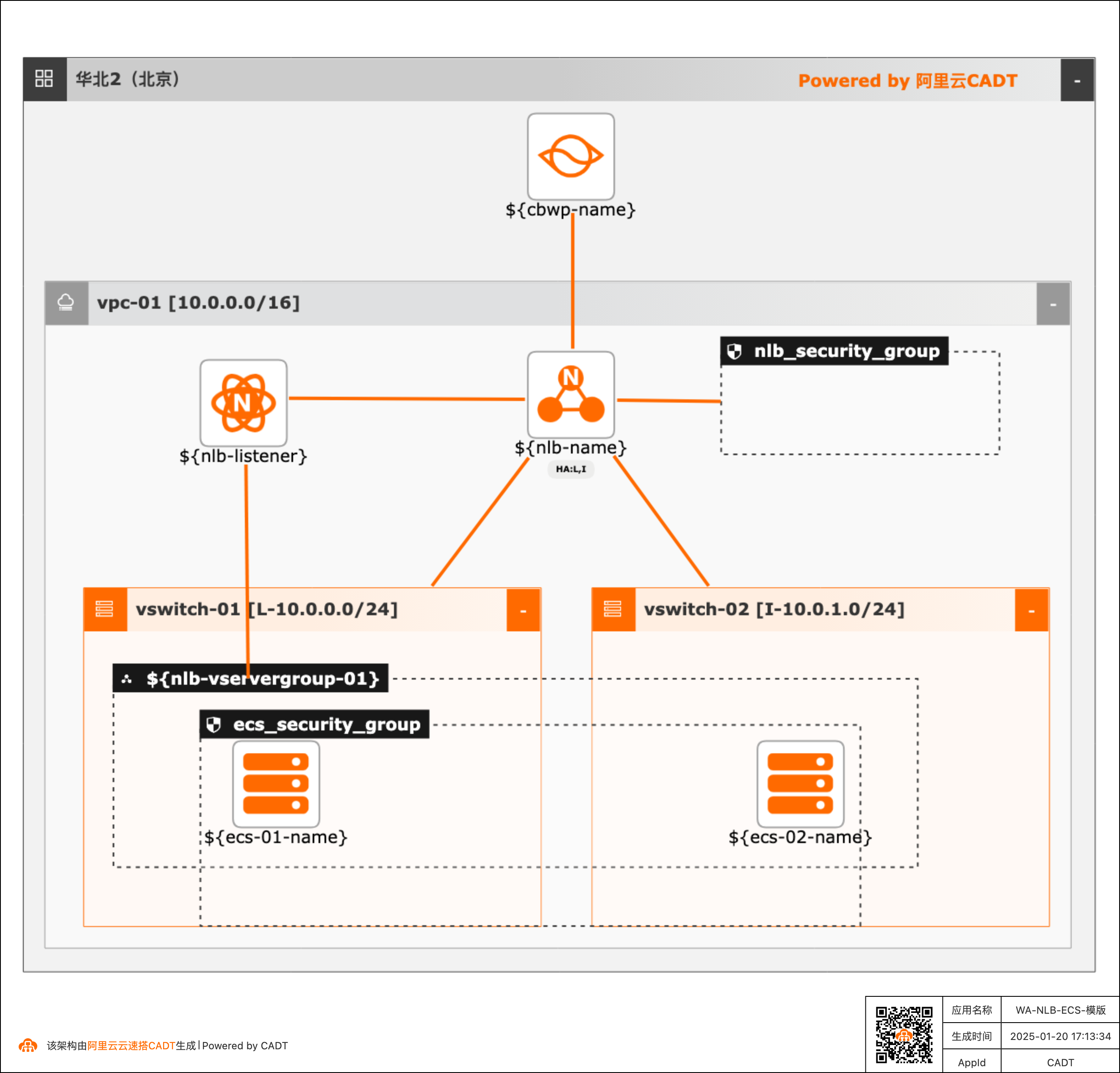
參數變數
參數變數類型包括String、Integer、Boolean、Map等,通過variables傳遞相關參數值。
如果未傳遞,則使用預設值。 如果修改模板變數配置,可以參考:模板變數配置
序號 | 變數名稱 | 變數類型 | 預設值 | 描述 |
1 | ${nlb-name} | String | nlb | NLB執行個體名稱 |
2 | ${nlb-network-type} | String | Internet | 網路類型 |
3 | ${instance-tags} | Map | {"createBy":"cadt"} | 資源標籤 |
4 | ${cbwp-name} | String | cbwp | 共用頻寬名稱 |
5 | ${cbwp-bandwidth} | Integer | 1 | 頻寬(Mbps) |
6 | ${nlb-listener} | String | nlb_listener_80 | NLB的監聽 |
7 | ${nlb-listener-port} | Integer | 80 | 監聽連接埠 |
8 | ${nlb-vservergroup-01} | String | nlb_servergroup | 虛擬伺服器組 |
9 | ${nlb-sg-backend-port} | List<Map> | [{"backend_port":"80","weight":100}] | 伺服器組連接埠配置 |
10 | ${ecs-01-type} | String | ecs.c6.large | ECS01的執行個體規格 |
11 | ${ecs-01-name} | String | ecs-test-01 | ECS01的執行個體/主機名稱 |
12 | ${ecs-01-password} | String | Test1234 | ECS01的密碼 |
13 | ${ecs-01-num} | Integer | 1 | ECS01的執行個體數量 |
14 | ${ecs-01-type} | String | ecs.c6.large | ECS02的執行個體規格 |
15 | ${ecs-01-name} | String | ecs-test-02 | ECS02的執行個體/主機名稱 |
16 | ${ecs-01-password} | String | Test1234 | ECS02的密碼 |
17 | ${ecs-02-num} | Integer | 1 | ECS02的執行個體數量 |
命令列調試
YAML檔案傳參配置樣本(預設VPC、交換器、共用頻寬、NLB、ECS均為新建立):
template_id: SX4CLB1IH4FYNAGH
area_id: "cn-beijing"
instances:
#  - node_type: vpc
#    node_name: vpc-01
#    id: vpc-bp**********ws
#  - node_type: vswitch
#    node_name: vswitch-01
#    id: vsw-bp**********0ex
#  - node_type: vswitch
#    node_name: vswitch-02
#    id: vsw-bp**********1ek
# 預設建立VPC和交換器,已注釋對應參數。複用現有VPC和交換器時,取消注釋,替換對應的執行個體ID

variables:
  ${nlb-name}: "ali-prod-nlb"
  ${nlb-network-type}: "Intranet"
  # 私網:Intranet,公網:Internet
  ${cbwp-name}: "ali-nlb-cbwp"
  ${cbwp-bandwidth}: "1"
  # 頻寬預設1Mbps,自動將NLB添加到共用頻寬
  ${nlb-listener}: "listener_TCP_80"
  ${nlb-listener-port}: "80"
  ${nlb-vservergroup-01}: "SG_TCP_01"
  ${nlb-sg-backend-port}: "[{\"backend_port\":\"80\",\"weight\":\"100\"}]"
  ${ecs-01-type}: "ecs.c6.large"
  ${ecs-01-num}: "1"
  ${ecs-01-name}: "ecs-test-01"
  ${ecs-01-password}: "Test1234"
  ${ecs-02-type}: "ecs.c6.large"
  ${ecs-02-num}: "1"
  ${ecs-02-name}: "ecs-test-02"
  ${ecs-02-password}: "Test1234"
  ${instance-tags}: "{\"env\":\"test\",\"createBy\":\"cadt\"}"
  #${resourcegroupId}: "rg-ac*****y"

configuration:
  enableMonitor: "0"
  enableReport: "0"

output:
  nlb:
    - Address
    - Port
  ecs:
    - Private_ip
備忘說明:
1、如果更換地區,替換area_id的欄位,如北京"cn-beijing",替換為上海“cn-shanghai”
ID可以參考:地區和可用性區域
2、如果需要替換模板中的已保有執行個體,比如使用存量的VPC、交換器等。可以替換對應的instances的ID欄位。
instances:
  - node_type: vpc
    node_name: vpc-01
    id: vpc-bp**********ws
  - node_type: vswitch
    node_name: vswitch-01
    id: vsw-bp**********0ex
  - node_type: vswitch
    node_name: vswitch-02
    id: vsw-bp**********1ek