このドキュメントでは、SuperApp ビジネスアプリケーションプラットフォームについて紹介します。
とは何か、そして SuperApp ビジネスアプリケーションプラットフォームの利点について説明します
このドキュメントでは、SuperApp ビジネス アプリケーション プラットフォームの概要、利点、および MiniApp 開発フレームワークの選択について説明します。
SuperApp とは??
スーパーアプリとは、ミニアプリのプラットフォームとエコシステムの両方として機能する アプリケーション です。顧客、パートナー、従業員などのエンドユーザーに直接配信される一連のコア機能を提供し、サードパーティの開発者がプラットフォーム上でミニアプリを作成して公開できるようにします。スーパーアプリのユーザーは、使用したいミニアプリを選択してアクティブ化し、さまざまなパーソナライズされたミニアプリ全体で一貫したユーザーエクスペリエンスを楽しむことができます。
Alibaba SuperApp ビジネス アプリケーション プラットフォーム
Alibaba SuperApp ビジネス アプリケーション プラットフォームは、スーパーアプリと関連エコシステムを構築するためのフルスタック ツール プラットフォームです。MiniApp コンテナー、IDE プラグイン、 アプリケーション オープン プラットフォームなど、完全なプラットフォーム機能を提供し、豊富な アプリケーション エコシステムの構築を支援します。
アーキテクチャ
次の図は、Alibaba SuperApp ビジネス アプリケーション プラットフォームのアーキテクチャを示しています。
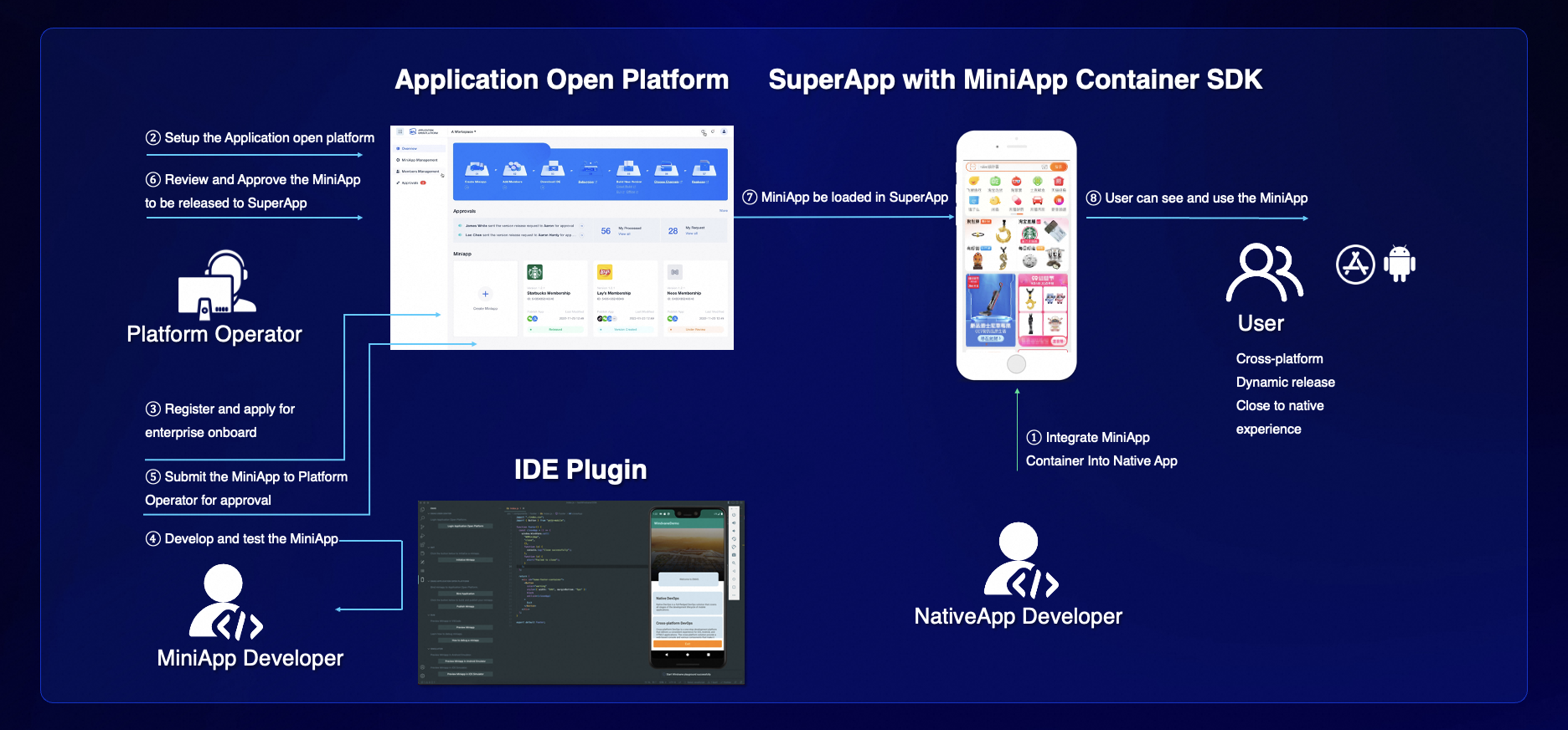
アーキテクチャには 3 つのモジュールが含まれています。
モジュール | 説明 |
ミニアプリ コンテナー | ネイティブアプリをスーパーアプリにスペックアップするには、ミニアプリ コンテナーを介してミニアプリをサポートする必要があります。Alibaba Superapp ソリューションを使用すると、uni-app フレームワークと WindVane フレームワークを使用してミニアプリ コンテナーを構築できます。 |
アプリケーション オープン プラットフォーム | 開発者の登録、ミニアプリのレビューと配信など、スーパーアプリのライフサイクル全体を管理できる開発者 プラットフォームです。 |
MiniApp 開発 IDE プラグイン | MiniApp 開発 IDE プラグインは、テンプレートベースの MiniApp 作成、開発とデバッグ、プレビュー テスト、パッケージ化とリリースなどのエンドツーエンドの開発機能を提供します。 |
Alibaba SuperApp ビジネス アプリケーション プラットフォームを選ぶ理由
アプリの一元管理
さまざまなアプリをミニアプリに変換し、単一のスーパーアプリで顧客にサービスを提供します。
ユーザーの成長を促進
スーパーアプリ プラットフォームは、ユーザーのアクティビティとスーパーアプリの粘着性を向上させるために、より豊富なビジネス シナリオと サービス を提供できます。
技術仕様の統一
R&D チーム、ISV、パートナーは、同じプラットフォームと技術仕様に基づいてミニアプリを開発できます。
エコシステム パートナーの活用
スーパーアプリ プラットフォームの所有者は、ミニアプリを使用してサードパーティ パートナーのビジネス シナリオをスーパーアプリにオンボードできます。
ミニアプリ開発フレームワーク
ミニアプリとは
ミニアプリは、豊富な機能と優れたユーザーエクスペリエンスを提供します。非常に便利です。
ミニアプリは、ミニアプリ コンテナーをホストするモバイル スーパーアプリ上で実行されます。ミニアプリと H5 アプリケーション は、どちらも Javascript でプログラムされており、クロスプラットフォーム サポート、低開発コスト、高速 反復 などの利点をもたらすという点で非常に似ています。ただし、ミニアプリは ハードウェア 機能を利用して、ネットワーク ステータスの取得、データのキャッシュ、センサーの使用など、H5 アプリケーション より多くの機能を提供できるため、ネイティブアプリと同等のユーザーエクスペリエンスを提供します。
ミニアプリの利点:
クロスプラットフォーム サポート:ミニアプリは、コードを個別に管理する必要なく、Android と iOS の両方で実行できます。
低コスト:開発の類似性により、開発者は H5 アプリケーション からミニアプリに簡単に切り替えることができます。
高速 反復 :H5 アプリケーション と同様に、ミニアプリはリアルタイムで公開および更新できます。
ネイティブに近いエクスペリエンス:ミニアプリはシステム 権限 を取得し、 ハードウェア 機能を利用して、ネイティブアプリと同等のユーザーエクスペリエンスを提供できます。
Alibaba Superapp ソリューションでサポートされているミニアプリ フレームワーク
uni-app
uni-app は、Vue.js を使用してフロントエンド アプリケーション を開発できるフレームワークです。同じ コード セットを、スーパーアプリ(Alipay、DingTalk、Taobao、WeChat など)、ネイティブ iOS および Android アプリ、または Web アプリケーション としてミニアプリとして公開できます。uni-app には、数百万人の開発者と アプリケーション を擁するコミュニティがあります。uni-app は、誰もが使用できるようにGithubでオープン ソース化されています。
uni-app の詳細については、uni-app 公式 Web サイトをご覧ください。
Alibaba Superapp ソリューションは、uni-app を使用して構築されたミニアプリを起動および管理できる uni-app ミニアプリ コンテナーを提供します。uni-app ミニアプリ コンテナーは EMAS アプリケーション オープン プラットフォームと統合されており、企業や独立系開発者が アプリケーション エコシステムを構築するのに役立ちます。
WindVane
WinVane は、ハイブリッドアプリ用の拡張可能な ソリューション です。ハイブリッドアプリの Web アプリケーション に、強力で使いやすい WebView コンテナーを提供します。WindVane は、URL フィルタリングや イベント など、WebView オブジェクト にさまざまな機能を追加します。WindVane Web アプリケーション は、ホスティング ハイブリッドアプリと対話して ハードウェア 機能を利用できます。WindVane コンテナーは、ミニアプリと H5 アプリケーション をサポートしています。
WindVane ミニアプリは、
windvane.jsと統合され、WindVane コンテナー内で実行される Web アプリケーション です。H5 アプリケーション と比較して、WindVane ミニアプリはシステム 権限 を取得し、 ハードウェア 機能を利用できます。WindVane は、ミニアプリが JS API を使用してネイティブアプリと対話できるようにする
windvane.jsを介してこの機能を統合します。WindVane には、 デバイス 機能への アクセス を可能にする数十の組み込み JS API があり、カスタム JS API をサポートしています。これにより、開発者は、より豊富な機能と優れたユーザーエクスペリエンスを提供する Web アプリケーション を作成できます。
比較
項目
WindVane
uni-app
プログラミング言語
Javascript および Typescript
Javascript および Typescript
開発フレームワーク
無制限
Vue.js
ミニアプリ コンテナー
WindVane コンテナーは標準の WebView コンテナーであり、WindVane ミニアプリと標準 Web アプリケーション の両方をレンダリングできます。
uni-app コンテナーは、uni-app ミニアプリとネイティブアプリのコンポーネントをレンダリングできます。
レイアウト メソッド
HTML (div) + CSS
プロジェクト構造
Web アプリケーション の一般的なプロジェクト構造
pages.json や manifest.json などの uni-app 固有の構成ファイルが含まれています
タグ
div や img などの一般的な HTML タグ
view や image など、uni-app で定義された タグ
UI コンポーネント ライブラリの多様性
高
高
多種多様な API
はい
はい
API の高い 拡張性
高。カスタム API がサポートされています。
高。カスタム API がサポートされています。
SDK サイズ
小
大
アプリケーション タイプ
WindVane ミニアプリ
uni-app ミニアプリ、Web アプリケーション 、ネイティブアプリ
アプリケーション のサイズ
KB~MB
MB
まとめ:
学習曲線
学習曲線
WindVane は、HTML + CSS の一般的な組み合わせなど、すべての Web 開発フレームワークと互換性があるため、スムーズな学習曲線を実現しています。したがって、WindVane は、Web 開発 メソッド に既に精通している開発者にとってより良い ソリューション です。
一方、uni-app は Vue.js フレームワークに限定されています。他の標準に精通している開発者は、最初に Vue.js を学習する必要があり、Vue 単一ファイル コンポーネント (SFC)に準拠しています。アプリのプロジェクト構造には、uni-app 固有の構成ファイルが含まれています。
アプリケーション サイズ
ストレージ フットプリントが無視できる軽量アプリを開発する場合は、WindVane をお勧めします。
WindVane ミニアプリは通常数 KB を占有します。非常に複雑なミニアプリなどの極端な場合にのみ、ミニアプリは数 MB を占有します。uni-app ミニアプリは通常数 MB を占有し、 デバイス にダウンロードする必要があるため、システム ストレージ を占有します。
クロスプラットフォーム サポート
クロスプラットフォーム ソリューション が必要な場合は、uni-app フレームワークをお勧めします。
WindVane と uni-app はどちらもクロスプラットフォーム開発をサポートしていますが、uni-app のみで単一の コード セットでこれを実装できます。同じ コード セットを、Alipay や WeChat などのさまざまなプラットフォームでミニアプリとして、また一般的な Web アプリケーション やネイティブアプリとしてデプロイできます。