O DataWorks oferece diversas operações de API. Use-as para gerenciar seus negócios conforme suas necessidades. Este tópico descreve como chamar as operações de API do DataWorks para desenvolver, enviar e executar tarefas com agilidade.
Informações básicas
Este tópico aborda as operações de API do DataWorks aplicáveis aos cenários de negócios a seguir. Antes de executar as etapas descritas aqui, recomendamos compreender os conceitos e recursos essenciais relacionados a esses cenários.
Consultar e gerenciar workspaces, workflows, pastas de nós e nós, além de enviar e implantar nós. Para isso, use operações de API do DataStudio, como CreateBusiness e ListBusiness.
Executar testes de fumaça e visualizar logs de execução. Nesse caso, use operações de API do Operation Center, como RunSmokeTest.
As seções a seguir detalham o procedimento principal e apresentam exemplos de código essenciais para esta prática.
Para visualizar ou baixar o código-fonte completo do exemplo, consulte a seção Referência: Baixar código-fonte completo do exemplo neste tópico.
Desenvolvimento de código backend
Etapa 1: Desenvolver a classe ProjectService para consultar workspaces
Desenvolva a classe ProjectService. Essa classe define a função ListProjects, usada para chamar a operação ListProjects e consultar workspaces. Após a chamada da operação, o sistema retorna os workspaces disponíveis para desenvolvimento frontend.
package com.aliyun.dataworks.services;

import com.aliyun.dataworks_public20200518.models.ListProjectsRequest;
import com.aliyun.dataworks_public20200518.models.ListProjectsResponse;
import com.aliyun.dataworks_public20200518.models.ListProjectsResponseBody;
import org.springframework.beans.factory.annotation.Autowired;
import org.springframework.stereotype.Service;

@Service
public class ProjectService {

    @Autowired
    private DataWorksOpenApiClient dataWorksOpenApiClient;

    /**
     * @param pageNumber
     * @param pageSize
     * @return
     */
    public ListProjectsResponseBody.ListProjectsResponseBodyPageResult listProjects(Integer pageNumber, Integer pageSize) {
        try {
            ListProjectsRequest listProjectsRequest = new ListProjectsRequest();
            listProjectsRequest.setPageNumber(pageNumber);
            listProjectsRequest.setPageSize(pageSize);
            ListProjectsResponse listProjectsResponse = dataWorksOpenApiClient.createClient().listProjects(listProjectsRequest);
            System.out.println(listProjectsResponse.getBody().getRequestId());
            return listProjectsResponse.getBody().getPageResult();
        } catch (Exception e) {
            e.printStackTrace();
            // Error message
            System.out.println(e.getMessage());
        }
        return null;
    }
}
Etapa 2: Desenvolver a classe BusinessService para processar workflows
Desenvolva a classe BusinessService. Essa classe define as seguintes funções:
A função CreateBusiness, que chama a operação CreateBusiness para criar um workflow.
A função ListBusiness, que chama a operação ListBusiness para consultar workflows.
Essas funções são utilizadas durante o desenvolvimento frontend para criar um workflow de exemplo e consultar workflows existentes.
Também é possível definir uma função FolderService para exibir uma árvore de diretórios composta por workflows, pastas de nós e nós. O exemplo a seguir omite as etapas relacionadas a pastas de nós e mostra apenas o processo principal. Para obter o código completo da função FolderService relacionada a operações de pasta, acesse o exemplo de código no GitHub.
package com.aliyun.dataworks.services;

import com.aliyun.dataworks.dto.CreateBusinessDTO;
import com.aliyun.dataworks.dto.DeleteBusinessDTO;
import com.aliyun.dataworks.dto.ListBusinessesDTO;
import com.aliyun.dataworks.dto.UpdateBusinessDTO;
import com.aliyun.dataworks_public20200518.models.*;
import org.springframework.beans.factory.annotation.Autowired;
import org.springframework.stereotype.Service;
import org.springframework.util.CollectionUtils;

import java.util.List;

/**
 * @author dataworks demo
 */
@Service
public class BusinessService {

    @Autowired
    private DataWorksOpenApiClient dataWorksOpenApiClient;

    /**
     * create a business
     *
     * @param createBusinessDTO
     */
    public Long createBusiness(CreateBusinessDTO createBusinessDTO) {
        try {
            CreateBusinessRequest createBusinessRequest = new CreateBusinessRequest();
            // The name of the workflow.
            createBusinessRequest.setBusinessName(createBusinessDTO.getBusinessName());
            createBusinessRequest.setDescription(createBusinessDTO.getDescription());
            createBusinessRequest.setOwner(createBusinessDTO.getOwner());
            createBusinessRequest.setProjectId(createBusinessDTO.getProjectId());
            // The module to which the workflow belongs. Valid values: NORMAL (Data Development) and MANUAL_BIZ (manually triggered workflow).
            createBusinessRequest.setUseType(createBusinessDTO.getUseType());
            CreateBusinessResponse createBusinessResponse = dataWorksOpenApiClient.createClient().createBusiness(createBusinessRequest);
            System.out.println("create business requestId:" + createBusinessResponse.getBody().getRequestId());
            System.out.println("create business successful,the businessId:" + createBusinessResponse.getBody().getBusinessId());
            return createBusinessResponse.getBody().getBusinessId();
        } catch (Exception e) {
            e.printStackTrace();
            // Error message
            System.out.println(e.getMessage());
        }
        return null;
    }

    /**
     * @param listBusinessesDTO
     * @return
     */
    public List<ListBusinessResponseBody.ListBusinessResponseBodyDataBusiness> listBusiness(ListBusinessesDTO listBusinessesDTO) {
        try {
            ListBusinessRequest listBusinessRequest = new ListBusinessRequest();
            listBusinessRequest.setKeyword(listBusinessesDTO.getKeyword());
            listBusinessRequest.setPageNumber(listBusinessesDTO.getPageNumber() < 1 ? 1 : listBusinessesDTO.getPageNumber());
            listBusinessRequest.setPageSize(listBusinessesDTO.getPageSize() < 10 ? 10 : listBusinessesDTO.getPageSize());
            listBusinessRequest.setProjectId(listBusinessesDTO.getProjectId());
            ListBusinessResponse listBusinessResponse = dataWorksOpenApiClient.createClient().listBusiness(listBusinessRequest);
            System.out.println("list business requestId:" + listBusinessResponse.getBody().getRequestId());
            ListBusinessResponseBody.ListBusinessResponseBodyData data = listBusinessResponse.getBody().getData();
            System.out.println("total count:" + data.getTotalCount());
            if (!CollectionUtils.isEmpty(data.getBusiness())) {
                for (ListBusinessResponseBody.ListBusinessResponseBodyDataBusiness businessItem : data.getBusiness()) {
                    System.out.println(businessItem.getBusinessId() + "," + businessItem.getBusinessName() + "," + businessItem.getUseType());
                }
            }
            return data.getBusiness();
        } catch (Exception e) {
            e.printStackTrace();
            // Error message
            System.out.println(e.getMessage());
        }
        return null;
    }

    /**
     * update a business
     * @param updateBusinessDTO
     * @return
     */
    public Boolean updateBusiness(UpdateBusinessDTO updateBusinessDTO) {
        try {
            UpdateBusinessRequest updateBusinessRequest = new UpdateBusinessRequest();
            updateBusinessRequest.setBusinessId(updateBusinessDTO.getBusinessId());
            updateBusinessRequest.setBusinessName(updateBusinessDTO.getBusinessName());
            updateBusinessRequest.setDescription(updateBusinessDTO.getDescription());
            updateBusinessRequest.setOwner(updateBusinessDTO.getOwner());
            updateBusinessRequest.setProjectId(updateBusinessDTO.getProjectId());
            UpdateBusinessResponse updateBusinessResponse = dataWorksOpenApiClient.createClient().updateBusiness(updateBusinessRequest);
            System.out.println(updateBusinessResponse.getBody().getRequestId());
            System.out.println(updateBusinessResponse.getBody().getSuccess());
            return updateBusinessResponse.getBody().getSuccess();
        } catch (Exception e) {
            e.printStackTrace();
            // Error message
            System.out.println(e.getMessage());
        }
        return false;
    }

    /**
     * delete a business
     * @param deleteBusinessDTO
     */
    public boolean deleteBusiness(DeleteBusinessDTO deleteBusinessDTO) {
        try {
            DeleteBusinessRequest deleteBusinessRequest = new DeleteBusinessRequest();
            deleteBusinessRequest.setBusinessId(deleteBusinessDTO.getBusinessId());
            deleteBusinessRequest.setProjectId(deleteBusinessDTO.getProjectId());
            DeleteBusinessResponse deleteBusinessResponse = dataWorksOpenApiClient.createClient().deleteBusiness(deleteBusinessRequest);
            System.out.println("delete business:" + deleteBusinessResponse.getBody().getRequestId());
            System.out.println("delete business" + deleteBusinessResponse.getBody().getSuccess());
            return deleteBusinessResponse.getBody().getSuccess();
        } catch (Exception e) {
            e.printStackTrace();
            // Error message
            System.out.println(e.getMessage());
        }
        return false;
    }
}
Etapa 3: Desenvolver a classe FileService para processar arquivos
Desenvolva a classe FileService. Essa classe define as seguintes funções para processamento de arquivos:
A função listFile, que chama a operação ListFiles para consultar arquivos.
A função createFile, que chama a operação CreateFile para criar arquivos.
A função updateFile, que chama a operação UpdateFile para atualizar arquivos.
A função deployFile, que chama a operação DeployFile para implantar arquivos.
A função runSmokeTest, que chama a operação RunSmokeTest para executar testes de fumaça.
A função getInstanceLog, que chama a operação GetInstanceLog para consultar os logs de uma instância.
A interface do usuário chama esses métodos para criar arquivos, obter listas de arquivos, salvar arquivos, além de enviar e executar arquivos.
package com.aliyun.dataworks.services;
import com.aliyun.dataworks.dto.*;
import com.aliyun.dataworks_public20200518.models.*;
import org.springframework.beans.factory.annotation.Autowired;
import org.springframework.stereotype.Service;
import org.springframework.util.CollectionUtils;
import java.util.List;
/**
* the ide files manager service
*
* @author dataworks demo
*/
@Service
public class FileService {
@Autowired
private DataWorksOpenApiClient dataWorksOpenApiClient;
public static final int CYCLE_NUM = 10;
/**
* Paged query
*
* @param listFilesDTO
* @return
*/
public List<ListFilesResponseBody.ListFilesResponseBodyDataFiles> listFiles(ListFilesDTO listFilesDTO) {
try {
ListFilesRequest listFilesRequest = new ListFilesRequest();
// File path: "Workflow/" + Target workflow name + Directory name + Latest folder name
// Example: Workflow/MyFirstWorkflow/MaxCompute/ods, do not add "Data Development"
listFilesRequest.setFileFolderPath(listFilesDTO.getFileFolderPath());
// The code type of the file. Multiple types are supported. Separate them with commas (,), for example, 10,23.
listFilesRequest.setFileTypes(listFilesDTO.getFileTypes());
// The keyword in the file name. Fuzzy match is supported.
listFilesRequest.setKeyword(listFilesDTO.getKeyword());
// The ID of the scheduling node.
listFilesRequest.setNodeId(listFilesDTO.getNodeId());
// The owner of the file.
listFilesRequest.setOwner(listFilesDTO.getOwner());
// The page number of the requested data page.
listFilesRequest.setPageNumber(listFilesDTO.getPageNumber() <= 0 ? 1 : listFilesDTO.getPageNumber());
// The number of entries to display on each page.
listFilesRequest.setPageSize(listFilesDTO.getPageSize() <= 10 ? 10 : listFilesDTO.getPageSize());
// The ID of the DataWorks workspace.
listFilesRequest.setProjectId(listFilesDTO.getProjectId());
// The module to which the file belongs.
listFilesRequest.setUseType(listFilesDTO.getUseType());
ListFilesResponse listFilesResponse = dataWorksOpenApiClient.createClient()
.listFiles(listFilesRequest);
ListFilesResponseBody.ListFilesResponseBodyData fileData = listFilesResponse.getBody().getData();
if (fileData.getFiles() != null && !fileData.getFiles().isEmpty()) {
for (ListFilesResponseBody.ListFilesResponseBodyDataFiles file : fileData.getFiles()) {
// Workflow ID
System.out.println(file.getBusinessId());
// File ID
System.out.println(file.getFileId());
// File name
System.out.println(file.getFileName());
// File type, for example, 10
System.out.println(file.getFileType());
// Node ID
System.out.println(file.getNodeId());
// Folder ID
System.out.println(file.getFileFolderId());
}
}
return fileData.getFiles();
} catch (Exception e) {
e.printStackTrace();
// Error message
System.out.println(e.getMessage());
}
return null;
}
/**
* Create a file
*
* @param createFileDTO
*/
public Long createFile(CreateFileDTO createFileDTO) {
try {
CreateFileRequest createFileRequest = new CreateFileRequest();
// The advanced configuration of the task.
createFileRequest.setAdvancedSettings(createFileDTO.getAdvancedSettings());
// Specifies whether to enable automatic parsing for the file. This parameter is required.
createFileRequest.setAutoParsing(createFileDTO.getAutoParsing());
// The interval for automatic reruns after an error occurs, in milliseconds. The maximum value is 1,800,000 (30 minutes).
createFileRequest.setAutoRerunIntervalMillis(createFileDTO.getAutoRerunIntervalMillis());
// The number of automatic retries.
createFileRequest.setAutoRerunTimes(createFileDTO.getAutoRerunTimes());
// The data source connected for task execution after the file is published as a task. This parameter is required.
createFileRequest.setConnectionName(createFileDTO.getConnectionName());
// The code content of the file. This parameter is required.
createFileRequest.setContent(createFileDTO.getContent());
// The cron expression for the recurring schedule. This parameter is required.
createFileRequest.setCronExpress(createFileDTO.getCronExpress());
// The type of the scheduling cycle. This parameter is required.
createFileRequest.setCycleType(createFileDTO.getCycleType());
// The list of nodes on which the current node's instance in the current cycle depends from the previous cycle.
createFileRequest.setDependentNodeIdList(createFileDTO.getDependentNodeIdList());
// The dependency type on the previous cycle. This parameter is required.
createFileRequest.setDependentType(createFileDTO.getDependentType());
// The timestamp to stop automatic scheduling, in milliseconds.
createFileRequest.setEndEffectDate(createFileDTO.getEndEffectDate());
// The file description.
createFileRequest.setFileDescription(createFileDTO.getFileDescription());
// The path of the file. This parameter is required.
createFileRequest.setFileFolderPath(createFileDTO.getFileFolderPath());
// The name of the file. This parameter is required.
createFileRequest.setFileName(createFileDTO.getFileName());
// The code type of the file. This parameter is required.
createFileRequest.setFileType(createFileDTO.getFileType());
// The output names of upstream files that the current file depends on. Separate multiple outputs with commas (,). This parameter is required.
createFileRequest.setInputList(createFileDTO.getInputList());
// The Alibaba Cloud user ID of the file owner. If this parameter is empty, the user ID of the caller is used by default. This parameter is required.
createFileRequest.setOwner(createFileDTO.getOwner());
// Scheduling parameters.
createFileRequest.setParaValue(createFileDTO.getParaValue());
// The project ID. This parameter is required.
createFileRequest.setProjectId(createFileDTO.getProjectId());
// Rerun property.
createFileRequest.setRerunMode(createFileDTO.getRerunMode());
// The resource group for the task. This parameter is required.
createFileRequest.setResourceGroupIdentifier(createFileDTO.getResourceGroupIdentifier());
// The scheduling type.
createFileRequest.setSchedulerType(createFileDTO.getSchedulerType());
// The start timestamp for automatic scheduling, in milliseconds.
createFileRequest.setStartEffectDate(createFileDTO.getStartEffectDate());
// Specifies whether to skip execution.
createFileRequest.setStop(createFileDTO.getStop());
CreateFileResponse createFileResponse = dataWorksOpenApiClient.createClient()
.createFile(createFileRequest);
// requestId
System.out.println(createFileResponse.getBody().getRequestId());
// fileId
System.out.println(createFileResponse.getBody().getData());
return createFileResponse.getBody().getData();
} catch (Exception e) {
e.printStackTrace();
// Error message
System.out.println(e.getMessage());
}
return null;
}
/**
* Update a file
*
* @param updateFileDTO
*/
public boolean updateFile(UpdateFileDTO updateFileDTO) {
try {
UpdateFileRequest updateFileRequest = new UpdateFileRequest();
// The advanced configuration of the task. For the specific format, see the relevant documentation.
updateFileRequest.setAdvancedSettings(updateFileDTO.getAdvancedSettings());
// Specifies whether to enable automatic parsing for the file.
updateFileRequest.setAutoParsing(updateFileDTO.getAutoParsing());
// The interval for automatic reruns after an error occurs, in milliseconds. The maximum value is 1,800,000 (30 minutes).
updateFileRequest.setAutoRerunIntervalMillis(updateFileDTO.getAutoRerunIntervalMillis());
// The number of automatic reruns after an error occurs.
updateFileRequest.setAutoRerunTimes(updateFileDTO.getAutoRerunTimes());
// The identifier of the data source used by the task during execution.
updateFileRequest.setConnectionName(updateFileDTO.getConnectionName());
// The code content of the file.
updateFileRequest.setContent(updateFileDTO.getContent());
// The cron expression for the recurring schedule.
updateFileRequest.setCronExpress(updateFileDTO.getCronExpress());
// The type of the scheduling cycle. Valid values: NOT_DAY (minute, hour) and DAY (day, week, month).
updateFileRequest.setCycleType(updateFileDTO.getCycleType());
// When DependentType is set to USER_DEFINE, this parameter specifies the IDs of nodes that the current file depends on. Separate multiple node IDs with commas (,).
updateFileRequest.setDependentNodeIdList(updateFileDTO.getDependentNodeIdList());
// The dependency type on the previous cycle.
updateFileRequest.setDependentType(updateFileDTO.getDependentType());
// The timestamp to stop automatic scheduling, in milliseconds.
updateFileRequest.setEndEffectDate(updateFileDTO.getEndEffectDate());
// The description of the file.
updateFileRequest.setFileDescription(updateFileDTO.getFileDescription());
// The path where the file is located.
updateFileRequest.setFileFolderPath(updateFileDTO.getFileFolderPath());
// The ID of the file.
updateFileRequest.setFileId(updateFileDTO.getFileId());
// The name of the file.
updateFileRequest.setFileName(updateFileDTO.getFileName());
// The output names of upstream files that the current file depends on. Separate multiple outputs with commas (,).
updateFileRequest.setInputList(updateFileDTO.getInputList());
// The output of the file.
updateFileRequest.setOutputList(updateFileDTO.getOutputList());
// The user ID of the file owner.
updateFileRequest.setOwner(updateFileDTO.getOwner());
// Scheduling parameters.
updateFileRequest.setParaValue(updateFileDTO.getParaValue());
// The ID of the DataWorks workspace.
updateFileRequest.setProjectId(updateFileDTO.getProjectId());
// Rerun property. ALL_ALLOWED.
updateFileRequest.setRerunMode(updateFileDTO.getRerunMode());
// The resource group corresponding to the task execution after the file is published.
updateFileRequest.setResourceGroupIdentifier(updateFileDTO.getResourceGroupIdentifier());
// The scheduling type. NORMAL.
updateFileRequest.setSchedulerType(updateFileDTO.getSchedulerType());
// The start timestamp for automatic scheduling, in milliseconds.
updateFileRequest.setStartEffectDate(updateFileDTO.getStartEffectDate());
// Specifies whether to start immediately after publishing.
updateFileRequest.setStartImmediately(updateFileDTO.getStartImmediately());
// Specifies whether to skip execution.
updateFileRequest.setStop(updateFileDTO.getStop());
UpdateFileResponse updateFileResponse = dataWorksOpenApiClient.createClient()
.updateFile(updateFileRequest);
// requestId
System.out.println(updateFileResponse.getBody().getRequestId());
// Success or failure.
System.out.println(updateFileResponse.getBody().getSuccess());
return updateFileResponse.getBody().getSuccess();
} catch (Exception e) {
e.printStackTrace();
// Error message
System.out.println(e.getMessage());
}
return false;
}
/**
* Delete a file
*
* @param deleteFileDTO
* @return
* @throws InterruptedException
*/
public boolean deleteFile(DeleteFileDTO deleteFileDTO) throws InterruptedException {
try {
DeleteFileRequest deleteFileRequest = new DeleteFileRequest();
deleteFileRequest.setFileId(deleteFileDTO.getFileId());
deleteFileRequest.setProjectId(deleteFileDTO.getProjectId());
DeleteFileResponse deleteFileResponse = dataWorksOpenApiClient.createClient()
.deleteFile(deleteFileRequest);
System.out.println(deleteFileResponse.getBody().getRequestId());
System.out.println(deleteFileResponse.getBody().getDeploymentId());
GetDeploymentRequest getDeploymentRequest = new GetDeploymentRequest();
getDeploymentRequest.setProjectId(deleteFileDTO.getProjectId());
getDeploymentRequest.setDeploymentId(deleteFileResponse.getBody().getDeploymentId());
for (int i = 0; i < CYCLE_NUM; i++) {
GetDeploymentResponse getDeploymentResponse = dataWorksOpenApiClient.createClient()
.getDeployment(getDeploymentRequest);
// The current status of the deployment package. 0: Ready, 1: Succeeded, 2: Failed.
Integer deleteStatus = getDeploymentResponse.getBody().getData().getDeployment().getStatus();
// You can loop here to check the deletion status.
if (deleteStatus == 1) {
System.out.println("File deleted successfully.");
break;
} else {
System.out.println("Deleting file...");
Thread.sleep(1000L);
}
}
GetProjectRequest getProjectRequest = new GetProjectRequest();
getProjectRequest.setProjectId(deleteFileDTO.getProjectId());
GetProjectResponse getProjectResponse = dataWorksOpenApiClient.createClient()
.getProject(getProjectRequest);
// Standard mode has DEV and PROD environments. Basic mode has only the PROD environment.
Boolean standardMode = getProjectResponse.getBody().getData().getEnvTypes().size() == 2;
if (standardMode) {
// In standard mode, you need to publish the deletion to the production environment.
DeployFileRequest deployFileRequest = new DeployFileRequest();
deployFileRequest.setProjectId(deleteFileDTO.getProjectId());
deployFileRequest.setFileId(deleteFileDTO.getFileId());
DeployFileResponse deployFileResponse = dataWorksOpenApiClient.createClient()
.deployFile(deployFileRequest);
getDeploymentRequest.setDeploymentId(deployFileResponse.getBody().getData());
for (int i = 0; i < CYCLE_NUM; i++) {
GetDeploymentResponse getDeploymentResponse = dataWorksOpenApiClient.createClient()
.getDeployment(getDeploymentRequest);
// The current status of the deployment package. 0: Ready, 1: Succeeded, 2: Failed.
Integer deleteStatus = getDeploymentResponse.getBody().getData().getDeployment().getStatus();
// You can loop here to check the deletion status.
if (deleteStatus == 1) {
System.out.println("File deleted successfully.");
break;
} else {
System.out.println("Deleting file...");
Thread.sleep(1000L);
}
}
}
return true;
} catch (Exception e) {
e.printStackTrace();
// Error message
System.out.println(e.getMessage());
}
return false;
}
/**
* Query a file
*
* @param getFileDTO
*/
public GetFileResponseBody.GetFileResponseBodyDataFile getFile(GetFileDTO getFileDTO) {
try {
GetFileRequest getFileRequest = new GetFileRequest();
getFileRequest.setFileId(getFileDTO.getFileId());
getFileRequest.setProjectId(getFileDTO.getProjectId());
getFileRequest.setNodeId(getFileDTO.getNodeId());
GetFileResponse getFileResponse = dataWorksOpenApiClient.createClient().getFile(getFileRequest);
System.out.println(getFileResponse.getBody().getRequestId());
GetFileResponseBody.GetFileResponseBodyDataFile file = getFileResponse.getBody().getData().getFile();
System.out.println(file.getFileName());
System.out.println(file.getFileType());
System.out.println(file.getNodeId());
System.out.println(file.getCreateUser());
return file;
} catch (Exception e) {
e.printStackTrace();
// Error message
System.out.println(e.getMessage());
}
return null;
}
/**
* @param deployFileDTO
* @return
* @throws InterruptedException
*/
public Boolean deployFile(DeployFileDTO deployFileDTO) throws InterruptedException {
try {
GetProjectRequest getProjectRequest = new GetProjectRequest();
getProjectRequest.setProjectId(deployFileDTO.getProjectId());
GetProjectResponse getProjectResponse = dataWorksOpenApiClient.createClient()
.getProject(getProjectRequest);
// Standard mode has DEV and PROD environments. Basic mode has only the PROD environment.
Boolean standardMode = getProjectResponse.getBody().getData().getEnvTypes().size() == 2;
if (standardMode) {
SubmitFileRequest submitFileRequest = new SubmitFileRequest();
submitFileRequest.setFileId(deployFileDTO.getFileId());
submitFileRequest.setProjectId(deployFileDTO.getProjectId());
SubmitFileResponse submitFileResponse = dataWorksOpenApiClient.createClient()
.submitFile(submitFileRequest);
System.out.println("submit file requestId:" + submitFileResponse.getBody().getRequestId());
System.out.println("submit file deploymentId:" + submitFileResponse.getBody().getData());
for (int i = 0; i < CYCLE_NUM; i++) {
GetDeploymentRequest getDeploymentRequest = new GetDeploymentRequest();
getDeploymentRequest.setProjectId(deployFileDTO.getProjectId());
getDeploymentRequest.setDeploymentId(submitFileResponse.getBody().getData());
GetDeploymentResponse getDeploymentResponse = dataWorksOpenApiClient.createClient()
.getDeployment(getDeploymentRequest);
// The current status of the deployment package. 0: Ready, 1: Succeeded, 2: Failed.
Integer deleteStatus = getDeploymentResponse.getBody().getData().getDeployment().getStatus();
// You can loop here to check the deletion status.
if (deleteStatus == 1) {
System.out.println("File submitted successfully.");
break;
} else {
System.out.println("Submitting file...");
Thread.sleep(1000L);
}
}
}
DeployFileRequest deployFileRequest = new DeployFileRequest();
deployFileRequest.setFileId(deployFileDTO.getFileId());
deployFileRequest.setProjectId(deployFileDTO.getProjectId());
DeployFileResponse deployFileResponse = dataWorksOpenApiClient.createClient()
.deployFile(deployFileRequest);
System.out.println("deploy file requestId:" + deployFileResponse.getBody().getRequestId());
System.out.println("deploy file deploymentId:" + deployFileResponse.getBody().getData());
for (int i = 0; i < CYCLE_NUM; i++) {
GetDeploymentRequest getDeploymentRequest = new GetDeploymentRequest();
getDeploymentRequest.setProjectId(deployFileDTO.getProjectId());
getDeploymentRequest.setDeploymentId(deployFileResponse.getBody().getData());
GetDeploymentResponse getDeploymentResponse = dataWorksOpenApiClient.createClient()
.getDeployment(getDeploymentRequest);
// The current status of the deployment package. 0: Ready, 1: Succeeded, 2: Failed.
Integer deleteStatus = getDeploymentResponse.getBody().getData().getDeployment().getStatus();
// You can loop here to check the deletion status.
if (deleteStatus == 1) {
System.out.println("File published successfully.");
break;
} else {
System.out.println("Publishing file...");
Thread.sleep(1000L);
}
}
return true;
} catch (Exception e) {
e.printStackTrace();
// Error message
System.out.println(e.getMessage());
}
return false;
}
public List<ListInstancesResponseBody.ListInstancesResponseBodyDataInstances> runSmokeTest(RunSmokeTestDTO runSmokeTestDTO) {
try {
RunSmokeTestRequest runSmokeTestRequest = new RunSmokeTestRequest();
runSmokeTestRequest.setBizdate(runSmokeTestDTO.getBizdate());
runSmokeTestRequest.setNodeId(runSmokeTestDTO.getNodeId());
runSmokeTestRequest.setNodeParams(runSmokeTestDTO.getNodeParams());
runSmokeTestRequest.setName(runSmokeTestDTO.getName());
runSmokeTestRequest.setProjectEnv(runSmokeTestDTO.getProjectEnv());
RunSmokeTestResponse runSmokeTestResponse = dataWorksOpenApiClient.createClient()
.runSmokeTest(runSmokeTestRequest);
System.out.println(runSmokeTestResponse.getBody().getRequestId());
// DAG ID
System.out.println(runSmokeTestResponse.getBody().getData());
ListInstancesRequest listInstancesRequest = new ListInstancesRequest();
listInstancesRequest.setDagId(runSmokeTestResponse.getBody().getData());
listInstancesRequest.setProjectId(runSmokeTestDTO.getProjectId());
listInstancesRequest.setProjectEnv(runSmokeTestDTO.getProjectEnv());
listInstancesRequest.setNodeId(runSmokeTestDTO.getNodeId());
listInstancesRequest.setPageNumber(1);
listInstancesRequest.setPageSize(10);
ListInstancesResponse listInstancesResponse = dataWorksOpenApiClient.createClient()
.listInstances(listInstancesRequest);
System.out.println(listInstancesResponse.getBody().getRequestId());
List<ListInstancesResponseBody.ListInstancesResponseBodyDataInstances> instances = listInstancesResponse.getBody().getData().getInstances();
if (CollectionUtils.isEmpty(instances)) {
return null;
}
return instances;
} catch (Exception e) {
e.printStackTrace();
// Error message
System.out.println(e.getMessage());
}
return null;
}
public InstanceDetail getInstanceLog(Long instanceId, String projectEnv) {
try {
GetInstanceLogRequest getInstanceLogRequest = new GetInstanceLogRequest();
getInstanceLogRequest.setInstanceId(instanceId);
getInstanceLogRequest.setProjectEnv(projectEnv);
GetInstanceLogResponse getInstanceLogResponse = dataWorksOpenApiClient.createClient()
.getInstanceLog(getInstanceLogRequest);
System.out.println(getInstanceLogResponse.getBody().getRequestId());
GetInstanceRequest getInstanceRequest = new GetInstanceRequest();
getInstanceRequest.setInstanceId(instanceId);
getInstanceRequest.setProjectEnv(projectEnv);
GetInstanceResponse getInstanceResponse = dataWorksOpenApiClient.createClient()
.getInstance(getInstanceRequest);
System.out.println(getInstanceResponse.getBody().getRequestId());
System.out.println(getInstanceResponse.getBody().getData());
InstanceDetail instanceDetail = new InstanceDetail();
instanceDetail.setInstance(getInstanceResponse.getBody().getData());
instanceDetail.setInstanceLog(getInstanceLogResponse.getBody().getData());
return instanceDetail;
} catch (Exception e) {
e.printStackTrace();
// Error message
System.out.println(e.getMessage());
}
return null;
}
}Etapa 4: Desenvolver um controlador IDE
Defina um controlador IDE que forneça as operações de API necessárias para roteamento durante o desenvolvimento frontend.
package com.aliyun.dataworks.demo;

import com.aliyun.dataworks.dto.*;
import com.aliyun.dataworks.services.BusinessService;
import com.aliyun.dataworks.services.FileService;
import com.aliyun.dataworks.services.FolderService;
import com.aliyun.dataworks.services.ProjectService;
import com.aliyun.dataworks_public20200518.models.*;
import org.springframework.beans.factory.annotation.Autowired;
import org.springframework.web.bind.annotation.*;

import java.util.List;

/**
 * @author dataworks demo
 */
@RestController
@RequestMapping("/ide")
public class IdeController {

    @Autowired
    private FileService fileService;

    @Autowired
    private FolderService folderService;

    @Autowired
    private BusinessService businessService;

    @Autowired
    private ProjectService projectService;

    /**
     * for list those files
     *
     * @param listFilesDTO
     * @return ListFilesResponse.Data.File
     */
    @CrossOrigin(origins = "http://localhost:8080")
    @GetMapping("/listFiles")
    public List<ListFilesResponseBody.ListFilesResponseBodyDataFiles> listFiles(ListFilesDTO listFilesDTO) {
        return fileService.listFiles(listFilesDTO);
    }

    /**
     * for list those folders
     *
     * @param listFoldersDTO
     * @return ListFoldersResponse.Data.FoldersItem
     */
    @CrossOrigin(origins = "http://localhost:8080")
    @GetMapping("/listFolders")
    public List<ListFoldersResponseBody.ListFoldersResponseBodyDataFolders> listFolders(ListFoldersDTO listFoldersDTO) {
        return folderService.listFolders(listFoldersDTO);
    }

    /**
     * for create the folder
     *
     * @param createFolderDTO
     * @return boolean
     */
    @CrossOrigin(origins = "http://localhost:8080")
    @PostMapping("/createFolder")
    public boolean createFolder(@RequestBody CreateFolderDTO createFolderDTO) {
        return folderService.createFolder(createFolderDTO);
    }

    /**
     * for update the folder
     *
     * @param updateFolderDTO
     * @return boolean
     */
    @CrossOrigin(origins = "http://localhost:8080")
    @PostMapping("/updateFolder")
    public boolean updateFolder(@RequestBody UpdateFolderDTO updateFolderDTO) {
        return folderService.updateFolder(updateFolderDTO);
    }

    /**
     * for get the file
     *
     * @param getFileDTO
     * @return GetFileResponse.Data.File
     */
    @CrossOrigin(origins = "http://localhost:8080")
    @GetMapping("/getFile")
    public GetFileResponseBody.GetFileResponseBodyDataFile getFile(GetFileDTO getFileDTO) {
        return fileService.getFile(getFileDTO);
    }

    /**
     * for create the file
     *
     * @param createFileDTO
     * @return fileId
     */
    @CrossOrigin(origins = "http://localhost:8080")
    @PostMapping("/createFile")
    public Long createFile(@RequestBody CreateFileDTO createFileDTO) {
        return fileService.createFile(createFileDTO);
    }

    /**
     * for update the file
     *
     * @param updateFileDTO
     * @return boolean
     */
    @CrossOrigin(origins = "http://localhost:8080")
    @PostMapping("/updateFile")
    public boolean updateFile(@RequestBody UpdateFileDTO updateFileDTO) {
        return fileService.updateFile(updateFileDTO);
    }

    /**
     * for deploy the file
     *
     * @param deployFileDTO
     * @return boolean
     */
    @CrossOrigin(origins = "http://localhost:8080")
    @PostMapping("/deployFile")
    public boolean deployFile(@RequestBody DeployFileDTO deployFileDTO) {
        try {
            return fileService.deployFile(deployFileDTO);
        } catch (Exception e) {
            System.out.println(e);
        }
        return false;
    }

    /**
     * for delete the file
     *
     * @param deleteFileDTO
     * @return
     */
    @CrossOrigin(origins = "http://localhost:8080")
    @DeleteMapping("/deleteFile")
    public boolean deleteFile(DeleteFileDTO deleteFileDTO) {
        try {
            return fileService.deleteFile(deleteFileDTO);
        } catch (Exception e) {
            System.out.println(e);
        }
        return false;
    }

    /**
     * for delete the folder
     *
     * @param deleteFolderDTO
     * @return
     */
    @CrossOrigin(origins = "http://localhost:8080")
    @DeleteMapping("/deleteFolder")
    public boolean deleteFolder(DeleteFolderDTO deleteFolderDTO) {
        return folderService.deleteFolder(deleteFolderDTO);
    }

    /**
     * list businesses
     *
     * @param listBusinessesDTO
     * @return
     */
    @CrossOrigin(origins = "http://localhost:8080")
    @GetMapping("/listBusinesses")
    public List<ListBusinessResponseBody.ListBusinessResponseBodyDataBusiness> listBusiness(ListBusinessesDTO listBusinessesDTO) {
        return businessService.listBusiness(listBusinessesDTO);
    }

    /**
     * create a business
     *
     * @param createBusinessDTO
     * @return
     */
    @CrossOrigin(origins = "http://localhost:8080")
    @PostMapping("/createBusiness")
    public Long createBusiness(@RequestBody CreateBusinessDTO createBusinessDTO) {
        return businessService.createBusiness(createBusinessDTO);
    }

    /**
     * update a business
     *
     * @param updateBusinessDTO
     * @return
     */
    @CrossOrigin(origins = "http://localhost:8080")
    @PostMapping("/updateBusiness")
    public boolean updateBusiness(@RequestBody UpdateBusinessDTO updateBusinessDTO) {
        return businessService.updateBusiness(updateBusinessDTO);
    }

    /**
     * delete a business
     *
     * @param deleteBusinessDTO
     * @return
     */
    @CrossOrigin(origins = "http://localhost:8080")
    @PostMapping("/deleteBusiness")
    public boolean deleteBusiness(@RequestBody DeleteBusinessDTO deleteBusinessDTO) {
        return businessService.deleteBusiness(deleteBusinessDTO);
    }

    /**
     * @param pageNumber
     * @param pageSize
     * @return
     */
    @CrossOrigin(origins = "http://localhost:8080")
    @GetMapping("/listProjects")
    public ListProjectsResponseBody.ListProjectsResponseBodyPageResult listProjects(Integer pageNumber, Integer pageSize) {
        return projectService.listProjects(pageNumber, pageSize);
    }

    /**
     * @param runSmokeTestDTO
     * @return
     */
    @CrossOrigin(origins = "http://localhost:8080")
    @PutMapping("/runSmokeTest")
    public List<ListInstancesResponseBody.ListInstancesResponseBodyDataInstances> runSmokeTest(@RequestBody RunSmokeTestDTO runSmokeTestDTO) {
        return fileService.runSmokeTest(runSmokeTestDTO);
    }

    /**
     * @param instanceId
     * @param projectEnv
     * @return
     */
    @CrossOrigin(origins = "http://localhost:8080")
    @GetMapping("/getLog")
    public InstanceDetail getLog(@RequestParam Long instanceId, @RequestParam String projectEnv) {
        return fileService.getInstanceLog(instanceId, projectEnv);
    }

}
Desenvolvimento de código frontend
-
Inicialize o editor, a árvore de diretórios e o terminal.
Código de exemplo:
const App: FunctionComponent<Props> = () => { const editorRef = useRef<HTMLDivElement>(null); const termianlRef = useRef<HTMLDivElement>(null); const [terminal, setTerminal] = useState<NextTerminal>(); const [editor, setEditor] = useState<monaco.editor.IStandaloneCodeEditor>(); const [expnadedKeys, setExpandedKeys] = useState<any[]>(); const [workspace, setWorkspace] = useState<number>(); const [workspaces, setWorkspaces] = useState<{ label: string, value: number }[]>([]); const [dataSource, setDataSource] = useState<any[]>(); const [selectedFile, setSelectedFile] = useState<number>(); const [loading, setLoading] = useState<boolean>(false); // Create an editor instance. useEffect(() => { if (editorRef.current) { const nextEditor = monaco.editor.create(editorRef.current, editorOptions); setEditor(nextEditor); return () => { nextEditor.dispose(); }; } }, [editorRef.current]); // Add a keydown event to save the file. useEffect(() => { editor?.addCommand(monaco.KeyMod.CtrlCmd | monaco.KeyCode.KeyS, () => { if (!workspace) { showTips('Please select workspace first'); return; } saveFile(workspace, editor, selectedFile); }); }, [editor, workspace, selectedFile]); // Create a terminal instance. useEffect(() => { if (termianlRef.current) { const term: NextTerminal = new Terminal(terminalOptions) as any; term.pointer = -1; term.stack = []; setTerminal(term); const fitAddon = new FitAddon(); term.loadAddon(fitAddon); term.open(termianlRef.current); fitAddon.fit(); term.write('$ '); return () => { term.dispose(); }; } }, [termianlRef.current]); // Register a terminal input event. useEffect(() => { const event = terminal?.onKey(e => onTerminalKeyChange(e, terminal, dataSource, workspace)); return () => { event?.dispose(); }; }, [terminal, dataSource, workspace]); // Get the data source for the directory tree. useEffect(() => { workspace && (async () => { setLoading(true); const nextDataSource = await getTreeDataSource(workspace, workspaces); const defaultKey = nextDataSource?.[0]?.key; defaultKey && setExpandedKeys([defaultKey]); setDataSource(nextDataSource); setLoading(false); })(); }, [workspace]); // When a file in the directory tree is clicked, get the file details and display the code. useEffect(() => { workspace && selectedFile && (async () => { setLoading(true); const file = await getFileInfo(workspace, selectedFile); editor?.setValue(file.content); editor?.getAction('editor.action.formatDocument').run(); setLoading(false); })(); }, [selectedFile]); // Get the list of workspaces. useEffect(() => { (async () => { const list = await getWorkspaceList(); setWorkspaces(list); })(); }, []); const onExapnd = useCallback((keys: number[]) => { setExpandedKeys(keys); }, []); const onWorkspaceChange = useCallback((value: number) => { setWorkspace(value) }, []); const onTreeNodeSelect = useCallback((key: number[]) => { key[0] && setSelectedFile(key[0]) }, []); return ( <div className={cn(classes.appWrapper)}> <div className={cn(classes.leftArea)}> <div className={cn(classes.workspaceWrapper)}> Workspace: <Select value={workspace} dataSource={workspaces} onChange={onWorkspaceChange} autoWidth={false} showSearch /> </div> <div className={cn(classes.treeWrapper)}> <Tree dataSource={dataSource} isNodeBlock={{ defaultPaddingLeft: 20 }} expandedKeys={expnadedKeys} selectedKeys={[selectedFile]} onExpand={onExapnd} onSelect={onTreeNodeSelect} defaultExpandAll /> </div> </div> <div className={cn(classes.rightArea)}> <div className={cn(classes.monacoEditorWrapper)} ref={editorRef} /> <div className={cn(classes.panelWrapper)} ref={termianlRef} /> </div> <div className={cn(classes.loaderLine)} style={{ display: loading ? 'block' : 'none' }} /> </div> ); }; -
Consulte o workflow e o arquivo de exemplo e exiba a árvore de diretórios.
O fluxograma a seguir ilustra o processo de consulta do workflow e do arquivo de exemplo.
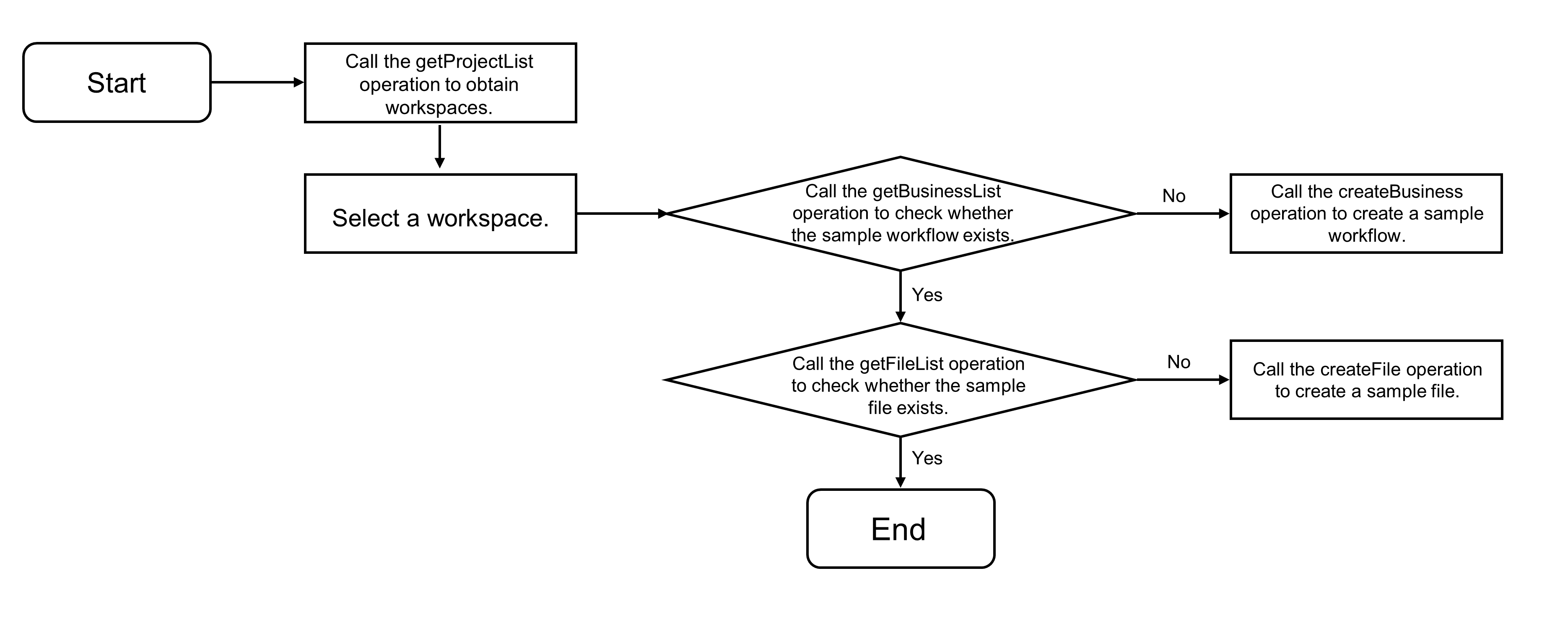
/** * Get the data source for the directory tree. * @param workspace The workspace ID. * @param dataSource The list of workspaces. */ async function getTreeDataSource(workspace: number, dataSource: { label: string, value: number }[]) { try { const businesses = await services.ide.getBusinessList(workspace, openPlatformBusinessName); businesses.length === 0 && await services.ide.createBusiness(workspace, openPlatformBusinessName); } catch (e) { showError('You have no permission to access this workspace.'); return; } const fileFolderPath = `Workflow/${openPlatformBusinessName}/MaxCompute`; const files = await services.ide.getFileList(workspace, fileFolderPath); let children: { key: number, label: string }[] = []; if (files.length === 0) { try { const currentWorkspace = dataSource.find(i => i.value === workspace); const file1 = await services.ide.createFile(workspace, currentWorkspace!.label, fileFolderPath, 'simpleSQL.mc.sql', 'SELECT 1'); const file2 = await services.ide.createFile(workspace, currentWorkspace!.label, fileFolderPath, 'createTable.mc.sql', 'CREATE TABLE IF NOT EXISTS _qcc_mysql1_odps_source_20220113100903_done_ (\ncol string\n)\nCOMMENT \'DONE table that marks the completion of full data synchronization\'\nPARTITIONED BY\n(\nstatus STRING COMMENT \'DONE partition\'\n)\nLIFECYCLE 36500;'); children = children.concat([ { key: file1, label: 'simpleSQL.mc.sql' }, { key: file2, label: 'createTable.mc.sql' }, ]); } catch (e) { showError('Create file failed. The datasource odps_source does not exist.'); return; } } else { children = files.map((i) => ({ key: i.fileId, label: i.fileName })); } return [{ key: 1, label: openPlatformBusinessName, children }]; } -
Após editar e salvar o arquivo, envie o conteúdo editado ao backend para atualizar o arquivo.
Código de exemplo:
/** * Save the file, triggered by Ctrl+S. * @param workspace The workspace ID. * @param editor The editor instance. * @param selectedFile The selected file. */ async function saveFile(workspace: number, editor: monaco.editor.IStandaloneCodeEditor, selectedFile?: number) { if (!selectedFile) { showTips('Please select a file.'); return; } const content = editor.getValue(); const result = await services.ide.updateFile(workspace, selectedFile, { content }); result ? showTips('Saved file') : showError('Failed to save file'); } -
Quando o usuário insere
dw run ...no terminal, o sistema envia o arquivo para o sistema de agendamento e executa um teste de fumaça.O fluxo de processamento está ilustrado abaixo, juntamente com exemplos de código.
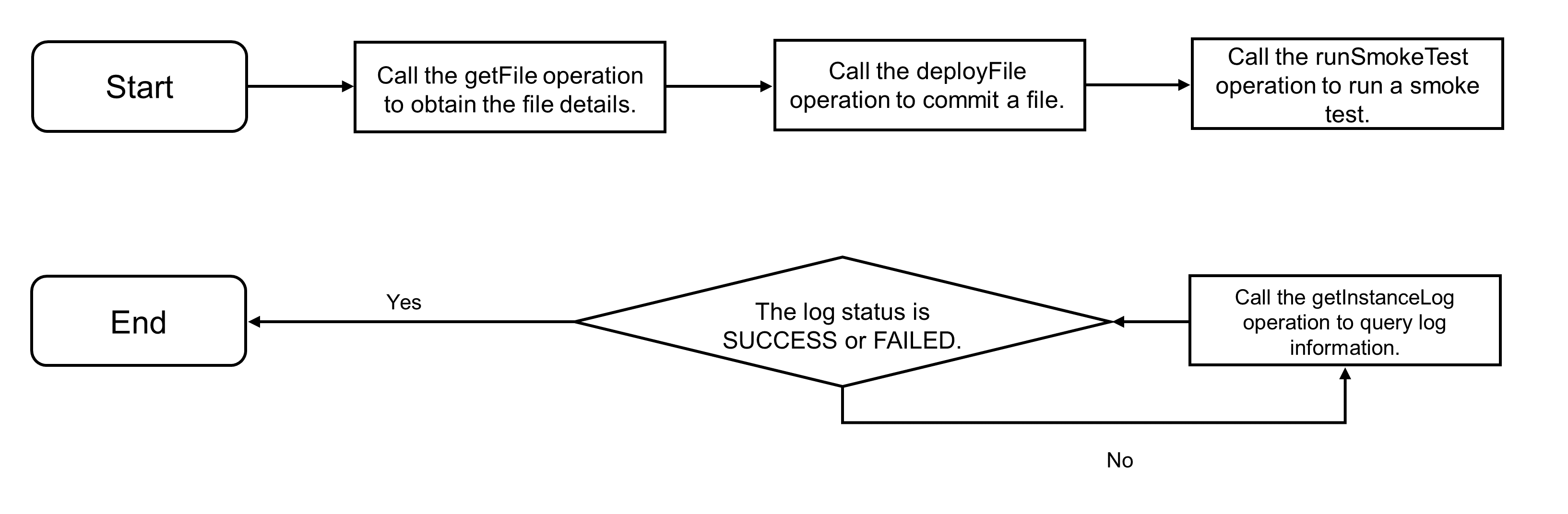
/**
 * Handle terminal keyboard events.
 * @param e The event object.
 * @param term The terminal instance.
 * @param dataSource The data source for the directory tree.
 * @param workspace The workspace ID.
 */
function onTerminalKeyChange(e: { key: string; domEvent: KeyboardEvent; }, term: NextTerminal, dataSource: any, workspace?: number) {
  const ev = e.domEvent;
  const printable = !ev.altKey && !ev.ctrlKey && !ev.metaKey;
  term.inputText = typeof term.inputText === 'string' ? term.inputText : '';
  switch (ev.key) {
    case 'ArrowUp':
      term.pointer = term.pointer < (term.stack.length - 1) ? term.pointer + 1 : term.pointer;
      term.inputText = term.stack[term.pointer];
      term.write(`\x1b[2K\r$ ${term.inputText}`);
      break;
    case 'ArrowDown':
      term.pointer = term.pointer > -1 ? term.pointer - 1 : -1;
      term.inputText = term.pointer === -1 ? '' : term.stack[term.pointer];
      term.write(`\x1b[2K\r$ ${term.inputText}`);
      break;
    case 'ArrowLeft':
      (term as any)._core.buffer.x > 2 && printable && term.write(e.key);
      break;
    case 'ArrowRight':
      (term as any)._core.buffer.x <= (term.inputText.length + 1) && printable && term.write(e.key);
      break;
    case 'Enter':
      commandHandler(term, dataSource, workspace);
      break;
    case 'Backspace':
      if ((term as any)._core.buffer.x > 2) {
        term.inputText = term.inputText.slice(0, -1);
        term.write('\b \b');
      }
      break;
    default:
      if (printable) {
        term.inputText += e.key;
        term.write(e.key);
      }
  }
}
/**
 * Method to handle task submission, triggered when 'dw run ...' is entered in the terminal.
 * @param term The terminal instance.
 * @param dataSource The data source for the directory tree.
 * @param workspace The workspace ID.
 */
async function commandHandler(term: NextTerminal, dataSource: any, workspace?: number) {
  term.write('\r\n$ ');
  const input = term.inputText;
  term.inputText = '';
  if (['', undefined].includes(input)) {
    return;
  }
  term.stack = [input!, ...term.stack];
  term.pointer = -1;
  if (!workspace) {
    term.write(highlight.text('[ERROR] You should select workspace first.\r\n$ ', brush));
    return;
  }
  // This is a simple parser for the input command line. If the command starts with 'dw' and the action is 'run', the process continues. Otherwise, an error is reported.
  const words = input?.split(' ');
  const tag = words?.[0].toLowerCase();
  const command = words?.[1]?.toLowerCase();
  const fileName = words?.[2];
  if (tag !== 'dw' || !validCommands.includes(command!)) {
    term.write(highlight.text('[ERROR] Invalid command.\r\n$ ', brush));
    return;
  }
  // Get the input file.
  const source = dataSource?.[0]?.children.find((i: any) => i.label === fileName);
  const file = await services.ide.getFile(workspace, source.key);
  if (!file) {
    term.write(highlight.text('[ERROR] File name does not exist.\r\n$ ', brush));
    return;
  }
  term.write(highlight.text('[INFO] Submitting file.\r\n$ ', brush));
  // Call the deploy file API to publish the file to the scheduling system.
  const response = await services.ide.deployFile(workspace, source.key);
  if (response) {
    term.write(highlight.text('[INFO] Submit file success.\r\n$ ', brush));
  } else {
    term.write(highlight.text('[ERROR] Submit file failed.\r\n$ ', brush));
    return;
  }
  // Execute a smoke test to run the scheduling task.
  let dag: services.ide.Dag;
  try {
    term.write(highlight.text('[INFO] Start to run task.\r\n$ ', brush));
    dag = (await services.ide.runSmoke(workspace, file.nodeId, openPlatformBusinessName))[0];
    term.write(highlight.text('[INFO] Trigger sql task success.\r\n$ ', brush));
  } catch (e) {
    term.write(highlight.text('[ERROR] Trigger sql task failed.\r\n$ ', brush));
    return;
  }
  // Poll to get task logs.
  const event = setInterval(async () => {
    try {
      const logInfo = await services.ide.getLog(dag.instanceId, 'DEV');
      let log: string;
      switch (logInfo.instance.status) {
        case 'WAIT_TIME':
          log = 'Waiting for the scheduled time.';
          break;
        case 'WAIT_RESOURCE':
          log = 'Waiting for resources...';
          break;
        default:
          log = logInfo.instanceLog;
      }
      term.write(`${highlight.text(log, brush).replace(/\n/g, '\r\n')}\r\n$ `);
      const finished = ['SUCCESS', 'FAILURE', 'NOT_RUN'].includes(logInfo.instance.status);
      finished && clearInterval(event);
    } catch (e) {
      term.write(highlight.text('[ERROR] SQL Task run failed.\r\n$ ', brush));
      return;
    }
  }, 3000);
}
Implantar e executar localmente
Siga as instruções no exemplo de código no GitHub para preparar o ambiente. As dependências incluem Java 8 ou superior, a ferramenta de build Maven, um ambiente Node.js e a ferramenta pnpm. Em seguida, execute o comando de inicialização.
pnpm installAltere também as informações relacionadas aos pares de AccessKey no caminho raiz. Execute o seguinte comando no diretório raiz do projeto para rodar o código de exemplo:
npm run example:ideInsira https://localhost:8080 na barra de endereços do navegador para verificar os resultados.
https://localhost:8080Referência: Baixar código-fonte completo do exemplo
Baixe o código-fonte completo do exemplo no GitHub. Código de exemplo para todas as operações deste tópico:
import { useEffect, useRef, useState, useCallback } from 'react';
import type { FunctionComponent } from 'react';
import cn from 'classnames';
import * as monaco from 'monaco-editor';
import { Terminal } from 'xterm';
import { FitAddon } from 'xterm-addon-fit';
import { Tree, Select, Message } from '@alifd/next';
import * as highlight from '../helpers/highlight';
import * as services from '../services';
import classes from '../styles/app.module.css';

export interface Props {}
export interface NextTerminal extends Terminal {
  inputText?: string;
  stack: string[];
  pointer: number;
}

const brush = {
  rules: [
    { regex: /\bERROR\b/gmi, theme: 'red' },
    { regex: /\bWARN\b/gmi, theme: 'yellow' },
    { regex: /\bINFO\b/gmi, theme: 'green' },
    { regex: /^FAILED:.*$/gmi, theme: 'red' },
  ],
};
// Name of the sample workflow.
const openPlatformBusinessName = 'Open Platform Sample Workflow';
// Parameters for creating the editor.
const editorOptions = {
  content: '',
  language: 'sql',
  theme: 'vs-dark',
  automaticLayout: true,
  fontSize: 16,
};
// Parameters for creating the terminal.
const terminalOptions = {
  cursorBlink: true,
  cursorStyle: 'underline' as const,
  fontSize: 16,
};
const validCommands = [
  'run',
];

/**
 * Method to display an error message pop-up.
 * @param message The error message.
 */
function showError(message: string) {
  Message.error({ title: 'Error Message', content: message });
}
/**
 * Method to display a tip pop-up.
 * @param message The tip message.
 */
function showTips(message: string) {
  Message.show({ title: 'Tips', content: message });
}
/**
 * Method to handle task submission, triggered when 'dw run ...' is entered in the terminal.
 * @param term The terminal instance.
 * @param dataSource The data source for the directory tree.
 * @param workspace The workspace ID.
 */
async function commandHandler(term: NextTerminal, dataSource: any, workspace?: number) {
  term.write('\r\n$ ');
  const input = term.inputText;
  term.inputText = '';
  if (['', undefined].includes(input)) {
    return;
  }
  term.stack = [input!, ...term.stack];
  term.pointer = -1;
  if (!workspace) {
    term.write(highlight.text('[ERROR] You should select workspace first.\r\n$ ', brush));
    return;
  }
  // This is a simple parser for the input command line. If the command starts with 'dw' and the action is 'run', the process continues. Otherwise, an error is reported.
  const words = input?.split(' ');
  const tag = words?.[0].toLowerCase();
  const command = words?.[1]?.toLowerCase();
  const fileName = words?.[2];
  if (tag !== 'dw' || !validCommands.includes(command!)) {
    term.write(highlight.text('[ERROR] Invalid command.\r\n$ ', brush));
    return;
  }
  // Get the input file.
  const source = dataSource?.[0]?.children.find((i: any) => i.label === fileName);
  const file = await services.ide.getFile(workspace, source.key);
  if (!file) {
    term.write(highlight.text('[ERROR] File name does not exist.\r\n$ ', brush));
    return;
  }
  term.write(highlight.text('[INFO] Submitting file.\r\n$ ', brush));
  // Call the deploy file API to publish the file to the scheduling system.
  const response = await services.ide.deployFile(workspace, source.key);
  if (response) {
    term.write(highlight.text('[INFO] Submit file success.\r\n$ ', brush));
  } else {
    term.write(highlight.text('[ERROR] Submit file failed.\r\n$ ', brush));
    return;
  }
  // Execute a smoke test to run the scheduling task.
  let dag: services.ide.Dag;
  try {
    term.write(highlight.text('[INFO] Start to run task.\r\n$ ', brush));
    dag = (await services.ide.runSmoke(workspace, file.nodeId, openPlatformBusinessName))[0];
    term.write(highlight.text('[INFO] Trigger sql task success.\r\n$ ', brush));
  } catch (e) {
    term.write(highlight.text('[ERROR] Trigger sql task failed.\r\n$ ', brush));
    return;
  }
  // Poll to get task logs.
  const event = setInterval(async () => {
    try {
      const logInfo = await services.ide.getLog(dag.instanceId, 'DEV');
      let log: string;
      switch (logInfo.instance.status) {
        case 'WAIT_TIME':
          log = 'Waiting for the scheduled time.';
          break;
        case 'WAIT_RESOURCE':
          log = 'Waiting for resources...';
          break;
        default:
          log = logInfo.instanceLog;
      }
      term.write(`${highlight.text(log, brush).replace(/\n/g, '\r\n')}\r\n$ `);
      const finished = ['SUCCESS', 'FAILURE', 'NOT_RUN'].includes(logInfo.instance.status);
      finished && clearInterval(event);
    } catch (e) {
      term.write(highlight.text('[ERROR] SQL Task run failed.\r\n$ ', brush));
      return;
    }
  }, 3000);
}
/**
 * Handle terminal keyboard events.
 * @param e The event object.
 * @param term The terminal instance.
 * @param dataSource The data source for the directory tree.
 * @param workspace The workspace ID.
 */
function onTerminalKeyChange(e: { key: string; domEvent: KeyboardEvent; }, term: NextTerminal, dataSource: any, workspace?: number) {
  const ev = e.domEvent;
  const printable = !ev.altKey && !ev.ctrlKey && !ev.metaKey;
  term.inputText = typeof term.inputText === 'string' ? term.inputText : '';
  switch (ev.key) {
    case 'ArrowUp':
      term.pointer = term.pointer < (term.stack.length - 1) ? term.pointer + 1 : term.pointer;
      term.inputText = term.stack[term.pointer];
      term.write(`\x1b[2K\r$ ${term.inputText}`);
      break;
    case 'ArrowDown':
      term.pointer = term.pointer > -1 ? term.pointer - 1 : -1;
      term.inputText = term.pointer === -1 ? '' : term.stack[term.pointer];
      term.write(`\x1b[2K\r$ ${term.inputText}`);
      break;
    case 'ArrowLeft':
      (term as any)._core.buffer.x > 2 && printable && term.write(e.key);
      break;
    case 'ArrowRight':
      (term as any)._core.buffer.x <= (term.inputText.length + 1) && printable && term.write(e.key);
      break;
    case 'Enter':
      commandHandler(term, dataSource, workspace);
      break;
    case 'Backspace':
      if ((term as any)._core.buffer.x > 2) {
        term.inputText = term.inputText.slice(0, -1);
        term.write('\b \b');
      }
      break;
    default:
      if (printable) {
        term.inputText += e.key;
        term.write(e.key);
      }
  }
}
/**
 * Get the list of workspaces.
 */
async function getWorkspaceList() {
  const response = await services.tenant.getProjectList();
  const list = response.projectList.filter(i => i.projectStatusCode === 'AVAILABLE').map(i => (
    { label: i.projectName, value: i.projectId }
  ));
  return list;
}
/**
 * Get the data source for the directory tree.
 * @param workspace The workspace ID.
 * @param dataSource The list of workspaces.
 */
async function getTreeDataSource(workspace: number, dataSource: { label: string, value: number }[]) {
  try {
    const businesses = await services.ide.getBusinessList(workspace, openPlatformBusinessName);
    businesses.length === 0 && await services.ide.createBusiness(workspace, openPlatformBusinessName);
  } catch (e) {
    showError('You have no permission to access this workspace.');
    return;
  }
  const fileFolderPath = `Workflow/${openPlatformBusinessName}/MaxCompute`;
  const files = await services.ide.getFileList(workspace, fileFolderPath);
  let children: { key: number, label: string }[] = [];
  if (files.length === 0) {
    try {
      const currentWorkspace = dataSource.find(i => i.value === workspace);
      const file1 = await services.ide.createFile(workspace, currentWorkspace!.label, fileFolderPath, 'simpleSQL.mc.sql', 'SELECT 1');
      const file2 = await services.ide.createFile(workspace, currentWorkspace!.label, fileFolderPath, 'createTable.mc.sql', 'CREATE TABLE IF NOT EXISTS _qcc_mysql1_odps_source_20220113100903_done_ (\ncol string\n)\nCOMMENT \'DONE table that marks the completion of full data synchronization\'\nPARTITIONED BY\n(\nstatus STRING   COMMENT \'DONE partition\'\n)\nLIFECYCLE 36500;');
      children = children.concat([
        { key: file1, label: 'simpleSQL.mc.sql' },
        { key: file2, label: 'createTable.mc.sql' },
      ]);
    } catch (e) {
      showError('Create file failed. The datasource odps_source does not exist.');
      return;
    }
  } else {
    children = files.map((i) => ({ key: i.fileId, label: i.fileName }));
  }
  return [{ key: 1, label: openPlatformBusinessName, children }];
}
/**
 * Get file details.
 * @param workspace The workspace ID.
 * @param fileId The file ID.
 */
async function getFileInfo(workspace: number, fileId: number) {
  const response = await services.ide.getFile(workspace, fileId);
  return response;
}
/**
 * Save the file, triggered by Ctrl+S.
 * @param workspace The workspace ID.
 * @param editor The editor instance.
 * @param selectedFile The selected file.
 */
async function saveFile(workspace: number, editor: monaco.editor.IStandaloneCodeEditor, selectedFile?: number) {
  if (!selectedFile) {
    showTips('Please select a file.');
    return;
  }
  const content = editor.getValue();
  const result = await services.ide.updateFile(workspace, selectedFile, { content });
  result ? showTips('Saved file') : showError('Failed to save file');
}

const App: FunctionComponent<Props> = () => {
  const editorRef = useRef<HTMLDivElement>(null);
  const termianlRef = useRef<HTMLDivElement>(null);
  const [terminal, setTerminal] = useState<NextTerminal>();
  const [editor, setEditor] = useState<monaco.editor.IStandaloneCodeEditor>();
  const [expnadedKeys, setExpandedKeys] = useState<any[]>();
  const [workspace, setWorkspace] = useState<number>();
  const [workspaces, setWorkspaces] = useState<{ label: string, value: number }[]>([]);
  const [dataSource, setDataSource] = useState<any[]>();
  const [selectedFile, setSelectedFile] = useState<number>();
  const [loading, setLoading] = useState<boolean>(false);
  // Create an editor instance.
  useEffect(() => {
    if (editorRef.current) {
      const nextEditor = monaco.editor.create(editorRef.current, editorOptions);
      setEditor(nextEditor);
      return () => { nextEditor.dispose(); };
    }
  }, [editorRef.current]);
  // Add a keydown event to save the file.
  useEffect(() => {
    editor?.addCommand(monaco.KeyMod.CtrlCmd | monaco.KeyCode.KeyS, () => {
      if (!workspace) {
        showTips('Please select workspace first');
        return;
      }
      saveFile(workspace, editor, selectedFile);
    });
  }, [editor, workspace, selectedFile]);
  // Create a terminal instance.
  useEffect(() => {
    if (termianlRef.current) {
      const term: NextTerminal = new Terminal(terminalOptions) as any;
      term.pointer = -1;
      term.stack = [];
      setTerminal(term);
      const fitAddon = new FitAddon();
      term.loadAddon(fitAddon);
      term.open(termianlRef.current);
      fitAddon.fit();
      term.write('$ ');
      return () => { term.dispose(); };
    }
  }, [termianlRef.current]);
  // Register a terminal input event.
  useEffect(() => {
    const event = terminal?.onKey(e => onTerminalKeyChange(e, terminal, dataSource, workspace));
    return () => {
      event?.dispose();
    };
  }, [terminal, dataSource, workspace]);
  // Get the data source for the directory tree.
  useEffect(() => {
    workspace && (async () => {
      setLoading(true);
      const nextDataSource = await getTreeDataSource(workspace, workspaces);
      const defaultKey = nextDataSource?.[0]?.key;
      defaultKey && setExpandedKeys([defaultKey]);
      setDataSource(nextDataSource);
      setLoading(false);
    })();
  }, [workspace]);
  // When a file in the directory tree is clicked, get the file details and display the code.
  useEffect(() => {
    workspace && selectedFile && (async () => {
      setLoading(true);
      const file = await getFileInfo(workspace, selectedFile);
      editor?.setValue(file.content);
      editor?.getAction('editor.action.formatDocument').run();
      setLoading(false);
    })();
  }, [selectedFile]);
  // Get the list of workspaces.
  useEffect(() => {
    (async () => {
      const list = await getWorkspaceList();
      setWorkspaces(list);
    })();
  }, []);
  const onExapnd = useCallback((keys: number[]) => { setExpandedKeys(keys); }, []);
  const onWorkspaceChange = useCallback((value: number) => { setWorkspace(value) }, []);
  const onTreeNodeSelect = useCallback((key: number[]) => { key[0] && setSelectedFile(key[0]) }, []);
  return (
    <div className={cn(classes.appWrapper)}>
      <div className={cn(classes.leftArea)}>
        <div className={cn(classes.workspaceWrapper)}>
          Workspace:
          <Select
            value={workspace}
            dataSource={workspaces}
            onChange={onWorkspaceChange}
            autoWidth={false}
            showSearch
          />
        </div>
        <div className={cn(classes.treeWrapper)}>
          <Tree
            dataSource={dataSource}
            isNodeBlock={{ defaultPaddingLeft: 20 }}
            expandedKeys={expnadedKeys}
            selectedKeys={[selectedFile]}
            onExpand={onExapnd}
            onSelect={onTreeNodeSelect}
            defaultExpandAll
          />
        </div>
      </div>
      <div className={cn(classes.rightArea)}>
        <div
          className={cn(classes.monacoEditorWrapper)}
          ref={editorRef}
        />
        <div
          className={cn(classes.panelWrapper)}
          ref={termianlRef}
        />
      </div>
      <div className={cn(classes.loaderLine)} style={{ display: loading ? 'block' : 'none' }} />
    </div>
  );
};

export default App;