Deploy large models exceeding single-device capacity using multi-node distributed inference for MoE models like DeepSeek 671B.
Prerequisites
Official SGLang and vLLM images from EAS or Model Gallery natively support distributed inference. For custom images, follow the networking requirements of your distributed inference framework and standard distributed processing patterns. For details, see How it works.
How it works
Key concepts and implementation principles for distributed inference:
Instance unit
Distributed inference introduces instance units (referred to as Unit in this topic). Instances within a Unit coordinate using high-performance network communication and patterns like tensor parallelism (TP) and pipeline parallelism (PP) to process each request. Instances in a Unit are stateful. Units are fully symmetric and stateless relative to each other.
Instance ID
Each instance in a Unit receives an instance ID through an environment variable. For a list of environment variables and descriptions, see Appendix. Instances receive sequential IDs. Use these IDs to assign different tasks to instances.
Traffic handling
By default, each Unit handles traffic only through instance 0 (RANK_ID = 0). The system routes user traffic to instance 0 of different Units using service discovery. Each Unit processes requests internally in a distributed manner and handles traffic independently without interference.

Rolling updates
During a rolling update, a Unit is rebuilt as a whole. All instances in the new Unit start in parallel. After all instances in the new Unit are ready, the system removes traffic from the old Unit and deletes all instances.

Lifecycle
Unit rebuild
When a Unit is recreated, all instances in the old Unit are deleted in parallel. All instances in the new Unit are created in parallel. No special handling occurs based on instance ID.
Instance recreation
By default, each instance lifecycle in a Unit matches that of instance 0. When instance 0 is recreated, all other instances in the Unit are recreated. When any non-zero instance is recreated, other instances remain unaffected.
Distributed fault tolerance
-
Instance failure handling
-
When the system detects failure in one instance of a distributed service, it automatically restarts all instances in the Unit.
-
Purpose: Prevents cluster state inconsistency caused by single-point failures. Ensures all instances start with a clean, consistent environment.
-
-
Coordinated recovery
-
After instances restart, the system waits for all instances in the Unit to reach a consistent ready state using a synchronization barrier. Only after all instances are ready does the system start business processes.
-
Purpose:
-
Prevents failures when NCCL forms communication groups due to inconsistent instance states.
-
Ensures strict startup synchronization across all nodes involved in distributed inference tasks.
-
-
Distributed fault tolerance is disabled by default. To enable it, set the unit.guard parameter. Example:
{
  "unit": {
    "size": 2,
    "guard": true
  }
}
Procedure
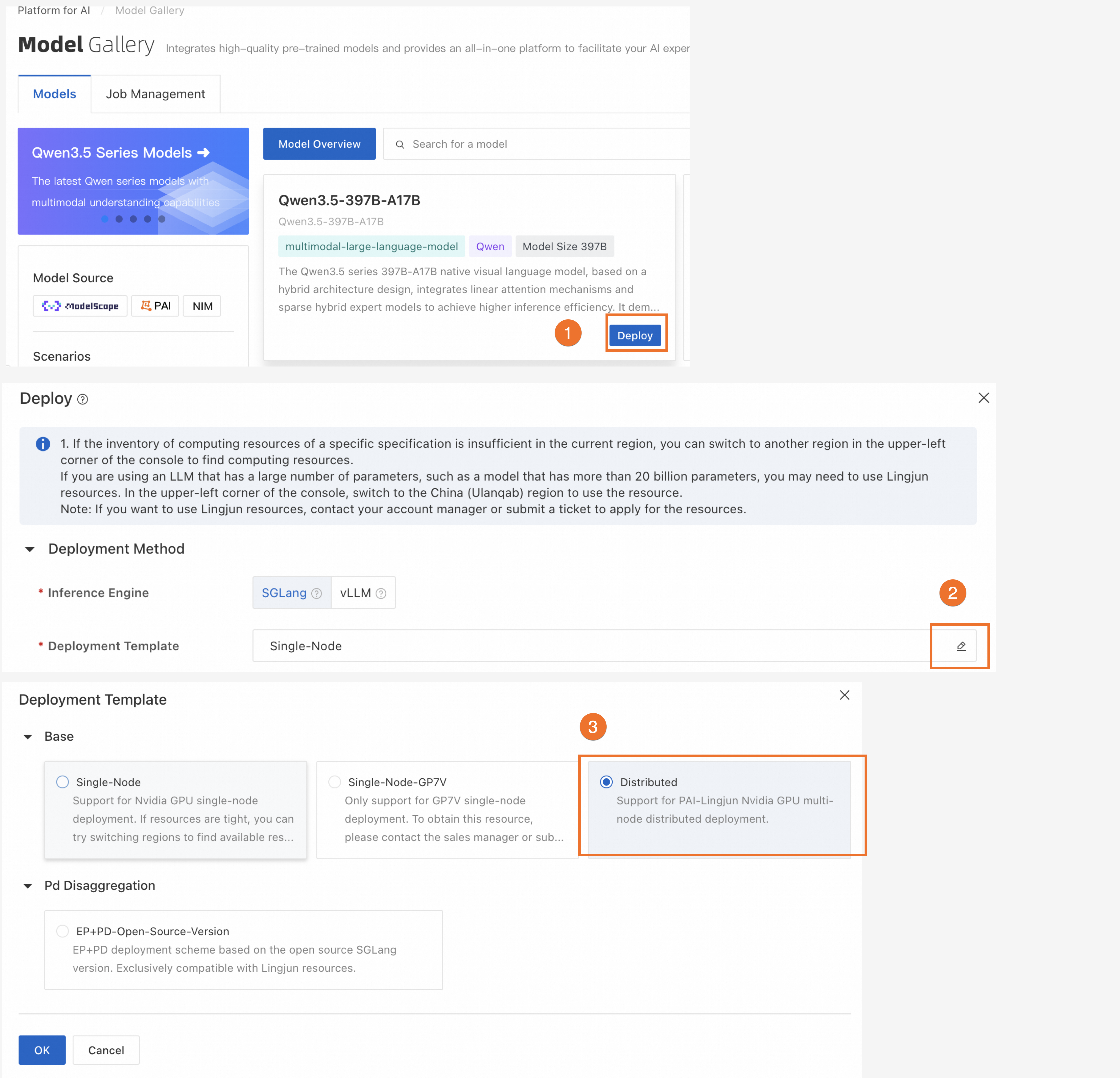
Deploy using Model Gallery
We recommend using Model Gallery for multi-node distributed deployment.
-
Distributed inference is supported only when the inference engine is SGLang or vLLM.
-
Select deployment resources that match your chosen template.
Deploy using a custom image
-
Log on to the PAI console. Select a region on the top of the page. Then, select the desired workspace and click Elastic Algorithm Service (EAS).
-
Create a service: On the Inference Service tab, click Deploy Service. Select Custom Model Deployment> Custom Deployment.
-
Update a service: On the Inference Service tab, find your target service in the service list. In the Actions column, click Update.
-
-
In the parameter configuration form, set the following parameters. For more details, see Custom Deployment.
-
In the Environment Information section, configure the runtime image and start command:
-
Image Configuration: In the Alibaba Cloud Image list, select a vLLM or SGLang image:

-
Command: After selecting an image, the system sets the start command automatically. Do not modify it.
-
-
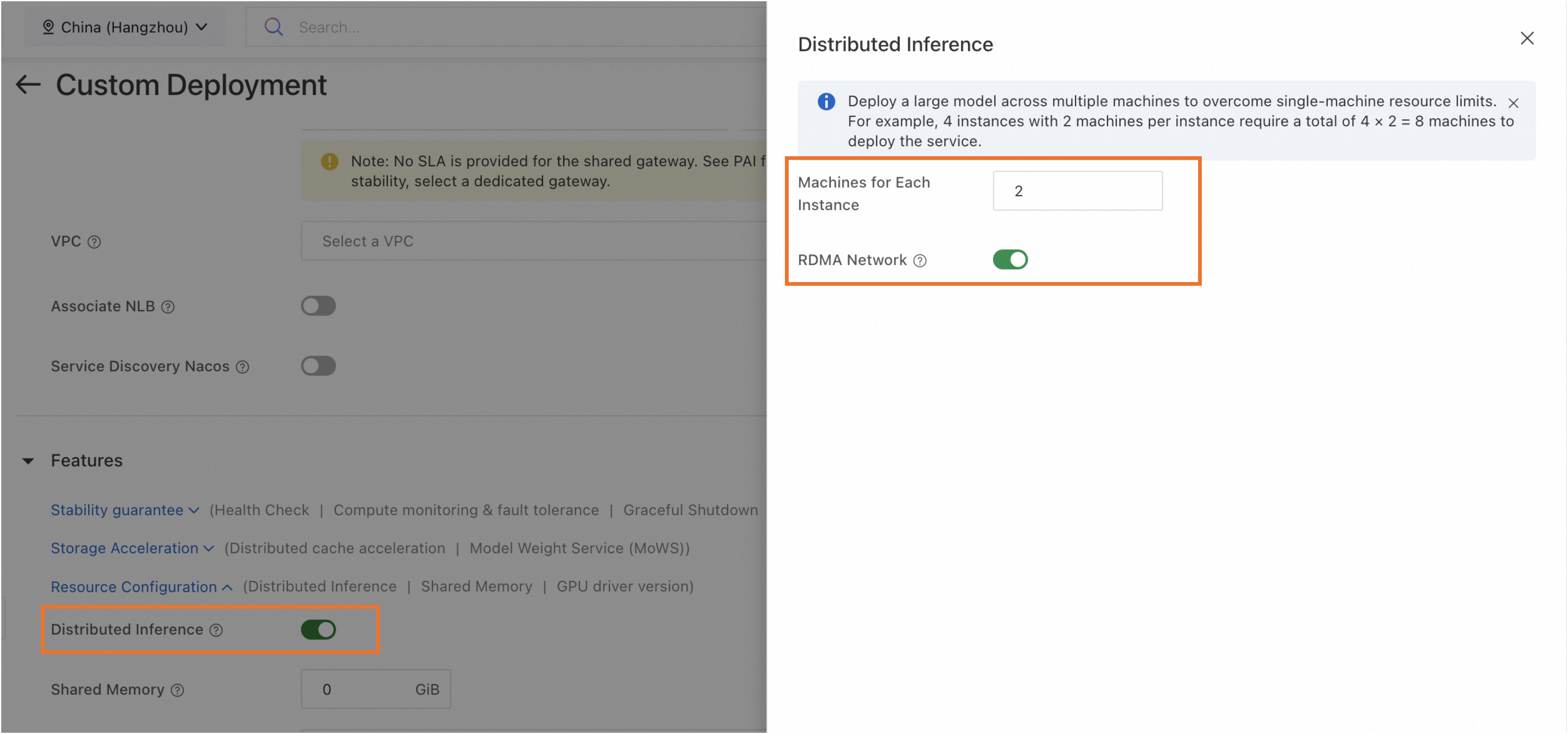
In the Features section, turn on Distributed Inference. Then set the following parameters:
Parameter
Description
Number of Machines for Single-Replica Deployment
Number of machines for a single model inference instance. Minimum value is 2.
RDMA Network
Enable RDMA to ensure high-speed network connections between machines.
NoteRDMA is available only for services deployed on Lingjun resources.
-
-
After configuring parameters, click Deploy or Update.
Appendix
When deploying a distributed inference service, configure networking for frameworks such as Torch Distributed or Ray. If configuring VPC or RDMA, each instance has multiple NICs. Specify which NIC to use for inter-instance networking.
-
RDMA enabled: Uses RDMA NIC (net0) by default.
-
RDMA disabled: Uses VPC NIC (eth1) configured by user.
Pass related settings using environment variables in your start command:
|
Environment Variable Name |
Description |
Example Value |
|
RANK_ID |
Instance ID starting from 0 and incrementing by 1. |
0 |
|
COMM_IFNAME |
NIC for inter-instance networking:
|
net0 |
|
RANK_IP |
IP address for inter-instance networking—IP of the NIC specified by COMM_IFNAME. |
11.*.*.* |
|
MASTER_ADDRESS |
IP address of instance 0 (RANK_ID = 0)—IP of the NIC specified by COMM_IFNAME for instance 0. |
11.*.*.* |