このトピックでは、不要になった前払い (サブスクリプションまたはリソースプラン) 製品を解約する方法について説明します。従量課金製品の場合、解約を申請する必要はありません。課金を停止するには、データをバックアップし、リソースをリリースしてください。
Unsubscription rules
Before you unsubscribe, review the unsubscription rules to understand the policies and confirm whether your resource is eligible for unsubscription.
After you unsubscribe, the resources are released and all data is permanently deleted. This action cannot be undone. Before you proceed, make sure that you have backed up your data and verified the order information.
Note the following limitations before proceeding with an unsubscription:
Alibaba Cloud does not support a "one-click unsubscribe all services" feature. To unsubscribe resources, sign in to the [料金と費用] console and go to the [リソースのサブスクリプション解除] page to filter and unsubscribe resources one by one.
Pay-as-you-go (postpaid) resources cannot be unsubscribed through the [リソースのサブスクリプション解除] page. To stop billing for pay-as-you-go resources, go to the respective product console and release or delete the resource.
Initiate unsubscription
The Alibaba Cloud root account has unsubscription permissions by default. To grant a RAM user the required permissions, either attach the AliyunBSSFullAccess policy directly to the user or add the user to an authorized user group. For more information, see Manage RAM user permissions.
Sign in to the [料金と費用] console. In the left-side navigation pane, choose Expenses > Subscription Orders to go to the [リソースのサブスクリプション解除] page. This page lists the resources eligible for unsubscription under your account. The resources are categorized by resource type, refund type, and activation status.
Active instance orders appear on the [リソースの解約] tab (in the new console) or the Unsubscribe Active Resources tab (in the legacy console). Unsubscribing cancels both the current active order and any pending renewal orders for the resource.
Pending renewal orders appear on the [無効な更新のサブスクリプション解除] tab. If you choose to unsubscribe, only the pending renewal orders are canceled. Your current active service is not affected.
Unsubscribe from active orders
Active orders are classified as either [通常のクラウドリソース] or [リソースプラン]. If a resource has pending renewal orders, these orders will also be canceled.
Regular cloud resource
Unsubscriptions for regular cloud resources are classified into two types: [一部返金] and [返金不可].
Only resources that are eligible for a [一部返金] can be unsubscribed in batches. You can unsubscribe from a maximum of 50 instances at a time. The refund amount is calculated based on the rules on the official website.
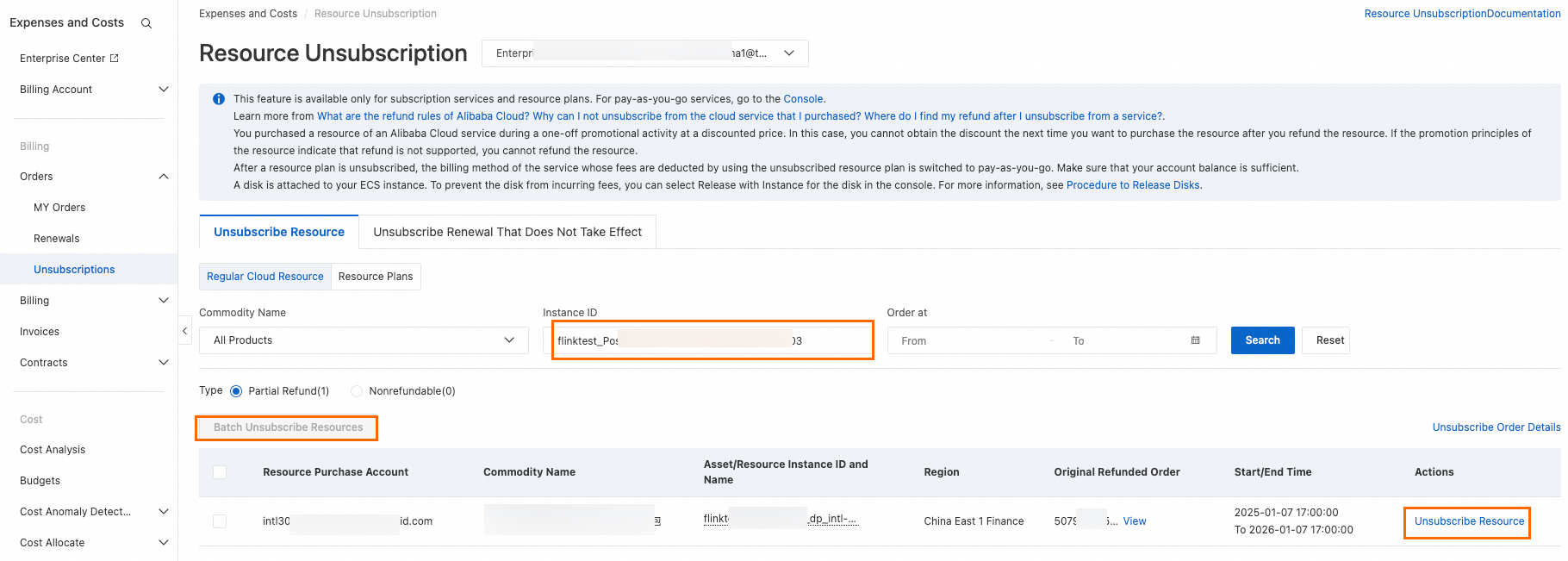
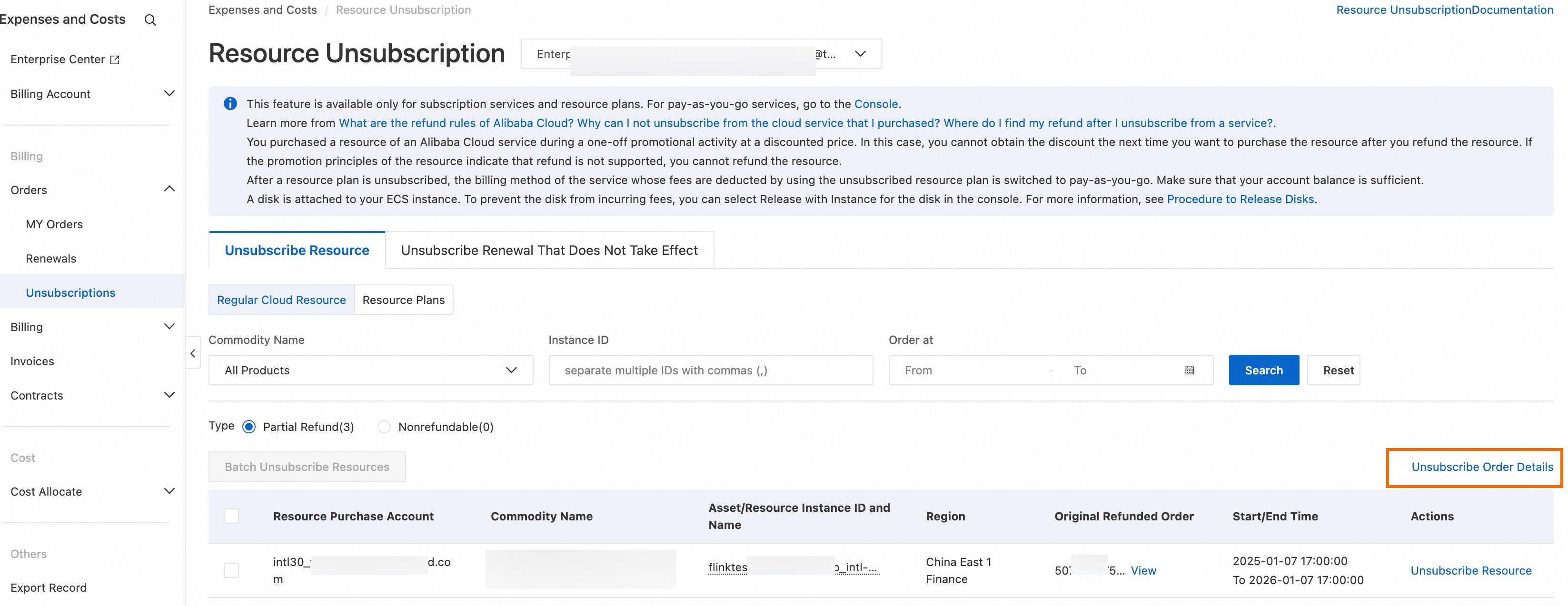
On the [通常のクラウドリソース] tab, filter by product name, instance ID, or order time to find the instance that you want to unsubscribe from. Then, click [リソースの解約] or [一括でリソースのサブスクリプションを解除].
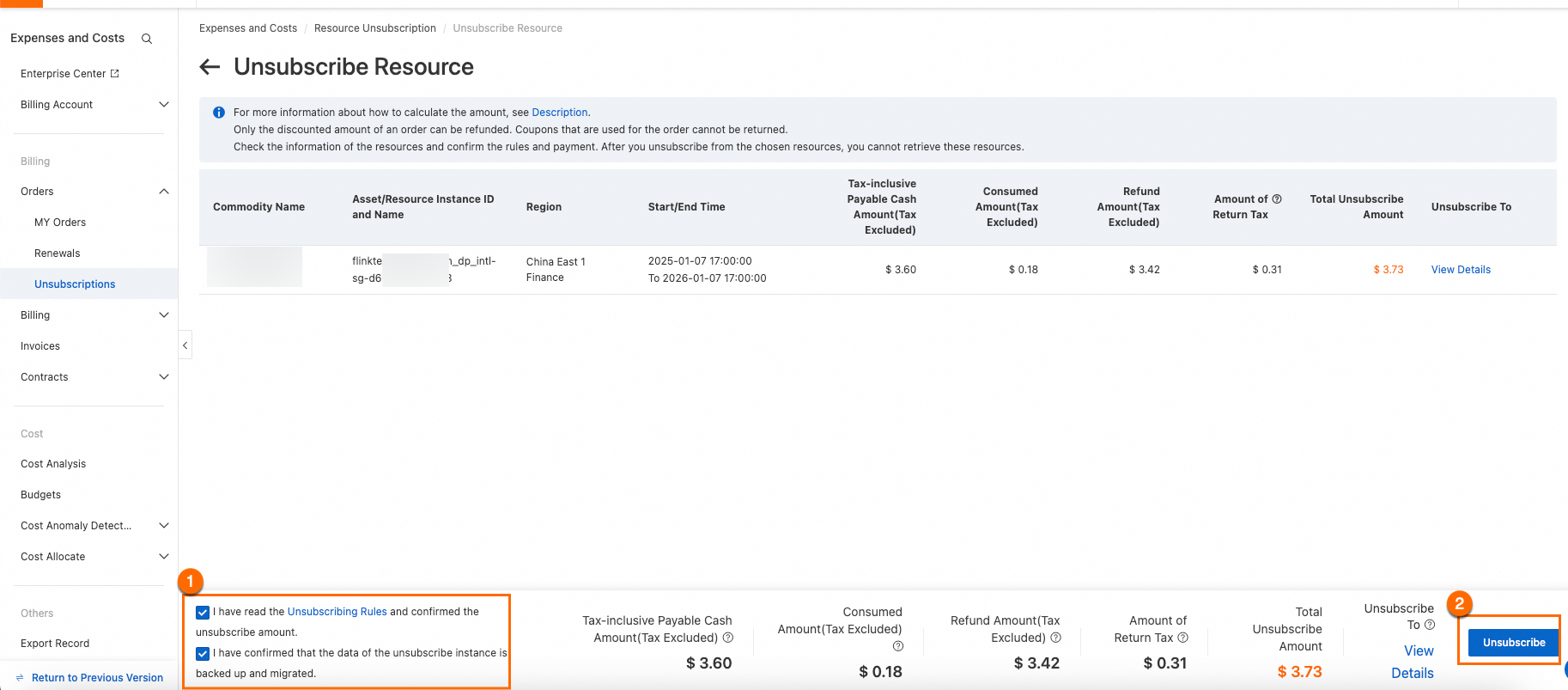
On the [リソースの解約] page, carefully review the resource information, and confirm the unsubscription terms and the refund amount. At the bottom-left of the page, select the two checkboxes to confirm the refund amount and to confirm that you have backed up or migrated your data. The [Unsubscribe Now] button is enabled only after you select both checkboxes. Click Unsubscribe Now to complete the unsubscription.
Review the following before confirming your unsubscription.
Data retention period — After an ECS instance is unsubscribed, it enters a Refund Shutdown state. Instance data is retained for 15 days before being permanently released and cannot be recovered. For [Web ホスト] products, data is released immediately upon unsubscription with no retention period.
Associated resources — Unsubscribing an ECS instance does not automatically delete any snapshots or custom images you have created, nor does it automatically release associated pay-as-you-go cloud disks. Go to the ECS console after unsubscription to confirm whether you want to release these resources. Unreleased pay-as-you-go disks continue to incur charges.
Service impact:
Unsubscribing a renewal order (a pending renewal that has not yet taken effect) only restores the instance expiration time to before the renewal. Current running services are not affected.
Unsubscribing an effective (currently running) instance terminates the service immediately. Make sure that you have backed up all data and confirmed that your business workloads have been migrated before proceeding.
Resource plans
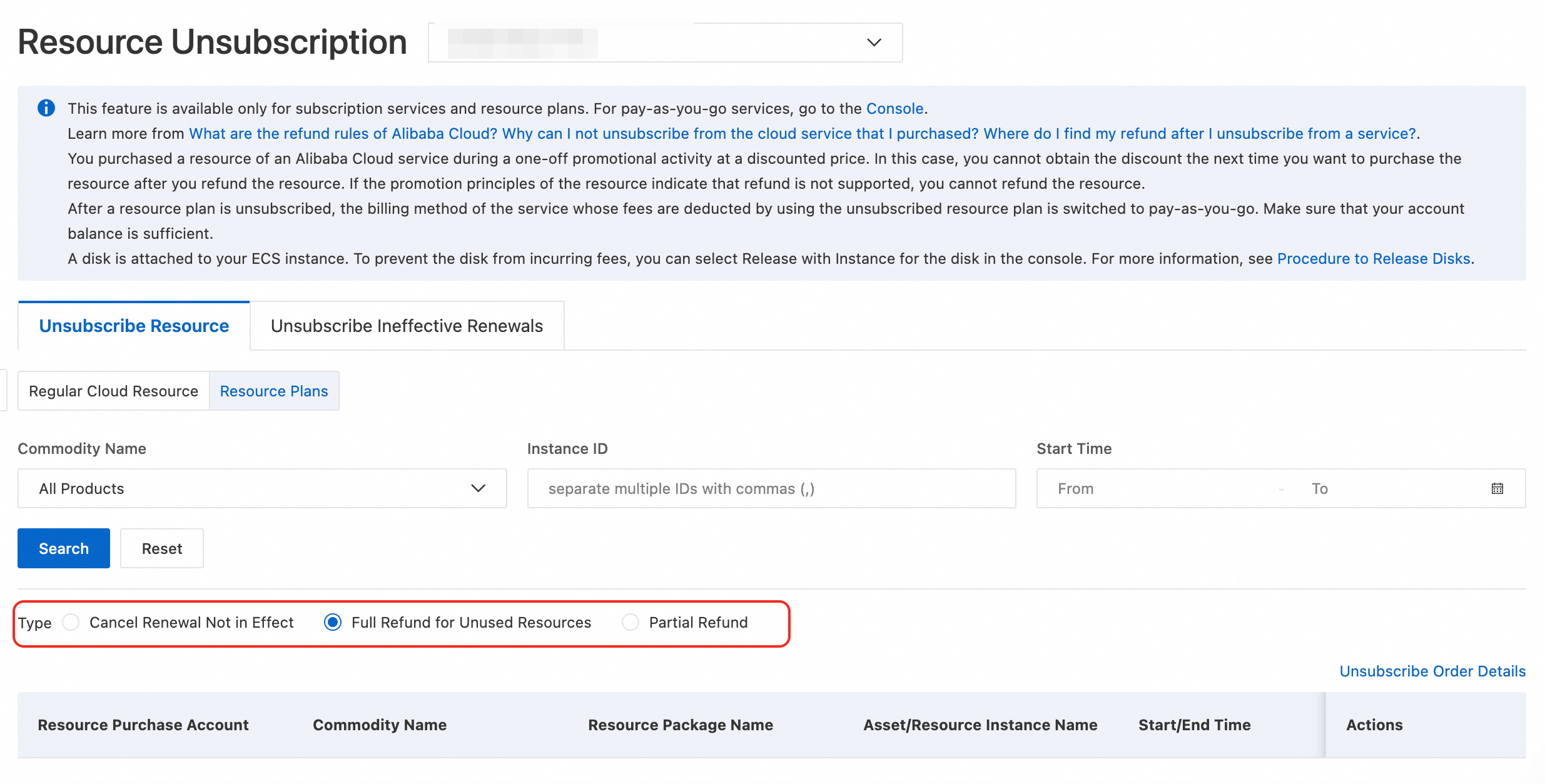
Unsubscriptions for resource plans are classified into three types: Unactivated Subscription Refund, [未使用リソースの全額返金], and [一部返金].
Only resources that are eligible for a [一部返金] can be unsubscribed in batches. You can unsubscribe from a maximum of 50 instances at a time. The refund amount is calculated based on the rules on the official website.
On the Resource Plans tab, filter by product name, instance ID, or order time to find the resource plan that you want to unsubscribe from. Then, click [リソースの解約] or [一括でリソースのサブスクリプションを解除] and complete the unsubscription as prompted.
Unsubscribe from pending renewals
Unsubscribe from pending renewals
Sign in to the Resource Unsubscription page.
Click the [無効な更新のサブスクリプション解除] tab. Filter by product name or instance ID to find one or more instances that you want to unsubscribe from. Click [更新のサブスクリプション解除] or [一括返金 / 更新], and then complete the unsubscription as prompted.
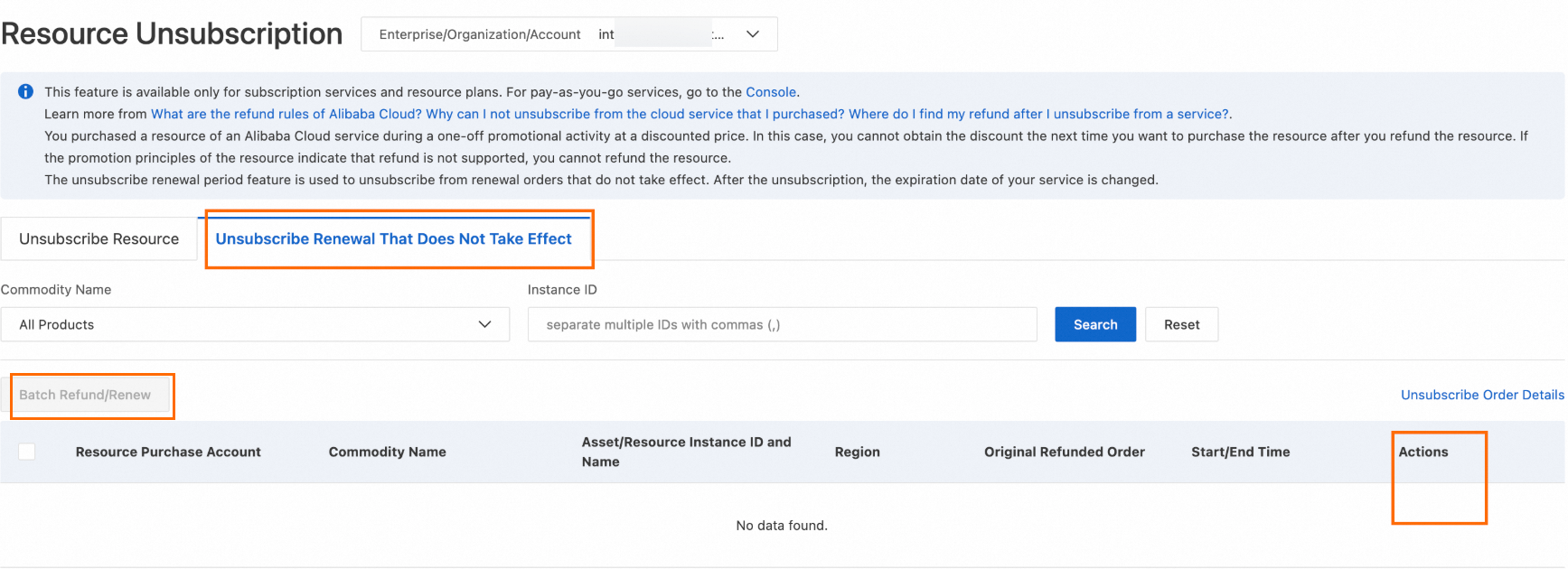
If an instance has multiple renewal orders, you can select an [更新後の有効期限] to unsubscribe from a specific order. You can unsubscribe from one or more orders at a time.
The [無効な更新のサブスクリプション解除] tab only handles renewal orders that have not yet taken effect. Effective renewal orders (renewals that have already started billing and are currently active) cannot be individually unsubscribed or cancelled from this tab.
If you need a refund for an effective renewal order, you must unsubscribe the entire instance from the [リソースの解約] tab. This terminates both the current subscription and any associated pending renewals.
If you only need to stop future automatic renewals or change the renewal period without affecting the current subscription, go to the [Renewal Management] page to disable auto-renewal or modify the renewal cycle.
返金ステータス
デフォルトでは、返金は元の支払元に返されます。解約が成功した後、返金が到着するまでの時間は、支払いチャネルの処理速度によって異なり、最大 30 営業日かかる場合があります。
支払い方法 | 返金先 |
銀行カード | 支払い後 5 か月 (150 日) 以内に解約が行われた場合、返金は元のアカウントに返されます。 支払い後 5 か月以上経過してから解約が行われた場合、返金は Alibaba Cloud アカウント残高に入金されます。 |
PayPal | 支払い後 6 か月 (180 日) 以内に解約が行われた場合、返金は元の PayPal アカウントに返されます。 支払い後 6 か月以上経過してから解約が行われた場合、返金は Alibaba Cloud アカウント残高に入金されます。 |
Alibaba Cloud アカウント残高 | Alibaba Cloud アカウント残高。 |
次の方法で、解約記録を確認できます。
リソースのサブスクリプション解除 ページにサインインし、解約注文の詳細 をクリックすると、アカウントのサブスクリプション解除履歴を表示できます。
サブスクリプション解除リストで、解約済みの注文を見つけ、操作 列の 詳細を表示 をクリックします。詳細 ページで、注文の状況、返金先、返金時刻、返金額、解約情報 などの情報を確認できます。返金が着金するまでの時間と方法は、お支払い方法によって異なります。詳細については、「返金ポリシー」をご参照ください。
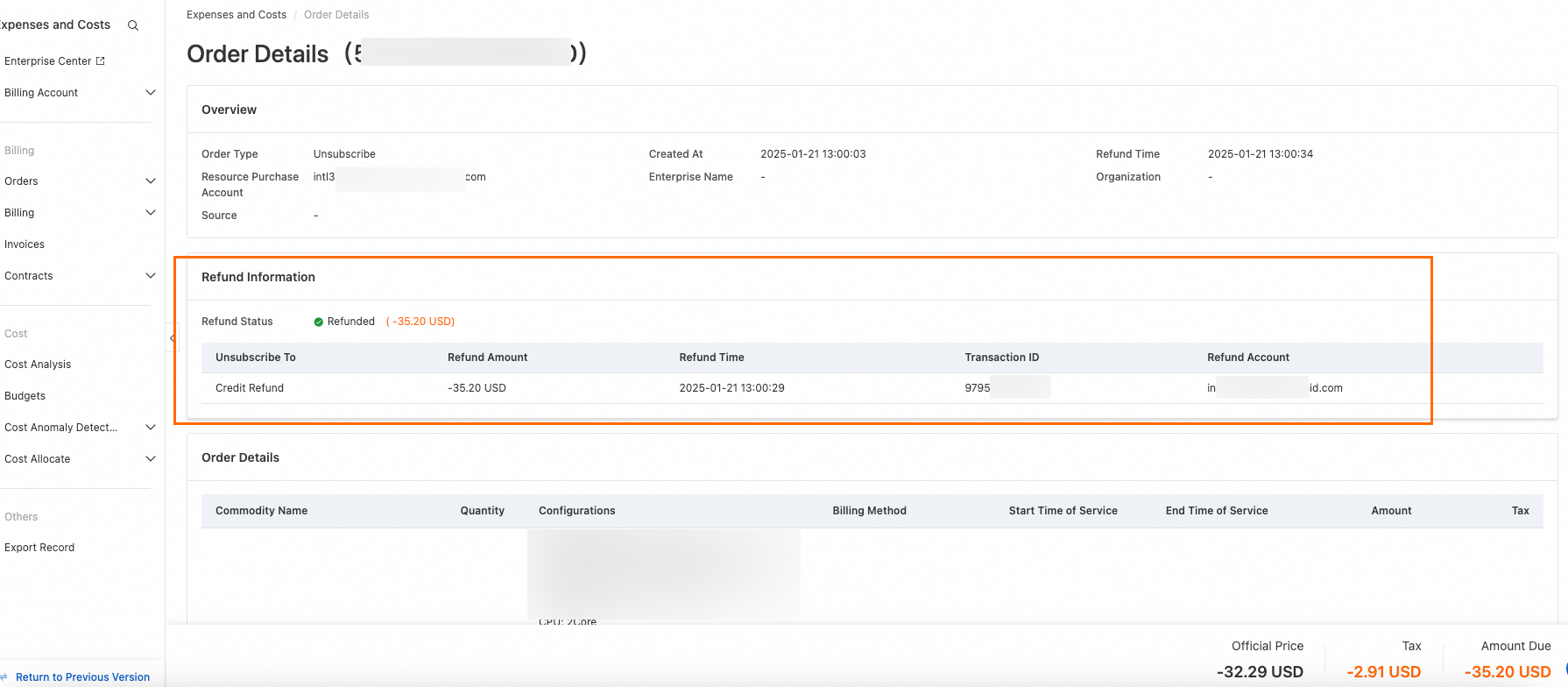
返金が到着していない場合の対処方法:
送信が成功したことの確認:解約注文の詳細 で対応する退会記録を確認してください。記録が存在しない場合、退会は正常に送信されていません。最初から退会プロセスをやり直してください。
返金のタイムライン — 返金の到着時間は、支払いチャネルによって異なります。元の支払い方法への返金は、銀行または支払いプロバイダーの処理により追加の時間がかかる場合があります。最大処理期間は、解約成功日から 30 営業日です。支払い方法ごとの具体的な期限については、上記の返金パステーブルをご参照ください。
返金経路 — 元の支払い経路が利用できなくなった場合 (例:支払期限が切れているなど)、または返金額がお客様の請求可能額を超えている場合、返金は自動的にお客様の Alibaba Cloud アカウント残高に振り替えられます。アカウント残高は、料金と費用 コンソールでご確認ください。
未処理の請求書の影響 — アカウントに未処理の請求書 (返金後、実際に消費された金額よりも多い金額で発行された請求書) がある場合、返金が凍結され、未処理の金額を相殺するために使用される可能性があります。返金された資金を引き出す前に、まず未処理の請求書の問題を解決してください。
よくある質問
[解約] ページで注文またはインスタンスが見つからないのはなぜですか?
次のような状況では、注文やインスタンスがリソースのサブスクリプション解除 ページに表示されない場合があります。
一時的な帯域幅のアップグレード (スケジュールされた帯域幅の拡張) — 直接解約はサポートされていません。アップグレードがアクティブな間に固定帯域幅値を下げるか、パブリック帯域幅課金方法を切り替えると、アップグレードは自動的にキャンセルされ、返金されます。
拡張注文 — 個別に解約することはできません。容量を削減するには、SMC 経由でワークロードを移行するか、新しいクラウドディスクを購入することを検討してください。
発効済みの更新注文 — 発効済みの更新注文はリソースの解約 タブに表示されません。無効な更新のサブスクリプション解除 タブに切り替えて、対象の注文を検索し、サブスクリプションを解除してください。
製品別ポータル — SMS リソースパッケージ、ICP 登録アシスタント、SSL 証明書、Alibaba Cloud Marketplace 製品など、一部の製品では、一元的な リソースのサブスクリプション解除 ページからではなく、それぞれの製品コンソールまたは指定されたリンクから操作する必要があります。
従量課金または無料利用枠の注文 — 解約することはできません。課金を停止するには、それぞれの製品コンソールからインスタンスを解放または削除します。
アカウントセキュリティの制限 — 検出された AK またはアカウント認証情報のリスクにより、アカウントで解約が制限されている場合、解約を続行する前に、プライマリアカウント所有者が RAM ユーザーを承認するか、制限を解除するための申し立てを送信する必要があります。
解約後、クーポン、バウチャー、初回購入割引は保持されますか?
バウチャーとクーポン — 解約された注文に関連付けられたアクティビティバウチャーとクーポンは、通常、解約が成功すると失効します。ただし、元のクーポンがまだ有効期間内であり、適用される返品ルールを満たしている場合は、アカウントに返される場合があります。具体的な結果については、解約確認ページのプロンプトを確認してください。
初回購入およびプロモーション割引 — 初回購入割引または特定のプロモーションオファーで購入したインスタンスを解約した後、その割引資格を再度使用することはできません。同じ製品を再購入すると、通常価格または現在適用されているプロモーション価格で請求されます。
請求書の割り当て — 返金が成功すると、利用可能な請求書の割り当て (請求書を発行できる金額) が自動的に減少します。返金額が残りの請求可能額を超える場合、超過した資金は Alibaba Cloud アカウント残高に返されます。返金された注文に対して請求書を申請しないでください。申請すると、返金された残高を引き出す能力に影響する可能性があります。
[今すぐ解約] ボタンがグレー表示されていてクリックできない場合はどうすればよいですか?
[今すぐ登録解除] ボタンを有効にするには、登録解除確認ページの左下隅にある、以下の両方のチェックボックスを選択する必要があります。
返金額を確認
データがバックアップおよび移行されたことを確認
両方のチェックボックスをオンにした後にのみ、ボタンがクリック可能になります。
両方のチェックボックスをオンにした後もボタンがクリックできない場合は、次の操作を試してください。
別のブラウザーに切り替えます (一部のブラウザーでは、このページとの互換性の問題がある場合があります)。
PC またはノートパソコンを使用してください。モバイルデバイス (Alibaba Cloud アプリおよびモバイルブラウザーを含む) では、解約操作はサポートされていません。
セルフサービスでの解約をサポートしていない製品、または特別な申請が必要な製品はどれですか?
次のシナリオでは、標準のセルフサービス解約フローではなく、手動の介入または特別なプロセスが必要です。
セルフサービスでサブスクリプションを解除できない製品 — Cloud Storage Gateway、ESA プラン、一部の AI Saving Plan、Token Plan などの特定の製品は、標準の リソースのサブスクリプション解除 ページではサポートされていません。これらの製品については、チケットを起票するか、特別な申請を完了して、専用の返金リンクを取得する必要があります。
アカウントセキュリティリスク — システムがアカウントに関連付けられた AK またはアカウント認証情報の侵害を検出した場合、解約操作が制限されます。プライマリアカウント所有者が操作を承認するか、セキュリティ問題を解決して制限を解除する必要があります。
一括解約のリスク管理 — 短期間に高頻度の解約リクエストによりアカウントが自動リスク管理をトリガーした場合、アカウントは一時的に制限されます。続行する前に、制限を解除するための申請を送信してください。
リセラー注文 — Alibaba Cloud リセラー (パートナー) を通じて購入したリソースは、リセラーを通じて処理する必要があります。リセラーに直接連絡して、解約または返金プロセスを開始してください。
使用済みまたは部分的に控除されたリソースパッケージ — すでに部分的に消費されているリソースパッケージは、完全に解約することはできません。未使用部分または残存価値のみが、適用される返金ルールに従って返金の対象となる場合があります。
RAMユーザーが解約権限を取得するにはどうすればよいですか?
デフォルトでは、プライマリ Alibaba Cloud アカウントのみが解約権限を持っています。RAM ユーザーが解約操作を実行できるようにするには、プライマリアカウントが RAM ユーザーに次の権限のうち少なくとも 1 つを付与する必要があります。
AliyunBSSFullAccess— 解約を含む、請求およびコスト管理へのフルアクセス。AliyunBSSRefundAccess— 解約および返金操作の専用権限。
RAM ユーザーが必要な権限を持っていない場合、リソースのサブスクリプション解除 ページにリソースが表示されないか、[今すぐサブスクリプションを解除] などのアクションボタンがグレー表示されてクリックできなくなる可能性があります。
RAM 権限の付与手順については、RAM コンソールのドキュメントをご参照ください。