すべてのプロダクト
Search
ドキュメントセンター

Platform For AI:開発者センター

最終更新日:Sep 03, 2025

このトピックでは、開発者センターを使用して ComfyUI API 統合を検証する方法について説明します。

ComfyUI API 統合の検証

API エディション

ComfyUI API エディションは、マルチ ComfyUI インスタンス シナリオでの API 呼び出しに使用されます。統合を実装する開発者向けに設計されており、Web グラフィカルインターフェイスはありません。 ComfyUI はステートフルサービスであるため、マルチ ComfyUI インスタンス シナリオでは、EAS の非同期キューサービスを使用して ComfyUI サービスを適切に呼び出します。

前提条件

Python 環境があり、EAS SDK(非同期キューサービス用)をインストールしていること: pip install eas_prediction

手順

  1. PAI ArtLab コンソール にログインします。左側のナビゲーションウィンドウで [開発者センター] を選択し、[カスタムサービス] タブをクリックします。次に、[カスタムサービスの作成] をクリックします。

    [サービスエディション][ComfyUI (API エディション)] を選択します。

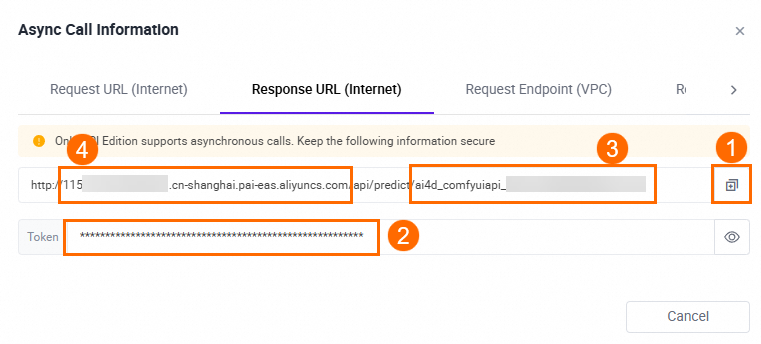
  2. [サービスステータス][実行中] に変わったら、[呼び出し情報] をクリックします。[レスポンス URL (インターネット)] タブで、URL、トークン、エンドポイント、およびサービス ID を取得します。
    image

  3. コード内の対応するコンテンツを取得した呼び出し情報に置き換え、サンプルコードを実行します。

    サンプルコード

    import requests
    
    ##### 呼び出し情報に基づいて以下のパラメータを置き換えます #####
    input_url = "http://115************.cn-shanghai.pai-eas.aliyuncs.com/api/predict/ai4d_comfyuiapi_1u38************"
    token = "Yjha************"
    endpoint = "115************.cn-shanghai.pai-eas.aliyuncs.com"
    service_name = "ai4d_comfyuiapi_1u38************/sink"
    ################################
    
    session = requests.session()
    session.headers.update({"Authorization": f"{token}"})
    
    work_flow = {
        "3": {
            "inputs": {
                "seed": 156680208700286,
                "steps": 20,
                "cfg": 8,
                "sampler_name": "euler",
                "scheduler": "normal",
                "denoise": 1,
                "model": [
                    "4",
                    0
                ],
                "positive": [
                    "6",
                    0
                ],
                "negative": [
                    "7",
                    0
                ],
                "latent_image": [
                    "5",
                    0
                ]
            },
            "class_type": "KSampler",
            "_meta": {
                "title": "K sampler"  // K サンプラー
            }
        },
        "4": {
            "inputs": {
                "ckpt_name": "3dAnimationDiffusion_v10.safetensors"
            },
            "class_type": "CheckpointLoaderSimple",
            "_meta": {
                "title": "Checkpoint loader (simple)" // チェックポイントローダー (シンプル)
            }
        },
        "5": {
            "inputs": {
                "width": 512,
                "height": 512,
                "batch_size": 1
            },
            "class_type": "EmptyLatentImage",
            "_meta": {
                "title": "Empty Latent" // 空の潜在画像
            }
        },
        "6": {
            "inputs": {
                "text": "beautiful scenery nature glass bottle landscape, , purple galaxy bottle,",
                "clip": [
                    "4",
                    1
                ]
            },
            "class_type": "CLIPTextEncode",
            "_meta": {
                "title": "CLIP text encoder" // CLIP テキストエンコーダー
            }
        },
        "7": {
            "inputs": {
                "text": "text, watermark",
                "clip": [
                    "4",
                    1
                ]
            },
            "class_type": "CLIPTextEncode",
            "_meta": {
                "title": "CLIP text encoder" // CLIP テキストエンコーダー
            }
        },
        "8": {
            "inputs": {
                "samples": [
                    "3",
                    0
                ],
                "vae": [
                    "4",
                    2
                ]
            },
            "class_type": "VAEDecode",
            "_meta": {
                "title": "VAE decoding" // VAE デコード
            }
        },
        "9": {
            "inputs": {
                "filename_prefix": "ComfyUI",
                "images": [
                    "8",
                    0
                ]
            },
            "class_type": "SaveImage",
            "_meta": {
                "title": "Save the image" // 画像の保存
            }
        }
    }
    
    for i in range(1):
        payload = work_flow
        response = session.post(url=f'{input_url}/api_prompt?task_id=txt2img_test', json=payload)
        if response.status_code != 200:
            exit(f"send request error:{response.content}, response code:{response.status_code}") // リクエスト送信エラー:{response.content}, レスポンスコード:{response.status_code}
        else:
            print(f"send {i} success, index is {response.content}") // {i} 送信成功、インデックスは {response.content} です
    
    
    from eas_prediction import QueueClient
    
    sink_queue = QueueClient(f'{endpoint}', f'{service_name}')
    sink_queue.set_token(f'{token}')
    sink_queue.init()
    
    watcher = sink_queue.watch(0, 1, auto_commit=False)
    for x in watcher.run():
        if 'task_id' in x.tags:
            print('index {} task_id is {}'.format(x.index, x.tags['task_id'])) // インデックス {} task_id は {} です
            print(f'index {x.index} data is {x.data}') // インデックス {x.index} データは {x.data} です
            sink_queue.commit(x.index)
    
  4. コードを実行した後、結果からファイル名を取得します。

    image

  5. ArtLab で、右上隅の image にカーソルを合わせます。[ストレージ] の横にあるリンクをクリックして OSS バケットに移動し、ストレージパスを取得します。

    image

  6. OSS イメージアドレスを連結してアクセスします。形式: OSS バケットパス/output/ファイル名

    例: 26****/data-115****************/output/ComfyUI_00000000_174427782695938_599ffc33-edea-4e64-bb60-28e834940f5c_.png

排他エディション

ComfyUI 排他エディションは、API 呼び出しとオンラインデバッグの両方をサポートしています。検証プロセスは API エディションと同様です。

前提条件

Python 環境があること。

手順

  1. PAI ArtLab コンソール にログインします。左側のナビゲーションウィンドウで [開発者センター] を選択し、[カスタムサービス] タブをクリックします。次に、[カスタムサービスの作成] をクリックします。

    [サービスエディション] には [ComfyUI (排他的エディション)] を選択します。

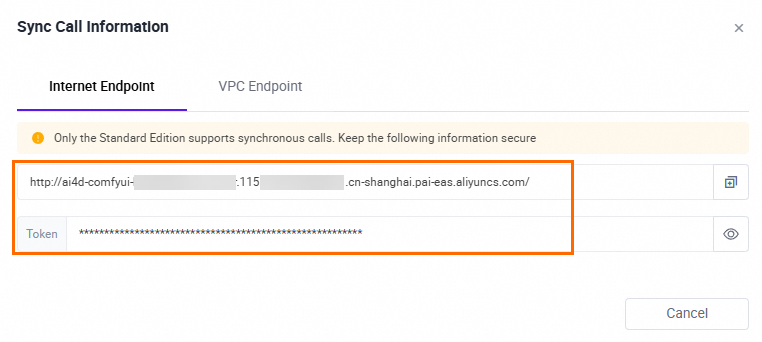
  2. [サービスステータス][実行中] に変わったら、[呼び出し情報] をクリックします。[インターネットエンドポイント] タブで、URL とトークンを取得します。
    image

  3. コード内の対応するコンテンツを取得した呼び出し情報に置き換え、サンプルコードを実行します。

    サンプルコード

    import requests
    
    ##### デバッグ情報に基づいて以下のパラメータを置き換えます #####
    url = "http://ai4d_comfyuiapi_1u38************.115************.cn-shanghai.pai-eas.aliyuncs.com/"
    token = "Yjha************"
    ################################
    
    payload = {
        "prompt": {
            "3": {
                "inputs": {
                    "seed": 156680208700286,
                    "steps": 20,
                    "cfg": 8,
                    "sampler_name": "euler",
                    "scheduler": "normal",
                    "denoise": 1,
                    "model": [
                        "4",
                        0
                    ],
                    "positive": [
                        "6",
                        0
                    ],
                    "negative": [
                        "7",
                        0
                    ],
                    "latent_image": [
                        "5",
                        0
                    ]
                },
                "class_type": "KSampler",
                "_meta": {
                    "title": "K sampler" // K サンプラー
                }
            },
            "4": {
                "inputs": {
                    "ckpt_name": "3dAnimationDiffusion_v10.safetensors"
                },
                "class_type": "CheckpointLoaderSimple",
                "_meta": {
                    "title": "Checkpoint loader (simple)" // チェックポイントローダー (シンプル)
                }
            },
            "5": {
                "inputs": {
                    "width": 512,
                    "height": 512,
                    "batch_size": 1
                },
                "class_type": "EmptyLatentImage",
                "_meta": {
                    "title": "Empty Latent" // 空の潜在画像
                }
            },
            "6": {
                "inputs": {
                    "text": "beautiful scenery nature glass bottle landscape, , purple galaxy bottle,",
                    "clip": [
                        "4",
                        1
                    ]
                },
                "class_type": "CLIPTextEncode",
                "_meta": {
                    "title": "CLIP text encoder" // CLIP テキストエンコーダー
                }
            },
            "7": {
                "inputs": {
                    "text": "text, watermark",  // テキスト、ウォーターマーク
                    "clip": [
                        "4",
                        1
                    ]
                },
                "class_type": "CLIPTextEncode",
                "_meta": {
                    "title": "CLIP text encoder" // CLIP テキストエンコーダー
                }
            },
            "8": {
                "inputs": {
                    "samples": [
                        "3",
                        0
                    ],
                    "vae": [
                        "4",
                        2
                    ]
                },
                "class_type": "VAEDecode",
                "_meta": {
                    "title": "VAE decoding" // VAE デコード
                }
            },
            "9": {
                "inputs": {
                    "filename_prefix": "ComfyUI",
                    "images": [
                        "8",
                        0
                    ]
                },
                "class_type": "SaveImage",
                "_meta": {
                    "title": "Save the image" // 画像の保存
                }
            }
        }
    }
    
    # リクエストを開始する
    session = requests.session()
    session.headers.update({"Authorization": f"{token}"})
    prompt_url = url + "prompt"
    
    response = session.post(url=f'{prompt_url}', json=payload)
    if response.status_code != 200:
        raise Exception(response.content)
    
    data = response.json()
    prompt_id = data['prompt_id']
    print(f"get data: {data}, get prompt id: {prompt_id}") // データの取得: {data}, prompt id の取得: {prompt_id}
    
    
    # 結果を取得する
    # リクエスト URL を構築する
    history_url = f"{url}history/{prompt_id}"
    
    session = requests.session()
    session.headers.update({"Authorization": f"{token}"})
    
    response = session.get(url=f'{history_url}')
    
    if response.status_code != 200:
        raise Exception(response.content)
    
    data = response.json()
    print(data)
    
    # JSON データを解析して、すべての出力の画像情報を取得する
    for prompt_id, prompt_data in data.items():
        outputs = prompt_data.get("outputs", {})
        for node_id, node_data in outputs.items():
            images = node_data.get("images", [])
            for image in images:
                filename = image.get("filename")
                print(f"Node number: {node_id}, Image filename: {filename}") // ノード番号: {node_id}, 画像ファイル名: {filename}
    
  4. コードを実行した後、結果からファイル名を取得します。

    image

  5. ArtLab で、右上隅の image にカーソルを合わせます。[ストレージ] の横にあるリンクをクリックして OSS バケットに移動し、ストレージパスを取得します。

    image

  6. OSS イメージアドレスを連結してアクセスします。形式: OSS バケットパス/output/ファイル名

    例: 26****/data-115****************/output/ComfyUI_00000000_174427782695938_599ffc33-edea-4e64-bb60-28e834940f5c_.png

