Alibaba Cloud Model Studio の エージェント および ワークフロー (エージェントオーケストレーションアプリケーションに代わるアプリケーション)を呼び出す際に、主にカスタムプラグインおよびカスタムノード向けにカスタムパラメーターを渡します。
API キーの作成およびAPI キーを環境変数としてエクスポートします。SDK を使用して呼び出しを行う場合は、DashScope SDK をインストールしてください。
カスタムプラグインパラメーター
この記事では、寮規則照会ツールを例に、API を使用してカスタムプラグインにパラメーターを渡す方法を説明します。
注記カスタムプラグインのパラメーターは、関連付けられた エージェント または ワークフロー の プラグインノード経由で渡されます。
以下の例では、エージェント のカスタムプラグインパラメーターを渡す方法を示します。
使用方法
ステップ 1:カスタムプラグインの作成
すでにプラグインタールを作成済みまたはプラグインをインポート済みの場合は、このステップをスキップしてください。
-
カスタムプラグインを作成します。Model Studio コンソールの プラグイン ページにアクセスし、Add Custom Plug-in をクリックします。プラグイン情報を入力します。認証が必要な場合は、認証の有効化 スイッチをオンにして設定を行います。
プラグインの説明例: 寮規則を照会し、数値インデックスで特定の項目を検索します。
プラグイン URL の例: https://domitorgreement-plugin-example-icohrkdjxy.cn-beijing.fcapp.run

注: Plug-in Description は、プラグインの目的を簡潔にまとめたものです。これにより、大規模言語モデルがタスクに対してプラグインを呼び出す必要があるかどうかを判断できます。自然言語で記述してください。
-
ツールを作成します。ツール情報を入力し、入力および出力パラメーターを設定します。注:
- Tool Description は、大規模言語モデルがツールの機能とユースケースをよりよく理解するために役立ちます。自然言語を使用し、可能であれば例を記載してください。
- わかりやすい Parameter Name は、大規模言語モデルがその情報が何を表しているかを理解するのに役立ちます。
- Parameter Description は、入力パラメーターの機能を説明するものです。簡潔かつ正確に記述し、大規模言語モデルが正しい値を決定できるようにしてください。
- 入力パラメーターの Passing Method として、必ず 業務パススルー を選択してください。
この例では、寮規則コンテンツのインデックス(
article_index)をパススルーパラメーターとして設定します。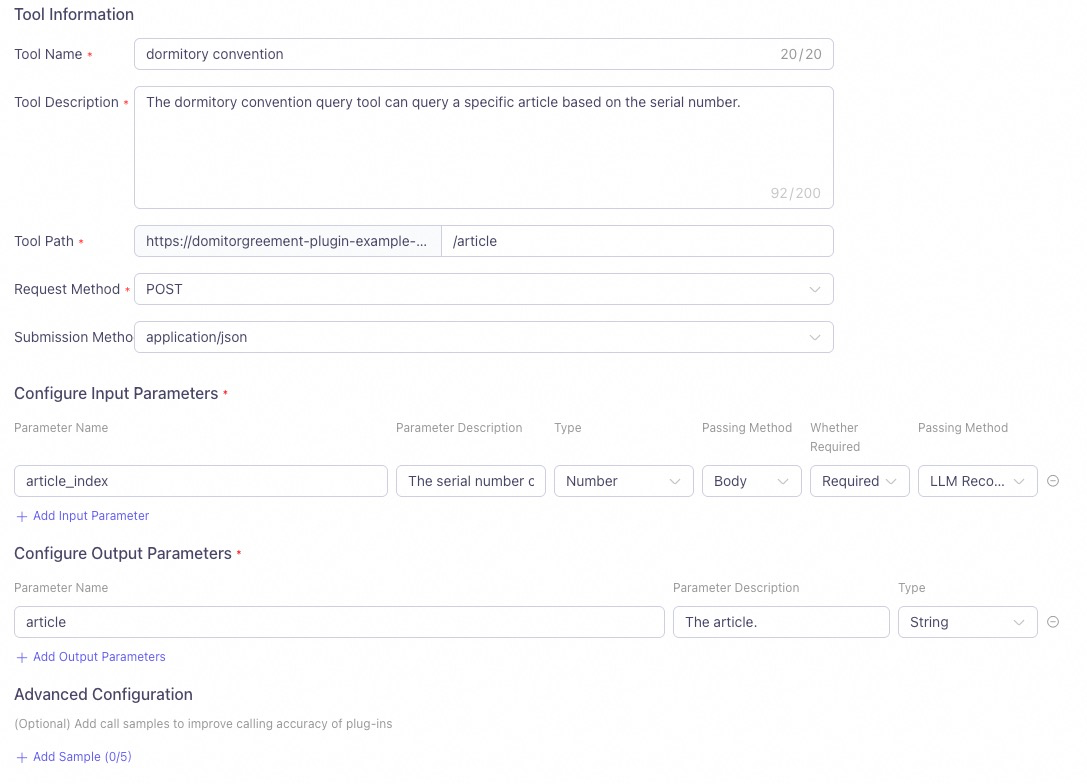
-
Test Tool をクリックします。テストが成功したら、Publish します。
ステップ 2:プラグインとエージェントの関連付け
プラグインは、同一ワークスペース内の エージェント のみに関連付けることができます。
- 公開済みプラグインのカードで、Add to Agent をクリックし、エージェントアプリケーションを選択します。
- または、アプリケーション内で + プラグイン をクリックしてカスタムプラグインを関連付けます。
- 最後に、Publish します。
ステップ 3:API 呼び出し
-
認証不要の場合:API 経由でカスタムプラグインを呼び出すには、
biz_paramsのuser_defined_paramsパラメーターを使用してカスタムプラグイン情報を渡します。your_plugin_codeは実際のプラグイン ID に置き換え、プラグインで設定した入力パラメーターのキーと値のペアを渡します。プラグイン ID はプラグインカード上で確認できます。
この例では、
article_indexパラメーターに値 2 を渡すことで、2 番目の寮規則の内容を照会し、正しい結果を返します。Python
リクエストサンプル
応答サンプルimport os from http import HTTPStatus # DashScope SDK v1.14.0 以降の使用を推奨します。 import dashscope from dashscope import Application dashscope.base_http_api_url = 'https://dashscope-intl.aliyuncs.com/api/v1' biz_params = { # エージェントアプリケーションのカスタムプラグインの入力パラメーターを渡します。`your_plugin_code` をプラグイン ID に置き換えてください。 "user_defined_params": { "your_plugin_code": { "article_index": 2}}} response = Application.call( # 環境変数が設定されていない場合は、次の行を api_key="sk-xxx" に置き換えることで、Model Studio API キーを使用できます。API キーの漏洩を防ぐため、本番環境では環境変数の使用を推奨します。 api_key=os.getenv("DASHSCOPE_API_KEY"), app_id='YOUR_APP_ID', prompt='Dormitory convention content', biz_params=biz_params) if response.status_code != HTTPStatus.OK: print(f'request_id={response.request_id}') print(f'code={response.status_code}') print(f'message={response.message}') print(f'For more information, see: https://www.alibabacloud.com/help/en/model-studio/developer-reference/error-code') else: print('%s\n' % (response.output.text)) # テキストのみを処理して出力します。 # print('%s\n' % (response.usage))The second article of the dormitory convention is as follows: "Roommates must help, care for, and learn from each other to achieve mutual improvement. They must be tolerant, forgiving, respectful, and sincere." This suggests that roommates should foster a positive living and learning environment by supporting and helping each other, while also learning to understand and respect others. If you want to learn about other articles of the convention, just ask!Java
リクエストサンプル
応答サンプルimport com.alibaba.dashscope.app.*; import com.alibaba.dashscope.exception.ApiException; import com.alibaba.dashscope.exception.InputRequiredException; import com.alibaba.dashscope.exception.NoApiKeyException; import com.alibaba.dashscope.utils.JsonUtils; import com.alibaba.dashscope.utils.Constants; public class Main { static { Constants.baseHttpApiUrl="https://dashscope-intl.aliyuncs.com/api/v1"; } public static void appCall() throws NoApiKeyException, InputRequiredException { String bizParams = // エージェントアプリケーションのカスタムプラグインの入力パラメーターを渡します。`{your_plugin_code}` はプラグイン ID に置き換えてください。 "{\"user_defined_params\":{\"{your_plugin_code}\":{\"article_index\":2}}}"; ApplicationParam param = ApplicationParam.builder() // 環境変数が設定されていない場合、次の行を .apiKey("sk-xxx") に置き換えることで Model Studio API キーを使用できます。本番環境では API キーの漏洩を防ぐため、環境変数の使用を推奨します。 .apiKey(System.getenv("DASHSCOPE_API_KEY")) .appId("YOUR_APP_ID") .prompt("Dormitory convention content") .bizParams(JsonUtils.parse(bizParams)) .build(); Application application = new Application(); ApplicationResult result = application.call(param); System.out.printf("%s\n", result.getOutput().getText()); } public static void main(String[] args) { try { appCall(); } catch (ApiException | NoApiKeyException | InputRequiredException e) { System.out.printf("Exception: %s", e.getMessage()); System.out.println("詳細については、「https://www.alibabacloud.com/help/ja/model-studio/developer-reference/error-code」をご参照ください。"); } System.exit(0); } }The second article of the dormitory convention is as follows: Article 2: Roommates must help, care for, and learn from each other to achieve mutual improvement. They must be tolerant, forgiving, respectful, and sincere. This emphasizes that in a shared living environment, roommates should maintain a positive and supportive relationship to create a harmonious atmosphere for living and learning. If you need to learn about any other specific articles, please let me know.HTTP
curl
リクエストサンプルcurl -X POST https://dashscope-intl.aliyuncs.com/api/v1/apps/YOUR_APP_ID/completion \ --header "Authorization: Bearer $DASHSCOPE_API_KEY" \ --header 'Content-Type: application/json' \ --data '{ "input": { "prompt": "Dormitory convention content", "biz_params": { "user_defined_params": { "{your_plugin_code}": { "article_index": 2 } } } }, "parameters": {}, "debug":{} }'
応答サンプルYOUR_APP_IDはご利用のアプリケーション ID に置き換えてください。{"output": {"finish_reason":"stop", "session_id":"e151267ffded4fbdb13d91439011d31e", "text":"The second article of the dormitory convention is: \"Roommates must help, care for, and learn from each other to achieve mutual improvement. They must be tolerant, forgiving, respectful, and sincere.\" This means that in dormitory life, everyone must support each other to create a harmonious and positive living environment."}, "usage":{"models":[{"output_tokens":94,"model_id":"qwen-max","input_tokens":453}]}, "request_id":"a39fd2b5-7e2c-983e-84a1-1039f726f18a"}%PHP
リクエストサンプル
応答サンプル<?php # 環境変数が設定されていない場合、次の行を $api_key="sk-xxx" に置き換えることで Model Studio API キーを使用できます。本番環境では API キーの漏洩を防ぐため、環境変数の使用を推奨します。 $api_key = getenv("DASHSCOPE_API_KEY"); $application_id = 'YOUR_APP_ID'; // ご利用のアプリケーション ID に置き換えてください。 $url = "https://dashscope-intl.aliyuncs.com/api/v1/apps/$application_id/completion"; // `{your_plugin_code}` はご利用のプラグイン ID に置き換えてください。 // リクエストデータを構築します。 $data = [ "input" => [ 'prompt' => 'Dormitory convention content', 'biz_params' => [ 'user_defined_params' => [ '{your_plugin_code}' => [ 'article_index' => 2 ] ] ] ], ]; // データを JSON としてエンコードします。 $dataString = json_encode($data); // json_encode が成功したかを確認します。 if (json_last_error() !== JSON_ERROR_NONE) { die("JSON encoding failed with error: " . json_last_error_msg()); } // cURL セッションを初期化します。 $ch = curl_init($url); // cURL オプションを設定します。 curl_setopt($ch, CURLOPT_CUSTOMREQUEST, "POST"); curl_setopt($ch, CURLOPT_POSTFIELDS, $dataString); curl_setopt($ch, CURLOPT_RETURNTRANSFER, true); curl_setopt($ch, CURLOPT_HTTPHEADER, [ 'Content-Type: application/json', 'Authorization: Bearer ' . $api_key ]); // リクエストを実行します。 $response = curl_exec($ch); // cURL 実行が成功したかを確認します。 if ($response === false) { die("cURL Error: " . curl_error($ch)); } // HTTP ステータスコードを取得します。 $status_code = curl_getinfo($ch, CURLINFO_HTTP_CODE); // cURL セッションを閉じます。 curl_close($ch); // 応答データをデコードします。 $response_data = json_decode($response, true); // 応答を処理します。 if ($status_code == 200) { if (isset($response_data['output']['text'])) { echo "{$response_data['output']['text']}\n"; } else { echo "No text in response.\n"; } }else { if (isset($response_data['request_id'])) { echo "request_id={$response_data['request_id']}\n";} echo "code={$status_code}\n"; if (isset($response_data['message'])) { echo "message={$response_data['message']}\n";} else { echo "message=Unknown error\n";} } ?>The second article of the dormitory convention states: Roommates must help, care for, and learn from each other to achieve mutual improvement. They must be tolerant, forgiving, respectful, and sincere. This is to ensure that everyone can live and study in a harmonious and friendly environment. If you want to learn about other specific articles or have other questions, feel free to ask.Node.js
依存関係:
リクエストサンプルnpm install axios
応答サンプルconst axios = require('axios'); async function callDashScope() { // 環境変数が設定されていない場合、次の行を apiKey='sk-xxx' に置き換えることで Model Studio API キーを使用できます。本番環境では API キーの漏洩を防ぐため、環境変数の使用を推奨します。 const apiKey = process.env.DASHSCOPE_API_KEY; const appId = 'YOUR_APP_ID';// ご利用のアプリケーション ID に置き換えてください。 const pluginCode = 'YOUR_PLUGIN_CODE';// ご利用のプラグイン ID に置き換えてください。 const url = `https://dashscope-intl.aliyuncs.com/api/v1/apps/${appId}/completion`; const data = { input: { prompt: "Dormitory convention content", biz_params: { user_defined_params: { [pluginCode]: { // 'article_index' はカスタムプラグインパラメーターの例です。 'article_index': 2 } } } }, parameters: {}, debug: {} }; try { console.log("Sending request to DashScope API..."); const response = await axios.post(url, data, { headers: { 'Authorization': `Bearer ${apiKey}`, 'Content-Type': 'application/json' } }); if (response.status === 200) { if (response.data.output && response.data.output.text) { console.log(`${response.data.output.text}`); } } else { console.log("Request failed:"); if (response.data.request_id) { console.log(`request_id=${response.data.request_id}`); } console.log(`code=${response.status}`); if (response.data.message) { console.log(`message=${response.data.message}`); } else { console.log('message=Unknown error'); } } } catch (error) { console.error(`Error calling DashScope: ${error.message}`); if (error.response) { console.error(`Response status: ${error.response.status}`); console.error(`Response data: ${JSON.stringify(error.response.data, null, 2)}`); } } } callDashScope();The second article of the dormitory convention states: Roommates must help, care for, and learn from each other to achieve mutual improvement. They must be tolerant, forgiving, respectful, and sincere. This is to ensure that everyone can live and study in a harmonious and friendly environment. If you want to learn about other specific articles or have other questions, feel free to ask.C#
リクエストサンプル
応答サンプルusing System.Text; class Program { static async Task Main(string[] args) { // 環境変数が設定されていない場合、次の行を apiKey="sk-xxx" に置き換えることで Model Studio API キーを使用できます。本番環境では API キーの漏洩を防ぐため、環境変数の使用を推奨します。 string apiKey = Environment.GetEnvironmentVariable("DASHSCOPE_API_KEY")?? throw new InvalidOperationException("DASHSCOPE_API_KEY environment variable is not set.");; string appId = "YOUR_APP_ID";// ご利用のアプリケーション ID に置き換えてください。 if (string.IsNullOrEmpty(apiKey)) { Console.WriteLine("Please ensure that the DASHSCOPE_API_KEY environment variable is set."); return; } string url = $"https://dashscope-intl.aliyuncs.com/api/v1/apps/{appId}/completion"; using (HttpClient client = new HttpClient()) { client.DefaultRequestHeaders.Add("Authorization", $"Bearer {apiKey}"); string pluginCode = "{your_plugin_code}"; // `{your_plugin_code}` はご利用のプラグイン ID に置き換えてください。 string jsonContent = $@"{{ ""input"": {{ ""prompt"": ""Dormitory convention content"", ""biz_params"": {{ ""user_defined_params"": {{ ""{pluginCode}"": {{ ""article_index"": 2 }} }} }} }}, ""parameters"": {{}}, ""debug"": {{}} }}"; HttpContent content = new StringContent(jsonContent, Encoding.UTF8, "application/json"); try { HttpResponseMessage response = await client.PostAsync(url, content); if (response.IsSuccessStatusCode) { string responseBody = await response.Content.ReadAsStringAsync(); Console.WriteLine("Request successful:"); Console.WriteLine(responseBody); } else { Console.WriteLine($"Request failed with status code: {response.StatusCode}"); string responseBody = await response.Content.ReadAsStringAsync(); Console.WriteLine(responseBody); } } catch (Exception ex) { Console.WriteLine($"Error calling DashScope: {ex.Message}"); } } } }{ "output": { "finish_reason": "stop", "session_id": "237ca6187c814f3b9e7461090a5f8b74", "text": "The second article of the dormitory convention is as follows:\n\n\"Roommates must help, care for, and learn from each other to achieve mutual improvement. They must be tolerant, forgiving, respectful, and sincere.\"\n\nThis indicates that in the dormitory, roommates need to establish a positive relationship, creating a harmonious living and learning environment by helping, caring for, and supporting each other. They should also learn to understand and accept differences between roommates and communicate with sincerity. If you want to learn about other articles or specific content, please let me know!" }, "usage": { "models": [ { "output_tokens": 133, "model_id": "qwen-max", "input_tokens": 829 } ] }, "request_id": "64e8c359-d071-9d2e-bb94-187e86cc3a79" }Go
リクエストサンプル
応答サンプルpackage main import ( "bytes" "encoding/json" "fmt" "io" "net/http" "os" ) func main() { // 環境変数が設定されていない場合、次の行を apiKey := "sk-xxx" に置き換えることで Model Studio API キーを使用できます。本番環境では API キーの漏洩を防ぐため、環境変数の使用を推奨します。 apiKey := os.Getenv("DASHSCOPE_API_KEY") appId := "YOUR_APP_ID" // ご利用のアプリケーション ID に置き換えてください。 pluginCode := "YOUR_PLUGIN_CODE" // ご利用のプラグイン ID に置き換えてください。 if apiKey == "" { fmt.Println("Please ensure that the DASHSCOPE_API_KEY environment variable is set.") return } url := fmt.Sprintf("https://dashscope-intl.aliyuncs.com/api/v1/apps/%s/completion", appId) // リクエストボディを作成します。 requestBody := map[string]interface{}{ "input": map[string]interface{}{ "prompt": "Dormitory convention content", "biz_params": map[string]interface{}{ "user_defined_params": map[string]interface{}{ pluginCode: map[string]interface{}{ "article_index": 2, }, }, }, }, "parameters": map[string]interface{}{}, "debug": map[string]interface{}{}, } jsonData, err := json.Marshal(requestBody) if err != nil { fmt.Printf("Failed to marshal JSON: %v\n", err) return } // HTTP POST リクエストを作成します。 req, err := http.NewRequest("POST", url, bytes.NewBuffer(jsonData)) if err != nil { fmt.Printf("Failed to create request: %v\n", err) return } // リクエストヘッダーを設定します。 req.Header.Set("Authorization", "Bearer "+apiKey) req.Header.Set("Content-Type", "application/json") // リクエストを送信します。 client := &http.Client{} resp, err := client.Do(req) if err != nil { fmt.Printf("Failed to send request: %v\n", err) return } defer resp.Body.Close() // 応答を読み取ります。 body, err := io.ReadAll(resp.Body) if err != nil { fmt.Printf("Failed to read response: %v\n", err) return } // 応答を処理します。 if resp.StatusCode == http.StatusOK { fmt.Println("Request successful:") fmt.Println(string(body)) } else { fmt.Printf("Request failed with status code: %d\n", resp.StatusCode) fmt.Println(string(body)) } }{ "output": { "finish_reason": "stop", "session_id": "860d2a4c1f3649ac880298537993cb51", "text": "The second article of the dormitory convention is as follows:\n\nRoommates must help, care for, and learn from each other to achieve mutual improvement. They must be tolerant, forgiving, respectful, and sincere.\n\nThis emphasizes that in dormitory life, roommates should maintain a supportive relationship and respect each other. Would you like to learn about the content of other articles?" }, "usage": { "models": [ { "output_tokens": 84, "model_id": "qwen-max", "input_tokens": 876 } ] }, "request_id": "0a250055-90a4-992d-9276-e268ad35d1ab" } -
認証が必要な場合:このシナリオでは、認証 が有効化され、ユーザレベル認証 が設定されたカスタムプラグインを呼び出す方法を説明します。
プラグイン ID はプラグインカード上で確認できます。
biz_paramsフィールドのuser_defined_paramsを使用してカスタムプラグイン情報を渡します。your_plugin_codeはご利用のプラグイン ID に置き換え、入力パラメーターをキーと値のペアで指定します。biz_paramsフィールドのuser_defined_tokensを使用して認証情報を渡します。your_plugin_codeはご利用のプラグイン ID に置き換え、user_tokenの値を認証トークン(例:DashScope API キー)に設定します。- 認証が成功すると、サービスは提供されたインデックスパラメーターに基づいて指定された項目を照会し、正しい結果を返します。
この例では、
article_indexパラメーターに 2 を設定し、user_tokenの値であるYOUR_TOKENを実際の DASHSCOPE_API_KEY に置き換えます。認証が成功すると、2 番目の寮規則の内容が照会され、正しい結果が返されます。Python
リクエストサンプル
応答サンプルfrom http import HTTPStatus import os # DashScope SDK v1.14.0 以降の使用を推奨します。 import dashscope from dashscope import Application dashscope.base_http_api_url = 'https://dashscope-intl.aliyuncs.com/api/v1' biz_params = { # エージェントアプリケーションのカスタムプラグイン用の認証情報を渡します。 # your_plugin_code をプラグイン ID に、YOUR_TOKEN を API キーなどの認証トークンに置き換えます。 "user_defined_params": { "your_plugin_code": { "article_index": 2}}, "user_defined_tokens": { "your_plugin_code": { "user_token": "YOUR_TOKEN"}}} response = Application.call( # 環境変数が設定されていない場合は、次の行を api_key="sk-xxx" に置き換えて DashScope API キーを使用できます。 # ただし、キーの漏洩リスクを低減するため、本番環境で API キーをハードコーディングすることは推奨されません。 api_key=os.getenv("DASHSCOPE_API_KEY"), app_id='YOUR_APP_ID', prompt='Dormitory convention content', biz_params=biz_params) if response.status_code != HTTPStatus.OK: print(f'request_id={response.request_id}') print(f'code={response.status_code}') print(f'message={response.message}') print(f'詳細については、以下を参照してください: https://www.alibabacloud.com/help/en/model-studio/developer-reference/error-code') else: print('%s\n' % (response.output.text)) # テキストのみを処理して出力します。 # print('%s\n' % (response.usage))The second article of the dormitory convention is as follows: Roommates must help, care for, and learn from each other to achieve mutual improvement. They must be tolerant, forgiving, respectful, and sincere. If you need to know about other articles of the convention, please let me know.Java
リクエストサンプル
応答サンプルimport com.alibaba.dashscope.app.*; import com.alibaba.dashscope.exception.ApiException; import com.alibaba.dashscope.exception.InputRequiredException; import com.alibaba.dashscope.exception.NoApiKeyException; import com.alibaba.dashscope.utils.JsonUtils; import com.alibaba.dashscope.utils.Constants; public class Main { static { Constants.baseHttpApiUrl="https://dashscope-intl.aliyuncs.com/api/v1"; } public static void appCall() throws NoApiKeyException, InputRequiredException { String bizParams = // {your_plugin_code} はご利用のプラグイン ID に、YOUR_TOKEN はトークン(例:API キー)に置き換えてください。 "{\"user_defined_params\":{\"{your_plugin_code}\":{\"article_index\":2}}," + "\"user_defined_tokens\":{\"{your_plugin_code}\":{\"user_token\":\"YOUR_TOKEN\"}}}"; ApplicationParam param = ApplicationParam.builder() // 環境変数が設定されていない場合、次の行を .apiKey("sk-xxx") に置き換えることで DashScope API キーを使用できます。 // ただし、本番環境では API キーの漏洩リスクを低減するため、コード内に API キーをハードコードしないことを推奨します。 .apiKey(System.getenv("DASHSCOPE_API_KEY")) .appId("YOUR_APP_ID") .prompt("Dormitory convention content") .bizParams(JsonUtils.parse(bizParams)) .build(); Application application = new Application(); ApplicationResult result = application.call(param); System.out.printf("%s\n", result.getOutput().getText()); } public static void main(String[] args) { try { appCall(); } catch (ApiException | NoApiKeyException | InputRequiredException e) { System.out.printf("Exception: %s", e.getMessage()); System.out.println("詳細については、「https://www.alibabacloud.com/help/ja/model-studio/developer-reference/error-code」をご参照ください。"); } System.exit(0); } }The second article of the dormitory convention is as follows: Roommates must help, care for, and learn from each other to achieve mutual improvement. They must be tolerant, forgiving, respectful, and sincere. If you need to query for more articles, please let me know.YOUR_APP_ID はご利用のアプリケーション ID に、your_plugin_code はカスタムプラグイン ID に、YOUR_TOKEN は認証トークンに置き換えてください。
HTTP
curl
リクエストサンプルcurl -X POST https://dashscope-intl.aliyuncs.com/api/v1/apps/YOUR_APP_ID/completion \ --header "Authorization: Bearer $DASHSCOPE_API_KEY" \ --header 'Content-Type: application/json' \ --data '{ "input": { "prompt": "Dormitory convention content", "biz_params": { "user_defined_params": { "{your_plugin_code}": { "article_index": 2 } }, "user_defined_tokens": { "{your_plugin_code}": { "user_token": "YOUR_TOKEN" } } } }, "parameters": {}, "debug":{} }'
応答サンプルYOUR_APP_ID はご利用のアプリケーション ID に、{your_plugin_code} はカスタムプラグイン ID に、YOUR_TOKEN は認証トークンに置き換えてください。
{"output":{"finish_reason":"stop",
"session_id":"d3b5c3e269dc40479255a7a02df5c630",
"text":"The second article of the dormitory convention is: \"Roommates must help, care for, and learn from each other to achieve mutual improvement. They must be tolerant, forgiving, respectful, and sincere.\" This emphasizes the importance of harmonious coexistence and mutual progress among members in dormitory life."},
"usage":{"models":[{"output_tokens":80,"model_id":"qwen-max","input_tokens":432}]},
"request_id":"1f77154c-edc3-9003-b622-816fa2f849cf"}%
PHP
リクエストサンプル
応答サンプル<?php # 環境変数が設定されていない場合、次の行を $api_key="sk-xxx" に置き換えることで DashScope API キーを使用できます。 # ただし、本番環境では API キーの漏洩リスクを低減するため、コード内に API キーをハードコードしないことを推奨します。 $api_key = getenv("DASHSCOPE_API_KEY"); $application_id = 'YOUR_APP_ID'; // ご利用のアプリケーション ID に置き換えてください。 $url = "https://dashscope-intl.aliyuncs.com/api/v1/apps/$application_id/completion"; // リクエストデータを構築します。 $data = [ "input" => [ 'prompt' => 'Dormitory convention content', 'biz_params' => [ 'user_defined_params' => [ '{your_plugin_code}' => [//{your_plugin_code} はご利用のプラグイン ID に置き換えてください。 'article_index' => 2 ] ], 'user_defined_tokens' => [ '{your_plugin_code}' => [//{your_plugin_code} はご利用のプラグイン ID に置き換えてください。 'user_token' => 'YOUR_TOKEN'//認証トークン(例:API キー)に置き換えてください。 ] ] ] ], ]; // データを JSON としてエンコードします。 $dataString = json_encode($data); // json_encode が成功したかを確認します。 if (json_last_error() !== JSON_ERROR_NONE) { die("JSON encoding failed with error: " . json_last_error_msg()); } // cURL セッションを初期化します。 $ch = curl_init($url); // cURL オプションを設定します。 curl_setopt($ch, CURLOPT_CUSTOMREQUEST, "POST"); curl_setopt($ch, CURLOPT_POSTFIELDS, $dataString); curl_setopt($ch, CURLOPT_RETURNTRANSFER, true); curl_setopt($ch, CURLOPT_HTTPHEADER, [ 'Content-Type: application/json', 'Authorization: Bearer ' . $api_key ]); // リクエストを実行します。 $response = curl_exec($ch); // cURL 実行が成功したかを確認します。 if ($response === false) { die("cURL Error: " . curl_error($ch)); } // HTTP ステータスコードを取得します。 $status_code = curl_getinfo($ch, CURLINFO_HTTP_CODE); // cURL セッションを閉じます。 curl_close($ch); // 応答データをデコードします。 $response_data = json_decode($response, true); // 応答を処理します。 if ($status_code == 200) { if (isset($response_data['output']['text'])) { echo "{$response_data['output']['text']}\n"; } else { echo "No text in response.\n"; } }else { if (isset($response_data['request_id'])) { echo "request_id={$response_data['request_id']}\n";} echo "code={$status_code}\n"; if (isset($response_data['message'])) { echo "message={$response_data['message']}\n";} else { echo "message=Unknown error\n";} } ?>The second article of the dormitory convention is as follows: > Roommates must help, care for, and learn from each other to achieve mutual improvement. They must be tolerant, forgiving, respectful, and sincere. If you need to know more about the convention or other information, please feel free to ask.Node.js
依存関係:
リクエストサンプルnpm install axios
応答サンプルconst axios = require('axios'); async function callDashScope() { // 環境変数が設定されていない場合、次の行を apiKey='sk-xxx' に置き換えることで DashScope API キーを使用できます。 // ただし、本番環境では API キーの漏洩リスクを低減するため、コード内に API キーをハードコードしないことを推奨します。 const apiKey = process.env.DASHSCOPE_API_KEY; const appId = 'YOUR_APP_ID';// ご利用のアプリケーション ID に置き換えてください。 const pluginCode = 'YOUR_PLUGIN_CODE';// ご利用のプラグイン ID に置き換えてください。 const url = `https://dashscope-intl.aliyuncs.com/api/v1/apps/${appId}/completion`; const data = { input: { prompt: "Dormitory convention content", biz_params: { user_defined_params: { [pluginCode]: { // `article_index` はカスタムプラグインのサンプルパラメーターです。ご利用のパラメーターに置き換えてください。 'article_index': 6 } }, user_defined_tokens: { [pluginCode]: { // YOUR_TOKEN を認証トークン(例:API キー)に置き換えてください。 user_token: 'YOUR_TOKEN' } } } }, parameters: {}, debug: {} }; try { console.log("Sending request to DashScope API..."); const response = await axios.post(url, data, { headers: { 'Authorization': `Bearer ${apiKey}`, 'Content-Type': 'application/json' } }); if (response.status === 200) { if (response.data.output && response.data.output.text) { console.log(`${response.data.output.text}`); } } else { console.log("Request failed:"); if (response.data.request_id) { console.log(`request_id=${response.data.request_id}`); } console.log(`code=${response.status}`); if (response.data.message) { console.log(`message=${response.data.message}`); } else { console.log('message=Unknown error'); } } } catch (error) { console.error(`Error calling DashScope: ${error.message}`); if (error.response) { console.error(`Response status: ${error.response.status}`); console.error(`Response data: ${JSON.stringify(error.response.data, null, 2)}`); } } } callDashScope();The sixth article of the dormitory convention states: Develop good sleep habits. Every roommate has the right to rest and the responsibility to ensure others' right to rest. If you need to know more about the regulations, please provide more details.C#
リクエストサンプル
応答サンプルusing System.Text; class Program { static async Task Main(string[] args) { // 環境変数が設定されていない場合、次の行を apiKey="sk-xxx" に置き換えることで DashScope API キーを使用できます。 // ただし、本番環境では API キーの漏洩リスクを低減するため、コード内に API キーをハードコードしないことを推奨します。 string apiKey = Environment.GetEnvironmentVariable("DASHSCOPE_API_KEY")?? throw new InvalidOperationException("DASHSCOPE_API_KEY environment variable is not set.");; string appId = "YOUR_APP_ID";// ご利用のアプリケーション ID に置き換えてください。 if (string.IsNullOrEmpty(apiKey)) { Console.WriteLine("Please make sure the DASHSCOPE_API_KEY environment variable is set."); return; } string url = $"https://dashscope-intl.aliyuncs.com/api/v1/apps/{appId}/completion"; using (HttpClient client = new HttpClient()) { client.DefaultRequestHeaders.Add("Authorization", $"Bearer {apiKey}"); string pluginCode = "your_plugin_code"; // your_plugin_code はご利用のプラグイン ID に置き換えてください。 // YOUR_TOKEN を認証トークン(例:API キー)に置き換えてください。 string jsonContent = $@"{{ ""input"": {{ ""prompt"": ""Dormitory convention content"", ""biz_params"": {{ ""user_defined_params"": {{ ""{pluginCode}"": {{ ""article_index"": 2 }} }}, ""user_defined_tokens"": {{ ""{pluginCode}"": {{ ""user_token"": ""YOUR_TOKEN"" }} }} }} }}, ""parameters"": {{}}, ""debug"": {{}} }}"; HttpContent content = new StringContent(jsonContent, Encoding.UTF8, "application/json"); try { HttpResponseMessage response = await client.PostAsync(url, content); if (response.IsSuccessStatusCode) { string responseBody = await response.Content.ReadAsStringAsync(); Console.WriteLine("Request successful:"); Console.WriteLine(responseBody); } else { Console.WriteLine($"Request failed with status code: {response.StatusCode}"); string responseBody = await response.Content.ReadAsStringAsync(); Console.WriteLine(responseBody); } } catch (Exception ex) { Console.WriteLine($"Error calling DashScope: {ex.Message}"); } } } }{ "output": { "finish_reason": "stop", "session_id": "1a1913a9922a401f8eba36df8ea1a062", "text": "The second article of the dormitory convention is as follows:\n\nRoommates must help, care for, and learn from each other to achieve mutual improvement. They must be tolerant, forgiving, respectful, and sincere.\n\nIf you need more details about the convention, please specify." }, "usage": { "models": [ { "output_tokens": 66, "model_id": "qwen-max", "input_tokens": 802 } ] }, "request_id": "04bac806-c5e6-9fab-a846-a66641862be9" }Go
リクエストサンプル
応答サンプルpackage main import ( "bytes" "encoding/json" "fmt" "io" "net/http" "os" ) func main() { // 環境変数が設定されていない場合、次の行を apiKey := "sk-xxx" に置き換えることで DashScope API キーを使用できます。 // ただし、本番環境では API キーの漏洩リスクを低減するため、コード内に API キーをハードコードしないことを推奨します。 apiKey := os.Getenv("DASHSCOPE_API_KEY") appId := "YOUR_APP_ID" // ご利用のアプリケーション ID に置き換えてください。 pluginCode := "YOUR_PLUGIN_CODE" // ご利用のプラグイン ID に置き換えてください。 if apiKey == "" { fmt.Println("Please make sure the DASHSCOPE_API_KEY environment variable is set.") return } url := fmt.Sprintf("https://dashscope-intl.aliyuncs.com/api/v1/apps/%s/completion", appId) // リクエストボディを作成します。 requestBody := map[string]interface{}{ "input": map[string]interface{}{ "prompt": "Dormitory convention content", "biz_params": map[string]interface{}{ "user_defined_params": map[string]interface{}{ pluginCode: map[string]interface{}{ "article_index": 10, }, }, "user_defined_tokens": map[string]interface{}{ pluginCode: map[string]interface{}{ "user_token": "YOUR_TOKEN", // 認証トークン(例:API キー)に置き換えてください。 }, }, }, }, "parameters": map[string]interface{}{}, "debug": map[string]interface{}{}, } jsonData, err := json.Marshal(requestBody) if err != nil { fmt.Printf("Failed to marshal JSON: %v\n", err) return } // HTTP POST リクエストを作成します。 req, err := http.NewRequest("POST", url, bytes.NewBuffer(jsonData)) if err != nil { fmt.Printf("Failed to create request: %v\n", err) return } // リクエストヘッダーを設定します。 req.Header.Set("Authorization", "Bearer "+apiKey) req.Header.Set("Content-Type", "application/json") // リクエストを送信します。 client := &http.Client{} resp, err := client.Do(req) if err != nil { fmt.Printf("Failed to send request: %v\n", err) return } defer resp.Body.Close() // 応答を読み取ります。 body, err := io.ReadAll(resp.Body) if err != nil { fmt.Printf("Failed to read response: %v\n", err) return } // 応答を処理します。 if resp.StatusCode == http.StatusOK { fmt.Println("Request successful:") fmt.Println(string(body)) } else { fmt.Printf("Request failed with status code: %d\n", resp.StatusCode) fmt.Println(string(body)) } }{ "output": { "finish_reason": "stop", "session_id": "b8e051ba7e954ff8919208e7b84430fa", "text": "The tenth article of the dormitory convention states that roommates should work together to create and maintain a clean, tidy, aesthetically pleasing, and culturally rich dormitory environment. To understand the full content of the dormitory convention, you may need to view other articles or directly consult the dormitory management department. Is there any other specific content you would like to know about?" }, "usage": { "models": [ { "output_tokens": 70, "model_id": "qwen-max", "input_tokens": 855 } ] }, "request_id": "0921ee34-2754-9616-a826-cea33a0e0a14" }
カスタムノードパラメーターの渡し方
このトピックでは、都市名による行政区画の照会の例を用いて、API 呼び出しを通じてアプリケーションにカスタムノードパラメーターを渡す方法を説明します。
注記アプリケーションのカスタムノードパラメーターは、ワークフロー の開始ノードを通じて渡されます。
以下の例では、ワークフロー の開始ノードにカスタムパラメーターを渡す方法を示します。
使用方法
ステップ 1:カスタムノードパラメーターの設定
Model Studio コンソールの マイアプリケーション ページにアクセスします。ワークフロー を選択し、その 開始ノード にカスタムパラメーターを定義します。この例では、city という名前の文字列型変数を作成します。次に、プロンプト に city および query 変数を挿入し、Publish します。
ステップ 2:API 呼び出し
API 呼び出しを行う際、biz_params フィールドに city の値を、prompt フィールドに query の値を渡します。
Python
リクエストサンプルimport os
from http import HTTPStatus
import dashscope
from dashscope import Application
// ワークフローアプリケーションのカスタムパラメーターを渡します。
dashscope.base_http_api_url = 'https://dashscope-intl.aliyuncs.com/api/v1'
biz_params = {"city": "Hangzhou"}
response = Application.call(
// 環境変数が設定されていない場合、次の行を api_key="sk-xxx" に置き換えることで Model Studio API キーを使用できます。
// 本番環境では API キーの漏洩リスクを低減するため、コード内に API キーをハードコードしないことを推奨します。
api_key=os.getenv("DASHSCOPE_API_KEY"),
app_id='YOUR_APP_ID', // 実際のアプリケーション ID に置き換えてください。
prompt='Query the administrative divisions of this city',
biz_params=biz_params // ビジネスパラメーターを渡します。
)
if response.status_code != HTTPStatus.OK:
print(f'request_id={response.request_id}')
print(f'code={response.status_code}')
print(f'message={response.message}')
print(f'詳細については、「https://www.alibabacloud.com/help/ja/model-studio/developer-reference/error-code」をご参照ください。')
else:
print(f'{response.output.text}') // テキストのみを処理して出力します。
Hangzhou, the capital city of Zhejiang Province, is divided into 10 municipal districts: Shangcheng, Gongshu, Xihu, Binjiang, Xiaoshan, Yuhang, Linping, Qiantang, Fuyang, and Lin'an. Each district has its own unique features and development priorities.

- Shangcheng District: Located in the center of Hangzhou, it is one of the city's political, economic, and cultural hubs.
- Gongshu District: Known for its canal culture and numerous historical and cultural heritage sites.
- Xihu District: Home to the famous West Lake scenic area, a major tourist destination.
- Binjiang District: A hub for high-tech industries, where well-known companies such as Alibaba are located.
- Xiaoshan District: An administrative district in the southeast known for its rapid economic development, especially in manufacturing.
- Yuhang District: Has developed rapidly in recent years, especially in the internet economy. Alibaba's headquarters is also located here (Note: Alibaba's headquarters is actually in Binjiang District).
- Linping District: A newly established administrative district aimed at promoting comprehensive economic and social development in the area.
- Qiantang District: Also a result of recent administrative division adjustments, it emphasizes both innovative development and ecological protection.
- Fuyang District: Located to the southwest of Hangzhou, it is known for its rich natural landscapes and long history and culture.
- Lin'an District: Situated in the western part of Hangzhou, it is famous for its beautiful ecology and profound cultural heritage.

Note that specific urban planning may change over time. Refer to the latest official information.
Java
リクエストサンプルimport com.alibaba.dashscope.app.*;
import com.alibaba.dashscope.exception.ApiException;
import com.alibaba.dashscope.exception.InputRequiredException;
import com.alibaba.dashscope.exception.NoApiKeyException;
import com.alibaba.dashscope.utils.JsonUtils;
import io.reactivex.Flowable;
import com.alibaba.dashscope.utils.Constants;
public class Main {
static {
Constants.baseHttpApiUrl="https://dashscope-intl.aliyuncs.com/api/v1";
}
public static void appCall() throws NoApiKeyException, InputRequiredException {
String bizParams =
"{\"city\":\"Hangzhou\"}";
ApplicationParam param = ApplicationParam.builder()
// 環境変数が設定されていない場合、次の行を .apiKey("sk-xxx") に置き換えることで Model Studio API キーを使用できます。
// 本番環境では API キーの漏洩リスクを低減するため、コード内に API キーをハードコードしないことを推奨します。
.apiKey(System.getenv("DASHSCOPE_API_KEY"))
.appId("YOUR_APP_ID")
.prompt("Query the administrative divisions of this city")
.bizParams(JsonUtils.parse(bizParams))
.build();
Application application = new Application();
ApplicationResult result = application.call(param);
System.out.printf("%s\n",
result.getOutput().getText());
}
public static void main(String[] args) {
try {
appCall();
} catch (ApiException | NoApiKeyException | InputRequiredException e) {
System.out.printf("Exception: %s", e.getMessage());
System.out.println("詳細については、「https://www.alibabacloud.com/help/ja/model-studio/developer-reference/error-code」をご参照ください。");
}
System.exit(0);
}
}
Hangzhou is the capital city of Zhejiang Province. Its administrative divisions mainly include 10 municipal districts: Shangcheng, Gongshu, Xihu, Binjiang, Xiaoshan, Yuhang, Linping, Qiantang, Fuyang, and Lin'an. Each district has its own characteristics and development priorities.

- Shangcheng District: Located in the center of Hangzhou, it has many historical and cultural heritage sites.
- Gongshu District: Famous for its Grand Canal culture, it is also an important commercial and residential area.
- Xihu District: Known for its beautiful natural scenery, including the famous West Lake scenic area.
- Binjiang District: A hub for high-tech industries. The Hangzhou National High-tech Industrial Development Zone is located here.
- Xiaoshan District: It has experienced rapid economic growth, with outstanding performance in manufacturing.
- Yuhang District: It has grown rapidly in recent years with the rise of high-tech companies like Alibaba. (Note: Alibaba's headquarters is actually in Binjiang District.)
- Linping District: Formed from parts of the original Yuhang District in 2021, it focuses on ecological development and technological innovation.
- Qiantang District: Also established in 2021, this new district is positioned as a hub for transportation and industrial development in eastern Hangzhou.
- Fuyang District: It is a city with a long history and a major center for the papermaking industry.
- Lin'an District: Located in the west of Hangzhou, it has high forest coverage and a good ecological environment.

Together, these districts form the unique geographical layout and socio-economic structure of Hangzhou. If you are interested in a specific area or need more detailed information, let me know!
HTTP
curl
リクエストサンプルcurl -X POST https://dashscope-intl.aliyuncs.com/api/v1/apps/YOUR_APP_ID/completion \
--header "Authorization: Bearer $DASHSCOPE_API_KEY" \
--header 'Content-Type: application/json' \
--data '{
"input": {
"prompt": "Query the administrative divisions of this city",
"biz_params": {
"city": "Hangzhou"}
},
"parameters": {}
}'
応答サンプルYOUR_APP_ID は実際のアプリケーション ID に置き換えてください。
{"output":{"finish_reason":"stop","session_id":"c211219896004b50a1f6f66f2ec5413e",
"text":"Hangzhou administers 10 districts, 1 county, and 2 county-level cities, which are:\nShangcheng District, Gongshu District, Xihu District, Binjiang District, Xiaoshan District, Yuhang District, Linping District, Qiantang District, Fuyang District, Lin'an District, Tonglu County, Chun'an County, Jiande City, and Zhuji City.\nNote: Zhuji City is directly administered by Zhejiang Province and jointly managed by Hangzhou and Shaoxing cities."},"usage":{},
"request_id":"02c3c9e1-7912-9505-91aa-248d04fb1f5d"}
PHP
リクエストサンプル<?php
# 環境変数が設定されていない場合、次の行を $api_key="sk-xxx" に置き換えることで Model Studio API キーを使用できます。
# 本番環境では API キーの漏洩リスクを低減するため、コード内に API キーをハードコードしないことを推奨します。
$api_key = getenv("DASHSCOPE_API_KEY");
$application_id = 'YOUR_APP_ID'; // 実際のアプリケーション ID に置き換えてください。
$url = "https://dashscope-intl.aliyuncs.com/api/v1/apps/$application_id/completion";
// リクエストデータを構築します。
$data = [
"input" => [
'prompt' => 'Query the administrative divisions of this city',
'biz_params' => [
'city' => 'Hangzhou'
]
],
];
// データを JSON としてエンコードします。
$dataString = json_encode($data);
// json_encode が成功したかを確認します。
if (json_last_error() !== JSON_ERROR_NONE) {
die("JSON encoding failed with error: " . json_last_error_msg());
}
// cURL セッションを初期化します。
$ch = curl_init($url);
// cURL オプションを設定します。
curl_setopt($ch, CURLOPT_CUSTOMREQUEST, "POST");
curl_setopt($ch, CURLOPT_POSTFIELDS, $dataString);
curl_setopt($ch, CURLOPT_RETURNTRANSFER, true);
curl_setopt($ch, CURLOPT_HTTPHEADER, [
'Content-Type: application/json',
'Authorization: Bearer ' . $api_key
]);
// リクエストを実行します。
$response = curl_exec($ch);
// cURL 実行が成功したかを確認します。
if ($response === false) {
die("cURL Error: " . curl_error($ch));
}
// HTTP ステータスコードを取得します。
$status_code = curl_getinfo($ch, CURLINFO_HTTP_CODE);
// cURL セッションを閉じます。
curl_close($ch);
// 応答データをデコードします。
$response_data = json_decode($response, true);
// 応答を処理します。
if ($status_code == 200) {
if (isset($response_data['output']['text'])) {
echo "{$response_data['output']['text']}\n";
} else {
echo "No text in response.\n";
}
} else {
if (isset($response_data['request_id'])) {
echo "request_id={$response_data['request_id']}\n";
}
echo "code={$status_code}\n";
if (isset($response_data['message'])) {
echo "message={$response_data['message']}\n";
} else {
echo "message=Unknown error\n";
}
}
Hangzhou is the capital city of Zhejiang Province. Its administrative divisions mainly include 10 municipal districts: Shangcheng, Gongshu, Xihu, Binjiang, Xiaoshan, Yuhang, Linping, Qiantang, Fuyang, and Lin'an.

Each district has its own characteristics and development priorities, such as:
- Shangcheng and Gongshu districts are located in the center of Hangzhou, with bustling commerce and a long history.
- Xihu District is famous for the beautiful West Lake and is also an important scientific, educational, and cultural area.
- Binjiang District is known for its high-tech industry development.
- Xiaoshan District, Yuhang District, and others are new urban areas or economic development zones that have grown rapidly in recent years.
- Lin'an District, Fuyang District, and other areas have preserved more of their natural scenery and rural features.

Please note that China's administrative divisions may be adjusted according to national policy. Obtain the latest information through official channels.
Node.js
必要な依存関係のインストール:npm install axios
const axios = require('axios');

async function callDashScope() {
    // 環境変数が設定されていない場合、次の行を apiKey='sk-xxx' に置き換えることで Model Studio API キーを使用できます。
    // 本番環境では API キーの漏洩リスクを低減するため、コード内に API キーをハードコードしないことを推奨します。
    const apiKey = process.env.DASHSCOPE_API_KEY;
    const appId = 'YOUR_APP_ID'; // 実際のアプリケーション ID に置き換えてください。

    const url = `https://dashscope-intl.aliyuncs.com/api/v1/apps/${appId}/completion`;

    const data = {
        input: {
            prompt: "Query the administrative divisions of this city",
            biz_params: {
                'city': 'Hangzhou',
            },
        },
        parameters: {},
        debug: {},
    };

    try {
        console.log("Sending request to DashScope API...");

        const response = await axios.post(url, data, {
            headers: {
                'Authorization': `Bearer ${apiKey}`,
                'Content-Type': 'application/json'
            }
        });

        if (response.status === 200) {
            if (response.data.output && response.data.output.text) {
                console.log(`${response.data.output.text}`);
            }
        } else {
            console.log("Request failed:");
            if (response.data.request_id) {
                console.log(`request_id=${response.data.request_id}`);
            }
            console.log(`code=${response.status}`);
            if (response.data.message) {
                console.log(`message=${response.data.message}`);
            } else {
                console.log('message=Unknown error');
            }
        }
    } catch (error) {
        console.error(`Error calling DashScope: ${error.message}`);
        if (error.response) {
            console.error(`Response status: ${error.response.status}`);
            console.error(`Response data: ${JSON.stringify(error.response.data, null, 2)}`);
        }
    }
}

callDashScope();
Hangzhou is the capital of Zhejiang Province. Its administrative divisions include 10 municipal districts. They are as follows:

1. Shangcheng District (Shàngchéng Qū): Located south of the city center, it is one of the oldest and most culturally rich areas in Hangzhou.
2. Gongshu District (Gǒngshù Qū): A new district formed by the merger of the former Xiacheng and Gongshu districts, located in the northern part of Hangzhou.
3. Xihu District (Xīhú Qū): Famous for the West Lake, a UNESCO World Heritage site, it boasts rich natural and cultural landscapes.
4. Binjiang District (Bīnjiāng Qū): Located on the south bank of the Qiantang River, it is a hub for high-tech industries.
5. Xiaoshan District (Xiāoshān Qū): Located in the eastern part of Hangzhou, it is one of China's important manufacturing bases.
6. Yuhang District (Yúháng Qū): Once home to Linping, one of the four famous towns in China, it has now become an important economic development zone in Hangzhou.
7. Fuyang District (Fùyáng Qū): Located in the southwest of Hangzhou, it is named after the Fuchun River that flows through it.
8. Lin'an District (Lín'ān Qū): Located in the mountainous area west of Hangzhou, it is known for its beautiful natural scenery.
9. Qiantang District (Qiántáng Qū): Established in 2021, it is composed of the former Dajiangdong Industrial Cluster and parts of Xiaoshan District, and aims to promote the development of eastern Hangzhou.
10. Linping District (Lín Píng Qū): A new administrative division separated from Yuhang District, mainly covering areas such as the former Linping Sub-district within Yuhang.

The information above reflects the situation as of my last update. Please note that administrative divisions may be adjusted. Refer to the latest official announcements for the most accurate information.
C#
リクエストサンプルusing System.Text;
class Program
{
static async Task Main(string[] args)
{
//環境変数が設定されていない場合、次の行を apiKey="sk-xxx" に置き換えることで Model Studio API キーを使用できます。
//本番環境では API キーの漏洩リスクを低減するため、コード内に API キーをハードコードしないことを推奨します。
string apiKey = Environment.GetEnvironmentVariable("DASHSCOPE_API_KEY") ?? throw new InvalidOperationException("DASHSCOPE_API_KEY environment variable is not set.");
string appId = "YOUR_APP_ID"; // 実際のアプリケーション ID に置き換えてください。
string url = $"https://dashscope-intl.aliyuncs.com/api/v1/apps/{appId}/completion";
using (HttpClient client = new HttpClient())
{
client.DefaultRequestHeaders.Add("Authorization", $"Bearer {apiKey}");
string jsonContent = @"{
""input"": {
""prompt"": ""Query the administrative divisions of this city"",
""biz_params"":{
""city"":""Hangzhou""
}
},
""parameters"": {},
""debug"": {}
}";
HttpContent content = new StringContent(jsonContent, Encoding.UTF8, "application/json");
try
{
HttpResponseMessage response = await client.PostAsync(url, content);
if (response.IsSuccessStatusCode)
{
string responseBody = await response.Content.ReadAsStringAsync();
Console.WriteLine("Request successful:");
Console.WriteLine(responseBody);
}
else
{
Console.WriteLine($"Request failed with status code: {response.StatusCode}");
string responseBody = await response.Content.ReadAsStringAsync();
Console.WriteLine(responseBody);
}
}
catch (Exception ex)
{
Console.WriteLine($"Error calling DashScope: {ex.Message}");
}
}
}
}
{
    "output": {
        "finish_reason": "stop",
        "session_id": "7a9ff57eec7d475fa5d487de5f5178d2",
        "text": "Hangzhou is the capital of Zhejiang Province. It governs 10 municipal districts: Shangcheng, Gongshu, Xihu, Binjiang, Xiaoshan, Yuhang, Linping, Qiantang, Fuyang, and Lin'an. Each district has its unique geographical location and development characteristics. For example, Xihu District is known for its beautiful natural scenery, especially the famous West Lake. Binjiang District is better known for its high-tech industries. In addition, as the city develops, administrative divisions may be adjusted. Refer to the latest information from official sources."
    },
    "usage": {

    },
    "request_id": "d2c2fcc9-f821-98c9-9430-8704a2a41225"
}
Go
リクエストサンプルpackage main
import (
"bytes"
"encoding/json"
"fmt"
"io"
"net/http"
"os"
)
func main() {
// 環境変数が設定されていない場合、次の行を apiKey := "sk-xxx" に置き換えることで Model Studio API キーを使用できます。
// 本番環境では API キーの漏洩リスクを低減するため、コード内に API キーをハードコードしないことを推奨します。
apiKey := os.Getenv("DASHSCOPE_API_KEY")
appId := "YOUR_APP_ID" // 実際のアプリケーション ID に置き換えてください。
if apiKey == "" {
fmt.Println("Ensure that the DASHSCOPE_API_KEY environment variable is set.")
return
}
url := fmt.Sprintf("https://dashscope-intl.aliyuncs.com/api/v1/apps/%s/completion", appId)
// リクエストボディを作成します。
requestBody := map[string]interface{}{
"input": map[string]interface{}{
"prompt": "Query the administrative divisions of this city",
"biz_params": map[string]interface{}{
"city": "Hangzhou",
},
},
"parameters": map[string]interface{}{},
"debug": map[string]interface{}{},
}
jsonData, err := json.Marshal(requestBody)
if err != nil {
fmt.Printf("Failed to marshal JSON: %v\n", err)
return
}
// HTTP POST リクエストを作成します。
req, err := http.NewRequest("POST", url, bytes.NewBuffer(jsonData))
if err != nil {
fmt.Printf("Failed to create request: %v\n", err)
return
}
// リクエストヘッダーを設定します。
req.Header.Set("Authorization", "Bearer "+apiKey)
req.Header.Set("Content-Type", "application/json")
// リクエストを送信します。
client := &http.Client{}
resp, err := client.Do(req)
if err != nil {
fmt.Printf("Failed to send request: %v\n", err)
return
}
defer resp.Body.Close()
// 応答を読み取ります。
body, err := io.ReadAll(resp.Body)
if err != nil {
fmt.Printf("Failed to read response: %v\n", err)
return
}
// 応答を処理します。
if resp.StatusCode == http.StatusOK {
fmt.Println("Request successful:")
fmt.Println(string(body))
} else {
fmt.Printf("Request failed with status code: %d\n", resp.StatusCode)
fmt.Println(string(body))
}
}
{
    "output": {
        "finish_reason": "stop",
        "session_id": "2dc3e1a9dcd248c6bb9ca92bffc3e745",
        "text": "Hangzhou, abbreviated as 'Hang', is the capital city of Zhejiang Province. According to the latest administrative division adjustments, Hangzhou now governs 10 municipal districts, 2 county-level cities, and 1 county, as follows:\n\n- Municipal districts (10): Shangcheng, Gongshu, Xihu, Binjiang, Xiaoshan, Yuhang, Linping, Qiantang, Fuyang, and Lin'an.\n- County-level cities (2): Jiande City, Tonglu County (Note that Tonglu is treated as a county-level city here, but it is technically a county).\n- County (1): Chun'an County.\n\nPlease note that administrative divisions may be adjusted over time. Refer to the latest official announcements for the most accurate information. The information above is compiled from recent data. For the latest changes, please consult the official government website for the most accurate information."
    },
    "usage": {

    },
    "request_id": "d3c8f368-b645-9446-bfe4-20ca51821a02"
}
関連ドキュメント
カスタムプラグイン:カスタムプラグインの作成方法について学習します。
アプリケーションの呼び出し:アプリケーションの呼び出し方法とその他のユースケースについて学習します。
アプリケーション呼び出し API:完全なパラメーターリストと呼び出し例を参照します。