バージョン要件
Bluetooth | mPaaS バージョン | Android/iOS |
Bluetooth Low Energy (BLE) | mPaaS 10.1.60 以降 |
|
Traditional Bluetooth | mPaaS 10.1.60 以降 | - |
処理フロー
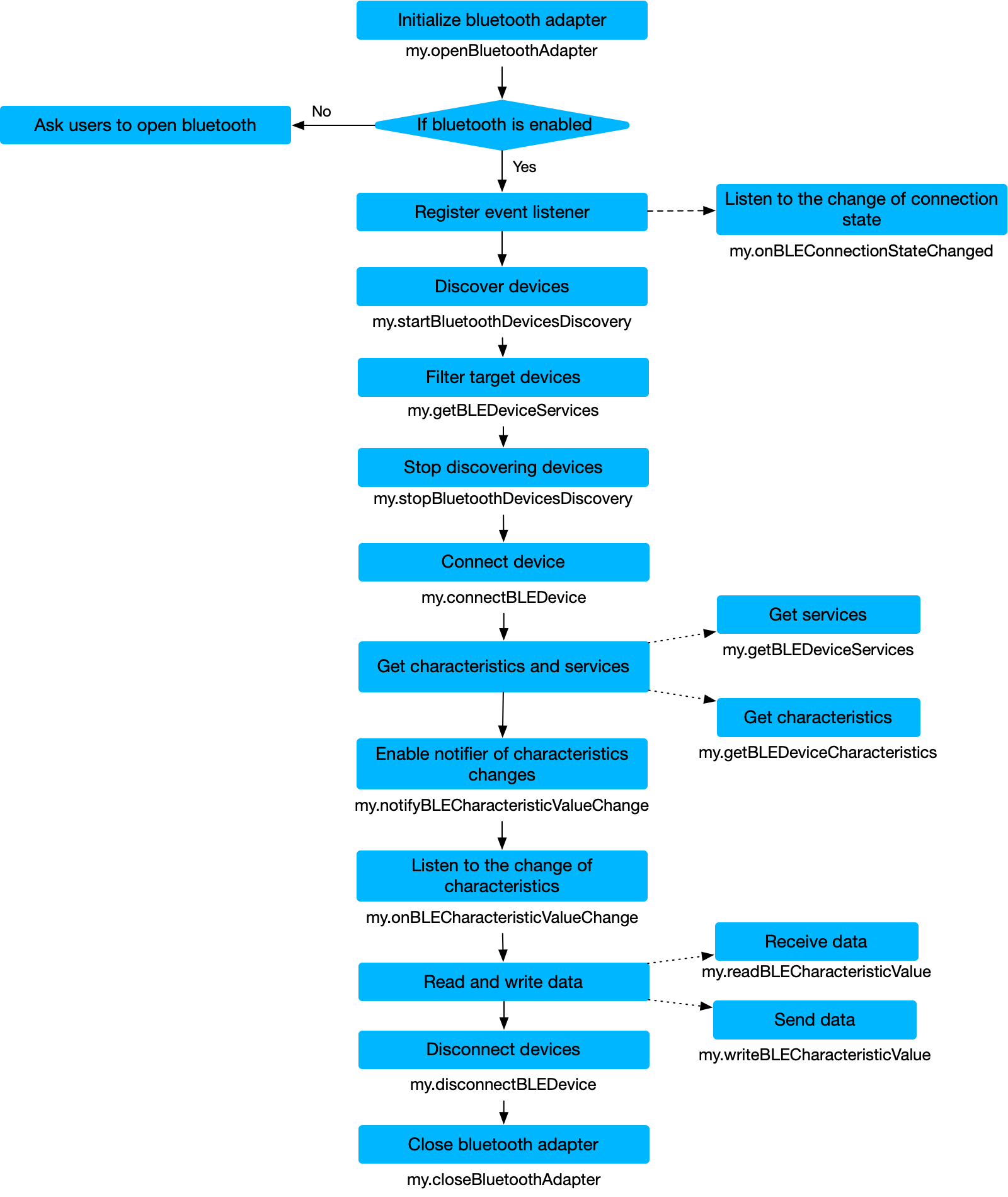
BLE
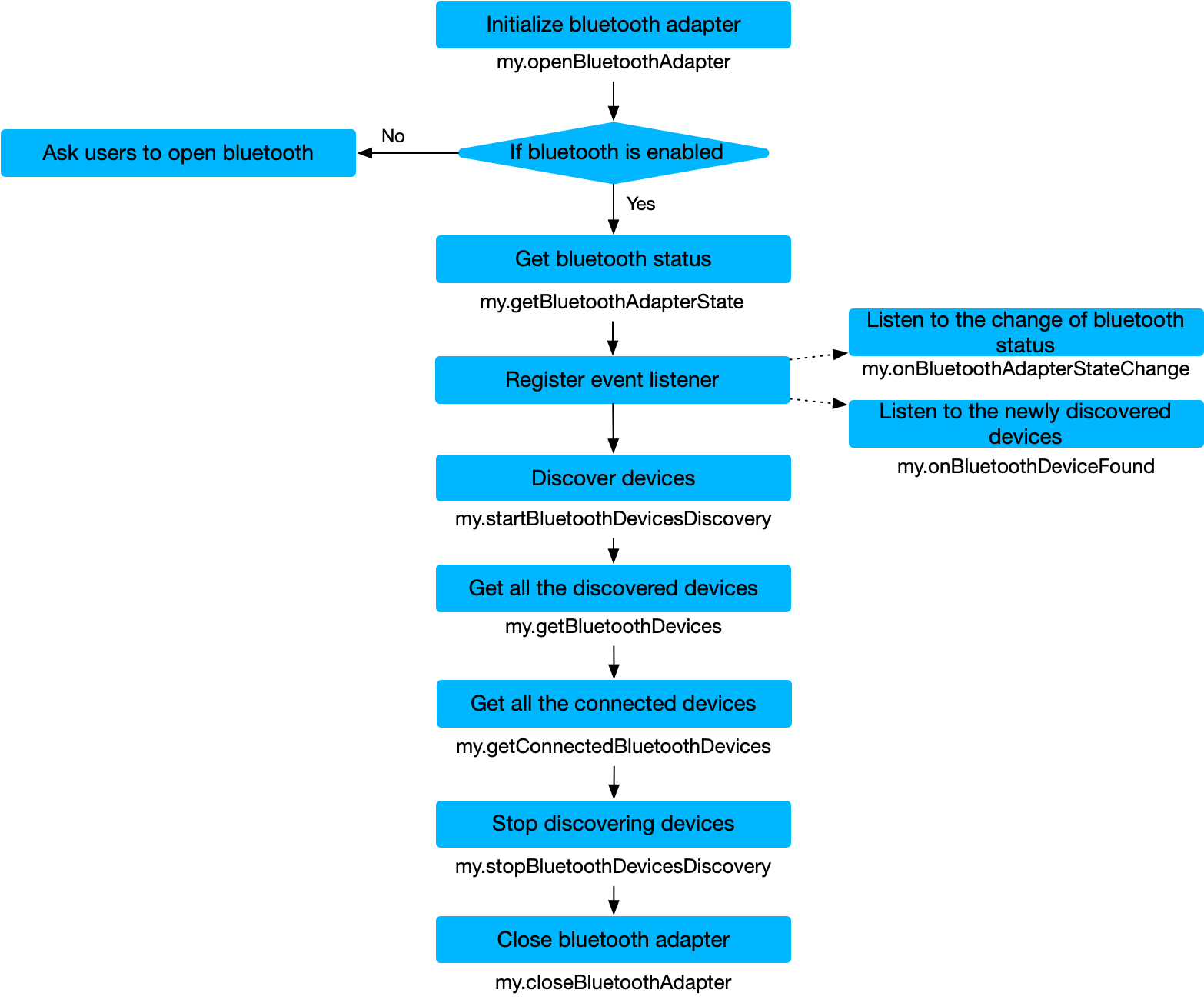
Traditional Bluetooth
Bluetooth API
Bluetooth Low Energy
API | 説明 |
Bluetooth Low Energy デバイスに接続します。 | |
Bluetooth Low Energy デバイスとの接続を切断します。 | |
Bluetooth Low Energy デバイスの特性を取得します。 | |
検出されたすべての Bluetooth Low Energy デバイス (接続されているデバイスを含む) を取得します。 | |
特性値の変更を通知する機能を有効にします。 | |
特性値の変更を通知する機能を無効にします。 | |
接続状態変更イベントのリスナーを無効にします。 | |
特性値変更イベントのリスナーを有効にします。 | |
デバイスの紛失やデバイスの切断など、接続状態変更イベントのリスナーを有効にします。 | |
特性値を読み取ります。 | |
特性値にデータを書き込みます。 |
Traditional Bluetooth
API | 説明 |
ミニプログラムの Bluetooth モジュールを閉じます。 | |
ミニプログラムの Bluetooth アダプタの状態を取得します。 | |
検出されたすべての Bluetooth Low Energy デバイス (接続されているデバイスを含む) を取得します。 | |
接続されている Bluetooth デバイスを取得します。 | |
接続状態変更イベントのリスナーを削除します。 | |
新しい Bluetooth デバイス検出イベントのリスナーを削除します。 | |
新しい Bluetooth デバイスが検出されたときにイベントをトリガーします。 | |
Bluetooth 状態変更イベントを監視します。 | |
ミニプログラムの Bluetooth モジュールを初期化します。 | |
近くの Bluetooth デバイスの検出を開始します。 | |
近くの Bluetooth デバイスの検出を停止します。 |
サンプルコード
// 初期化
my.openBluetoothAdapter({
  success: (res) => {
      console.log(res);
  }
});
// 検出イベントの登録
my.onBluetoothDeviceFound({
  success: (res) => {
    let device = res.devices[0];
    // 検出されたデバイスに接続する
    my.connectBLEDevice({
      deviceId: deviceId,
      success: (res) => {
        console.log(res)
      },
      fail:(res) => {
      },
      complete: (res)=>{
      }
    });
    // 検出を停止する
    my.stopBluetoothDevicesDiscovery({
      success: (res) => {
        console.log(res)
      },
      fail:(res) => {
      },
      complete: (res)=>{
      }
    });
  }
});
// 接続イベントの登録
my.onBLEConnectionStateChanged({
  success: (res) => {
      console.log(res);
    if (res.connected) {
        // 読み取り、書き込み、通知などの操作を開始する
        my.notifyBLECharacteristicValueChange({
          deviceId: deviceId,
          serviceId: serviceId,
          characteristicId: characteristicId,
          success: (res) => {
              console.log(res)
          },
          fail:(res) => {
          },
          complete: (res)=>{
          }
        });
    }
  }
});
// 読み取りまたは通知データ受信イベントの登録
my.onBLECharacteristicValueChange({
  success: (res) => {
      console.log(res);
  }
});
// 検出を開始する
my.startBluetoothDevicesDiscovery({
  services: ['fff0'],
  success: (res) => {
      console.log(res)
  },
  fail:(res) => {
  },
  complete: (res)=>{
  }
});

// 切断する
my.disconnectBLEDevice({
  deviceId: deviceId,
  success: (res) => {
      console.log(res)
  },
  fail:(res) => {
  },
  complete: (res)=>{
  }
});

// イベントの登録解除
my.offBluetoothDeviceFound();
my.offBLEConnectionStateChanged();
my.offBLECharacteristicValueChange();

// Bluetooth モジュールを終了する
my.closeBluetoothAdapter({
  success: (res) => {
  },
  fail:(res) => {
  },
  complete: (res)=>{
  }
});