Terraform を使用して、アプリケーションアクセスポイントを作成および管理できます。このトピックでは、アプリケーションアクセスポイントの作成方法について説明します。
概要
自己管理型アプリケーションで暗号操作を実行したり、シークレット値を取得したりする前に、アプリケーションアクセスポイントのクライアントキーを使用して KMS インスタンスにアクセスする必要があります。
アプリケーションアクセスポイントは、KMS インスタンス SDK を使用してキーまたはシークレットにアクセスする場合にのみ必要です。他の Alibaba Cloud サービスでのサーバ側暗号化や、メインの KMS SDK を使用してシークレットにアクセスする場合には不要です。
このトピックのサンプルコードは、Terraform Explorer で直接実行できます。
前提条件
ルートアカウントはすべてのリソースに対して完全な権限を持っています。ルートアカウントが侵害されると、重大なセキュリティリスクが生じます。Resource Access Management (RAM) ユーザーを使用し、その AccessKey ペアを作成することを推奨します。詳細については、「RAM ユーザーの作成」および「AccessKey ペアの作成」をご参照ください。
RAM ユーザーに
AliyunKMSFullAccess権限を付与して、Key Management Service (KMS) を管理します。詳細については、「RAM ユーザーへの権限付与」をご参照ください。{ "Version": "1", "Statement": [ { "Effect": "Allow", "Action": [ "kms:*" ], "Resource": [ "*" ], "Condition": {} } ] }Terraform 実行環境を準備します。次のいずれかの方法を使用できます:
Terraform Explorer で Terraform を使用する:Alibaba Cloud は、ローカルにインストールすることなく Terraform を使用できるオンライン環境を提供します。この方法は、無料で Terraform を迅速かつ簡単に試したりデバッグしたりするのに最適です。
Terraform を使用して迅速にリソースを作成する:Alibaba Cloud の Cloud Shell には Terraform がプリインストールされており、認証も事前設定済みです。Cloud Shell で直接 Terraform コマンドを実行できます。この方法は、低コストで Terraform に便利にアクセスできます。
オンプレミスマシンに Terraform をインストールして設定する:この方法は、ネットワーク接続が悪い環境や、開発セットアップをカスタマイズする必要があるユーザーに適しています。
重要Terraform 0.12.28 以降を使用していることを確認してください。Terraform のバージョンを確認するには、
terraform --versionコマンドを実行します。
使用されるリソース
alicloud_kms_network_rule: ネットワークルールを作成します。
alicloud_kms_application_access_point: アプリケーションアクセスポイントのリソースを定義します。
alicloud_kms_client_key: クライアントキーのリソースを定義します。
alicloud_kms_policy: アクセス制御ポリシーを作成します。
操作手順
この例では、KMS インスタンスにアプリケーションアクセスポイントを作成する方法を示します。
作業ディレクトリを作成し、その中に
main.tfという名前の次の設定ファイルを作成します。main.tf は、デプロイするリソースを定義する主要な Terraform ファイルです。続行する前に、KMS インスタンスが作成されていることを確認してください。variable "region" { # リージョン ID。この例では、中国 (河源) リージョンに対応する cn-heyuan を使用します。 default = "cn-heyuan" } provider "alicloud" { region = var.region } variable "instance_name" { default = "tf-kms-vpc-172-16" } variable "instance_type" { default = "ecs.n1.tiny" } # データソースを使用して可用性ゾーンをクエリします。リソースは指定された可用性ゾーンでのみ作成できます。 data "alicloud_zones" "default" { available_disk_category = "cloud_efficiency" available_resource_creation = "VSwitch" available_instance_type = var.instance_type } # Virtual Private Cloud (VPC) を作成します。 resource "alicloud_vpc" "vpc" { vpc_name = var.instance_name cidr_block = "192.168.0.0/16" } # CIDR ブロック 192.168.10.0/24 で VSwitch を作成します。 resource "alicloud_vswitch" "vsw" { vpc_id = alicloud_vpc.vpc.id cidr_block = "192.168.10.0/24" zone_id = data.alicloud_zones.default.zones.0.id vswitch_name = "terraform-example-1" } # CIDR ブロック 192.168.20.0/24 で別の VSwitch を作成します。 resource "alicloud_vswitch" "vsw1" { vpc_id = alicloud_vpc.vpc.id cidr_block = "192.168.20.0/24" zone_id = data.alicloud_zones.default.zones.0.id vswitch_name = "terraform-example-2" } # ソフトウェアキー管理インスタンスを作成し、ネットワークパラメーターを指定して起動します。 resource "alicloud_kms_instance" "default" { # KMS インスタンスのタイプ。値 3 はソフトウェアキー管理インスタンスを指定します。 product_version = "3" vpc_id = alicloud_vpc.vpc.id # KMS インスタンスの可用性ゾーン。クエリした可用性ゾーンの ID を使用します。 zone_ids = [ "cn-heyuan-a", "cn-heyuan-b", ] # VSwitch の ID。 vswitch_ids = [ alicloud_vswitch.vsw.id,alicloud_vswitch.vsw1.id ] # パフォーマンスレベル、およびキー、シークレット、VPC の最大数。 vpc_num = "1" key_num = "1000" secret_num = "100" spec = "1000" # (オプション) KMS インスタンスを他の VPC に関連付けます。 # VPC と KMS インスタンスが異なる Alibaba Cloud アカウントに属している場合は、まず VSwitch を共有する必要があります。 #bind_vpcs { #vpc_id = "vpc-j6cy0l32yz9ttxfy6****" #vswitch_id = "vsw-j6cv7rd1nz8x13ram****" #region_id = "cn-shanghai" #vpc_owner_id = "119285303511****" #} #bind_vpcs { #vpc_id = "vpc-j6cy0l32yz9ttd7g3****" #vswitch_id = "vsw-3h4yrd1nz8x13ram****" #region_id = "cn-shanghai" #vpc_owner_id = "119285303511****" #} } # KMS インスタンスの CA 証明書をローカルファイルに保存します。 resource "local_file" "ca_certificate_chain_pem" { content = alicloud_kms_instance.default.ca_certificate_chain_pem filename = "ca.pem" }アプリケーションアクセスポイントを作成します:
# ネットワークルールを作成します。 resource "alicloud_kms_network_rule" "network_rule_example" { # ネットワークルールの名前。 network_rule_name = "sample_network_rule" # 説明。 description = "description_test_module" # 許可される送信元プライベート IP アドレス範囲。 source_private_ip = ["172.16.0.0/12"] } # アクセス制御ポリシーを作成します。 resource "alicloud_kms_policy" "policy_example" { # ポリシーの名前。 policy_name = "sample_policy" # 説明。 description = "description_test_module" # 暗号化サービスキーとシークレットへのアクセスを含む権限のリスト。 permissions = ["RbacPermission/Template/CryptoServiceKeyUser", "RbacPermission/Template/CryptoServiceSecretUser"] # すべてのキーとシークレットに適用されるリソースのリスト。 resources = ["key/*", "secret/*"] # KMS インスタンスの ID。 kms_instance_id = alicloud_kms_instance.default.id # 以前に定義されたネットワークルールを参照する JSON 形式のアクセス制御ルール。 access_control_rules = <<EOF { "NetworkRules":[ "alicloud_kms_network_rule.network_rule_example.network_rule_name" ] } EOF } # アプリケーションアクセスポイントリソースを定義します。 resource "alicloud_kms_application_access_point" "application_access_point_example" { # アプリケーションアクセスポイントの名前。 application_access_point_name = "sample_aap" # 以前に作成されたアクセス制御ポリシーの名前を参照する、関連付けられたポリシーのリスト。 policies = [alicloud_kms_policy.policy_example.policy_name] # アプリケーションアクセスポイントの説明。 description = "aap_description" } # クライアントキーリソースを定義します。 resource "alicloud_kms_client_key" "client_key" { # アプリケーションアクセスポイントの名前。 aap_name = alicloud_kms_application_access_point.application_access_point_example.application_access_point_name # クライアントキーのパスワード。独自のパスワードに置き換えてください。 password = "testPassword@" # クライアントキーの有効期間の開始時刻。 not_before = "2023-09-01T14:11:22Z" # クライアントキーの有効期間の終了時刻。 not_after = "2032-09-01T14:11:22Z" # クライアントキーを保存するローカルファイルパス。 private_key_data_file = "./client_key.json" }重要アプリケーションアクセスポイントが作成された後、指定されたローカルファイルパスからクライアントキーを取得し、機密に保管してください。
ベストプラクティスとして、Terraform の機密性の高い入力変数を使用して
passwordを設定し、プレーンテキストで公開されるのを避けてください。
次のコマンドを実行して、Terraform 環境を初期化します:
terraform init次の出力は、初期化が成功したことを示します:
Initializing the backend...

Initializing provider plugins...
- Reusing previous version of hashicorp/alicloud from the dependency lock file
- Using previously-installed hashicorp/alicloud v1.231.0

Terraform has been successfully initialized!

You may now begin working with Terraform. Try running "terraform plan" to see
any changes that are required for your infrastructure. All Terraform commands
should now work.

If you ever set or change modules or backend configuration for Terraform,
rerun this command to reinitialize your working directory. If you forget, other
commands will detect it and remind you to do so if necessary.
次のコマンドを実行して実行計画を作成し、変更をプレビューします:
terraform plan次のコマンドを実行して、アプリケーションアクセスポイントを作成します:
terraform applyプロンプトが表示されたら、
yesと入力し、Enter キーを押します。次の出力は、アプリケーションアクセスポイントが正常に作成されたことを示します:Do you want to perform these actions? Terraform will perform the actions described above. Only 'yes' will be accepted to approve. Enter a value: yes ... alicloud_kms_network_rule.network_rule_example: Creating... alicloud_kms_policy.policy_example: Creating... alicloud_kms_network_rule.network_rule_example: Creation complete after 0s [id=sample_network_***] alicloud_kms_policy.policy_example: Creation complete after 0s [id=sample_pol***] alicloud_kms_application_access_point.application_access_point_example: Creating... alicloud_kms_application_access_point.application_access_point_example: Creation complete after 0s [id=sample_***] alicloud_kms_client_key.client_key: Creation complete after 0s [id=KAAP.5093ea57-0b84-4455-a8e9-7679bdc****] ... Apply complete! Resources: 4 added, 0 changed, 0 destroyed.結果を確認します。
Terraform show コマンド
次のコマンドを実行して、Terraform を使用して作成したリソースの詳細を表示します:
terraform show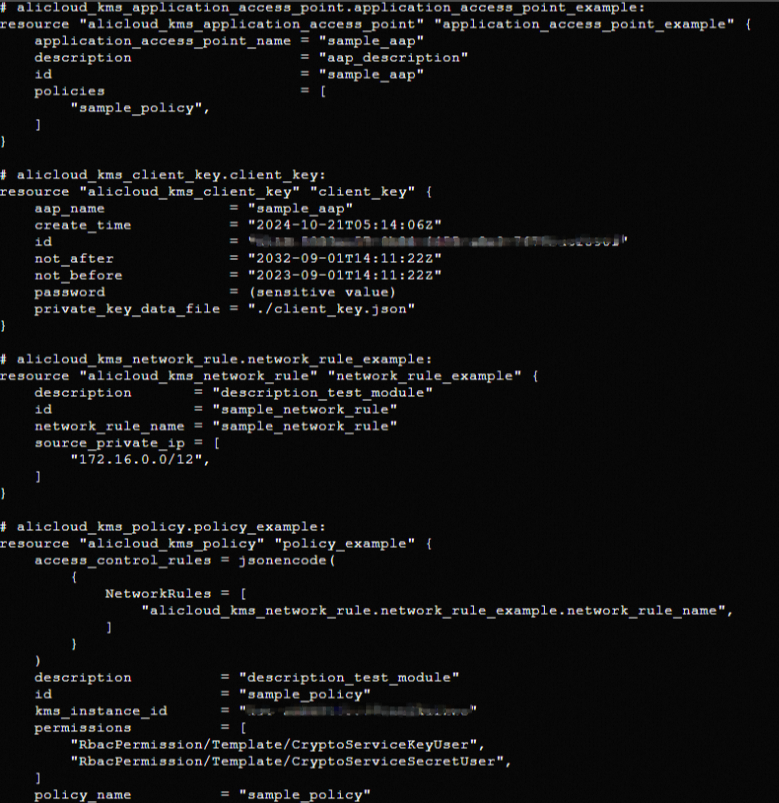
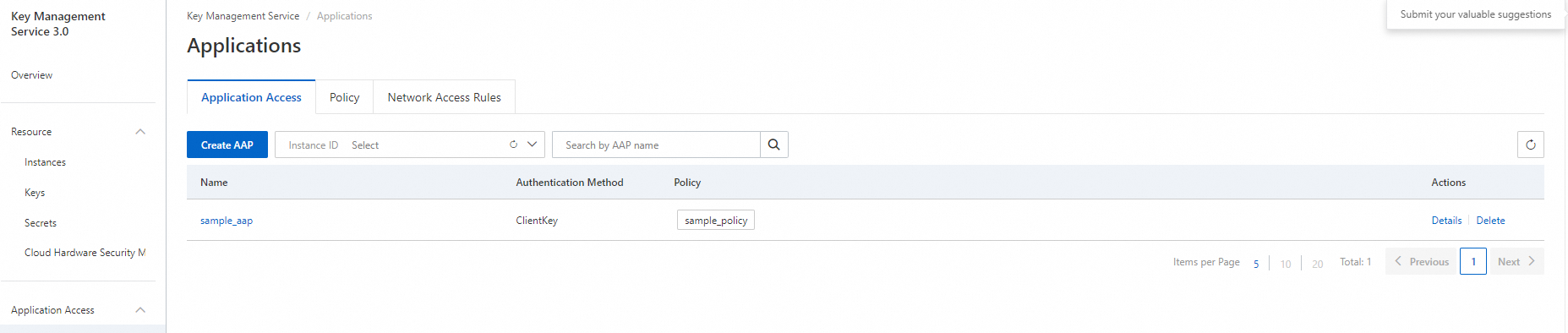
KMS コンソール
Key Management Service (KMS) コンソールにログインして、アプリケーションアクセスポイントを表示します。
リソースのクリーンアップ
Terraform によって作成または管理されているリソースが不要になった場合は、次のコマンドを実行してそれらをリリースします。terraform destroy コマンドの詳細については、「一般的なコマンド」をご参照ください。
terraform destroy完全な例
このトピックのサンプルコードは、Terraform Explorer で直接実行できます。