すべてのプロダクト
Search
ドキュメントセンター

Elastic Compute Service:ECSシステムイベントを自動的に監視して対応し、トラブルシューティングや動的スケジューリングなどのO&M操作を自動化

最終更新日:Sep 14, 2024

Alibaba Cloudは、ECSインスタンスの起動、停止、有効期限、ECSインスタンスでのタスクの実行など、リソース情報を記録および通信するためのElastic Compute Service (ECS) システムイベントを提供します。 大規模なクラスターが関与し、リソースがリアルタイムでスケジュールされるシナリオでは、Cloud AssistantのECS-tool-eventプラグインを使用してecsシステムイベントを監視および対応し、トラブルシューティングや動的スケジューリングなどのO&M操作を自動化できます。

説明
  • ECSシステムイベントは、O&Mタスクの実行ステータス、リソース例外、リソースステータスの変更などのリソース情報を記録および通信するためにAlibaba Cloudによって定義されています。 ECSシステムイベントのカテゴリと詳細については、「ECSシステムイベントの概要」をご参照ください。

  • Cloud Assistantは、簡単なコマンドを実行して複雑な設定を実行し、O&M効率を向上させるプラグインを提供します。 詳細については、「Cloud Assistantの概要」および「Cloud Assistantプラグインの使用」をご参照ください。

メカニズム

ECSコンソールで、またはECS API操作を呼び出すことで、ECSシステムイベントを監視および応答できます。 しかし、両方の方法には限界がある。

  • ECSコンソールでECSシステムイベントを監視または応答する場合、イベントへの応答を自動化することはできません。 手動で操作を実行する必要があります。 その結果、複数のECSインスタンスに対してECSシステムイベントが生成されると、イベントを見落とす可能性があります。

  • ECS APIを呼び出してECSシステムイベントを監視または応答する場合、API操作を統合するプログラムを開発する必要があります。 これには財政的および技術的サポートが必要です。

上記の問題を解決するために、Alibaba Cloudは、ecsシステムイベントをMetaServerに1分ごとに要求し、イベントをログとしてオペレーティングシステムに保存するCloud AssistantのECS-tool-eventプラグインを提供しています。 これにより、オペレーティングシステムからシステムイベントログを収集し、追加のプログラムを開発する必要なく、ログに基づいてECSシステムイベントを監視および応答できます。 たとえば、Kubernetesの自動O&M機能がある場合、host_event.logファイルからログストリームを収集して、O&Mシステムに適合させることができます。

手順

重要
  • Cloud Assistant AgentがECSインスタンスにインストールされていることを確認します。 詳細については、「Cloud Assistant Agentのインストール」をご参照ください。

  • Cloud Assistantプラグインの開始、停止、およびステータスの確認に必要なroot権限があること。

  1. ECSインスタンスにログインし、ecs-tool-eventプラグインを起動します。

    ecs-tool-eventプラグインを起動すると、プラグインは毎分MetaServerにECSシステムイベントを要求し、イベントをログとしてECSインスタンスのオペレーティングシステムに保存します。

    sudo acs-plugin-manager --exec --plugin=ecs-tool-event --params --start
    説明

    ecs-tool-eventプラグインを起動した後、ls /var/logディレクトリに移動して、自動的に生成されるhost_event.logファイルを表示できます。

    • ログパス: /var /Log /host_event.log

    • ログ形式:

      % Y-% m-% d % H:% M:% S - WARNING - Ecsイベントタイプは: ${イベントタイプ} 、イベントステータスは: ${イベントステータス} 、アクションISO 8601時間は ${ISO 8601の実行時間} です。

      例:

      2024-01-08 17:02:01-警告-Ecsイベントタイプは: InstanceFailure.Reboot、イベントステータスは: Executed、アクションISO 8601時間は2023-12-27T11:49:28Z

  2. ecs-tool-event部品の状態を確認してください。

    sudo acs-plugin-manager --status
  3. host_event.logファイルからログストリームを収集し、ビジネスシナリオに基づいてO&Mシステムを調整します。

    例: ECSインスタンスがKubernetesクラスターのノードとして使用されている場合のECSシステムイベントへの自動応答

  4. (オプション) ECSシステムイベントに応答しない場合は、ecs-tool-eventプラグインを停止します。

    sudo acs-plugin-manager --remove --plugin ecs-tool-event

例: ECSインスタンスがKubernetesクラスターのノードとして使用されている場合のECSシステムイベントへの自動応答

シナリオ

Kubernetesクラスターのノードとして使用されているECSインスタンスのいずれかで例外が発生した場合 (ECSインスタンスの再起動、メモリ不足、オペレーティングシステムエラーなど) 、オンラインサービスの安定性に影響を与える可能性があります。 例外イベントを監視して応答し、できるだけ早い機会に例外を特定してトラブルシューティングする必要があります。 ECS-tool-eventプラグインを使用してecsシステムイベントをオペレーティングシステムログに変換し、Kubernetesコミュニティが提供するオープンソースのNode Problem Detector (NPD) 、Draino、Autoscalerを使用して、追加のプログラムを開発することなく、イベントを便利かつ効率的に監視および応答できます。 これにより、Kubernetesクラスターの安定性と信頼性を向上させることができます。

NPD、Draino、およびAutoscaler

  • NPD: Kubernetesコミュニティが提供するオープンソースコンポーネントで、ノードの健全性を監視し、ハードウェアやネットワークの問題などのノードの問題を検出します。 詳細については、NPDの公式ドキュメントをご参照ください。

  • Draino: Kubernetesのコントローラーとして機能し、Kubernetesクラスター内のすべてのノードを監視し、正常でないノードから正常なノードにポッドを移行します。 詳細については、Drainoの公式ドキュメントをご参照ください。

  • Autoscaler: Kubernetesコミュニティが提供するオープンソースコンポーネントで、Kubernetesクラスター内のノード数を自動的に調整し、ノードを監視して、すべてのノードを実行できる十分なリソースを確保し、アイドルノードが存在しないことを確認します。 詳細については、Autoscalerの公式ドキュメントをご参照ください。

アーキテクチャ

次のワークフローでは、ecsインスタンスがKubernetesクラスターのノードとして使用されている場合に、ECS-tool-eventプラグインを使用してECSシステムイベントに自動的に応答する方法について説明します。 次の図はアーキテクチャを示しています。

  1. Cloud Assistantのecs-tool-eventプラグインは、MetaServerにECSシステムイベントを1分ごとに要求し、オペレーティングシステムの次のパス /var/log/host_event.logにイベントをログとして保存します。

  2. NPDはシステムイベントログを収集し、問題をAPIサーバーに報告します。

  3. Drainoは、APIサーバーからKubernetesイベント (ECSシステムイベント) を受信し、異常なノードからポッドを削除し、ポッドを正常なノードに移行します。

  4. 異常なノードからポッドが追い出された後、ビジネスシナリオに基づいてノードを停止するか、Autoscalerを使用してノードを自動的にリリースし、新しいECSインスタンスをKubernetesクラスターのノードとして追加します。

image

手順

手順1: ノードでecs-tool-eventプラグインを起動する

Kubernetesクラスターのノード (ECSインスタンス) にログインし、ecs-tool-eventプラグインを起動します。

重要

実際のシナリオでは、Kubernetesクラスター内のすべてのノードでecs-tool-eventプラグインを起動する必要があります。 Cloud Assistantを使用して、複数のECSインスタンスで次のコマンドをバッチ実行し、ecs-tool-eventプラグインを起動できます。 詳細については、「コマンドの作成と実行」をご参照ください。

sudo acs-plugin-manager --exec --plugin=ecs-tool-event --params --start

ecs-tool-eventプラグインを起動すると、プラグインは自動的にECSシステムイベントをログに変換し、そのログをノードのオペレーティングシステムに保存します。

手順2: KubernetesクラスターのNPDとDrainoの設定

  1. Kubernetesクラスター内の任意のノードにログインします。

  2. Kubernetesクラスター全体で有効になるNPDを設定します。

    1. 次のNPDファイルを設定します。

      説明

      NPDファイルの設定方法については、NPDの公式ドキュメントをご参照ください。

      • node-problem-detector-config.yaml: システムログなど、NPDが監視するメトリックを定義するために使用されます。

      • node-problem-detector.yaml: KubernetesクラスターでのNPDの動作を定義するために使用されます。

      • rbac.yaml: KubernetesクラスターのNPDに付与される権限を定義するために使用されます。

        NPDが設定されていないECSインスタンスにNPDファイルを追加

        上記のNPDファイルをECSインスタンスに追加します。

        node-problem-detector-config.yaml

        apiVersion: v1
        data:
          kernel-monitor.json: |
            {
                "plugin": "kmsg",
                "logPath": "/dev/kmsg",
                "lookback": "5m",
                "bufferSize": 10,
                "source": "kernel-monitor",
                "conditions": [
                    {
                        "type": "KernelDeadlock",
                        "reason": "KernelHasNoDeadlock",
                        "message": "kernel has no deadlock"
                    },
                    {
                        "type": "ReadonlyFilesystem",
                        "reason": "FilesystemIsNotReadOnly",
                        "message": "Filesystem is not read-only"
                    }
                ],
                "rules": [
                    {
                        "type": "temporary",
                        "reason": "OOMKilling",
                        "pattern": "Kill process \\d+ (.+) score \\d+ or sacrifice child\\nKilled process \\d+ (.+) total-vm:\\d+kB, anon-rss:\\d+kB, file-rss:\\d+kB.*"
                    },
                    {
                        "type": "temporary",
                        "reason": "TaskHung",
                        "pattern": "task \\S+:\\w+ blocked for more than \\w+ seconds\\."
                    },
                    {
                        "type": "temporary",
                        "reason": "UnregisterNetDevice",
                        "pattern": "unregister_netdevice: waiting for \\w+ to become free. Usage count = \\d+"
                    },
                    {
                        "type": "temporary",
                        "reason": "KernelOops",
                        "pattern": "BUG: unable to handle kernel NULL pointer dereference at .*"
                    },
                    {
                        "type": "temporary",
                        "reason": "KernelOops",
                        "pattern": "divide error: 0000 \\[#\\d+\\] SMP"
                    },
                    {
                                "type": "temporary",
                                "reason": "MemoryReadError",
                                "pattern": "CE memory read error .*"
                    },
                    {
                        "type": "permanent",
                        "condition": "KernelDeadlock",
                        "reason": "DockerHung",
                        "pattern": "task docker:\\w+ blocked for more than \\w+ seconds\\."
                    },
                    {
                        "type": "permanent",
                        "condition": "ReadonlyFilesystem",
                        "reason": "FilesystemIsReadOnly",
                        "pattern": "Remounting filesystem read-only"
                    }
                ]
            }
          host_event.json: |
            {
                "plugin": "filelog",                     
                "pluginConfig": {
                    "timestamp": "^.{19}",
                    "message": "Ecs event type is: .*",
                    "timestampFormat": "2006-01-02 15:04:05"
                },
                "logPath": "/var/log/host_event.log",   
                "lookback": "5m",
                "bufferSize": 10,
                "source": "host-event",                     
                "conditions": [
                    {
                        "type": "HostEventRebootAfter48",       
                        "reason": "HostEventWillRebootAfter48",
                        "message": "The Host Is Running In Good Condition"
                    }
                ],
                "rules": [
                    {
                        "type": "temporary",
                        "reason": "HostEventRebootAfter48temporary",
                        "pattern": "Ecs event type is: SystemMaintenance.Reboot,event status is: Scheduled.*|Ecs event type is: SystemMaintenance.Reboot,event status is: Inquiring.*"
                    },
                    {
                        "type": "permanent",
                        "condition": "HostEventRebootAfter48", 
                        "reason": "HostEventRebootAfter48Permanent",
                        "pattern": "Ecs event type is: SystemMaintenance.Reboot,event status is: Scheduled.*|Ecs event type is: SystemMaintenance.Reboot,event status is: Inquiring.*"
                    }
                ]
            }
        
          docker-monitor.json: |
            {
                "plugin": "journald",
                "pluginConfig": {
                    "source": "dockerd"
                },
                "logPath": "/var/log/journal",
                "lookback": "5m",
                "bufferSize": 10,
                "source": "docker-monitor",
                "conditions": [],
                "rules": [
                    {
                        "type": "temporary",
                        "reason": "CorruptDockerImage",
                        "pattern": "Error trying v2 registry: failed to register layer: rename /var/lib/docker/image/(.+) /var/lib/docker/image/(.+): directory not empty.*"
                    }
                ]
            }
        kind: ConfigMap
        metadata:
          name: node-problem-detector-config
          namespace: kube-system

        node-problem-detector.yaml

        apiVersion: apps/v1
        kind: DaemonSet
        metadata:
          name: node-problem-detector
          namespace: kube-system
          labels:
            app: node-problem-detector
        spec:
          selector:
            matchLabels:
              app: node-problem-detector
          template:
            metadata:
              labels:
                app: node-problem-detector
            spec:
              affinity:
                nodeAffinity:
                  requiredDuringSchedulingIgnoredDuringExecution:
                    nodeSelectorTerms:
                      - matchExpressions:
                          - key: kubernetes.io/os
                            operator: In
                            values:
                              - linux
              containers:
              - name: node-problem-detector
                command:
                - /node-problem-detector
                - --logtostderr
                - --config.system-log-monitor=/config/kernel-monitor.json,/config/docker-monitor.json,/config/host_event.json
                image: cncamp/node-problem-detector:v0.8.10
                resources:
                  limits:
                    cpu: 10m
                    memory: 80Mi
                  requests:
                    cpu: 10m
                    memory: 80Mi
                imagePullPolicy: Always
                securityContext:
                  privileged: true
                env:
                - name: NODE_NAME
                  valueFrom:
                    fieldRef:
                      fieldPath: spec.nodeName
                volumeMounts:
                - name: log
                  mountPath: /var/log
                  readOnly: true
                - name: kmsg
                  mountPath: /dev/kmsg
                  readOnly: true
                # Make sure node problem detector is in the same timezone
                # with the host.
                - name: localtime
                  mountPath: /etc/localtime
                  readOnly: true
                - name: config
                  mountPath: /config
                  readOnly: true
              serviceAccountName: node-problem-detector
              volumes:
              - name: log
                # Config `log` to your system log directory
                hostPath:
                  path: /var/log/
              - name: kmsg
                hostPath:
                  path: /dev/kmsg
              - name: localtime
                hostPath:
                  path: /etc/localtime
              - name: config
                configMap:
                  name: node-problem-detector-config
                  items:
                  - key: kernel-monitor.json
                    path: kernel-monitor.json
                  - key: docker-monitor.json
                    path: docker-monitor.json
                  - key: host_event.json
                    path: host_event.json
              tolerations:
                - effect: NoSchedule
                  operator: Exists
                - effect: NoExecute
                  operator: Exists

        rbac.yaml

        apiVersion: v1
        kind: ServiceAccount
        metadata:
          name: node-problem-detector
          namespace: kube-system
        
        ---
        apiVersion: rbac.authorization.k8s.io/v1
        kind: ClusterRoleBinding
        metadata:
          name: npd-binding
        roleRef:
          apiGroup: rbac.authorization.k8s.io
          kind: ClusterRole
          name: system:node-problem-detector
        subjects:
          - kind: ServiceAccount
            name: node-problem-detector
            namespace: kube-system

        NPDが設定されているECSインスタンスのNPDファイルの変更

        • host_event.jsonファイルのログ監視設定をnode-problem-detector-config.yamlファイルに追加します。 次のサンプルコードは、ログモニタリング設定の例を示しています。

          ...
          
          host_event.json: |
              {
                  "plugin": "filelog",   # Specify the plug-in that is used to collect logs. Set this parameter to filelog.       
                  "pluginConfig": {
                      "timestamp": "^.{19}",
                      "message": "Ecs event type is: .*",
                      "timestampFormat": "2006-01-02 15:04:05"
                  },
                  "logPath": "/var/log/host_event.log",    # Specify the path in which you want to store system event logs. Set this parameter to /var/log/host_event.log.
                  "lookback": "5m",
                  "bufferSize": 10,
                  "source": "host-event",                     
                  "conditions": [
                      {
                          "type": "HostEventRebootAfter48",    # Specify an event name, which is used in the Draino configuration.
                          "reason": "HostEventWillRebootAfter48",
                          "message": "The Host Is Running In Good Condition"
                      }
                  ],
                  "rules": [
                      {
                          "type": "temporary",
                          "reason": "HostEventRebootAfter48temporary",
                          "pattern": "Ecs event type is: SystemMaintenance.Reboot,event status is: Scheduled.*|Ecs event type is: SystemMaintenance.Reboot,event status is: Inquiring.*"
                      },
                      {
                          "type": "permanent",
                          "condition": "HostEventRebootAfter48", 
                          "reason": "HostEventRebootAfter48Permanent",
                          "pattern": "Ecs event type is: SystemMaintenance.Reboot,event status is: Scheduled.*|Ecs event type is: SystemMaintenance.Reboot,event status is: Inquiring.*"
                      }
                  ]
              }
          
          ...
        • node-problem-detector.yamlファイルを設定します。

          • /config/host_event.json設定を- -- config.system-log-monitor行に追加して、NPDがシステムイベントログを監視できるようにします。 次のサンプルコードは、設定の例を示しています。

            containers:
                  - name: node-problem-detector
                    command:
                     ...
                    - --config.system-log-monitor=/config/kernel-monitor.json,/config/docker-monitor.json,/config/host_event.json
            
          • 次のサンプルコードに示すように、- name: configセクションのitems: 行の下に行を追加します。

            ...
            - name: config
                    configMap:
                      name: node-problem-detector-config
                      items:
                      - key: kernel-monitor.json
                        path: kernel-monitor.json
                      - key: docker-monitor.json
                        path: docker-monitor.json
                      -key: host_event.json     # Add this line.
                        path: host_event.json    # Add this line.
            ...
    2. ファイルを有効にするには、次のコマンドを実行します。

      sudo kubectl create -f rbac.yaml
      sudo kubectl create -f node-problem-detector-config.yaml
      sudo kubectl create -f node-problem-detector.yaml
    3. 次のコマンドを実行して、NPD設定が有効かどうかを確認します。

      sudo kubectl describe nodes -n kube-system

      HostEventRebootAfter48エントリが [Conditions] セクションに追加された次のコマンド出力が返されると、NPD設定は完了し、期待どおりに動作します。 HostEventRebootAfter48エントリが [条件] セクションに表示されない場合は、3分から5分待ちます。
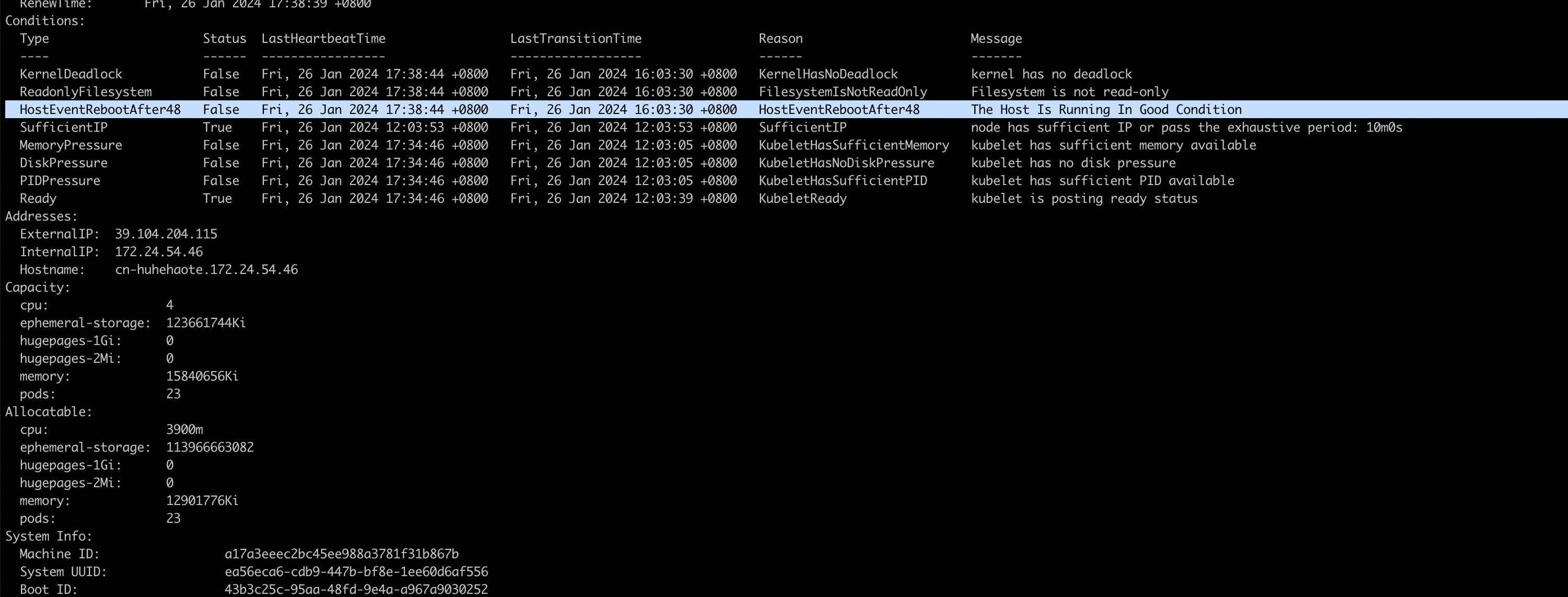
      image.png

  3. Kubernetesクラスター全体で有効になるDrainoを設定します。

    1. Drainoをインストールするか、Draino構成を変更します。

    2. DrainoがインストールされていないECSインスタンスにDrainoをインストール

      次のYAMLファイルをECSインスタンスに追加します。

      draino.yaml

      ---
      apiVersion: v1
      kind: ServiceAccount
      metadata:
        labels: {component: draino}
        name: draino
        namespace: kube-system
      ---
      apiVersion: rbac.authorization.k8s.io/v1
      kind: ClusterRole
      metadata:
        labels: {component: draino}
        name: draino
      rules:
      - apiGroups: ['']
        resources: [events]
        verbs: [create, patch, update]
      - apiGroups: ['']
        resources: [nodes]
        verbs: [get, watch, list, update]
      - apiGroups: ['']
        resources: [nodes/status]
        verbs: [patch]
      - apiGroups: ['']
        resources: [pods]
        verbs: [get, watch, list]
      - apiGroups: ['']
        resources: [pods/eviction]
        verbs: [create]
      - apiGroups: [extensions]
        resources: [daemonsets]
        verbs: [get, watch, list]
      ---
      apiVersion: rbac.authorization.k8s.io/v1
      kind: ClusterRoleBinding
      metadata:
        labels: {component: draino}
        name: draino
      roleRef: {apiGroup: rbac.authorization.k8s.io, kind: ClusterRole, name: draino}
      subjects:
      - {kind: ServiceAccount, name: draino, namespace: kube-system}
      ---
      apiVersion: apps/v1
      kind: Deployment
      metadata:
        labels: {component: draino}
        name: draino
        namespace: kube-system
      spec:
        # Draino does not currently support locking/master election, so you should
        # only run one draino at a time. Draino won't start draining nodes immediately
        # so it's usually safe for multiple drainos to exist for a brief period of
        # time.
        replicas: 1
        selector:
          matchLabels: {component: draino}
        template:
          metadata:
            labels: {component: draino}
            name: draino
            namespace: kube-system
          spec:
            containers:
            - name: draino
              image: planetlabs/draino:dbadb44
              # You'll want to change these labels and conditions to suit your deployment.
              command:
              - /draino
              - --debug
              - --evict-daemonset-pods
              - --evict-emptydir-pods
              - --evict-unreplicated-pods
              - KernelDeadlock
              - OutOfDisk
              - HostEventRebootAfter48
              # - ReadonlyFilesystem
              # - MemoryPressure
              # - DiskPressure
              # - PIDPressure
              livenessProbe:
                httpGet: {path: /healthz, port: 10002}
                initialDelaySeconds: 30
            serviceAccountName: draino

      DrainoがインストールされているECSインスタンスのDraino設定の変更

      Draino設定ファイルを開き、containers: セクションを見つけて、次のコードに示すように、手順2「Kubernetesクラスター全体で有効になるNPDを設定する」のnode-problem-detector-config.yamlファイルで指定したイベント名を追加します。 この例では、イベント名はHostEventRebootAfter48です。

      containers:
            - name: draino
              image: planetlabs/draino:dbadb44
              # You'll want to change these labels and conditions to suit your deployment.
              command:
              - /draino
              - --debug
              ......
              - KernelDeadlock
              - OutOfDisk
              - HostEventRebootAfter48  # Add this line.  
    3. Draino構成を有効にするには、次のコマンドを実行します。

    4. sudo kubectl create -f draino.yaml

手順3: 異常なノードを停止し、新しいノードを追加

異常なノードからポッドが追い出された後、ビジネスシナリオに基づいてノードを停止するか、Autoscalerを使用してノードを自動的にリリースし、新しいECSインスタンスをKubernetesクラスターのノードとして追加します。 Autoscalerの使用方法については、Autoscalerの公式ドキュメントをご参照ください。

結果の検証

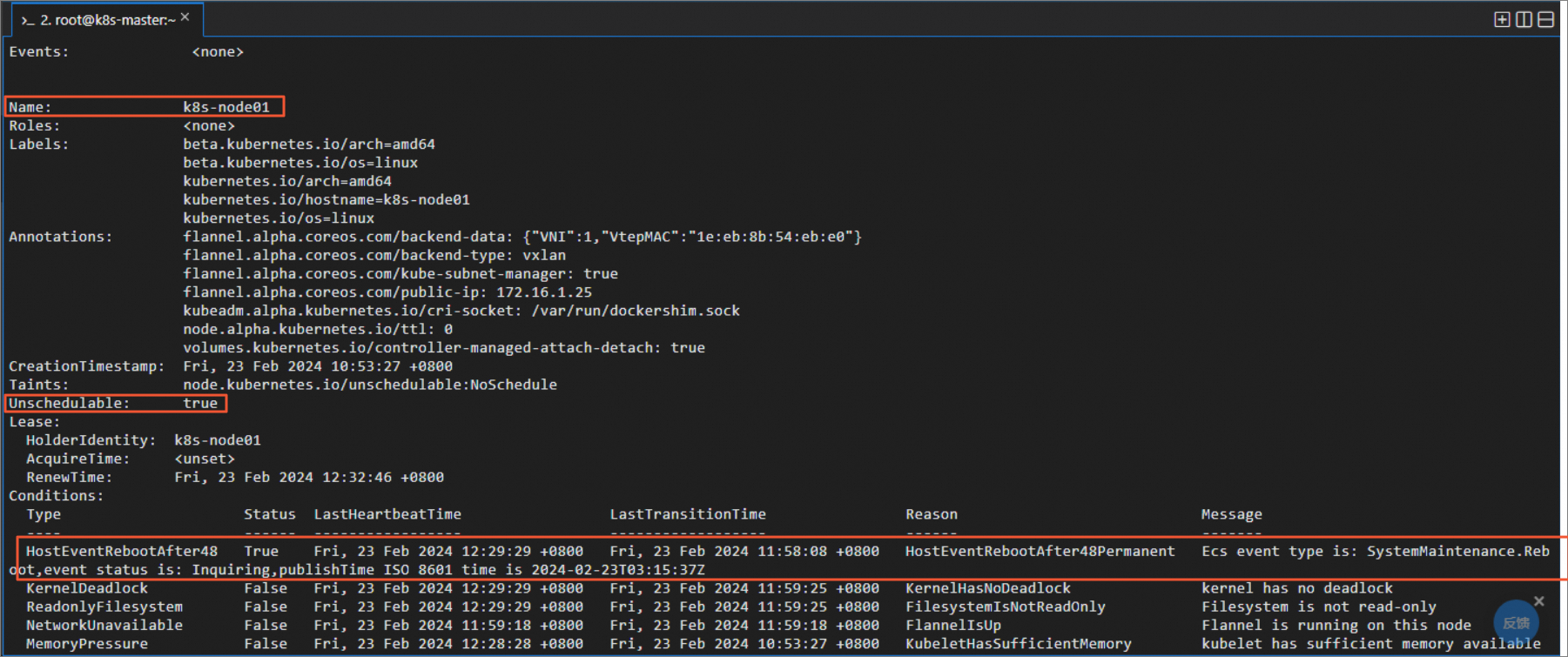
  1. ノードにログインし、次のコマンドを実行してECSシステムイベントのログをシミュレートします。

    重要

    コマンドの時刻を現在のシステム時刻に置き換えます。

    sudo echo  '2024-02-23 12:29:29 - WARNING - Ecs event type is: InstanceFailure.Reboot,event status is: Executed,action ISO 8601 time is 2023-12-27T11:49:28Z'  > /var/log/host_event.log
  2. 次のコマンドを実行して、ノードを確認します。 次のコマンド出力は、Cloud AssistantプラグインがECSシステムイベントを検出し、イベントに基づいてKubernetesイベントを生成し、ノードのステータスをUnschedulableに設定することを示しています。

    sudo kubectl describe nodes -n kube-system
    image