すべてのプロダクト
Search
ドキュメントセンター

Elastic Container Instance:Istio への Bookinfo アプリケーションのデプロイ

最終更新日:Jun 22, 2026

Istio は、トラフィック管理、可観測性、セキュリティ、およびポリシー機能を提供するオープンソースのサービスメッシュです。Kubernetes と統合された Istio は、コンテナアプリケーションの管理と制御を向上させ、アプリケーションのパフォーマンス、セキュリティ、信頼性を高めるのに役立ちます。このトピックでは、VNode を使用して Elastic Container Instance (ECI) に接続された自己管理型 Kubernetes クラスターに、Istio を使用して Bookinfo アプリケーションをデプロイする方法について説明します。

背景情報

Istio は、マイクロサービス間のトラフィックを管理し、ネットワーク通信とセキュリティリスクを処理するために使用されるオープンソースのサービスメッシュプラットフォームです。Istio は Kubernetes と統合して、標準的で安全なトラフィック管理を提供し、デプロイと運用保守作業を簡素化できます。

Bookinfo は、オンライン書店の単一のカタログエントリを模倣して、書籍の説明、ISBN やページ数などの書籍の詳細、書籍に関するレビューなどの書籍情報を表示します。Bookinfo は異種混合アプリケーションであり、さまざまな Istio の特徴を実証するために、異なる言語で書かれた 4 つのマイクロサービスで構成されています。Bookinfo のエンドツーエンドアーキテクチャは次のとおりです:
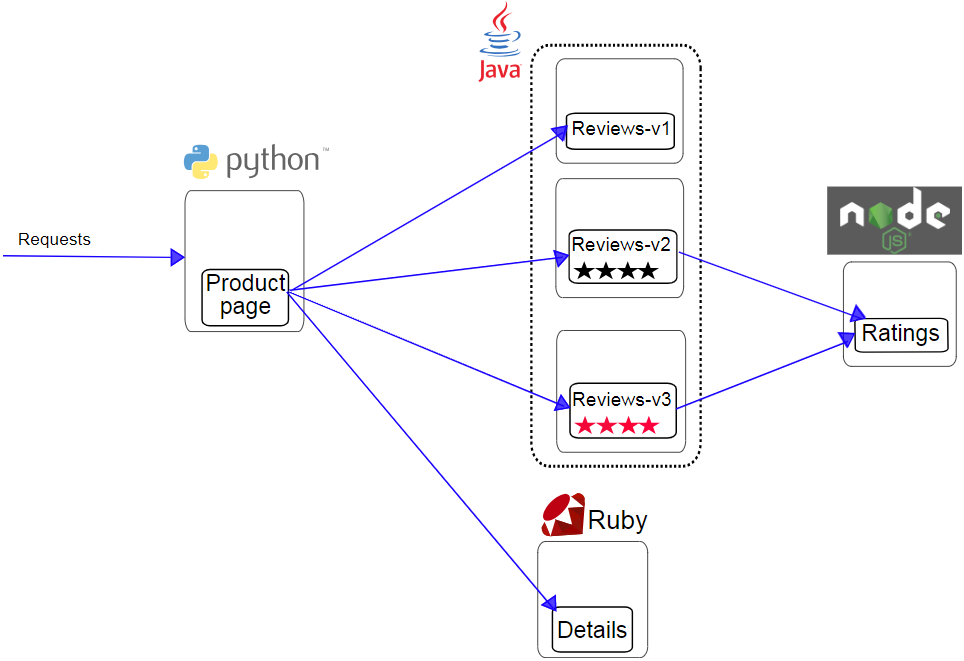
bookinfo

  • Productpage:ページを生成するために Details と Reviews のマイクロサービスを呼び出す Python マイクロサービスです。Productpage マイクロサービスは、ログイン・ログオフ機能を提供します。

  • Details:書籍情報を含む Ruby マイクロサービスです。

  • Reviews:書籍のレビューを含む Java マイクロサービスです。Reviews マイクロサービスには、次の 3 つのバージョンがあります:

    • バージョン 1:Ratings マイクロサービスを呼び出しません。

    • バージョン 2:Ratings マイクロサービスを呼び出し、1 つから 5 つの黒い星で書籍を評価します。

    • バージョン 3:Ratings マイクロサービスを呼び出し、1 つから 5 つの赤い星で書籍を評価します。

  • Ratings:書籍のレビューに基づいて生成された評価を提供する Node.js マイクロサービスです。

詳細については、Istio をご参照ください。

前提条件

このトピックの説明は、自己管理型 Kubernetes クラスターに適用されます。ご利用のクラスターが次の条件を満たしていることを確認してください:

  • 自己管理型 Kubernetes クラスターに VNode がデプロイされていること。

  • 自己管理型 Kubernetes クラスターがデータセンターにデプロイされている場合、データセンターは Alibaba Cloud に接続されています。

  • 自己管理型 Kubernetes クラスターが Elastic Compute Service (ECS) インスタンスにデプロイされており、ネットワークプラグインが Flannel の場合、クラスターに Kubernetes クラウドコントローラーマネージャー (CCM) がデプロイされていることを確認してください。これにより、ECI が実ノード上の Pod と相互接続されることが保証されます。詳細については、「CCM のデプロイ」をご参照ください。

事前準備

  1. Istio をインストールします。詳細については、クイックスタートをご参照ください。

  2. 名前空間を作成し、その名前空間にラベルを設定します。

    kubectl create namespace istio-test
    kubectl label namespace istio-test istio-injection=enabled

操作手順

Bookinfo アプリケーションのデプロイ

  1. bookinfo.yaml という名前のファイルを作成し、次のテンプレートをファイルにコピーします:

    説明

    以下の YAML サンプルコードでは、Pod を VNode にスケジュールするために nodeSelector が追加されています。eci-profile を設定して Pod を VNode にスケジュールすることもできます。詳細については、「Pod を VNode にスケジュールする」および「eci-profile を使用して Pod を VNode にスケジュールする」をご参照ください。

    bookinfo.yaml ファイルを展開

    # Copyright Istio Authors
    #
    #   Licensed under the Apache License, Version 2.0 (the "License");
    #   you may not use this file except in compliance with the License.
    #   You may obtain a copy of the License at
    #
    #       http://www.apache.org/licenses/LICENSE-2.0
    #
    #   Unless required by applicable law or agreed to in writing, software
    #   distributed under the License is distributed on an "AS IS" BASIS,
    #   WITHOUT WARRANTIES OR CONDITIONS OF ANY KIND, either express or implied.
    #   See the License for the specific language governing permissions and
    #   limitations under the License.
    ##################################################################################################
    # このファイルは、Bookinfo サンプルのサービス、サービスアカウント、およびデプロイメントを定義します。
    #
    # 4 つすべての Bookinfo サービス、対応するサービスアカウント、およびデプロイメントを適用するには:
    #
    #   kubectl apply -f samples/bookinfo/platform/kube/bookinfo.yaml
    #
    # または、任意のリソースを個別にデプロイすることもできます:
    #
    #   kubectl apply -f samples/bookinfo/platform/kube/bookinfo.yaml -l service=reviews # reviews Service
    #   kubectl apply -f samples/bookinfo/platform/kube/bookinfo.yaml -l account=reviews # reviews ServiceAccount
    #   kubectl apply -f samples/bookinfo/platform/kube/bookinfo.yaml -l app=reviews,version=v3 # reviews-v3 Deployment
    ##################################################################################################
    ##################################################################################################
    # Details サービス
    ##################################################################################################
    apiVersion: v1
    kind: Service
    metadata:
      name: details
      labels:
        app: details
        service: details
    spec:
      ports:
      - port: 9080
        name: http
      selector:
        app: details
    ---
    apiVersion: v1
    kind: ServiceAccount
    metadata:
      name: bookinfo-details
      labels:
        account: details
    ---
    apiVersion: apps/v1
    kind: Deployment
    metadata:
      name: details-v1
      labels:
        app: details
        version: v1
    spec:
      replicas: 1
      selector:
        matchLabels:
          app: details
          version: v1
      template:
        metadata:
          labels:
            app: details
            version: v1
        spec:
          nodeSelector:     # 特定の nodeSelector を設定
            k8s.aliyun.com/vnode: "true"
          tolerations:      # 特定の Toleration を設定
          - key: k8s.aliyun.com/vnode
            operator: "Equal"
            value: "true"
            effect: "NoSchedule"
          serviceAccountName: bookinfo-details
          containers:
          - name: details
            image: docker.io/istio/examples-bookinfo-details-v1:1.16.4
            imagePullPolicy: IfNotPresent
            ports:
            - containerPort: 9080
            securityContext:
              runAsUser: 1000
    ---
    ##################################################################################################
    # Ratings サービス
    ##################################################################################################
    apiVersion: v1
    kind: Service
    metadata:
      name: ratings
      labels:
        app: ratings
        service: ratings
    spec:
      ports:
      - port: 9080
        name: http
      selector:
        app: ratings
    ---
    apiVersion: v1
    kind: ServiceAccount
    metadata:
      name: bookinfo-ratings
      labels:
        account: ratings
    ---
    apiVersion: apps/v1
    kind: Deployment
    metadata:
      name: ratings-v1
      labels:
        app: ratings
        version: v1
    spec:
      replicas: 1
      selector:
        matchLabels:
          app: ratings
          version: v1
      template:
        metadata:
          labels:
            app: ratings
            version: v1
        spec:
          nodeSelector:     # 特定の nodeSelector を設定
            k8s.aliyun.com/vnode: "true"
          tolerations:      # 特定の Toleration を設定
          - key: k8s.aliyun.com/vnode
            operator: "Equal"
            value: "true"
            effect: "NoSchedule"
          serviceAccountName: bookinfo-ratings
          containers:
          - name: ratings
            image: docker.io/istio/examples-bookinfo-ratings-v1:1.16.4
            imagePullPolicy: IfNotPresent
            ports:
            - containerPort: 9080
            securityContext:
              runAsUser: 1000
    ---
    ##################################################################################################
    # Reviews サービス
    ##################################################################################################
    apiVersion: v1
    kind: Service
    metadata:
      name: reviews
      labels:
        app: reviews
        service: reviews
    spec:
      ports:
      - port: 9080
        name: http
      selector:
        app: reviews
    ---
    apiVersion: v1
    kind: ServiceAccount
    metadata:
      name: bookinfo-reviews
      labels:
        account: reviews
    ---
    apiVersion: apps/v1
    kind: Deployment
    metadata:
      name: reviews-v1
      labels:
        app: reviews
        version: v1
    spec:
      replicas: 1
      selector:
        matchLabels:
          app: reviews
          version: v1
      template:
        metadata:
          labels:
            app: reviews
            version: v1
        spec:
          nodeSelector:     # 特定の nodeSelector を設定
            k8s.aliyun.com/vnode: "true"
          tolerations:      # 特定の Toleration を設定
          - key: k8s.aliyun.com/vnode
            operator: "Equal"
            value: "true"
            effect: "NoSchedule"
          serviceAccountName: bookinfo-reviews
          containers:
          - name: reviews
            image: docker.io/istio/examples-bookinfo-reviews-v1:1.16.4
            imagePullPolicy: IfNotPresent
            env:
            - name: LOG_DIR
              value: "/tmp/logs"
            ports:
            - containerPort: 9080
            volumeMounts:
            - name: tmp
              mountPath: /tmp
            - name: wlp-output
              mountPath: /opt/ibm/wlp/output
            securityContext:
              runAsUser: 1000
          volumes:
          - name: wlp-output
            emptyDir: {}
          - name: tmp
            emptyDir: {}
    ---
    apiVersion: apps/v1
    kind: Deployment
    metadata:
      name: reviews-v2
      labels:
        app: reviews
        version: v2
    spec:
      replicas: 1
      selector:
        matchLabels:
          app: reviews
          version: v2
      template:
        metadata:
          labels:
            app: reviews
            version: v2
        spec:
          nodeSelector:     # 特定の nodeSelector を設定
            k8s.aliyun.com/vnode: "true"
          tolerations:      # 特定の Toleration を設定
          - key: k8s.aliyun.com/vnode
            operator: "Equal"
            value: "true"
            effect: "NoSchedule"
          serviceAccountName: bookinfo-reviews
          containers:
          - name: reviews
            image: docker.io/istio/examples-bookinfo-reviews-v2:1.16.4
            imagePullPolicy: IfNotPresent
            env:
            - name: LOG_DIR
              value: "/tmp/logs"
            ports:
            - containerPort: 9080
            volumeMounts:
            - name: tmp
              mountPath: /tmp
            - name: wlp-output
              mountPath: /opt/ibm/wlp/output
            securityContext:
              runAsUser: 1000
          volumes:
          - name: wlp-output
            emptyDir: {}
          - name: tmp
            emptyDir: {}
    ---
    apiVersion: apps/v1
    kind: Deployment
    metadata:
      name: reviews-v3
      labels:
        app: reviews
        version: v3
    spec:
      replicas: 1
      selector:
        matchLabels:
          app: reviews
          version: v3
      template:
        metadata:
          labels:
            app: reviews
            version: v3
        spec:
          nodeSelector:     # 特定の nodeSelector を設定
            k8s.aliyun.com/vnode: "true"
          tolerations:      # 特定の Toleration を設定
          - key: k8s.aliyun.com/vnode
            operator: "Equal"
            value: "true"
            effect: "NoSchedule"
          serviceAccountName: bookinfo-reviews
          containers:
          - name: reviews
            image: docker.io/istio/examples-bookinfo-reviews-v3:1.16.4
            imagePullPolicy: IfNotPresent
            env:
            - name: LOG_DIR
              value: "/tmp/logs"
            ports:
            - containerPort: 9080
            volumeMounts:
            - name: tmp
              mountPath: /tmp
            - name: wlp-output
              mountPath: /opt/ibm/wlp/output
            securityContext:
              runAsUser: 1000
          volumes:
          - name: wlp-output
            emptyDir: {}
          - name: tmp
            emptyDir: {}
    ---
    ##################################################################################################
    # Productpage サービス
    ##################################################################################################
    apiVersion: v1
    kind: Service
    metadata:
      name: productpage
      labels:
        app: productpage
        service: productpage
    spec:
      ports:
      - port: 9080
        name: http
      selector:
        app: productpage
    ---
    apiVersion: v1
    kind: ServiceAccount
    metadata:
      name: bookinfo-productpage
      labels:
        account: productpage
    ---
    apiVersion: apps/v1
    kind: Deployment
    metadata:
      name: productpage-v1
      labels:
        app: productpage
        version: v1
    spec:
      replicas: 1
      selector:
        matchLabels:
          app: productpage
          version: v1
      template:
        metadata:
          labels:
            app: productpage
            version: v1
        spec:
          nodeSelector:     # 特定の nodeSelector を設定
            k8s.aliyun.com/vnode: "true"
          tolerations:      # 特定の Toleration を設定
          - key: k8s.aliyun.com/vnode
            operator: "Equal"
            value: "true"
            effect: "NoSchedule"
          serviceAccountName: bookinfo-productpage
          containers:
          - name: productpage
            image: docker.io/istio/examples-bookinfo-productpage-v1:1.16.4
            imagePullPolicy: IfNotPresent
            ports:
            - containerPort: 9080
            volumeMounts:
            - name: tmp
              mountPath: /tmp
            securityContext:
              runAsUser: 1000
          volumes:
          - name: tmp
            emptyDir: {}
    ---
  2. Bookinfo アプリケーションをデプロイします。

    kubectl -n istio-test apply -f bookinfo.yaml

    次のコマンド出力が返されます:

    xxx# kubectl -n istio-test apply -f bookinfo.yaml
    service/details created
    serviceaccount/bookinfo-details created
    deployment.apps/details-v1 created
    service/ratings created
    serviceaccount/bookinfo-ratings created
    deployment.apps/ratings-v1 created
    service/reviews created
    serviceaccount/bookinfo-reviews created
    deployment.apps/reviews-v1 created
    deployment.apps/reviews-v2 created
    deployment.apps/reviews-v3 created
    service/productpage created
    serviceaccount/bookinfo-productpage created
    deployment.apps/productpage-v1 created
  3. Bookinfo のステータスを表示します。

    kubectl -n istio-test get pods -o wide

    次のコマンド出力が返されます:

    [xxx@xxx ~]# kubectl -n istio-test get pods -o wide
    NAME                                   READY   STATUS    RESTARTS   AGE     IP          NODE                          NOMINATED NODE   READINESS GATES
    details-v1-5f957dd5ff-kdvpc            2/2     Running   0          14m     192.168.xxx cn-qingdao.vnd-m5echu4xxx     <none>           <none>
    productpage-v1-85976f8df7-ht5dg        2/2     Running   0          72s     192.168.xxx cn-qingdao.vnd-m5echu4xxx     <none>           <none>
    ratings-v1-69fb6864cf-9l7fp            2/2     Running   0          23m     192.168.xxx cn-qingdao.vnd-m5echu4xxx     <none>           <none>
    reviews-v1-77f77b5-sssgw               2/2     Running   0          7m13s   192.168.xxx cn-qingdao.vnd-m5echu4xxx     <none>           <none>
    reviews-v2-5b9b5676c-bcjx9             2/2     Running   0          23m     192.168.xxx cn-qingdao.vnd-m5echu4xxx     <none>           <none>
    reviews-v3-6ff46dbb9c-kf2gl            2/2     Running   0          13m     192.168.xxx cn-qingdao.vnd-m5echu4xxx     <none>           <none>
  4. Bookinfo のマイクロサービスを確認します。

    kubectl -n istio-test get services

    次のコマンド出力が返されます:

    NAME          TYPE        CLUSTER-IP    EXTERNAL-IP   PORT(S)    AGE
    details       ClusterIP   10.96.1.xxx   <none>        9080/TCP   25m
    productpage   ClusterIP   10.96.2.xxx   <none>        9080/TCP   25m
    ratings       ClusterIP   10.96.1.xxx   <none>        9080/TCP   25m
    reviews       ClusterIP   10.96.1.xxx   <none>        9080/TCP   25m

Istio ゲートウェイのデプロイ

  1. bookinfo-gateway.yaml という名前のファイルを作成し、次のテンプレートをファイルにコピーします:

    bookinfo-gateway.yaml ファイルを展開

    apiVersion: networking.istio.io/v1alpha3
    kind: Gateway
    metadata:
      name: bookinfo-gateway
    spec:
      selector:
        istio: ingressgateway # istio のデフォルトコントローラーを使用
      servers:
      - port:
          number: 80
          name: http
          protocol: HTTP
        hosts:
        - "*"
    ---
    apiVersion: networking.istio.io/v1alpha3
    kind: VirtualService
    metadata:
      name: bookinfo
    spec:
      hosts:
      - "*"
      gateways:
      - bookinfo-gateway
      http:
      - match:
        - uri:
            exact: /productpage
        - uri:
            prefix: /static
        - uri:
            exact: /login
        - uri:
            exact: /logout
        - uri:
            prefix: /api/v1/products
        route:
        - destination:
            host: productpage
            port:
              number: 9080
  2. Istio ゲートウェイをデプロイします。

    kubectl -n istio-test apply -f bookinfo-gateway.yaml

    期待される出力:

    [root@xxx ~]# kubectl -n istio-test apply -f bookinfo-gateway.yaml
    gateway.networking.istio.io/bookinfo-gateway created
    virtualservice.networking.istio.io/bookinfo created
  3. Istio ゲートウェイを表示します。

    kubectl -n istio-test get gateway

    次のコマンド出力が返されます:

    NAME                AGE
    bookinfo-gateway    88s

Bookinfo マイクロサービスの検証

  1. Istio ゲートウェイのホストアドレスを取得します。

    クラスターの種類に基づいて Istio Ingress サービスを選択します。このトピックでは、Istio Ingress サービスとして LoadBalancer を選択します。

    kubectl -n istio-system get service istio-ingressgateway

    次のコマンド出力が返されます:

    [xxx@xxx ~]# kubectl -n istio-system get service istio-ingressgateway
    NAME                   TYPE           CLUSTER-IP   EXTERNAL-IP   PORT(S)                                                                      AGE
    istio-ingressgateway   LoadBalancer   10.96.xxx    <pending>     15021:31682/TCP,80:32247/TCP,443:31049/TCP,31400:30519/TCP,15443:31511/TCP   43m

    返されたメッセージの istio-ingressgateway パラメーターは、Istio Ingress Gateway のホストアドレス (IP:Port フォーマット) を示します。このトピックでは、ホストアドレスは 10.96.XX.XX:80 です。

  2. テスト Pod を作成して、Bookinfo のマイクロサービスを検証します。

    1. test-pod.yaml という名前のファイルを作成し、次のテンプレートをファイルにコピーします:

      test-pod.yaml ファイルを展開

      apiVersion: v1
      kind: Pod
      metadata:
        name: centos
      spec:
        nodeSelector:    
          k8s.aliyun.com/vnode: "true"
        tolerations:      
        - key: k8s.aliyun.com/vnode
          operator: "Equal"
          value: "true"
          effect: "NoSchedule"
        containers:
        - name: eip
          image: registry-vpc.cn-shanghai.aliyuncs.com/eci_open/centos:7
          command:
          - bash
          - -c
          - sleep inf
    2. Pod をデプロイします。

      kubectl apply -f test-pod.yaml
  3. テスト Pod にログインし、次のコマンドを実行して Bookinfo のマイクロサービスを検証します。

    kubectl exec -it centos -- bash
    curl -s http://10.96.XX.XX:80/productpage | grep -o "<title>.*</title>"

    10.96.xxx:80 をご利用のイングレスゲートウェイの内部アドレスに置き換えてください。コマンドが <title>Simple BookStore App</title> を返した場合、Bookinfo アプリケーションは Istio イングレスゲートウェイ経由でアクセス可能です。