Wan は、T2V (text-to-video) および I2V (image-to-video) 生成をサポートするオープンソースのビデオ生成モデルです。Platform for AI (PAI) は、カスタマイズされた JSON ワークフローと API 呼び出しメソッドを提供し、ComfyUI で Wan モデルを使用して高品質のビデオを生成するのに役立ちます。このトピックでは、I2V を例に、ComfyUI サービスをデプロイし、Wan を使用してビデオを生成する方法を示します。
ComfyUI 標準サービスのデプロイ (シングルユーザー向け)
サービスのデプロイ
カスタムデプロイメソッドを使用して、ComfyUI 標準サービスをデプロイします。次の手順を実行します。
PAI コンソールにログインします。ページ上部でリージョンを選択します。次に、目的のワークスペースを選択し、Elastic Algorithm Service (EAS) をクリックします。
[サービスのデプロイ] をクリックします。[カスタムモデルのデプロイ] セクションで、[カスタムデプロイ] をクリックします。
[カスタムデプロイ] ページで、次のパラメーターを設定します。
[環境情報] セクション:
パラメーター
説明
[イメージの設定]
[Alibaba Cloud イメージ] リストから Comfyui > Comfyui:1.9 を選択します。
説明1.9 はイメージバージョンです。バージョンの反復が速いため、デプロイ時には最新バージョンを選択してください。
ストレージのマウント
サービスに外部ストレージ (OSS や NAS など) をマウントします。生成されたビデオは、対応するデータソースに自動的に保存されます。[OSS] を例に、次のパラメーターを設定します。
[Uri]:OSS バケットのディレクトリを選択します。バケットとディレクトリの作成方法の詳細については、「コンソールのクイックスタート」をご参照ください。ご利用のバケットが EAS サービスと同じリージョンにあることを確認してください。
[マウントパス]:サービスインスタンス内の宛先パスです。例:
/code/data-oss。
コマンド
イメージを選択すると、システムが自動的にこのパラメーターを設定します。
モデル設定が完了したら、コマンドで
--data-dirマウントディレクトリを設定し、マウントディレクトリがモデル設定のマウントパスと同じであることを確認します。イメージバージョン 1.9 では、
--data-dirは事前設定されています。モデル設定のマウントパスに更新するだけで済みます。例:python main.py --listen --port 8000 --data-dir /code/data-oss。[リソース情報] セクションで、リソース仕様を設定します。
パラメーター
説明
リソースタイプ
[パブリックリソース] を選択します。
デプロイメントリソース
[リソースタイプ] を選択します。ビデオ生成はイメージ生成よりも多くの GPU メモリを必要とするため、カードあたり 48 GB 以上の GPU メモリを持つタイプ (GU60 タイプなど、例:
ml.gu8is.c16m128.1-gu60) を推奨します。[ネットワーク情報] セクションで、インターネットアクセスを持つ Virtual Private Cloud (VPC) を設定します。詳細については、「VPC のインターネットアクセスを設定」をご参照ください。
説明EAS サービスはデフォルトではインターネットアクセスがありません。しかし、I2V 関数はインターネットからイメージをダウンロードする必要があるため、インターネットアクセスを持つ VPC が必要です。
パラメーターを設定した後、[デプロイ] をクリックします。
WebUI の使用
サービスがデプロイされた後、WebUI ページでワークフローを構築できます。次の手順を実行します。
[サービスタイプ] 列の [Web アプリケーションを表示] をクリックします。
左上隅で [ワークフロー] > [開く] を選択し、JSON ワークフローファイルを選択して [開く] をクリックします。
PAI は ComfyUI にさまざまな高速化アルゴリズムを統合しています。以下は、速度とパフォーマンスに優れたワークフローのいくつかです。
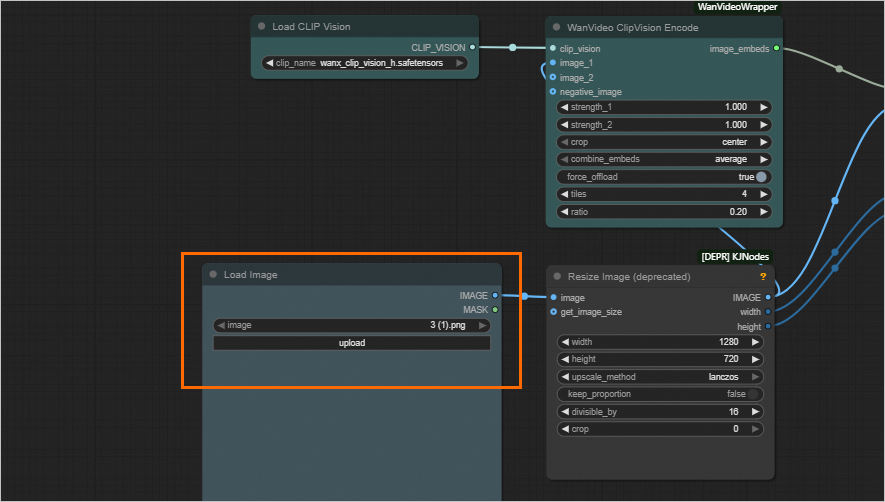
I2V (イメージを直接アップロード):wanvideo_720P_I2V.json
ワークフローが読み込まれた後、[イメージの読み込み] セクションの [アップロード] をクリックして、イメージファイルをアップロードまたは更新できます。
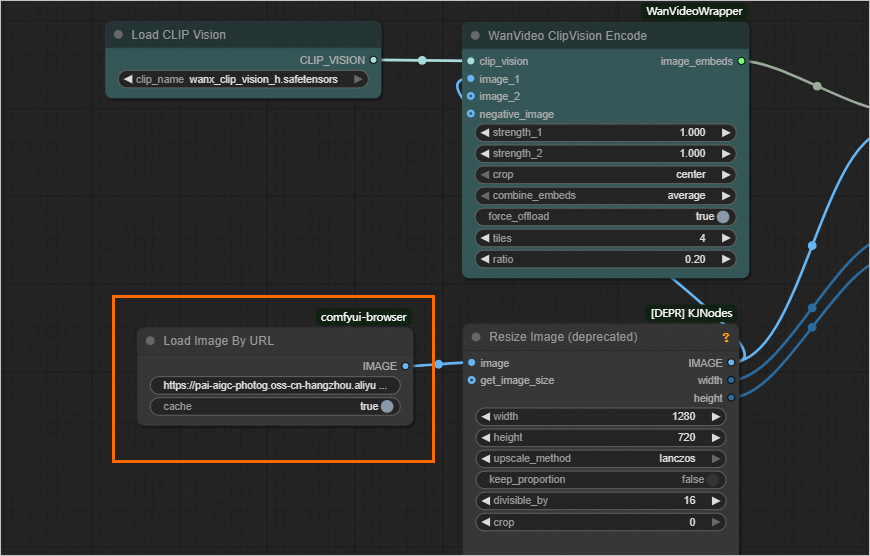
I2V (イメージ URL を読み込み):wanvideo_720P_I2V_URL.json
ワークフローが読み込まれた後、[URL からイメージを読み込み] セクションでイメージ URL を設定してイメージを更新します。
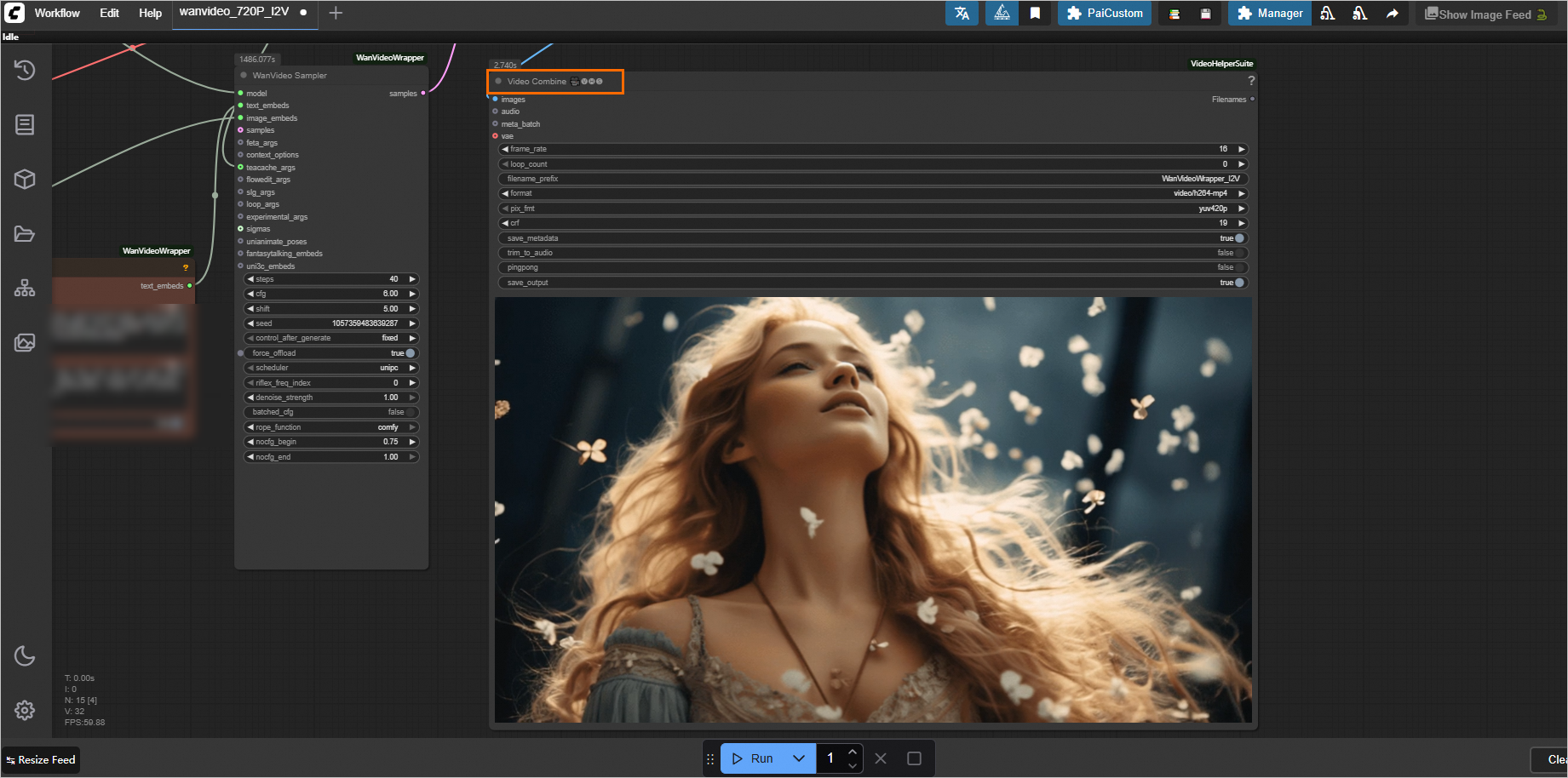
ページ下部の [実行] ボタンをクリックしてビデオを生成します。
約 20 分の実行後、結果は右側の [ビデオ結合] セクションに表示されます。
同期 API 呼び出し
標準サービスは同期呼び出しのみをサポートします。これは、EAS キューサービスを使用せずに推論インスタンスに直接リクエストすることを意味します。次の手順を実行します。
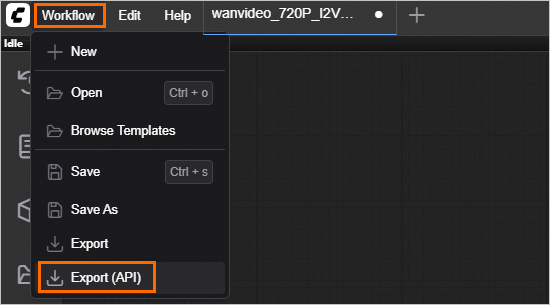
ワークフローの JSON ファイルをエクスポートします。
API リクエストボディはワークフローの設定に依存します。まず、サービスの WebUI ページでワークフローを設定する必要があります。次に、左上隅で [ワークフロー] > [エクスポート (API)] を選択して、ワークフローに対応する JSON ファイルを取得します。
エンドポイント情報を表示します。
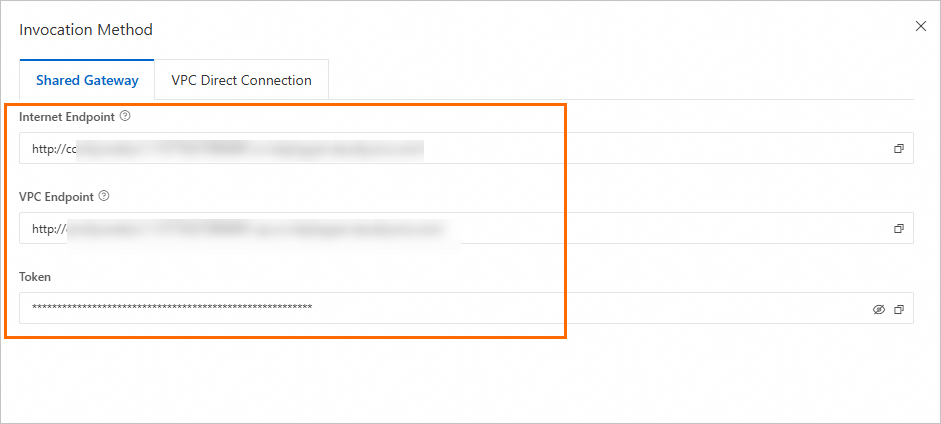
サービスリストでサービス名をクリックし、[基本情報] セクションの [エンドポイント情報を表示] をクリックします。
[呼び出し方法] パネルで、エンドポイントとトークンを取得します。
説明インターネットエンドポイントを使用する場合:クライアントはインターネットへのアクセスをサポートしている必要があります。
VPC エンドポイントを使用する場合:クライアントはサービスと同じ VPC 内にある必要があります。
サービスを呼び出します。
以下は、呼び出しと結果取得のための完全なコードサンプルです。最終結果の
data[prompt_id]["outputs"]["fullpath"]から出力イメージの完全なパスを取得できます。このサンプルコードでは、環境変数からエンドポイントとトークンを取得します。ターミナルで次のコマンドを実行して、一時的な環境変数を追加します (現在のセッションでのみ有効です)。
# ご利用のエンドポイントとトークンを設定します。

export SERVICE_URL="http://test****.115770327099****.cn-beijing.pai-eas.aliyuncs.com/"
export TOKEN="MzJlMDNjMmU3YzQ0ZDJ*****************TMxZA=="
I2V 呼び出しの完全なコード
from time import sleep

import os
import json
import requests

service_url     = os.getenv("SERVICE_URL")
token           = os.getenv("TOKEN")
image_url       = "https://pai-aigc-photog.oss-cn-hangzhou.aliyuncs.com/wan_fun/asset/3.png"
prompt          = "金髪の女性が頭を後ろに傾け、目を閉じ、穏やかで夢見るような表情をしています。彼女の髪は非常に長くふわふわで、風に吹かれたような自然なウェーブがかかっています。背景には、ぼやけた花びらが舞い落ち、ロマンチックで夢のような雰囲気を醸し出しています。彼女はレースの飾りがついたトップスを着ており、服の色は背景と調和し、全体的に柔らかな色調です。上からの光が彼女の顔と髪を照らし、画像全体が非常に柔らかく暖かい印象を与えています。"
negative_prompt = "鮮やかな色調、露出オーバー、静止、細部のぼやけ、字幕、スタイル、アートワーク、絵画、画像、静止画、全体的な灰色、最低品質、低品質、JPEG 圧縮アーティファクト、醜い、不完全、余分な指、下手な手、下手な顔、変形、奇形、変形した手足、指の融合、静止画像、乱雑な背景、3本足、背景に多くの人々、後ろ向きに歩く"
height          = 720
width           = 1280
steps           = 40
num_frames      = 81

if service_url[-1] == "/":
    service_url = service_url[:-1]

prompt_url = f"{service_url}/prompt"

# ペイロードの prompt の値を、ワークフローに対応する JSON ファイルの内容として設定してください。
payload = """
{
    "prompt":
    {
        "11": {
            "inputs": {
            "model_name": "umt5-xxl-enc-bf16.safetensors",
            "precision": "bf16",
            "load_device": "offload_device",
            "quantization": "disabled"
            },
            "class_type": "LoadWanVideoT5TextEncoder",
            "_meta": {
            "title": "Load WanVideo T5 TextEncoder"
            }
        },
        "16": {
            "inputs": {
            "positive_prompt": "A blonde woman with her head tilted back and eyes closed, her expression serene and dreamy. Her hair is very long and fluffy, showing natural waves as if blown by the wind. In the background, some blurred flowers are falling, creating a romantic and dreamy atmosphere. She is wearing a top with lace decorations, and the color of her clothes coordinates with the background, with an overall soft tone. Light shines down from above, illuminating her face and hair, making the entire image appear very soft and warm.",
            "negative_prompt": "Vibrant color tones, overexposure, static, blurry details, captions, style, artwork, painting, image, still, overall grayness, worst quality, low quality, JPEG compression artifacts, ugly, incomplete, extra fingers, poorly drawn hands, poorly drawn face, deformed, disfigured, deformed limbs, finger fusion, static image, messy background, three legs, many people in the background, walking backwards",
            "force_offload": true,
            "speak_and_recognation": {
                "__value__": [
                false,
                true
                ]
            },
            "t5": [
                "11",
                0
            ],
            "model_to_offload": [
                "22",
                0
            ]
            },
            "class_type": "WanVideoTextEncode",
            "_meta": {
            "title": "WanVideo TextEncode"
            }
        },
        "22": {
            "inputs": {
            "model": "WanVideo/wan2.1_i2v_720p_14B_bf16.safetensors",
            "base_precision": "fp16",
            "quantization": "fp8_e4m3fn",
            "load_device": "offload_device",
            "attention_mode": "sageattn",
            "compile_args": [
                "35",
                0
            ]
            },
            "class_type": "WanVideoModelLoader",
            "_meta": {
            "title": "WanVideo Model Loader"
            }
        },
        "27": {
            "inputs": {
            "steps": 40,
            "cfg": 6,
            "shift": 5,
            "seed": 1057359483639287,
            "force_offload": true,
            "scheduler": "unipc",
            "riflex_freq_index": 0,
            "denoise_strength": 1,
            "batched_cfg": "",
            "rope_function": "comfy",
            "nocfg_begin": 0.7500000000000001,
            "nocfg_end": 1,
            "model": [
                "22",
                0
            ],
            "text_embeds": [
                "16",
                0
            ],
            "image_embeds": [
                "63",
                0
            ],
            "teacache_args": [
                "52",
                0
            ]
            },
            "class_type": "WanVideoSampler",
            "_meta": {
            "title": "WanVideo Sampler"
            }
        },
        "28": {
            "inputs": {
            "enable_vae_tiling": false,
            "tile_x": 272,
            "tile_y": 272,
            "tile_stride_x": 144,
            "tile_stride_y": 128,
            "vae": [
                "38",
                0
            ],
            "samples": [
                "27",
                0
            ]
            },
            "class_type": "WanVideoDecode",
            "_meta": {
            "title": "WanVideo Decode"
            }
        },
        "30": {
            "inputs": {
            "frame_rate": 16,
            "loop_count": 0,
            "filename_prefix": "WanVideoWrapper_I2V",
            "format": "video/h264-mp4",
            "pix_fmt": "yuv420p",
            "crf": 19,
            "save_metadata": true,
            "trim_to_audio": false,
            "pingpong": false,
            "save_output": true,
            "images": [
                "28",
                0
            ]
            },
            "class_type": "VHS_VideoCombine",
            "_meta": {
            "title": "Merge to video"
            }
        },
        "35": {
            "inputs": {
            "backend": "inductor",
            "fullgraph": false,
            "mode": "default",
            "dynamic": false,
            "dynamo_cache_size_limit": 64,
            "compile_transformer_blocks_only": true
            },
            "class_type": "WanVideoTorchCompileSettings",
            "_meta": {
            "title": "WanVideo Torch Compile Settings"
            }
        },
        "38": {
            "inputs": {
            "model_name": "WanVideo/Wan2_1_VAE_bf16.safetensors",
            "precision": "bf16"
            },
            "class_type": "WanVideoVAELoader",
            "_meta": {
            "title": "WanVideo VAE Loader"
            }
        },
        "52": {
            "inputs": {
            "rel_l1_thresh": 0.25,
            "start_step": 1,
            "end_step": -1,
            "cache_device": "offload_device",
            "use_coefficients": "true"
            },
            "class_type": "WanVideoTeaCache",
            "_meta": {
            "title": "WanVideo TeaCache"
            }
        },
        "59": {
            "inputs": {
            "clip_name": "wanx_clip_vision_h.safetensors"
            },
            "class_type": "CLIPVisionLoader",
            "_meta": {
            "title": "CLIP Vision Loader"
            }
        },
        "63": {
            "inputs": {
            "width": [
                "66",
                1
            ],
            "height": [
                "66",
                2
            ],
            "num_frames": 81,
            "noise_aug_strength": 0.030000000000000006,
            "start_latent_strength": 1,
            "end_latent_strength": 1,
            "force_offload": true,
            "start_image": [
                "66",
                0
            ],
            "vae": [
                "38",
                0
            ],
            "clip_embeds": [
                "65",
                0
            ]
            },
            "class_type": "WanVideoImageToVideoEncode",
            "_meta": {
            "title": "WanVideo ImageToVideo Encode"
            }
        },
        "65": {
            "inputs": {
            "strength_1": 1,
            "strength_2": 1,
            "crop": "center",
            "combine_embeds": "average",
            "force_offload": true,
            "tiles": 4,
            "ratio": 0.20000000000000004,
            "clip_vision": [
                "59",
                0
            ],
            "image_1": [
                "66",
                0
            ]
            },
            "class_type": "WanVideoClipVisionEncode",
            "_meta": {
            "title": "WanVideo ClipVision Encode"
            }
        },
        "66": {
            "inputs": {
            "width": 832,
            "height": 480,
            "upscale_method": "lanczos",
            "keep_proportion": false,
            "divisible_by": 16,
            "crop": "disabled",
            "image": [
                "68",
                0
            ]
            },
            "class_type": "ImageResizeKJ",
            "_meta": {
            "title": "Image Resize (KJ)"
            }
        },
        "68": {
            "inputs": {
            "url": "https://pai-aigc-photog.oss-cn-hangzhou.aliyuncs.com/wan_fun/asset/3.png",
            "cache": true
            },
            "class_type": "LoadImageByUrl //Browser",
            "_meta": {
            "title": "Load Image By URL"
            }
        }
    }
}
"""

session = requests.session()
session.headers.update({"Authorization":token})

payload = json.loads(payload)
payload["prompt"]["16"]["inputs"]["positive_prompt"] = prompt
payload["prompt"]["16"]["inputs"]["negative_prompt"] = negative_prompt
payload["prompt"]["27"]["inputs"]["steps"] = steps
payload["prompt"]["66"]["inputs"]["height"] = height
payload["prompt"]["66"]["inputs"]["width"] = width
payload["prompt"]["63"]["inputs"]["num_frames"] = num_frames
payload["prompt"]["68"]["inputs"]["url"] = image_url

response = session.post(url=f'{prompt_url}', json=payload)
if response.status_code != 200:
    raise Exception(response.content)

data = response.json()
prompt_id = data["prompt_id"]
print(data)

while 1:
    url = f"{service_url}/history/{prompt_id}"

    response = session.get(url=f'{url}')

    if response.status_code != 200:
        raise Exception(response.content)

    data = response.json()
    if len(data) != 0:
        print(data[prompt_id]["outputs"])
        if len(data[prompt_id]["outputs"]) == 0:
            print("Find no outputs key in output json, the process may be failed, please check the log")
        break
    else:
        sleep(1)
上記コードのステップバイステップの説明
POST リクエストを送信し、返された結果から Prompt ID を取得します。
import requests import os service_url = os.getenv("SERVICE_URL") token = os.getenv("TOKEN") url = f"{service_url}/prompt" payload = { "prompt": リクエストボディ... 省略 } session = requests.session() session.headers.update({"Authorization":token}) response = session.post(url=f'{url}', json=payload) if response.status_code != 200: raise Exception(response.content) data = response.json() print(data)ここで、payload はリクエストボディであり、prompt の値は上記のエクスポート (API) から取得したリクエスト JSON です。Python の requests では、リクエストボディ内のブール値 (True および False) は先頭の文字を大文字にする必要があります。
最初のリクエストの応答は次のとおりです。
{
    "prompt_id": "021ebc5b-e245-4e37-8bd3-00f7b949****",
    "number": 5,
    "node_errors": {}
}
Prompt ID に基づいて最終結果を取得します。
import requests
import os
# リクエスト URL を作成します。
service_url = os.getenv("SERVICE_URL")
token = os.getenv("TOKEN")
url = f"{service_url}history/<prompt_id>"

session = requests.session()
session.headers.update({"Authorization":f'{token}'})

response = session.get(url=f'{url}')

if response.status_code != 200:
    raise Exception(response.content)

data = response.json()
print(data)
<prompt_id> を前のステップの prompt_id に置き換えます。
次の応答が返されます。
{
    "130bcd6b-5bb5-496c-9c8c-3a1359a0****": {
        "prompt": ... 省略,
        "outputs": {
            "30": {
              'gifs': [
                {
                  'filename': 'WanVideo2_1_T2V_00002.mp4',
                  'subfolder': '',
                  'type': 'output',
                  'format': 'video/h264-mp4',
                  'frame_rate': 16.0, 'workflow':
                  'WanVideo2_1_T2V_00002.png', 'fullpath':
                  '/code/data-oss/output/WanVideo2_1_T2V_00002.mp4'
                }
              ]
            }
        },
        "status": {
            "status_str": "success",
            "completed": true,
            "messages": ... 省略,
        }
    }
}
ComfyUI API サービスのデプロイ (高同時実行シナリオ向け)
サービスのデプロイ
すでに標準サービスを作成しており、それを API バージョンに変更したい場合は、元のサービスを削除して新しい API バージョンを作成することを推奨します。
カスタムデプロイメソッドを使用して、ComfyUI API サービスをデプロイします。次の手順を実行します。
PAI コンソールにログインします。ページ上部でリージョンを選択します。次に、目的のワークスペースを選択し、Elastic Algorithm Service (EAS) をクリックします。
[サービスのデプロイ] をクリックします。[カスタムモデルのデプロイ] セクションで、[カスタムデプロイ] をクリックします。
[カスタムデプロイ] ページで、次のパラメーターを設定します。
[環境情報] セクション:
パラメーター
説明
[イメージの設定]
[Aibaba Cloud イメージ] リストから Comfyui > Comfyui:1.9-api を選択します。
説明1.9 はイメージバージョンです。バージョンの反復が速いため、デプロイ時には最新バージョンを選択してください。
モデル設定
サービスに外部ストレージ (OSS や NAS など) をマウントします。生成されたビデオは、対応するデータソースに自動的に保存されます。[OSS] を例に、次のパラメーターを設定します。
[Uri]:OSS バケットのディレクトリを選択します。バケットとディレクトリの作成方法の詳細については、「コンソールのクイックスタート」をご参照ください。ご利用のバケットが EAS サービスと同じリージョンにあることを確認してください。
[マウントパス]:サービスインスタンス内の宛先パスです。例:
/code/data-oss。
コマンド
イメージを選択すると、システムが自動的にこのパラメーターを設定します。
モデル設定が完了したら、コマンドで
--data-dirマウントディレクトリを設定し、マウントディレクトリがモデル設定のマウントパスと同じであることを確認します。イメージバージョン 1.9 では、
--data-dirは事前設定されています。モデル設定のマウントパスに更新するだけで済みます。例:python main.py --listen --port 8000 --api --data-dir /code/data-oss。[リソース情報] セクションで、リソース仕様を選択します。
パラメーター
説明
[リソースタイプ]
[パブリックリソース] を選択します。
[デプロイリソース]
[リソースタイプ] を選択します。ビデオ生成はイメージ生成よりも多くの GPU メモリを必要とするため、カードあたり 48 GB 以上の GPU メモリを持つタイプ (GU60 タイプなど、例:
ml.gu8is.c16m128.1-gu60) を推奨します。[非同期キュー] セクションで、[単一入力リクエストの最大データ量] と [単一出力の最大データ量] を設定します。標準値は 1024 KB です。
説明制限を超えたことによるリクエストの拒否、サンプルの損失、応答の失敗、またはキューのブロッキングを避けるために、データサイズを適切に設定してください。
[サービスアクセス] セクションで、[VPC (VPC)]、[vSwitch]、[セキュリティグループ名] パラメーターを含む、インターネットアクセスを持つ VPC を設定します。詳細については、「VPC のインターネットアクセスを設定」をご参照ください。
説明EAS サービスはデフォルトではインターネットアクセスがありません。しかし、I2V 関数はインターネットからイメージをダウンロードする必要があるため、インターネットアクセスを持つ VPC が必要です。
パラメーターを設定した後、[デプロイ] をクリックします。
非同期 API 呼び出し
API サービスは、非同期呼び出しと api_prompt パスのみをサポートします。非同期呼び出しとは、EAS キューサービスを使用して入力キューにリクエストを送信し、サブスクリプションを通じて結果を取得することを意味します。次の手順を実行します。
エンドポイント情報を表示します。
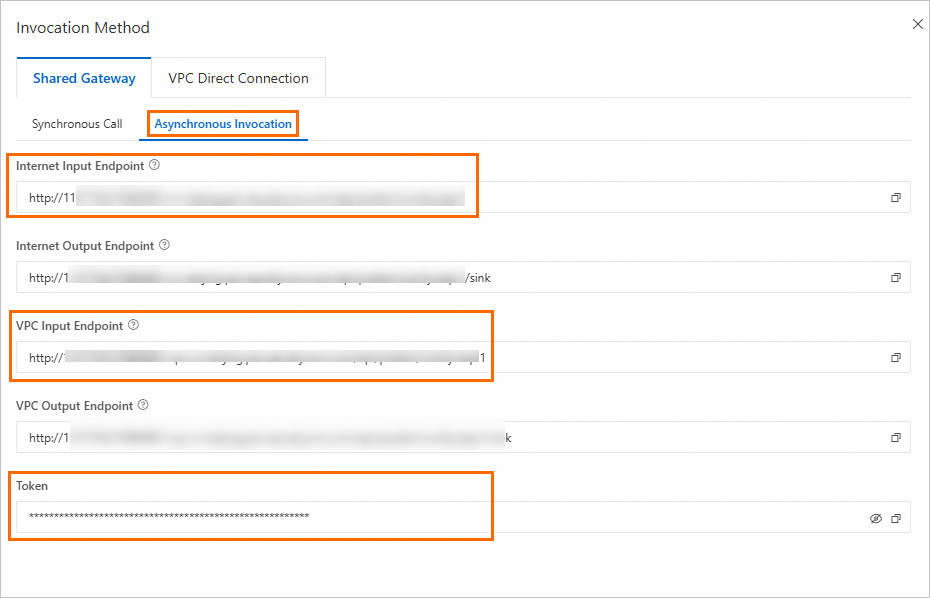
サービスの [サービスタイプ] 列の [呼び出し情報] をクリックします。[呼び出し方法] パネルの [非同期呼び出し] タブで、エンドポイントとトークンを表示します。
説明インターネットエンドポイントを使用する場合:クライアントはインターネットへのアクセスをサポートしている必要があります。
VPC エンドポイントを使用する場合:クライアントはサービスと同じ VPC 内にある必要があります。
ターミナルで次のコマンドを実行して、eas_prediction SDK をインストールします。
pip install eas_prediction --userサービスを呼び出します。
以下は完全なコードサンプルです。最終結果の
json.loads(x.data.decode('utf-8'))[1]["data"]["output"]["gifs"][0]["fullpath"]から出力イメージの完全なパスを取得できます。このサンプルコードでは、環境変数からエンドポイントとトークンを取得します。ターミナルで次のコマンドを実行して、一時的な環境変数を追加します (現在のセッションでのみ有効です)。
# ご利用のエンドポイントとトークンを設定します。

export SERVICE_URL="http://test****.115770327099****.cn-beijing.pai-eas.aliyuncs.com/"
export TOKEN="MzJlMDNjMmU3YzQ0ZDJ*****************TMxZA=="
I2V 呼び出しの完全なコード
import json
import os
import requests
from urllib.parse import urlparse, urlunparse
from eas_prediction import QueueClient

service_url     = os.getenv("SERVICE_URL")
token           = os.getenv("TOKEN")

image_url       = "https://pai-aigc-photog.oss-cn-hangzhou.aliyuncs.com/wan_fun/asset/3.png"
prompt          = "金髪の女性が頭を後ろに傾け、目を閉じ、穏やかで夢見るような表情をしています。彼女の髪は非常に長くふわふわで、風に吹かれたような自然なウェーブがかかっています。背景には、ぼやけた花びらが舞い落ち、ロマンチックで夢のような雰囲気を醸し出しています。彼女はレースの飾りがついたトップスを着ており、服の色は背景と調和し、全体的に柔らかな色調です。上からの光が彼女の顔と髪を照らし、画像全体が非常に柔らかく暖かい印象を与えています。"
negative_prompt = "鮮やかな色調、露出オーバー、静止、細部のぼやけ、字幕、スタイル、アートワーク、絵画、画像、静止画、全体的な灰色、最低品質、低品質、JPEG 圧縮アーティファクト、醜い、不完全、余分な指、下手な手、下手な顔、変形、奇形、変形した手足、指の融合、静止画像、乱雑な背景、3本足、背景に多くの人々、後ろ向きに歩く"
height          = 720
width           = 1280
steps           = 40
num_frames      = 81

if service_url[-1] == "/":
    service_url = service_url[:-1]


def parse_service_url(service_url):
    parsed = urlparse(service_url)
    service_domain = f"{parsed.scheme}://{parsed.netloc}"
    path_parts = [p for p in parsed.path.strip('/').split('/') if p]
    service_name = path_parts[-1]
    return service_domain, service_name


service_domain, service_name = parse_service_url(service_url)
print(f"service_domain: {service_domain}, service_name: {service_name}.")

# ペイロードを、ワークフローに対応する JSON ファイルの内容として設定してください。
payload = """
{
    "11": {
        "inputs": {
        "model_name": "umt5-xxl-enc-bf16.safetensors",
        "precision": "bf16",
        "load_device": "offload_device",
        "quantization": "disabled"
        },
        "class_type": "LoadWanVideoT5TextEncoder",
        "_meta": {
        "title": "Load WanVideo T5 TextEncoder"
        }
    },
    "16": {
        "inputs": {
        "positive_prompt": "A blonde woman with her head tilted back and eyes closed, her expression serene and dreamy. Her hair is very long and fluffy, showing natural waves as if blown by the wind. In the background, some blurred flowers are falling, creating a romantic and dreamy atmosphere. She is wearing a top with lace decorations, and the color of her clothes coordinates with the background, with an overall soft tone. Light shines down from above, illuminating her face and hair, making the entire image appear very soft and warm.",
        "negative_prompt": "Vibrant color tones, overexposure, static, blurry details, captions, style, artwork, painting, image, still, overall grayness, worst quality, low quality, JPEG compression artifacts, ugly, incomplete, extra fingers, poorly drawn hands, poorly drawn face, deformed, disfigured, deformed limbs, finger fusion, static image, messy background, three legs, many people in the background, walking backwards",
        "force_offload": true,
        "speak_and_recognation": {
            "__value__": [
            false,
            true
            ]
        },
        "t5": [
            "11",
            0
        ],
        "model_to_offload": [
            "22",
            0
        ]
        },
        "class_type": "WanVideoTextEncode",
        "_meta": {
        "title": "WanVideo TextEncode"
        }
    },
    "22": {
        "inputs": {
        "model": "WanVideo/wan2.1_i2v_720p_14B_bf16.safetensors",
        "base_precision": "fp16",
        "quantization": "fp8_e4m3fn",
        "load_device": "offload_device",
        "attention_mode": "sageattn",
        "compile_args": [
            "35",
            0
        ]
        },
        "class_type": "WanVideoModelLoader",
        "_meta": {
        "title": "WanVideo Model Loader"
        }
    },
    "27": {
        "inputs": {
        "steps": 40,
        "cfg": 6,
        "shift": 5,
        "seed": 1057359483639287,
        "force_offload": true,
        "scheduler": "unipc",
        "riflex_freq_index": 0,
        "denoise_strength": 1,
        "batched_cfg": "",
        "rope_function": "comfy",
        "nocfg_begin": 0.7500000000000001,
        "nocfg_end": 1,
        "model": [
            "22",
            0
        ],
        "text_embeds": [
            "16",
            0
        ],
        "image_embeds": [
            "63",
            0
        ],
        "teacache_args": [
            "52",
            0
        ]
        },
        "class_type": "WanVideoSampler",
        "_meta": {
        "title": "WanVideo Sampler"
        }
    },
    "28": {
        "inputs": {
        "enable_vae_tiling": false,
        "tile_x": 272,
        "tile_y": 272,
        "tile_stride_x": 144,
        "tile_stride_y": 128,
        "vae": [
            "38",
            0
        ],
        "samples": [
            "27",
            0
        ]
        },
        "class_type": "WanVideoDecode",
        "_meta": {
        "title": "WanVideo Decode"
        }
    },
    "30": {
        "inputs": {
        "frame_rate": 16,
        "loop_count": 0,
        "filename_prefix": "WanVideoWrapper_I2V",
        "format": "video/h264-mp4",
        "pix_fmt": "yuv420p",
        "crf": 19,
        "save_metadata": true,
        "trim_to_audio": false,
        "pingpong": false,
        "save_output": true,
        "images": [
            "28",
            0
        ]
        },
        "class_type": "VHS_VideoCombine",
        "_meta": {
        "title": "Merge to video"
        }
    },
    "35": {
        "inputs": {
        "backend": "inductor",
        "fullgraph": false,
        "mode": "default",
        "dynamic": false,
        "dynamo_cache_size_limit": 64,
        "compile_transformer_blocks_only": true
        },
        "class_type": "WanVideoTorchCompileSettings",
        "_meta": {
        "title": "WanVideo Torch Compile Settings"
        }
    },
    "38": {
        "inputs": {
        "model_name": "WanVideo/Wan2_1_VAE_bf16.safetensors",
        "precision": "bf16"
        },
        "class_type": "WanVideoVAELoader",
        "_meta": {
        "title": "WanVideo VAE Loader"
        }
    },
    "52": {
        "inputs": {
        "rel_l1_thresh": 0.25,
        "start_step": 1,
        "end_step": -1,
        "cache_device": "offload_device",
        "use_coefficients": "true"
        },
        "class_type": "WanVideoTeaCache",
        "_meta": {
        "title": "WanVideo TeaCache"
        }
    },
    "59": {
        "inputs": {
        "clip_name": "wanx_clip_vision_h.safetensors"
        },
        "class_type": "CLIPVisionLoader",
        "_meta": {
        "title": "CLIP Vision Loader"
        }
    },
    "63": {
        "inputs": {
        "width": [
            "66",
            1
        ],
        "height": [
            "66",
            2
        ],
        "num_frames": 81,
        "noise_aug_strength": 0.030000000000000006,
        "start_latent_strength": 1,
        "end_latent_strength": 1,
        "force_offload": true,
        "start_image": [
            "66",
            0
        ],
        "vae": [
            "38",
            0
        ],
        "clip_embeds": [
            "65",
            0
        ]
        },
        "class_type": "WanVideoImageToVideoEncode",
        "_meta": {
        "title": "WanVideo ImageToVideo Encode"
        }
    },
    "65": {
        "inputs": {
        "strength_1": 1,
        "strength_2": 1,
        "crop": "center",
        "combine_embeds": "average",
        "force_offload": true,
        "tiles": 4,
        "ratio": 0.20000000000000004,
        "clip_vision": [
            "59",
            0
        ],
        "image_1": [
            "66",
            0
        ]
        },
        "class_type": "WanVideoClipVisionEncode",
        "_meta": {
        "title": "WanVideo ClipVision Encode"
        }
    },
    "66": {
        "inputs": {
        "width": 832,
        "height": 480,
        "upscale_method": "lanczos",
        "keep_proportion": false,
        "divisible_by": 16,
        "crop": "disabled",
        "image": [
            "68",
            0
        ]
        },
        "class_type": "ImageResizeKJ",
        "_meta": {
        "title": "Image Resize (KJ)"
        }
    },
    "68": {
        "inputs": {
        "url": "https://pai-aigc-photog.oss-cn-hangzhou.aliyuncs.com/wan_fun/asset/3.png",
        "cache": true
        },
        "class_type": "LoadImageByUrl //Browser",
        "_meta": {
        "title": "Load Image By URL"
        }
    }
}
"""


session = requests.session()
session.headers.update({"Authorization":token})

payload = json.loads(payload)
payload["16"]["inputs"]["positive_prompt"] = prompt
payload["16"]["inputs"]["negative_prompt"] = negative_prompt
payload["27"]["inputs"]["steps"] = steps
payload["66"]["inputs"]["height"] = height
payload["66"]["inputs"]["width"] = width
payload["63"]["inputs"]["num_frames"] = num_frames
payload["68"]["inputs"]["url"] = image_url

response = session.post(url=f'{service_url}/api_prompt?task_id=txt2img', json=payload)
if response.status_code != 200:
    raise Exception(response.content)

data = response.json()
sink_queue = QueueClient(service_domain, f'{service_name}/sink')
sink_queue.set_token(token)
sink_queue.init()

watcher = sink_queue.watch(0, 1, auto_commit=False)
for x in watcher.run():
    if 'task_id' in x.tags:
        print('index {} task_id is {}'.format(x.index, x.tags['task_id']))
    print(f'index {x.index} data is {x.data}')
    print(json.loads(x.data.decode('utf-8'))[1]["data"]["output"]["gifs"][0]["fullpath"])
    sink_queue.commit(x.index)
上記コードのステップバイステップの説明
リクエストを送信します。
import requests, io, base64, os from PIL import Image, PngImagePlugin url = os.getenv("SERVICE_URL") token = os.getenv("TOKEN") session = requests.session() session.headers.update({"Authorization": token}) work_flow = { '3': ... 省略 } # Standard Edition とは異なり、prompt キーはありません for i in range(1): payload = work_flow response = session.post(url=f'{url}/api_prompt?task_id=txt2img_{i}', json=payload) if response.status_code != 200: exit(f"send request error:{response.content}") else: print(f"send {i} success, index is {response.content}")ここで、work_flow はリクエストボディであり、上記のエクスポート (API) から取得したリクエスト JSON です。Python の requests では、リクエストボディ内のブール値 (True および False) は先頭の文字を大文字にする必要があります。
結果をサブスクライブします。
from eas_prediction import QueueClient
import os

token = os.getenv("TOKEN")
sink_queue = QueueClient('<service_domain>', '<service_name>/sink')
sink_queue.set_token(token)
sink_queue.init()

watcher = sink_queue.watch(0, 1, auto_commit=False)
for x in watcher.run():
    if 'task_id' in x.tags:
        print('index {} task_id is {}'.format(x.index, x.tags['task_id']))
    print(f'index {x.index} data is {x.data}')
    sink_queue.commit(x.index)
主要な設定項目:
項目
説明
<service_domain>
取得したエンドポイントに置き換えます。例:
139699392458****.cn-hangzhou.pai-eas.aliyuncs.com。<service_name>
サービスの名前に置き換えます。
次のようなコマンド出力が返されます。
index 2 task_id is txt2img
index 2 data is b'[{"status_code": 200}, {"type": "executed", "data": {"node": "30", "display_node": "30", "output": {"gifs": [{"filename": "WanVideoWrapper_I2V_00001.mp4", "subfolder": "", "type": "output", "format": "video/h264-mp4", "frame_rate": 16.0, "workflow": "WanVideoWrapper_I2V_00001.png", "fullpath": "/code/data-oss/output/WanVideoWrapper_I2V_00001.mp4"}]}, "prompt_id": "e20b1cb0-fb48-4ddd-92e5-3c783b064a2c"}}, {"e20b1cb0-fb48-4ddd-92e5-3c783b064a2c": {"prompt": [1, "e20b1cb0-fb48-4ddd-92e5-3c783b064a2c", {"11": {"inputs": {"model_name": "umt5-xxl-enc-bf16.safetensors", "precision": "bf16", "load_device": "offload_device", "quantization": "disabled"}, "class_type": "LoadWanVideoT5TextEncoder", "_meta": {"title": "Load WanVideo T5 TextEncoder"}}, "16": {"inputs": {"positive_prompt": "\\u4e00\\u4f4d\\u91d1\\u53d1\\u5973\\u5b50\\uff0c\\u5979\\u4ef0\\u5934\\u95ed\\u773c\\uff0c\\u8868\\u60c5\\u5b81\\u9759\\u800c\\u68a6\\u5e7b\\u3002\\u5979\\u7684\\u5934\\u53d1\\u975e\\u5e38\\u957f\\u4e14\\u84ec\\u677e\\uff0c\\u5448\\u73b0\\u51fa\\u81ea\\u7136\\u7684\\u6ce2\\u6d6a\\u72b6\\uff0c\\u4eff\\u4f5b\\u88ab\\u98ce\\u5439\\u62c2\\u3002\\u80cc\\u666f\\u4e2d\\u6709\\u4e00\\u4e9b\\u6a21\\u7cca\\u7684\\u82b1\\u6735\\u98d8\\u843d\\uff0c\\u8425\\u9020\\u51fa\\u4e00\\u79cd\\u6d6a\\u6f2b\\u548c\\u68a6\\u5e7b\\u7684\\u6c1b\\u56f4\\u3002\\u5979\\u7a7f\\u7740\\u4e00\\u4ef6\\u5e26\\u6709\\u857e\\u4e1d\\u88c5\\u9970\\u7684\\u4e0a\\u8863\\uff0c\\u8863\\u670d\\u7684\\u989c\\u8272\\u4e0e\\u80cc\\u666f\\u76f8\\u534f\\u8c03\\uff0c\\u6574\\u4f53\\u8272\\u8c03\\u67d4\\u548c\\u3002\\u5149\\u7ebf\\u4ece\\u4e0a\\u65b9\\u7167\\u5c04\\u4e0b\\u6765\\uff0c\\u7167\\u4eae\\u4e86\\u5979\\u7684\\u8138\\u5e9e\\u548c\\u5934\\u53d1\\uff0c\\u4f7f\\u6574\\u4e2a\\u753b\\u9762\\u663e\\u5f97\\u975e\\u5e38\\u67d4\\u548c\\u548c\\u6e29\\u6696\\u3002", "negative_prompt": "\\u8272\\u8c03\\u8273\\u4e3d\\uff0c\\u8fc7\\u66dd\\uff0c\\u9759\\u6001\\uff0c\\u7ec6\\u8282\\u6a21\\u7cca\\u4e0d\\u6e05\\uff0c\\u5b57\\u5e55\\uff0c\\u98ce\\u683c\\uff0c\\u4f5c\\u54c1\\uff0c\\u753b\\u4f5c\\uff0c\\u753b\\u9762\\uff0c\\u9759\\u6b62\\uff0c\\u6574\\u4f53\\u53d1\\u7070\\uff0c\\u6700\\u5dee\\u8d28\\u91cf\\uff0c\\u4f4e\\u8d28\\u91cf\\uff0cJPEG\\u538b\\u7f29\\u6b8b\\u7559\\uff0c\\u4e11\\u964b\\u7684\\uff0c\\u6b8b\\u7f3a\\u7684\\uff0c\\u591a\\u4f59\\u7684\\u624b\\u6307\\uff0c\\u753b\\u5f97\\u4e0d\\u597d\\u7684\\u624b\\u90e8\\uff0c\\u753b\\u5f97\\u4e0d\\u597d\\u7684\\u8138\\u90e8\\uff0c\\u7578\\u5f62\\u7684\\uff0c\\u6bc1\\u5bb9\\u7684\\uff0c\\u5f62\\u6001\\u7578\\u5f62\\u7684\\u80a2\\u4f53\\uff0c\\u624b\\u6307\\u878d\\u5408\\uff0c\\u9759\\u6b62\\u4e0d\\u52a8\\u7684\\u753b\\u9762\\uff0c\\u6742\\u4e71\\u7684\\u80cc\\u666f\\uff0c\\u4e09\\u6761\\u817f\\uff0c\\u80cc\\u666f\\u4eba\\u5f88\\u591a\\uff0c\\u5012\\u7740\\u8d70", "force_offload": true, "speak_and_recognation": {"__value__": [false, true]}, "t5": ["11", 0], "model_to_offload": ["22", 0]}, "class_type": "WanVideoTextEncode", "_meta": {"title": "WanVideo TextEncode"}}, "22": {"inputs": {"model": "WanVideo/wan2.1_i2v_720p_14B_bf16.safetensors", "base_precision": "fp16", "quantization": "fp8_e4m3fn", "load_device": "offload_device", "attention_mode": "sageattn", "compile_args": ["35", 0]}, "class_type": "WanVideoModelLoader", "_meta": {"title": "WanVideo Model Loader"}}, "27": {"inputs": {"steps": 40, "cfg": 6.0, "shift": 5.0, "seed": 1057359483639287, "force_offload": true, "scheduler": "unipc", "riflex_freq_index": 0, "denoise_strength": 1.0, "batched_cfg": false, "rope_function": "comfy", "nocfg_begin": 0.7500000000000001, "nocfg_end": 1.0, "model": ["22", 0], "text_embeds": ["16", 0], "image_embeds": ["63", 0], "teacache_args": ["52", 0]}, "class_type": "WanVideoSampler", "_meta": {"title": "WanVideo Sampler"}}, "28": {"inputs": {"enable_vae_tiling": false, "tile_x": 272, "tile_y": 272, "tile_stride_x": 144, "tile_stride_y": 128, "vae": ["38", 0], "samples": ["27", 0]}, "class_type": "WanVideoDecode", "_meta": {"title": "WanVideo Decode"}}, "30": {"inputs": {"frame_rate": 16.0, "loop_count": 0, "filename_prefix": "WanVideoWrapper_I2V", "format": "video/h264-mp4", "pix_fmt": "yuv420p", "crf": 19, "save_metadata": true, "trim_to_audio": false, "pingpong": false, "save_output": true, "images": ["28", 0]}, "class_type": "VHS_VideoCombine", "_meta": {"title": "\\u5408\\u5e76\\u4e3a\\u89c6\\u9891"}}, "35": {"inputs": {"backend": "inductor", "fullgraph": false, "mode": "default", "dynamic": false, "dynamo_cache_size_limit": 64, "compile_transformer_blocks_only": true}, "class_type": "WanVideoTorchCompileSettings", "_meta": {"title": "WanVideo Torch Compile Settings"}}, "38": {"inputs": {"model_name": "WanVideo/Wan2_1_VAE_bf16.safetensors", "precision": "bf16"}, "class_type": "WanVideoVAELoader", "_meta": {"title": "WanVideo VAE Loader"}}, "52": {"inputs": {"rel_l1_thresh": 0.25, "start_step": 1, "end_step": -1, "cache_device": "offload_device", "use_coefficients": true}, "class_type": "WanVideoTeaCache", "_meta": {"title": "WanVideo TeaCache"}}, "59": {"inputs": {"clip_name": "wanx_clip_vision_h.safetensors"}, "class_type": "CLIPVisionLoader", "_meta": {"title": "CLIP\\u89c6\\u89c9\\u52a0\\u8f7d\\u5668"}}, "63": {"inputs": {"width": ["66", 1], "height": ["66", 2], "num_frames": 81, "noise_aug_strength": 0.030000000000000006, "start_latent_strength": 1.0, "end_latent_strength": 1.0, "force_offload": true, "start_image": ["66", 0], "vae": ["38", 0], "clip_embeds": ["65", 0]}, "class_type": "WanVideoImageToVideoEncode", "_meta": {"title": "WanVideo ImageToVideo Encode"}}, "65": {"inputs": {"strength_1": 1.0, "strength_2": 1.0, "crop": "center", "combine_embeds": "average", "force_offload": true, "tiles": 4, "ratio": 0.20000000000000004, "clip_vision": ["59", 0], "image_1": ["66", 0]}, "class_type": "WanVideoClipVisionEncode", "_meta": {"title": "WanVideo ClipVision Encode"}}, "66": {"inputs": {"width": 1280, "height": 720, "upscale_method": "lanczos", "keep_proportion": false, "divisible_by": 16, "crop": "disabled", "image": ["68", 0]}, "class_type": "ImageResizeKJ", "_meta": {"title": "\\u56fe\\u50cf\\u7f29\\u653e\\uff08KJ\\uff09"}}, "68": {"inputs": {"url": "https://pai-aigc-photog.oss-cn-hangzhou.aliyuncs.com/wan_fun/asset/3.png", "cache": true}, "class_type": "LoadImageByUrl //Browser", "_meta": {"title": "Load Image By URL"}}}, {"client_id": "unknown"}, ["30"]], "outputs": {"30": {"gifs": [{"filename": "WanVideoWrapper_I2V_00001.mp4", "subfolder": "", "type": "output", "format": "video/h264-mp4", "frame_rate": 16.0, "workflow": "WanVideoWrapper_I2V_00001.png", "fullpath": "/code/data-oss/output/WanVideoWrapper_I2V_00001.mp4"}]}}, "status": {"status_str": "success", "completed": true, "messages": [["execution_start", {"prompt_id": "e20b1cb0-fb48-4ddd-92e5-3c783b064a2c", "timestamp": 1746512702895}], ["execution_cached", {"nodes": ["11", "16", "22", "27", "28", "30", "35", "38", "52", "59", "63", "65", "66", "68"], "prompt_id": "e20b1cb0-fb48-4ddd-92e5-3c783b064a2c", "timestamp": 1746512702899}], ["execution_success", {"prompt_id": "e20b1cb0-fb48-4ddd-92e5-3c783b064a2c", "timestamp": 1746512702900}]]}, "meta": {"30": {"node_id": "30", "display_node": "30", "parent_node": null, "real_node_id": "30"}}}}, {"30": {"gifs": [{"filename": "WanVideoWrapper_I2V_00001.mp4", "subfolder": "", "type": "output", "format": "video/h264-mp4", "frame_rate": 16.0, "workflow": "WanVideoWrapper_I2V_00001.png", "fullpath": "/code/data-oss/output/WanVideoWrapper_I2V_00001.mp4"}]}}]'
付録:その他の例
T2V の使用プロセスは I2V と同じです。上記の手順を参照してサービスをデプロイし、呼び出すことができます。ただし、T2V はインターネットアクセスを必要としないため、EAS サービスをデプロイする際に VPC を設定する必要はありません。
サンプルワークフローファイル (wanvideo_720P_T2V.json) を通じて WebUI 呼び出しプロセスを体験できます。WebUI ページでワークフローを読み込み、WanVideo TextEncode 入力ボックスにプロンプトを入力します。[実行] をクリックして開始します。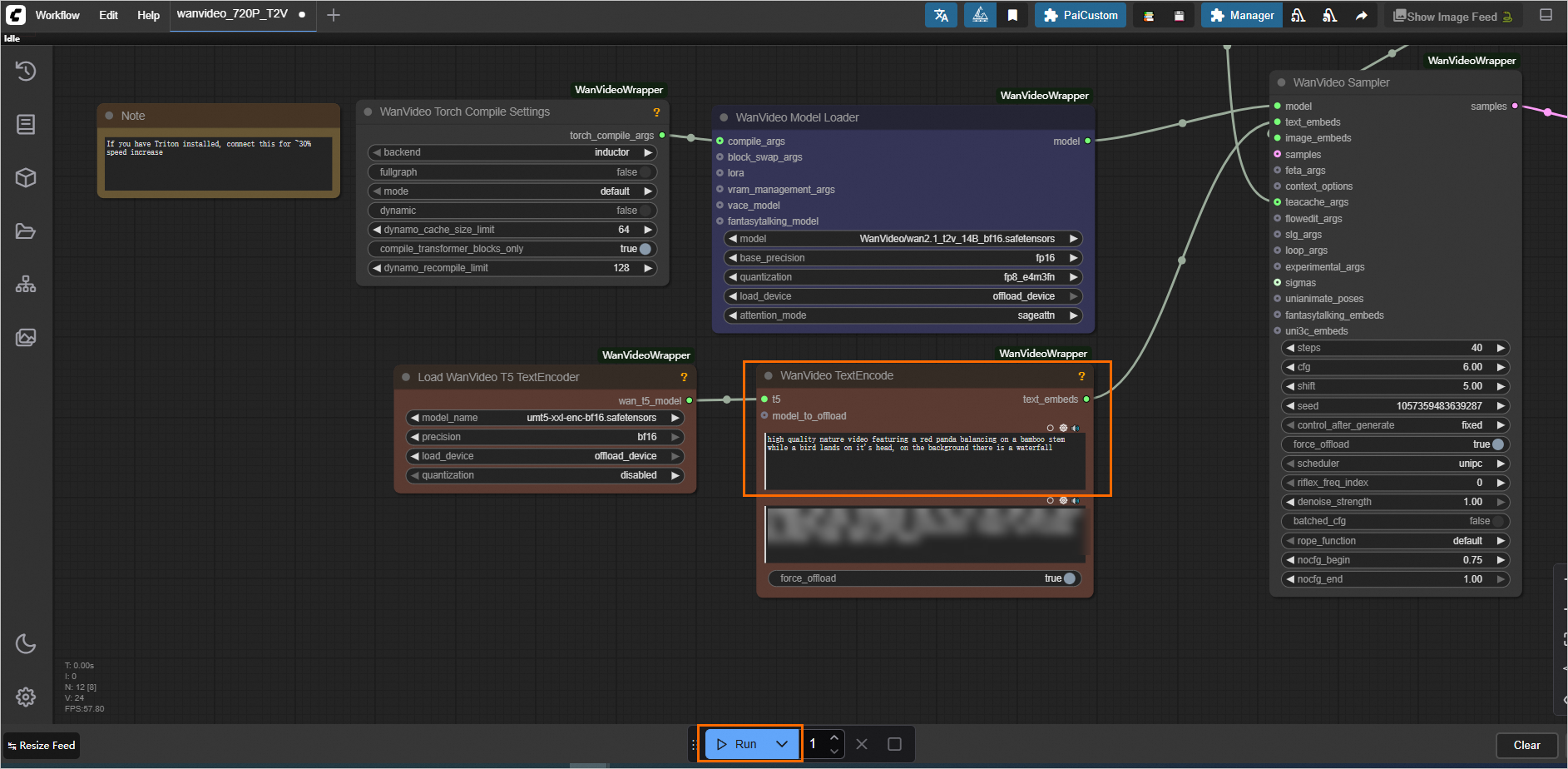 API を介して呼び出すには、以下にコードサンプルを示します。
このサンプルコードでは、環境変数からエンドポイントとトークンを取得します。ターミナルで次のコマンドを実行して、一時的な環境変数を追加します (現在のセッションでのみ有効です)。
# ご利用のエンドポイントとトークンを設定します。

export SERVICE_URL="http://test****.115770327099****.cn-beijing.pai-eas.aliyuncs.com/"
export TOKEN="MzJlMDNjMmU3YzQ0ZDJ*****************TMxZA=="
同期 API 呼び出し
T2V 呼び出しの完全なコード
from time import sleep

import os
import json
import requests

service_url     = os.getenv("SERVICE_URL")
token           = os.getenv("TOKEN")
prompt          = "金髪の女性が頭を後ろに傾け、目を閉じ、穏やかで夢見るような表情をしています。彼女の髪は非常に長くふわふわで、風に吹かれたような自然なウェーブがかかっています。背景には、ぼやけた花びらが舞い落ち、ロマンチックで夢のような雰囲気を醸し出しています。彼女はレースの飾りがついたトップスを着ており、服の色は背景と調和し、全体的に柔らかな色調です。上からの光が彼女の顔と髪を照らし、画像全体が非常に柔らかく暖かい印象を与えています。"
negative_prompt = "鮮やかな色調、露出オーバー、静止、細部のぼやけ、字幕、スタイル、アートワーク、絵画、画像、静止画、全体的な灰色、最低品質、低品質、JPEG 圧縮アーティファクト、醜い、不完全、余分な指、下手な手、下手な顔、変形、奇形、変形した手足、指の融合、静止画像、乱雑な背景、3本足、背景に多くの人々、後ろ向きに歩く"
height          = 720
width           = 1280
steps           = 40
num_frames      = 81

if service_url[-1] == "/":
    service_url = service_url[:-1]

prompt_url = f"{service_url}/prompt"

# ペイロードの prompt の値を、ワークフローに対応する JSON ファイルの内容として設定してください。
payload = """
{
    "prompt":
    {
        "11": {
            "inputs": {
            "model_name": "umt5-xxl-enc-bf16.safetensors",
            "precision": "bf16",
            "load_device": "offload_device",
            "quantization": "disabled"
            },
            "class_type": "LoadWanVideoT5TextEncoder",
            "_meta": {
            "title": "Load WanVideo T5 TextEncoder"
            }
        },
        "16": {
            "inputs": {
            "positive_prompt": "A blonde woman with her head tilted back and eyes closed, her expression serene and dreamy. Her hair is very long and fluffy, showing natural waves as if blown by the wind. In the background, some blurred flowers are falling, creating a romantic and dreamy atmosphere. She is wearing a top with lace decorations, and the color of her clothes coordinates with the background, with an overall soft tone. Light shines down from above, illuminating her face and hair, making the entire image appear very soft and warm.",
            "negative_prompt": "Vibrant color tones, overexposure, static, blurry details, captions, style, artwork, painting, image, still, overall grayness, worst quality, low quality, JPEG compression artifacts, ugly, incomplete, extra fingers, poorly drawn hands, poorly drawn face, deformed, disfigured, deformed limbs, finger fusion, static image, messy background, three legs, many people in the background, walking backwards",
            "force_offload": true,
            "speak_and_recognation": {
                "__value__": [
                false,
                true
                ]
            },
            "t5": [
                "11",
                0
            ]
            },
            "class_type": "WanVideoTextEncode",
            "_meta": {
            "title": "WanVideo TextEncode"
            }
        },
        "22": {
            "inputs": {
            "model": "WanVideo/wan2.1_t2v_14B_bf16.safetensors",
            "base_precision": "fp16",
            "quantization": "fp8_e4m3fn",
            "load_device": "offload_device",
            "attention_mode": "sageattn",
            "compile_args": [
                "35",
                0
            ]
            },
            "class_type": "WanVideoModelLoader",
            "_meta": {
            "title": "WanVideo Model Loader"
            }
        },
        "27": {
            "inputs": {
            "steps": 40,
            "cfg": 6.000000000000002,
            "shift": 5.000000000000001,
            "seed": 1057359483639287,
            "force_offload": true,
            "scheduler": "unipc",
            "riflex_freq_index": 0,
            "denoise_strength": 1,
            "batched_cfg": false,
            "rope_function": "default",
            "nocfg_begin": 0.7500000000000001,
            "nocfg_end": 1,
            "model": [
                "22",
                0
            ],
            "text_embeds": [
                "16",
                0
            ],
            "image_embeds": [
                "37",
                0
            ],
            "teacache_args": [
                "52",
                0
            ]
            },
            "class_type": "WanVideoSampler",
            "_meta": {
            "title": "WanVideo Sampler"
            }
        },
        "28": {
            "inputs": {
            "enable_vae_tiling": true,
            "tile_x": 272,
            "tile_y": 272,
            "tile_stride_x": 144,
            "tile_stride_y": 128,
            "vae": [
                "38",
                0
            ],
            "samples": [
                "27",
                0
            ]
            },
            "class_type": "WanVideoDecode",
            "_meta": {
            "title": "WanVideo Decode"
            }
        },
        "30": {
            "inputs": {
            "frame_rate": 16,
            "loop_count": 0,
            "filename_prefix": "WanVideo2_1_T2V",
            "format": "video/h264-mp4",
            "pix_fmt": "yuv420p",
            "crf": 19,
            "save_metadata": true,
            "trim_to_audio": false,
            "pingpong": false,
            "save_output": true,
            "images": [
                "28",
                0
            ]
            },
            "class_type": "VHS_VideoCombine",
            "_meta": {
            "title": "Merge to video"
            }
        },
        "35": {
            "inputs": {
            "backend": "inductor",
            "fullgraph": false,
            "mode": "default",
            "dynamic": false,
            "dynamo_cache_size_limit": 64,
            "compile_transformer_blocks_only": true
            },
            "class_type": "WanVideoTorchCompileSettings",
            "_meta": {
            "title": "WanVideo Torch Compile Settings"
            }
        },
        "37": {
            "inputs": {
            "width": 832,
            "height": 480,
            "num_frames": 81
            },
            "class_type": "WanVideoEmptyEmbeds",
            "_meta": {
            "title": "WanVideo Empty Embeds"
            }
        },
        "38": {
            "inputs": {
            "model_name": "WanVideo/Wan2_1_VAE_bf16.safetensors",
            "precision": "bf16"
            },
            "class_type": "WanVideoVAELoader",
            "_meta": {
            "title": "WanVideo VAE Loader"
            }
        },
        "52": {
            "inputs": {
            "rel_l1_thresh": 0.25000000000000006,
            "start_step": 1,
            "end_step": -1,
            "cache_device": "offload_device",
            "use_coefficients": "true"
            },
            "class_type": "WanVideoTeaCache",
            "_meta": {
            "title": "WanVideo TeaCache"
            }
        }
    }
}
"""

session = requests.session()
session.headers.update({"Authorization":token})

payload = json.loads(payload)
payload["prompt"]["16"]["inputs"]["positive_prompt"] = prompt
payload["prompt"]["16"]["inputs"]["negative_prompt"] = negative_prompt
payload["prompt"]["27"]["inputs"]["steps"] = steps
payload["prompt"]["37"]["inputs"]["height"] = height
payload["prompt"]["37"]["inputs"]["width"] = width
payload["prompt"]["37"]["inputs"]["num_frames"] = num_frames

response = session.post(url=f'{prompt_url}', json=payload)
if response.status_code != 200:
    raise Exception(response.content)

data = response.json()
prompt_id = data["prompt_id"]
print(data)

while 1:
    url = f"{service_url}/history/{prompt_id}"

    response = session.get(url=f'{url}')

    if response.status_code != 200:
        raise Exception(response.content)

    data = response.json()
    if len(data) != 0:
        print(data[prompt_id]["outputs"])
        if len(data[prompt_id]["outputs"]) == 0:
            print("Find no outputs key in output json, the process may be failed, please check the log")
        break
    else:
        sleep(1)
非同期 API 呼び出し
T2V 呼び出しの完全なコード
import json
import os
import requests
from urllib.parse import urlparse, urlunparse
from eas_prediction import QueueClient

service_url     = os.getenv("SERVICE_URL")
token           = os.getenv("TOKEN")

prompt          = "金髪の女性が頭を後ろに傾け、目を閉じ、穏やかで夢見るような表情をしています。彼女の髪は非常に長くふわふわで、風に吹かれたような自然なウェーブがかかっています。背景には、ぼやけた花びらが舞い落ち、ロマンチックで夢のような雰囲気を醸し出しています。彼女はレースの飾りがついたトップスを着ており、服の色は背景と調和し、全体的に柔らかな色調です。上からの光が彼女の顔と髪を照らし、画像全体が非常に柔らかく暖かい印象を与えています。"
negative_prompt = "鮮やかな色調、露出オーバー、静止、細部のぼやけ、字幕、スタイル、アートワーク、絵画、画像、静止画、全体的な灰色、最低品質、低品質、JPEG 圧縮アーティファクト、醜い、不完全、余分な指、下手な手、下手な顔、変形、奇形、変形した手足、指の融合、静止画像、乱雑な背景、3本足、背景に多くの人々、後ろ向きに歩く"
height          = 720
width           = 1280
steps           = 40
num_frames      = 81

if service_url[-1] == "/":
    service_url = service_url[:-1]


def parse_service_url(service_url):
    parsed = urlparse(service_url)
    service_domain = f"{parsed.scheme}://{parsed.netloc}"
    path_parts = [p for p in parsed.path.strip('/').split('/') if p]
    service_name = path_parts[-1]
    return service_domain, service_name


service_domain, service_name = parse_service_url(service_url)
print(f"service_domain: {service_domain}, service_name: {service_name}.")

# ペイロードを、ワークフローに対応する JSON ファイルの内容として設定してください。
payload = """
{
    "11": {
        "inputs": {
        "model_name": "umt5-xxl-enc-bf16.safetensors",
        "precision": "bf16",
        "load_device": "offload_device",
        "quantization": "disabled"
        },
        "class_type": "LoadWanVideoT5TextEncoder",
        "_meta": {
        "title": "Load WanVideo T5 TextEncoder"
        }
    },
    "16": {
        "inputs": {
        "positive_prompt": "A blonde woman with her head tilted back and eyes closed, her expression serene and dreamy. Her hair is very long and fluffy, showing natural waves as if blown by the wind. In the background, some blurred flowers are falling, creating a romantic and dreamy atmosphere. She is wearing a top with lace decorations, and the color of her clothes coordinates with the background, with an overall soft tone. Light shines down from above, illuminating her face and hair, making the entire image appear very soft and warm.",
        "negative_prompt": "Vibrant color tones, overexposure, static, blurry details, captions, style, artwork, painting, image, still, overall grayness, worst quality, low quality, JPEG compression artifacts, ugly, incomplete, extra fingers, poorly drawn hands, poorly drawn face, deformed, disfigured, deformed limbs, finger fusion, static image, messy background, three legs, many people in the background, walking backwards",
        "force_offload": true,
        "speak_and_recognation": {
            "__value__": [
            false,
            true
            ]
        },
        "t5": [
            "11",
            0
        ]
        },
        "class_type": "WanVideoTextEncode",
        "_meta": {
        "title": "WanVideo TextEncode"
        }
    },
    "22": {
        "inputs": {
        "model": "WanVideo/wan2.1_t2v_14B_bf16.safetensors",
        "base_precision": "fp16",
        "quantization": "fp8_e4m3fn",
        "load_device": "offload_device",
        "attention_mode": "sageattn",
        "compile_args": [
            "35",
            0
        ]
        },
        "class_type": "WanVideoModelLoader",
        "_meta": {
        "title": "WanVideo Model Loader"
        }
    },
    "27": {
        "inputs": {
        "steps": 40,
        "cfg": 6.000000000000002,
        "shift": 5.000000000000001,
        "seed": 1057359483639287,
        "force_offload": true,
        "scheduler": "unipc",
        "riflex_freq_index": 0,
        "denoise_strength": 1,
        "batched_cfg": false,
        "rope_function": "default",
        "nocfg_begin": 0.7500000000000001,
        "nocfg_end": 1,
        "model": [
            "22",
            0
        ],
        "text_embeds": [
            "16",
            0
        ],
        "image_embeds": [
            "37",
            0
        ],
        "teacache_args": [
            "52",
            0
        ]
        },
        "class_type": "WanVideoSampler",
        "_meta": {
        "title": "WanVideo Sampler"
        }
    },
    "28": {
        "inputs": {
        "enable_vae_tiling": true,
        "tile_x": 272,
        "tile_y": 272,
        "tile_stride_x": 144,
        "tile_stride_y": 128,
        "vae": [
            "38",
            0
        ],
        "samples": [
            "27",
            0
        ]
        },
        "class_type": "WanVideoDecode",
        "_meta": {
        "title": "WanVideo Decode"
        }
    },
    "30": {
        "inputs": {
        "frame_rate": 16,
        "loop_count": 0,
        "filename_prefix": "WanVideo2_1_T2V",
        "format": "video/h264-mp4",
        "pix_fmt": "yuv420p",
        "crf": 19,
        "save_metadata": true,
        "trim_to_audio": false,
        "pingpong": false,
        "save_output": true,
        "images": [
            "28",
            0
        ]
        },
        "class_type": "VHS_VideoCombine",
        "_meta": {
        "title": "Merge to video"
        }
    },
    "35": {
        "inputs": {
        "backend": "inductor",
        "fullgraph": false,
        "mode": "default",
        "dynamic": false,
        "dynamo_cache_size_limit": 64,
        "compile_transformer_blocks_only": true
        },
        "class_type": "WanVideoTorchCompileSettings",
        "_meta": {
        "title": "WanVideo Torch Compile Settings"
        }
    },
    "37": {
        "inputs": {
        "width": 832,
        "height": 480,
        "num_frames": 81
        },
        "class_type": "WanVideoEmptyEmbeds",
        "_meta": {
        "title": "WanVideo Empty Embeds"
        }
    },
    "38": {
        "inputs": {
        "model_name": "WanVideo/Wan2_1_VAE_bf16.safetensors",
        "precision": "bf16"
        },
        "class_type": "WanVideoVAELoader",
        "_meta": {
        "title": "WanVideo VAE Loader"
        }
    },
    "52": {
        "inputs": {
        "rel_l1_thresh": 0.25000000000000006,
        "start_step": 1,
        "end_step": -1,
        "cache_device": "offload_device",
        "use_coefficients": "true"
        },
        "class_type": "WanVideoTeaCache",
        "_meta": {
        "title": "WanVideo TeaCache"
        }
    }
}
"""

session = requests.session()
session.headers.update({"Authorization":token})

payload = json.loads(payload)
payload["16"]["inputs"]["positive_prompt"] = prompt
payload["16"]["inputs"]["negative_prompt"] = negative_prompt
payload["27"]["inputs"]["steps"] = steps
payload["37"]["inputs"]["height"] = height
payload["37"]["inputs"]["width"] = width
payload["37"]["inputs"]["num_frames"] = num_frames

response = session.post(url=f'{service_url}/api_prompt?task_id=txt2img', json=payload)
if response.status_code != 200:
    raise Exception(response.content)

data = response.json()
sink_queue = QueueClient(service_domain, f'{service_name}/sink')
sink_queue.set_token(token)
sink_queue.init()

watcher = sink_queue.watch(0, 1, auto_commit=False)
for x in watcher.run():
    if 'task_id' in x.tags:
        print('index {} task_id is {}'.format(x.index, x.tags['task_id']))
    print(f'index {x.index} data is {x.data}')
    print(json.loads(x.data.decode('utf-8'))[1]["data"]["output"]["gifs"][0]["fullpath"])
    sink_queue.commit(x.index)
関連ドキュメント
カスタムモデルの読み込み、プラグインの統合、よくある質問など、ComfyUI のデプロイと機能の詳細については、「AI ビデオ生成 - ComfyUI のデプロイ」をご参照ください。