すべてのプロダクト
Search
ドキュメントセンター

:インテリジェントコーディングアシスタント

最終更新日:Oct 28, 2025

このトピックの実験を通して、コード生成、コードの書き換え、コードの解釈、コード補完、ワンクリックエラー修正、構文と関数の解釈など、プログラミングアシスタントとしての DataWorks Copilot の機能を体験します。 また、AI 支援テーブル作成、インテリジェントチャート生成、ノードと関数デプロイメントの説明生成など、さまざまな巧妙なエージェント機能についても探ります。

背景情報

DataWorks の概要

DataWorks は、15 年にわたるビッグデータの経験に基づく Alibaba グループのビッグデータ開発手法を活用した、インテリジェントなレイクハウスベースのデータ開発およびガバナンスプラットフォームです。 DataWorks は、MaxCompute、E-MapReduce(EMR)、Hologres、Realtime Compute for Apache Flink、Platform for AI(PAI)など、Alibaba Cloud が提供する数十のビッグデータおよび AI コンピューティングサービスと深く互換性があります。 DataWorks は、データウェアハウス、データレイク、OpenLake レイクハウスアーキテクチャ向けのインテリジェントな抽出、変換、ロード(ETL)開発、データ分析、プロアクティブなデータ資産ガバナンスをサポートし、Data+AI ライフサイクル全体にわたるデータ管理を促進します。 2009 年以来、DataWorks は Alibaba データシステムを継続的に製品化および改良し、公共サービス部門、金融、小売、インターネット、自動車、製造などのさまざまな業界にサービスを提供してきました。 DataWorks は、デジタルトランスフォーメーションと価値創造のために DataWorks を選択した何万ものお客様から信頼を得ています。

DataWorks Copilot は、インテリジェントなアシスタントです。デフォルトの DataWorks モデル、Qwen3-235B-A22B、DeepSeek-R1-0528、または Qwen3-Coder を選択して Copilot 操作を実行できます。DeepSeek-R1 の高度な推論能力により、DataWorks Copilot は自然言語の対話に基づいて SQL コードの生成、最適化、テストなどの複雑なタスクを実行できます。これにより、ETL 開発とデータ分析の効率が大幅に向上します。

注意事項

  • DataWorks Copilot パブリックプレビューが利用可能なリージョンと DataWorks エディションは限られています。 詳細については、「DataWorks Copilot」トピックのパブリックプレビューの説明セクションをご参照ください。

  • DataWorks Copilot は SQL と Python をサポートしています。 実験では SQL が使用されます。

  • DataWorks Copilot の機能は、コンピューティングエンジンの種類によって異なりません。 DataWorks Copilot は、すべてのコードタイプのノードをサポートしています。 実験では、MaxCompute ノードが使用されます。

環境の準備

  • DataWorks がアクティブ化されています。 詳細については、「DataWorks をアクティブ化する」をご参照ください。

  • DataWorks ワークスペースが作成されています。 詳細については、「ワークスペースを作成する」をご参照ください。

  • アカウントが DataWorks Copilot のパブリックプレビューの要件を満たしており、パブリックプレビューに参加しています。 詳細については、「DataWorks Copilot」をご参照ください。

実験手順

説明

以下のセクションの実験は特定の順序ではありません。 好きなように試すことができます。

NL2Code

DataWorks Copilot は、自然言語に基づいて SQL コードを返します。

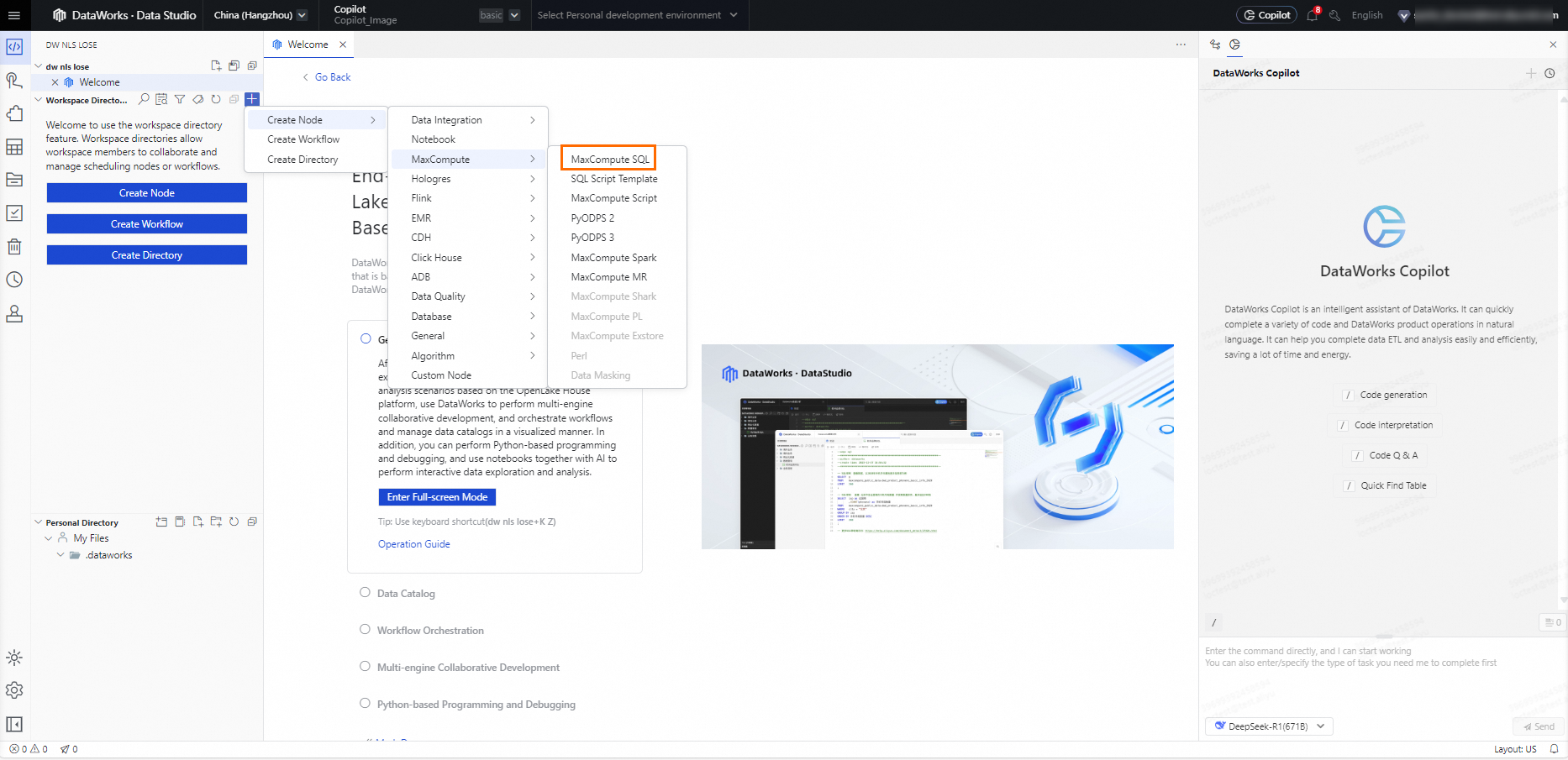
  1. DATA STUDIOimageワークスペースディレクトリノードを作成MaxComputeMaxCompute SQL ペインで、 の右側にある アイコンをクリックし、 > > を選択します。
    image

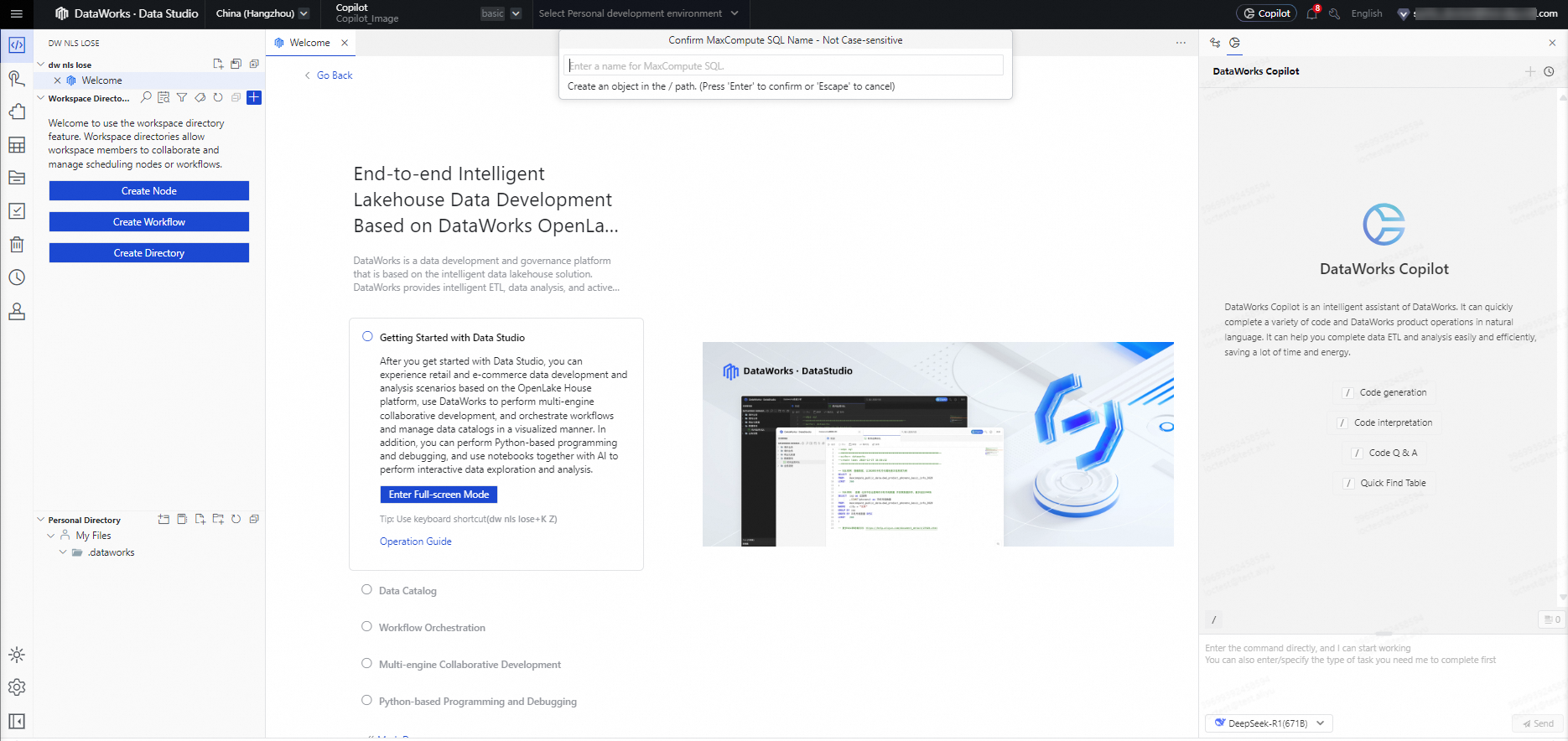
  2. 表示されるポップオーバーに、ノード名を入力し、Enter キーを押します。

    プリセットノード名: ads_ec_ec360_gmv_kpi_overview
    image

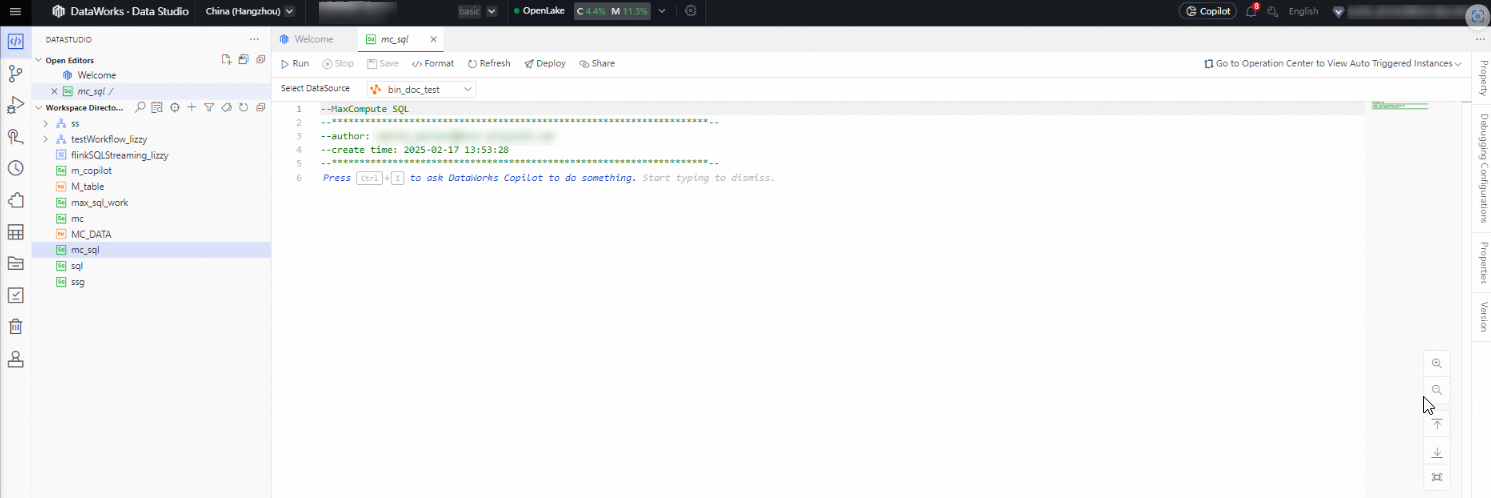
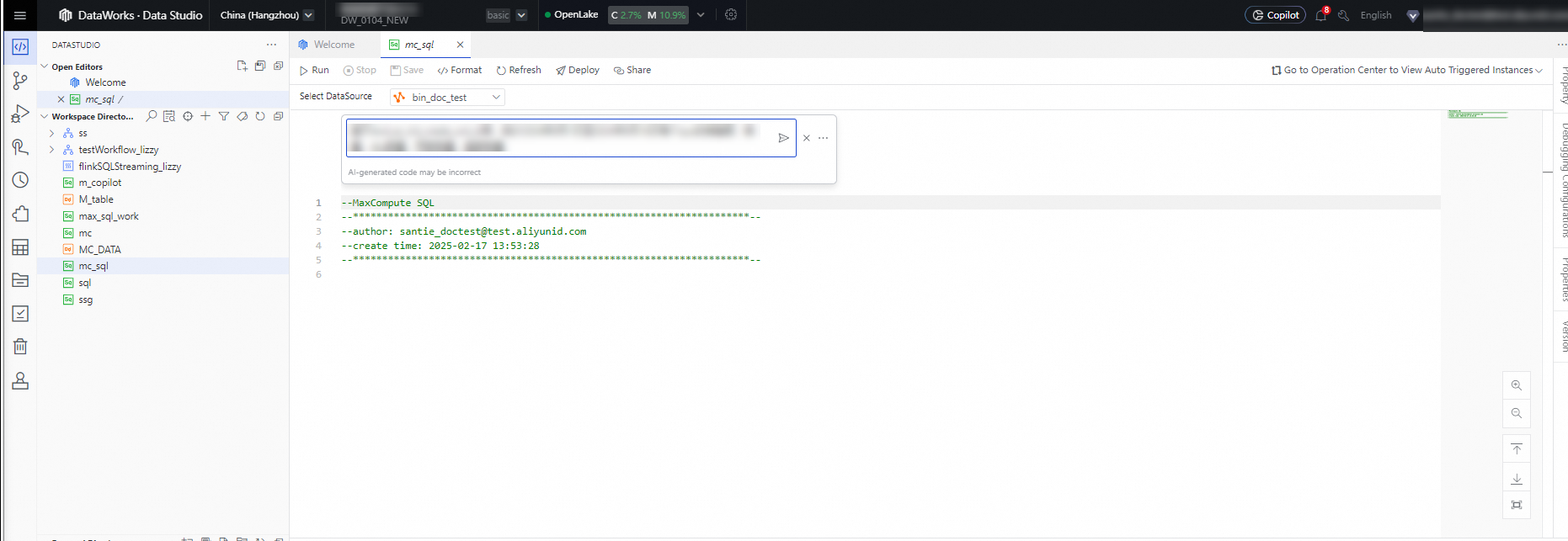
  3. [コードエディタ][DataWorks Copilot に何かを依頼する] をクリックして、Copilot Chat インターフェイスを開きます。インターフェイスでコマンドを入力し、[送信] をクリックして、Copilot が結果を返すまで待ちます。

    プリセット命令: 2024 年 9 月 1 日から 18 日までの期間に、dwd_ec_trd_create_ord_di テーブルに基づいて、各標準製品単位 (SPU) に関する次の情報 (売上収益、販売量、在庫管理単位 (SKU) の数、購入者数、販売者数) の統計を収集します

image

image

インテリジェントコード補完

DataWorks Copilot はコードを補完できます。

[DATA STUDIO] ペインで、MaxCompute ノードを作成します。 [コードエディタ][Copilot] をクリックして Copilot Chat インターフェイスを開きます。 テーブル名を含む任意のコードスニペットを入力して [Space] キーまたは [Enter] キーを押し、Copilot が結果を返すまで待ちます。
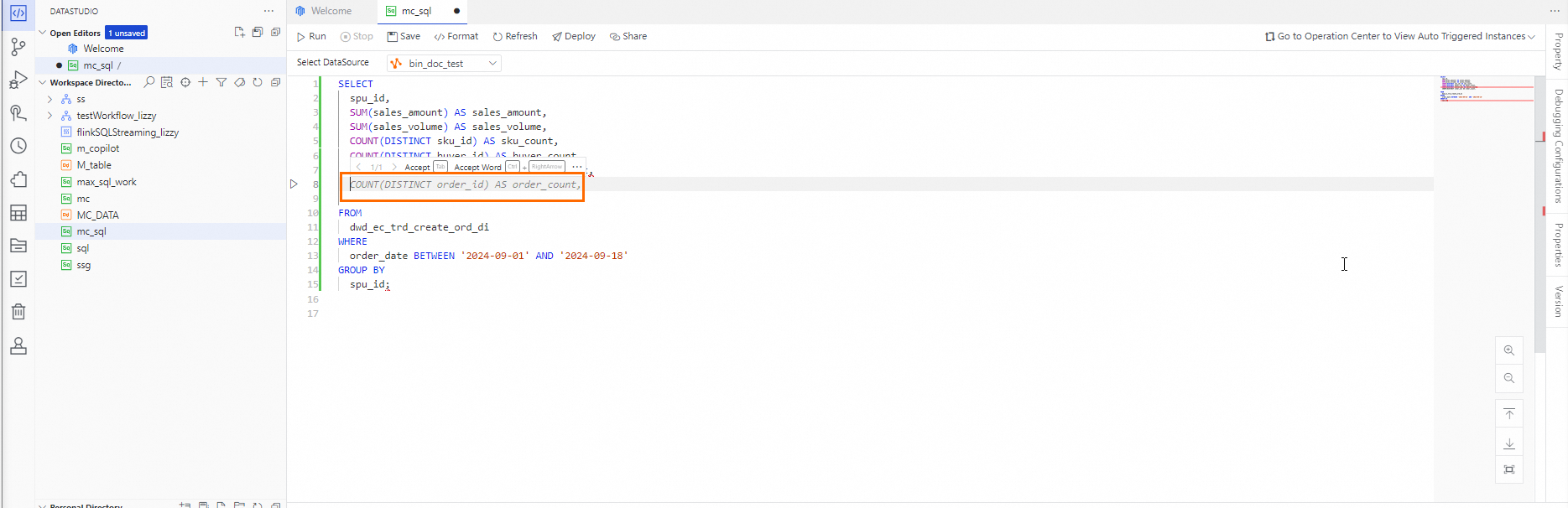
プリセットコード:

-- Conduct an analysis of e-commerce website sales orders in September 2024.
SELECT  ds
        ,spu_id
        ,SUM(sales_amt) AS total_sales
        ,COUNT(DISTINCT order_id) AS total_orders
        ,COUNT(DISTINCT sku_id) AS total_skus
        ,COUNT(DISTINCT buyer_id) AS total_buyers
FROM    default.dwd_ec_trd_create_ord_di
WHERE   order_date BETWEEN '2024-09-01' AND '2024-09-18'
;

image

インテリジェント Q&A

DataWorks Copilot では、コードエラーの修正、コードコメントの生成、コードの解釈など、自然言語を使用して次の操作を実行できます。 DataWorks Copilot は、SQL 構文と関数に関する質問にも答えることができます。

SQL の書き換え

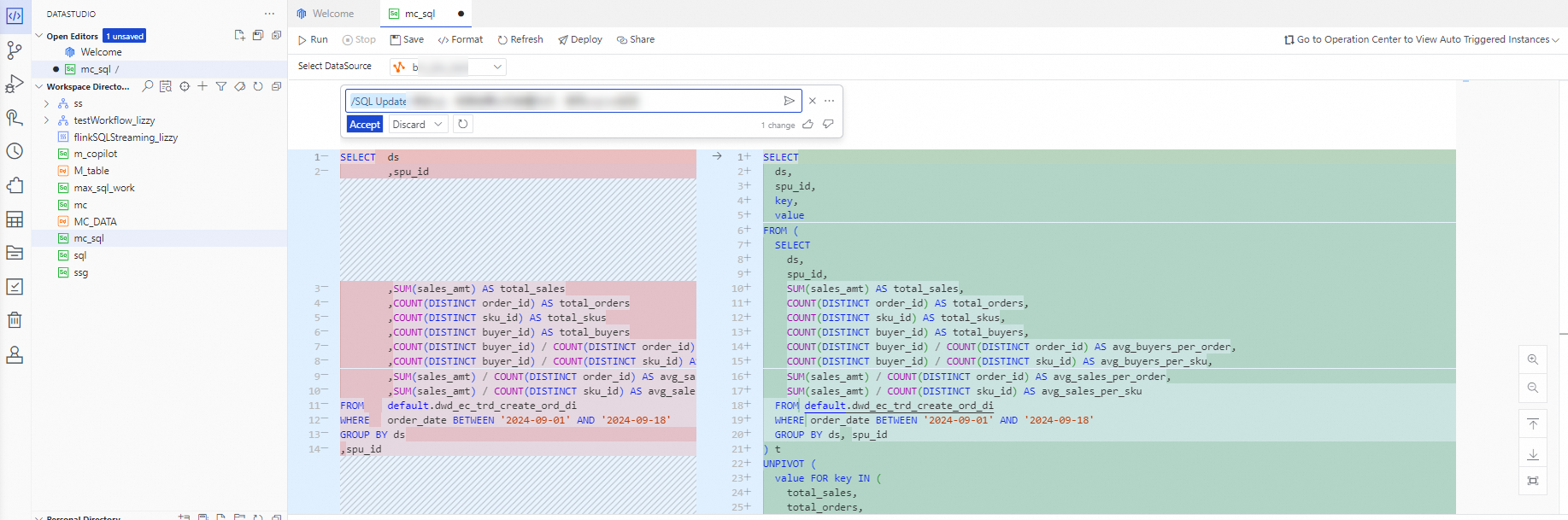
[DATA STUDIO] ペインで、MaxCompute ノードを作成します。 MaxCompute ノードのデータスタジオコードエディターCopilot で、コードスニペットを入力して選択し、Data Studio ページの右上隅にある をクリックします。 DataWorks Copilot チャットウィンドウで、書き換えリクエストを入力し、 をクリックします。 次に、DataWorks Copilot が結果を返すのを待ちます。

  • プリセット命令: UNPIVOT 操作を使用して、クエリ結果を列から行に変換するように SQL 文を変更します。
  • プリセットコード:

    -- Conduct an analysis of e-commerce website sales orders in September 2024.
    SELECT  ds
            ,spu_id
            ,SUM(sales_amt) AS total_sales
            ,COUNT(DISTINCT order_id) AS total_orders
            ,COUNT(DISTINCT sku_id) AS total_skus
            ,COUNT(DISTINCT buyer_id) AS total_buyers
            ,COUNT(DISTINCT buyer_id) / COUNT(DISTINCT order_id) AS avg_buyers_per_order
            ,COUNT(DISTINCT buyer_id) / COUNT(DISTINCT sku_id) AS avg_buyers_per_sku
            ,SUM(sales_amt) / COUNT(DISTINCT order_id) AS avg_sales_per_order
            ,SUM(sales_amt) / COUNT(DISTINCT sku_id) AS avg_sales_per_sku
    FROM    default.dwd_ec_trd_create_ord_di
    WHERE   order_date BETWEEN '2024-09-01' AND '2024-09-18'
    GROUP BY ds
    ,spu_id
    ORDER BY total_sales DESC
    LIMIT   10
    ;

image

SQL エラー修正

[DATA STUDIO] ペインで、MaxCompute ノードを作成します。 MaxCompute ノードの[コードエディタ]で、コードスニペットを選択して右クリックし、[Copilot] > [SQL Rectify] を選択します。 DataWorks Copilot チャットポップオーバーで[送信]をクリックし、DataWorks Copilot が結果を返すまで待ちます。
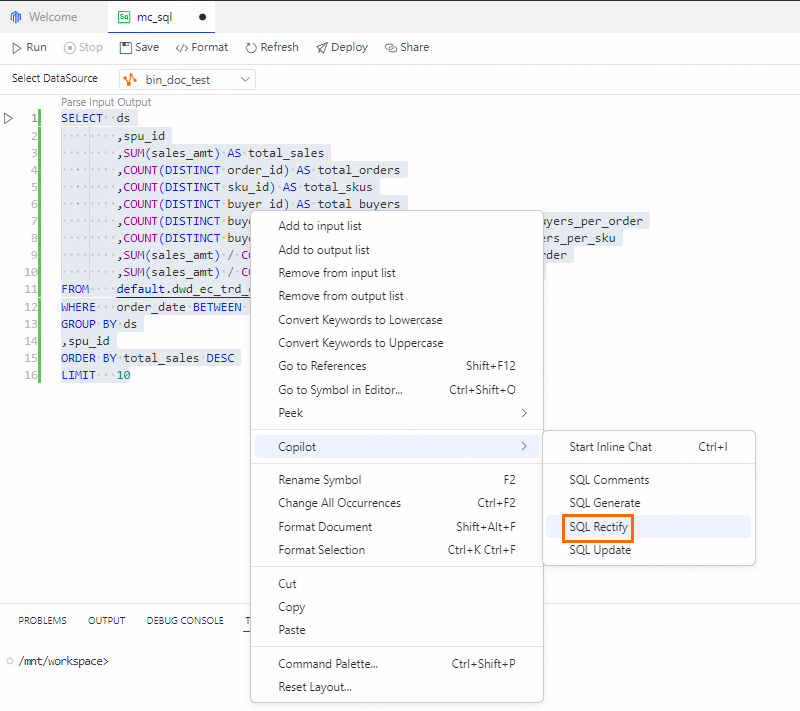
プリセットコード:

-- Conduct an analysis of e-commerce website sales orders in September 2024.
SELECT  ds
        ,spu_id
        ,SUM(sales_amt) AS total_sales
        ,COUNT(DISTINCT order_id) AS total_orders
        ,COUNT(DISTINCT sku_id) AS total_skus
        COUNT(DISTINCT buyer_id) AS total_buyers
        COUNT(DISTINCT buyer_id) / COUNT(DISTINCT order_id) AS avg_buyers_per_order
        ,COUNT(DISTINCT buyer_id) / COUNT(DISTINCT sku_id)  AS avg_buyers_per_sku
        ,SUM(sales_amt) / COUNT(DISTINCT order_id) AS avg_sales_per_order
        ,SUM(sales_amt) / COUNT(DISTINCT sku_id) AS avg_sales_per_sku
FROM    default.dwd_ec_trd_create_ord_di
WHERE   order_date BETWEEN '2024-09-01' AND '2024-09-18'
ORDER BY total_sales DESC
LIMIT   10
;

image

SQL の解釈

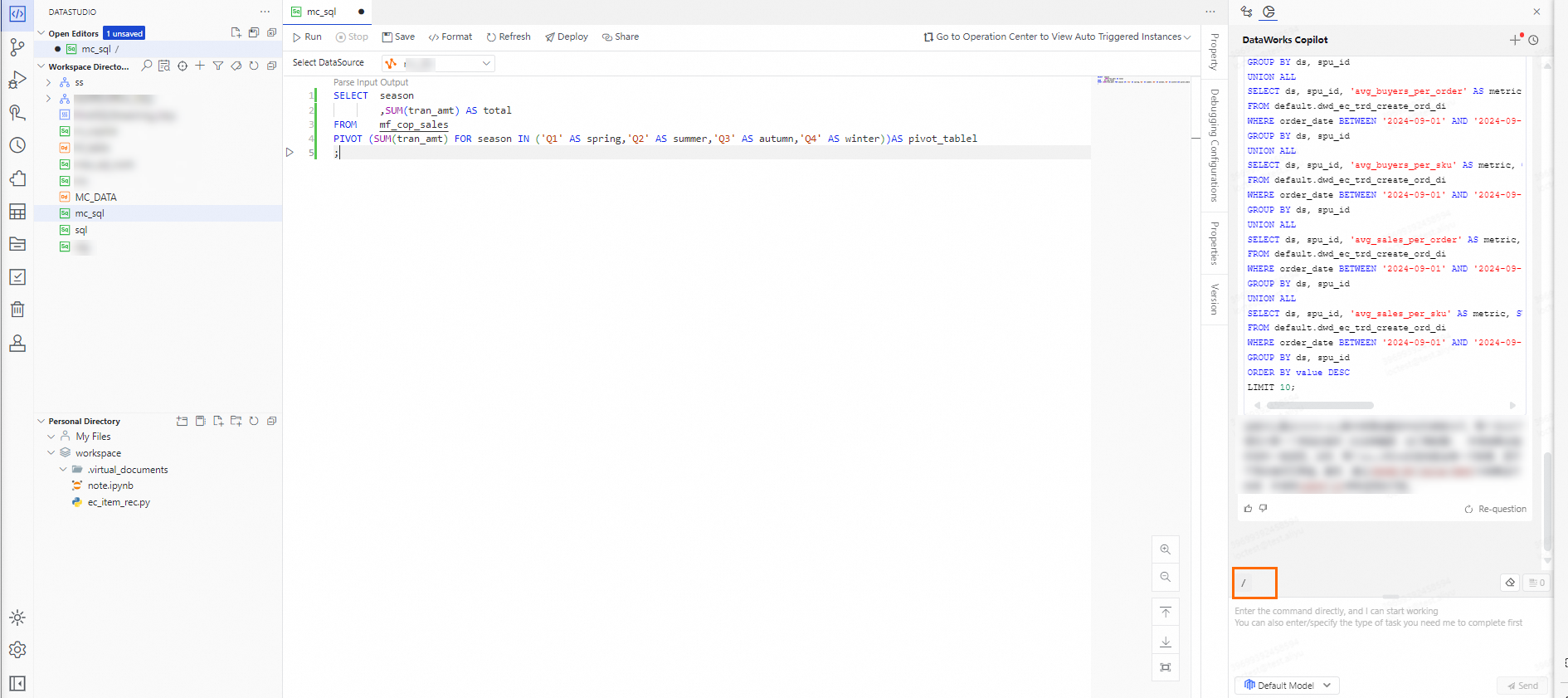
[DATA STUDIO] ペインで、MaxCompute ノードを作成します。 MaxCompute ノードの DATA STUDIOコードエディターCopilot で、コードスニペットを選択し、Data Studio ページの右上隅にある をクリックします。 DataWorks Copilot チャットウィンドウで、命令を入力し、 をクリックします。 次に、DataWorks Copilot が結果を返すのを待ちます。

  • プリセット命令: SQL 文を解釈します

  • プリセットコード:

    SELECT  season
            ,SUM(tran_amt) AS total
    FROM    mf_cop_sales
    PIVOT (SUM(tran_amt) FOR season IN ('Q1' AS spring,'Q2' AS summer,'Q3' AS autumn,'Q4' AS winter))AS pivot_tablel
    ;

image

コメント生成

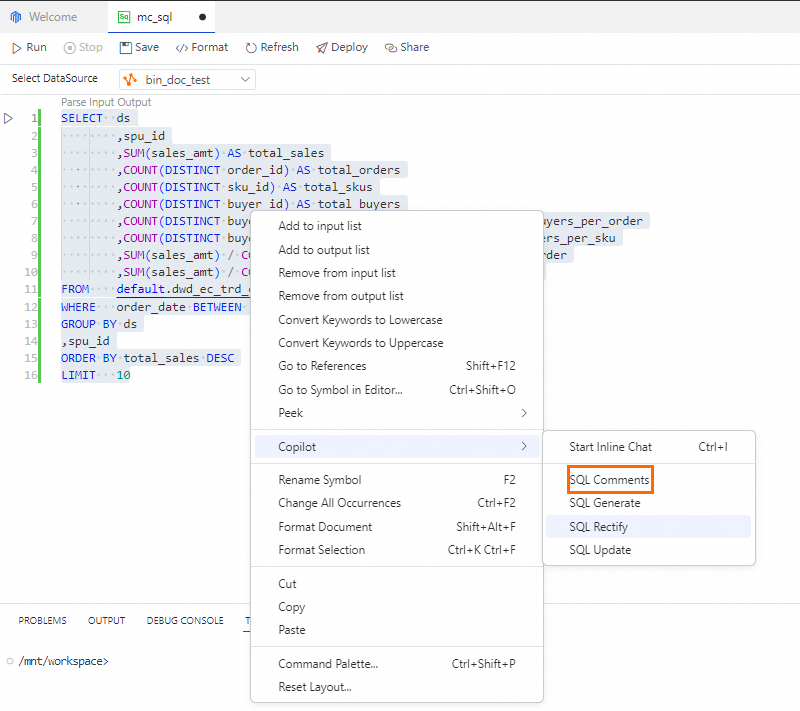
[DATA STUDIO] ペインで、MaxCompute ノードを作成します。MaxCompute ノードの [コードエディタ] でコードスニペットを選択して右クリックし、[Copilot] > [SQL コメント] を選択します。DataWorks Copilot チャットポップオーバーで命令を入力して [送信] をクリックし、DataWorks Copilot から結果が返されるまで待ちます。

  • プリセット命令: 各フィールドにコメントを追加します

  • プリセットコード:

    CREATE TABLE ods_mbr_user_info
    (
      id                BIGINT
      ,gmt_create       STRING
      ,gmt_modified     STRING
      ,id_card_number   STRING
      ,id_card_type     STRING
      ,is_delete        STRING
      ,nick             STRING
      ,reg_address      STRING
      ,reg_birthdate    STRING
      ,reg_city_id      STRING
      ,reg_email        STRING
      ,reg_fullname     STRING
      ,reg_gender       STRING
      ,reg_mobile_phone STRING
      ,reg_nation_id    STRING
      ,reg_prov_id      STRING
      ,user_active_time STRING
      ,user_active_type STRING
      ,user_id          BIGINT
      ,user_regdate     STRING
      ,user_regip       STRING
      ,vip_level        STRING
    )
    COMMENT '';

image

SQL 構文と関数に関する Q&A

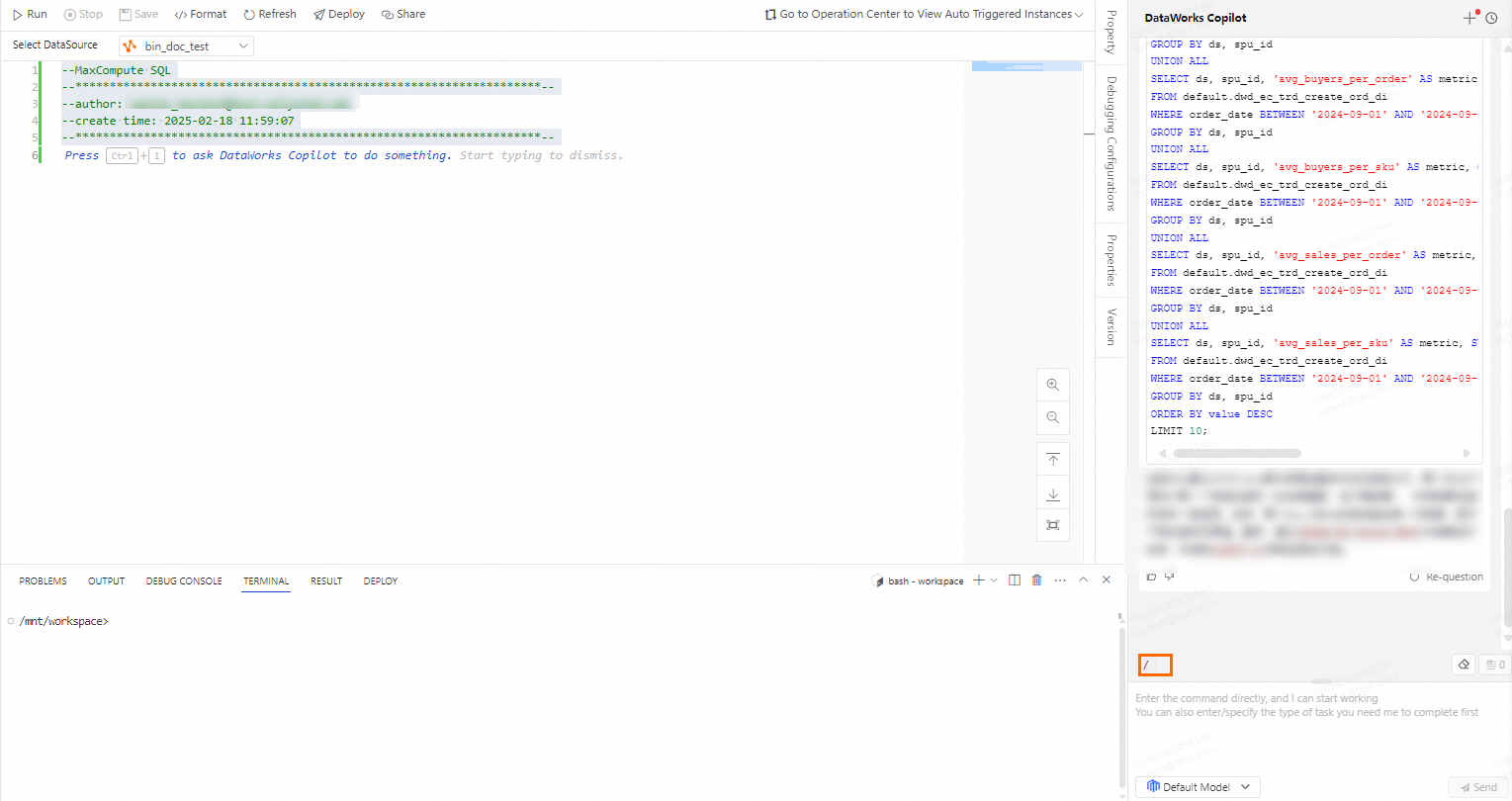
[DATA STUDIO] ペインで、Data Studio ページの右上隅にある DATA STUDIOCopilot をクリックします。 DataWorks Copilot チャットウィンドウで、命令を入力し、 をクリックします。 次に、DataWorks Copilot が結果を返すのを待ちます。

  • プリセット命令 1: MaxCompute で共通テーブル式 (CTE) 構文を使用する方法は?

  • プリセット命令 2: MaxCompute で MapJoin を使用する方法は?

  • プリセット命令 3: MaxCompute PIVOT 関数を使用する方法は?

  • プリセット命令 4: テーブルに自動インクリメント ID フィールドが含まれていますが、その値は連続していません。テーブル内の ID の範囲をページごとに取得するにはどうすればよいですか?

  • プリセット命令 5: t1(name) と t2(name) という名前のテーブルがあります。t1.name のクエリ結果が返されない場合は、t2.name のクエリ結果を使用するという目的を達成するための SQL 文を記述してください。
image

AI エージェント

Data Studio、DataAnalysis、Data Map、DataService Studio などの DataWorks サービスでは、DataWorks Copilot を使用して特定の操作を便利に実行できるため、サービスが使いやすくなります。 たとえば、DataWorks Copilot のテーブル作成アシスタントを使用して、テーブル名キーワードを入力することでテーブルを作成できます。 DataWorks Copilot の分析アシスタントを使用して、データクエリ結果に関するチャートを表示し、数回クリックするだけでデータの洞察を得ることができます。

インテリジェントテーブル作成

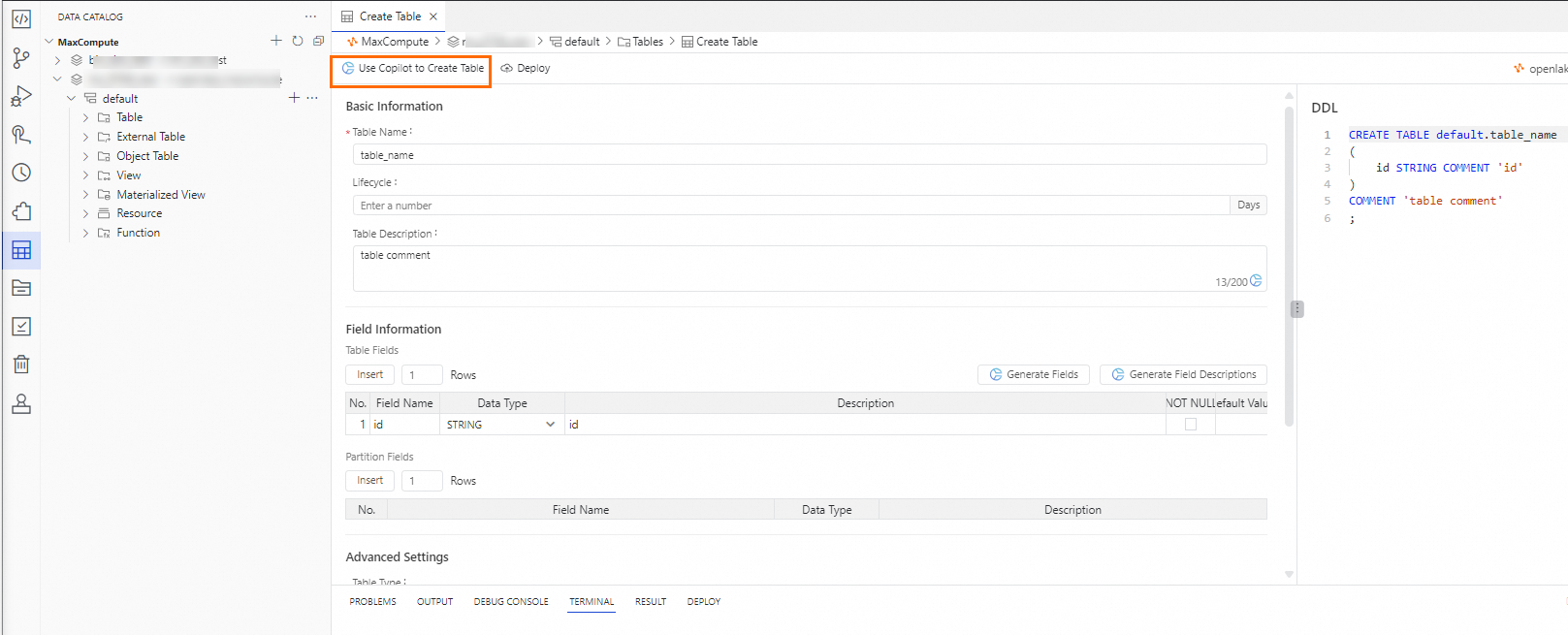
Data Studio ページの左側のナビゲーションウィンドウで、[データカタログ] をクリックします。[データカタログ] ウィンドウで、データカタログを選択して、カタログにテーブルを作成します。表示されるページの上部のツールバーで、[Copilot を使用してテーブルを作成] をクリックします。表示されたフィールドに命令を入力し、[送信] をクリックして、DataWorks Copilot が結果を返すのを待ちます。

プリセット命令: 会員登録情報テーブル
image

データチャートとデータの洞察の生成

[DATA STUDIO] ペインで MaxCompute ノードを作成します。MaxCompute ノードの [コードエディタ] で実行可能なコードスニペットを選択し、上部のツールバーで [実行] をクリックします。SQL 文が正常に実行され、クエリ結果が生成されたら、ページ下部に表示される [RESULT] タブのチャートアイコンをクリックします。右側に表示されるエリアで [Copilot] をクリックし、DataWorks Copilot から結果が返されるまで待ちます。
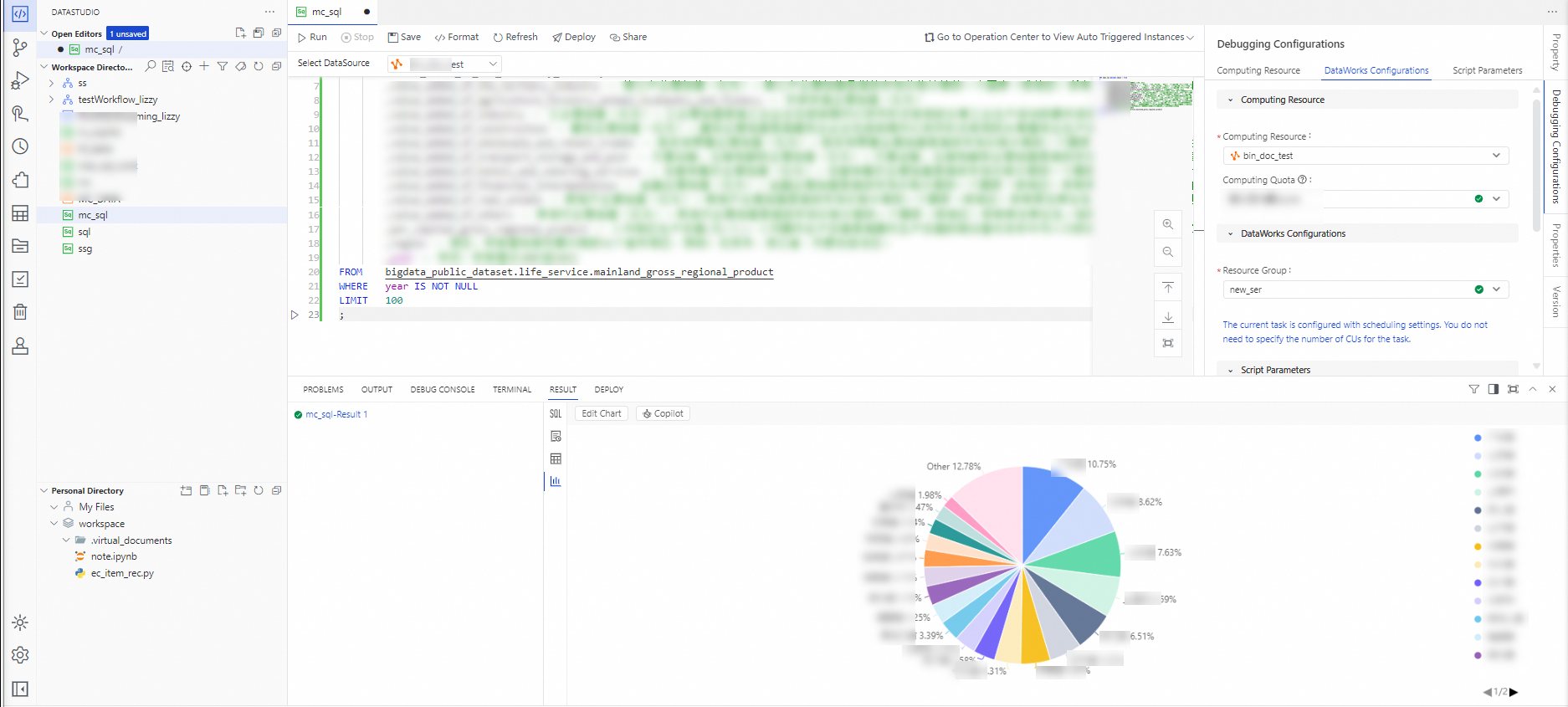
プリセットコード:

-- Read sample data.
-- Open the MaxCompute three-layer model.
SET odps.namespace.schema = true
;

-- Make sure that the new implementation for data of the DECIMAL data type is used.
SET odps.sql.decimal.odps2 = true
;

SELECT  gross_regional_product -- Gross Regional Product (GRP) (CNY 100 million).
        ,value_added_of_the_primary_industry -- Value added of the primary industry (CNY 100 million). This refers to the market value of the final output of all resident units from primary-industry production activities in a country (or a region) during a period of time. The primary industry includes agriculture, forestry, animal husbandry, and fishery. 
        ,value_added_of_the_secondary_industry -- Value added of the second industry (CNY 100 million). This refers to the market value of the final output of all resident units from second-industry production activities in a country (or a region) during a period of time. The second industry includes mining, manufacturing, production and supply sector of electricity, gas, and water, and construction. 
        ,value_added_of_the_tertiary_industry -- Value added of the third industry (CNY 100 million). This refers to the market value of the final output of all resident units from third-industry production activities in a country (or a region) during a period of time. The third industry includes all sectors except the primary and second industries. 
        ,value_added_of_agriculture_forestry_animal_husbandry_and_fishery -- Value added of agriculture, forestry, animal husbandry, and fishery (CNY 100 million).
        ,value_added_of_industry -- Value added of industry (CNY 100 million). This refers to the final output of industrial enterprises from industrial production activities during the reporting period, expressed in monetary terms. 
        ,value_added_of_construction -- Value added of the construction industry (CNY 100 million). This refers to the final output of construction enterprises from production activities of the construction industry during the reporting period, expressed in monetary terms. 
        ,value_added_of_wholesale_and_retail_trades -- Value added of the wholesale and retail industries (CNY 100 million). This refers to the market value of the final output of all resident units from production activities of the wholesale and retail industries in a country (or a region) during a period of time. 
        ,value_added_of_transport_storage_and_post -- Value added of the transportation, warehousing, and post industries (CNY 100 million). This refers to the market value of the final output of all resident units from production activities of the transportation, warehousing, and post industries in a country (or a region) during a period of time. 
        ,value_added_of_hotels_and_catering_services -- Value added of the accommodation and catering industries (CNY 100 million). This refers to the market value of the final output of all resident units from production activities of the accommodation and catering industries in a country (or a region) during a period of time. 
        ,value_added_of_financial_intermediation -- Value added of the financial industry (CNY 100 million). This refers to the market value of the final output of all resident units from production activities of the financial industry in a country (or a region) during a period of time. 
        ,value_added_of_real_estate -- Value added of the real estate industry (CNY 100 million). This refers to the market value of the final output of all resident units from production activities of the real estate industry in a country (or a region) during a period of time. 
        ,value_added_of_others -- Value added of other industries (CNY 100 million). This refers to the market value of the final output of all resident units from production activities of other industries in a country (or a region) during a period of time. 
        ,per_capital_gross_regional_product -- GRP per capita (yuan/person). GRP per capita refers to the ratio of the absolute value of GRP to the average population of that year. It measures the economic contribution or value created by each resident in a country or region. 
        ,region -- the region. The enumeration includes the 31 provinces, municipalities, and autonomous regions in the Chinese mainland, such as Beijing, Zhejiang Province, and Inner Mongolia Autonomous Region. 
        ,year -- the year. The enumeration includes years from 2003 to 2022.
FROM    bigdata_public_dataset.life_service.mainland_gross_regional_product
WHERE   year IS NOT NULL
LIMIT   100
;

image

説明の生成

ノードデプロイメントの説明生成

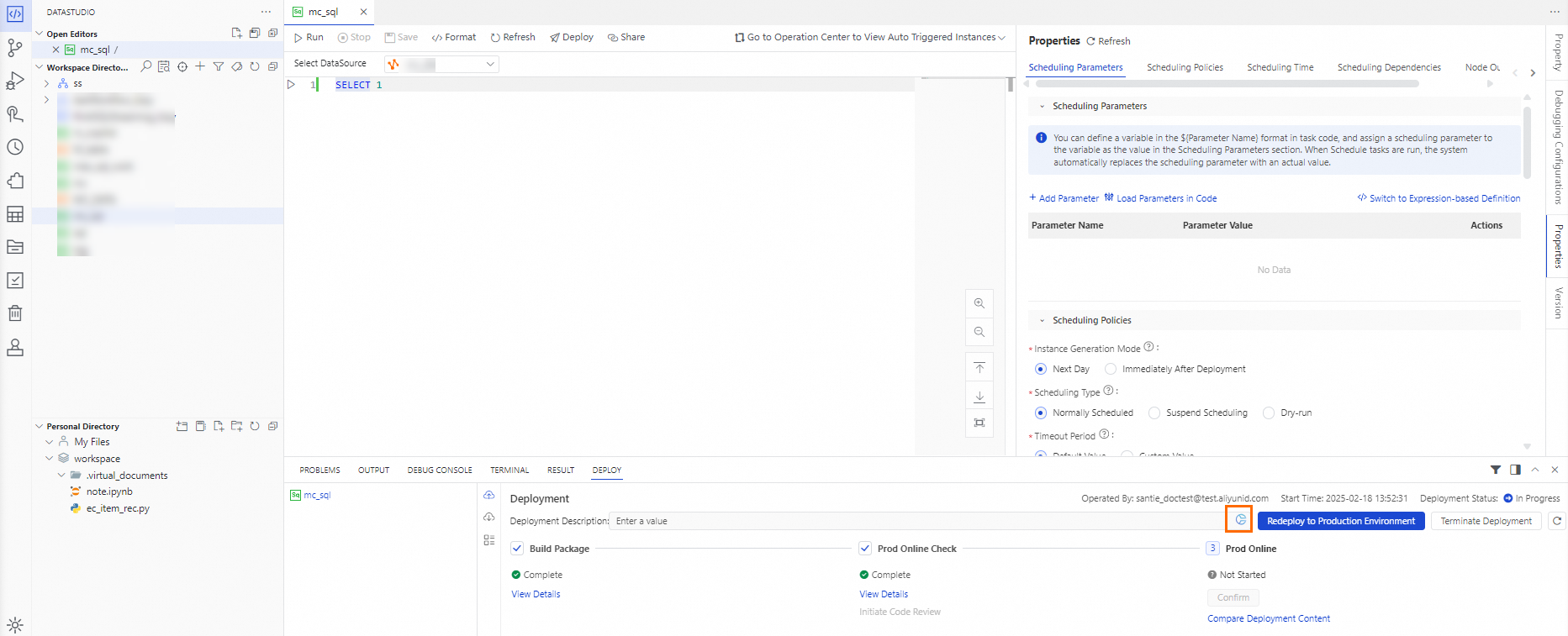
DATA STUDIO ペインで、MaxCompute ノードを作成します。MaxCompute ノードの コードエディタ で、実行可能なコード スニペットを選択し、右側のナビゲーション ペインで [プロパティ] をクリックします。表示されるタブで、パラメーターを構成し、上部のツールバーの [デプロイ] をクリックします。ページ下部に表示される [デプロイ] タブで、手順 3: 本番環境にデプロイ の入力ボックスの右下隅にある DataWorks Copilot アイコン をクリックし、DataWorks Copilot が結果を返すまで待ちます。

プリセットノード名: ads_ec_ec360_gmv_kpi_overview
image

関数の説明生成

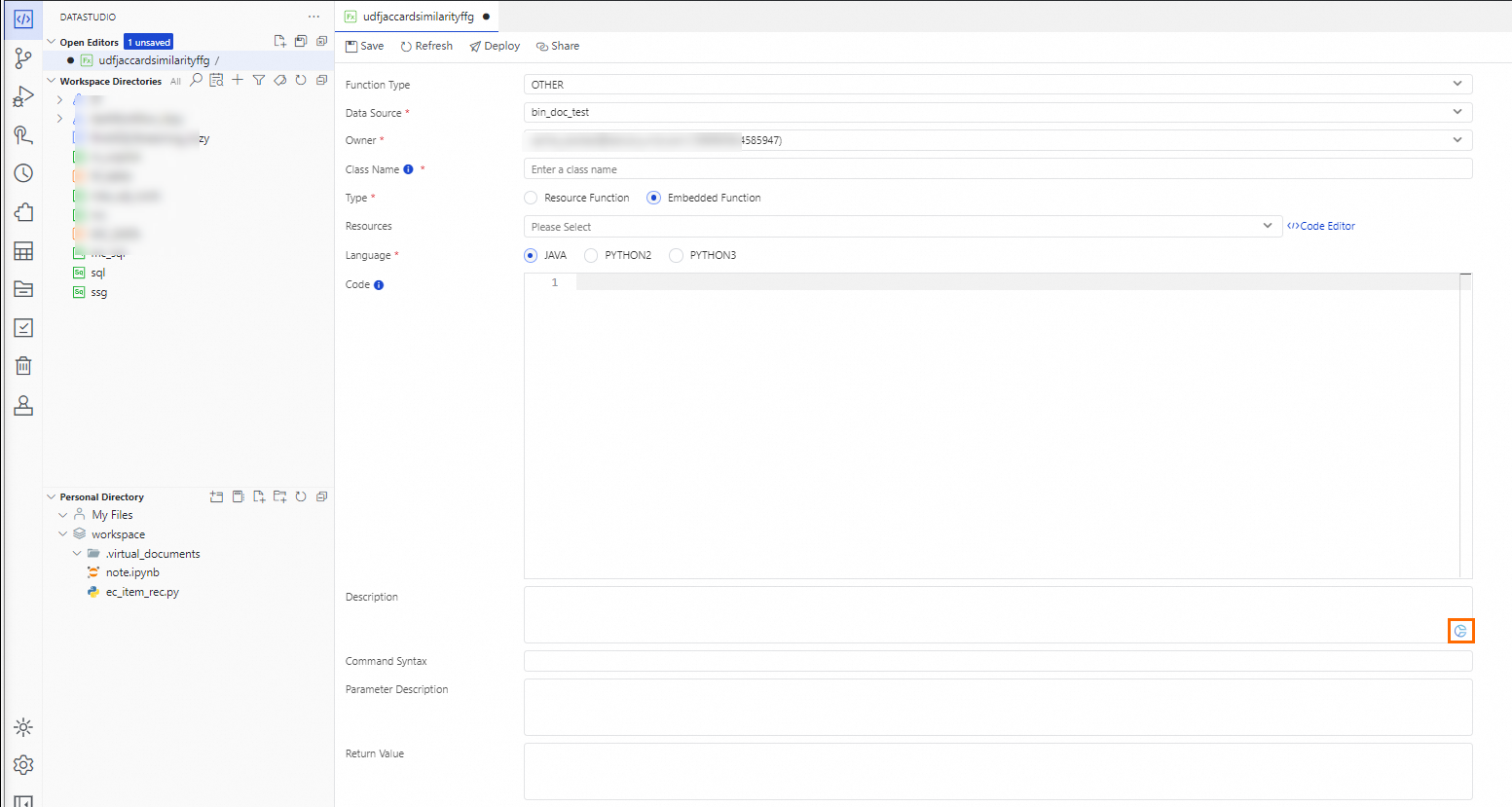
[Data Studio] ページの左側のナビゲーションペインで、[リソース管理] をクリックします。 Data Studioリソース管理DataWorks Copilot アイコン ペインで、既存の MaxCompute 関数を見つけます。または、作成します。 MaxCompute 関数の構成タブで、 フィールドの右下隅にある をクリックし、DataWorks Copilot が結果を返すのを待ちます。

プリセット関数名: udfjaccardsimilarity
image