このトピックでは、Community EditionのTCPクライアントSDK for C ++ を使用してトランザクションメッセージを送受信できるサンプルコードを提供します。
ApsaraMQ for RocketMQは、拡張アーキテクチャ (XA) およびOpen XA分散トランザクション処理モードと同様の分散トランザクション処理機能を提供します。 この機能は、ApsaraMQ for RocketMQでデータの一貫性を確保するのに役立ちます。
相互作用プロセス
次の図は、トランザクションメッセージの対話プロセスを示しています。
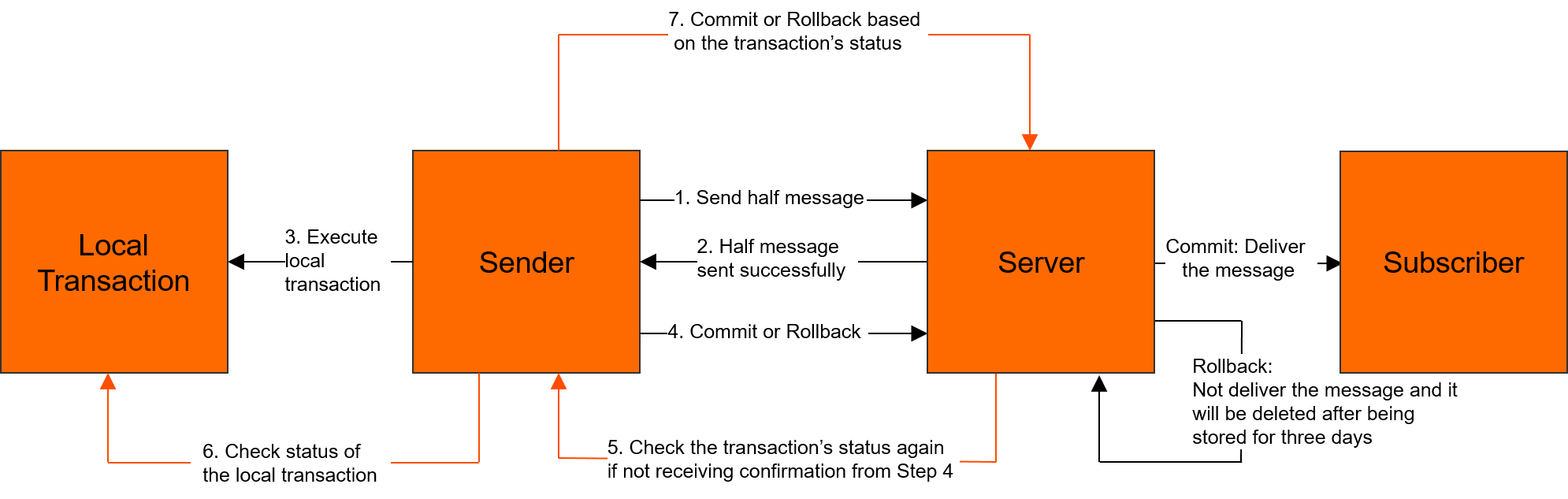
詳細については、「トランザクションメッセージ」をご参照ください。
前提条件
C ++ ダイナミックライブラリがインストールされています。 詳細については、「C ++ ダイナミックライブラリのインストール」をご参照ください。
Alibaba Cloudアカウント用にAccessKeyペアが作成されます。 詳細については、「AccessKey の作成」をご参照ください。
トランザクションメッセージの送信
次のコードをTransProducerDemo.cppファイルにコピーします。 ファイルで、対応するパラメーターを変更し、g ++ コマンドを実行してコードをコンパイルし、実行できる実行可能ファイルを生成します。
g ++ -o trans_producer_demo -std=c ++ 11 -lz -lrocketmq TransProducerDemo.cpp次のサンプルコードは、Community EditionのTCPクライアントSDK for C ++ を使用してトランザクションメッセージを送信する方法の例を示しています。
#include <iostream>
#include <chrono>
#include <thread>
#include "TransactionMQProducer.h"
#include "MQClientException.h"
#include "TransactionListener.h"

using namespace std;
using namespace rocketmq;

class ExampleTransactionListener : public TransactionListener {
public:
    LocalTransactionState executeLocalTransaction(const MQMessage &msg, void *arg) {
        // Execute the local transaction. If the local transaction is executed, COMMIT_MESSAGE is returned. If the local transaction fails to be executed, ROLLBACK_MESSAGE is returned. If the execution status of the local transaction is unknown, UNKNOWN is returned.
        // If UNKNOWN is returned, the scheduled task to query the status of the local transaction is triggered.
        std::cout << "Execute Local Transaction,Received Message Topic:" << msg.getTopic() << ", MsgId:"
                  << msg.getBody() << std::endl;
        return UNKNOWN;
    }

    LocalTransactionState checkLocalTransaction(const MQMessageExt &msg) {
        // Query the execution status of the local transaction. If the local transaction is executed, COMMIT_MESSAGE is returned. If the local transaction fails to be executed, ROLLBACK_MESSAGE is returned. If the execution status of the local transaction is unknown, UNKNOWN is returned.
        // If UNKNOWN is returned, wait until the next scheduled task to query the status of the local transaction is triggered.
        std::cout << "Check Local Transaction,Received Message Topic:" << msg.getTopic() << ", MsgId:" << msg.getMsgId()
                  << std::endl;
        return COMMIT_MESSAGE;
    }
};

int main() {
    std::cout << "=======Before sending messages=======" << std::endl;
    // The ID of the group for which you applied in the ApsaraMQ for RocketMQ console.
    TransactionMQProducer producer("GID_XXXXXXXXXXXXXXXX");
    // The TCP endpoint that you obtained from the Instance Details page in the ApsaraMQ for RocketMQ console.
    producer.setNamesrvAddr("http://MQ_XXXXXXXXXXXX.mq-internet-access.mq-internet.aliyuncs.com:80");
    // Make sure that the environment variables ALIBABA_CLOUD_ACCESS_KEY_ID and ALIBABA_CLOUD_ACCESS_KEY_SECRET are configured.
	  // ALIBABA_CLOUD_ACCESS_KEY_ID and ALIBABA_CLOUD_ACCESS_KEY_SECRET specify the AccessKey ID and AccessKey secret of your Alibaba Cloud account, which are used for identity verification.
    // The user channel. Default value: ALIYUN.
    producer.setSessionCredentials(getenv("ALIBABA_CLOUD_ACCESS_KEY_ID"), getenv("ALIBABA_CLOUD_ACCESS_KEY_SECRET"), "ALIYUN");

    // The transaction listener.
    ExampleTransactionListener *exampleTransactionListener = new ExampleTransactionListener();
    producer.setTransactionListener(exampleTransactionListener);
    // After you configure the required parameters, start the producer.
    producer.start();
    auto start = std::chrono::system_clock::now();
    int count = 3;
    for (int i = 0; i < count; ++i) {
        // The topic for which you applied in the ApsaraMQ for RocketMQ console.
        MQMessage msg("YOUR TRANSACTION TOPIC", "HiTAG", "Hello,CPP SDK, Transaction Message.");
        try {
            SendResult sendResult = producer.sendMessageInTransaction(msg, &i);
            std::cout << "SendResult:" << sendResult.getSendStatus() << ", Message ID: " << sendResult.getMsgId()
                      << std::endl;
            this_thread::sleep_for(chrono::seconds(1));
        } catch (MQException e) {
            std::cout << "ErrorCode: " << e.GetError() << " Exception:" << e.what() << std::endl;
        }
    }
    auto interval = std::chrono::system_clock::now() - start;
    std::cout << "Send " << count << " messages OK, costs "
              << std::chrono::duration_cast<std::chrono::milliseconds>(interval).count() << "ms" << std::endl;

    std::cout << "Wait for local transaction check..... " << std::endl;
    for (int i = 0; i < 6; ++i) {
        this_thread::sleep_for(chrono::seconds(10));
        std::cout << "Running "<< i*10 + 10 << " Seconds......"<< std::endl;
    }
    producer.shutdown();
    std::cout << "=======After sending messages=======" << std::endl;
    return 0;
}
トランザクションメッセージを消費する
次のコードをConsumerDemo.cppファイルにコピーします。 ファイルで、対応するパラメーターを変更し、g ++ コマンドを実行してコードをコンパイルし、実行できる実行可能ファイルを生成します。
g ++ -o consumer_demo -std=c ++ 11 -lz -lrocketmq ConsumerDemo.cpp次のサンプルコードは、Community EditionのTCPクライアントSDK for C ++ を使用してトランザクションメッセージを消費する方法の例を示しています。
#include <iostream>
#include <thread>
#include "DefaultMQPushConsumer.h"

using namespace rocketmq;


class ExampleMessageListener : public MessageListenerConcurrently {
public:
    ConsumeStatus consumeMessage(const std::vector<MQMessageExt> &msgs) {
        for (auto item = msgs.begin(); item != msgs.end(); item++) {
            std::cout << "Received Message Topic:" << item->getTopic() << ", MsgId:" << item->getMsgId() << std::endl;
        }
        return CONSUME_SUCCESS;
    }
};

int main(int argc, char *argv[]) {
    std::cout << "=======Before consuming messages=======" << std::endl;
    // The ID of the group for which you applied in the ApsaraMQ for RocketMQ console.
    DefaultMQPushConsumer *consumer = new DefaultMQPushConsumer("GID_XXXXXXXX");
    // The TCP endpoint that you obtained from the Instance Details page in the ApsaraMQ for RocketMQ console.
    consumer->setNamesrvAddr("http://MQ_INST_XXXXXXXXXXX.mq-internet-access.mq-internet.aliyuncs.com:80");
    // Make sure that the environment variables ALIBABA_CLOUD_ACCESS_KEY_ID and ALIBABA_CLOUD_ACCESS_KEY_SECRET are configured.
	  // ALIBABA_CLOUD_ACCESS_KEY_ID and ALIBABA_CLOUD_ACCESS_KEY_SECRET specify the AccessKey ID and AccessKey secret of your Alibaba Cloud account, which are used for identity verification.
    // The user channel. Default value: ALIYUN.
    consumer->setSessionCredentials(getenv("ALIBABA_CLOUD_ACCESS_KEY_ID"), getenv("ALIBABA_CLOUD_ACCESS_KEY_SECRET"), "ALIYUN");
    auto start = std::chrono::system_clock::now();


    // Use a custom listener function to process the received message and return the result.
    ExampleMessageListener *messageListener = new ExampleMessageListener();
    consumer->subscribe("YOURTOPIC", "*");
    consumer->registerMessageListener(messageListener);

    // The preparation is complete. You must invoke the startup function to start the consumer.
    // ********************************************
    // 1. Before you start the consumer, make sure that the subscription is configured.
    // 2. Make sure that the subscriptions of consumers in the same group are consistent.
    // *********************************************
    consumer->start();

    // Keep the main thread running until the process is shut down.
    std::this_thread::sleep_for(std::chrono::milliseconds(60 * 1000));
    consumer->shutdown();
    std::cout << "=======After consuming messages======" << std::endl;
    return 0;
}