Topik ini menjelaskan praktik terbaik untuk menyediakan kredensial secara aman kepada aplikasi dan alat yang perlu melakukan panggilan API programatik ke Alibaba Cloud. Mengikuti praktik ini membantu mengurangi risiko keamanan akibat paparan kredensial.
Pahami kredensial untuk akses programatik
Saat mengakses Alibaba Cloud secara programatik menggunakan SDK, CLI, atau alat pengembangan lainnya, Anda harus menyediakan kredensial untuk mengotentikasi identitas Anda. Terdapat dua jenis utama kredensial:
AccessKey pair: Kredensial jangka panjang yang terdiri dari ID AccessKey dan Rahasia AccessKey. Pasangan AccessKey dikaitkan dengan Pengguna RAM dan memiliki izin yang sama seperti pengguna tersebut. Karena tidak kedaluwarsa, kredensial ini harus dikelola dengan sangat hati-hati. Untuk informasi lebih lanjut, lihat Buat pasangan AccessKey.
Security Token Service (STS) token: Kredensial sementara jangka pendek dengan izin terbatas dan waktu kedaluwarsa yang dapat dikonfigurasi. Token STS merupakan jenis kredensial yang direkomendasikan untuk sebagian besar kasus penggunaan karena secara signifikan mengurangi risiko kebocoran kredensial.
Mengapa Anda harus menghindari pasangan AccessKey jangka panjang
Kredensial yang dikelola secara tidak tepat—terutama pasangan AccessKey jangka panjang—menimbulkan risiko keamanan yang signifikan. Kesalahan umum dan serius adalah menyematkan pasangan AccessKey langsung ke dalam kode sumber aplikasi. Jika kode tersebut di-commit ke repositori publik seperti GitHub, dibagikan kepada pihak lain, atau bahkan hanya disimpan di repositori internal yang dapat diakses secara luas, kredensial tersebut berisiko dikompromikan. Penyerang yang memperoleh pasangan AccessKey yang valid dapat mengakses sumber daya Alibaba Cloud Anda, yang berpotensi menyebabkan pelanggaran data atau kerugian finansial.
Praktik terbaik: Gunakan kredensial sementara dengan peran RAM
Metode paling aman bagi aplikasi untuk mengakses Alibaba Cloud adalah menggunakan peran RAM guna memperoleh token STS sementara. Pendekatan ini menghilangkan kebutuhan untuk mengelola dan mendistribusikan pasangan AccessKey jangka panjang. Metode yang direkomendasikan bervariasi tergantung pada lingkungan tempat aplikasi Anda berjalan.
Untuk aplikasi pada instans ECS
Jika aplikasi Anda berjalan pada instans Elastic Compute Service (ECS), Anda dapat menetapkan instance RAM role kepadanya. Aplikasi kemudian dapat menggunakan Alibaba Cloud SDK untuk secara otomatis mengambil token STS sementara dari layanan instance metadata tanpa menyimpan kredensial apa pun pada instans tersebut.
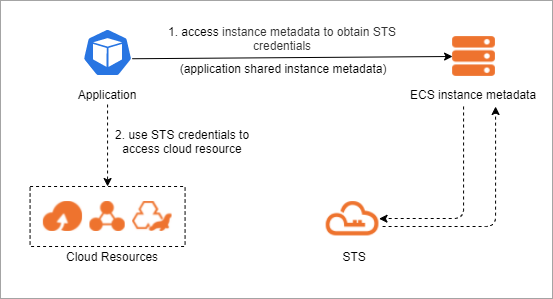
Konfigurasi: Untuk petunjuk cara membuat dan menyambungkan instance RAM role, lihat Sambungkan instance RAM role.
Integrasi SDK: Alibaba Cloud SDK secara otomatis mendeteksi dan menggunakan instance RAM role. Anda tidak perlu mengonfigurasi kredensial apa pun dalam kode Anda.
Contoh:
Untuk aplikasi terkontainerisasi pada ACK
Untuk aplikasi yang berjalan dalam kluster Container Service for Kubernetes (ACK), gunakan fitur RAM Roles for Service Accounts (RRSA). RRSA memungkinkan Anda mengaitkan peran RAM dengan akun layanan Kubernetes. Pod yang menggunakan akun layanan ini kemudian dapat memperoleh token STS sementara untuk mengakses sumber daya Alibaba Cloud yang diizinkan.
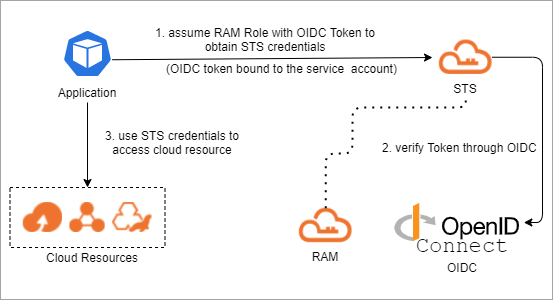
Konfigurasi: Untuk petunjuknya, lihat Aktifkan RRSA dan Gunakan RRSA untuk memberi otorisasi pod berbeda agar mengakses layanan cloud berbeda.
Contoh:
| Bahasa | Versi minimum | Demo |
|---|---|---|
| Go | Alibaba Cloud Credentials for Go 1.2.6 | Demo SDK Go |
| Java | Alibaba Cloud Credentials for Java 0.2.10 | Demo SDK Java |
| Python 3 | Alibaba Cloud Credentials for Python 0.3.1 | Demo SDK Python |
| Node.js / TypeScript | Alibaba Cloud Credentials for TypeScript/Node.js 2.2.6 | Demo SDK Node.js |
Untuk aplikasi arsitektur tanpa server pada Function Compute
Jika aplikasi Anda dideploy pada Function Compute, kaitkan peran RAM dengan fungsi Anda. Saat fungsi dipanggil, fungsi tersebut secara otomatis menerima kredensial STS sementara yang dapat digunakan untuk mengakses layanan Alibaba Cloud lainnya, sehingga menghilangkan kebutuhan untuk menyematkan pasangan AccessKey dalam kode fungsi Anda.
Konfigurasi: Untuk petunjuknya, lihat Berikan izin Function Compute untuk mengakses layanan Alibaba Cloud lainnya.
Untuk pengembang dan akses CLI
Bagi pengembang, administrator, atau pengguna manusia lainnya yang memerlukan akses command-line, praktik terbaik adalah mengintegrasikan penyedia identitas perusahaan (IdP) Anda dengan Alibaba Cloud untuk Single Sign-On (SSO). Pengguna dapat mengotentikasi diri dengan kredensial perusahaan yang sudah ada untuk mengasumsikan peran RAM dan menerima token STS sementara yang dapat digunakan dengan CLI atau alat lainnya.
Konfigurasi: Untuk mengonfigurasi SSO, lihat Ikhtisar SSO berbasis peran dengan SAML dan Konfigurasi SSO. Untuk menggunakan kredensial dengan CLI, lihat Gunakan Alibaba Cloud CLI untuk login ke portal pengguna CloudSSO.
Kelola kredensial jangka panjang secara aman (jika diperlukan)
Jika penggunaan peran RAM dan kredensial sementara tidak memungkinkan untuk kasus penggunaan Anda, dan Anda harus menggunakan pasangan AccessKey jangka panjang, simpanlah secara aman menggunakan variabel lingkungan atau file kredensial. Jangan menyematkannya langsung dalam aplikasi Anda.
Penggunaan pasangan AccessKey jangka panjang bukanlah praktik yang direkomendasikan. Lebih baik gunakan metode berbasis peran yang dijelaskan di atas bila memungkinkan.
Anda dapat mengonfigurasi ID AccessKey dan rahasia Anda sebagai variabel lingkungan:
Linux dan macOS
Jalankan perintah berikut:
export ALIBABA_CLOUD_ACCESS_KEY_ID=<access_key_id>
export ALIBABA_CLOUD_ACCESS_KEY_SECRET=<access_key_secret>
Ganti
<access_key_id>dengan ID AccessKey Anda dan<access_key_secret>dengan Rahasia AccessKey Anda.Windows
Buat file variabel lingkungan, tambahkan variabel lingkungan ALIBABA_CLOUD_ACCESS_KEY_ID dan ALIBABA_CLOUD_ACCESS_KEY_SECRET ke file tersebut, lalu tetapkan ID AccessKey Anda untuk
ALIBABA_CLOUD_ACCESS_KEY_IDdan Rahasia AccessKey Anda untukALIBABA_CLOUD_ACCESS_KEY_SECRET.Mulai ulang sistem operasi Windows.
Alibaba Cloud SDK dirancang untuk secara otomatis mencari kredensial dalam urutan tertentu, dimulai dari variabel lingkungan. Jika Anda menyetel variabel ini, Anda dapat menginisialisasi client SDK tanpa menyediakan kredensial apa pun dalam kode Anda.
Contoh:
import com.aliyun.credentials.Client;
import com.aliyun.credentials.models.Config;

public class DemoTest {
    public static void main(String[] args) throws Exception{
        Config config = new Config();
        // Jenis kredensial yang Anda inginkan
        config.setType("access_key");
        // AccessKeyId dari pengguna ram Anda
        config.setAccessKeyId(System.getenv("ALIBABA_CLOUD_ACCESS_KEY_ID"));
        // AccessKeySecret dari pengguna ram Anda
        config.setAccessKeySecret(System.getenv("ALIBABA_CLOUD_ACCESS_KEY_SECRET"));
        Client client = new Client(config);
    }
}
Apa yang harus dilakukan jika kredensial bocor
Jika Anda mencurigai pasangan AccessKey atau token STS telah dikompromikan, segera ambil tindakan untuk melindungi akun Anda. Untuk langkah-langkah detail, lihat Tangani pasangan AccessKey yang dikompromikan dan Peran RAM dan token STS.