Topik ini menjelaskan cara membaca resource MaxCompute menggunakan Java UDTF di MaxCompute Studio.
Prasyarat
-
Anda telah menginstal MaxCompute Studio, terhubung ke proyek MaxCompute, dan membuat modul Java MaxCompute.
-
Anda telah menginstal IntelliJ IDEA 2024 dan JDK 1.8.
-
Untuk informasi lebih lanjut, lihat Install MaxCompute Studio, Manage project connections, dan Create a MaxCompute Java module.
-
Untuk informasi lebih lanjut tentang resource MaxCompute, lihat Resources.
Contoh kode UDTF
Berikut adalah kode Java UDTF tersebut.
|
Parameter category |
Parameter type |
Description |
|
input parameter |
string |
Parameter input pertama. |
|
string |
Parameter input kedua. |
|
|
output parameter |
string |
Nilai dari parameter input pertama. |
|
bigint |
Panjang dari parameter input kedua. |
|
|
string |
String hasil penggabungan yang berisi jumlah baris dari file_resource.txt serta jumlah baris dari resource table_resource1 dan table_resource2. |
package com.aliyun.odps.examples.udf;
import java.io.BufferedReader;
import java.io.IOException;
import java.io.InputStream;
import java.io.InputStreamReader;
import java.util.Iterator;
import com.aliyun.odps.udf.ExecutionContext;
import com.aliyun.odps.udf.UDFException;
import com.aliyun.odps.udf.UDTF;
import com.aliyun.odps.udf.annotation.Resolve;
/**
 * project: example_project
 * table: wc_in2
 * partitions: p1=2,p2=1
 * columns: cola,colc
 */
@Resolve("string,string->string,bigint,string")
public class UDTFResource extends UDTF {
  ExecutionContext ctx;
  long fileResourceLineCount;
  long tableResource1RecordCount;
  long tableResource2RecordCount;
  @Override
  public void setup(ExecutionContext ctx) throws UDFException {
  this.ctx = ctx;
  try {
   InputStream in = ctx.readResourceFileAsStream("file_resource.txt");
   BufferedReader br = new BufferedReader(new InputStreamReader(in));
   String line;
   fileResourceLineCount = 0;
   while ((line = br.readLine()) != null) {
     fileResourceLineCount++;
   }
   br.close();
   Iterator<Object[]> iterator = ctx.readResourceTable("table_resource1").iterator();
   tableResource1RecordCount = 0;
   while (iterator.hasNext()) {
     tableResource1RecordCount++;
     iterator.next();
   }
   iterator = ctx.readResourceTable("table_resource2").iterator();
   tableResource2RecordCount = 0;
   while (iterator.hasNext()) {
     tableResource2RecordCount++;
     iterator.next();
   }
 } catch (IOException e) {
   throw new UDFException(e);
 }
}
   @Override
   public void process(Object[] args) throws UDFException {
     String a = (String) args[0];
     long b = args[1] == null ? 0 : ((String) args[1]).length();
     forward(a, b, "fileResourceLineCount=" + fileResourceLineCount + "|tableResource1RecordCount="
     + tableResource1RecordCount + "|tableResource2RecordCount=" + tableResource2RecordCount);
    }
}
Dependency berikut dalam pom.xml diperlukan untuk pengujian lokal.
<dependency>
    <groupId>com.aliyun.odps</groupId>
    <artifactId>odps-udf-local</artifactId>
    <version>0.48.0-public</version>
</dependency>
Prosedur
Pengujian lokal
-
Di MaxCompute Studio, buat kelas Java UDTF bernama
UDTFResourcemenggunakan kode dari bagian Contoh kode UDTF. -
Konfigurasikan parameter run berdasarkan konten resource warehouse di modul Java MaxCompute.
Catatan-
Parameter input adalah nilai kolom pertama dan ketiga dari setiap baris pada partisi p1=2, p2=1 tabel wc_in2 di resource lokal.
-
Saat dieksekusi, kode membaca data dari file lokal file_resource.txt, tabel wc_in1 (dipetakan ke resource table_resource1), dan partisi p1=2, p2=1 tabel wc_in2 (dipetakan ke resource table_resource2).
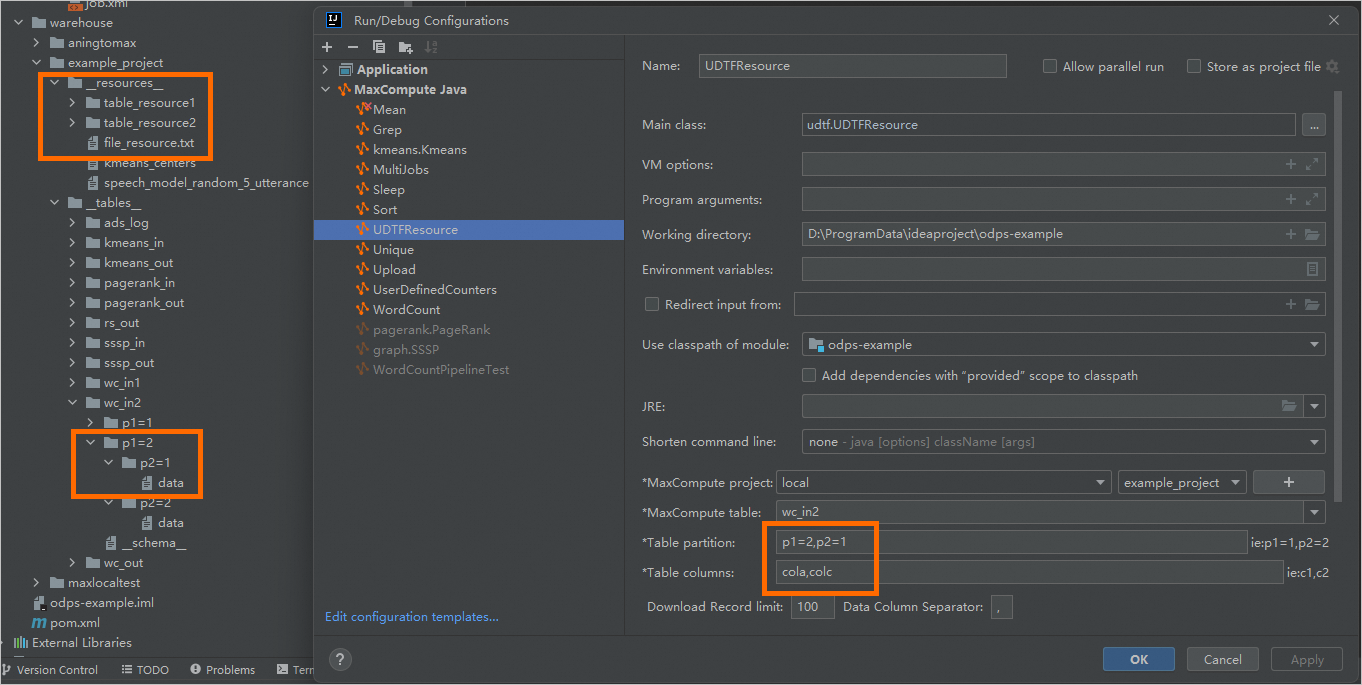
-
-
Klik kanan nama kelas UDTFResource dan pilih Run.


Pengujian sisi client
-
Di pojok kiri atas IDEA, klik
 Project Explorer, lalu pilih
  Add Resource.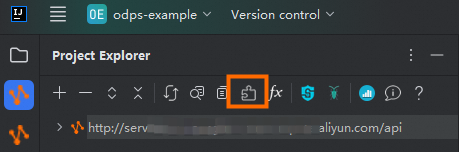
-
Tambahkan file file_resource.txt berdasarkan informasi instans MaxCompute Anda.
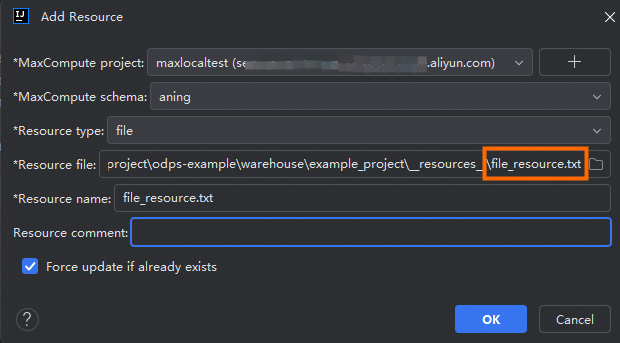
-
Di proyek MaxCompute Anda, buat dan isi tabel data sampel wc_in1 dan wc_in2.
CREATE TABLE wc_in1 ( col1 STRING, col2 STRING, col3 STRING, col4 STRING ); INSERT INTO wc_in1 VALUES ('A1','A2','A3','A4'), ('A1','A2','A3','A4'), ('A1','A2','A3','A4'), ('A1','A2','A3','A4'); CREATE TABLE wc_in2 ( cola STRING, colb STRING, colc STRING ) PARTITIONED BY (p1 STRING, p2 STRING); ALTER TABLE wc_in2 ADD PARTITION (p1='2',p2='1'); INSERT INTO wc_in2 PARTITION (p1='2',p2='1') VALUES ('three1','three2','three3'), ('three1','three2','three3'), ('three1','three2','three3'); -
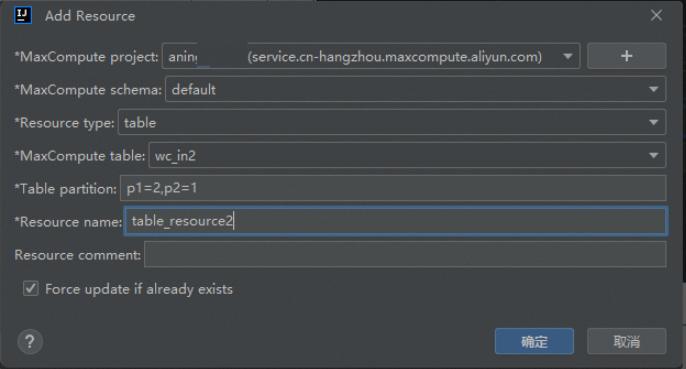
Petakan tabel wc_in1 dan wc_in2 yang telah Anda buat di MaxCompute ke resource table_resource1 dan table_resource2.
Tambahkan resource wc_in1.
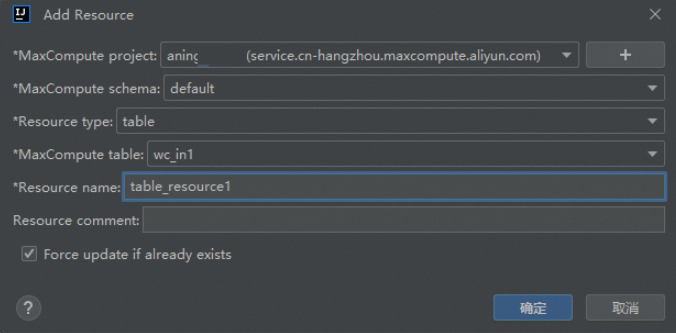
Tambahkan resource wc_in2.
-
Bundel UDTF menjadi paket JAR, unggah ke proyek MaxCompute Anda, dan daftarkan sebagai fungsi bernama
my_udtf. Untuk men-deploy, klik kanan nama kelas UDTFResource dan pilih Deploy to Server.... Di kotak dialog yang muncul, tambahkan resource yang diperlukanfile_resource.txt,table_resource1, dantable_resource2di bagian Extra resources.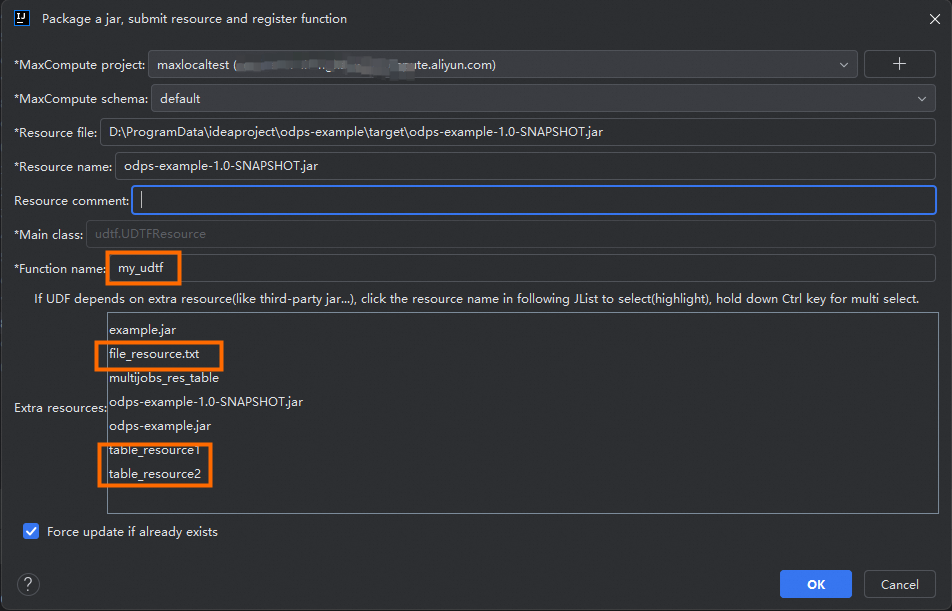
-
Klik
Project Explorer. Klik kanan proyek MaxCompute target Anda dan pilih Open Console untuk menjalankan client MaxCompute. Kemudian, jalankan perintah SQL untuk memanggil UDTF.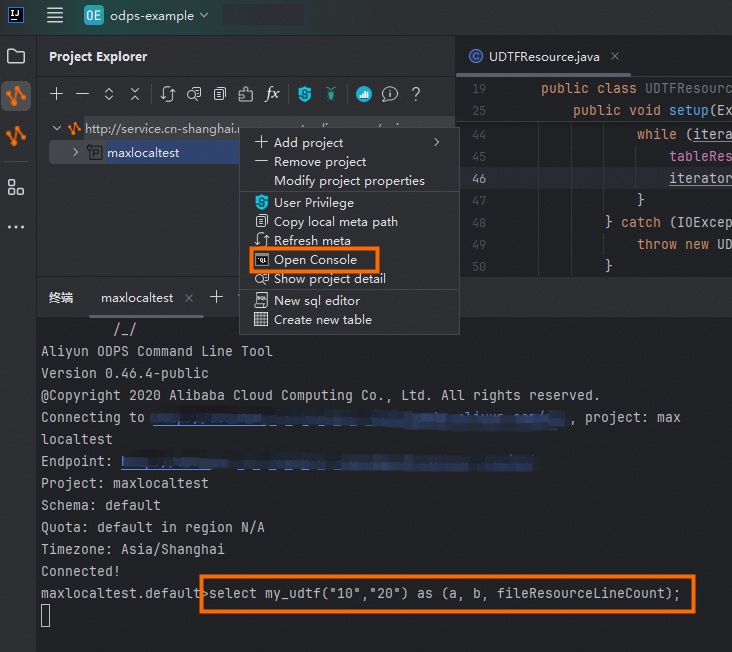

Berikut contoh perintahnya:
SELECT my_udtf("10","20") AS (a, b, fileResourceLineCount);