DataWorks menyediakan berbagai macam operasi API. Anda dapat memanggil operasi API tersebut untuk mengelola bisnis sesuai kebutuhan. Topik ini menjelaskan cara memanggil operasi API DataWorks untuk dengan cepat mengembangkan, menyerahkan, dan menjalankan tugas.
Informasi latar belakang
Topik ini menjelaskan operasi API DataWorks yang dapat dipanggil dalam skenario bisnis berikut. Sebelum melanjutkan langkah-langkah yang dijelaskan, disarankan untuk memahami kemampuan inti dan konsep terkait skenario bisnis tersebut.
Kueri dan kelola ruang kerja, alur kerja, folder node, serta node, lalu serahkan dan terapkan node. Operasi API DataStudio seperti CreateBusiness dan ListBusiness digunakan.
Lakukan pengujian asap dan lihat log run. Operasi API Pusat Operasi seperti RunSmokeTest digunakan.
Bagian berikut menjelaskan prosedur utama dan menyediakan contoh kode inti untuk praktik ini.
Untuk melihat atau mengunduh kode sumber contoh lengkap, lihat Referensi: Unduh Kode Sumber Contoh Lengkap dalam topik ini.
Pengembangan kode backend
Langkah 1: Kembangkan kelas ProjectService untuk menanyakan ruang kerja
Anda perlu mengembangkan kelas ProjectService. Kelas ini mendefinisikan fungsi ListProjects yang digunakan untuk memanggil operasi ListProjects untuk menanyakan ruang kerja. Setelah memanggil operasi tersebut, ruang kerja yang dapat digunakan untuk pengembangan frontend akan dikembalikan.
package com.aliyun.dataworks.services;

import com.aliyun.dataworks_public20200518.models.ListProjectsRequest;
import com.aliyun.dataworks_public20200518.models.ListProjectsResponse;
import com.aliyun.dataworks_public20200518.models.ListProjectsResponseBody;
import org.springframework.beans.factory.annotation.Autowired;
import org.springframework.stereotype.Service;

@Service
public class ProjectService {

    @Autowired
    private DataWorksOpenApiClient dataWorksOpenApiClient;

    /**
     * @param pageNumber
     * @param pageSize
     * @return
     */
    public ListProjectsResponseBody.ListProjectsResponseBodyPageResult listProjects(Integer pageNumber, Integer pageSize) {
        try {
            ListProjectsRequest listProjectsRequest = new ListProjectsRequest();
            listProjectsRequest.setPageNumber(pageNumber);
            listProjectsRequest.setPageSize(pageSize);
            ListProjectsResponse listProjectsResponse = dataWorksOpenApiClient.createClient().listProjects(listProjectsRequest);
            System.out.println(listProjectsResponse.getBody().getRequestId());
            return listProjectsResponse.getBody().getPageResult();
        } catch (Exception e) {
            e.printStackTrace();
            // Error message
            System.out.println(e.getMessage());
        }
        return null;
    }
}
Langkah 2: Kembangkan kelas BusinessService untuk memproses alur kerja
Anda perlu mengembangkan kelas BusinessService. Kelas ini mendefinisikan fungsi-fungsi berikut:
Fungsi CreateBusiness yang digunakan untuk memanggil operasi CreateBusiness untuk membuat alur kerja.
Fungsi ListBusiness yang digunakan untuk memanggil operasi ListBusiness untuk menanyakan alur kerja.
Fungsi-fungsi ini digunakan selama pengembangan frontend untuk membuat alur kerja sampel dan menanyakan alur kerja.
Anda juga dapat mendefinisikan fungsi FolderService untuk menampilkan pohon direktori yang terdiri dari alur kerja, folder node, dan node. Contoh berikut menghilangkan langkah terkait folder node dan hanya menunjukkan proses inti. Untuk fungsi FolderService yang terkait dengan operasi folder, Anda dapat merujuk ke contoh kode lengkap di contoh kode GitHub.
package com.aliyun.dataworks.services;

import com.aliyun.dataworks.dto.CreateBusinessDTO;
import com.aliyun.dataworks.dto.DeleteBusinessDTO;
import com.aliyun.dataworks.dto.ListBusinessesDTO;
import com.aliyun.dataworks.dto.UpdateBusinessDTO;
import com.aliyun.dataworks_public20200518.models.*;
import org.springframework.beans.factory.annotation.Autowired;
import org.springframework.stereotype.Service;
import org.springframework.util.CollectionUtils;

import java.util.List;

/**
 * @author dataworks demo
 */
@Service
public class BusinessService {

    @Autowired
    private DataWorksOpenApiClient dataWorksOpenApiClient;

    /**
     * create a business
     *
     * @param createBusinessDTO
     */
    public Long createBusiness(CreateBusinessDTO createBusinessDTO) {
        try {
            CreateBusinessRequest createBusinessRequest = new CreateBusinessRequest();
            // The name of the workflow.
            createBusinessRequest.setBusinessName(createBusinessDTO.getBusinessName());
            createBusinessRequest.setDescription(createBusinessDTO.getDescription());
            createBusinessRequest.setOwner(createBusinessDTO.getOwner());
            createBusinessRequest.setProjectId(createBusinessDTO.getProjectId());
            // The module to which the workflow belongs. Valid values: NORMAL (Data Development) and MANUAL_BIZ (manually triggered workflow).
            createBusinessRequest.setUseType(createBusinessDTO.getUseType());
            CreateBusinessResponse createBusinessResponse = dataWorksOpenApiClient.createClient().createBusiness(createBusinessRequest);
            System.out.println("create business requestId:" + createBusinessResponse.getBody().getRequestId());
            System.out.println("create business successful,the businessId:" + createBusinessResponse.getBody().getBusinessId());
            return createBusinessResponse.getBody().getBusinessId();
        } catch (Exception e) {
            e.printStackTrace();
            // Error message
            System.out.println(e.getMessage());
        }
        return null;
    }

    /**
     * @param listBusinessesDTO
     * @return
     */
    public List<ListBusinessResponseBody.ListBusinessResponseBodyDataBusiness> listBusiness(ListBusinessesDTO listBusinessesDTO) {
        try {
            ListBusinessRequest listBusinessRequest = new ListBusinessRequest();
            listBusinessRequest.setKeyword(listBusinessesDTO.getKeyword());
            listBusinessRequest.setPageNumber(listBusinessesDTO.getPageNumber() < 1 ? 1 : listBusinessesDTO.getPageNumber());
            listBusinessRequest.setPageSize(listBusinessesDTO.getPageSize() < 10 ? 10 : listBusinessesDTO.getPageSize());
            listBusinessRequest.setProjectId(listBusinessesDTO.getProjectId());
            ListBusinessResponse listBusinessResponse = dataWorksOpenApiClient.createClient().listBusiness(listBusinessRequest);
            System.out.println("list business requestId:" + listBusinessResponse.getBody().getRequestId());
            ListBusinessResponseBody.ListBusinessResponseBodyData data = listBusinessResponse.getBody().getData();
            System.out.println("total count:" + data.getTotalCount());
            if (!CollectionUtils.isEmpty(data.getBusiness())) {
                for (ListBusinessResponseBody.ListBusinessResponseBodyDataBusiness businessItem : data.getBusiness()) {
                    System.out.println(businessItem.getBusinessId() + "," + businessItem.getBusinessName() + "," + businessItem.getUseType());
                }
            }
            return data.getBusiness();
        } catch (Exception e) {
            e.printStackTrace();
            // Error message
            System.out.println(e.getMessage());
        }
        return null;
    }

    /**
     * update a business
     * @param updateBusinessDTO
     * @return
     */
    public Boolean updateBusiness(UpdateBusinessDTO updateBusinessDTO) {
        try {
            UpdateBusinessRequest updateBusinessRequest = new UpdateBusinessRequest();
            updateBusinessRequest.setBusinessId(updateBusinessDTO.getBusinessId());
            updateBusinessRequest.setBusinessName(updateBusinessDTO.getBusinessName());
            updateBusinessRequest.setDescription(updateBusinessDTO.getDescription());
            updateBusinessRequest.setOwner(updateBusinessDTO.getOwner());
            updateBusinessRequest.setProjectId(updateBusinessDTO.getProjectId());
            UpdateBusinessResponse updateBusinessResponse = dataWorksOpenApiClient.createClient().updateBusiness(updateBusinessRequest);
            System.out.println(updateBusinessResponse.getBody().getRequestId());
            System.out.println(updateBusinessResponse.getBody().getSuccess());
            return updateBusinessResponse.getBody().getSuccess();
        } catch (Exception e) {
            e.printStackTrace();
            // Error message
            System.out.println(e.getMessage());
        }
        return false;
    }

    /**
     * delete a business
     * @param deleteBusinessDTO
     */
    public boolean deleteBusiness(DeleteBusinessDTO deleteBusinessDTO) {
        try {
            DeleteBusinessRequest deleteBusinessRequest = new DeleteBusinessRequest();
            deleteBusinessRequest.setBusinessId(deleteBusinessDTO.getBusinessId());
            deleteBusinessRequest.setProjectId(deleteBusinessDTO.getProjectId());
            DeleteBusinessResponse deleteBusinessResponse = dataWorksOpenApiClient.createClient().deleteBusiness(deleteBusinessRequest);
            System.out.println("delete business:" + deleteBusinessResponse.getBody().getRequestId());
            System.out.println("delete business" + deleteBusinessResponse.getBody().getSuccess());
            return deleteBusinessResponse.getBody().getSuccess();
        } catch (Exception e) {
            e.printStackTrace();
            // Error message
            System.out.println(e.getMessage());
        }
        return false;
    }
}
Langkah 3: Kembangkan kelas FileService untuk memproses file
Anda perlu mengembangkan kelas FileService. Kelas ini mendefinisikan fungsi-fungsi berikut yang digunakan untuk memproses file:
Fungsi listFile yang digunakan untuk memanggil operasi ListFiles untuk menanyakan file.
Fungsi createFile yang digunakan untuk memanggil operasi CreateFile untuk membuat file.
Fungsi updateFile yang digunakan untuk memanggil operasi UpdateFile untuk memperbarui file.
Fungsi deployFile yang digunakan untuk memanggil operasi DeployFile untuk menerapkan file.
Fungsi runSmokeTest yang digunakan untuk memanggil operasi RunSmokeTest untuk melakukan pengujian asap.
Fungsi getInstanceLog yang digunakan untuk memanggil operasi GetInstanceLog untuk menanyakan log suatu instance.
Metode-metode ini dipanggil dari UI untuk membuat file, menampilkan daftar file, menyimpan file, serta menyerahkan dan mengeksekusi file.
package com.aliyun.dataworks.services;
import com.aliyun.dataworks.dto.*;
import com.aliyun.dataworks_public20200518.models.*;
import org.springframework.beans.factory.annotation.Autowired;
import org.springframework.stereotype.Service;
import org.springframework.util.CollectionUtils;
import java.util.List;
/**
* the ide files manager service
*
* @author dataworks demo
*/
@Service
public class FileService {
@Autowired
private DataWorksOpenApiClient dataWorksOpenApiClient;
public static final int CYCLE_NUM = 10;
/**
* Paged query
*
* @param listFilesDTO
* @return
*/
public List<ListFilesResponseBody.ListFilesResponseBodyDataFiles> listFiles(ListFilesDTO listFilesDTO) {
try {
ListFilesRequest listFilesRequest = new ListFilesRequest();
// File path: "Workflow/" + Target workflow name + Directory name + Latest folder name
// Example: Workflow/MyFirstWorkflow/MaxCompute/ods, do not add "Data Development"
listFilesRequest.setFileFolderPath(listFilesDTO.getFileFolderPath());
// The code type of the file. Multiple types are supported. Separate them with commas (,), for example, 10,23.
listFilesRequest.setFileTypes(listFilesDTO.getFileTypes());
// The keyword in the file name. Fuzzy match is supported.
listFilesRequest.setKeyword(listFilesDTO.getKeyword());
// The ID of the scheduling node.
listFilesRequest.setNodeId(listFilesDTO.getNodeId());
// The owner of the file.
listFilesRequest.setOwner(listFilesDTO.getOwner());
// The page number of the requested data page.
listFilesRequest.setPageNumber(listFilesDTO.getPageNumber() <= 0 ? 1 : listFilesDTO.getPageNumber());
// The number of entries to display on each page.
listFilesRequest.setPageSize(listFilesDTO.getPageSize() <= 10 ? 10 : listFilesDTO.getPageSize());
// The ID of the DataWorks workspace.
listFilesRequest.setProjectId(listFilesDTO.getProjectId());
// The module to which the file belongs.
listFilesRequest.setUseType(listFilesDTO.getUseType());
ListFilesResponse listFilesResponse = dataWorksOpenApiClient.createClient()
.listFiles(listFilesRequest);
ListFilesResponseBody.ListFilesResponseBodyData fileData = listFilesResponse.getBody().getData();
if (fileData.getFiles() != null && !fileData.getFiles().isEmpty()) {
for (ListFilesResponseBody.ListFilesResponseBodyDataFiles file : fileData.getFiles()) {
// Workflow ID
System.out.println(file.getBusinessId());
// File ID
System.out.println(file.getFileId());
// File name
System.out.println(file.getFileName());
// File type, for example, 10
System.out.println(file.getFileType());
// Node ID
System.out.println(file.getNodeId());
// Folder ID
System.out.println(file.getFileFolderId());
}
}
return fileData.getFiles();
} catch (Exception e) {
e.printStackTrace();
// Error message
System.out.println(e.getMessage());
}
return null;
}
/**
* Create a file
*
* @param createFileDTO
*/
public Long createFile(CreateFileDTO createFileDTO) {
try {
CreateFileRequest createFileRequest = new CreateFileRequest();
// The advanced configuration of the task.
createFileRequest.setAdvancedSettings(createFileDTO.getAdvancedSettings());
// Specifies whether to enable automatic parsing for the file. This parameter is required.
createFileRequest.setAutoParsing(createFileDTO.getAutoParsing());
// The interval for automatic reruns after an error occurs, in milliseconds. The maximum value is 1,800,000 (30 minutes).
createFileRequest.setAutoRerunIntervalMillis(createFileDTO.getAutoRerunIntervalMillis());
// The number of automatic retries.
createFileRequest.setAutoRerunTimes(createFileDTO.getAutoRerunTimes());
// The data source connected for task execution after the file is published as a task. This parameter is required.
createFileRequest.setConnectionName(createFileDTO.getConnectionName());
// The code content of the file. This parameter is required.
createFileRequest.setContent(createFileDTO.getContent());
// The cron expression for the recurring schedule. This parameter is required.
createFileRequest.setCronExpress(createFileDTO.getCronExpress());
// The type of the scheduling cycle. This parameter is required.
createFileRequest.setCycleType(createFileDTO.getCycleType());
// The list of nodes on which the current node's instance in the current cycle depends from the previous cycle.
createFileRequest.setDependentNodeIdList(createFileDTO.getDependentNodeIdList());
// The dependency type on the previous cycle. This parameter is required.
createFileRequest.setDependentType(createFileDTO.getDependentType());
// The timestamp to stop automatic scheduling, in milliseconds.
createFileRequest.setEndEffectDate(createFileDTO.getEndEffectDate());
// The file description.
createFileRequest.setFileDescription(createFileDTO.getFileDescription());
// The path of the file. This parameter is required.
createFileRequest.setFileFolderPath(createFileDTO.getFileFolderPath());
// The name of the file. This parameter is required.
createFileRequest.setFileName(createFileDTO.getFileName());
// The code type of the file. This parameter is required.
createFileRequest.setFileType(createFileDTO.getFileType());
// The output names of upstream files that the current file depends on. Separate multiple outputs with commas (,). This parameter is required.
createFileRequest.setInputList(createFileDTO.getInputList());
// The Alibaba Cloud user ID of the file owner. If this parameter is empty, the user ID of the caller is used by default. This parameter is required.
createFileRequest.setOwner(createFileDTO.getOwner());
// Scheduling parameters.
createFileRequest.setParaValue(createFileDTO.getParaValue());
// The project ID. This parameter is required.
createFileRequest.setProjectId(createFileDTO.getProjectId());
// Rerun property.
createFileRequest.setRerunMode(createFileDTO.getRerunMode());
// The resource group for the task. This parameter is required.
createFileRequest.setResourceGroupIdentifier(createFileDTO.getResourceGroupIdentifier());
// The scheduling type.
createFileRequest.setSchedulerType(createFileDTO.getSchedulerType());
// The start timestamp for automatic scheduling, in milliseconds.
createFileRequest.setStartEffectDate(createFileDTO.getStartEffectDate());
// Specifies whether to skip execution.
createFileRequest.setStop(createFileDTO.getStop());
CreateFileResponse createFileResponse = dataWorksOpenApiClient.createClient()
.createFile(createFileRequest);
// requestId
System.out.println(createFileResponse.getBody().getRequestId());
// fileId
System.out.println(createFileResponse.getBody().getData());
return createFileResponse.getBody().getData();
} catch (Exception e) {
e.printStackTrace();
// Error message
System.out.println(e.getMessage());
}
return null;
}
/**
* Update a file
*
* @param updateFileDTO
*/
public boolean updateFile(UpdateFileDTO updateFileDTO) {
try {
UpdateFileRequest updateFileRequest = new UpdateFileRequest();
// The advanced configuration of the task. For the specific format, see the relevant documentation.
updateFileRequest.setAdvancedSettings(updateFileDTO.getAdvancedSettings());
// Specifies whether to enable automatic parsing for the file.
updateFileRequest.setAutoParsing(updateFileDTO.getAutoParsing());
// The interval for automatic reruns after an error occurs, in milliseconds. The maximum value is 1,800,000 (30 minutes).
updateFileRequest.setAutoRerunIntervalMillis(updateFileDTO.getAutoRerunIntervalMillis());
// The number of automatic reruns after an error occurs.
updateFileRequest.setAutoRerunTimes(updateFileDTO.getAutoRerunTimes());
// The identifier of the data source used by the task during execution.
updateFileRequest.setConnectionName(updateFileDTO.getConnectionName());
// The code content of the file.
updateFileRequest.setContent(updateFileDTO.getContent());
// The cron expression for the recurring schedule.
updateFileRequest.setCronExpress(updateFileDTO.getCronExpress());
// The type of the scheduling cycle. Valid values: NOT_DAY (minute, hour) and DAY (day, week, month).
updateFileRequest.setCycleType(updateFileDTO.getCycleType());
// When DependentType is set to USER_DEFINE, this parameter specifies the IDs of nodes that the current file depends on. Separate multiple node IDs with commas (,).
updateFileRequest.setDependentNodeIdList(updateFileDTO.getDependentNodeIdList());
// The dependency type on the previous cycle.
updateFileRequest.setDependentType(updateFileDTO.getDependentType());
// The timestamp to stop automatic scheduling, in milliseconds.
updateFileRequest.setEndEffectDate(updateFileDTO.getEndEffectDate());
// The description of the file.
updateFileRequest.setFileDescription(updateFileDTO.getFileDescription());
// The path where the file is located.
updateFileRequest.setFileFolderPath(updateFileDTO.getFileFolderPath());
// The ID of the file.
updateFileRequest.setFileId(updateFileDTO.getFileId());
// The name of the file.
updateFileRequest.setFileName(updateFileDTO.getFileName());
// The output names of upstream files that the current file depends on. Separate multiple outputs with commas (,).
updateFileRequest.setInputList(updateFileDTO.getInputList());
// The output of the file.
updateFileRequest.setOutputList(updateFileDTO.getOutputList());
// The user ID of the file owner.
updateFileRequest.setOwner(updateFileDTO.getOwner());
// Scheduling parameters.
updateFileRequest.setParaValue(updateFileDTO.getParaValue());
// The ID of the DataWorks workspace.
updateFileRequest.setProjectId(updateFileDTO.getProjectId());
// Rerun property. ALL_ALLOWED.
updateFileRequest.setRerunMode(updateFileDTO.getRerunMode());
// The resource group corresponding to the task execution after the file is published.
updateFileRequest.setResourceGroupIdentifier(updateFileDTO.getResourceGroupIdentifier());
// The scheduling type. NORMAL.
updateFileRequest.setSchedulerType(updateFileDTO.getSchedulerType());
// The start timestamp for automatic scheduling, in milliseconds.
updateFileRequest.setStartEffectDate(updateFileDTO.getStartEffectDate());
// Specifies whether to start immediately after publishing.
updateFileRequest.setStartImmediately(updateFileDTO.getStartImmediately());
// Specifies whether to skip execution.
updateFileRequest.setStop(updateFileDTO.getStop());
UpdateFileResponse updateFileResponse = dataWorksOpenApiClient.createClient()
.updateFile(updateFileRequest);
// requestId
System.out.println(updateFileResponse.getBody().getRequestId());
// Success or failure.
System.out.println(updateFileResponse.getBody().getSuccess());
return updateFileResponse.getBody().getSuccess();
} catch (Exception e) {
e.printStackTrace();
// Error message
System.out.println(e.getMessage());
}
return false;
}
/**
* Delete a file
*
* @param deleteFileDTO
* @return
* @throws InterruptedException
*/
public boolean deleteFile(DeleteFileDTO deleteFileDTO) throws InterruptedException {
try {
DeleteFileRequest deleteFileRequest = new DeleteFileRequest();
deleteFileRequest.setFileId(deleteFileDTO.getFileId());
deleteFileRequest.setProjectId(deleteFileDTO.getProjectId());
DeleteFileResponse deleteFileResponse = dataWorksOpenApiClient.createClient()
.deleteFile(deleteFileRequest);
System.out.println(deleteFileResponse.getBody().getRequestId());
System.out.println(deleteFileResponse.getBody().getDeploymentId());
GetDeploymentRequest getDeploymentRequest = new GetDeploymentRequest();
getDeploymentRequest.setProjectId(deleteFileDTO.getProjectId());
getDeploymentRequest.setDeploymentId(deleteFileResponse.getBody().getDeploymentId());
for (int i = 0; i < CYCLE_NUM; i++) {
GetDeploymentResponse getDeploymentResponse = dataWorksOpenApiClient.createClient()
.getDeployment(getDeploymentRequest);
// The current status of the deployment package. 0: Ready, 1: Succeeded, 2: Failed.
Integer deleteStatus = getDeploymentResponse.getBody().getData().getDeployment().getStatus();
// You can loop here to check the deletion status.
if (deleteStatus == 1) {
System.out.println("File deleted successfully.");
break;
} else {
System.out.println("Deleting file...");
Thread.sleep(1000L);
}
}
GetProjectRequest getProjectRequest = new GetProjectRequest();
getProjectRequest.setProjectId(deleteFileDTO.getProjectId());
GetProjectResponse getProjectResponse = dataWorksOpenApiClient.createClient()
.getProject(getProjectRequest);
// Standard mode has DEV and PROD environments. Basic mode has only the PROD environment.
Boolean standardMode = getProjectResponse.getBody().getData().getEnvTypes().size() == 2;
if (standardMode) {
// In standard mode, you need to publish the deletion to the production environment.
DeployFileRequest deployFileRequest = new DeployFileRequest();
deployFileRequest.setProjectId(deleteFileDTO.getProjectId());
deployFileRequest.setFileId(deleteFileDTO.getFileId());
DeployFileResponse deployFileResponse = dataWorksOpenApiClient.createClient()
.deployFile(deployFileRequest);
getDeploymentRequest.setDeploymentId(deployFileResponse.getBody().getData());
for (int i = 0; i < CYCLE_NUM; i++) {
GetDeploymentResponse getDeploymentResponse = dataWorksOpenApiClient.createClient()
.getDeployment(getDeploymentRequest);
// The current status of the deployment package. 0: Ready, 1: Succeeded, 2: Failed.
Integer deleteStatus = getDeploymentResponse.getBody().getData().getDeployment().getStatus();
// You can loop here to check the deletion status.
if (deleteStatus == 1) {
System.out.println("File deleted successfully.");
break;
} else {
System.out.println("Deleting file...");
Thread.sleep(1000L);
}
}
}
return true;
} catch (Exception e) {
e.printStackTrace();
// Error message
System.out.println(e.getMessage());
}
return false;
}
/**
* Query a file
*
* @param getFileDTO
*/
public GetFileResponseBody.GetFileResponseBodyDataFile getFile(GetFileDTO getFileDTO) {
try {
GetFileRequest getFileRequest = new GetFileRequest();
getFileRequest.setFileId(getFileDTO.getFileId());
getFileRequest.setProjectId(getFileDTO.getProjectId());
getFileRequest.setNodeId(getFileDTO.getNodeId());
GetFileResponse getFileResponse = dataWorksOpenApiClient.createClient().getFile(getFileRequest);
System.out.println(getFileResponse.getBody().getRequestId());
GetFileResponseBody.GetFileResponseBodyDataFile file = getFileResponse.getBody().getData().getFile();
System.out.println(file.getFileName());
System.out.println(file.getFileType());
System.out.println(file.getNodeId());
System.out.println(file.getCreateUser());
return file;
} catch (Exception e) {
e.printStackTrace();
// Error message
System.out.println(e.getMessage());
}
return null;
}
/**
* @param deployFileDTO
* @return
* @throws InterruptedException
*/
public Boolean deployFile(DeployFileDTO deployFileDTO) throws InterruptedException {
try {
GetProjectRequest getProjectRequest = new GetProjectRequest();
getProjectRequest.setProjectId(deployFileDTO.getProjectId());
GetProjectResponse getProjectResponse = dataWorksOpenApiClient.createClient()
.getProject(getProjectRequest);
// Standard mode has DEV and PROD environments. Basic mode has only the PROD environment.
Boolean standardMode = getProjectResponse.getBody().getData().getEnvTypes().size() == 2;
if (standardMode) {
SubmitFileRequest submitFileRequest = new SubmitFileRequest();
submitFileRequest.setFileId(deployFileDTO.getFileId());
submitFileRequest.setProjectId(deployFileDTO.getProjectId());
SubmitFileResponse submitFileResponse = dataWorksOpenApiClient.createClient()
.submitFile(submitFileRequest);
System.out.println("submit file requestId:" + submitFileResponse.getBody().getRequestId());
System.out.println("submit file deploymentId:" + submitFileResponse.getBody().getData());
for (int i = 0; i < CYCLE_NUM; i++) {
GetDeploymentRequest getDeploymentRequest = new GetDeploymentRequest();
getDeploymentRequest.setProjectId(deployFileDTO.getProjectId());
getDeploymentRequest.setDeploymentId(submitFileResponse.getBody().getData());
GetDeploymentResponse getDeploymentResponse = dataWorksOpenApiClient.createClient()
.getDeployment(getDeploymentRequest);
// The current status of the deployment package. 0: Ready, 1: Succeeded, 2: Failed.
Integer deleteStatus = getDeploymentResponse.getBody().getData().getDeployment().getStatus();
// You can loop here to check the deletion status.
if (deleteStatus == 1) {
System.out.println("File submitted successfully.");
break;
} else {
System.out.println("Submitting file...");
Thread.sleep(1000L);
}
}
}
DeployFileRequest deployFileRequest = new DeployFileRequest();
deployFileRequest.setFileId(deployFileDTO.getFileId());
deployFileRequest.setProjectId(deployFileDTO.getProjectId());
DeployFileResponse deployFileResponse = dataWorksOpenApiClient.createClient()
.deployFile(deployFileRequest);
System.out.println("deploy file requestId:" + deployFileResponse.getBody().getRequestId());
System.out.println("deploy file deploymentId:" + deployFileResponse.getBody().getData());
for (int i = 0; i < CYCLE_NUM; i++) {
GetDeploymentRequest getDeploymentRequest = new GetDeploymentRequest();
getDeploymentRequest.setProjectId(deployFileDTO.getProjectId());
getDeploymentRequest.setDeploymentId(deployFileResponse.getBody().getData());
GetDeploymentResponse getDeploymentResponse = dataWorksOpenApiClient.createClient()
.getDeployment(getDeploymentRequest);
// The current status of the deployment package. 0: Ready, 1: Succeeded, 2: Failed.
Integer deleteStatus = getDeploymentResponse.getBody().getData().getDeployment().getStatus();
// You can loop here to check the deletion status.
if (deleteStatus == 1) {
System.out.println("File published successfully.");
break;
} else {
System.out.println("Publishing file...");
Thread.sleep(1000L);
}
}
return true;
} catch (Exception e) {
e.printStackTrace();
// Error message
System.out.println(e.getMessage());
}
return false;
}
public List<ListInstancesResponseBody.ListInstancesResponseBodyDataInstances> runSmokeTest(RunSmokeTestDTO runSmokeTestDTO) {
try {
RunSmokeTestRequest runSmokeTestRequest = new RunSmokeTestRequest();
runSmokeTestRequest.setBizdate(runSmokeTestDTO.getBizdate());
runSmokeTestRequest.setNodeId(runSmokeTestDTO.getNodeId());
runSmokeTestRequest.setNodeParams(runSmokeTestDTO.getNodeParams());
runSmokeTestRequest.setName(runSmokeTestDTO.getName());
runSmokeTestRequest.setProjectEnv(runSmokeTestDTO.getProjectEnv());
RunSmokeTestResponse runSmokeTestResponse = dataWorksOpenApiClient.createClient()
.runSmokeTest(runSmokeTestRequest);
System.out.println(runSmokeTestResponse.getBody().getRequestId());
// DAG ID
System.out.println(runSmokeTestResponse.getBody().getData());
ListInstancesRequest listInstancesRequest = new ListInstancesRequest();
listInstancesRequest.setDagId(runSmokeTestResponse.getBody().getData());
listInstancesRequest.setProjectId(runSmokeTestDTO.getProjectId());
listInstancesRequest.setProjectEnv(runSmokeTestDTO.getProjectEnv());
listInstancesRequest.setNodeId(runSmokeTestDTO.getNodeId());
listInstancesRequest.setPageNumber(1);
listInstancesRequest.setPageSize(10);
ListInstancesResponse listInstancesResponse = dataWorksOpenApiClient.createClient()
.listInstances(listInstancesRequest);
System.out.println(listInstancesResponse.getBody().getRequestId());
List<ListInstancesResponseBody.ListInstancesResponseBodyDataInstances> instances = listInstancesResponse.getBody().getData().getInstances();
if (CollectionUtils.isEmpty(instances)) {
return null;
}
return instances;
} catch (Exception e) {
e.printStackTrace();
// Error message
System.out.println(e.getMessage());
}
return null;
}
public InstanceDetail getInstanceLog(Long instanceId, String projectEnv) {
try {
GetInstanceLogRequest getInstanceLogRequest = new GetInstanceLogRequest();
getInstanceLogRequest.setInstanceId(instanceId);
getInstanceLogRequest.setProjectEnv(projectEnv);
GetInstanceLogResponse getInstanceLogResponse = dataWorksOpenApiClient.createClient()
.getInstanceLog(getInstanceLogRequest);
System.out.println(getInstanceLogResponse.getBody().getRequestId());
GetInstanceRequest getInstanceRequest = new GetInstanceRequest();
getInstanceRequest.setInstanceId(instanceId);
getInstanceRequest.setProjectEnv(projectEnv);
GetInstanceResponse getInstanceResponse = dataWorksOpenApiClient.createClient()
.getInstance(getInstanceRequest);
System.out.println(getInstanceResponse.getBody().getRequestId());
System.out.println(getInstanceResponse.getBody().getData());
InstanceDetail instanceDetail = new InstanceDetail();
instanceDetail.setInstance(getInstanceResponse.getBody().getData());
instanceDetail.setInstanceLog(getInstanceLogResponse.getBody().getData());
return instanceDetail;
} catch (Exception e) {
e.printStackTrace();
// Error message
System.out.println(e.getMessage());
}
return null;
}
}Langkah 4: Kembangkan kontroler IDE
Anda perlu mendefinisikan kontroler IDE yang menyediakan operasi API yang dapat dipanggil untuk routing selama pengembangan frontend.
package com.aliyun.dataworks.demo;


import com.aliyun.dataworks.dto.*;
import com.aliyun.dataworks.services.BusinessService;
import com.aliyun.dataworks.services.FileService;
import com.aliyun.dataworks.services.FolderService;
import com.aliyun.dataworks.services.ProjectService;
import com.aliyun.dataworks_public20200518.models.*;
import org.springframework.beans.factory.annotation.Autowired;
import org.springframework.web.bind.annotation.*;


import java.util.List;


/**
 * @author dataworks demo
 */
@RestController
@RequestMapping("/ide")
public class IdeController {


    @Autowired
    private FileService fileService;


    @Autowired
    private FolderService folderService;


    @Autowired
    private BusinessService businessService;


    @Autowired
    private ProjectService projectService;


    /**
     * for list those files
     *
     * @param listFilesDTO
     * @return ListFilesResponse.Data.File
     */
    @CrossOrigin(origins = "http://localhost:8080")
    @GetMapping("/listFiles")
    public List<ListFilesResponseBody.ListFilesResponseBodyDataFiles> listFiles(ListFilesDTO listFilesDTO) {
        return fileService.listFiles(listFilesDTO);
    }


    /**
     * for list those folders
     *
     * @param listFoldersDTO
     * @return ListFoldersResponse.Data.FoldersItem
     */
    @CrossOrigin(origins = "http://localhost:8080")
    @GetMapping("/listFolders")
    public List<ListFoldersResponseBody.ListFoldersResponseBodyDataFolders> listFolders(ListFoldersDTO listFoldersDTO) {
        return folderService.listFolders(listFoldersDTO);
    }


    /**
     * for create the folder
     *
     * @param createFolderDTO
     * @return boolean
     */
    @CrossOrigin(origins = "http://localhost:8080")
    @PostMapping("/createFolder")
    public boolean createFolder(@RequestBody CreateFolderDTO createFolderDTO) {
        return folderService.createFolder(createFolderDTO);
    }


    /**
     * for update the folder
     *
     * @param updateFolderDTO
     * @return boolean
     */
    @CrossOrigin(origins = "http://localhost:8080")
    @PostMapping("/updateFolder")
    public boolean updateFolder(@RequestBody UpdateFolderDTO updateFolderDTO) {
        return folderService.updateFolder(updateFolderDTO);
    }


    /**
     * for get the file
     *
     * @param getFileDTO
     * @return GetFileResponse.Data.File
     */
    @CrossOrigin(origins = "http://localhost:8080")
    @GetMapping("/getFile")
    public GetFileResponseBody.GetFileResponseBodyDataFile getFile(GetFileDTO getFileDTO) {
        return fileService.getFile(getFileDTO);
    }


    /**
     * for create the file
     *
     * @param createFileDTO
     * @return fileId
     */
    @CrossOrigin(origins = "http://localhost:8080")
    @PostMapping("/createFile")
    public Long createFile(@RequestBody CreateFileDTO createFileDTO) {
        return fileService.createFile(createFileDTO);
    }


    /**
     * for update the file
     *
     * @param updateFileDTO
     * @return boolean
     */
    @CrossOrigin(origins = "http://localhost:8080")
    @PostMapping("/updateFile")
    public boolean updateFile(@RequestBody UpdateFileDTO updateFileDTO) {
        return fileService.updateFile(updateFileDTO);
    }


    /**
     * for deploy the file
     *
     * @param deployFileDTO
     * @return boolean
     */
    @CrossOrigin(origins = "http://localhost:8080")
    @PostMapping("/deployFile")
    public boolean deployFile(@RequestBody DeployFileDTO deployFileDTO) {
        try {
            return fileService.deployFile(deployFileDTO);
        } catch (Exception e) {
            System.out.println(e);
        }
        return false;
    }


    /**
     * for delete the file
     *
     * @param deleteFileDTO
     * @return
     */
    @CrossOrigin(origins = "http://localhost:8080")
    @DeleteMapping("/deleteFile")
    public boolean deleteFile(DeleteFileDTO deleteFileDTO) {
        try {
            return fileService.deleteFile(deleteFileDTO);
        } catch (Exception e) {
            System.out.println(e);
        }
        return false;
    }


    /**
     * for delete the folder
     *
     * @param deleteFolderDTO
     * @return
     */
    @CrossOrigin(origins = "http://localhost:8080")
    @DeleteMapping("/deleteFolder")
    public boolean deleteFolder(DeleteFolderDTO deleteFolderDTO) {
        return folderService.deleteFolder(deleteFolderDTO);
    }


    /**
     * list businesses
     *
     * @param listBusinessesDTO
     * @return
     */
    @CrossOrigin(origins = "http://localhost:8080")
    @GetMapping("/listBusinesses")
    public List<ListBusinessResponseBody.ListBusinessResponseBodyDataBusiness> listBusiness(ListBusinessesDTO listBusinessesDTO) {
        return businessService.listBusiness(listBusinessesDTO);
    }


    /**
     * create a business
     *
     * @param createBusinessDTO
     * @return
     */
    @CrossOrigin(origins = "http://localhost:8080")
    @PostMapping("/createBusiness")
    public Long createBusiness(@RequestBody CreateBusinessDTO createBusinessDTO) {
        return businessService.createBusiness(createBusinessDTO);
    }


    /**
     * update a business
     *
     * @param updateBusinessDTO
     * @return
     */
    @CrossOrigin(origins = "http://localhost:8080")
    @PostMapping("/updateBusiness")
    public boolean updateBusiness(@RequestBody UpdateBusinessDTO updateBusinessDTO) {
        return businessService.updateBusiness(updateBusinessDTO);
    }


    /**
     * delete a business
     *
     * @param deleteBusinessDTO
     * @return
     */
    @CrossOrigin(origins = "http://localhost:8080")
    @PostMapping("/deleteBusiness")
    public boolean deleteBusiness(@RequestBody DeleteBusinessDTO deleteBusinessDTO) {
        return businessService.deleteBusiness(deleteBusinessDTO);
    }


    /**
     * @param pageNumber
     * @param pageSize
     * @return
     */
    @CrossOrigin(origins = "http://localhost:8080")
    @GetMapping("/listProjects")
    public ListProjectsResponseBody.ListProjectsResponseBodyPageResult listProjects(Integer pageNumber, Integer pageSize) {
        return projectService.listProjects(pageNumber, pageSize);
    }


    /**
     * @param runSmokeTestDTO
     * @return
     */
    @CrossOrigin(origins = "http://localhost:8080")
    @PutMapping("/runSmokeTest")
    public List<ListInstancesResponseBody.ListInstancesResponseBodyDataInstances> runSmokeTest(@RequestBody RunSmokeTestDTO runSmokeTestDTO) {
        return fileService.runSmokeTest(runSmokeTestDTO);
    }


    /**
     * @param instanceId
     * @param projectEnv
     * @return
     */
    @CrossOrigin(origins = "http://localhost:8080")
    @GetMapping("/getLog")
    public InstanceDetail getLog(@RequestParam Long instanceId, @RequestParam String projectEnv) {
        return fileService.getInstanceLog(instanceId, projectEnv);
    }


}
Pengembangan kode frontend
Inisialisasi editor, pohon direktori, dan terminal.
Kode sampel:
const App: FunctionComponent<Props> = () => {
  const editorRef = useRef<HTMLDivElement>(null);
  const termianlRef = useRef<HTMLDivElement>(null);
  const [terminal, setTerminal] = useState<NextTerminal>();
  const [editor, setEditor] = useState<monaco.editor.IStandaloneCodeEditor>();
  const [expnadedKeys, setExpandedKeys] = useState<any[]>();
  const [workspace, setWorkspace] = useState<number>();
  const [workspaces, setWorkspaces] = useState<{ label: string, value: number }[]>([]);
  const [dataSource, setDataSource] = useState<any[]>();
  const [selectedFile, setSelectedFile] = useState<number>();
  const [loading, setLoading] = useState<boolean>(false);
  // Create an editor instance.
  useEffect(() => {
    if (editorRef.current) {
      const nextEditor = monaco.editor.create(editorRef.current, editorOptions);
      setEditor(nextEditor);
      return () => { nextEditor.dispose(); };
    }
  }, [editorRef.current]);
  // Add a keydown event to save the file.
  useEffect(() => {
    editor?.addCommand(monaco.KeyMod.CtrlCmd | monaco.KeyCode.KeyS, () => {
      if (!workspace) {
        showTips('Please select workspace first');
        return;
      }
      saveFile(workspace, editor, selectedFile);
    });
  }, [editor, workspace, selectedFile]);
  // Create a terminal instance.
  useEffect(() => {
    if (termianlRef.current) {
      const term: NextTerminal = new Terminal(terminalOptions) as any;
      term.pointer = -1;
      term.stack = [];
      setTerminal(term);
      const fitAddon = new FitAddon();
      term.loadAddon(fitAddon);
      term.open(termianlRef.current);
      fitAddon.fit();
      term.write('$ ');
      return () => { term.dispose(); };
    }
  }, [termianlRef.current]);
  // Register a terminal input event.
  useEffect(() => {
    const event = terminal?.onKey(e => onTerminalKeyChange(e, terminal, dataSource, workspace));
    return () => {
      event?.dispose();
    };
  }, [terminal, dataSource, workspace]);
  // Get the data source for the directory tree.
  useEffect(() => {
    workspace && (async () => {
      setLoading(true);
      const nextDataSource = await getTreeDataSource(workspace, workspaces);
      const defaultKey = nextDataSource?.[0]?.key;
      defaultKey && setExpandedKeys([defaultKey]);
      setDataSource(nextDataSource);
      setLoading(false);
    })();
  }, [workspace]);
  // When a file in the directory tree is clicked, get the file details and display the code.
  useEffect(() => {
    workspace && selectedFile && (async () => {
      setLoading(true);
      const file = await getFileInfo(workspace, selectedFile);
      editor?.setValue(file.content);
      editor?.getAction('editor.action.formatDocument').run();
      setLoading(false);
    })();
  }, [selectedFile]);
  // Get the list of workspaces.
  useEffect(() => {
    (async () => {
      const list = await getWorkspaceList();
      setWorkspaces(list);
    })();
  }, []);
  const onExapnd = useCallback((keys: number[]) => { setExpandedKeys(keys); }, []);
  const onWorkspaceChange = useCallback((value: number) => { setWorkspace(value) }, []);
  const onTreeNodeSelect = useCallback((key: number[]) => { key[0] && setSelectedFile(key[0]) }, []);
  return (
    <div className={cn(classes.appWrapper)}>
      <div className={cn(classes.leftArea)}>
        <div className={cn(classes.workspaceWrapper)}>
          Workspace:
          <Select
            value={workspace}
            dataSource={workspaces}
            onChange={onWorkspaceChange}
            autoWidth={false}
            showSearch
          />
        </div>
        <div className={cn(classes.treeWrapper)}>
          <Tree
            dataSource={dataSource}
            isNodeBlock={{ defaultPaddingLeft: 20 }}
            expandedKeys={expnadedKeys}
            selectedKeys={[selectedFile]}
            onExpand={onExapnd}
            onSelect={onTreeNodeSelect}
            defaultExpandAll
          />
        </div>
      </div>
      <div className={cn(classes.rightArea)}>
        <div
          className={cn(classes.monacoEditorWrapper)}
          ref={editorRef}
        />
        <div
          className={cn(classes.panelWrapper)}
          ref={termianlRef}
        />
      </div>
      <div className={cn(classes.loaderLine)} style={{ display: loading ? 'block' : 'none' }} />
    </div>
  );
};
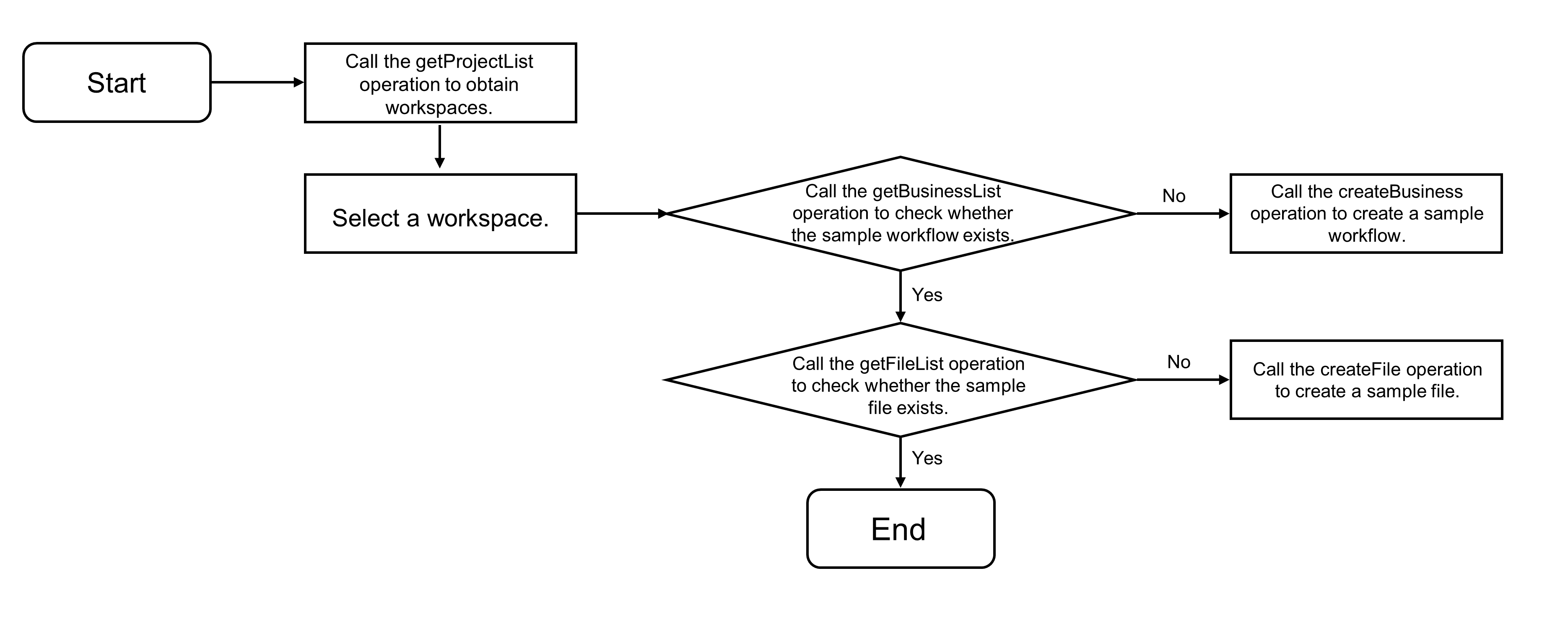
Menanyakan alur kerja dan file sampel serta menampilkan pohon direktori.
Bagan alir berikut menunjukkan cara menanyakan alur kerja dan file sampel.
/**
 * Get the data source for the directory tree.
 * @param workspace The workspace ID.
 * @param dataSource The list of workspaces.
 */
async function getTreeDataSource(workspace: number, dataSource: { label: string, value: number }[]) {
  try {
    const businesses = await services.ide.getBusinessList(workspace, openPlatformBusinessName);
    businesses.length === 0 && await services.ide.createBusiness(workspace, openPlatformBusinessName);
  } catch (e) {
    showError('You have no permission to access this workspace.');
    return;
  }
  const fileFolderPath = `Workflow/${openPlatformBusinessName}/MaxCompute`;
  const files = await services.ide.getFileList(workspace, fileFolderPath);
  let children: { key: number, label: string }[] = [];
  if (files.length === 0) {
    try {
      const currentWorkspace = dataSource.find(i => i.value === workspace);
      const file1 = await services.ide.createFile(workspace, currentWorkspace!.label, fileFolderPath, 'simpleSQL.mc.sql', 'SELECT 1');
      const file2 = await services.ide.createFile(workspace, currentWorkspace!.label, fileFolderPath, 'createTable.mc.sql', 'CREATE TABLE IF NOT EXISTS _qcc_mysql1_odps_source_20220113100903_done_ (\ncol string\n)\nCOMMENT \'DONE table that marks the completion of full data synchronization\'\nPARTITIONED BY\n(\nstatus STRING   COMMENT \'DONE partition\'\n)\nLIFECYCLE 36500;');
      children = children.concat([
        { key: file1, label: 'simpleSQL.mc.sql' },
        { key: file2, label: 'createTable.mc.sql' },
      ]);
    } catch (e) {
      showError('Create file failed. The datasource odps_source does not exist.');
      return;
    }
  } else {
    children = files.map((i) => ({ key: i.fileId, label: i.fileName }));
  }
  return [{ key: 1, label: openPlatformBusinessName, children }];
}
Setelah mengedit dan menyimpan file, Anda perlu memberikan file yang telah diedit ke backend dan memperbarui file tersebut.
Kode sampel:
/**
 * Save the file, triggered by Ctrl+S.
 * @param workspace The workspace ID.
 * @param editor The editor instance.
 * @param selectedFile The selected file.
 */
async function saveFile(workspace: number, editor: monaco.editor.IStandaloneCodeEditor, selectedFile?: number) {
  if (!selectedFile) {
    showTips('Please select a file.');
    return;
  }
  const content = editor.getValue();
  const result = await services.ide.updateFile(workspace, selectedFile, { content });
  result ? showTips('Saved file') : showError('Failed to save file');
}
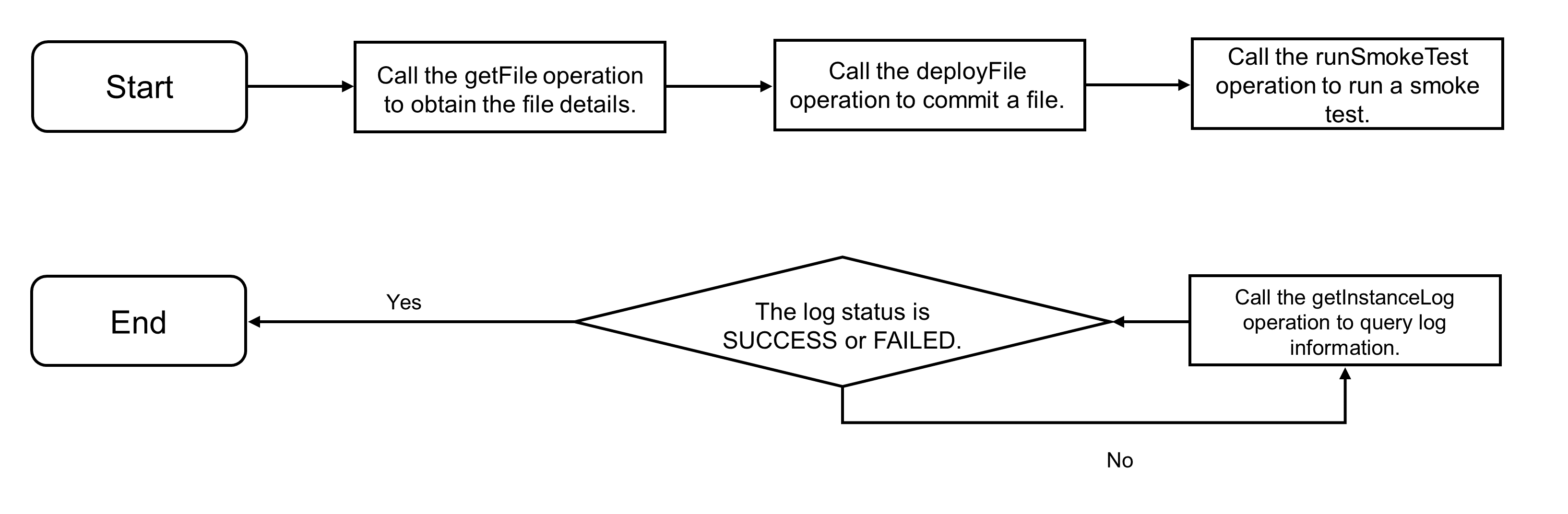
Ketika pengguna memasukkan
dw run ...di terminal, file dikirim ke sistem penjadwalan dan pengujian asap dijalankan.Alur pemrosesan diilustrasikan di bawah ini, disertai contoh kode.
/**
 * Handle terminal keyboard events.
 * @param e The event object.
 * @param term The terminal instance.
 * @param dataSource The data source for the directory tree.
 * @param workspace The workspace ID.
 */
function onTerminalKeyChange(e: { key: string; domEvent: KeyboardEvent; }, term: NextTerminal, dataSource: any, workspace?: number) {
  const ev = e.domEvent;
  const printable = !ev.altKey && !ev.ctrlKey && !ev.metaKey;
  term.inputText = typeof term.inputText === 'string' ? term.inputText : '';
  switch (ev.key) {
    case 'ArrowUp':
      term.pointer = term.pointer < (term.stack.length - 1) ? term.pointer + 1 : term.pointer;
      term.inputText = term.stack[term.pointer];
      term.write(`\x1b[2K\r$ ${term.inputText}`);
      break;
    case 'ArrowDown':
      term.pointer = term.pointer > -1 ? term.pointer - 1 : -1;
      term.inputText = term.pointer === -1 ? '' : term.stack[term.pointer];
      term.write(`\x1b[2K\r$ ${term.inputText}`);
      break;
    case 'ArrowLeft':
      (term as any)._core.buffer.x > 2 && printable && term.write(e.key);
      break;
    case 'ArrowRight':
      (term as any)._core.buffer.x <= (term.inputText.length + 1) && printable && term.write(e.key);
      break;
    case 'Enter':
      commandHandler(term, dataSource, workspace);
      break;
    case 'Backspace':
      if ((term as any)._core.buffer.x > 2) {
        term.inputText = term.inputText.slice(0, -1);
        term.write('\b \b');
      }
      break;
    default:
      if (printable) {
        term.inputText += e.key;
        term.write(e.key);
      }
  }
}
/**
 * Method to handle task submission, triggered when 'dw run ...' is entered in the terminal.
 * @param term The terminal instance.
 * @param dataSource The data source for the directory tree.
 * @param workspace The workspace ID.
 */
async function commandHandler(term: NextTerminal, dataSource: any, workspace?: number) {
  term.write('\r\n$ ');
  const input = term.inputText;
  term.inputText = '';
  if (['', undefined].includes(input)) {
    return;
  }
  term.stack = [input!, ...term.stack];
  term.pointer = -1;
  if (!workspace) {
    term.write(highlight.text('[ERROR] You should select workspace first.\r\n$ ', brush));
    return;
  }
  // This is a simple parser for the input command line. If the command starts with 'dw' and the action is 'run', the process continues. Otherwise, an error is reported.
  const words = input?.split(' ');
  const tag = words?.[0].toLowerCase();
  const command = words?.[1]?.toLowerCase();
  const fileName = words?.[2];
  if (tag !== 'dw' || !validCommands.includes(command!)) {
    term.write(highlight.text('[ERROR] Invalid command.\r\n$ ', brush));
    return;
  }
  // Get the input file.
  const source = dataSource?.[0]?.children.find((i: any) => i.label === fileName);
  const file = await services.ide.getFile(workspace, source.key);
  if (!file) {
    term.write(highlight.text('[ERROR] File name does not exist.\r\n$ ', brush));
    return;
  }
  term.write(highlight.text('[INFO] Submitting file.\r\n$ ', brush));
  // Call the deploy file API to publish the file to the scheduling system.
  const response = await services.ide.deployFile(workspace, source.key);
  if (response) {
    term.write(highlight.text('[INFO] Submit file success.\r\n$ ', brush));
  } else {
    term.write(highlight.text('[ERROR] Submit file failed.\r\n$ ', brush));
    return;
  }
  // Execute a smoke test to run the scheduling task.
  let dag: services.ide.Dag;
  try {
    term.write(highlight.text('[INFO] Start to run task.\r\n$ ', brush));
    dag = (await services.ide.runSmoke(workspace, file.nodeId, openPlatformBusinessName))[0];
    term.write(highlight.text('[INFO] Trigger sql task success.\r\n$ ', brush));
  } catch (e) {
    term.write(highlight.text('[ERROR] Trigger sql task failed.\r\n$ ', brush));
    return;
  }
  // Poll to get task logs.
  const event = setInterval(async () => {
    try {
      const logInfo = await services.ide.getLog(dag.instanceId, 'DEV');
      let log: string;
      switch (logInfo.instance.status) {
        case 'WAIT_TIME':
          log = 'Waiting for the scheduled time.';
          break;
        case 'WAIT_RESOURCE':
          log = 'Waiting for resources...';
          break;
        default:
          log = logInfo.instanceLog;
      }
      term.write(`${highlight.text(log, brush).replace(/\n/g, '\r\n')}\r\n$ `);
      const finished = ['SUCCESS', 'FAILURE', 'NOT_RUN'].includes(logInfo.instance.status);
      finished && clearInterval(event);
    } catch (e) {
      term.write(highlight.text('[ERROR] SQL Task run failed.\r\n$ ', brush));
      return;
    }
  }, 3000);
}
Deploy dan jalankan secara lokal
Ikuti petunjuk dalam contoh kode GitHub untuk menyiapkan lingkungan. Dependensi mencakup Java 8 atau versi lebih baru, alat build Maven, lingkungan Node.js, dan alat pnpm. Kemudian, jalankan perintah inisialisasi.
pnpm installAnda juga perlu memodifikasi informasi terkait pasangan AccessKey di jalur root. Jalankan perintah berikut di direktori root proyek untuk menjalankan kode sampel:
npm run example:ideAnda dapat memasukkan https://localhost:8080 di bilah alamat browser untuk memverifikasi hasilnya.
https://localhost:8080Referensi: Unduh kode sumber contoh lengkap
Anda dapat mengunduh kode sumber contoh lengkap dari GitHub. Kode sampel mencakup semua operasi yang dijelaskan dalam topik ini:
import { useEffect, useRef, useState, useCallback } from 'react';
import type { FunctionComponent } from 'react';
import cn from 'classnames';
import * as monaco from 'monaco-editor';
import { Terminal } from 'xterm';
import { FitAddon } from 'xterm-addon-fit';
import { Tree, Select, Message } from '@alifd/next';
import * as highlight from '../helpers/highlight';
import * as services from '../services';
import classes from '../styles/app.module.css';

export interface Props {}
export interface NextTerminal extends Terminal {
  inputText?: string;
  stack: string[];
  pointer: number;
}

const brush = {
  rules: [
    { regex: /\bERROR\b/gmi, theme: 'red' },
    { regex: /\bWARN\b/gmi, theme: 'yellow' },
    { regex: /\bINFO\b/gmi, theme: 'green' },
    { regex: /^FAILED:.*$/gmi, theme: 'red' },
  ],
};
// Name of the sample workflow.
const openPlatformBusinessName = 'Open Platform Sample Workflow';
// Parameters for creating the editor.
const editorOptions = {
  content: '',
  language: 'sql',
  theme: 'vs-dark',
  automaticLayout: true,
  fontSize: 16,
};
// Parameters for creating the terminal.
const terminalOptions = {
  cursorBlink: true,
  cursorStyle: 'underline' as const,
  fontSize: 16,
};
const validCommands = [
  'run',
];

/**
 * Method to display an error message pop-up.
 * @param message The error message.
 */
function showError(message: string) {
  Message.error({ title: 'Error Message', content: message });
}
/**
 * Method to display a tip pop-up.
 * @param message The tip message.
 */
function showTips(message: string) {
  Message.show({ title: 'Tips', content: message });
}
/**
 * Method to handle task submission, triggered when 'dw run ...' is entered in the terminal.
 * @param term The terminal instance.
 * @param dataSource The data source for the directory tree.
 * @param workspace The workspace ID.
 */
async function commandHandler(term: NextTerminal, dataSource: any, workspace?: number) {
  term.write('\r\n$ ');
  const input = term.inputText;
  term.inputText = '';
  if (['', undefined].includes(input)) {
    return;
  }
  term.stack = [input!, ...term.stack];
  term.pointer = -1;
  if (!workspace) {
    term.write(highlight.text('[ERROR] You should select workspace first.\r\n$ ', brush));
    return;
  }
  // This is a simple parser for the input command line. If the command starts with 'dw' and the action is 'run', the process continues. Otherwise, an error is reported.
  const words = input?.split(' ');
  const tag = words?.[0].toLowerCase();
  const command = words?.[1]?.toLowerCase();
  const fileName = words?.[2];
  if (tag !== 'dw' || !validCommands.includes(command!)) {
    term.write(highlight.text('[ERROR] Invalid command.\r\n$ ', brush));
    return;
  }
  // Get the input file.
  const source = dataSource?.[0]?.children.find((i: any) => i.label === fileName);
  const file = await services.ide.getFile(workspace, source.key);
  if (!file) {
    term.write(highlight.text('[ERROR] File name does not exist.\r\n$ ', brush));
    return;
  }
  term.write(highlight.text('[INFO] Submitting file.\r\n$ ', brush));
  // Call the deploy file API to publish the file to the scheduling system.
  const response = await services.ide.deployFile(workspace, source.key);
  if (response) {
    term.write(highlight.text('[INFO] Submit file success.\r\n$ ', brush));
  } else {
    term.write(highlight.text('[ERROR] Submit file failed.\r\n$ ', brush));
    return;
  }
  // Execute a smoke test to run the scheduling task.
  let dag: services.ide.Dag;
  try {
    term.write(highlight.text('[INFO] Start to run task.\r\n$ ', brush));
    dag = (await services.ide.runSmoke(workspace, file.nodeId, openPlatformBusinessName))[0];
    term.write(highlight.text('[INFO] Trigger sql task success.\r\n$ ', brush));
  } catch (e) {
    term.write(highlight.text('[ERROR] Trigger sql task failed.\r\n$ ', brush));
    return;
  }
  // Poll to get task logs.
  const event = setInterval(async () => {
    try {
      const logInfo = await services.ide.getLog(dag.instanceId, 'DEV');
      let log: string;
      switch (logInfo.instance.status) {
        case 'WAIT_TIME':
          log = 'Waiting for the scheduled time.';
          break;
        case 'WAIT_RESOURCE':
          log = 'Waiting for resources...';
          break;
        default:
          log = logInfo.instanceLog;
      }
      term.write(`${highlight.text(log, brush).replace(/\n/g, '\r\n')}\r\n$ `);
      const finished = ['SUCCESS', 'FAILURE', 'NOT_RUN'].includes(logInfo.instance.status);
      finished && clearInterval(event);
    } catch (e) {
      term.write(highlight.text('[ERROR] SQL Task run failed.\r\n$ ', brush));
      return;
    }
  }, 3000);
}
/**
 * Handle terminal keyboard events.
 * @param e The event object.
 * @param term The terminal instance.
 * @param dataSource The data source for the directory tree.
 * @param workspace The workspace ID.
 */
function onTerminalKeyChange(e: { key: string; domEvent: KeyboardEvent; }, term: NextTerminal, dataSource: any, workspace?: number) {
  const ev = e.domEvent;
  const printable = !ev.altKey && !ev.ctrlKey && !ev.metaKey;
  term.inputText = typeof term.inputText === 'string' ? term.inputText : '';
  switch (ev.key) {
    case 'ArrowUp':
      term.pointer = term.pointer < (term.stack.length - 1) ? term.pointer + 1 : term.pointer;
      term.inputText = term.stack[term.pointer];
      term.write(`\x1b[2K\r$ ${term.inputText}`);
      break;
    case 'ArrowDown':
      term.pointer = term.pointer > -1 ? term.pointer - 1 : -1;
      term.inputText = term.pointer === -1 ? '' : term.stack[term.pointer];
      term.write(`\x1b[2K\r$ ${term.inputText}`);
      break;
    case 'ArrowLeft':
      (term as any)._core.buffer.x > 2 && printable && term.write(e.key);
      break;
    case 'ArrowRight':
      (term as any)._core.buffer.x <= (term.inputText.length + 1) && printable && term.write(e.key);
      break;
    case 'Enter':
      commandHandler(term, dataSource, workspace);
      break;
    case 'Backspace':
      if ((term as any)._core.buffer.x > 2) {
        term.inputText = term.inputText.slice(0, -1);
        term.write('\b \b');
      }
      break;
    default:
      if (printable) {
        term.inputText += e.key;
        term.write(e.key);
      }
  }
}
/**
 * Get the list of workspaces.
 */
async function getWorkspaceList() {
  const response = await services.tenant.getProjectList();
  const list = response.projectList.filter(i => i.projectStatusCode === 'AVAILABLE').map(i => (
    { label: i.projectName, value: i.projectId }
  ));
  return list;
}
/**
 * Get the data source for the directory tree.
 * @param workspace The workspace ID.
 * @param dataSource The list of workspaces.
 */
async function getTreeDataSource(workspace: number, dataSource: { label: string, value: number }[]) {
  try {
    const businesses = await services.ide.getBusinessList(workspace, openPlatformBusinessName);
    businesses.length === 0 && await services.ide.createBusiness(workspace, openPlatformBusinessName);
  } catch (e) {
    showError('You have no permission to access this workspace.');
    return;
  }
  const fileFolderPath = `Workflow/${openPlatformBusinessName}/MaxCompute`;
  const files = await services.ide.getFileList(workspace, fileFolderPath);
  let children: { key: number, label: string }[] = [];
  if (files.length === 0) {
    try {
      const currentWorkspace = dataSource.find(i => i.value === workspace);
      const file1 = await services.ide.createFile(workspace, currentWorkspace!.label, fileFolderPath, 'simpleSQL.mc.sql', 'SELECT 1');
      const file2 = await services.ide.createFile(workspace, currentWorkspace!.label, fileFolderPath, 'createTable.mc.sql', 'CREATE TABLE IF NOT EXISTS _qcc_mysql1_odps_source_20220113100903_done_ (\ncol string\n)\nCOMMENT \'DONE table that marks the completion of full data synchronization\'\nPARTITIONED BY\n(\nstatus STRING   COMMENT \'DONE partition\'\n)\nLIFECYCLE 36500;');
      children = children.concat([
        { key: file1, label: 'simpleSQL.mc.sql' },
        { key: file2, label: 'createTable.mc.sql' },
      ]);
    } catch (e) {
      showError('Create file failed. The datasource odps_source does not exist.');
      return;
    }
  } else {
    children = files.map((i) => ({ key: i.fileId, label: i.fileName }));
  }
  return [{ key: 1, label: openPlatformBusinessName, children }];
}
/**
 * Get file details.
 * @param workspace The workspace ID.
 * @param fileId The file ID.
 */
async function getFileInfo(workspace: number, fileId: number) {
  const response = await services.ide.getFile(workspace, fileId);
  return response;
}
/**
 * Save the file, triggered by Ctrl+S.
 * @param workspace The workspace ID.
 * @param editor The editor instance.
 * @param selectedFile The selected file.
 */
async function saveFile(workspace: number, editor: monaco.editor.IStandaloneCodeEditor, selectedFile?: number) {
  if (!selectedFile) {
    showTips('Please select a file.');
    return;
  }
  const content = editor.getValue();
  const result = await services.ide.updateFile(workspace, selectedFile, { content });
  result ? showTips('Saved file') : showError('Failed to save file');
}

const App: FunctionComponent<Props> = () => {
  const editorRef = useRef<HTMLDivElement>(null);
  const termianlRef = useRef<HTMLDivElement>(null);
  const [terminal, setTerminal] = useState<NextTerminal>();
  const [editor, setEditor] = useState<monaco.editor.IStandaloneCodeEditor>();
  const [expnadedKeys, setExpandedKeys] = useState<any[]>();
  const [workspace, setWorkspace] = useState<number>();
  const [workspaces, setWorkspaces] = useState<{ label: string, value: number }[]>([]);
  const [dataSource, setDataSource] = useState<any[]>();
  const [selectedFile, setSelectedFile] = useState<number>();
  const [loading, setLoading] = useState<boolean>(false);
  // Create an editor instance.
  useEffect(() => {
    if (editorRef.current) {
      const nextEditor = monaco.editor.create(editorRef.current, editorOptions);
      setEditor(nextEditor);
      return () => { nextEditor.dispose(); };
    }
  }, [editorRef.current]);
  // Add a keydown event to save the file.
  useEffect(() => {
    editor?.addCommand(monaco.KeyMod.CtrlCmd | monaco.KeyCode.KeyS, () => {
      if (!workspace) {
        showTips('Please select workspace first');
        return;
      }
      saveFile(workspace, editor, selectedFile);
    });
  }, [editor, workspace, selectedFile]);
  // Create a terminal instance.
  useEffect(() => {
    if (termianlRef.current) {
      const term: NextTerminal = new Terminal(terminalOptions) as any;
      term.pointer = -1;
      term.stack = [];
      setTerminal(term);
      const fitAddon = new FitAddon();
      term.loadAddon(fitAddon);
      term.open(termianlRef.current);
      fitAddon.fit();
      term.write('$ ');
      return () => { term.dispose(); };
    }
  }, [termianlRef.current]);
  // Register a terminal input event.
  useEffect(() => {
    const event = terminal?.onKey(e => onTerminalKeyChange(e, terminal, dataSource, workspace));
    return () => {
      event?.dispose();
    };
  }, [terminal, dataSource, workspace]);
  // Get the data source for the directory tree.
  useEffect(() => {
    workspace && (async () => {
      setLoading(true);
      const nextDataSource = await getTreeDataSource(workspace, workspaces);
      const defaultKey = nextDataSource?.[0]?.key;
      defaultKey && setExpandedKeys([defaultKey]);
      setDataSource(nextDataSource);
      setLoading(false);
    })();
  }, [workspace]);
  // When a file in the directory tree is clicked, get the file details and display the code.
  useEffect(() => {
    workspace && selectedFile && (async () => {
      setLoading(true);
      const file = await getFileInfo(workspace, selectedFile);
      editor?.setValue(file.content);
      editor?.getAction('editor.action.formatDocument').run();
      setLoading(false);
    })();
  }, [selectedFile]);
  // Get the list of workspaces.
  useEffect(() => {
    (async () => {
      const list = await getWorkspaceList();
      setWorkspaces(list);
    })();
  }, []);
  const onExapnd = useCallback((keys: number[]) => { setExpandedKeys(keys); }, []);
  const onWorkspaceChange = useCallback((value: number) => { setWorkspace(value) }, []);
  const onTreeNodeSelect = useCallback((key: number[]) => { key[0] && setSelectedFile(key[0]) }, []);
  return (
    <div className={cn(classes.appWrapper)}>
      <div className={cn(classes.leftArea)}>
        <div className={cn(classes.workspaceWrapper)}>
          Workspace:
          <Select
            value={workspace}
            dataSource={workspaces}
            onChange={onWorkspaceChange}
            autoWidth={false}
            showSearch
          />
        </div>
        <div className={cn(classes.treeWrapper)}>
          <Tree
            dataSource={dataSource}
            isNodeBlock={{ defaultPaddingLeft: 20 }}
            expandedKeys={expnadedKeys}
            selectedKeys={[selectedFile]}
            onExpand={onExapnd}
            onSelect={onTreeNodeSelect}
            defaultExpandAll
          />
        </div>
      </div>
      <div className={cn(classes.rightArea)}>
        <div
          className={cn(classes.monacoEditorWrapper)}
          ref={editorRef}
        />
        <div
          className={cn(classes.panelWrapper)}
          ref={termianlRef}
        />
      </div>
      <div className={cn(classes.loaderLine)} style={{ display: loading ? 'block' : 'none' }} />
    </div>
  );
};

export default App;